low oil pressure Acura MDX 2020 Owner's Manual
[x] Cancel search | Manufacturer: ACURA, Model Year: 2020, Model line: MDX, Model: Acura MDX 2020Pages: 701, PDF Size: 38.91 MB
Page 12 of 701
11
Quick Reference Guide
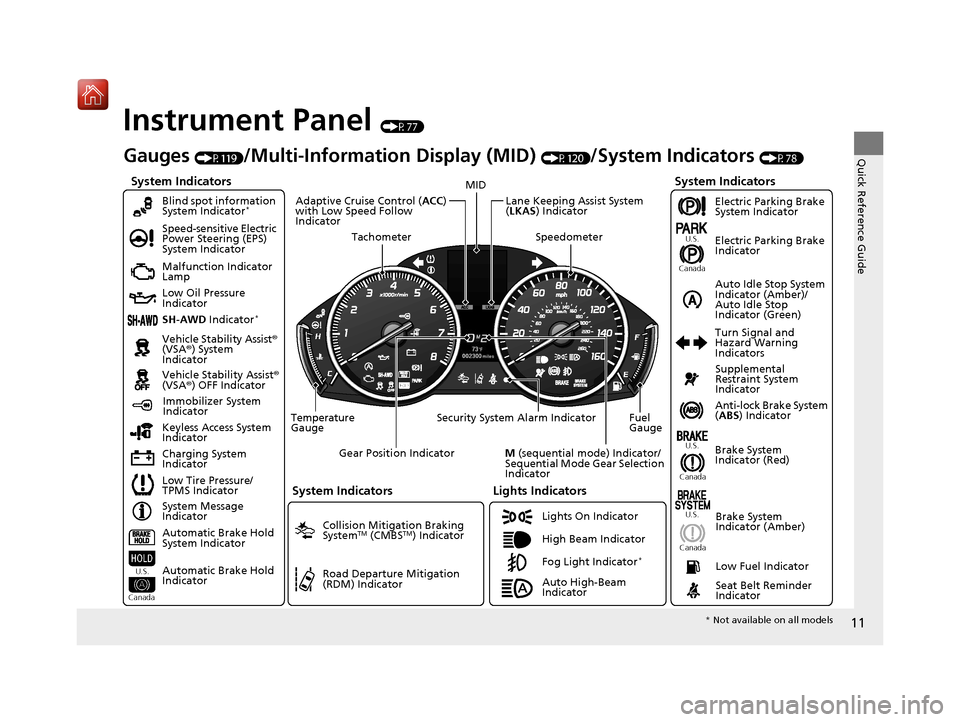
Instrument Panel (P77)
System Indicators
Malfunction Indicator
Lamp
Low Oil Pressure
Indicator
Charging System
IndicatorAnti-lock Brake System
(
ABS ) Indicator
Vehicle Stability Assist
®
(VSA® ) System
Indicator
Vehicle Stability Assist ®
(VSA® ) OFF Indicator
Speed-sensitive Electric
Power Steering (EPS)
System Indicator
Lights Indicators
Lights On Indicator
High Beam Indicator
Immobilizer System
Indicator
Seat Belt Reminder
Indicator
System Indicators
System Message
Indicator Brake System
Indicator (Red)Supplemental
Restraint System
Indicator
Low Fuel Indicator
Gauges (P119)/Multi-Information Display (MID) (P120)/System Indicators (P78)
Low Tire Pressure/
TPMS Indicator Turn Signal and
Hazard Warning
Indicators
Keyless Access System
Indicator
Temperature
Gauge Security System Alarm Indicator Fuel
Gauge
Tachometer
MID
Speedometer
Gear Position Indicator
M (sequential mode) Indicator/
Sequential Mode Gear Selection
Indicator
Brake System
Indicator (Amber)
SH-AWD Indicator*
Blind spot information
System Indicator*
System Indicators
Collision Mitigation Braking
SystemTM (CMBSTM) Indicator
Road Departure Mitigation
(RDM) Indicator
Lane Keeping Assist System
(LKAS ) Indicator
Adaptive Cruise Control (
ACC)
with Low Speed Follow
Indicator
U.S.
Canada U.S.
Canada
Fog Light Indicator*
Auto Idle Stop System
Indicator (Amber)/
Auto Idle Stop
Indicator (Green)
Automatic Brake Hold
System Indicator
Automatic Brake Hold
Indicator
U.S.
Canada
Electric Parking Brake
System Indicator
Electric Parking Brake
Indicator
U.S.
Canada
Auto High-Beam
Indicator
* Not available on all models
20 ACURA MDX-31TZ56600.book 11 ページ 2019年4月24日 水曜日 午後5時44分
Page 83 of 701
82
uuIndicators u
Instrument Panel
IndicatorNameOn/BlinkingExplanationMessage
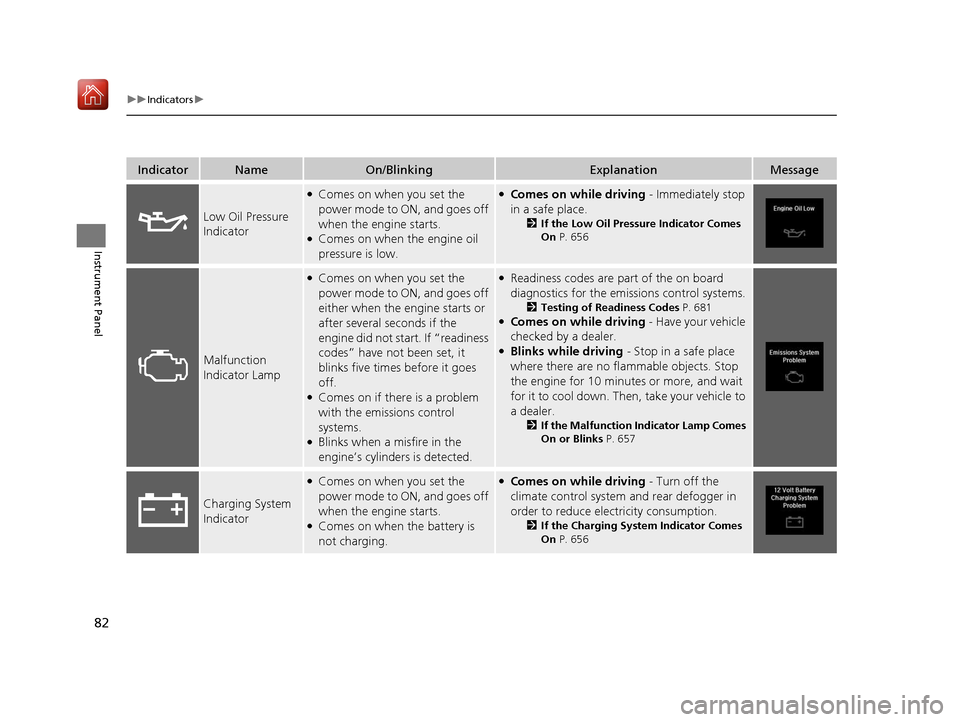
Low Oil Pressure
Indicator
●Comes on when you set the
power mode to ON, and goes off
when the engine starts.
●Comes on when the engine oil
pressure is low.
●Comes on while driving - Immediately stop
in a safe place.
2 If the Low Oil Pressure Indicator Comes
On P. 656
Malfunction
Indicator Lamp
●Comes on when you set the
power mode to ON, and goes off
either when the engine starts or
after several seconds if the
engine did not start. If “readiness
codes” have not been set, it
blinks five times before it goes
off.
●Comes on if there is a problem
with the emissions control
systems.
●Blinks when a misfire in the
engine’s cylinders is detected.
●Readiness codes are part of the on board
diagnostics for the emis sions control systems.
2Testing of Readiness Codes P. 681●Comes on while driving - Have your vehicle
checked by a dealer.
●Blinks while driving - Stop in a safe place
where there are no flammable objects. Stop
the engine for 10 minutes or more, and wait
for it to cool down. Then, take your vehicle to
a dealer.
2 If the Malfunction Indicator Lamp Comes
On or Blinks P. 657
Charging System
Indicator
●Comes on when you set the
power mode to ON, and goes off
when the engine starts.
●Comes on when the battery is
not charging.
●Comes on while driving - Turn off the
climate control system and rear defogger in
order to reduce electricity consumption.
2 If the Charging System Indicator Comes
On P. 656
20 ACURA MDX-31TZ56600.book 82 ページ 2019年4月24日 水曜日 午後5時44分
Page 468 of 701
Continued467
uuWhen Driving uStarting the Engine
Driving
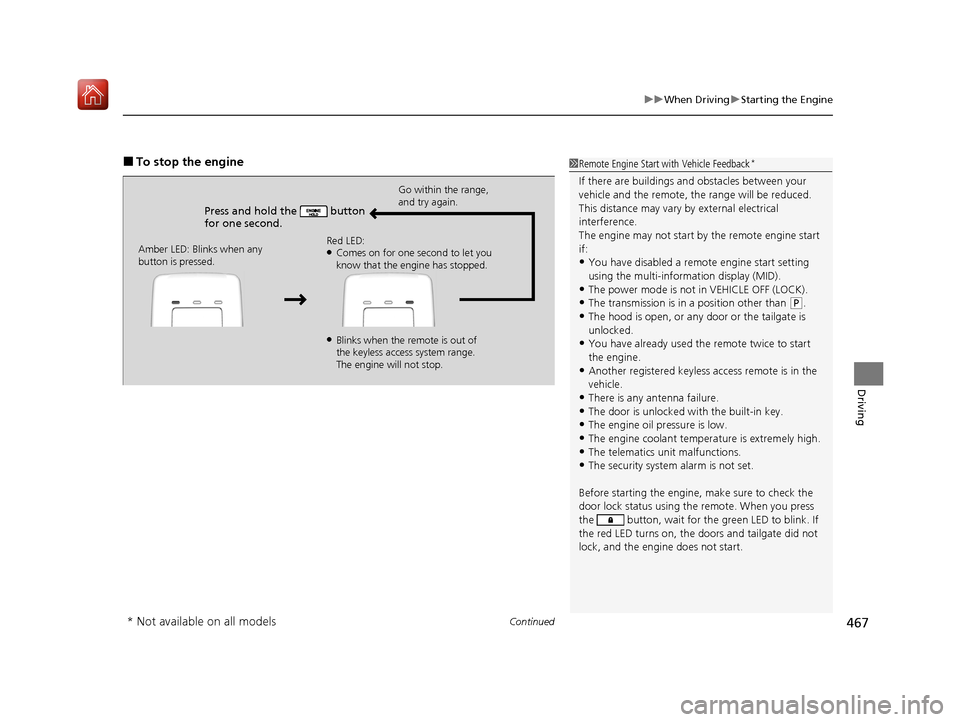
■To stop the engine
Press and hold the button
for one second.
Go within the range,
and try again.
Amber LED: Blinks when any
button is pressed. Red LED:
●Comes on for one second to let you
know that the engine has stopped.
●Blinks when the remote is out of
the keyless access system range.
The engine will not stop.
1
Remote Engine Start with Vehicle Feedback*
If there are buildings an d obstacles between your
vehicle and the remote, th e range will be reduced.
This distance may vary by external electrical
interference.
The engine may not start by the remote engine start
if:
•You have disabled a remo te engine start setting
using the multi-information display (MID).
•The power mode is not in VEHICLE OFF (LOCK).
•The transmission is in a position other than ( P.
•The hood is open, or any door or the tailgate is
unlocked.
•You have already used the remote twice to start
the engine.
•Another registered keyless access remote is in the
vehicle.
•There is any antenna failure.
•The door is unlocked with the built-in key.•The engine oil pressure is low.
•The engine coolant temper ature is extremely high.
•The telematics unit malfunctions.•The security system alarm is not set.
Before starting the engine, make sure to check the
door lock status using the remote. When you press
the button, wait for the green LED to blink. If
the red LED turns on, the doors and tailgate did not
lock, and the engine does not start.
* Not available on all models
20 ACURA MDX-31TZ56600.book 467 ページ 2019年4月24日 水曜日 午後5時44分
Page 573 of 701

572
Driving
Fuel Economy and CO2 Emissions
Improving Fuel Economy and Reducing CO2
Emissions
Achieving fuel economy and reducing CO2 emissions is dependent on several
factors, including driving conditions, load weight, idling time, driving habits, and
vehicle condition. Depending on these and other factors, you may not achieve the
rated fuel economy of this vehicle.
You can optimize your fuel economy with proper maintenance of your vehicle.
Always maintain your vehicle in accordance with the messages displayed on the
MID.
• Use the recommended viscosity engine oil.
2 Recommended Engine Oil P. 584
•Maintain the specified tire pressure.
• Do not load the vehicl e with excess cargo.
• Keep your vehicle clean. A buildup of snow or mud on your vehicle’s underside
adds weight and increases wind resistance.
■Maintenance and Fuel Economy
1Improving Fuel Economy and Reducing CO2 Emissions
Direct calculation is the recommended method to
determine actual fuel consumed while driving.
In Canada, posted fuel economy numbers are
established following a simulated test. For more
information on how this test is performed, please visit
http://oee.nrcan.gc.ca/
Miles driven Gallons of
fuel Miles per
Gallon
100 Liters of fuel Kilometers
driven L per 100 km
20 ACURA MDX-31TZ56600.book 572 ページ 2019年4月24日 水曜日 午後5時44分
Page 589 of 701
uuMaintenance Under the Hood uChanging the Engine Oil and Oil Filter
588
Maintenance
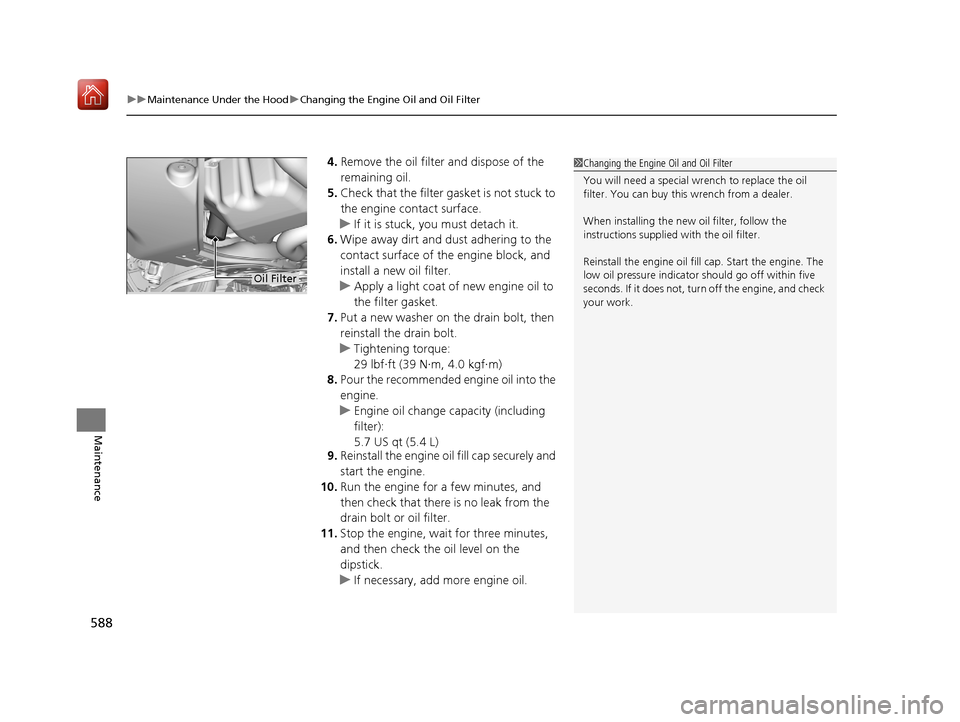
4. Remove the oil filter and dispose of the
remaining oil.
5. Check that the filter ga sket is not stuck to
the engine contact surface.
u If it is stuck, you must detach it.
6. Wipe away dirt and dust adhering to the
contact surface of the engine block, and
install a new oil filter.
u Apply a light coat of new engine oil to
the filter gasket.
7. Put a new washer on the drain bolt, then
reinstall the drain bolt.
u Tightening torque:
29 lbf∙ft (39 N∙m, 4.0 kgf∙m)
8. Pour the recommended engine oil into the
engine.
u Engine oil change capacity (including
filter):
5.7 US qt (5.4 L)
9. Reinstall the engine oi l fill cap securely and
start the engine.
10. Run the engine for a few minutes, and
then check that there is no leak from the
drain bolt or oil filter.
11. Stop the engine, wait for three minutes,
and then check the oil level on the
dipstick.
u If necessary, add more engine oil.1Changing the Engine Oil and Oil Filter
You will need a special wrench to replace the oil
filter. You can buy this wrench from a dealer.
When installing the new oil filter, follow the
instructions supplied with the oil filter.
Reinstall the engine oil fill cap. Start the engine. The
low oil pressure indicator should go off within five
seconds. If it does not, turn off the engine, and check
your work.
Oil Filter
20 ACURA MDX-31TZ56600.book 588 ページ 2019年4月24日 水曜日 午後5時44分
Page 622 of 701

Continued621
uuCleaning uExterior Care
Maintenance
• Keep sufficient distance between the cleaning nozzle and the vehicle body.
• Take particular care around the windows. Standing too close may cause water to
enter the vehicle interior.
• Do not spray high pressure water directly into the engine compartment. Instead,
use low pressure water and a mild detergent.
A good coat of automotive body wax helps protect your vehicle’s paint from the
elements. Wax will wear off over time and expose your vehicle’s paint to the
elements, so reapply as necessary.
If you get gasoline, oil, engine coolant, or battery fluid on resin coated parts, they
may be stained or the coating may peel. Prom ptly wipe it away using a soft cloth and
clean water.
Wipe using a glass cleaner.
■Using High Pressure Cleaners
■Applying Wax
■Maintaining the Bumpers and Other Resin Coated Parts
■Cleaning the Window
1 Applying Wax
NOTICE
Chemical solvents and strong cleaners can damage
the paint, metal, and plasti c on your vehicle. Wipe
away spills immediately.
1 Maintaining the Bumpers an d Other Resin Coated Parts
Ask a dealer about the corr ect coating material when
you want to repair the painted surface of the parts
made of resin.
20 ACURA MDX-31TZ56600.book 621 ページ 2019年4月24日 水曜日 午後5時44分
Page 626 of 701
625
Handling the Unexpected
This chapter explains how to handle unexpected troubles.
ToolsTypes of Tools .................................. 626
If a Tire Goes Flat
Changing a Flat Tire ......................... 627
Temporarily Repairi ng a Flat Tire....... 635
Engine Does Not Start Checking the Engine ........................ 649
If the Keyless Access Remote Battery is Weak ............................................. 650
Emergency Engine Stop ................... 651
Models with a compact spare tire
Models with temporary tire repair kit
Jump Starting .................................... 652
Overheating How to Handle Overheating............. 654
Indicator, Coming On/Blinking
If the Low Oil Pressure Indicator Comes On ... 656
If the Charging System Indicator Comes On .. 656
If the Malfunction Indicator Lamp Comes On or Blinks ................................... 657
If the Brake System Indicator (Red) Comes On ................................................... 658
If the Speed-Sensitive Electric Power Steering
(EPS) System Indicator Comes On........... 658
If the Low Tire Pressure/TPMS Indicator Comes On or Blinks ....................... 660
If the Transmission System Indicator Blinks along with the Warning Message ...... 661
Fuses Fuse Locations ................................. 662
Inspecting and Changing Fuses ........ 669
Emergency Towing ........................... 670
When You Cannot Unlock the Fuel Fill Door... 671
When You Cannot Open the Tailgate.. 672
Refueling........................................... 673
Refueling From a Portable Fuel Container . 673
20 ACURA MDX-31TZ56600.book 625 ページ 2019年4月24日 水曜日 午後5時44分
Page 657 of 701
656
Handling the Unexpected
Indicator, Coming On/Blinking
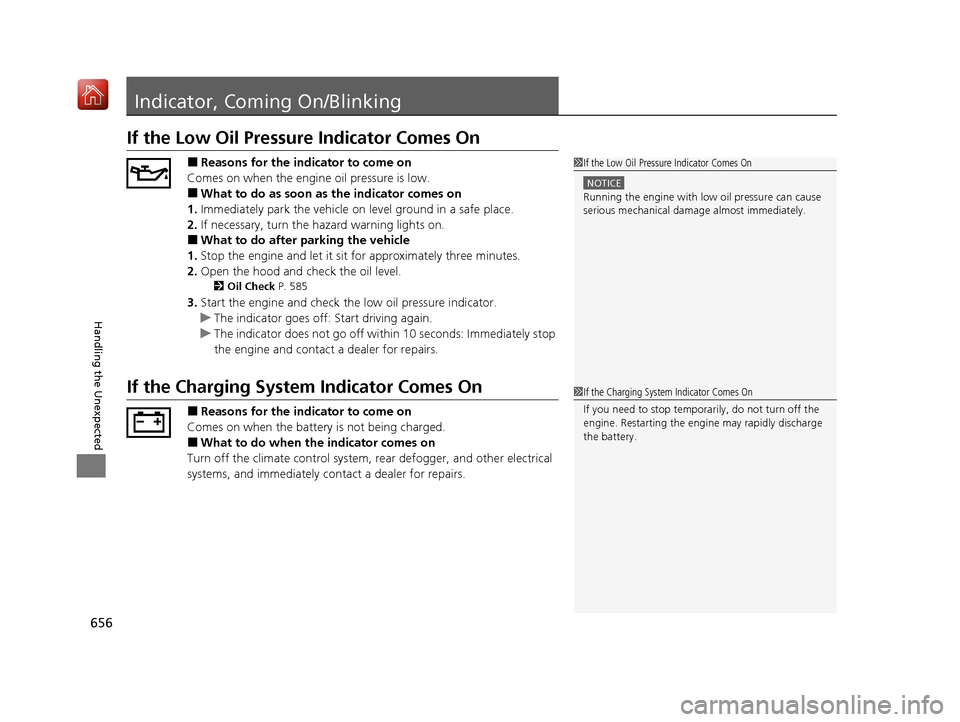
If the Low Oil Pressure Indicator Comes On
■Reasons for the indicator to come on
Comes on when the engine oil pressure is low.
■What to do as soon as the indicator comes on
1. Immediately park the vehicle on level ground in a safe place.
2. If necessary, turn the ha zard warning lights on.
■What to do after parking the vehicle
1. Stop the engine and let it sit for approximately three minutes.
2. Open the hood and check the oil level.
2 Oil Check P. 585
3.Start the engine and check th e low oil pressure indicator.
u The indicator goes off: Start driving again.
u The indicator does not go off with in 10 seconds: Immediately stop
the engine and contact a dealer for repairs.
If the Charging System Indicator Comes On
■Reasons for the indicator to come on
Comes on when the battery is not being charged.
■What to do when the indicator comes on
Turn off the climate con trol system, rear defogger, and other electrical
systems, and immediately contact a dealer for repairs.
1 If the Low Oil Pressure Indicator Comes On
NOTICE
Running the engine with low oil pressure can cause
serious mechanical damage almost immediately.
1If the Charging System Indicator Comes On
If you need to stop temporarily, do not turn off the
engine. Restarting the engi ne may rapidly discharge
the battery.
20 ACURA MDX-31TZ56600.book 656 ページ 2019年4月24日 水曜日 午後5時44分
Page 693 of 701
692
Index
Compact Spare Tire.......................... 627, 677
Compass .................................................... 443
Console Compartment ............................. 209
Controls ..................................................... 137
Coolant (Engine) ....................................... 589
Adding to the Radiator ............................ 590
Adding to the Reserve Tank ..................... 589
Overheating............................................. 654
Creeping (Automatic Transmission) ........ 471
Cross Traffic Monitor ................................ 552
Cup Holders ............................................... 211
Customized Features ........................ 126, 358
D
Daytime Running Lights ........................... 175
Dead Battery ............................................. 652
Defrosting the Windshield and
Windows .................................................. 225
Detachable Anchor ..................................... 38
Devices that Emit Radio Waves ................ 679
Dimming Headlights ............................................... 172
Rearview Mirror ....................................... 188
Dipstick (Engine Oil) ................................. 585
Directional Signals (Turn Signal) .............. 171
Door Mirrors ............................................. 189
Doors ......................................................... 139
Auto Door Locking .................................. 154
Auto Door Unlocking ............................... 154
Door Open Message .................................. 32 Keys ........................................................ 139
Locking/Unlocking the Doors from the
Inside .............................................. 13, 151
Locking/Unlocking the Doors from the Outside ................................................. 142
Lockout Prevention System ...................... 149
DOT Tire Quality Grading ........................ 605
Driver’s Knee Airbag .................................. 48
Driving ...................................................... 445
Automatic Transmission .......................... 471
Braking ................................................... 529
Off-Highway Driving Guidelines............... 462
Shifting Gear ........................................... 472
Starting the Engine.................................. 464
Driving Position Memory System ............ 185
Dust and Pollen Filter ............................... 617
Dynamic Mode button ............................. 486
E
Elapsed Time............................................. 123
Electric Parking Brake Indicator.................................................... 80
Switch ..................................................... 529
Electric Parking Brake System Indicator.................................................... 80
Electronic Stability Control (ESC) ............. 518
Emergency ................................................ 670
Emissions Testing (Readiness Codes) ....... 681
Engine ....................................................... 678
Coolant ................................................... 589 Jump Starting ......................................... 652
Remote Engine Start ............................... 466
Starting................................................... 464
Engine Compartment Cover .................... 583
Engine Coolant ........................................ 589
Adding to the Radiator ........................... 590
Adding to the Reserve Tank .................... 589
Overheating ............................................ 654
Temperature Gauge ................................ 119
Engine Oil Adding ................................................... 586
Checking ................................................ 585
Displaying Oil Life ................................... 577
Low Oil Pressure Indicator ................. 82, 656
ENGINE START/STOP Button .................... 168
EPS (Electric Power Steering) System ............................................... 88, 658
Exhaust Gas Hazard (Carbon Monoxide) .. 74
Exterior Care (Cleaning) .......................... 620
Exterior Mirrors ........................................ 189
F
Features.................................................... 231
Filters Dust and Pollen....................................... 617
Oil .......................................................... 587
Flat Tire ............................................. 627, 635
Floor Mats ................................................ 619
Fluids
Automatic Transmission .......................... 591
20 ACURA MDX-31TZ56600.book 692 ページ 2019年4月24日 水曜日 午後5時44分
Page 695 of 701
694
Index
I
Identification Numbers............................ 678
Engine and Transmission.......................... 678
Vehicle Identification ............................... 678
Illumination Control ................................. 183
Button ..................................................... 183
Immobilizer System .................................. 162
Indicator .................................................... 89
Indicators ..................................................... 78
Adaptive Cruise Control (ACC) with Low Speed Follow ............................ 95, 489
Anti-lock Brake System (ABS) ..................... 86
Auto High-Beam ........................................ 86
Auto Idle Stop ........................................... 92
Auto Idle Stop System................................ 92
Automatic Brake Hold........................ 81, 533
Automatic Brake Hold System ............ 81, 533
Blind spot information System ........... 99, 527
Brake System (Amber)................................ 79
Brake System (Red) ............................ 78, 658
Charging System ............................... 82, 656
Collision Mitigati on Braking System
TM
(CMBSTM) ........................................... 97, 98
Electric Parking Brake................................. 80
Electric Parking Brake System ..................... 80
Fog Lights .................................................. 89
Gear Position ............................................. 83
High Beam................................................. 88
Immobilizer System .................................... 89
Keyless Access System ............................... 91
Lane Keeping Assist System (LKAS) .... 93, 512 Lights On .................................................. 89
Low Fuel ................................................... 85
Low Oil Pressure ................................ 82, 656
Low Tire Pressure/TPMS ............................. 88
Malfunction Indicator Lamp............... 82, 657
Road Departure Mitigation (RDM) ............. 94
Seat Belt Reminder .............................. 34, 85
Security System Alarm ............................... 90
Speed-sensitive Electric Power
Steering (EPS) System ...................... 88, 658
Super Handling-All Wheel Drive
TM.............. 91
Supplemental Restraint System ............ 53, 86
System Message ........................................ 90
Transmission System.......................... 84, 661
Turn Signal ................................................ 88
Vehicle Stability Assist ® (VSA ®)
System ............................................ 87, 518
VSA ® OFF .......................................... 87, 519
Information .............................................. 675
Information Screen .................................. 244
Instrument Panel ........................................ 77
Brightness Control................................... 183
Integrated Dynamics System ................... 486
Dynamic Mode button ............................ 486
Interface Dial ............................................ 239
Interior Lights ........................................... 206
Interior Rearview Mirror .......................... 188
iPhone ............................................... 291, 318
iPod ................................................... 284, 318
J
Jack (Wheel Nut Wrench) ........................ 631
Jump Starting ........................................... 652
K
Key Number Tag ...................................... 141
Keyless Access System .............................. 142
Keyless Lockout Prevention ..................... 149
Keys ........................................................... 139
Lockout Prevention ................................. 149
Number Tag............................................ 141
Rear Door Won’t Open ........................... 153
Remote Transmitter ................................ 147
Types and Functions................................ 139
Kickdown (Automatic Transmission) ...... 471
L
Lane Keeping Assist System (LKAS)........ 510
Indicator ................................................... 93
LATCH (Child Seats) ............................. 61, 68
LED Puddle Light ...................................... 144
Legal Information on Apple CarPlay/ Android Auto ......................................... 331
License information ................................. 334
Lights ................................................ 172, 593
Automatic............................................... 173
Bulb Replacement ................................... 593
Daytime Running Lights .......................... 175
High Beam Indicator ................................. 88
20 ACURA MDX-31TZ56600.book 694 ページ 2019年4月24日 水曜日 午後5時44分