parking system Acura MDX 2020 Owner's Manual
[x] Cancel search | Manufacturer: ACURA, Model Year: 2020, Model line: MDX, Model: Acura MDX 2020Pages: 701, PDF Size: 38.91 MB
Page 3 of 701
Contents
This owner’s manual should be considered a permanent part of the
vehicle and should remain with the vehicle when it is sold.
This owner’s manual covers all models of your vehicle. You may find
descriptions of equipment and features that are not on your
particular model.
Images throughout this owner’s manu al (including the front cover)
represent features and equipment that are available on some, but
not all, models. Your particular mo del may not have some of these
features.
This owner’s manual is for vehicles sold in the United States and
Canada.
The information and specifications in cluded in this publication were
in effect at the time of approval for printing. Honda Motor Co., Ltd.
reserves the right, however, to discontinue or change specifications
or design at any time without notice and without incurring any
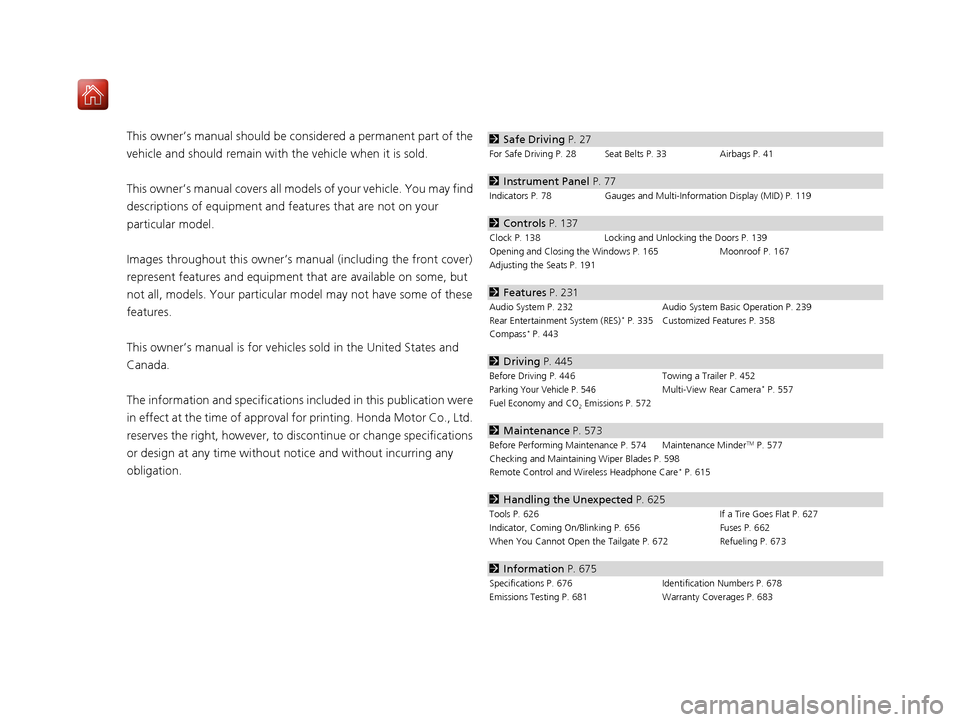
obligation.2 Safe Driving P. 27
For Safe Driving P. 28 Seat Belts P. 33 Airbags P. 41
2Instrument Panel P. 77
Indicators P. 78 Gauges and Multi-Information Display (MID) P. 119
2Controls P. 137
Clock P. 138 Locking and Unlocking the Doors P. 139
Opening and Closing the Windows P. 165 Moonroof P. 167
Adjusting the Seats P. 191
2 Features P. 231
Audio System P. 232 Audio System Basic Operation P. 239
Rear Entertainment System (RES)* P. 335 Customized Features P. 358
Compass* P. 443
2 Driving P. 445
Before Driving P. 446 Towing a Trailer P. 452
Parking Your Vehicle P. 546Multi-View Rear Camera* P. 557
Fuel Economy and CO
2 Emissions P. 572
2 Maintenance P. 573
Before Performing Maintenance P. 574 Maintenance MinderTM P. 577
Checking and Maintaining Wiper Blades P. 598
Remote Control and Wireless Headphone Care
* P. 615
2 Handling the Unexpected P. 625
Tools P. 626 If a Tire Goes Flat P. 627
Indicator, Coming On/Blinking P. 656 Fuses P. 662
When You Cannot Open the Tailgate P. 672Refueling P. 673
2Information P. 675
Specifications P. 676 Identification Numbers P. 678
Emissions Testing P. 681 Warranty Coverages P. 683
20 ACURA MDX-31TZ56600.book 2 ページ 2019年4月24日 水曜日 午後5時44分
Page 5 of 701
4
Quick Reference Guide
Quick Reference Guide
Visual Index
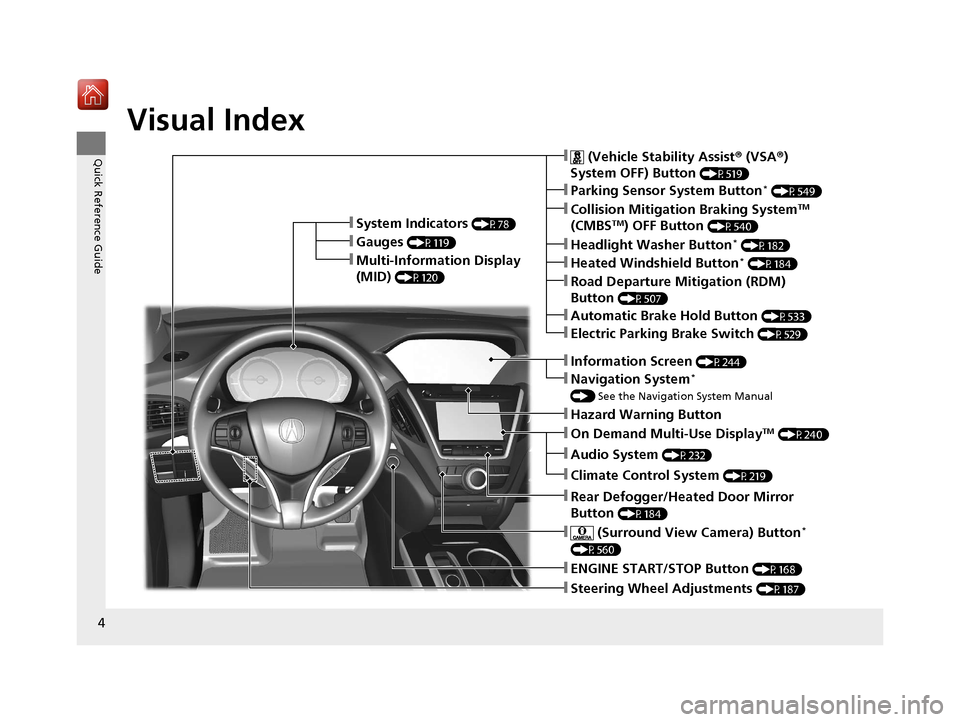
❚Steering Wheel Adjustments (P187)
❚ENGINE START/STOP Button (P168)
❚Navigation System*
() See the Navigation System Manual
❚Information Screen (P244)
❚Hazard Warning Button
❚On Demand Multi-Use DisplayTM (P240)
❚Audio System (P232)
❚System Indicators (P78)
❚Gauges (P119)
❚Multi-Information Display
(MID)
(P120)
❚Climate Control System (P219)
❚Rear Defogger/Heated Door Mirror
Button
(P184)
❚ (Surround View Camera) Button*
(P560)
❚ (Vehicle Stability Assist ® (VSA ®)
System OFF) Button
(P519)
❚Parking Sensor System Button* (P549)
❚Collision Mitigation Braking SystemTM
(CMBSTM) OFF Button (P540)
❚Headlight Washer Button* (P182)
❚Heated Windshield Button* (P184)
❚Electric Parking Brake Switch (P529)
❚Road Departure Mitigation (RDM)
Button
(P507)
❚Automatic Brake Hold Button (P533)
20 ACURA MDX-31TZ56600.book 4 ページ 2019年4月24日 水曜日 午後5時44分
Page 12 of 701
11
Quick Reference Guide
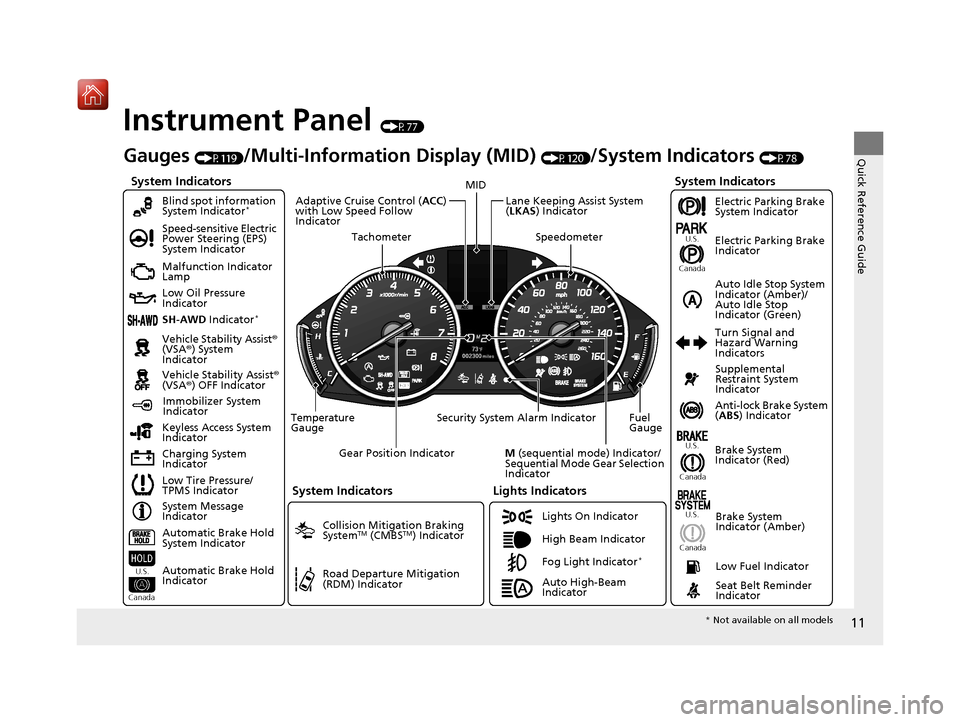
Instrument Panel (P77)
System Indicators
Malfunction Indicator
Lamp
Low Oil Pressure
Indicator
Charging System
IndicatorAnti-lock Brake System
(
ABS ) Indicator
Vehicle Stability Assist
®
(VSA® ) System
Indicator
Vehicle Stability Assist ®
(VSA® ) OFF Indicator
Speed-sensitive Electric
Power Steering (EPS)
System Indicator
Lights Indicators
Lights On Indicator
High Beam Indicator
Immobilizer System
Indicator
Seat Belt Reminder
Indicator
System Indicators
System Message
Indicator Brake System
Indicator (Red)Supplemental
Restraint System
Indicator
Low Fuel Indicator
Gauges (P119)/Multi-Information Display (MID) (P120)/System Indicators (P78)
Low Tire Pressure/
TPMS Indicator Turn Signal and
Hazard Warning
Indicators
Keyless Access System
Indicator
Temperature
Gauge Security System Alarm Indicator Fuel
Gauge
Tachometer
MID
Speedometer
Gear Position Indicator
M (sequential mode) Indicator/
Sequential Mode Gear Selection
Indicator
Brake System
Indicator (Amber)
SH-AWD Indicator*
Blind spot information
System Indicator*
System Indicators
Collision Mitigation Braking
SystemTM (CMBSTM) Indicator
Road Departure Mitigation
(RDM) Indicator
Lane Keeping Assist System
(LKAS ) Indicator
Adaptive Cruise Control (
ACC)
with Low Speed Follow
Indicator
U.S.
Canada U.S.
Canada
Fog Light Indicator*
Auto Idle Stop System
Indicator (Amber)/
Auto Idle Stop
Indicator (Green)
Automatic Brake Hold
System Indicator
Automatic Brake Hold
Indicator
U.S.
Canada
Electric Parking Brake
System Indicator
Electric Parking Brake
Indicator
U.S.
Canada
Auto High-Beam
Indicator
* Not available on all models
20 ACURA MDX-31TZ56600.book 11 ページ 2019年4月24日 水曜日 午後5時44分
Page 81 of 701
80
uuIndicators u
Instrument Panel
IndicatorNameOn/BlinkingExplanationMessage
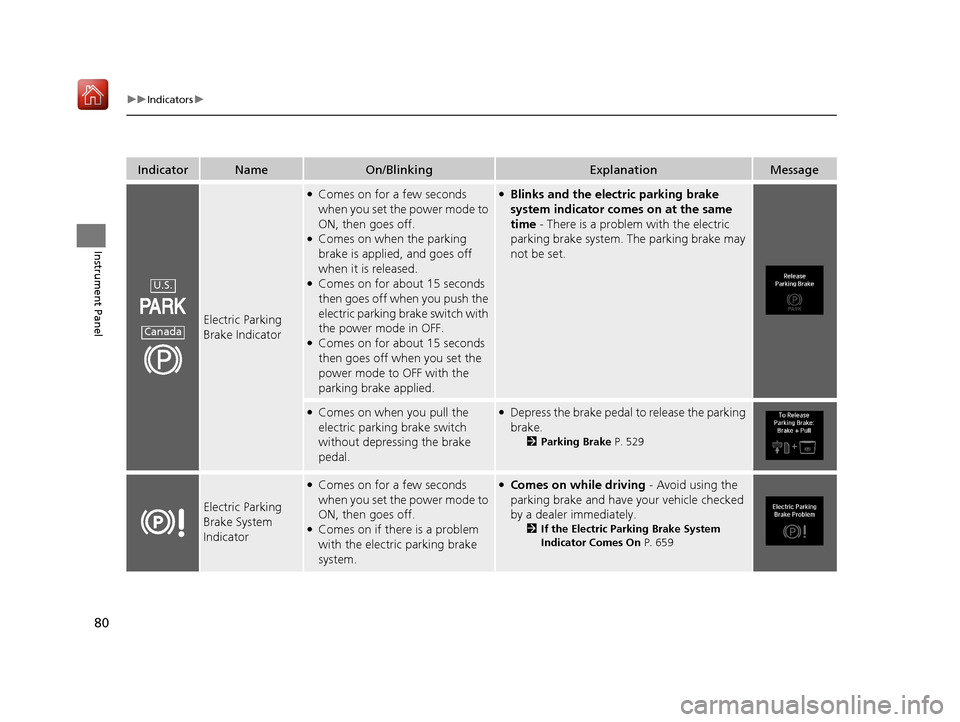
Electric Parking
Brake Indicator
●Comes on for a few seconds
when you set the power mode to
ON, then goes off.
●Comes on when the parking
brake is applied, and goes off
when it is released.
●Comes on for about 15 seconds
then goes off when you push the
electric parking brake switch with
the power mode in OFF.
●Comes on for about 15 seconds
then goes off when you set the
power mode to OFF with the
parking brake applied.
●Blinks and the electric parking brake
system indicator comes on at the same
time - There is a problem with the electric
parking brake system. The parking brake may
not be set.
●Comes on when you pull the
electric parking brake switch
without depressing the brake
pedal.●Depress the brake pedal to release the parking
brake.
2Parking Brake P. 529
Electric Parking
Brake System
Indicator
●Comes on for a few seconds
when you set the power mode to
ON, then goes off.
●Comes on if there is a problem
with the electric parking brake
system.
●Comes on while driving - Avoid using the
parking brake and have your vehicle checked
by a dealer immediately.
2 If the Electric Parking Brake System
Indicator Comes On P. 659
U.S.
Canada
20 ACURA MDX-31TZ56600.book 80 ページ 2019年4月24日 水曜日 午後5時44分
Page 85 of 701
84
uuIndicators u
Instrument Panel
IndicatorNameOn/BlinkingExplanationMessage
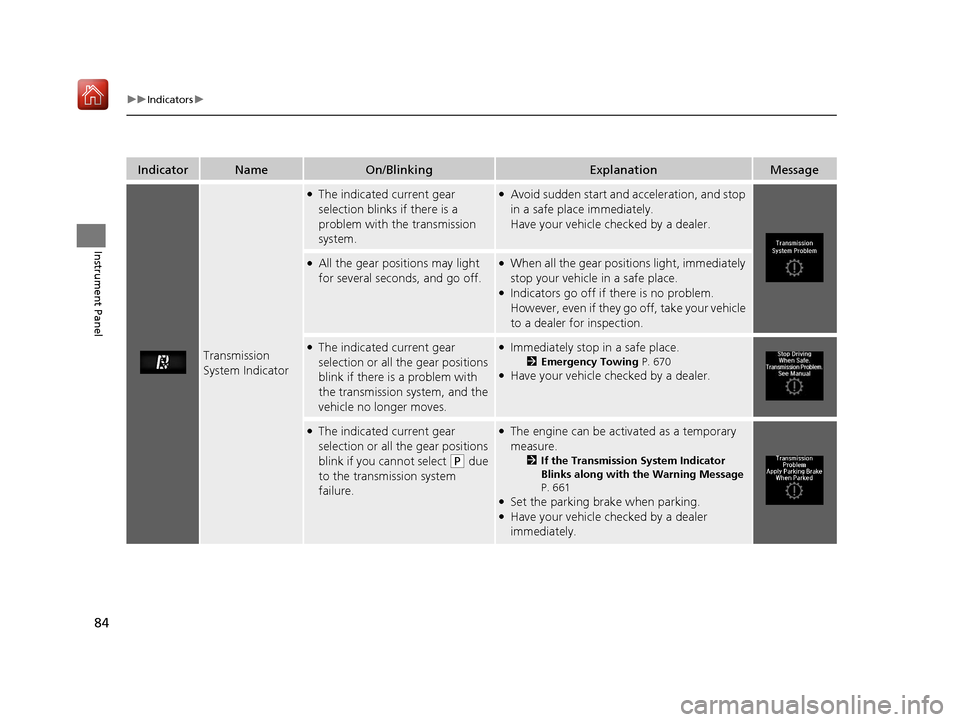
Transmission
System Indicator
●The indicated current gear
selection blinks if there is a
problem with the transmission
system.●Avoid sudden start and acceleration, and stop
in a safe place immediately.
Have your vehicle checked by a dealer.
●All the gear positions may light
for several seconds, and go off.●When all the gear positions light, immediately
stop your vehicle in a safe place.
●Indicators go off if there is no problem.
However, even if they go off, take your vehicle
to a dealer for inspection.
●The indicated current gear
selection or all the gear positions
blink if there is a problem with
the transmission system, and the
vehicle no longer moves.●Immediately stop in a safe place.
2Emergency Towing P. 670●Have your vehicle checked by a dealer.
●The indicated current gear
selection or all the gear positions
blink if you cannot select
(P due
to the transmission system
failure.
●The engine can be activated as a temporary
measure.
2 If the Transmission System Indicator
Blinks along with the Warning Message
P. 661
●Set the parking brake when parking.●Have your vehicle checked by a dealer
immediately.
20 ACURA MDX-31TZ56600.book 84 ページ 2019年4月24日 水曜日 午後5時44分
Page 109 of 701
108
uuIndicators uMulti-Information Display (MID) Warning and Information Messages
Instrument Panel
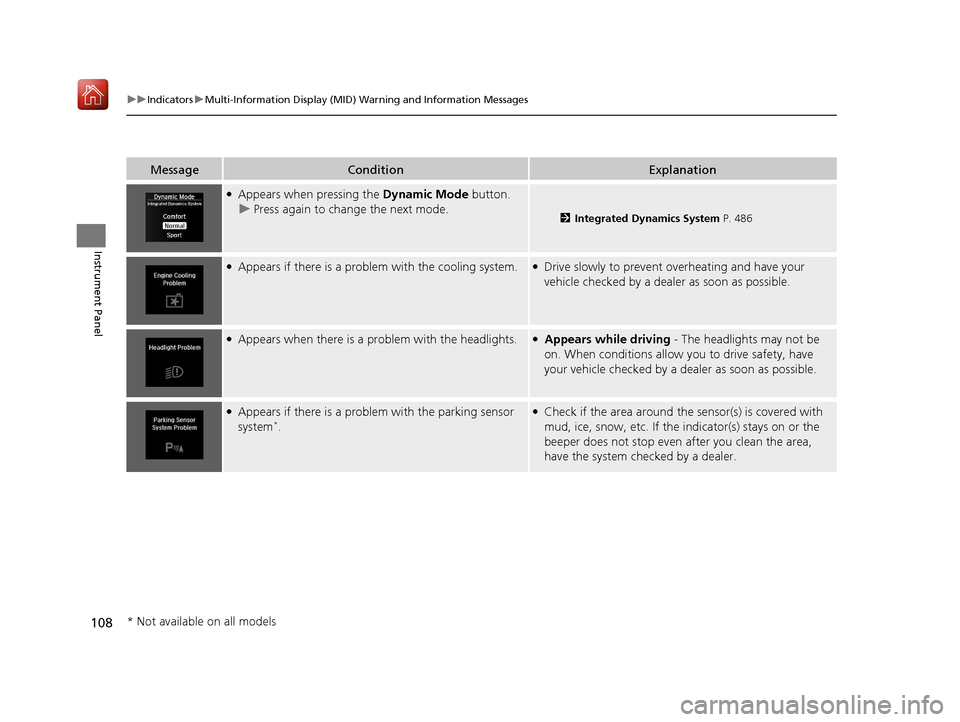
MessageConditionExplanation
●Appears when pressing the Dynamic Mode button.
u Press again to change the next mode.
2 Integrated Dynamics System P. 486
●Appears if there is a problem with the cooling system.●Drive slowly to prevent overheating and have your
vehicle checked by a dealer as soon as possible.
●Appears when there is a problem with the headlights.●Appears while driving - The headlights may not be
on. When conditions allow you to drive safety, have
your vehicle checked by a d ealer as soon as possible.
●Appears if there is a problem with the parking sensor
system*.
●Check if the area around the sensor(s) is covered with
mud, ice, snow, etc. If the indicator(s) stays on or the
beeper does not stop even after you clean the area,
have the system checked by a dealer.
* Not available on all models
20 ACURA MDX-31TZ56600.book 108 ページ 2019年4月24日 水曜日 午後5時44分
Page 110 of 701
109
uuIndicators uMulti-Information Display (MID) Warning and Information Messages
Continued
Instrument Panel
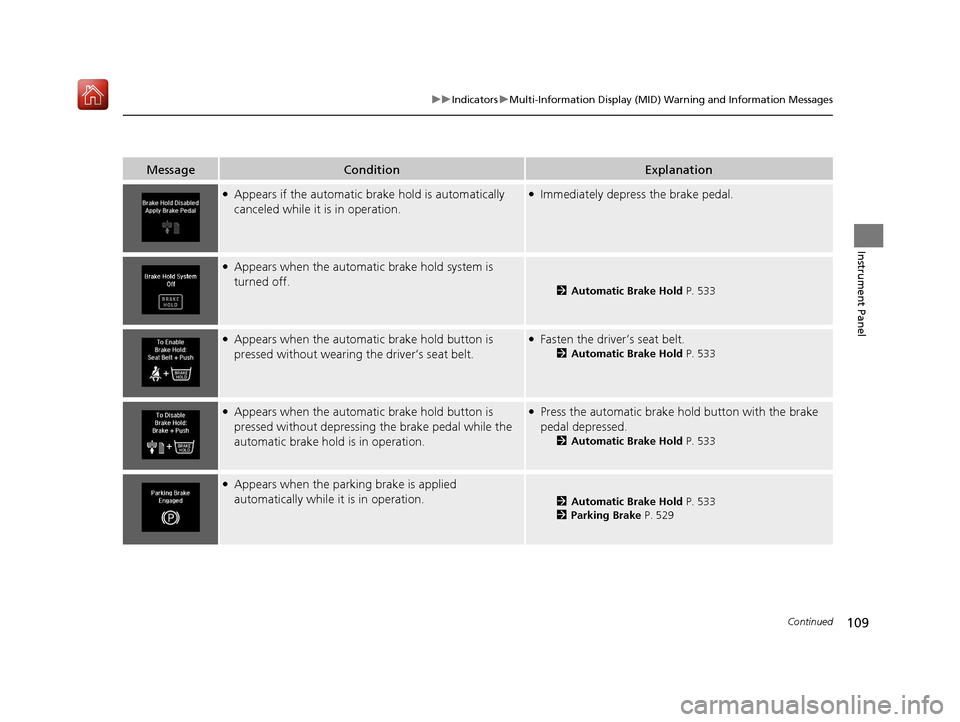
MessageConditionExplanation
●Appears if the automatic br ake hold is automatically
canceled while it is in operation.●Immediately depress the brake pedal.
●Appears when the automatic brake hold system is
turned off.
2 Automatic Brake Hold P. 533
●Appears when the automatic brake hold button is
pressed without wearing the driver’s seat belt.●Fasten the driver’s seat belt.
2Automatic Brake Hold P. 533
●Appears when the automatic brake hold button is
pressed without depressing the brake pedal while the
automatic brake hold is in operation.●Press the automatic brake ho ld button with the brake
pedal depressed.
2 Automatic Brake Hold P. 533
●Appears when the parking brake is applied
automatically while it is in operation.
2Automatic Brake Hold P. 533
2 Parking Brake P. 529
20 ACURA MDX-31TZ56600.book 109 ページ 2019年4月24日 水曜日 午後5時44分
Page 173 of 701
172
uuOperating the Switches Around the Steering Wheel uLight Switches
Controls
Light Switches
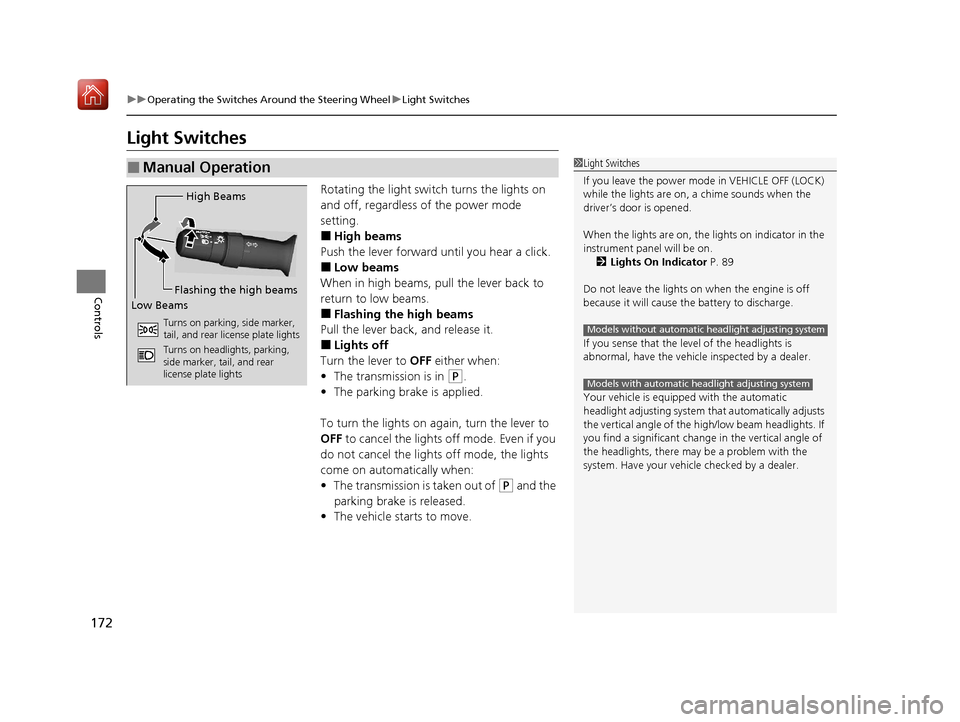
Rotating the light switch turns the lights on
and off, regardless of the power mode
setting.
■High beams
Push the lever forward until you hear a click.
■Low beams
When in high beams, pull the lever back to
return to low beams.
■Flashing the high beams
Pull the lever back, and release it.
■Lights off
Turn the lever to OFF either when:
• The transmission is in
(P.
• The parking brake is applied.
To turn the lights on ag ain, turn the lever to
OFF to cancel the lights off mode. Even if you
do not cancel the lights off mode, the lights
come on automatically when:
• The transmission is taken out of
(P and the
parking brake is released.
• The vehicle starts to move.
■Manual Operation1Light Switches
If you leave the power mode in VEHICLE OFF (LOCK)
while the lights are on, a chime sounds when the
driver’s door is opened.
When the lights are on, the lights on indicator in the
instrument pane l will be on.
2 Lights On Indicator P. 89
Do not leave the lights on when the engine is off
because it will cause the battery to discharge.
If you sense that the le vel of the headlights is
abnormal, have the vehicl e inspected by a dealer.
Your vehicle is equipped with the automatic
headlight adjusting system that automatically adjusts
the vertical angle of the high/low beam headlights. If
you find a significant change in the vertical angle of
the headlights, there may be a problem with the
system. Have your vehicle checked by a dealer.
Models without automatic headlight adjusting system
Models with automatic headlight adjusting system
High Beams
Flashing the high beams
Low Beams
Turns on parking, side marker,
tail, and rear license plate lights
Turns on headlights, parking,
side marker, tail, and rear
license plate lights
20 ACURA MDX-31TZ56600.book 172 ページ 2019年4月24日 水曜日 午後5時44分
Page 174 of 701
Continued173
uuOperating the Switches Around the Steering Wheel uLight Switches
Controls
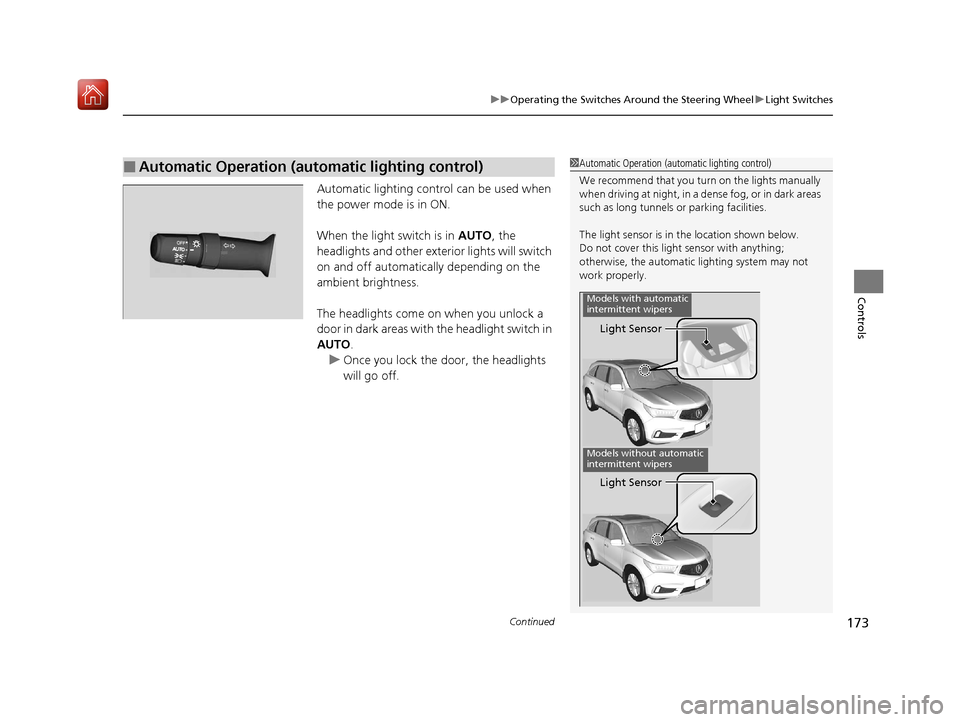
Automatic lighting control can be used when
the power mode is in ON.
When the light switch is in AUTO, the
headlights and other exterior lights will switch
on and off automatically depending on the
ambient brightness.
The headlights come on when you unlock a
door in dark areas with the headlight switch in
AUTO .
u Once you lock the door, the headlights
will go off.
■Automatic Operation (automatic lighting control)1 Automatic Operation (aut omatic lighting control)
We recommend that you tu rn on the lights manually
when driving at night, in a de nse fog, or in dark areas
such as long tunnels or parking facilities.
The light sensor is in the location shown below.
Do not cover this light sensor with anything;
otherwise, the automatic lighting system may not
work properly.
Light Sensor
Models with automatic
intermittent wipers
Models without automatic
intermittent wipers
Light Sensor
20 ACURA MDX-31TZ56600.book 173 ページ 2019年4月24日 水曜日 午後5時44分
Page 187 of 701
uuOperating the Switches Around the Steering Wheel uDriving Position Memory System
186
Controls
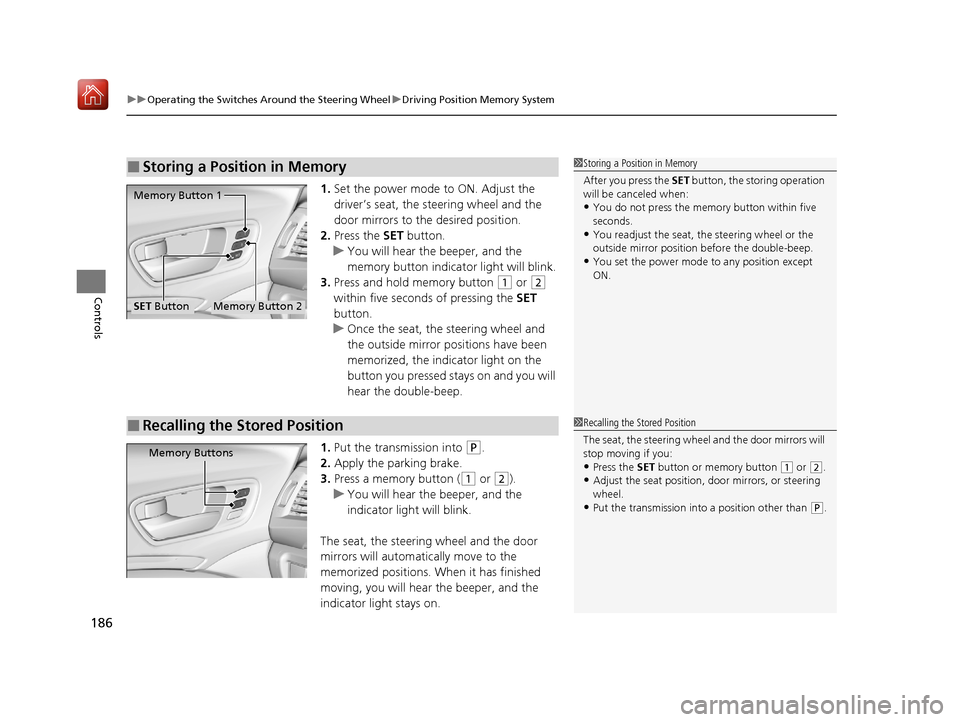
1. Set the power mode to ON. Adjust the
driver’s seat, the steering wheel and the
door mirrors to the desired position.
2. Press the SET button.
u You will hear the beeper, and the
memory button indicator light will blink.
3. Press and hold memory button
(1 or (2
within five seconds of pressing the SET
button.
u Once the seat, the steering wheel and
the outside mirror positions have been
memorized, the indicator light on the
button you pressed stays on and you will
hear the double-beep.
1. Put the transmission into
(P.
2. Apply the parking brake.
3. Press a memory button (
(1 or (2).
u You will hear the beeper, and the
indicator light will blink.
The seat, the steering wheel and the door
mirrors will automatically move to the
memorized positions. When it has finished
moving, you will hear the beeper, and the
indicator light stays on.
■Storing a Position in Memory1 Storing a Position in Memory
After you press the SET button, the storing operation
will be canceled when:
•You do not press the memory button within five
seconds.
•You readjust the seat, the steering wheel or the
outside mirror position before the double-beep.
•You set the power mode to any position except
ON.
Memory Button 1
Memory Button 2SET Button
■Recalling the Stored Position1Recalling the Stored Position
The seat, the steering wheel and the door mirrors will
stop moving if you:
•Press the SET button or memory button (1 or (2.•Adjust the seat position, door mirrors, or steering
wheel.
•Put the transmission into a position other than ( P.
Memory Buttons
20 ACURA MDX-31TZ56600.book 186 ページ 2019年4月24日 水曜日 午後5時44分