light ACURA MDX 2022 Owners Manual
[x] Cancel search | Manufacturer: ACURA, Model Year: 2022, Model line: MDX, Model: ACURA MDX 2022Pages: 712, PDF Size: 22.65 MB
Page 663 of 712

662
Handling the Unexpected
Engine Does Not Start
Checking the Engine
If the engine does not start, check the starter.
Starter conditionChecklist
Starter doesn’t turn or turns
over slowly.
The battery may be dead. Check
each of the items on the right and
respond accordingly.Check for a message on the dr iver information interface.
●If the To start, touch start button With emblem side of remote message appears
2If the Keyless Access Remote Battery is Weak P. 663
uMake sure the keyless access remo te is in its operating range.
2ENGINE START/STOP Button Operating Range P. 166
Check the brightness of the interior lights.
Turn on the interior ligh ts and check the brightness.
●If the interior lights are dim or do not come on at all 2 Battery P. 624●If the interior lights come on normally
2 Fuses P. 677
2 Emergency Engine Start P. 664
The starter turns over normally
but the engine doesn’t start.
There may be a problem with a
fuse. Check each of the items on
the right and respond accordingly. Review the engine start procedure.
Follow its instructions, and try to start the engine again.
2
Starting the Engine P. 434
Check the immobilizer system indicator.
When the immobilizer system indicator is blinking, the engine cannot be started.
2Immobilizer System P. 157
Check the fuel level.
There should be enough fuel in the tank.
2 Fuel Gauge P. 104
Check the fuses.
Check all fuses, or have the vehicle checked by a dealer.
2Inspecting and Changing Fuses P. 683
If the problem continues:
2Emergency Towing P. 685
1Checking the Engine
If you must start the vehi cle immediately, use an
assisting vehicle or booster battery to jump start it.
2 If the Battery Is Dead P. 666
22 ACURA MDX-31TYA6000_02.book 662 ページ 2020年11月5日 木曜日 午前11時39分
Page 667 of 712

666
Handling the Unexpected
If the Battery Is Dead
Turn off the power to electric devices, such as audio and lights. Turn off the engine,
then open the hood. 1.Open the cover on the positive + terminal.
2. Connect the first jump er cable to your
vehicle’s battery + terminal.
3. Connect the other end of the first jumper
cable to the booster battery + terminal.
u Use a 12-volt booster battery only.
u When using an automotive battery
charger to boost your 12-volt battery,
select a lower charging voltage than 15-
volt. Check the charger manual for the
proper setting.
4. Connect the second jumper cable to the
booster battery - terminal.
■Jump Starting Procedure1If the Battery Is Dead
Securely attach the jumper cables clips so that they
do not come off when the e ngine vibrates. Also be
careful not to tangle the ju mper cables or allow the
cable ends to touch each other while attaching or
detaching the jumper cables.
Battery performance degrades in cold conditions and
may prevent the engi ne from starting.
3WARNING
A battery can explode if you do not follow
the correct procedure, seriously injuring
anyone nearby.
Keep all sparks, open flames, and smoking
materials away from the battery.
Booster Battery
22 ACURA MDX-31TYA6000_02.book 666 ページ 2020年11月5日 木曜日 午前11時39分
Page 668 of 712

667
uuIf the Battery Is Dead u
Handling the Unexpected
5.Connect the other end of the second
jumper cable to the ground bolt as shown.
Do not connect this jumper cable to any
other part.
6. If your vehicle is connected to another
vehicle, start the assisting vehicle’s engine
and increase its rpm slightly.
7. Attempt to start your ve hicle’s engine. If it
turns over slowly, check that the jumper
cables have good metal-to-metal contact.
Once your vehicle’s engine has started, re move the jumper cables in the following
order.
1. Disconnect the jumper cable from your vehicle’s ground.
2. Disconnect the other end of the jump er cable from the booster battery -
terminal.
3. Disconnect the jumper cable from your vehicle’s battery + terminal.
4. Disconnect the other end of the jump er cable from the booster battery +
terminal.
Have your vehicle inspected by a n earby service station or a dealer.
■What to Do After the Engine Starts
1Jump Starting Procedure
The Vehicle Stability Assist
TM (VSA ®) system, Adaptive
Cruise Control (ACC) with Low Speed Follow, safety
support, and low tire pre ssure/TPMS indicators may
come on along with a message in the driver
information interface when you set the power mode
to ON after rec onnecting a battery.
Drive a short distance at mo re than 12mph (20 km/h).
Each indicator should go off. If any do not, have your
vehicle checked by a dealer.
22 ACURA MDX-31TYA6000_02.book 667 ページ 2020年11月5日 木曜日 午前11時39分
Page 669 of 712

668
Handling the Unexpected
Overheating
How to Handle Overheating
Overheating symptoms are as follows:
•The temperature gauge is at the mark or the engine suddenly loses power.
• The Engine temperature too hot. Do not drive. Allow engine to cool.
message appears on the driv er information interface.
• Steam or spray comes out of the engine compartment.
■First thing to do
1. Immediately park the vehicle in a safe place.
2. Turn off all accessories and turn on the hazard warning lights.
u No steam or spray present: Keep the engine running and open the hood.
u Steam or spray is present: Turn off the engine and wait until it subsides.
Then open the hood.
1 How to Handle Overheating
NOTICE
Continuing to drive with the temperature gauge at
the mark may damage the engine.
Continuing to drive with the Engine temperature
too hot. Do not drive. Allow engine to cool.
message on the driver information interface may
damage the engine.
3WARNING
Steam and spray from an overheated
engine can seri ously scald you.
Do not open the hood if steam is coming
out.
H
H
22 ACURA MDX-31TYA6000_02.book 668 ページ 2020年11月5日 木曜日 午前11時39分
Page 671 of 712

670
Handling the Unexpected
Indicator, Coming On/Blinking
If the Low Oil Pressure Warning Appears
■Reasons for the warning to appear
Appears when the engine oil pressure is low.
■What to do as soon as the warning
appears
1. Immediately park the vehicle on level
ground in a safe place.
2. If necessary, turn the hazard warning lights
on.
■What to do after parking the vehicle
1. Stop the engine and let it sit for
approximately three minutes.
2. Open the hood and check the oil level.
u Add oil as necessary.
2 Oil Check P. 600
3.Start the engine and check the low oil
pressure warning.
u The warning disappears: Start driving
again.
u The warning does not disappear within
10 seconds: Immediately stop the engine
and contact a dealer for repairs.
1If the Low Oil Pressure Warning Appears
NOTICE
Running the engine with low oil pressure can cause
serious mechanical damage almost immediately.
22 ACURA MDX-31TYA6000_02.book 670 ページ 2020年11月5日 木曜日 午前11時39分
Page 673 of 712

672
uuIndicator, Coming On/Blinking uIf the Brake System Indicator (Red) Comes On or Blinks
Handling the Unexpected
If the Brake System Indicator (Red) Comes On or
Blinks
■Reasons for the indicator to come on
• The brake fluid is low.
• There is a malfunction in the brake system.
■What to do when the indicator comes on while driving
Depress the brake pedal lightly to check pedal pressure.
• If normal, check the brake fluid level the next time you stop.
• If abnormal, take immediate action . If necessary, downshift the
transmission to slow the vehicle using engine braking.
■Reasons for the in dicator to blink
• There is a problem with the electric parking brake system.
■What to do when the indicator blinks
• Avoid using the parking brake and ha ve your vehicle checked by a
dealer immediately.
1 If the Brake System Indicator (Red) Comes On or Blinks
Have your vehicle re paired immediately.
It is dangerous to drive with low brake fluid. If there
is no resistance from the brake pedal, stop
immediately in a safe plac e. If necessary, downshift
the gears.
If the brake system indicator (red) and ABS indicator
come on simultaneously , the electronic brake
distribution system is not wo rking. This can result in
vehicle instability under sudden braking.
Have your vehicle inspecte d by a dealer immediately.
If the brake system indicator (red) blinks at the same
time when the brake system indicator (amber) comes
on, the parking br ake may not work.
Avoid using the parking brak e and have your vehicle
checked by a dealer immediately.
2 If the Brake System Indicator (Red) Comes
On or Blinks at the Same Time When the
Brake System Indicator (Amber) Comes On
P. 673
U.S.
Canada
22 ACURA MDX-31TYA6000_02.book 672 ページ 2020年11月5日 木曜日 午前11時39分
Page 676 of 712

675
uuIndicator, Coming On/Blinking uIf the Low Tire Pressure/TPMS Indicator Comes On or Blinks
Handling the Unexpected
If the Low Tire Pressure/TPMS Indicator Comes On or
Blinks
■Reasons for the indicator to come on or blink
A tire pressure is significantly low. If there is a problem with the TPMS
with Tire Fill Assist, the indicator bl inks for about one minute, and then
stays on.
If the compact spare tire
* is installed, the indicator will either come on or
it will first blink for about one minute, then stay on.
■What to do when th e indicator comes on
Drive carefully and avoid abrupt cornering and hard braking.
Stop your vehicle in a safe place. Ch eck the tire pressure and adjust the
pressure to the specified level. The spec ified tire pressure is on a label on
the driver side doorjamb.
If the compact spare tire
* causes the indicator to come on, change the
tire to a full-size tire.
■What to do when the indicator blinks
Have the tire inspected by a dealer as soon as possible. If the compact
spare tire
* causes the indicator to first b link, and then stays on, change
the tire to a full-size tire. The indi cator goes off after driving for a few
miles (kilometers).
1 If the Low Tire Pressure/TPMS Indicator Comes On or Blinks
NOTICE
Driving on an extremely unde rinflated tire can cause
it to overheat. An overheated tire can fail. Always
inflate your tires to the prescribed level.
TPMS with Tire Fill Assist provides visual and audible
assistance during tire pre ssure adjustment. With the
power mode in ON, while y ou adjust tire pressure up
or down, the system alerts you as follows:
Below recommended pressure: The beeper
sounds and exterior lights flash once every five
seconds.
At recommended pressure: The beeper sounds
and exterior lights flash ra pidly for three seconds with
five seconds intervals.
Above recommended pressure: The beeper
sounds and lights flash tw ice every two seconds.
* Not available on all models
22 ACURA MDX-31TYA6000_02.book 675 ページ 2020年11月5日 木曜日 午前11時39分
Page 677 of 712
676
uuIndicator, Coming On/Blinking uIf the Transmission System Indicator Blinks along with the Warning Message
Handling the Unexpected
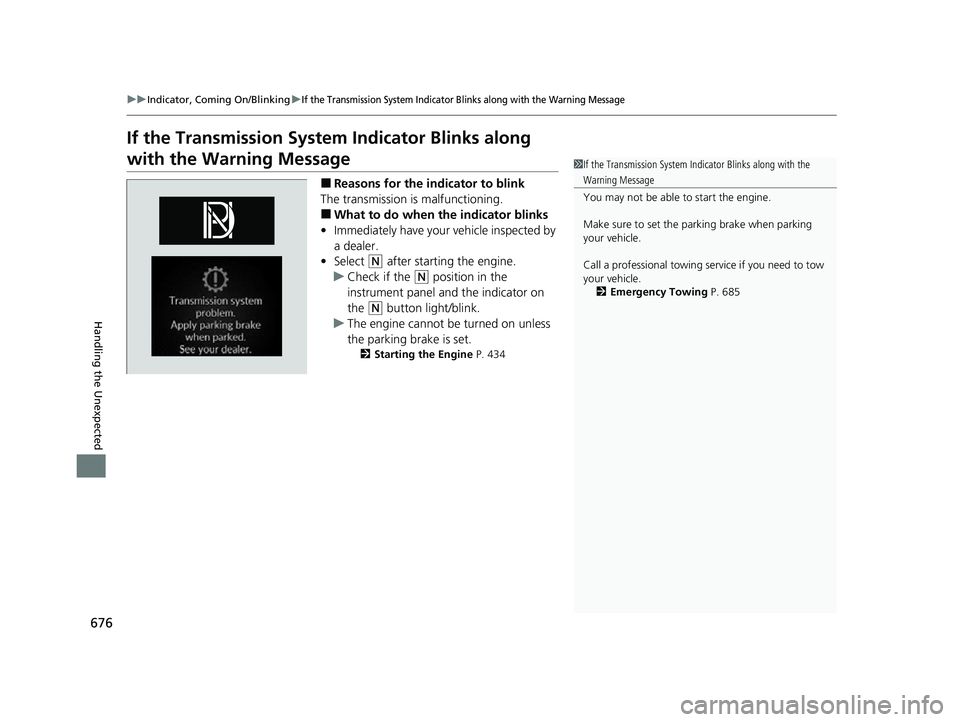
If the Transmission System Indicator Blinks along
with the Warning Message
■Reasons for the indicator to blink
The transmission is malfunctioning.
■What to do when the indicator blinks
• Immediately have your vehicle inspected by
a dealer.
• Select
(N after starting the engine.
u Check if the
(N position in the
instrument panel and the indicator on
the
(N button light/blink.
u The engine cannot be turned on unless
the parking brake is set.
2 Starting the Engine P. 434
1If the Transmission System In dicator Blinks along with the
Warning Message
You may not be able to start the engine.
Make sure to set the pa rking brake when parking
your vehicle.
Call a professional towing service if you need to tow
your vehicle. 2 Emergency Towing P. 685
22 ACURA MDX-31TYA6000_02.book 676 ページ 2020年11月5日 木曜日 午前11時39分
Page 679 of 712

678
uuFuses uFuse Locations
Handling the Unexpected
Circuit ProtectedAmps
21Transmission 115 A
22 − −
23Hazard10 A
24 − −
25Brake Lights7.5 A
26 IG Coil 15 A
27Transmission 310 A
28 Transmission 2 10 A
29−−
30 − −
31Washer15 A
32 Battery Sensor 10 A
33Shutter Grille10 A
34−−
35−−
36Cruise SW10 A
37IGPS (VSS)(10 A)
38Sub Fan Diode10 A
39−−
40−−
41−−
22 ACURA MDX-31TYA6000_02.book 678 ページ 2020年11月5日 木曜日 午前11時39分
Page 682 of 712

681
uuFuses uFuse Locations
Continued
Handling the Unexpected
Located on the lower side panel. Take off
the cover to open.
Fuse locations are shown on the cover.
■Passenger’s Side Interior Fuse
Box
Cover
Fuse Label
■Circuit protected and fuse rating
Circuit ProtectedAmps
1−−
2A/C Compressor10 A
3Heated Steering Wheel*(10 A)
4Heated Windshield*(15 A)
5Fog Lights*10 A
6FI Sub15 A
7Front Seat Heaters20 A
8−−
9−−
10Second Row Seat Heaters*(20 A)
11
Accessory Power Socket
(on the rear of the Console Compartment)
20 A
12Accessory Power Socket (Front Console)20 A
* Not available on all models
22 ACURA MDX-31TYA6000_02.book 681 ページ 2020年11月5日 木曜日 午前11時39分