blind spot ACURA MDX 2022 User Guide
[x] Cancel search | Manufacturer: ACURA, Model Year: 2022, Model line: MDX, Model: ACURA MDX 2022Pages: 712, PDF Size: 22.65 MB
Page 473 of 712
uuWhen Driving uBlind spot information System
472
Driving
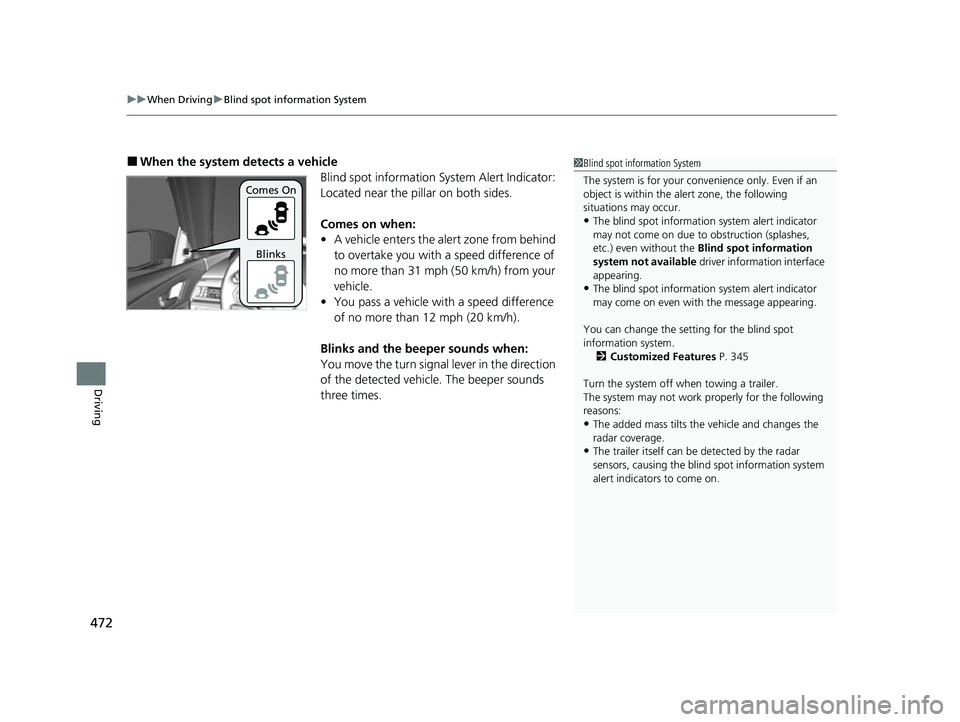
■When the system detects a vehicle
Blind spot information System Alert Indicator:
Located near the pillar on both sides.
Comes on when:
•A vehicle enters the alert zone from behind
to overtake you with a speed difference of
no more than 31 mph (50 km/h) from your
vehicle.
• You pass a vehicle with a speed difference
of no more than 12 mph (20 km/h).
Blinks and the beeper sounds when:
You move the turn signal lever in the direction
of the detected vehicle. The beeper sounds
three times.1 Blind spot information System
The system is for your convenience only. Even if an
object is within the alert zone, the following
situations may occur.
•The blind spot informatio n system alert indicator
may not come on due to obstruction (splashes,
etc.) even without the Blind spot information
system not available driver information interface
appearing.
•The blind spot informatio n system alert indicator
may come on even with the message appearing.
You can change the setting for the blind spot
information system. 2 Customized Features P. 345
Turn the system off when towing a trailer.
The system may not work properly for the following
reasons:
•The added mass tilts the vehicle and changes the
radar coverage.
•The trailer itself can be detected by the radar
sensors, causing the blind spot information system
alert indicators to come on.
Comes On
Blinks
22 ACURA MDX-31TYA6000_02.book 472 ページ 2020年11月5日 木曜日 午前11時39分
Page 474 of 712

473
uuWhen Driving uBlind spot information System
Driving
■Blind spot information System On and Off
When you turn the blind spot information
system on and off, do the following.
1. Press the safety support switch.
2. Roll the right selector wheel to the
symbol and push it.
u The message appears on the driver
information interface when the system
becomes on or off.
u A check mark appears in the box and the
color of the symbol changes green
when the system is on. The check mark
disappear and the color of the symbol
changes gray when the system is off.
The blind spot information system is in the
previously selected on (checked) or off
(unchecked) setting eac h time you start the
engine.1 Blind spot information System
You can also select the safety support content from
the driver information interface.
2 Driver Information Interface (Right Side
Area) P. 108
Blind spot information sy stem may be adversely
affected when:
•Objects (guard rails, poles, trees, etc,.) are
detected.
•An object that does not re flect radio waves well,
such as a motorcycle, is in the alert zone.
•Driving on a curved road.
•A vehicle is moving from a far lane to the adjacent
lane.
•The system picks up external electrical interference.
•The rear bumper or the sensors have been
improperly repaired or the rear bumper has been
deformed.
•The orientation of the sensors has been changed.
•In bad weather (Heavy rain, snow, and fog).•Making a turn at an intersection.
•Driving on a bumpy road.
•Making a short turn that slightly tilts the vehicle.
For a proper blind spot in formation system operation:
•Always keep the rear bumper corner area clean.•Do not cover the rear bumper corner area with
labels or stickers of any kind.
•Take your vehicle to a dealer if you need the rear
bumper corner area or th e radar sensors to be
repaired, or the rear bumper corner area is strongly
impacted.
Right Selector Wheel
Safety Support Switch
22 ACURA MDX-31TYA6000_02.book 473 ページ 2020年11月5日 木曜日 午前11時39分
Page 574 of 712

573
Driving
Surround View Camera System*
Is a four camera system that views areas commonly known as “blind spots” from
different angles, then displays the images on the audi o/information screen. This
system can be used to:
• Check the right and left sides of the vehi cle while crossing at intersections with
poor visibility (fog, heavy rain, obstructed view, etc.).
2Checking from the front wide view at intersections P. 579
•Check for obstacles in front of the vehicle when parking or maneuvering in
confined areas.
2 Checking the sides of your vehicle P. 579
•Check for obstacles when you are moving in (R.
2 Using the Surround View Camera System P. 577
1Surround View Camera System*
3WARNING
Failure to visually assess the area around
the vehicle (directly or by use of the
mirrors) may result in a crash causing
serious injury or death.
The areas shown in the surround view
camera system display are limited. The
display may not show all pedestrians or
other objects around your vehicle.
Do not solely rely only on the surround
view camera system display to assess
whether it is safe to move your vehicle.
3WARNING
Failure to pay proper attention to your
surroundings while driv ing may result in a
crash causing serious injury or death.
To help mitigate the ch ances of a collision,
only look at the surround view camera
system display when it is safe to do so.
* Not available on all models
22 ACURA MDX-31TYA6000_02.book 573 ページ 2020年11月5日 木曜日 午前11時39分
Page 575 of 712

574
uuSurround View Camera System*uDisplaying an Image From the Surround View Cameras
Driving
Displaying an Image From the Surround View
Cameras
■For frontal views:
Press the CAMERA button when the vehicle is
stationary or moving at 12 mph (20 km/h) or
slower. Press the butto n again to switch
camera views.
■For rear reviews:
Change the shift position to
(R when the
vehicle is stationary. Press the CAMERA
button to switch to rear view mode.
You can customize the display setting.
2 Customized Features P. 345
1Surround View Camera System*
The surround view camera system does not eliminate
all blind spots. The system is for your convenience only.
If the rear camera lens is covered with dirt or moisture,
activate the rearview camera washer or use a soft,
moist cloth to keep the lens clean and free of debris.
2 Rear Wiper/Washers P. 179
When the parking sensor system detects any
obstacles, the indica tor will display.
2 Parking Sensor System
* P. 562
When a vehicle is detected approaching from a rear
corner, Cross Traffic Monitor alerts you. 2 Cross Traffic Monitor P. 566
CAMERA
Button
1 Displaying an Image From the Surround View Cameras
The navigation system is disabled when the shift
position is in
(R.
Pressing the (home) or (back) button while
the surround view camera syst em screen is displayed
cancels the front view sc reen of the surround view
camera system.
If you press the CAMERA button while the vehicle
speed is more than 16 mph (25 km/h), the standby
screen appears.
When the vehicle speed is reduced below 12 mph (20
km/h), the screen switches to a surround view camera
system image.
* Not available on all models
22 ACURA MDX-31TYA6000_02.book 574 ページ 2020年11月5日 木曜日 午前11時39分
Page 578 of 712

Continued577
uuSurround View Camera System*u
Driving
■Checking for Obstacles at the Back of Your Vehicle
The display automatically changes to the rear view when the shift position is
changed to
(R.
■Using the Surround View Camera System1 Using the Surround View Camera System
The ground view can be displayed even with the door
mirrors folded. However, the viewable angle and
blind spot change.
Do not refer to the surround view camera system
when the door mirrors are folded.
When changing the shift position from/to
( R, you
may experience a delay in switching between the
audio/information screen and a rear view image.
Folded
Not folded
Rear Ground View
When the
steering wheel is
turned more than
90 degrees.
The projection lines
appear approx. 16
inches (40 cm) outside
the vehicle body.
Blind spots
appear in
black.
Approximate distances
the guide lines indicate
Approximate distances the
projection lines indicate 39 inches
(1 m)
20 inches
(50 cm)
39 inches
(1 m)
22 ACURA MDX-31TYA6000_02.book 577 ページ 2020年11月5日 木曜日 午前11時39分
Page 579 of 712

uuSurround View Camera System*u
578
Driving
You can display the ground view screen using all the four cameras for the system.
Pressing the CAMERA button when the vehicle speed is at below 12 mph (20 km/h)
changes the image as follows.
■Checking for the Sides of Your Vehicle1 Checking for the Sides of Your Vehicle
When the vehicle speed exceeds 16 mph (25 km/h),
the front or side view on the screen automatically
switches to the audio/information screen. The front
or side view screen resumes when the vehicle speed
is reduced below 12 mph (20 km/h).
0 mph (0 km/h)
Down Up Camera
Screen
Camera
Screen
Audio/Information
Screen
Audio/Information
Screen 16 mph (25 km/h)
12 mph (20 km/h)
0 mph (0 km/h)
Front Wide View + Ground View
Audio/Information Screen
Approximate distance
the reference line
indicates. Press the CAMERA
button.
approx. 3 feet (1 m) Blind spots appear
in black.
Side View + Ground View
22 ACURA MDX-31TYA6000_02.book 578 ページ 2020年11月5日 木曜日 午前11時39分
Page 704 of 712

703
Index
Shifting ................................................... 442
Average Fuel Economy ............................ 111
AWD ......................................................... 466
B
Battery ...................................................... 624
Charging System Indicator ................ 89, 671
If the Battery Is Dead............................... 666
Maintenance (Checking the Battery) ....... 624
Belts (Seat) .................................................. 37
Beverage Holders ..................................... 213
Blind spot information System ................ 471
Bluetooth ® Audio ..................................... 300
Bluetooth ® HandsFreeLink ®................... 376
Booster Seats (For Children) ...................... 79
Brake System ............................................ 551
Anti-lock Brake System (ABS) .................. 558
Automatic Brake Hold ............................. 556
Brake Assist System................................. 559
Fluid ....................................................... 607
Foot Brake .............................................. 555
Indicator (Amber) .............................. 88, 673
Indicator (Red) .................... 86, 87, 672, 673
Parking Brake.......................................... 551
Brightness Control (Instrument Panel) ... 181
Built-in Key ............................................... 131
Bulb Replacement .................................... 608
Back-Up Lights ........................................ 609
Brake Lights ............................................ 609
Door Outer Handle Am bient Lights ......... 609 Fog Lights ................................................ 608
Front Turn Signal/Parking, Daytime Running
and Front Side Marker Lights ................. 608
Headlights ............................................... 608
High-Mount Brake Light .......................... 609
Rear License Plate Light ........................... 609
Rear Side Marker Lights ........................... 609
Rear Turn Signal Lights ............................ 609
Side Turn Signal/Em ergency Indicator
Lights .................................................... 608
Taillights .................................................. 609
Bulb Specifications ................................... 690
C
CabinTalk®............................................... 414
CAMERA Button ....................................... 574
Carbon Monoxide Gas ................................ 80
Carrying Cargo .................................. 417, 419
Certification Label .................................... 692
Changing Bulbs ......................................... 608
Charging System Indicator ................. 89, 671
Child Safety ................................................. 63
Childproof Door Locks ............................. 145
Child Seat .................................................... 63
Booster Seats ............................................. 79
Child Seat for Infants ................................. 65
Child Seat for Small Children ..................... 66
Installing a Child Seat with a Lap/Shoulder Seat Belt .................................................. 72
Larger Children .......................................... 78 Rear-facing Child Seat ............................... 65
Selecting a Child Seat ................................ 67
Childproof Door Locks ............................. 145
Cleaning the Exterior ............................... 631
Cleaning the Interior ................................ 629
Client Service Information ....................... 701
Climate Control System ............................ 229
Defrosting the Windshield and
Windows ............................................... 231
Dust and Pollen Filter............................... 628
Sensors ................................................... 235
Synchronized Mode................................. 232
Using Automatic Climate Control ............ 229
Clock .......................................................... 128
CMBS
TM (Collision Mitigation Braking
SystemTM) ................................................. 479
Coat Hook ................................................. 215
Collision Mitigation Braking System
TM
(CMBSTM) ................................................. 479
Compact Spare Tire .......................... 639, 691
Console Compartment ............................. 212
Controls ..................................................... 127
Coolant (Engine) ...................................... 604
Adding to the Radiator ............................ 605
Adding to the Reserve Tank..................... 604
Overheating ............................................ 668
Creeping (Automatic Transmission) ........ 441
Cross Traffic Monitor ............................... 566
Cup Holders .............................................. 213
Customized Features ................................ 345
22 ACURA MDX-31TYA6000_02.book 703 ページ 2020年11月5日 木曜日 午前11時39分
Page 707 of 712

706
Index
Adaptive Cruise Control (ACC) with Low Speed Follow Interval ....................................... 100
Anti-lock Brake System (ABS) ..................... 94
Auto High-Beam ........................................ 97
Auto Idle Stop (Green) ............................... 91
Auto Idle Stop OFF..................................... 91
Auto Idle Stop Suspend ............................. 92
Auto Idle Stop System (Amber) .................. 91
Automatic Brake Hold........................ 88, 556
Automatic Brake Hold System ............ 88, 556
Blind spot information System ................. 472
Charging System ............................... 89, 671
Cruise Mode (White/Green) ..................... 100
Electric Power Steering (EPS) System .. 94, 674
Fog Light ................................................... 97
Gear Position ............................................. 89
High Beam................................................. 97
High Temperature (Red) ............................. 93
Immobilizer System .................................... 98
Lane Keeping Assist System (LKAS) (Amber) ................................................. 101
Lane Keeping Assist System (LKAS)
(White/Green) ........................................ 101
Lights On ................................................... 97
Low Fuel (Amber) ...................................... 93
Low Oil Pressure Warning ........................ 670
Low Tire Pressure/TPMS ............................. 96
M (sequential mode) Indicator/Sequential
Mode Gear Selection Indicator ................. 89
Malfunction Indicator Lamp ............... 89, 671 Parking Brake a
nd Brake System
(Amber) ........................................... 88, 673
Parking Brake a nd Brake System
(Red) ................................. 86, 87, 672, 673
Safety Support (Amber) ........................... 101
Safety Support (Green/Gray) .................... 103
Seat Belt Reminder .............................. 38, 93
Security System Alarm ............................... 98
Supplemental Restraint System ............ 59, 94
System Message ........................................ 99
Transmission System.......................... 90, 676
Turn Signal and Hazard Warning ............... 97
Vehicle Stability Assist
TM (VSA ®) OFF .. 95, 464
Vehicle Stability AssistTM (VSA ®)
System ............................................ 95, 463
VSA ® OFF ................................................ 464
Information .............................................. 689
Instant Fuel Economy ............................... 111
Instrument Panel ........................................ 83
Brightness Control................................... 181
Interior Lights ........................................... 208
Interior Rearview Mirror .......................... 187
iPad ........................................................... 323
iPhone ....................................................... 323
iPod ................................................... 294, 323
J
Jack (Wheel Nut Wrench) ........................ 643
K
Key Number Tag...................................... 132
Keyless Access System .............................. 133
Keys ........................................................... 130
Number Tag............................................ 132
Rear Door Won’t Open ........................... 145
Remote Transmitter ................................ 139
Types and Functions................................ 130
Kickdown (Automatic Transmission) ...... 441
Knee Airbag ............................................... 53
L
Lane Keeping Assist System (LKAS) ........ 514
LATCH (Child Seats) ............................. 68, 74
Legal Information .................................... 337
License Information ................................. 340
Lights ................................................ 170, 608
Automatic............................................... 171
Bulb Replacement ................................... 608
Daytime Running Lights .......................... 173
High Beam Indicator ................................. 97
Interior.................................................... 208
Light Switches......................................... 170
Lights On Indicator .................................... 97
Turn Signals ............................................ 169
Load Limits ............................................... 419
Locking/Unlocking ................................... 130
Auto Door Locking/Unlocking ................. 146
Childproof Door Locks ............................ 145
From Inside ............................................. 143
22 ACURA MDX-31TYA6000_02.book 706 ページ 2020年11月5日 木曜日 午前11時39分