battery ACURA MDX 2022 Workshop Manual
[x] Cancel search | Manufacturer: ACURA, Model Year: 2022, Model line: MDX, Model: ACURA MDX 2022Pages: 712, PDF Size: 22.65 MB
Page 627 of 712

626
Maintenance
Remote Transmitter Care
Replacing the Button Battery
If the indicator does not come on when the button is pressed, replace the battery.
1. Remove the built-in key.
2. Pry on the edge of the cover using a flat-tip
screwdriver to remove the cover.
u Wrap the flat-tip screwdriver with a cloth
to prevent scratches.
3. Make sure to replace the battery with the
correct polarity.
1 Replacing the Button Battery
NOTICE
An improperly disposed of battery can damage the
environment. Always conf irm local regulations for
battery disposal.
Replacement batteries are commercially available or
at a dealer.
3WARNING
CHEMICAL BURN HAZARD
The battery that powers the remote
transmitter can cause severe internal burns
and can even lead to death if swallowed.
Keep new and used batteries away from
children.
If you suspect that a child has swallowed
the battery, seek medical attention
immediately.
Models without two-way keyless access remote
Battery type: CR2032
Battery Cover
22 ACURA MDX-31TYA6000_02.book 626 ページ 2020年11月5日 木曜日 午前11時39分
Page 628 of 712

627
uuRemote Transmitter Care uReplacing the Button Battery
Maintenance
If the indicator does not come on when the button is pressed, replace the battery.
1. Remove the built-in key.
2. Pry on the edge of the cover using a flat-tip
screwdriver to remove the cover.
u Wrap the flat-tip screwdriver with a cloth
to prevent scratches.
3. Make sure to replace the battery with the
correct polarity.
Models with two-way keyless access remote1Replacing the Button Battery
NOTICE
The Remote transmitter is equipped with two
batteries: A standard replaceable CR2032 coin
button battery and an in tegral non-replaceable
rechargeable battery. To prevent permanent damage
to the rechargeable battery, replace the CR2032
battery every three to four years.
Models with two-way keyless access remote
Battery type: CR2032
Battery Cover
22 ACURA MDX-31TYA6000_02.book 627 ページ 2020年11月5日 木曜日 午前11時39分
Page 633 of 712
uuCleaning uExterior Care
632
Maintenance
• Make sure to follow the instructions indicated on the automated car wash.
• Fold in the door mirrors.
• For models equipped with automatic inte rmittent wipers, turn the wipers off.
• Keep sufficient distance between the cleaning nozzl e and the vehicle body.
• Take particular care around the windows. Standing too close may cause water to
enter the vehicle interior.
• Do not spray high pressure water directly into the engine compartment. Instead,
use low pressure water and a mild detergent.
A good coat of automotive body wax helps protect your vehicle’s paint from the
elements. Wax will wear off over time and expose your vehicle’s paint to the
elements, so reapply as necessary.
If you get gasoline, oil, engine coolant, or battery fluid on resin coated parts, they
may be stained or the coating may peel. Promptly wipe it away using a soft cloth and
clean water.
Wipe using a glass cleaner.
■Using an Automated Car Wash
■Using High Pressure Cleaners
■Applying Wax
■Maintaining the Bumpers and Other Resin Coated Parts
■Cleaning the Window
1 Using an Automated Car Wash
When using an automated car wash that pulls the
vehicle through with a conveyor, make sure the
transmission in
( N position.
2 If you want to keep the transmission in
(N
position [car wash mode] P. 446
1Applying Wax
NOTICE
Chemical solvents and st rong cleaners can damage
the paint, metal, and plasti c on your vehicle. Wipe
away spills immediately.
1 Maintaining the Bumpers an d Other Resin Coated Parts
Ask a dealer about the corr ect coating material when
you want to repair the painted surface of the parts
made of resin.
22 ACURA MDX-31TYA6000_02.book 632 ページ 2020年11月5日 木曜日 午前11時39分
Page 636 of 712

635
uuAccessories and Modifications uModifications
Maintenance
Modifications
Do not modify your vehicle in a manner that may affect its handling, stability, or
reliability, or install non-genuine Acura pa rts or accessories that may have a similar
effect.
Even minor modifications to vehicle systems can affect overall vehicle performance.
Always make sure all equipment is properly installed and maintained, and do not
make any modification to your vehicle or its systems that might cause your vehicle
to no longer meet federal, state, pr ovince, territory, and local regulations.
The on-board diagnostic port (OBD-II/SAE J1 962 connector) installed on this vehicle
is intended to be used with automobile system diagnostic devices or with other
devices that Acura has approved. Use of any other type of device may adversely
affect the vehicle’s electronic systems or allow them to be compromised, possibly
resulting in a system malfunction, drained battery, or other unexpected problems.
Do not modify or attempt to repair any of the electrical components.
22 ACURA MDX-31TYA6000_02.book 635 ページ 2020年11月5日 木曜日 午前11時39分
Page 638 of 712

637
Handling the Unexpected
This chapter explains how to handle unexpected troubles.
ToolsTypes of Tools .................................. 638
If a Tire Goes Flat Changing a Flat Tire ......................... 639
Temporarily Repairi ng a Flat Tire....... 647
Handling of the Jack ......................... 661
Engine Does Not Start Checking the Engine ........................ 662
If the Keyless Access Remote Battery is Weak ... 663Emergency Engine Start ................... 664
Emergency Engine Stop ................... 665
If the Battery Is Dead ....................... 666
Overheating
How to Handle Overheating ............. 668 Indicator, Coming On/Blinking
If the Low Oil Pressure Warning Appears ....670
If the Charging System Indicator Comes On .. 671
If the Malfunction Indicator Lamp Comes
On or Blinks ................................... 671
If the Brake System Indicator (Red) Comes On or Blinks ................................... 672
If the Brake System Indicator (Red) Comes On or Blinks at the Same Time When the Brake
System Indicator (Amber) Comes On .. 673
If the Electric Power Steering (EPS) System
Indicator Comes On ........................... 674
If the Low Tire Pressure/TPMS Indicator Comes On or Blinks ....................... 675
If the Transmission System Indicator Blinks along with the Warning Message... 676
Fuses Fuse Locations ................................. 677
Inspecting and Changing Fuses ........ 683
Emergency Towing ........................... 685
If You Cannot Unlock the Fuel Fill Door ... 686
If You Cannot Open the Tailgate .... 687
Refueling Refueling From a Portable Fuel Container ... 688
22 ACURA MDX-31TYA6000_02.book 637 ページ 2020年11月5日 木曜日 午前11時39分
Page 663 of 712

662
Handling the Unexpected
Engine Does Not Start
Checking the Engine
If the engine does not start, check the starter.
Starter conditionChecklist
Starter doesn’t turn or turns
over slowly.
The battery may be dead. Check
each of the items on the right and
respond accordingly.Check for a message on the dr iver information interface.
●If the To start, touch start button With emblem side of remote message appears
2If the Keyless Access Remote Battery is Weak P. 663
uMake sure the keyless access remo te is in its operating range.
2ENGINE START/STOP Button Operating Range P. 166
Check the brightness of the interior lights.
Turn on the interior ligh ts and check the brightness.
●If the interior lights are dim or do not come on at all 2 Battery P. 624●If the interior lights come on normally
2 Fuses P. 677
2 Emergency Engine Start P. 664
The starter turns over normally
but the engine doesn’t start.
There may be a problem with a
fuse. Check each of the items on
the right and respond accordingly. Review the engine start procedure.
Follow its instructions, and try to start the engine again.
2
Starting the Engine P. 434
Check the immobilizer system indicator.
When the immobilizer system indicator is blinking, the engine cannot be started.
2Immobilizer System P. 157
Check the fuel level.
There should be enough fuel in the tank.
2 Fuel Gauge P. 104
Check the fuses.
Check all fuses, or have the vehicle checked by a dealer.
2Inspecting and Changing Fuses P. 683
If the problem continues:
2Emergency Towing P. 685
1Checking the Engine
If you must start the vehi cle immediately, use an
assisting vehicle or booster battery to jump start it.
2 If the Battery Is Dead P. 666
22 ACURA MDX-31TYA6000_02.book 662 ページ 2020年11月5日 木曜日 午前11時39分
Page 664 of 712
663
uuEngine Does Not Start uIf the Keyless Access Remote Battery is Weak
Handling the Unexpected
If the Keyless Access Re mote Battery is Weak
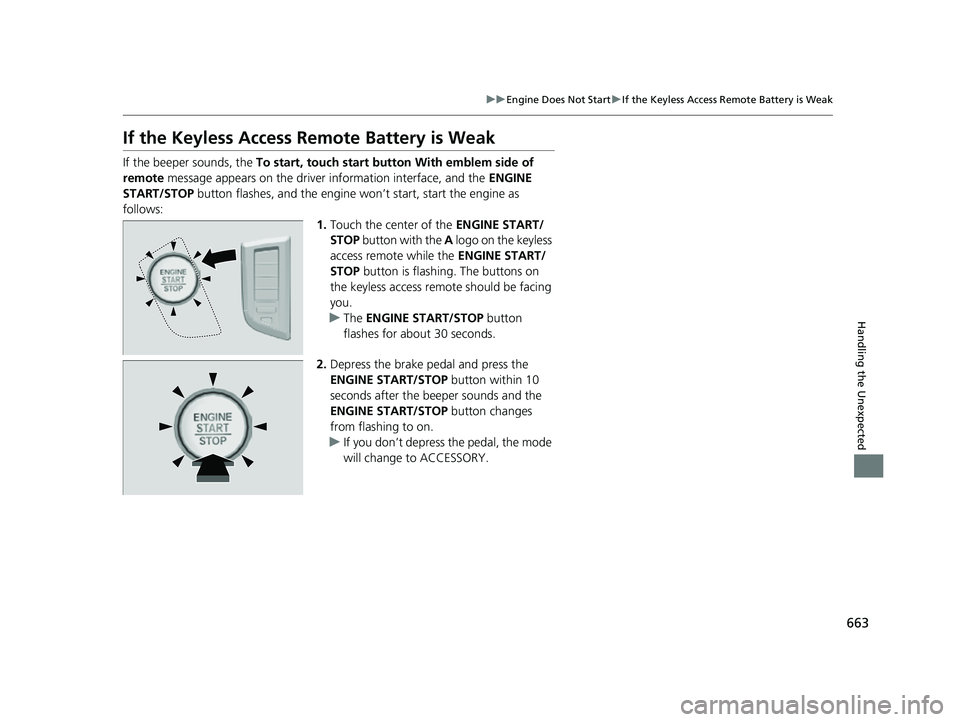
If the beeper sounds, the To start, touch start button With emblem side of
remote message appears on the driver information interface, and the ENGINE
START/STOP button flashes, and the engine wo n’t start, start the engine as
follows: 1.Touch the center of the ENGINE START/
STOP button with the A logo on the keyless
access remote while the ENGINE START/
STOP button is flashing. The buttons on
the keyless access remote should be facing
you.
u The ENGINE START/STOP button
flashes for about 30 seconds.
2. Depress the brake pedal and press the
ENGINE START/STOP button within 10
seconds after the beeper sounds and the
ENGINE START/STOP button changes
from flashing to on.
u If you don’t depress the pedal, the mode
will change to ACCESSORY.
22 ACURA MDX-31TYA6000_02.book 663 ページ 2020年11月5日 木曜日 午前11時39分
Page 667 of 712

666
Handling the Unexpected
If the Battery Is Dead
Turn off the power to electric devices, such as audio and lights. Turn off the engine,
then open the hood. 1.Open the cover on the positive + terminal.
2. Connect the first jump er cable to your
vehicle’s battery + terminal.
3. Connect the other end of the first jumper
cable to the booster battery + terminal.
u Use a 12-volt booster battery only.
u When using an automotive battery
charger to boost your 12-volt battery,
select a lower charging voltage than 15-
volt. Check the charger manual for the
proper setting.
4. Connect the second jumper cable to the
booster battery - terminal.
■Jump Starting Procedure1If the Battery Is Dead
Securely attach the jumper cables clips so that they
do not come off when the e ngine vibrates. Also be
careful not to tangle the ju mper cables or allow the
cable ends to touch each other while attaching or
detaching the jumper cables.
Battery performance degrades in cold conditions and
may prevent the engi ne from starting.
3WARNING
A battery can explode if you do not follow
the correct procedure, seriously injuring
anyone nearby.
Keep all sparks, open flames, and smoking
materials away from the battery.
Booster Battery
22 ACURA MDX-31TYA6000_02.book 666 ページ 2020年11月5日 木曜日 午前11時39分
Page 668 of 712

667
uuIf the Battery Is Dead u
Handling the Unexpected
5.Connect the other end of the second
jumper cable to the ground bolt as shown.
Do not connect this jumper cable to any
other part.
6. If your vehicle is connected to another
vehicle, start the assisting vehicle’s engine
and increase its rpm slightly.
7. Attempt to start your ve hicle’s engine. If it
turns over slowly, check that the jumper
cables have good metal-to-metal contact.
Once your vehicle’s engine has started, re move the jumper cables in the following
order.
1. Disconnect the jumper cable from your vehicle’s ground.
2. Disconnect the other end of the jump er cable from the booster battery -
terminal.
3. Disconnect the jumper cable from your vehicle’s battery + terminal.
4. Disconnect the other end of the jump er cable from the booster battery +
terminal.
Have your vehicle inspected by a n earby service station or a dealer.
■What to Do After the Engine Starts
1Jump Starting Procedure
The Vehicle Stability Assist
TM (VSA ®) system, Adaptive
Cruise Control (ACC) with Low Speed Follow, safety
support, and low tire pre ssure/TPMS indicators may
come on along with a message in the driver
information interface when you set the power mode
to ON after rec onnecting a battery.
Drive a short distance at mo re than 12mph (20 km/h).
Each indicator should go off. If any do not, have your
vehicle checked by a dealer.
22 ACURA MDX-31TYA6000_02.book 667 ページ 2020年11月5日 木曜日 午前11時39分
Page 672 of 712

671
uuIndicator, Comi ng On/BlinkinguIf the Charging System Indicator Comes On
Handling the Unexpected
If the Charging System Indicator Comes On
■Reasons for the indicator to come on
Comes on when there is a prob lem with the charging system.
■What to do when the indicator comes on
Stop in a safe place and have yo ur vehicle checked by a dealer
immediately.
If the Malfunction Indica tor Lamp Comes On or
Blinks
■Reasons for the indicator la mp to come on or blink
• Comes on when there is a problem with the engine emissions control
system.
• Blinks when engine misfiring is detected.
■What to do when the indicator lamp comes on
Avoid high speeds and immediately get your vehicle inspected at a
dealer.
■What to do when the indicator lamp blinks
Park the vehicle in a safe place with no flammable items and wait at least
10 minutes or more with the engine stopped until it cools.
1 If the Charging System Indicator Comes On
If you need to stop temporarily, do not turn off the
engine. Restarting the engi ne may rapidly discharge
the battery.
1 If the Malfunction Indicato r Lamp Comes On or Blinks
NOTICE
If you drive with the malf unction indicator lamp on,
the emissions control system and the engine could be
damaged.
If the malfunction indicator lamp blinks again when
restarting the engine, drive to the nearest dealer at
31 mph (50 km/h) or less. Have your vehicle
inspected.
22 ACURA MDX-31TYA6000_02.book 671 ページ 2020年11月5日 木曜日 午前11時39分