clock ACURA NSX 1991 Service User Guide
[x] Cancel search | Manufacturer: ACURA, Model Year: 1991, Model line: NSX, Model: ACURA NSX 1991Pages: 1640, PDF Size: 60.48 MB
Page 358 of 1640
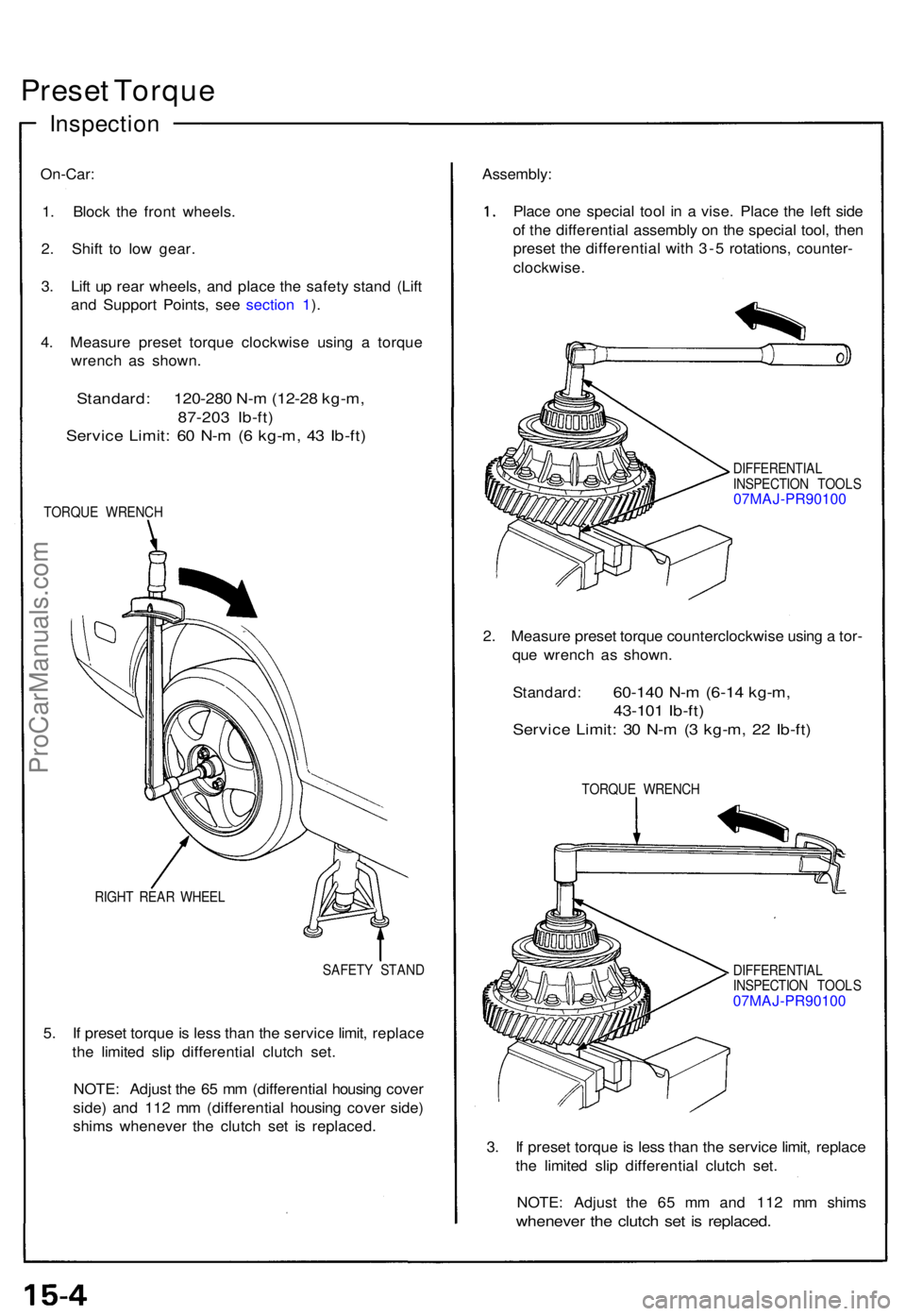
Preset Torqu e
Inspectio n
On-Car:
1 . Bloc k th e fron t wheels .
2 . Shif t t o low gear .
3 . Lif t u p rea r wheels , an d plac e th e safet y stan d (Lif t
an d Suppor t Points , se e sectio n 1 ).
4 . Measur e prese t torqu e clockwis e usin g a torqu e
wrenc h a s shown .
Standard: 120-280 N-m (12-28 kg-m,
87-20 3 Ib-ft )
Servic e Limit : 6 0 N- m (6 kg-m , 4 3 Ib-ft )
TORQU E WRENC H
RIGH T REA R WHEE L
SAFETY STAN D
5. I f prese t torqu e is les s tha n th e servic e limit , replac e
th e limite d sli p differentia l clutc h set .
NOTE : Adjus t th e 6 5 m m (differentia l housin g cove r
side ) an d 11 2 m m (differentia l housin g cove r side )
shim s wheneve r th e clutc h se t i s replaced . Assembly
:
Plac e on e specia l too l i n a vise . Plac e th e lef t sid e
o f th e differentia l assembl y o n th e specia l tool , the n
prese t th e differentia l wit h 3- 5 rotations , counter -
clockwise .
DIFFERENTIA L
INSPECTIO N TOOL S
07MAJ-PR90100
2. Measur e prese t torqu e counterclockwis e usin g a tor -
qu e wrenc h a s shown.
Standard :
60-140 N- m (6-1 4 kg-m ,
43-10 1 Ib-ft )
Servic e Limit : 3 0 N- m (3 kg-m , 2 2 Ib-ft )
TORQU E WRENC H
DIFFERENTIA L
INSPECTIO N TOOL S
07MAJ-PR90100
3 . I f prese t torqu e is les s tha n th e servic e limit , replac e
th e limite d sli p differentia l clutc h set .
NOTE : Adjus t th e 6 5 m m an d 11 2 m m shim s
wheneve r th e clutc h se t i s replaced .
ProCarManuals.com
Page 373 of 1640
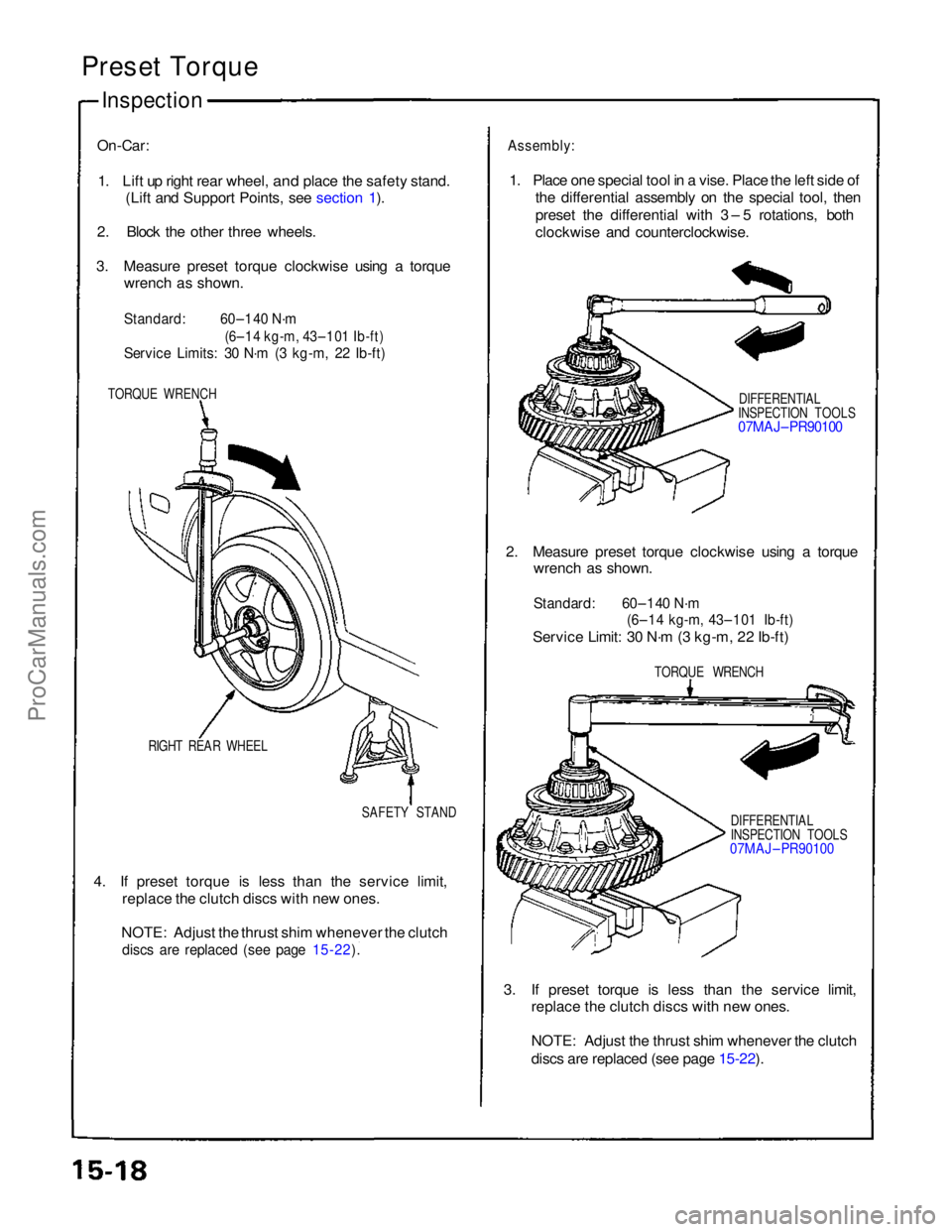
Preset Torque
Inspection
On-Car:
1. Lift up right rear wheel,
and place the safety stand.
(Lift and Support Points, see section 1).
2. Block the other three wheels.
3. Measure preset torque clockwise using a torque wrench as shown.
Standard:
60–140 N·m
(6–14 kg-m, 43–101 Ib-ft)
Service Limits: 30 N·m (3 kg-m, 22 Ib-ft)
TORQUE WRENCH
RIGHT REAR WHEEL SAFETY STAND
4. If preset torque is less than the service limit, replace the clutch discs with new ones.
NOTE: Adjust the thrust shim whenever the clutch
discs are replaced (see page 15-22).
Assembly:
1. Place one special tool in a vise. Place the left side of the differential assembly on the special tool, then
preset the differential with 3 – 5 rotations, both
clockwise and counterclockwise.
DIFFERENTIAL
INSPECTION TOOLS
07MAJ– PR90100
2. Measure preset torque clockwise using a torque wrench as shown.
Standard: 60–140 N·m
(6–14 kg-m, 43–101 Ib-ft)
Service Limit: 30 N·m (3 kg-m, 22 Ib-ft)
TORQUE WRENCH
DIFFERENTIAL
INSPECTION TOOLS
07MAJ – PR90100
3. If preset torque is less than the service limit, replace the clutch discs with new ones.
NOTE: Adjust the thrust shim whenever the clutch
discs are replaced (see page 15-22).
ProCarManuals.com
Page 417 of 1640
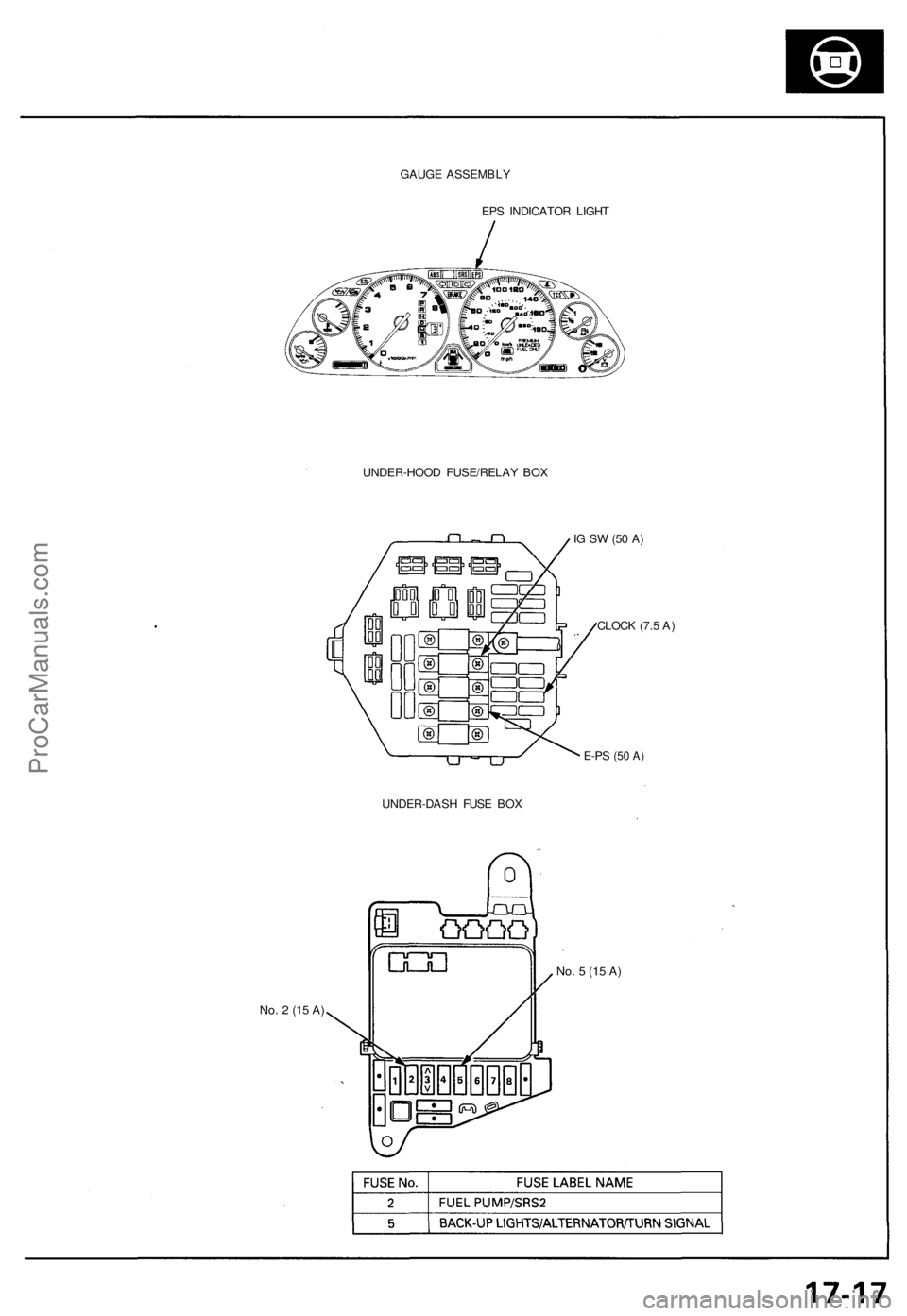
GAUGE ASSEMBLY
EPS INDICATOR LIGHT
UNDER-HOOD FUSE/RELAY BOX
No. 2 (15 A)
IG SW (50 A)
CLOCK (7.5 A)
E-PS
(50 A)
UNDER-DASH FUSE BOX
No. 5 (15 A)ProCarManuals.com
Page 420 of 1640
Troubleshooting Precautions
EPS Indicator Light
Under normal conditions, the EPS indicator light in the gauge assembly comes on when the ignition switch is turned to
the ON (II) position, then goes off after the engine is started. This indicates that the bulb and its circuits are operating cor-
rectly. If there is any trouble in the system, the EPS indicator light turns on during driving, and the power steering assist is
turned off. When the EPS indicator light comes on, the control unit memorizes the DTC. In this case, the control unit does
not activate the EPS system after the engine starts again but it keeps the EPS indicator light on.
Diagnostic Trouble Code (DTC)
• The lowest DTC is indicated first.
• The DTCs continue blinking until the ignition switch is turned off.
• The DTCs are erased from the control unit when the EPS control unit VBU power supply or connector is disconnected.
• The EPS system can be reset and the control unit's memory can be erased by disconnecting the CLOCK (7.5 A) fuse for
more than ten seconds.
Self-diagnosis:
The CPU (central processing unit) controls the following when it detects a problem during self-diagnosis:
1. Turns the EPS indicator light ON to alert the driver.
2. Power assist stops, and normal manual steering operation resumes (except DTC 21 and DTC 33).
3. The EPS control unit memorizes the diagnostic trouble code (DTC).
4. After the DTC is stored in the control unit, the CPU stops self-diagnosis.
Troubleshooting:
• Before starting the troubleshooting, clear the DTC by disconnecting the CLOCK (7.5 A) fuse for ten seconds or more,
and test-drive the car. Check that the symptom of the trouble appears again, and then troubleshoot. If the problem is an
intermittent problem, the system does not become active after the engine starts even though the problem is solved.
• When both EPS indicator light and A/T "D" indicator light come on, perform the A/T troubleshooting first.
• When the customer's reported problem cannot be verified in the car, ask the customer about the conditions when the
EPS indicator light came ON, then test-drive the car under those conditions, if possible. If the EPS indicator light does
not come ON during the test, check for loose connections or poor contacts at the connectors by wiggling the harness,
etc.
• The connector terminal numbers are viewed from the wire side for the female terminals and from the terminal side for
the male terminals.
• After the repair, test-drive the car and check that the EPS indicator light does not come ON again during the test. (Refer
to the Symptom-to-System Chart for diagnostic period.)ProCarManuals.com
Page 422 of 1640
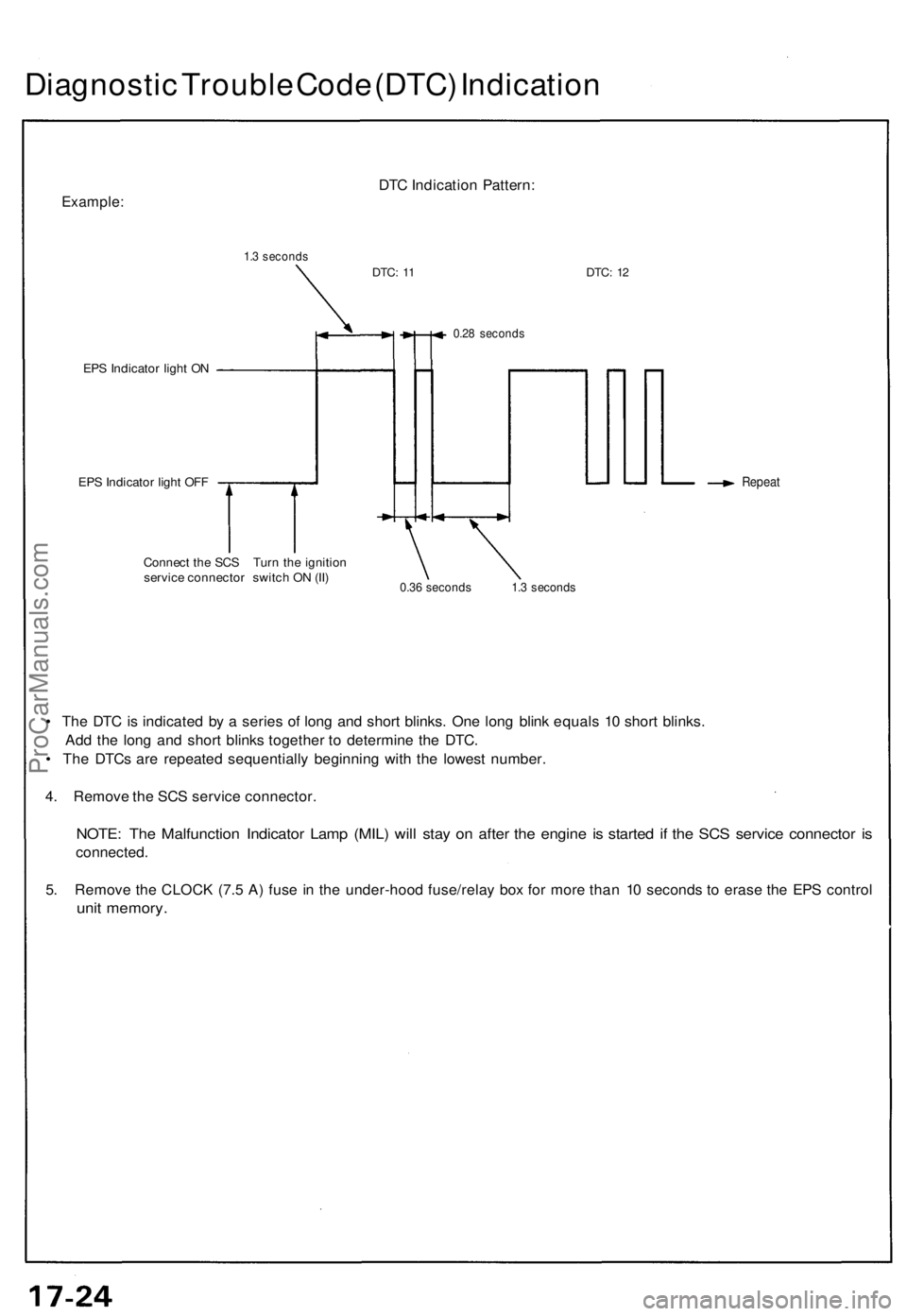
Diagnostic Trouble Code (DTC) Indication
Example:
1.3 seconds
DTC Indication Pattern:
DTC:
11
DTC:
12
EPS Indicator light ON
EPS Indicator light OFF
0.28 seconds
Repeat
Connect the SCS Turn the ignition
service connector switch ON (II)
0.36 seconds 1.3 seconds
• The DTC is indicated by a series of long and short blinks. One long blink equals 10 short blinks.
Add the long and short blinks together to determine the DTC.
• The DTCs are repeated sequentially beginning with the lowest number.
4. Remove the SCS service connector.
NOTE: The Malfunction Indicator Lamp (MIL) will stay on after the engine is started if the SCS service connector is
connected.
5. Remove the CLOCK (7.5 A) fuse in the under-hood fuse/relay box for more than 10 seconds to erase the EPS control
unit memory.ProCarManuals.com
Page 429 of 1640
Installation
NOTE: Before installing the steering wheel, make sure
the front wheels are straight ahead.
CAUTION:
• Be sure to install the harness wires so that they are
not pinched or interfering with other car parts.
• Do not replace the original steering wheel with any
other design, since it will make it impossible to prop-
erly install the airbag. (Use only genuine Honda
replacement parts.)
• After reassembly, confirm that the wheels are still
straight ahead and that steering wheel spoke angle
is correct. If minor spoke angle adjustment is neces-
sary, adjust the tie-rods only. Do not remove and
reposition the steering wheel.
Confirm that the airbag assembly is securely
attached to the steering wheel; otherwise, severe per-
sonal injury could result during later airbag deploy-
ment.
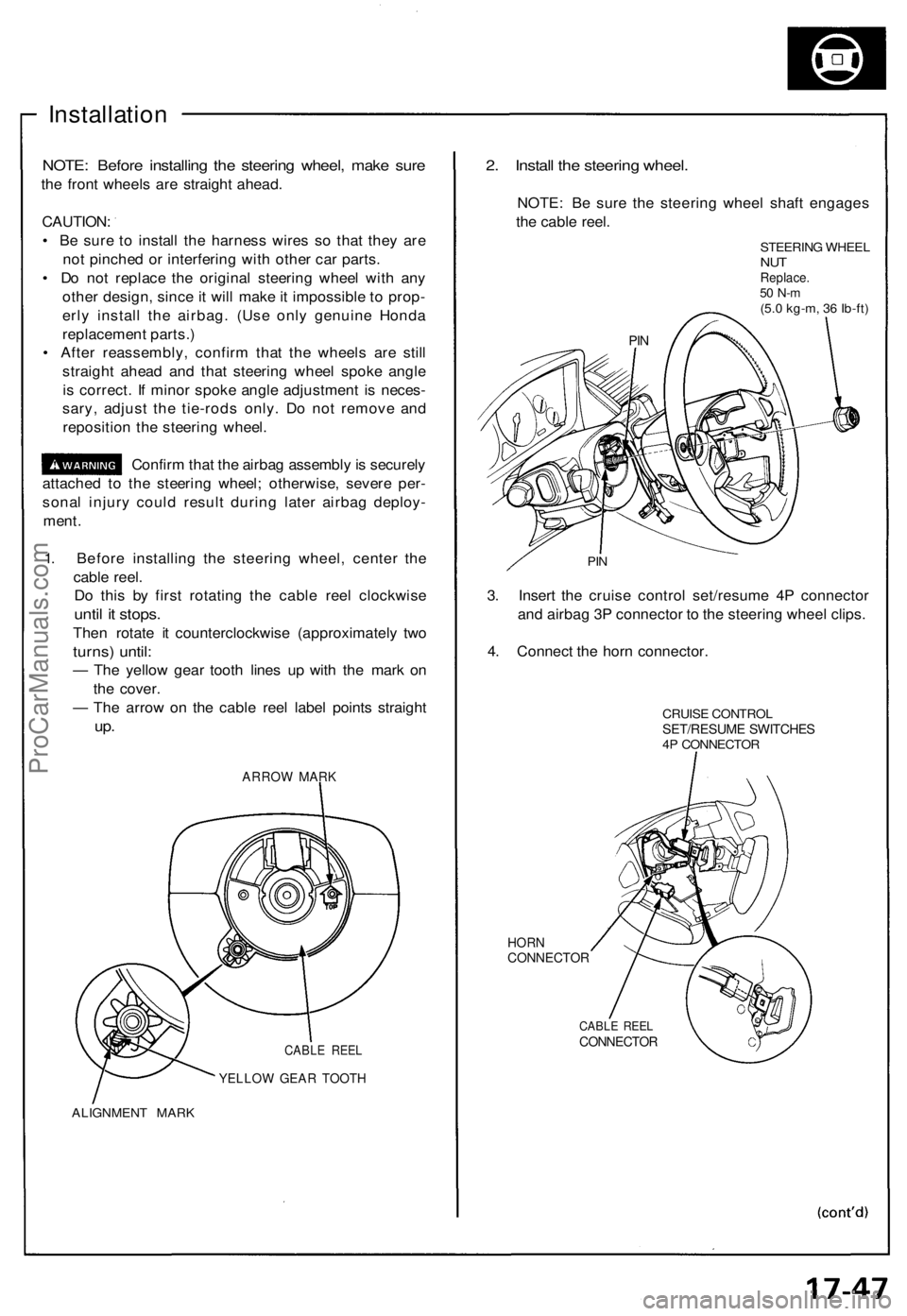
1. Before installing the steering wheel, center the
cable reel.
Do this by first rotating the cable reel clockwise
until it stops.
Then rotate it counterclockwise (approximately two
turns) until:
— The yellow gear tooth lines up with the mark on
the cover.
— The arrow on the cable reel label points straight
up.
ARROW MARK
CABLE REEL
YELLOW GEAR TOOTH
ALIGNMENT MARK
2. Install the steering wheel.
NOTE: Be sure the steering wheel shaft engages
the cable reel.
STEERING WHEEL
NUT
Replace.
50 N-m
(5.0 kg-m, 36 Ib-ft)
PIN
3. Insert the cruise control set/resume 4P connector
and airbag 3P connector to the steering wheel clips.
4. Connect the horn connector.
CRUISE CONTROL
SET/RESUME SWITCHES
4P CONNECTOR
HORN
CONNECTOR
CABLE REEL
CONNECTOR
PINProCarManuals.com
Page 430 of 1640
Steering Wheel
Installation
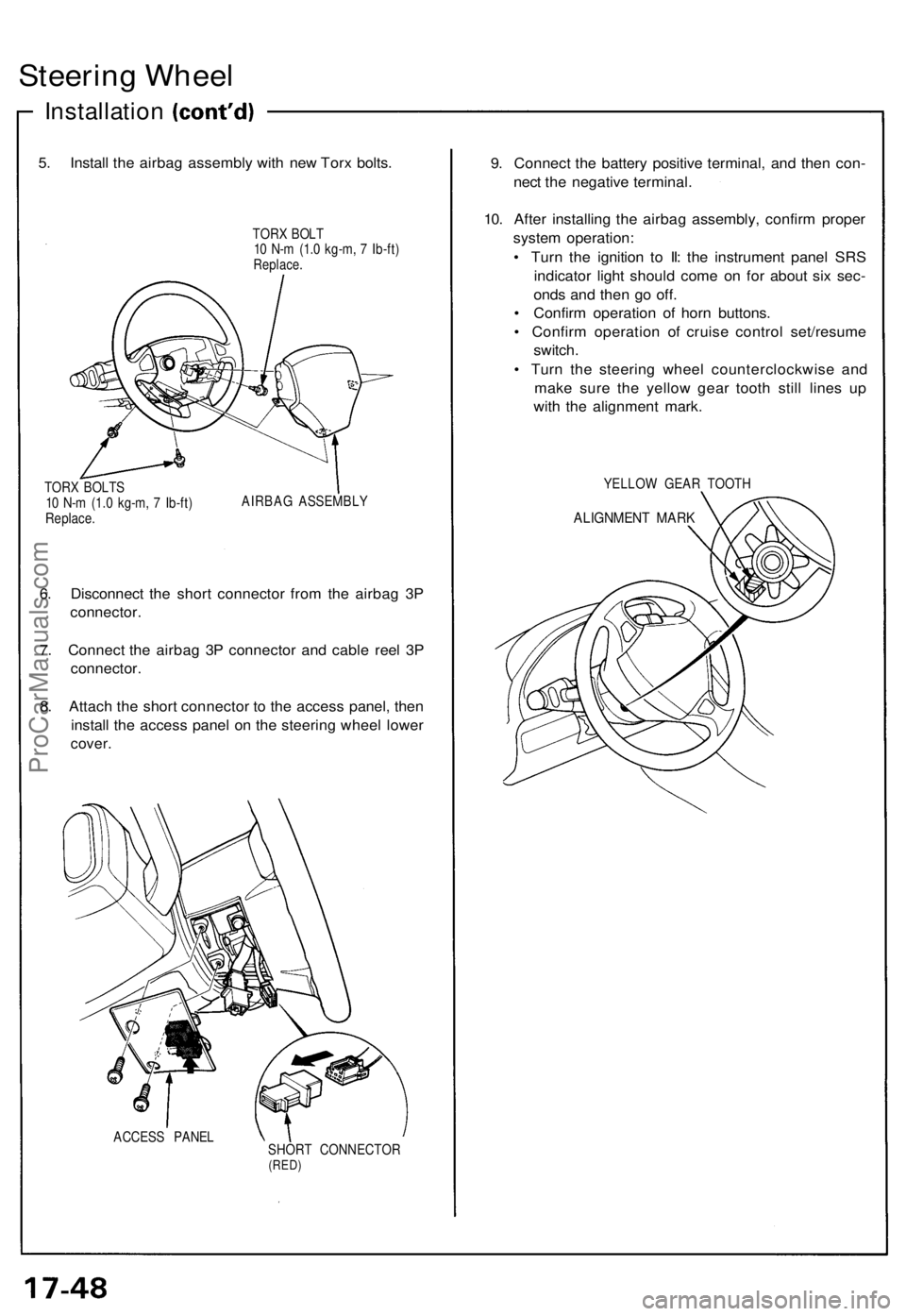
5. Install the airbag assembly with new Torx bolts.
TORX BOLT
10 N-m (1.0 kg-m, 7 Ib-ft)
Replace.
TORX BOLTS
10 N-m (1.0 kg-m, 7 Ib-ft)
Replace.
AIRBAG ASSEMBLY
6. Disconnect the short connector from the airbag 3P
connector.
7. Connect the airbag 3P connector and cable reel 3P
connector.
8. Attach the short connector to the access panel, then
install the access panel on the steering wheel lower
cover.
ACCESS PANEL
SHORT CONNECTOR
(RED)
9. Connect the battery positive terminal, and then con-
nect the negative terminal.
10. After installing the airbag assembly, confirm proper
system operation:
• Turn the ignition to II: the instrument panel SRS
indicator light should come on for about six sec-
onds and then go off.
• Confirm operation of horn buttons.
• Confirm operation of cruise control set/resume
switch.
• Turn the steering wheel counterclockwise and
make sure the yellow gear tooth still lines up
with the alignment mark.
YELLOW GEAR TOOTH
ALIGNMENT MARKProCarManuals.com
Page 506 of 1640
Rear Brak e Pad s
Inspection/Replacemen t (cont'd )
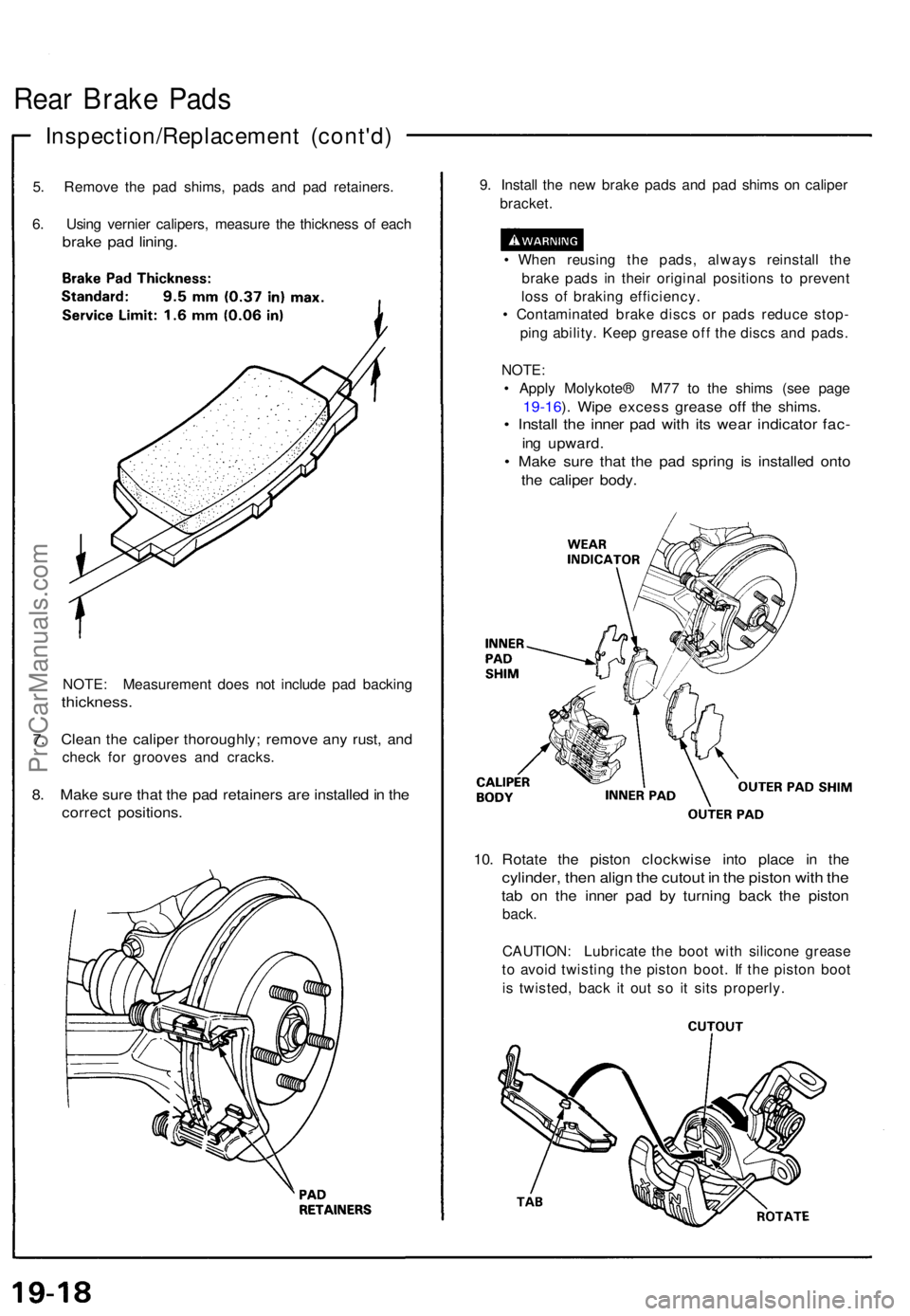
5. Remov e th e pa d shims , pad s an d pa d retainers .
6 . Usin g vernie r calipers , measur e th e thicknes s o f eac h
brak e pa d lining .
NOTE : Measuremen t doe s no t includ e pa d backin g
thickness .
7. Clea n th e calipe r thoroughly ; remov e an y rust , an d
chec k fo r groove s an d cracks .
8. Mak e sur e tha t th e pa d retainer s ar e installe d in th e
correc t positions .
9. Instal l th e ne w brak e pad s an d pa d shim s o n calipe r
bracket .
• Whe n reusin g th e pads , alway s reinstal l th e
brak e pad s i n thei r origina l position s t o preven t
los s o f brakin g efficiency .
• Contaminate d brak e disc s o r pad s reduc e stop -
pin g ability . Kee p greas e of f th e disc s an d pads .
NOTE :
• Appl y Molykote ® M7 7 t o th e shim s (se e pag e
19-16 ). Wip e exces s greas e of f th e shims .
• Instal l th e inne r pa d wit h it s wea r indicato r fac -
ing upward .
• Mak e sur e tha t th e pa d sprin g i s installe d ont o
the calipe r body .
10. Rotat e th e pisto n clockwis e int o plac e i n th e
cylinder , the n alig n th e cutou t i n th e pisto n wit h th e
tab o n th e inne r pa d b y turnin g bac k th e pisto n
back.
CAUTION : Lubricat e th e boo t wit h silicon e greas e
t o avoi d twistin g th e pisto n boot . I f th e pisto n boo t
i s twisted , bac k i t ou t s o i t sit s properly .
ProCarManuals.com
Page 514 of 1640
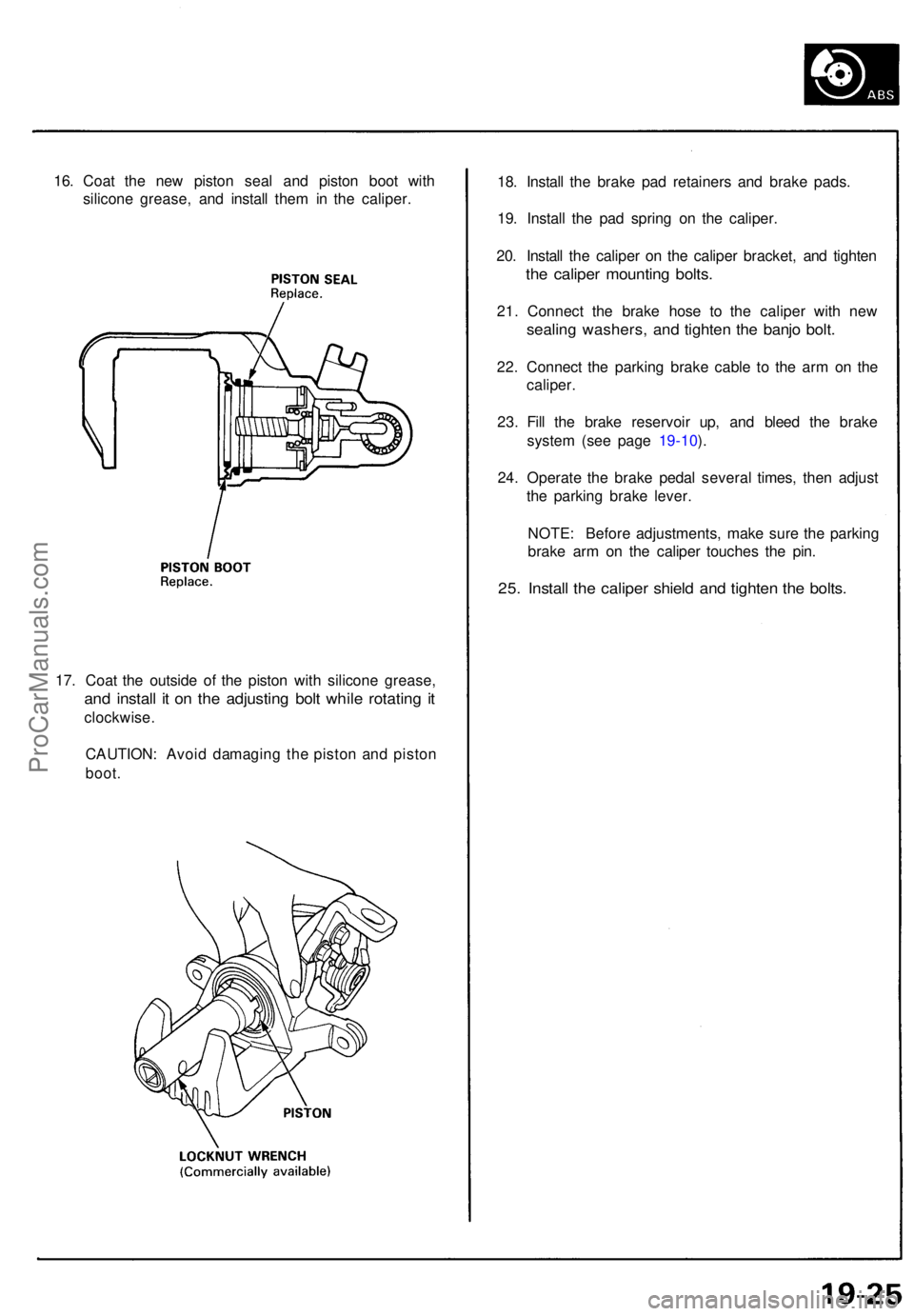
16. Coa t th e ne w pisto n sea l an d pisto n boo t wit h
silicon e grease , an d instal l the m in th e caliper .
17 . Coa t th e outsid e of the pisto n wit h silicon e grease ,
and instal l i t o n th e adjustin g bol t whil e rotatin g i t
clockwise .
CAUTION : Avoi d damagin g th e pisto n an d pisto n
boot.
18. Instal l th e brak e pa d retainer s an d brak e pads .
19 . Instal l th e pa d sprin g o n th e caliper .
20 . Instal l th e calipe r o n th e calipe r bracket , an d tighte n
the calipe r mountin g bolts .
21. Connec t th e brak e hos e t o th e calipe r wit h ne w
sealin g washers , an d tighte n th e banj o bolt .
22. Connec t th e parkin g brak e cabl e t o th e ar m o n th e
caliper .
23 . Fil l th e brak e reservoi r up , an d blee d th e brak e
syste m (se e pag e 19-10 ).
24 . Operat e th e brak e peda l severa l times , the n adjus t
th e parkin g brak e lever .
NOTE : Befor e adjustments , mak e sur e th e parkin g
brak e ar m o n th e calipe r touche s th e pin .
25. Instal l th e calipe r shiel d an d tighte n th e bolts .
ProCarManuals.com
Page 575 of 1640
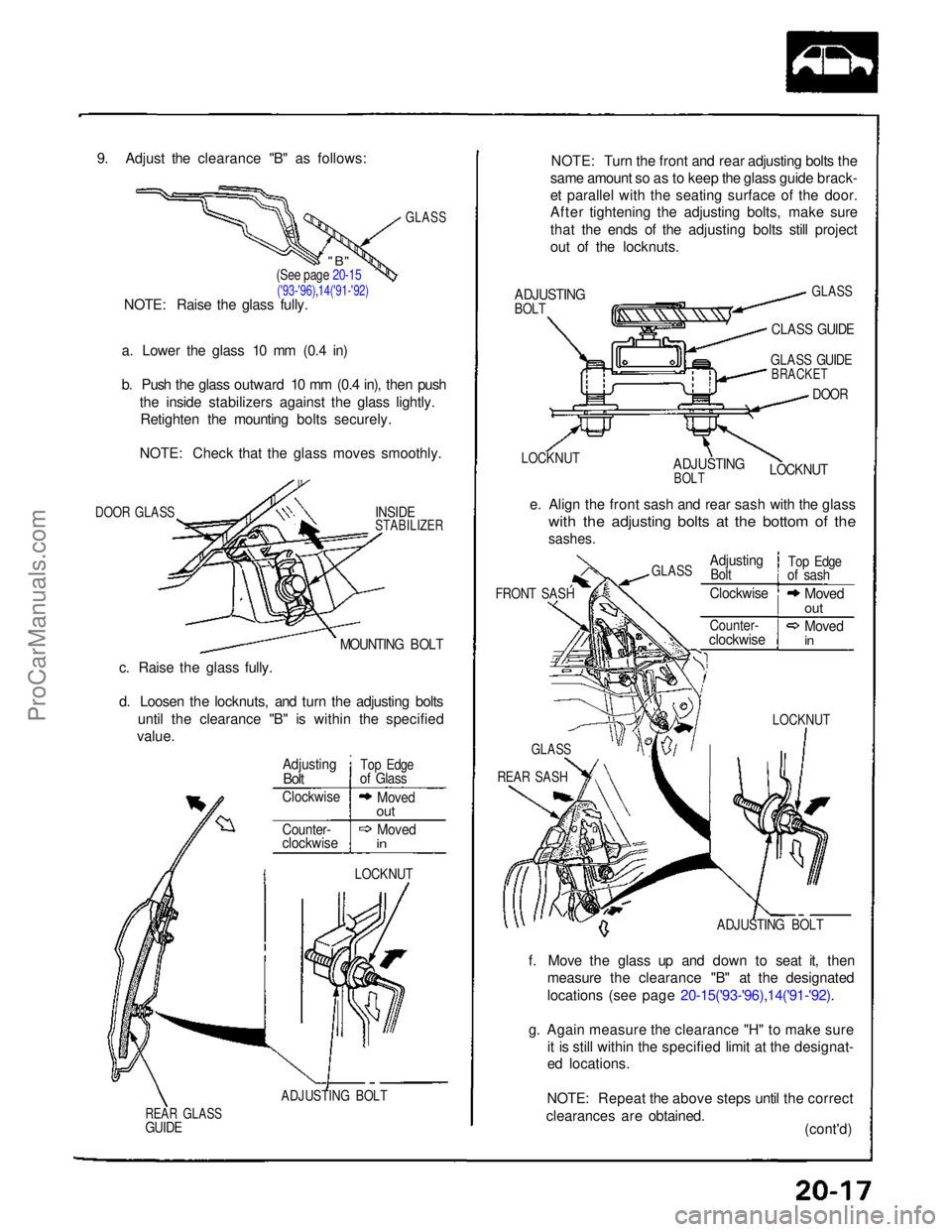
9. Adjust the clearance "B" as follows:
GLASS
a. Lower the glass 10 mm (0.4 in)
b. Push the glass outward 10 mm (0.4 in), then push the inside stabilizers against the glass lightly.Retighten the mounting bolts securely.
NOTE: Check that the glass moves smoothly.
DOOR GLASS
INSIDE
STABILIZER
MOUNTING BOLT
c. Raise the glass fully.
d. Loosen the locknuts, and turn the adjusting bolts until the clearance "B" is within the specified
value.
LOCKNUT
ADJUSTING BOLT
REAR GLASS
GUIDE
NOTE: Turn the front and rear adjusting bolts the
same amount so as to keep the glass guide brack-
et parallel with the seating surface of the door.
After tightening the adjusting bolts, make sure
that the ends of the adjusting bolts still project
out of the locknuts.
ADJUSTING
BOLT
GLASS
CLASS GUIDE
LOCKNUT
ADJUSTING
BOLT
GLASS GUIDE
BRACKET
DOOR
LOCKNUT
e. Align the front sash and rear sash with the glass
with the adjusting bolts at the bottom of the
sashes.
FRONT SASH
ADJUSTING BOLT
f. Move the glass up and down to seat it, then measure the clearance "B" at the designated
locations (see page 20-15('93-'96),14('91-'92).
g. Again measure the clearance "H" to make sure it is still within the specified limit at the designat-
ed locations.
NOTE: Repeat the above steps until the correct
clearances are obtained. (cont'd)
(See page 20-15
('93-'96),14('91-'92)
NOTE: Raise the glass fully.
Adjusting
Bolt
Top Edge
of Glass
Clockwise
Moved
out
Counter-
clockwise
Moved
in
LOCKNUT
GLASS
REAR SASH
GLASS
Adjusting
Bolt
Top Edge
of sash
Clockwise
Moved
out
Counter-
clockwise
Moved
in
"B"ProCarManuals.com