lock Acura NSX 2017 User Guide
[x] Cancel search | Manufacturer: ACURA, Model Year: 2017, Model line: NSX, Model: Acura NSX 2017Pages: 116, PDF Size: 7.19 MB
Page 33 of 116

60 || 61
VEHICLE CONTROLSVEHICLE CONTROLS
Interior and Exterior Lights
Operate interior and exterior lights when the vehicle is on or off.
n
Exterior Lights
Rotate the switches on the lev
er to operate the exterior lights. Push the lever forward to
turn on high beams. Return the lever to its original position for low beams.
Turn on all exterior lights including headlights.High Beams
Flashing the high beams
Low Beams
OFF All exterior lights are off.
Turn on exterior lights except headlights.
AUTO Turn on the automatic lighting feature.
Headlights turn on or off depending on ambient
brightness when the vehicle is on. Headlights
automatically come on after the wipers are
engaged for a certain time. n
Interior Lights
Located on the ceiling in the fr
ont.
ON position: Interior lights remain on.
Door activated position: Interior lights come on a door is
opened, the driver’s door is unlocked, or the vehicle is turned
off.
OFF position: Interior lights remain off.
Of f
Door
Activated Position
On
n Brightness Control
Adjust instrument panel brightness when the vehicle is on.
To brighten: Press the (+) button.
To dim: Press the (–) button.
A beep sounds when the brightness reaches minimum or
maximum.
(+) Button
(-) Butto n
Page 34 of 116

62 || 63
VEHICLE CONTROLSVEHICLE CONTROLS
n Map Lights
Press the map lights
in the ceiling to turn them on or off.
n One-Touch Turn Signal
Use this quick and conv enient method to signal a lane
change.
Lightly push the turn signal lever up or down for a three-blink
sequence.
For a continuous signal, push the lever up or down until it
locks into place.
Right
Left
Wiper Operation
The windshield wipers and washers can be used when the vehicle is on.
n
Front Wipers
Mov
e the wiper lever up or down to the desired position.
Pull to use
washer. MIST
OFF
INT (intermittent)
LO: Low speed wipe
HI: High speed wipe
Page 37 of 116

68 || 69
VEHICLE CONTROLSVEHICLE CONTROLS
n Power Seat Adjustments*
Horizontal
position
adjustment
Seat-back angle
adjustment
Driver’s seat is shown
Models with lumbar support
Lower part of the
Lumbar support Lumbar support
adjustment switchHigher part of the
Lumbar support
*if equipped
n Floor Mats
Position the floor mats properly and anchor them. If they are
not properly positioned, the floor mats can interfere with the
seat functions.
Do not put additional floor mats on top of the anchored
mats.
Unlock
Lock
Page 38 of 116
70 || 71
VEHICLE CONTROLSVEHICLE CONTROLS
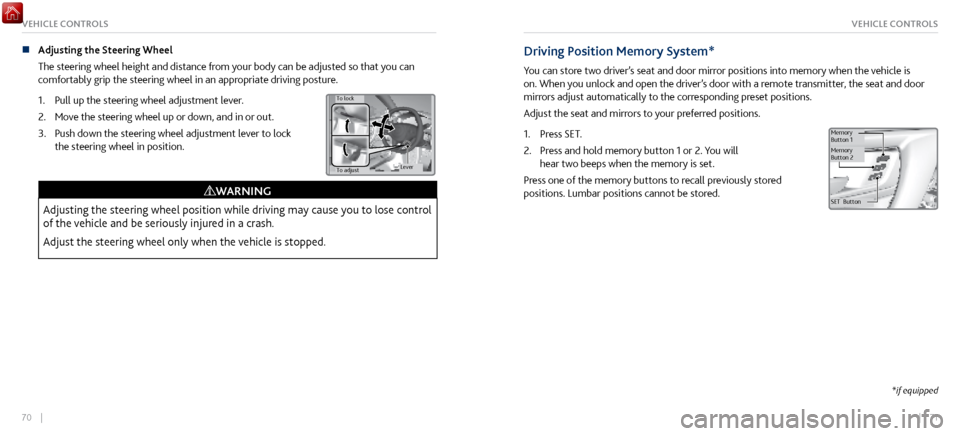
n Adjusting the Steering Wheel
The steering wheel height and distance
from your body can be adjusted so that you can
comfortably grip the steering wheel in an appropriate driving posture.
1.
Pull up the steering wheel adjustment lever
.
2.
Move the steering
wheel up or down, and in or out.
3.
Push down the steering wheel adjustment lev
er to lock
the steering wheel in position.
To adjust
To lock
Lever
Adjusting the steering wheel position while driving may cause you to lose control
of the vehicle and be seriously injured in a crash.
Adjust the steering wheel only when the vehicle is stopped.
WARNING
Driving Position Memory System*
You can store two driver’s seat and door mirror positions into memory when the vehicle is
on. When you unlock and open the driver’s door with a remote transmitter, the seat and door
mirrors adjust automatically to the corresponding preset positions.
Adjust the seat and mirrors to your preferred positions.
1.
Press SET.
2.
Press and hold memory button 1 or 2. Y
ou will
hear two beeps when the memory is set.
Press one of the memory buttons to recall previously stored
positions. Lumbar positions cannot be stored.
SET Button
Memory
Button
1
Memory
Button 2
*if equipped
Page 42 of 116
78 || 79
VEHICLE CONTROLSVEHICLE CONTROLS
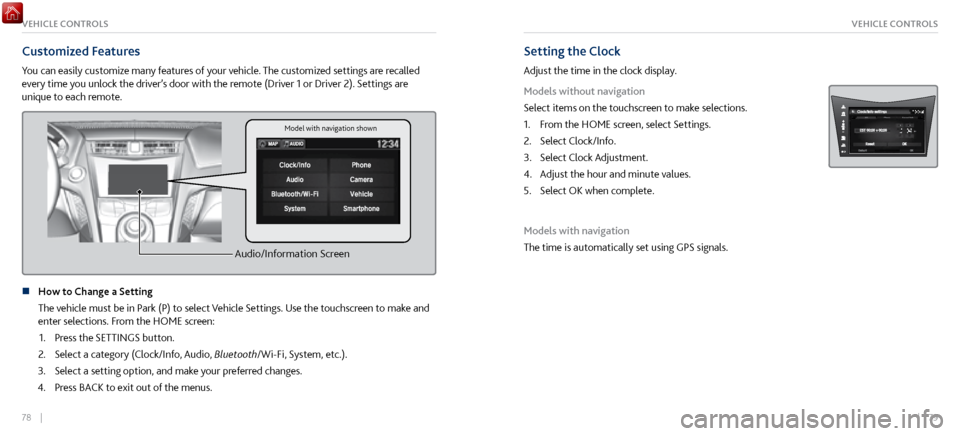
Customized Features
You can easily customize many features of your vehicle. The customized settings are recalled
every time you unlock the driver’s door with the remote (Driver 1 or Driver 2). Settings are
unique to each remote.
Audio/Information Screen
n How to Change a Setting
The vehicle must be in P
ark (P) to select Vehicle Settings. Use the touchscreen to make and
enter selections. From the HOME screen:
1.
Press the SETTINGS button.
2.
Select a category (Clock/Info, Audio,
Bluetooth/Wi-Fi, System, etc.).
3.
Select a setting option, and make y
our preferred changes.
4.
Press BACK to
exit out of the menus.
Setting the Clock
Adjust the time in the clock display.
Models without navigation
Select items on the touchscreen to make selections.
1.
From the HOME scr
een, select Settings.
2.
Select Clock/Info.
3.
Select Clock Adjustment.
4.
Adjust the hour and minute values.
5.
Select OK when complete.
Models with navigation
The time is automatically set using GPS signals.
Model with navigation shown
Page 59 of 116

112 || 113
Subscription Features
A subscription-based service that provides convenient features, such as collision notification,
emergency assistance, online security, and important messages about your vehicle.
To subscribe or get more information, contact a dealer or visit owners.acura.com (U.S.) or
www.myacura.ca (Canada). Requires enrollment and privacy agreement.
n
Emergency Assistance
If your v
ehicle’s airbags deploy or if the unit detects that
the vehicle is severely impacted, your vehicle automatically
attempts to connect to the AcuraLink operator if there is
sufficient cellular coverage. Once connected, information
about your vehicle, its positioning, and its condition will be
sent to the operator. You can also speak to the operator when
connected.
To manually connect to the operator, open the cover on the
ceiling console and press ASSIST when the vehicle is on.
ButtonASSIST
n Security Features
To use security
features, you need your user ID and personal identification number (PIN).
Some of these features are also available with the AcuraLink smartphone app. Visit owners.
acura.com/apps to download the app.
Stolen vehicle tracking: Searches and tracks down your vehicle position.
Remote door lock/unlock: Remotely lock or unlock doors.
Vehicle finder: Locate your vehicle in large areas, such as a parking lot.
Security alarm notification: If your vehicle’s security system detects tampering, the
provider notifies you.
n
Operator Assistance
Connect to the AcuraLink operator
when trying to find a
destination or for roadside assistance.
Press LINK to connect to an operator.
L INK button
ACURALINK®ACURALINK®
Page 66 of 116

126 || 127
DRIVINGDRIVING
If the doors are frozen shut, use warm water around the door edges to melt any ice. Do not
try to force them open, as this can damage the rubber trim around the doors. When done,
wipe dry to avoid further freezing.
NOTICE
n
Interior Checks
Store or secure all items
on board properly.
Do not pile items higher than the seat height.
Do not place anything in the footwells. Make sure to secure the floor mats.
If you have any animals on board, do not let them move freely in the vehicle.
Securely close and lock both doors.
Adjust your seating position, mirrors, and steering wheel properly.
Everyone in the vehicle must fasten their seat belt.
Make sure that the indicators in the instrument panel come on when you start the vehicle,
and go off soon after.
Improper accessories or modifications can affect your vehicle’s handling,
stability, and performance, and cause a crash in which you can be seriously hurt
or killed.
Follow all instructions in the vehicle owner’s manual regarding accessories and
modifications.
WARNING
Maximum Load Limit
Carrying too much cargo or improperly storing it can affect your vehicle’s handling, stability,
stopping distance, and tires, and make it unsafe.
The maximum load for your vehicle is 507 lbs (230 kg). See the Tire and Loading Information
label on the driver’s doorjamb. The maximum load in the trunk is 100 lbs (45 kg).
The vehicle maximum load includes the total weight of all occupants, cargo,
accessories, and the tongue load if you are towing a trailer. Below are the steps for
determining the correct load limit:
1. Locate the statement “The combined weight of occupants and cargo should never exceed
XXX kg or XXX lbs.” on your vehicle’s placard.
2.
Determine the combined weight of the driver
and passengers that will be riding in your
vehicle.
3.
Subtract the combined weight of the driver
and passengers from XXX kg or XXX lbs.
4.
The resulting figure equals
the available amount of cargo and luggage load capacity. For
example, if the “XXX” amount equals 1,400 lbs. and there will be five 150 lb. passengers in
your vehicle, the amount of available cargo and luggage load capacity is 650 lbs. (1,400 -
750 (5 x 150) = 650 lbs.)
High Voltage Battery Maintenance
All batteries discharge if not used. For best battery life and capacity, drive your vehicle for at
least 30 minutes, at least once every three months. Try to avoid parking under direct summer
sun. For battery maintenance while storing the vehicle, see page 207.
Page 72 of 116
138 || 139
DRIVINGDRIVING
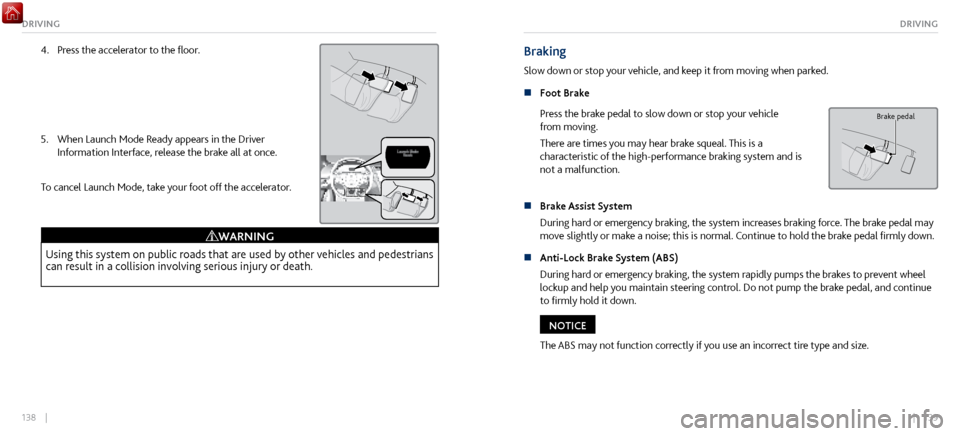
4. Press the accelerator to the floor.
5.
When Launch Mode Ready appears in the Driver
Information Interface, r
elease the brake all at once.
To cancel Launch Mode, take your foot off the accelerator.
Using this system on public roads that are used by other vehicles and pedestrians
can result in a collision involving serious injury or death.
WARNING
Braking
Slow down or stop your vehicle, and keep it from moving when parked.
n
Foot Brake
Press the
brake pedal to slow down or stop your vehicle
from moving.
There are times you may hear brake squeal. This is a
characteristic of the high-performance braking system and is
not a malfunction.
Brake pedal
n Brake Assist System
During hard or emer
gency braking, the system increases braking force. The brake pedal may
move slightly or make a noise; this is normal. Continue to hold the brake pedal firmly down.
n
Anti-Lock Brake System (ABS)
During har
d or emergency braking, the system rapidly pumps the brakes to prevent wheel
lockup and help you maintain steering control. Do not pump the brake pedal, and continue
to firmly hold it down.
The ABS may not function correctly if you use an incorrect tire type and size.
NOTICE
Page 87 of 116
168 || 169
HANDLING THE UNEXPECTEDHANDLING THE UNEXPECTED
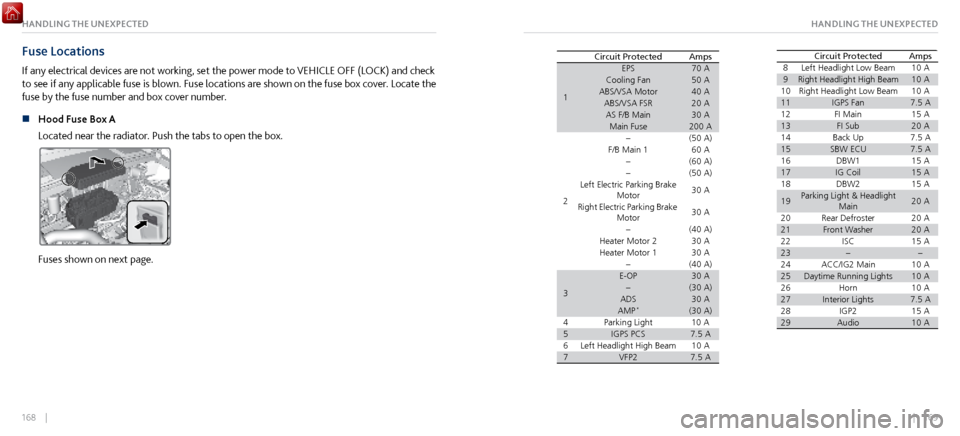
Fuse Locations
If any electrical devices are not working, set the power mode to VEHICLE OFF (LOCK) and check
to see if any applicable fuse is blown. Fuse locations are shown on the fuse box cover. Locate the
fuse by the fuse number and box cover number.
n
Hood Fuse Box A
Located near the
radiator. Push the tabs to open the box.
Fuses shown on next page.
Circuit Protected Amps
1
70A50A40A20A30A200A
2(50 A) 60 A
(6 0A )
(5 0A )
30 A
30 A
(4 0A )
30 A
30 A
3
(40A )30A(30 A)30A
4 (30 A)10
A
57.5A
610 A
77.5ALeft Headlight High Beam VFP2EPS
Cooling Fan
ABS/VSA Motor ABS/VSA FS R
AS F/B Main Main Fuse
F/B Main 1
Left Electric Parking Brake Motor
Right Electric Parking Brake Motor
Heater Motor 2
Heater Motor 1
E-OP
ADS
AMP
*
Parking Light IGPS PCS 8
Left Headlight Low Beam 10 A
9Right Headlight High Beam
10 10
A
Right Headlight Low Beam10 A
11IGPS Fan 7.5 A
12 FI Main15A
13FI Sub14 20
A
Back Up7.5A
15SBW ECU16 7.5 A
DBW 115A
17IG Coil15 A
18 DBW215A
19Parking Light & Headlight Main 20
A
20 Rear Defroste r
20A
21Front Washer 20A
22 ISC15A
23
24 ACC/IG2 Main 10 A
2510 A
26 Daytime Running Lights
Horn10A
27Interior Lights 7.5 A
28 IGP215A
29Audio10 A
AmpsCircuit Protecte dCircuit Protected Amps
1
70A50A40A20A30A200A
2(50 A) 60 A
(6 0A )
(5 0A )
30 A
30 A
(4 0A )
30 A
30 A
3
(40A )30A(30 A)30A
4 (30 A)10
A
57.5A
610 A
77.5ALeft Headlight High Beam VFP2EPS
Cooling Fan
ABS/VSA Motor ABS/VSA FS R
AS F/B Main Main Fuse
F/B Main 1
Left Electric Parking Brake Motor
Right Electric Parking Brake Motor
Heater Motor 2
Heater Motor 1
E-OP
ADS
AMP
*
Parking Light IGPS PCS 8
Left Headlight Low Beam 10 A
9Right Headlight High Beam
10 10
A
Right Headlight Low Beam10 A
11IGPS Fan 7.5 A
12 FI Main15A
13FI Sub14 20
A
Back Up7.5A
15SBW ECU16 7.5 A
DBW 115A
17IG Coil15 A
18 DBW215A
19Parking Light & Headlight Main 20
A
20 Rear Defroste r
20A
21Front Washer 20A
22 ISC15A
23
24 ACC/IG2 Main 10 A
2510 A
26 Daytime Running Lights
Horn10A
27Interior Lights 7.5 A
28 IGP215A
29Audio10 A
AmpsCircuit Protecte d
Page 88 of 116
170 || 171
HANDLING THE UNEXPECTEDHANDLING THE UNEXPECTED
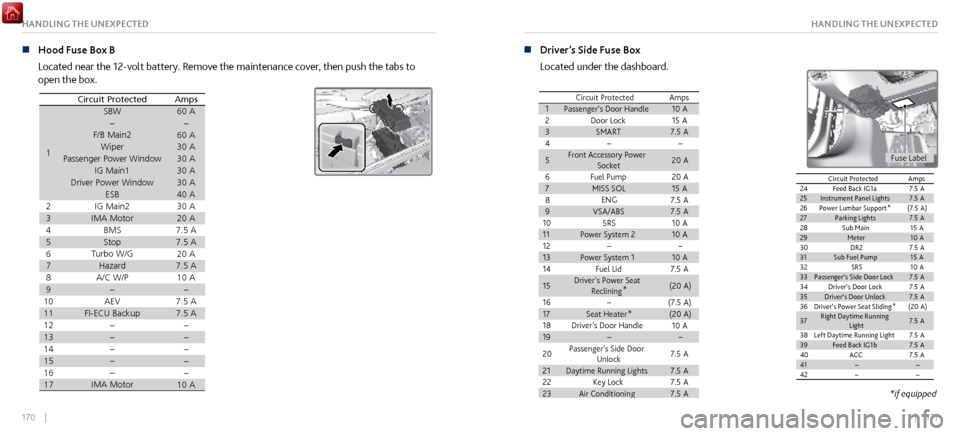
n Hood Fuse Box B
Located near the 12-volt battery
. Remove the maintenance cover, then push the tabs to
open the box.
AmpsCircuit Protected
160 A60A30A30A30A30A40A
230 A
320 A
47. 5A
5
6 7.
5A20 A
7
8 7.
5A10 A
9
107. 5A
11
12 7.
5A
13
14
15
16
1710A
SBW
F/B Main 2
Wiper
Passenger Power Window IG Main1
Driver Power Window ESB
IG Main2
IMA Moto r
BM S
Stop
Turbo W/ G
Hazard WA/
C/ P
AEV
FI-ECU Backup
IMA Motor
n Driver’s Side Fuse Box
Located under the dashboard.
Circuit Protected Amps110A
215 A
37.5 A
4
520 A
6
20 A
715 A
87.5 A
97.5 A
1010 A
1110 A
121310 A
147.5 A
15
(20A )
16
(7.5 A)
17(20A )
1810 A
19
207.5 A
21
7.5 A
227.5 A
237.5 A
Passenger’s Door Handle Door LockSMART
Front Accessory Power Socket
Fuel Pum p
MISS SO L
ENG
VSA/ABS SRS
Power System 2
Power System 1
Fuel Lid
Driver’s Power Seat Reclining *
Seat Heater *
Driver’s Door Handle
Passenger’s Side Door Unlock
Daytime Running Lights
Key Lock
Air Conditionin g
24Feed Back IG1a 7.5A
25Instrument Panel Lights7.5A
26Power Lumbar Support *(7.5
A)
27Parking Lights7.5A
28Sub Main15 A29Meter10 A30DR27.5A
31Sub Fuel Pump15 A
32SR S10 A
33Passenger’s Side Door Lock 7.5A34Driver’s Door Lock7.5A
35Driver’s Door Unlock7.5A
36Driver’s Power Seat Sliding *(2
0A )
37
7.5A
Right Daytime Running
Light
38
7.5A39 Left Daytime Running LightFeed Back IG1b7.5A
40ACC7.5A
4142
AmpsCircuit Protecte d
Fuse Label
Circuit Protected Amps110A
215 A
37.5 A
4
520 A
6
20 A
715 A
87.5 A
97.5 A
1010 A
1110 A
121310 A
147.5 A
15
(20A )
16
(7.5 A)
17(20A )
1810 A
19
207.5 A
21
7.5 A
227.5 A
237.5 A
Passenger’s Door Handle Door LockSMART
Front Accessory Power Socket
Fuel Pum p
MISS SO L
ENG
VSA/ABS SRS
Power System 2
Power System 1
Fuel Lid
Driver’s Power Seat Reclining *
Seat Heater *
Driver’s Door Handle
Passenger’s Side Door Unlock
Daytime Running Lights
Key Lock
Air Conditionin g
24Feed Back IG1a 7.5A
25Instrument Panel Lights7.5A
26Power Lumbar Support *(7.5
A)
27Parking Lights7.5A
28Sub Main15 A29Meter10 A30DR27.5A
31Sub Fuel Pump15 A
32SR S10 A
33Passenger’s Side Door Lock 7.5A34Driver’s Door Lock7.5A
35Driver’s Door Unlock7.5A
36Driver’s Power Seat Sliding *(2
0A )
37
7.5A
Right Daytime Running
Light
38
7.5A39 Left Daytime Running LightFeed Back IG1b7.5A
40ACC7.5A
4142
AmpsCircuit Protecte d
*if equipped