steering wheel Acura NSX 2017 Service Manual
[x] Cancel search | Manufacturer: ACURA, Model Year: 2017, Model line: NSX, Model: Acura NSX 2017Pages: 473, PDF Size: 16.01 MB
Page 333 of 473
uuWhen Driving uCruise Control
332
Driving
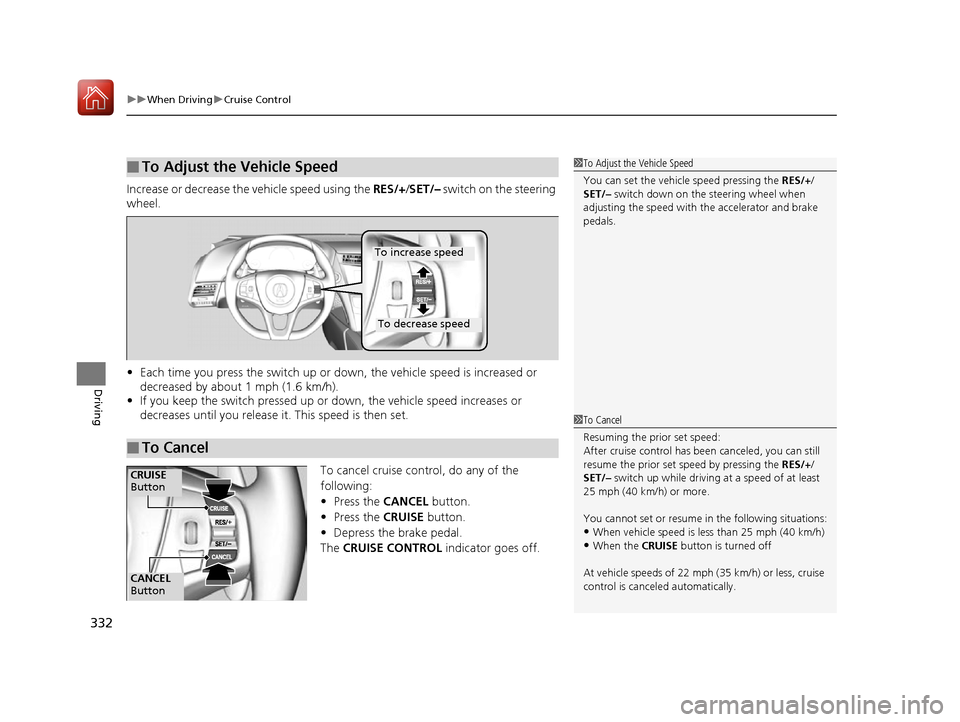
Increase or decrease the vehicle speed using the RES/+/SET/– switch on the steering
wheel.
• Each time you press the switch up or do wn, the vehicle speed is increased or
decreased by about 1 mph (1.6 km/h).
• If you keep the switch pressed up or down, the vehicle speed increases or
decreases until you release it . This speed is then set.
To cancel cruise control, do any of the
following:
•Press the CANCEL button.
• Press the CRUISE button.
• Depress the brake pedal.
The CRUISE CONTROL indicator goes off.
■To Adjust the Vehicle Speed1To Adjust the Vehicle Speed
You can set the vehicle speed pressing the RES/+/
SET/– switch down on the steering wheel when
adjusting the speed with the accelerator and brake
pedals.
■To Cancel
To decrease speed
To increase speed
1 To Cancel
Resuming the prior set speed:
After cruise control has be en canceled, you can still
resume the prior set speed by pressing the RES/+/
SET/– switch up while driving at a speed of at least
25 mph (40 km/h) or more.
You cannot set or resume in the following situations:
•When vehicle speed is less than 25 mph (40 km/h)•When the CRUISE button is turned off
At vehicle speeds of 22 m ph (35 km/h) or less, cruise
control is canceled automatically.
CANCEL
Button
CRUISE
Button
17 NSX-31T6N6000.book 332 ページ 2016年4月22日 金曜日 午後3時44分
Page 338 of 473
337
uuWhen Driving uAgile Handling Assist System
Driving
Agile Handling Assist System
Lightly brakes each of the front and rear wheels, as needed, when you turn the
steering wheel, and helps support the vehicle’s stability and performance during
cornering.1 Agile Handling Assist System
The agile handling assist system cannot enhance
stability in all driving situat ions. You still need to drive
and corner at speeds appr opriate for the conditions
and always leave a sufficient margin of safety.
When the VSA ® system indicator comes on and stays
on while driving, the agil e handling assist system
does not activate.
You may hear a sound coming from the front of the
car while the system is activated. This is normal.
17 NSX-31T6N6000.book 337 ページ 2016年4月22日 金曜日 午後3時44分
Page 350 of 473

349
uuBraking uAnti-lock Brake System (ABS)
Driving
Anti-lock Brake System (ABS)
Helps prevent the wheels from locking up, and helps you retain steering control by
pumping the brakes rapidly, much faster than you.
The electronic brake distribu tion (EBD) system, which is part of the ABS, also
balances the front-to-rear braking distribution according to vehicle loading.
You should never pump the brake pedal. Let the ABS work for you by always
keeping firm, steady pressure on the brake pe dal. This is sometimes referred to as
“stomp and steer.”
■ABS operation
You may hear an operating noise when th e ABS is working. Depress the brake pedal
and keep holding the pedal firmly down. On dry pavement, you will need to press
on the brake pedal very hard before the AB S activates. However, you may feel the
ABS activate immediately if you are trying to stop on snow or ice.
When the vehicle speed goes under 6 mph (10 km/h), the ABS stops.
■ABS1Anti-lock Brake System (ABS)
NOTICE
The ABS may not function correctly if you use an
incorrect tire type and size.
When the ABS indicator comes on while driving,
there may be a problem with the system.
While normal braking is not affected, there is a
possibility of the ABS not operating. Have your
vehicle checked by an authorized Acura NSX dealer
immediately.
The ABS does not reduce the time or distan ce it takes
to stop the vehicle. It only helps with steering control
during hard braking.
In the following cases, your vehicle may need more
stopping distance than a vehicle without the ABS:
•When driving on rough road surfaces, including
when driving on uneven surf aces, such as gravel or
snow.
•When tire chains are installed.
You may hear a motor sound coming from the front
of the car while system ch ecks are being performed
immediately after turning the power system on or
while driving. This is normal.
17 NSX-31T6N6000.book 349 ページ 2016年4月22日 金曜日 午後3時44分
Page 352 of 473
351
Driving
Parking Your Vehicle
When Stopped
1.Depress the brake pedal firmly.
2. With the brake pedal depressed, pull up th e electric parking brake switch slowly,
but fully.
3. Change the gear position to
(P.
4. Turn off the power system.
u The electric parking brake indicato r goes off in about 15 seconds.
Always confirm the electric parking brake is set, in particular if you are parked on an
incline.
During Auto Engine Stop, th e gear position changes to
(P and the engine restarts
automatically under the following conditions:
• You unfasten the driver side seat belt and open the door.
1Parking Your Vehicle
Do not park your vehicle near flammable objects,
such as dry grass, oil, or timber.
Heat from the exhaust can cause a fire.
3WARNING
The vehicle can roll aw ay if left unattended
without confirming that Park is engaged.
Always keep your foot on the brake pedal
until you have confirmed that
( P is shown
on the gear position indicator.
1 When Stopped
NOTICE
The following can damage the driveline:•Depressing the accelera tor and brake pedals
simultaneously.
•Changing to ( P before the vehicle stops
completely.
When facing uphill, do not hold the vehicle by
depressing the accelerator pedal.
Doing so may cause the power system to overheat
and fail.
In extremely cold temperatures, the parking brake may
freeze up if applied. If such temperatures are expected, do
not apply the parking brake. If parking on a slope, either
turn the steering wheel so one of the front tires will contact
the curb or block the wheels to keep the vehicle from
moving. If you do not take either precaution, the vehicle
may roll unexpectedly, leading to a crash.
When the IDS mode is in QUIET mode or SPORT mode
17 NSX-31T6N6000.book 351 ページ 2016年4月22日 金曜日 午後3時44分
Page 357 of 473
356
Driving
Multi-View Rear Camera
About Your Multi-View Rear Camera
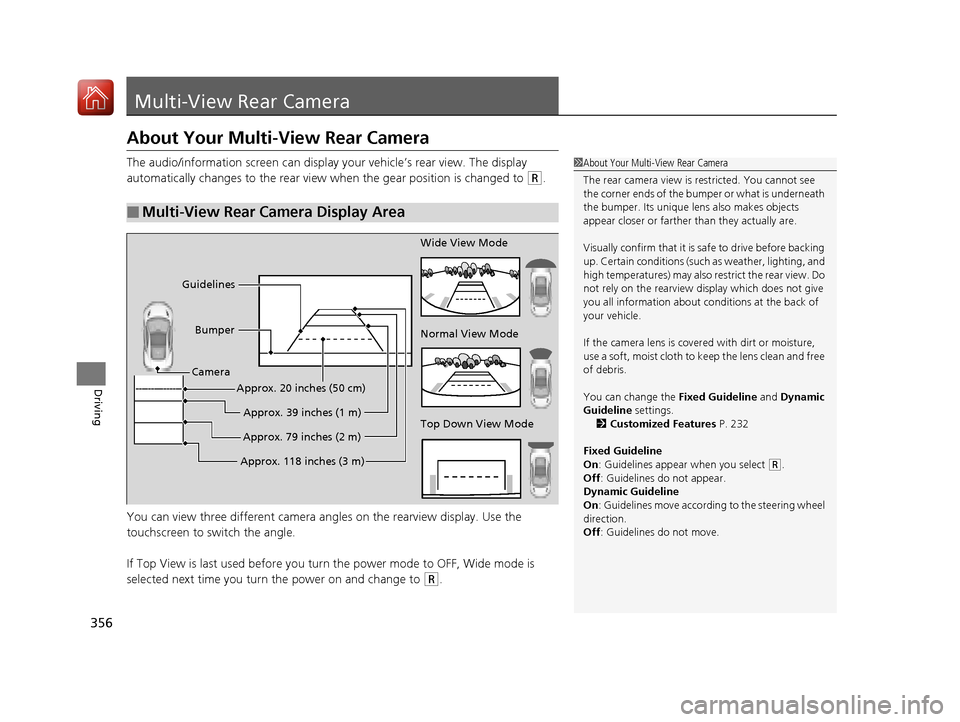
The audio/information screen can display your vehicle’s rear view. The display
automatically changes to the rear view when the gear position is changed to
(R.
You can view three different camera angl es on the rearview display. Use the
touchscreen to switch the angle.
If Top View is last used before you turn the power mode to OFF, Wide mode is
selected next time you turn the power on and change to
(R.
■Multi-View Rear Camera Display Area
1 About Your Multi-View Rear Camera
The rear camera view is restricted. You cannot see
the corner ends of the bum per or what is underneath
the bumper. Its unique le ns also makes objects
appear closer or farther than they actually are.
Visually confirm that it is safe to drive before backing
up. Certain conditions (such as weather, lighting, and
high temperatures) may also restrict the rear view. Do
not rely on the rearview display which does not give
you all information about conditions at the back of
your vehicle.
If the camera lens is cove red with dirt or moisture,
use a soft, moist cloth to keep the lens clean and free
of debris.
You can change the Fixed Guideline and Dynamic
Guideline settings. 2 Customized Features P. 232
Fixed Guideline
On : Guidelines appear when you select
(R.
Off : Guidelines do not appear.
Dynamic Guideline
On : Guidelines move according to the steering wheel
direction.
Off : Guidelines do not move.
Top Down View Mode Normal View Mode Wide View Mode
Guidelines
Bumper
Camera
Approx. 118 inches (3 m)Approx. 79 inches (2 m)
Approx. 39 inches (1 m)
Approx. 20 inches (50 cm)
17 NSX-31T6N6000.book 356 ページ 2016年4月22日 金曜日 午後3時44分
Page 402 of 473

401
uuChecking and Maintaining Tires uWinter Tires
Maintenance
Winter Tires
If driving on snowy or frozen roads, mount all-season marked M+S tires, snow tires,
or tire chains; reduce speed; and maintain sufficient distance between vehicles when
driving.
Be particularly careful when operating the steering wheel or brakes to prevent skidding.
Use tire chains, snow tires, or all-season tires when necessary or according to the law.
When mounting, refer to the following points.
For winter tires:
• Mount the tires to all four wheels.
For tire chains:
• Install them on the rear tires only.
• Because your vehicle has limited tire clea rance, we strongly recommend using the
chains listed below:
*1:Tire chains to be used only on optional 295/30R20 (97V) winter tires.
*2:Tire chains to be used only on optional 305/30R20 (103W) XL winter tires.
• Follow the chain manufactur er’s instruction when installing. Mount them as
tightly as you can.
• Check that the chains do not touc h the brake lines or suspension.
• Drive slowly.
Recommended Winter Tires:
●Michelin Alpin PA4
Front: 245/35R19 (93W) XL
Rear: 295/30R20 (97V)
●Pirelli SottoZero 3
Front: 245/35R19 (93W) XL
Rear: 305/30R20 (103W) XL
●Auto-trac 232405*1
●K-Summit K-44*2
1 Winter Tires
NOTICE
Traction devices that are th e wrong size or improperly
installed can damage your vehicle’s brake lines,
suspension, body, and wheels. Stop driving if they are
hitting any part of the vehicle.
When tire chains are mounted, follow the chain
manufacturer’s instructi ons regarding vehicle
operational limits.
If your vehicle is equipped with summer tires, be
aware that these tires are not designed for winter
driving conditions. For more information, contact an
authorized Acura NSX dealer.
3WARNING
Using the wrong chains, or not properly
installing chains, can damage the brake
lines and cause a crash in which you can be
seriously injured or killed.
Follow all instruction s in this owner’s
manual regarding the selection and use of
tire chains.
17 NSX-31T6N6000.book 401 ページ 2016年4月22日 金曜日 午後3時44分
Page 408 of 473
407
uuCleaning uInterior Care
Maintenance
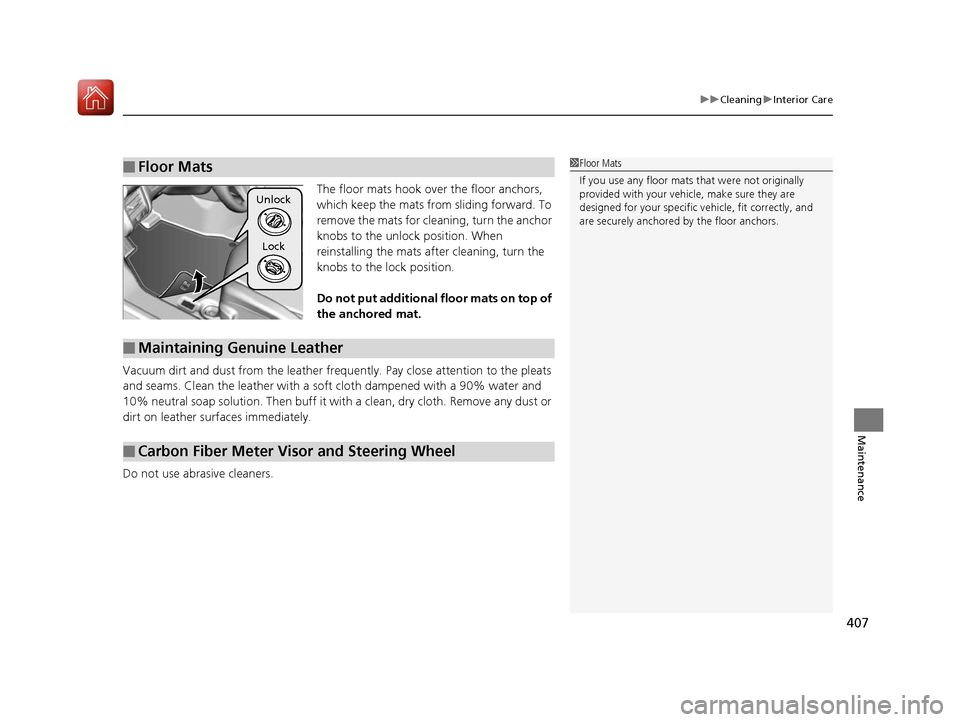
The floor mats hook over the floor anchors,
which keep the mats from sliding forward. To
remove the mats for cleaning, turn the anchor
knobs to the unlock position. When
reinstalling the mats after cleaning, turn the
knobs to the lock position.
Do not put additional floor mats on top of
the anchored mat.
Vacuum dirt and dust from the leather frequ ently. Pay close attention to the pleats
and seams. Clean the leather with a soft cloth dampened with a 90% water and
10% neutral soap solution. Then buff it with a clean, dry cloth. Remove any dust or
dirt on leather surfaces immediately.
Do not use abrasive cleaners.
■Floor Mats1 Floor Mats
If you use any floor mats that were not originally
provided with your vehicle, make sure they are
designed for your specific ve hicle, fit correctly, and
are securely anchored by the floor anchors.
Unlock
Lock
■Maintaining Genuine Leather
■Carbon Fiber Meter Visor and Steering Wheel
17 NSX-31T6N6000.book 407 ページ 2016年4月22日 金曜日 午後3時44分
Page 420 of 473
419Continued
Handling the Unexpected
If a Tire Goes Flat
Temporarily Repairing a Flat Tire
If the tire has a large cut or is otherwise severely damaged, you will need to have the
vehicle towed. If the tire only has a sma ll puncture, from a small nail for instance,
you can use the temporary tire repair kit so that you can drive to the nearest service
station for a more permanent repair.
If a tire goes flat while driving, grasp the steering wheel firmly, and brake gradually
to reduce speed. Then stop in a safe place.
1. Park the vehicle on a firm, level, and non-slippery surface. Apply the parking
brake.
2. Change the gear position to
(P.
3. Turn on the hazard warning lights an d set the power mode to VEHICLE OFF
(LOCK).
1 Temporarily Repairing a Flat Tire
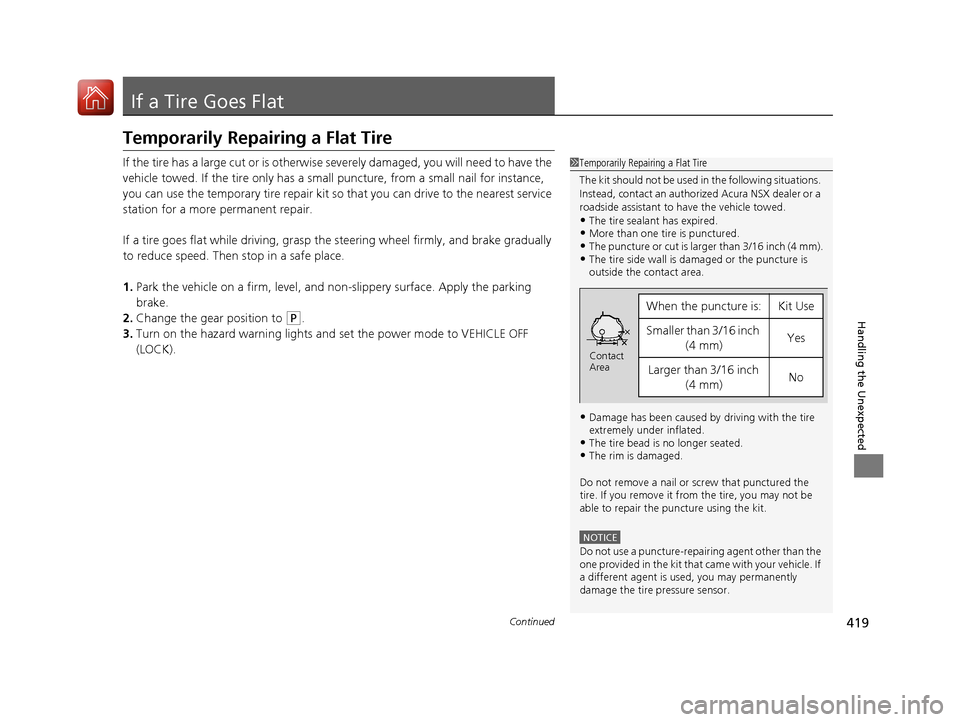
The kit should not be used in the following situations.
Instead, contact an authorized Acura NSX dealer or a
roadside assistant to have the vehicle towed.
•The tire sealant has expired.•More than one tire is punctured.•The puncture or cut is larger than 3/16 inch (4 mm).•The tire side wall is da maged or the puncture is
outside the contact area.
•Damage has been caused by driving with the tire
extremely under inflated.
•The tire bead is no longer seated.•The rim is damaged.
Do not remove a nail or screw that punctured the
tire. If you remove it from the tire, you may not be
able to repair the puncture using the kit.
NOTICE
Do not use a puncture-repairing agent other than the
one provided in the kit that came with your vehicle. If
a different agent is used, you may permanently
damage the tire pressure sensor.
When the puncture is:Kit Use
Smaller than 3/16 inch
(4 mm)Yes
Larger than 3/16 inch (4 mm)No
Contact
Area
17 NSX-31T6N6000.book 419 ページ 2016年4月22日 金曜日 午後3時44分
Page 434 of 473

433
uuPower System Won’t Start uEmergency Power System Off
Handling the Unexpected
Emergency Power System Off
The ENGINE START/STOP button may be used to turn the power system off due to
an emergency situation even while driving. If you must turn the power system off,
do either of the following operations:
• Press and hold the ENGINE START/STOP button for about two seconds.
• Firmly press the ENGINE START/STOP button three times.
The steering wheel will not lock. However, because turning off the engine disables
the power assist the engine provides to the steering and braking systems, it will
require significantly more physical effort an d time to steer and slow the vehicle. Use
both feet on the brake pedal to slow down the vehicle and stop immediately in a
safe place.
The gear position auto matically changes to
(P after the vehicle comes to a complete
stop. Then, the power mode changes to VEHICLE OFF.
1 Emergency Power System Off
Do not press the button while driving unless it is
absolutely necessary for the power system to be
turned off.
17 NSX-31T6N6000.book 433 ページ 2016年4月22日 金曜日 午後3時44分
Page 466 of 473
Index
465
Index
Index
Numbers
12-Volt Battery Charging System Indicator ................................................... 75
A
AAC........................................................... 208
ABS (Anti-lock Brake System) .................. 349
Accessories and Modifications ................ 412
Accessory Power Socket ........................... 154
Active Damper System Indicator ............... 74
AcuraLink ................................................. 292
Adding the Coolant ................................. 383
Additives Coolant .......................................... 382, 384
Engine Oil ............................................... 376
Washer ................................................... 386
Additives, Engine Oil ............................... 376
Adjusting Mirrors.................................................... 141
Seats....................................................... 144
Steering Wheel ....................................... 140
Temperature ........................................... 100
Agile Handling Assist System .................. 337
Air Conditioning System (Climate Control System) .................................................... 156
Changing the Mode................................ 157
Defrosting the Windshield and Windows .............................................. 158
Dust and Pollen Filters ............................. 405
Recirculation/Fresh Air Mode................... 157 Sensors .................................................... 160
Synchronized Mode ................................. 159
Using Automatic Climate Control ............ 156
Air Pressure ....................................... 394, 455
Airbags ........................................................ 43
Advanced Airbags ..................................... 49
Airbag Care ............................................... 57
Driver’s Knee Airbag .................................. 50
Event Data Recorder .................................... 0
Front Airbags (SRS) .................................... 46
Indicator .............................................. 55, 78
Passenger Airbag Off Indicator .................. 56
Sensors ...................................................... 43
Side Airbags .............................................. 52
Side Curtain Airbags .................................. 54
Android Auto ............................................ 219
Anti-lock Brake System (ABS) .................. 349
Indicator .................................................... 78
Apple CarPlay ........................................... 216
Audio Remote Controls ............................ 165
Audio System ............................................ 162
Adjusting the Sound ................................ 181
Changing the Home Screen Icon Layout ................................................... 170
Closing Apps ........................................... 180
Error Messages ........................................ 223
General Information ................................ 226
Home Screen ........................................... 173
iPod ......................................................... 199
Limitations for Manua l Operation ............ 183
MP3/WMA/AAC ...................................... 208 Reactivating ............................................ 164
Recommended Devices............................ 227
Remote Controls ..................................... 165
Security Code .......................................... 164
Selecting an Audio Source ....................... 183
Status Area ............................................. 179
Theft Protection ...................................... 164
USB Flash Drives ...................................... 227
USB Ports ................................................ 163
Wallpaper Setup...................................... 171
Audio/Information Screen ....................... 167
Authorized Manuals ................................ 463
Auto Door Locking/Unlocking ................. 118
Auto Engine Stop/Start .............................. 13
Automatic Brake Hold ............................. 347
Indicator............................................ 72, 347
Automatic Brake Hold System
Indicator............................................ 72, 347
Automatic Operation (automatic lighting
control) .................................................... 132
Average Fuel Economy ............................ 101
Average Speed ......................................... 101
B
Battery
12-Volt.................................................... 403
12-Volt Battery Charging System
Indicator .......................................... 75, 438
Charging (AGM Battery) .......................... 403
High Voltage ........................................... 343
17 NSX-31T6N6000.book 465 ページ 2016年4月22日 金曜日 午後3時44分