button Acura NSX 2017 Repair Manual
[x] Cancel search | Manufacturer: ACURA, Model Year: 2017, Model line: NSX, Model: Acura NSX 2017Pages: 473, PDF Size: 16.01 MB
Page 204 of 473
Continued203
uuAudio System Basic Operation uSong By VoiceTM (SBV)
Features
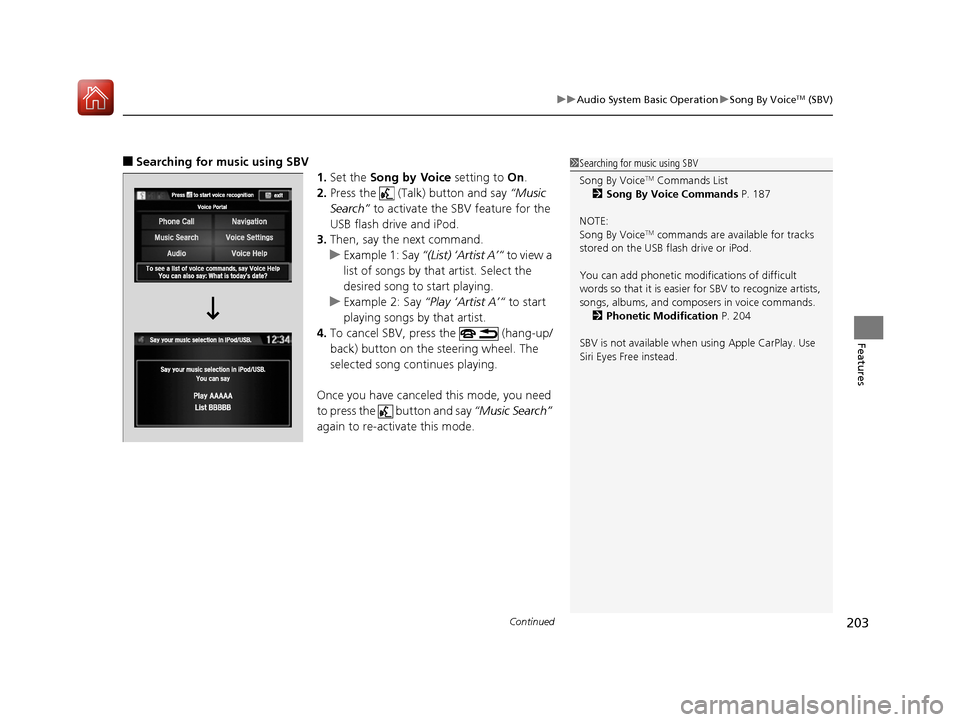
■Searching for music using SBV
1.Set the Song by Voice setting to On.
2. Press the (Talk) button and say “Music
Search” to activate the SBV feature for the
USB flash drive and iPod.
3. Then, say the next command.
u Example 1: Say “(List) ‘Artist A’“ to view a
list of songs by that artist. Select the
desired song to start playing.
u Example 2: Say “Play ‘Artist A’“ to start
playing songs by that artist.
4. To cancel SBV, press the (hang-up/
back) button on the steering wheel. The
selected song continues playing.
Once you have canceled this mode, you need
to press the button and say “Music Search”
again to re-activate this mode.1 Searching for music using SBV
Song By Voice
TM Commands List
2 Song By Voice Commands P. 187
NOTE:
Song By Voice
TM commands are available for tracks
stored on the USB flash drive or iPod.
You can add phonetic modi fications of difficult
words so that it is easier for SBV to recognize artists,
songs, albums, and composers in voice commands. 2 Phonetic Modification P. 204
SBV is not available when using Apple CarPlay. Use
Siri Eyes Free instead.
17 NSX-31T6N6000.book 203 ページ 2016年4月22日 金曜日 午後3時44分
Page 206 of 473
205
uuAudio System Basic Operation uSong By VoiceTM (SBV)
Features
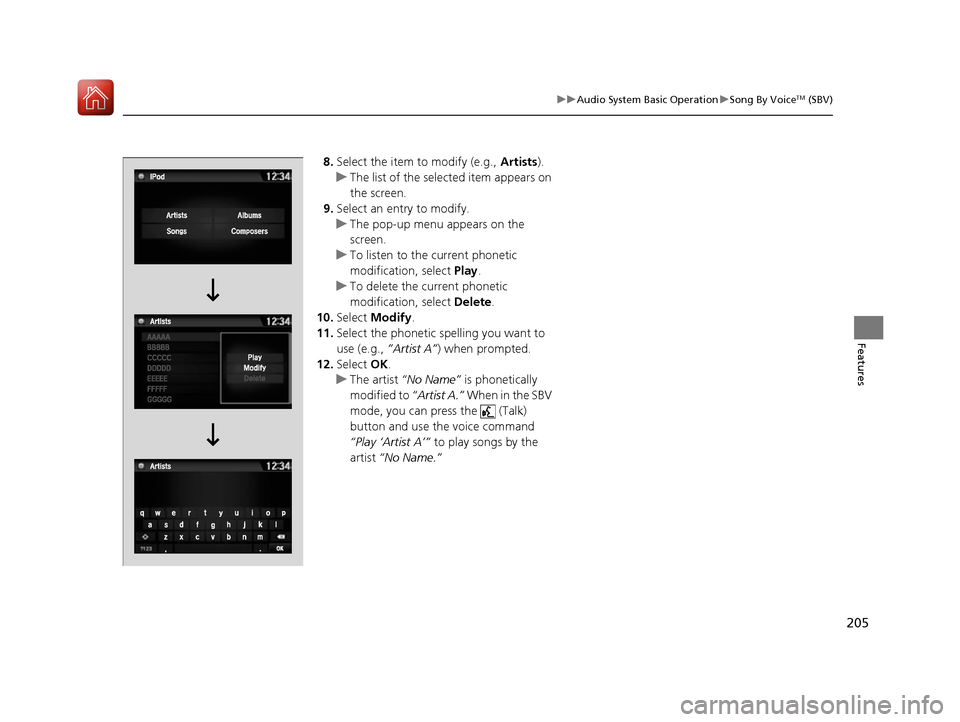
8. Select the item to modify (e.g., Artists).
u The list of the selected item appears on
the screen.
9. Select an entry to modify.
u The pop-up menu appears on the
screen.
u To listen to the current phonetic
modification, select Play.
u To delete the current phonetic
modification, select Delete.
10. Select Modify .
11. Select the phonetic spelling you want to
use (e.g., ”Artist A”) when prompted.
12. Select OK.
u The artist “No Name” is phonetically
modified to “Artist A.” When in the SBV
mode, you can press the (Talk)
button and use the voice command
“Play ‘Artist A’” to play songs by the
artist “No Name.”
17 NSX-31T6N6000.book 205 ページ 2016年4月22日 金曜日 午後3時44分
Page 216 of 473
215
uuAudio System Basic Operation uSiri Eyes Free
Features
Siri Eyes Free
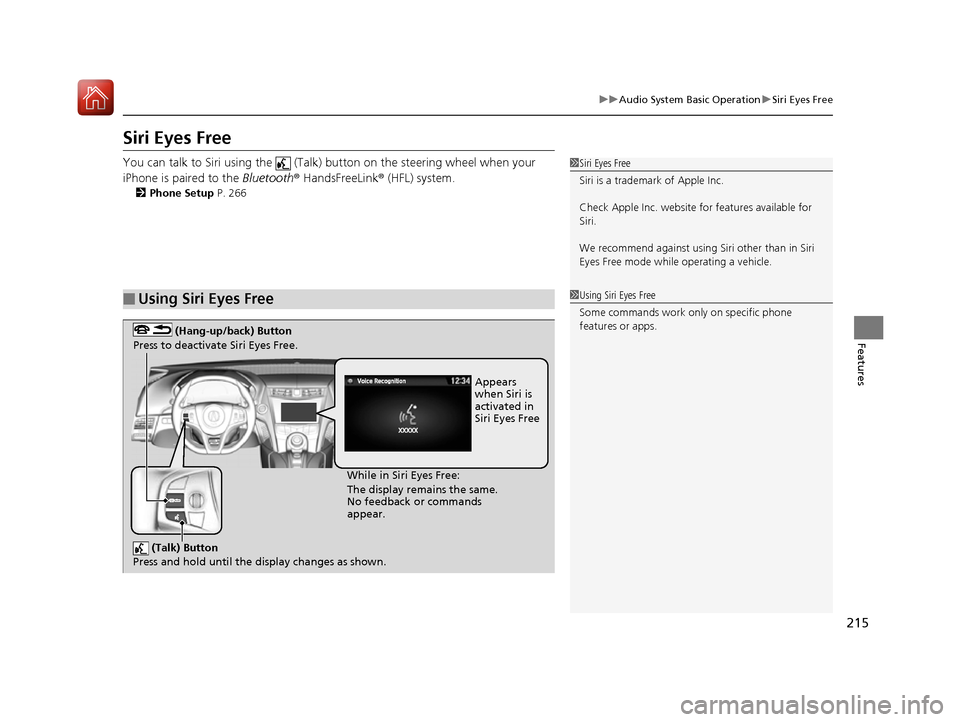
You can talk to Siri using the (Talk) button on the steering wheel when your
iPhone is paired to the Bluetooth® HandsFreeLink ® (HFL) system.
2Phone Setup P. 266
■Using Siri Eyes Free
1Siri Eyes Free
Siri is a trademark of Apple Inc.
Check Apple Inc. website for features available for
Siri.
We recommend against using Si ri other than in Siri
Eyes Free mode whil e operating a vehicle.
1Using Siri Eyes Free
Some commands work only on specific phone
features or apps.
(Talk) Button
Press and hold until the display changes as shown.
(Hang-up/back) Button
Press to deactivate Siri Eyes Free.
While in Siri Eyes Free:
The display remains the same.
No feedback or commands
appear. Appears
when Siri is
activated in
Siri Eyes Free
17 NSX-31T6N6000.book 215 ページ 2016年4月22日 金曜日 午後3時44分
Page 219 of 473
uuAudio System Basic Operation uApple CarPlay
218
Features
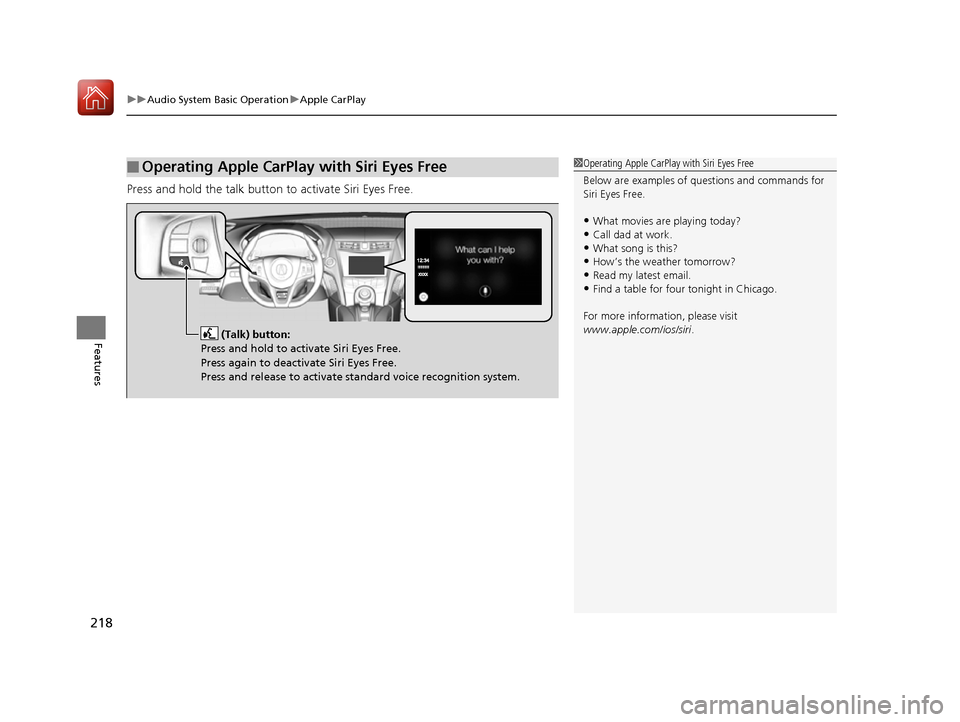
Press and hold the talk button to activate Siri Eyes Free.
■Operating Apple CarPlay with Siri Eyes Free1Operating Apple CarPlay with Siri Eyes Free
Below are examples of questions and commands for
Siri Eyes Free.
•What movies are playing today?
•Call dad at work.•What song is this?
•How’s the weather tomorrow?
•Read my latest email.•Find a table for four tonight in Chicago.
For more information, please visit
www.apple.com/ios/siri .
(Talk) button:
Press and hold to activate Siri Eyes Free.
Press again to deactivate Siri Eyes Free.
Press and release to activate standard voice recognition system.
17 NSX-31T6N6000.book 218 ページ 2016年4月22日 金曜日 午後3時44分
Page 223 of 473

uuAudio System Basic Operation uAndroid Auto
222
Features
Press and hold the talk button to op erate Android Auto with your voice.
■Operating Android Auto with Voice Recognition1Operating Android Auto with Voice Recognition
Below are examples of co mmands you can give with
voice recognition:
•Reply to text.
•Call my wife.•Navigate to Acura.
•Play my music.
•Send a text message to my wife.•Call flower shop.
For more information, please refer to the Android
Auto homepage.
You can also activate the voice recognition function
by pressing the icon in the upper-right corner of
the screen.
(Talk) button:
Press and hold to operate Android Auto with your voice.
Press again to deactivate voice recognition.
Press and release to activate standard voice recognition system.
17 NSX-31T6N6000.book 222 ページ 2016年4月22日 金曜日 午後3時44分
Page 227 of 473
226
Features
General Information on the Audio System
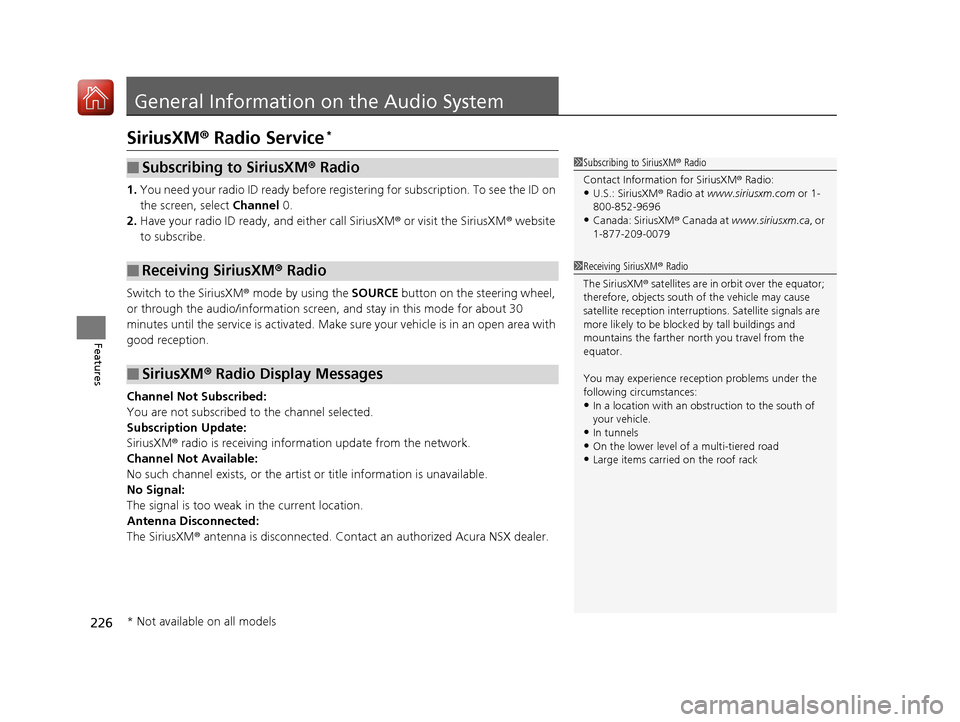
SiriusXM® Radio Service*
1. You need your radio ID ready before regist ering for subscription. To see the ID on
the screen, select Channel 0.
2. Have your radio ID ready, and either call SiriusXM ® or visit the SiriusXM ® website
to subscribe.
Switch to the SiriusXM ® mode by using the SOURCE button on the steering wheel,
or through the audio/information screen, and stay in this mode for about 30
minutes until the service is activated. Make sure your vehicle is in an open area with
good reception.
Channel Not Subscribed:
You are not subscribed to the channel selected.
Subscription Update:
SiriusXM ® radio is receiving informat ion update from the network.
Channel Not Available:
No such channel exists, or the artist or title information is unavailable.
No Signal:
The signal is too weak in the current location.
Antenna Disconnected:
The SiriusXM ® antenna is disconnected. Contact an authorized Acura NSX dealer.
■Subscribing to SiriusXM® Radio
■Receiving SiriusXM® Radio
■SiriusXM® Radio Display Messages
1 Subscribing to SiriusXM ® Radio
Contact Information for SiriusXM ® Radio:
•U.S.: SiriusXM ® Radio at www.siriusxm.com or 1-
800-852-9696
•Canada: SiriusXM ® Canada at www.siriusxm.ca, or
1-877-209-0079
1 Receiving SiriusXM ® Radio
The SiriusXM ® satellites are in orbit over the equator;
therefore, objects south of the vehicle may cause
satellite reception interruptions. Sa tellite signals are
more likely to be blocked by tall buildings and
mountains the farther north you travel from the
equator.
You may experience rece ption problems under the
following circumstances:
•In a location with an obstruction to the south of
your vehicle.
•In tunnels
•On the lower level of a multi-tiered road•Large items carried on the roof rack
* Not available on all models
17 NSX-31T6N6000.book 226 ページ 2016年4月22日 金曜日 午後3時44分
Page 248 of 473
247
uuCustomized Features u
Continued
Features
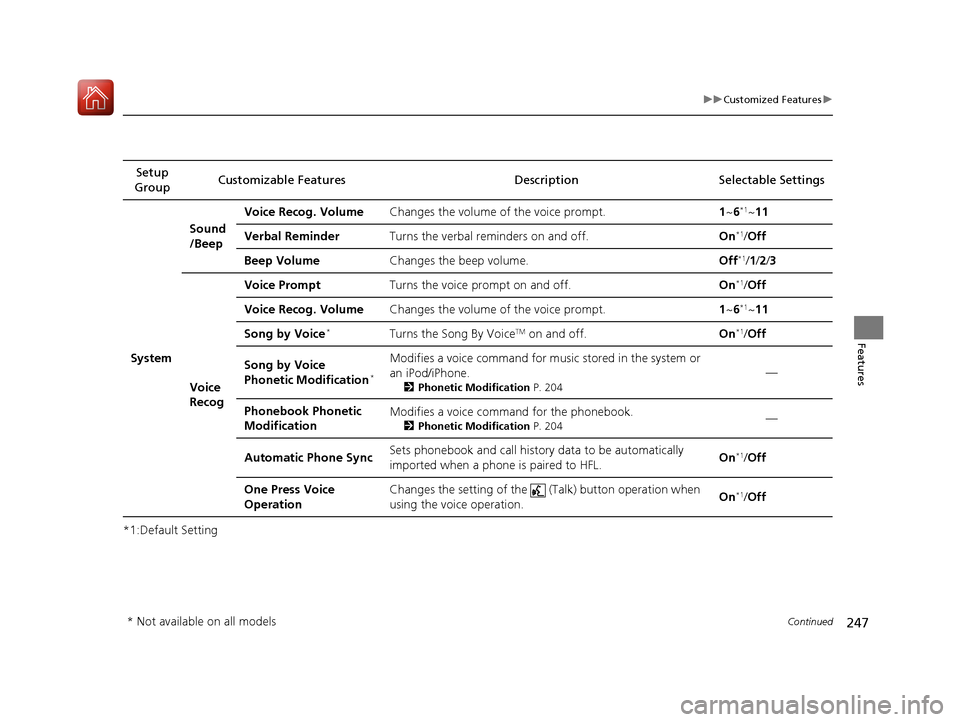
*1:Default SettingSetup
Group Customizable Features Descri
ption Selectable Settings
System Sound
/Beep
Voice Recog. Volume
Changes the volume of the voice prompt. 1~6
*1~ 11
Verbal Reminder Turns the verbal reminders on and off. On
*1/Off
Beep Volume Changes the beep volume. Off
*1/1 /2 /3
Voice
Recog Voice Prompt
Turns the voice prompt on and off. On
*1/Off
Voice Recog. Volume Changes the volume of the voice prompt. 1~6
*1~ 11
Song by Voice
*Turns the Song By VoiceTM on and off. On*1/Off
Song by Voice
Phonetic Modification
*
Modifies a voice command for music stored in the system or
an iPod/iPhone.
2 Phonetic Modification P. 204
—
Phonebook Phonetic
Modification Modifies a voice command for the phonebook.
2
Phonetic Modification P. 204—
Automatic Phone Sync Sets phonebook and call history data to be automatically
imported when a phone is paired to HFL.
On
*1/
Off
One Press Voice
Operation Changes the setting of the (Talk) button operation when
using the voice operation.
On
*1/
Off
* Not available on all models
17 NSX-31T6N6000.book 247 ページ 2016年4月22日 金曜日 午後3時44分
Page 250 of 473
249
uuCustomized Features u
Continued
Features
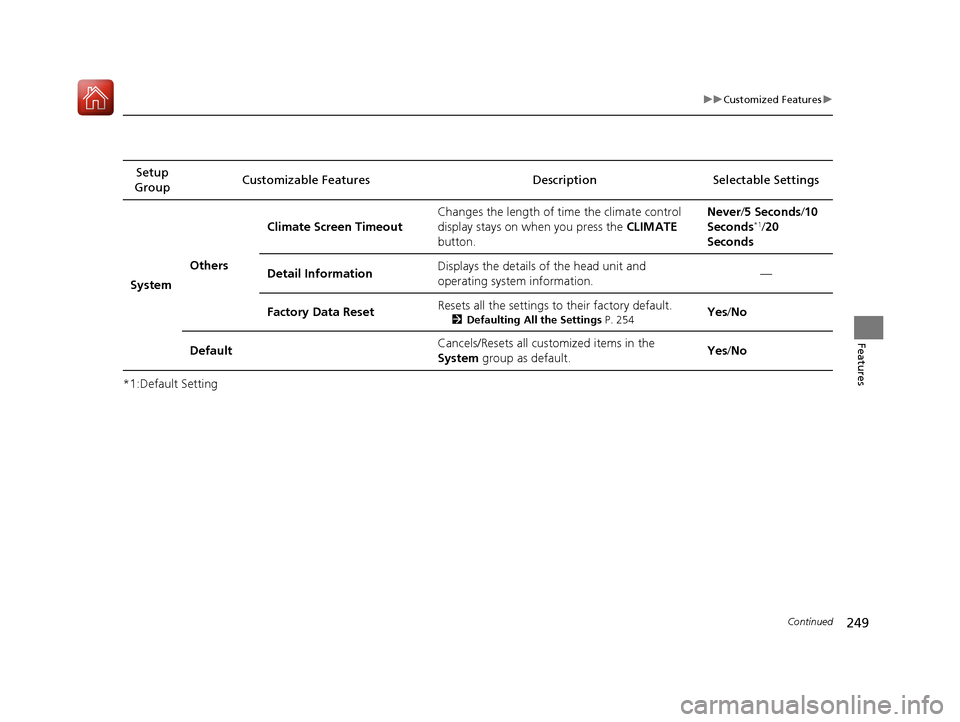
*1:Default SettingSetup
Group Customizable Features Description Selectable Settings
System Others Climate Screen Timeout
Changes the length of time the climate control
display stays on when you press the
CLIMATE
button. Never/
5 Seconds/ 10
Seconds
*1/ 20
Seconds
Detail Information Displays the details of the head unit and
operating system information. —
Factory Data Reset Resets all the settings to their factory default.
2
Defaulting All the Settings P. 254Yes /No
Default Cancels/Resets all cust
omized items in the
System group as default. Yes
/No
17 NSX-31T6N6000.book 249 ページ 2016年4月22日 金曜日 午後3時44分
Page 257 of 473
256
uuHomeLink ® Universal Transceiver uTraining HomeLink
Features
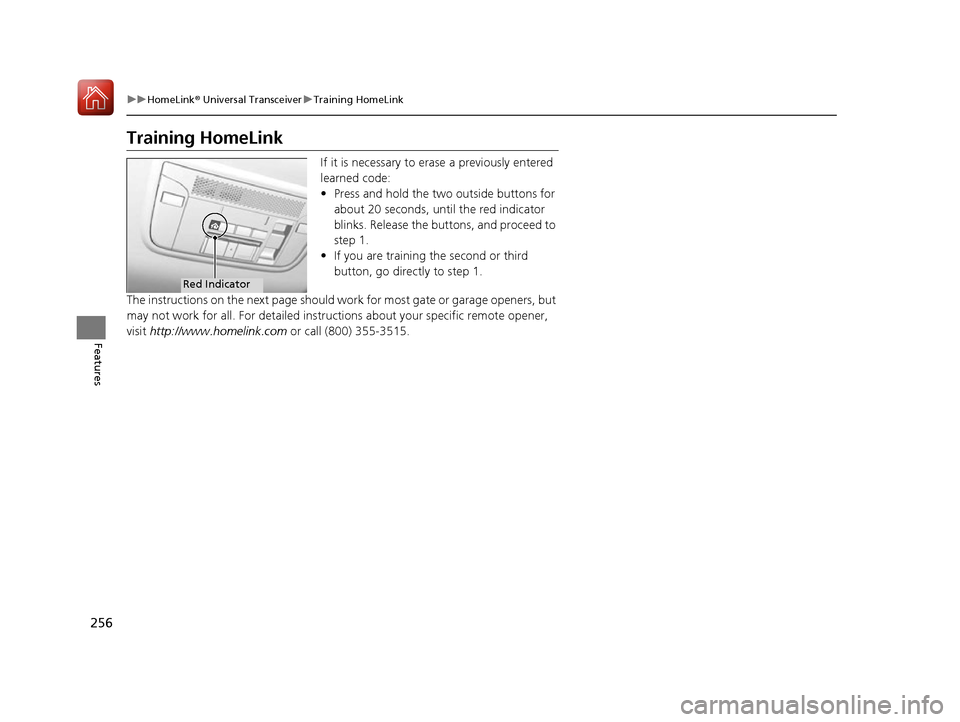
Training HomeLink
If it is necessary to erase a previously entered
learned code:
• Press and hold the two outside buttons for
about 20 seconds, until the red indicator
blinks. Release the bu ttons, and proceed to
step 1.
• If you are training the second or third
button, go directly to step 1.
The instructions on the next page should wo rk for most gate or garage openers, but
may not work for all. For detailed instruct ions about your specific remote opener,
visit http://www.homelink.com or call (800) 355-3515.
Red Indicator
17 NSX-31T6N6000.book 256 ページ 2016年4月22日 金曜日 午後3時44分
Page 258 of 473
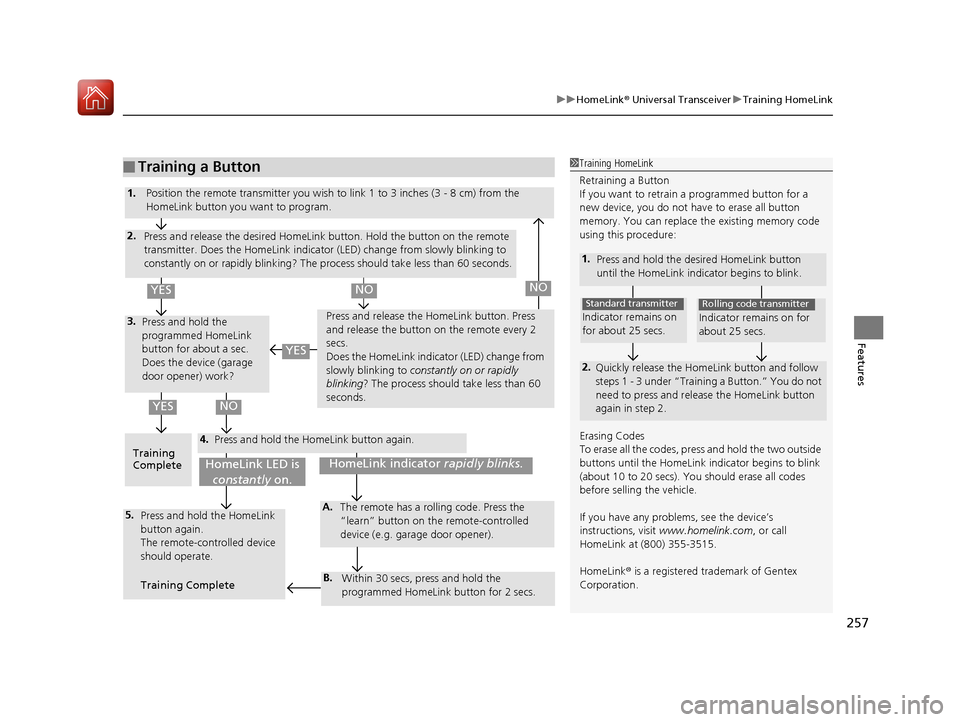
257
uuHomeLink ® Universal Transceiver uTraining HomeLink
Features
■Training a Button1Training HomeLink
Retraining a Button
If you want to retrain a programmed button for a
new device, you do not ha ve to erase all button
memory. You can replace the existing memory code
using this procedure:
1. Press and hold the desi red HomeLink button
until the HomeLink indi cator begins to blink.
2.
Quickly release the Home Link button and follow
steps 1 - 3 under “Training a Button.” You do not
need to press and rele ase the HomeLink button
again in step 2.
Indicator remains on
for about 25 secs.
Standard transmitter
Indicator remains on for
about 25 secs.
Rolling code transmitter
Erasing Codes
To erase all the codes, press and hold the two outside
buttons until the HomeLink i ndicator begins to blink
(about 10 to 20 secs). You should erase all codes
before selling the vehicle.
If you have any problems, see the device’s
instructions, visit www.homelink.com , or call
HomeLink at (800) 355-3515.
HomeLink ® is a registered tra demark of Gentex
Corporation.4.
3.
2.
5.A.
B.
1. Position the remote transmitter you wish to link 1 to 3 inches (3 - 8 cm) from the
HomeLink button you want to program.
Press and release the desi red HomeLink button. Hold the button on the remote
transmitter. Does the HomeLink indicato r (LED) change from slowly blinking to
constantly on or rapidly blinking? The process should take less than 60 seconds.
Press and hold the
programmed HomeLink
button for about a sec.
Does the device (garage
door opener) work? Press and release the Ho
meLink button. Press
and release the button on the remote every 2
secs.
Does the HomeLink indicator (LED) change from
slowly blinking to constantly on or rapidly
blinking? The process should take less than 60
seconds.
Training
Complete Press and hold the HomeLink button again.
Press and hold the HomeLink
button again.
The remote-controlled device
should operate.
Training Complete The remote has a ro
lling code. Press the
“learn” button on the remote-controlled
device (e.g. garage door opener).
Within 30 secs, press and hold the
programmed HomeLink button for 2 secs.
HomeLink indicator rapidly blinks.HomeLink LED is
constantly on.
YESNO
YES
YESNONO
17 NSX-31T6N6000.book 257 ページ 2016年4月22日 金曜日 午後3時44分