button Acura NSX 2017 Manual PDF
[x] Cancel search | Manufacturer: ACURA, Model Year: 2017, Model line: NSX, Model: Acura NSX 2017Pages: 473, PDF Size: 16.01 MB
Page 259 of 473
258
Features
Bluetooth® HandsFreeLink ®
Bluetooth® HandsFreeLink ® (HFL) allows you to place and receive phone calls using
your vehicle’s audio system, without handling your cell phone.
Using HFL
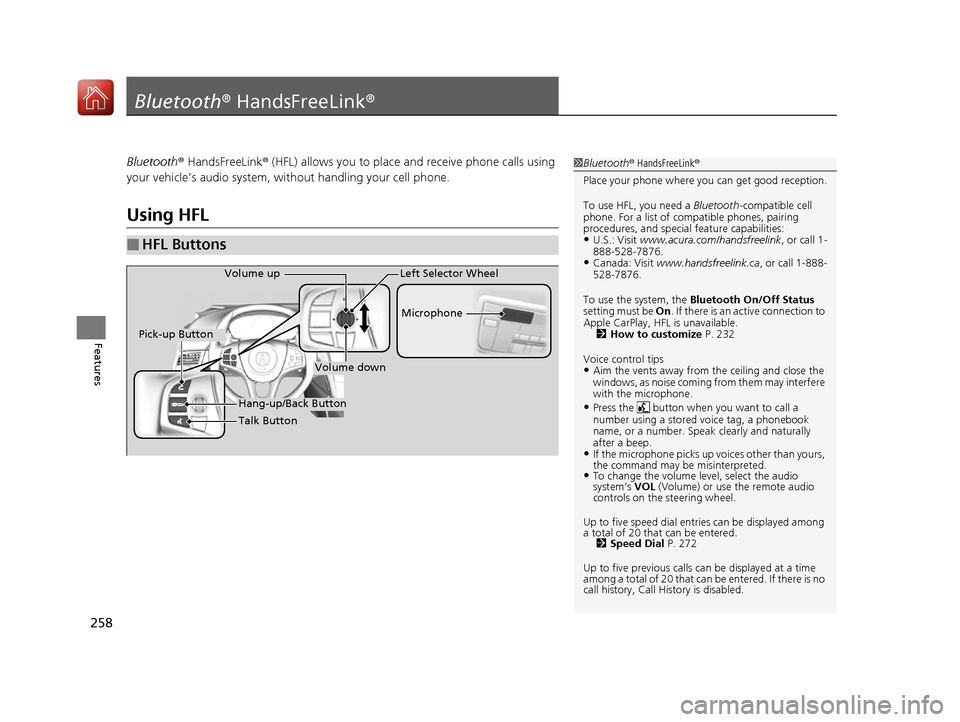
■HFL Buttons
1 Bluetooth ® HandsFreeLink ®
Place your phone where y ou can get good reception.
To use HFL, you need a Bluetooth-compatible cell
phone. For a list of compatible phones, pairing
procedures, and special feature capabilities:
•U.S.: Visit www.acura.com/handsfreelink , or call 1-
888-528-7876.
•Canada: Visit www.handsfreelink.ca , or call 1-888-
528-7876.
To use the system, the Bluetooth On/Off Status
setting must be On . If there is an active connection to
Apple CarPlay, H FL is unavailable.
2 How to customize P. 232
Voice control tips
•Aim the vents away from the ceiling and close the
windows, as noise coming fr om them may interfere
with the microphone.
•Press the button when you want to call a
number using a stored voice tag, a phonebook
name, or a number. Spe ak clearly and naturally
after a beep.
•If the microphone picks up vo ices other than yours,
the command may be misinterpreted.
•To change the volume level, select the audio
system’s VOL (Volume) or use the remote audio
controls on the steering wheel.
Up to five speed dial entries can be displayed among
a total of 20 that can be entered. 2 Speed Dial P. 272
Up to five previous calls can be displayed at a time
among a total of 20 that can be entered. If there is no
call history, Call History is disabled.
Talk Button Microphone
Hang-up/Back Button
Pick-up Button
Volume up
Volume down
Left Selector Wheel
17 NSX-31T6N6000.book 258 ページ 2016年4月22日 金曜日 午後3時44分
Page 260 of 473

Continued259
uuBluetooth ® HandsFreeLink ®u Using HFL
Features
(Pick-up) button: Press to go to the Speed Dial/Call History on the driver
information interface, or to answer an incoming call.
(Hang-up/back) button: Press to end a call, go back to the previous
command, cancel a command, or clear th e phone information on the driver
information interface.
(Talk) button: Press to access Voice Portal.
Left selector wheel:
Move to the right or left to select the Speed Dial or Call History on the driver
information interface.
Roll up or down to select an item displayed on the Speed Dial/Call History display.
Push to call a number listed in the selected item on the Speed Dial/Call History
display.
To go to the Phone menu screen:
1. Select .
2. Select Phone to switch the displa y to the phone screen.
3. Select .1Bluetooth ® HandsFreeLink ®
Bluetooth ® Wireless Technology
The Bluetooth ® word mark and logos are registered
trademarks owned by Bluetooth SIG, Inc., and any
use of such marks by Honda Motor Co., Ltd., is under
license. Other trademarks and trade names are those
of their respective owners.
HFL Limitations
An incoming call on HFL will interrupt the audio
system when it is playing. It will resume when the call
is ended.
17 NSX-31T6N6000.book 259 ページ 2016年4月22日 金曜日 午後3時44分
Page 273 of 473
uuBluetooth ® HandsFreeLink ®u HFL Menus
272
Features
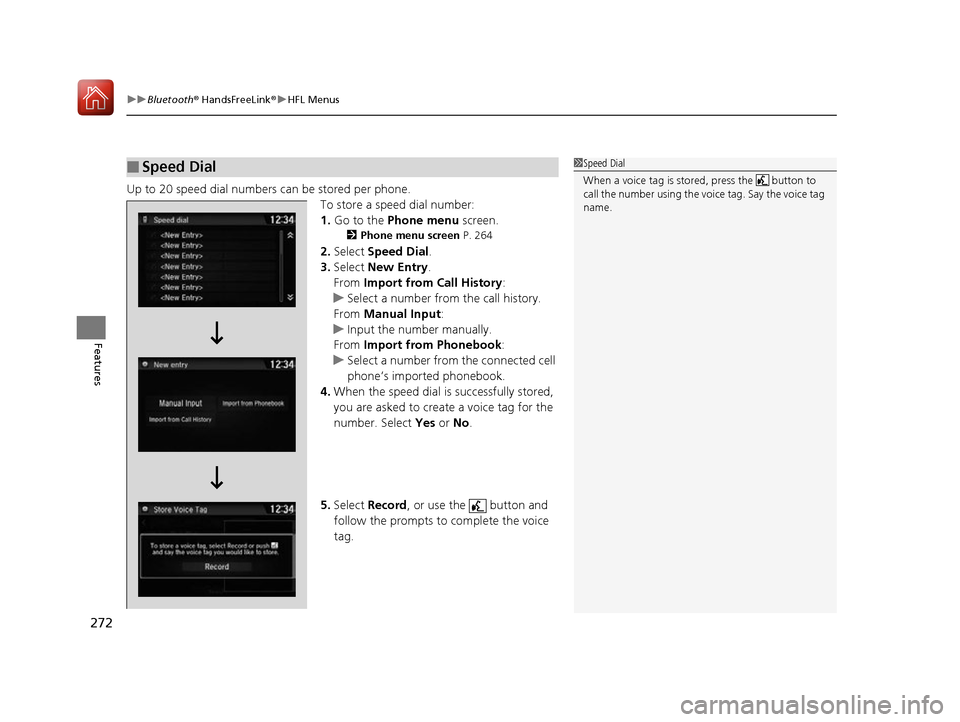
Up to 20 speed dial numbers can be stored per phone.
To store a speed dial number:
1.Go to the Phone menu screen.
2Phone menu screen P. 264
2.Select Speed Dial .
3. Select New Entry.
From Import from Call History:
u Select a number from the call history.
From Manual Input :
u Input the number manually.
From Import from Phonebook :
u Select a number from the connected cell
phone’s imported phonebook.
4. When the speed dial is successfully stored,
you are asked to create a voice tag for the
number. Select Yes or No.
5. Select Record , or use the button and
follow the prompts to complete the voice
tag.
■Speed Dial1 Speed Dial
When a voice tag is stored, press the button to
call the number using the voice tag. Say the voice tag
name.
17 NSX-31T6N6000.book 272 ページ 2016年4月22日 金曜日 午後3時44分
Page 274 of 473
Continued273
uuBluetooth ® HandsFreeLink ®u HFL Menus
Features
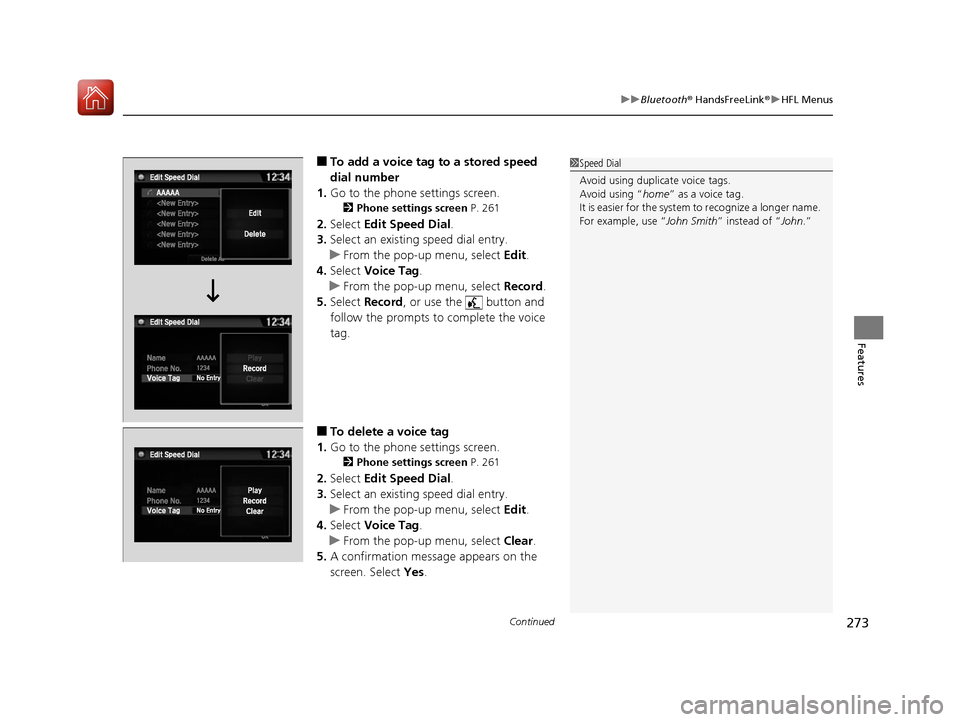
■To add a voice tag to a stored speed
dial number
1. Go to the phone settings screen.
2 Phone settings screen P. 261
2.Select Edit Speed Dial .
3. Select an existing speed dial entry.
u From the pop-up menu, select Edit.
4. Select Voice Tag .
u From the pop-up menu, select Record.
5. Select Record , or use the button and
follow the prompts to complete the voice
tag.
■To delete a voice tag
1. Go to the phone settings screen.
2 Phone settings screen P. 261
2.Select Edit Speed Dial .
3. Select an existing speed dial entry.
u From the pop-up menu, select Edit.
4. Select Voice Tag .
u From the pop-up menu, select Clear.
5. A confirmation message appears on the
screen. Select Yes.
1Speed Dial
Avoid using duplicate voice tags.
Avoid using “home ” as a voice tag.
It is easier for the system to recognize a longer name.
For example, use “ John Smith” instead of “John.”
17 NSX-31T6N6000.book 273 ページ 2016年4月22日 金曜日 午後3時44分
Page 277 of 473
276
uuBluetooth ® HandsFreeLink ®u HFL Menus
Features
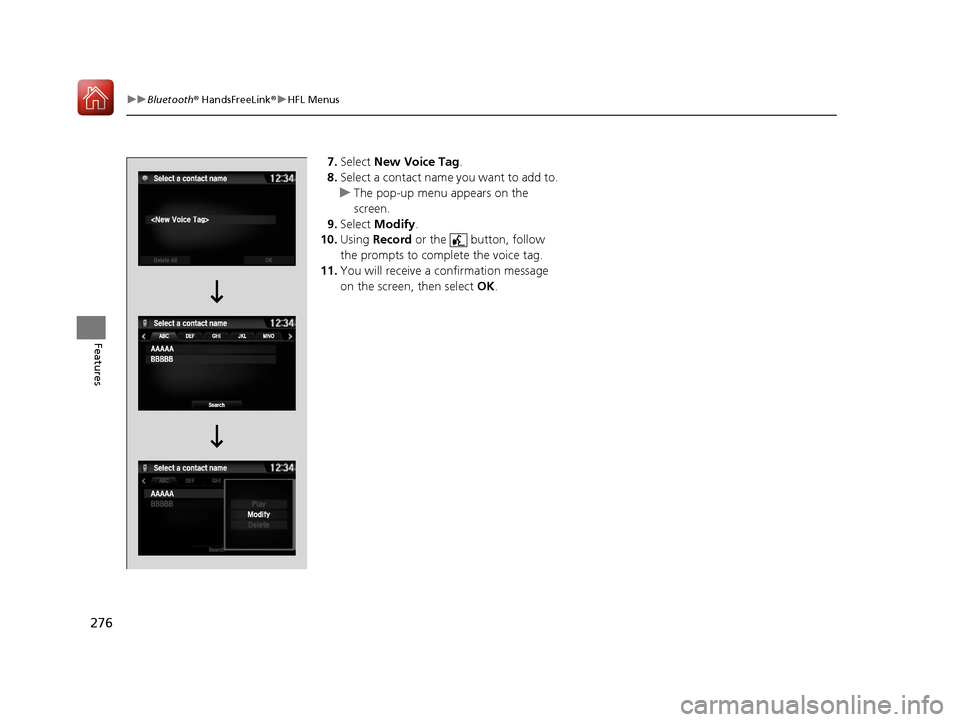
7. Select New Voice Tag.
8. Select a contact name you want to add to.
u The pop-up menu appears on the
screen.
9. Select Modify .
10. Using Record or the button, follow
the prompts to complete the voice tag.
11. You will receive a confirmation message
on the screen, then select OK.
17 NSX-31T6N6000.book 276 ページ 2016年4月22日 金曜日 午後3時44分
Page 278 of 473
Continued277
uuBluetooth ® HandsFreeLink ®u HFL Menus
Features
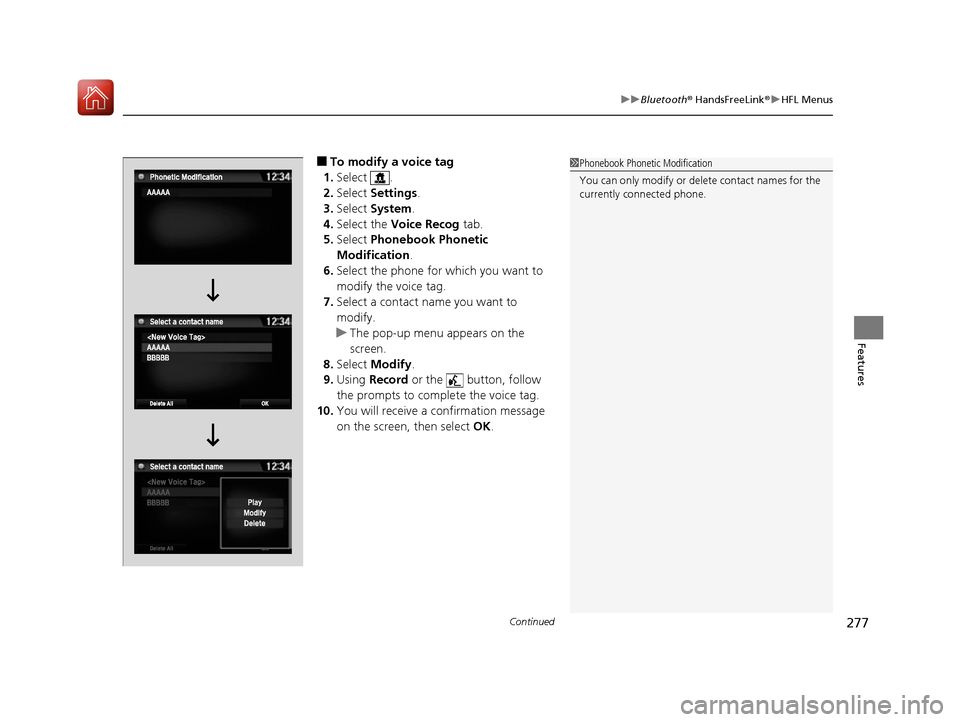
■To modify a voice tag
1. Select .
2. Select Settings .
3. Select System .
4. Select the Voice Recog tab.
5. Select Phonebook Phonetic
Modification .
6. Select the phone for which you want to
modify the voice tag.
7. Select a contact name you want to
modify.
u The pop-up menu appears on the
screen.
8. Select Modify .
9. Using Record or the button, follow
the prompts to complete the voice tag.
10. You will receive a confirmation message
on the screen, then select OK.1Phonebook Phonetic Modification
You can only modify or de lete contact names for the
currently connected phone.
17 NSX-31T6N6000.book 277 ページ 2016年4月22日 金曜日 午後3時44分
Page 281 of 473
uuBluetooth ® HandsFreeLink ®u HFL Menus
280
Features
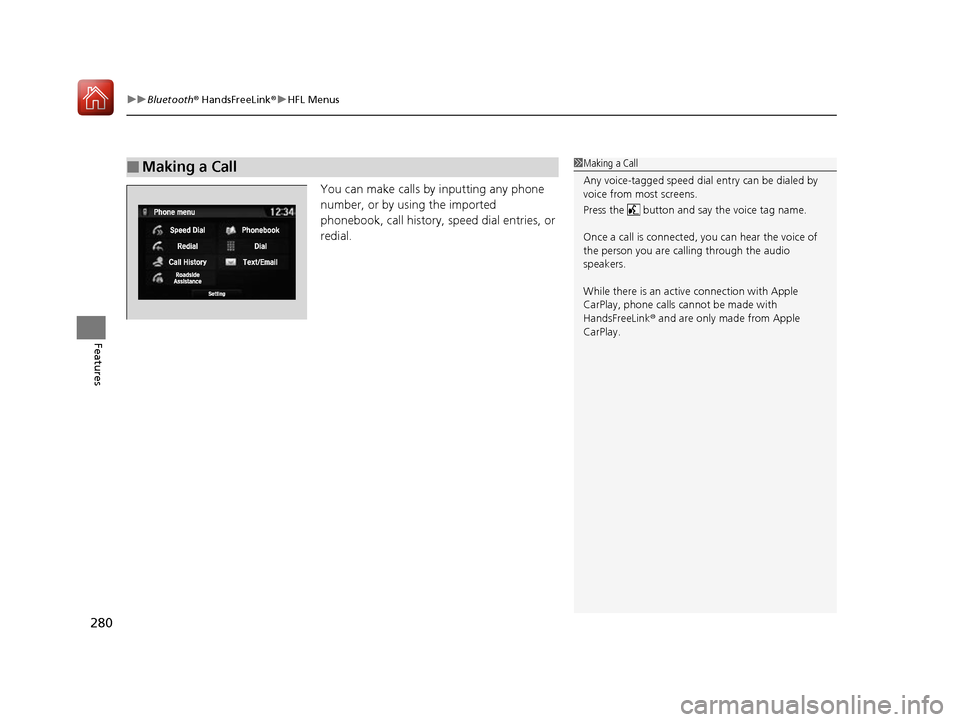
You can make calls by inputting any phone
number, or by using the imported
phonebook, call history, speed dial entries, or
redial.
■Making a Call1Making a Call
Any voice-tagged speed dial entry can be dialed by
voice from most screens.
Press the button and say the voice tag name.
Once a call is connected, you can hear the voice of
the person you are call ing through the audio
speakers.
While there is an active connection with Apple
CarPlay, phone calls ca nnot be made with
HandsFreeLink ® and are only made from Apple
CarPlay.
17 NSX-31T6N6000.book 280 ページ 2016年4月22日 金曜日 午後3時44分
Page 283 of 473
uuBluetooth ® HandsFreeLink ®u HFL Menus
282
Features
■To make a call using redial
1. Go to the Phone menu screen.
2Phone menu screen P. 264
2.Select Redial .
u Dialing starts automatically.
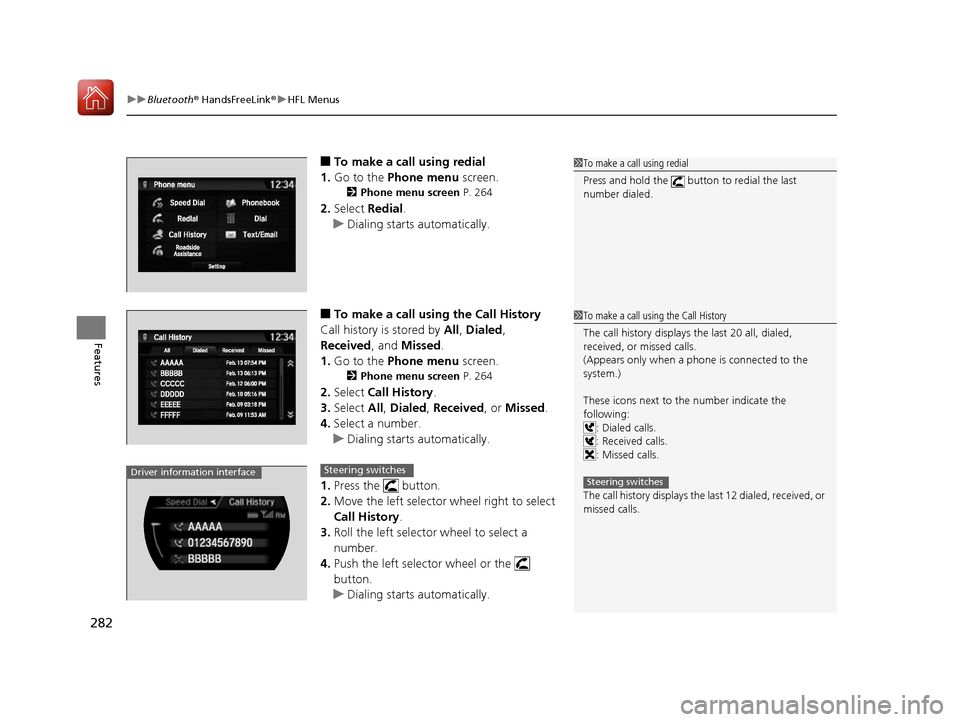
■To make a call using the Call History
Call history is stored by All, Dialed ,
Received, and Missed .
1. Go to the Phone menu screen.
2Phone menu screen P. 264
2.Select Call History .
3. Select All, Dialed , Received, or Missed .
4. Select a number.
u Dialing starts automatically.
1. Press the button.
2. Move the left selector wheel right to select
Call History .
3. Roll the left selector wheel to select a
number.
4. Push the left selector wheel or the
button.
u Dialing starts automatically.
1To make a call using redial
Press and hold the button to redial the last
number dialed.
1To make a call using the Call History
The call history displays the last 20 all, dialed,
received, or missed calls.
(Appears only when a phone is connected to the
system.)
These icons next to th e number indicate the
following: : Dialed calls.
: Received calls.
: Missed calls.
The call history displays the last 12 dialed, received, or
missed calls.
Steering switchesDriver information interfaceSteering switches
17 NSX-31T6N6000.book 282 ページ 2016年4月22日 金曜日 午後3時44分
Page 284 of 473
Continued283
uuBluetooth ® HandsFreeLink ®u HFL Menus
Features
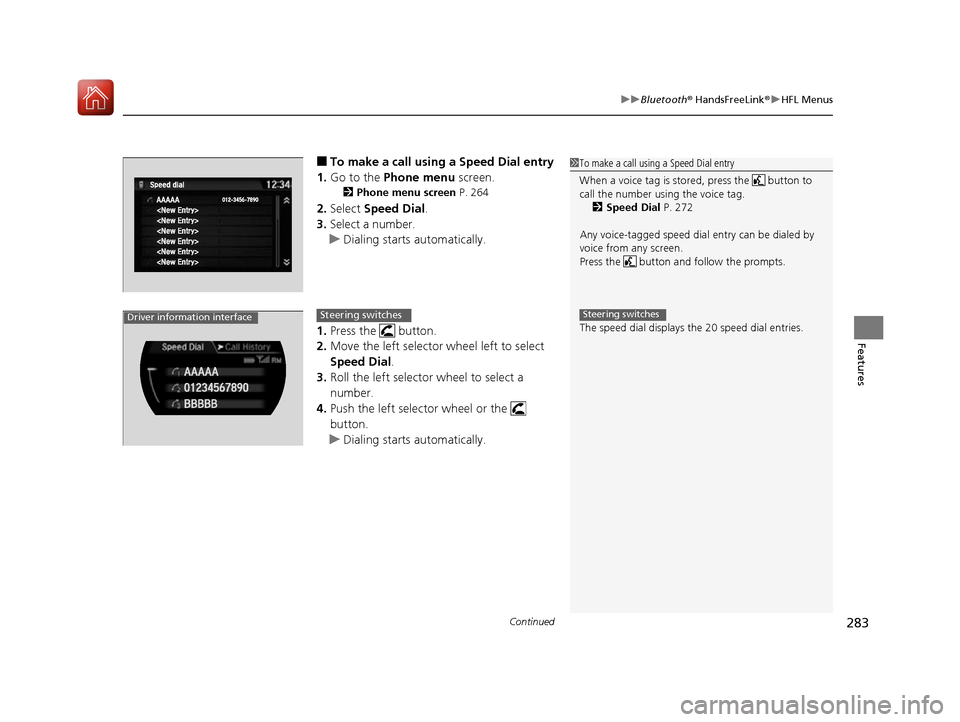
■To make a call usin g a Speed Dial entry
1. Go to the Phone menu screen.
2Phone menu screen P. 264
2.Select Speed Dial .
3. Select a number.
u Dialing starts automatically.
1. Press the button.
2. Move the left selector wheel left to select
Speed Dial .
3. Roll the left selector wheel to select a
number.
4. Push the left selector wheel or the
button.
u Dialing starts automatically.
1To make a call using a Speed Dial entry
When a voice tag is stored, press the button to
call the number using the voice tag.
2 Speed Dial P. 272
Any voice-tagged speed dial entry can be dialed by
voice from any screen.
Press the button and follow the prompts.
The speed dial displays the 20 speed dial entries.
Steering switchesDriver information interfaceSteering switches
17 NSX-31T6N6000.book 283 ページ 2016年4月22日 金曜日 午後3時44分
Page 285 of 473
uuBluetooth ® HandsFreeLink ®u HFL Menus
284
Features
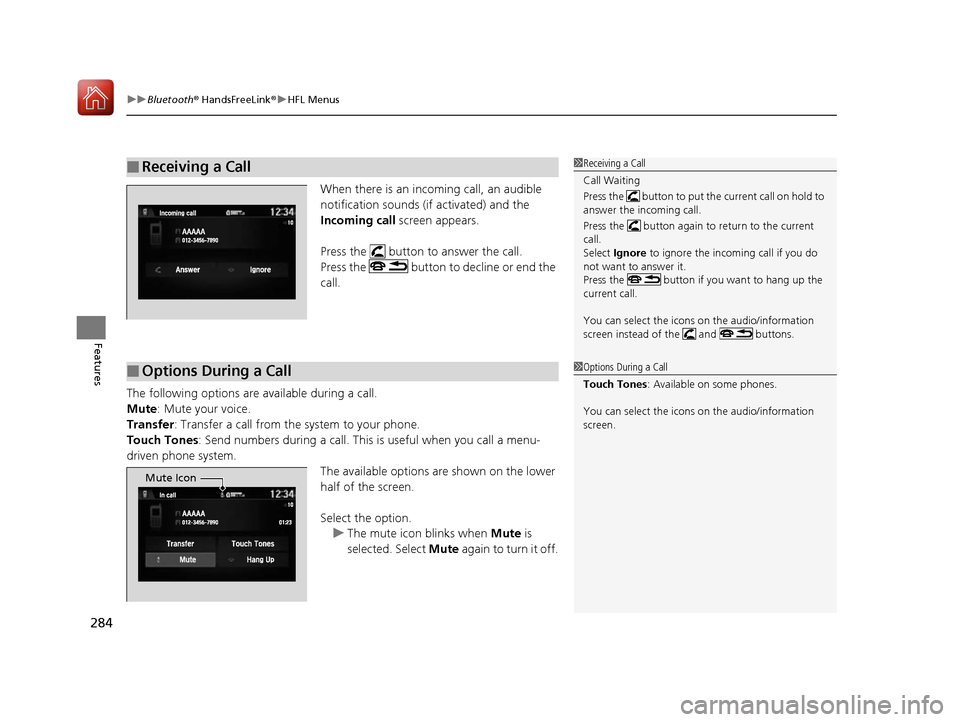
When there is an incoming call, an audible
notification sounds (if activated) and the
Incoming call screen appears.
Press the button to answer the call.
Press the button to decline or end the
call.
The following options are available during a call.
Mute : Mute your voice.
Transfer : Transfer a call from the system to your phone.
Touch Tones: Send numbers during a call. This is useful when you call a menu-
driven phone system.
The available options are shown on the lower
half of the screen.
Select the option.u The mute icon blinks when Mute is
selected. Select Mute again to turn it off.
■Receiving a Call1Receiving a Call
Call Waiting
Press the button to put the current call on hold to
answer the incoming call.
Press the button again to return to the current
call.
Select Ignore to ignore the incoming call if you do
not want to answer it.
Press the button if you want to hang up the
current call.
You can select the icons on the audio/information
screen instead of the and buttons.
■Options During a Call1 Options During a Call
Touch Tones : Available on some phones.
You can select the icons on the audio/information
screen.
Mute Icon
17 NSX-31T6N6000.book 284 ページ 2016年4月22日 金曜日 午後3時44分