reset ACURA NSX 2022 User Guide
[x] Cancel search | Manufacturer: ACURA, Model Year: 2022, Model line: NSX, Model: ACURA NSX 2022Pages: 492, PDF Size: 16.2 MB
Page 194 of 492
192
uuAudio System Basic Operation uPlaying SiriusXM ® Radio*
Features
Playing SiriusXM ® Radio*
*1:Some or all of the lists may not be displayed.
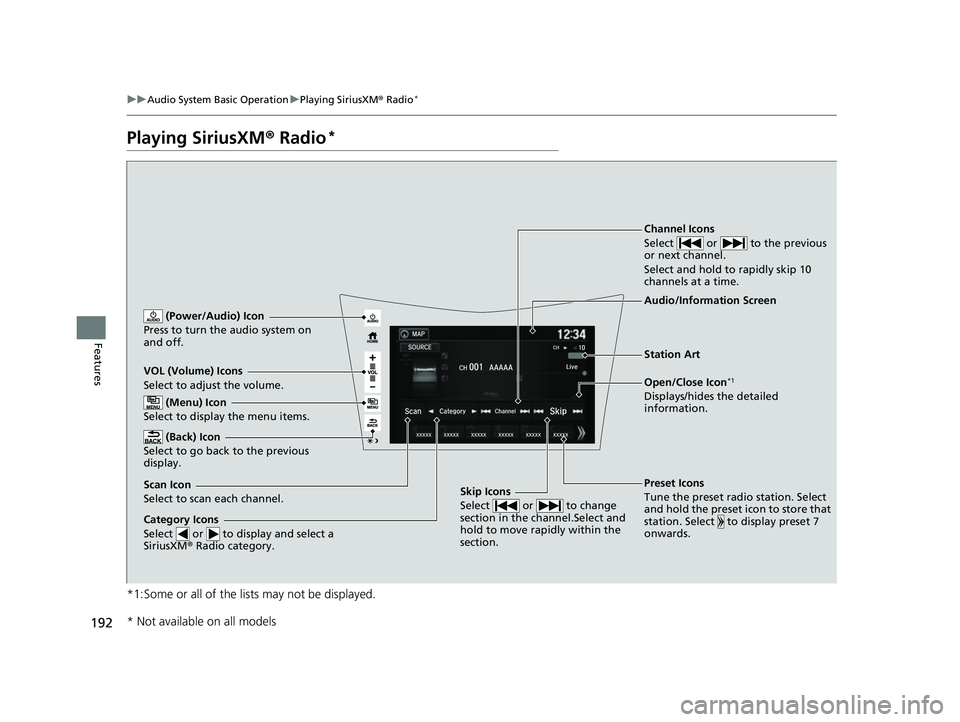
VOL (Volume) Icons
Select to adjust the volume.
(Back) Icon
Select to go back to the previous
display.
Channel Icons
Select or to the previous
or next channel.
Select and hold to rapidly skip 10
channels at a time.
(Power/Audio) Icon
Press to turn the audio system on
and off.
Open/Close Icon*1
Displays/hides the detailed
information.
(Menu) Icon
Select to display the menu items.
Category Icons
Select or to display and select a
SiriusXM ® Radio category.
Audio/Information Screen
Scan Icon
Select to scan each channel. Preset Icons
Tune the preset radio station. Select
and hold the preset icon to store that
station. Select to display preset 7
onwards.Skip Icons
Select or to change
section in the channel.Select and
hold to move rapidly within the
section.
Station Art
* Not available on all models
22 ACURA NSX PMC-31T6N6500.book 192 ページ 2021年9月28日 火曜日 午後4時7分
Page 195 of 492

Continued193
uuAudio System Basic Operation uPlaying SiriusXM ® Radio*
Features
1. Select .
2. Select Tune Mode .
3. Select Channel Mode or Category Mode .
■To Change the Tune Mode1Playing SiriusXM ® Radio*
In the channel mode, all available channels are
selectable. In the categor y mode, you can select a
channel within a ca tegory (Jazz, Rock, Classical, etc.).
There may be instances when SiriusXM ® Radio does
not broadcast all the data fi elds (artist name, title).
This does not indicate a problem with your audio
system.
SiriusXM ® Radio stations load in ascending order,
which can take about a minute. Once they have
loaded you will be able to scroll up or down to make
your selections.
Switching the Audio Mode
Press the SOURCE button on the steering wheel or
select SOURCE on the screen.
2 Audio Remote Controls P. 165
Tune Start:
When you change to a preset channel, a song being
played on that channel restarts from the beginning
with this function. This can be turned on or off from
the Audio settings screen.
2 Customized Features P. 243
* Not available on all models
22 ACURA NSX PMC-31T6N6500.book 193 ページ 2021年9月28日 火曜日 午後4時7分
Page 196 of 492
uuAudio System Basic Operation uPlaying SiriusXM ® Radio*
194
Features
To store a channel:
1. Tune to the selected channel.
2. Press and hold the preset number for the station you want to store.
3. Select Replace .
You can also store a channel by the following procedure.
1. Tune to the selected channel.
2. Select the open/close ic on to display a list.
3. Select the Preset tab.
4. Select and hold the preset number fo r the station you want to store.
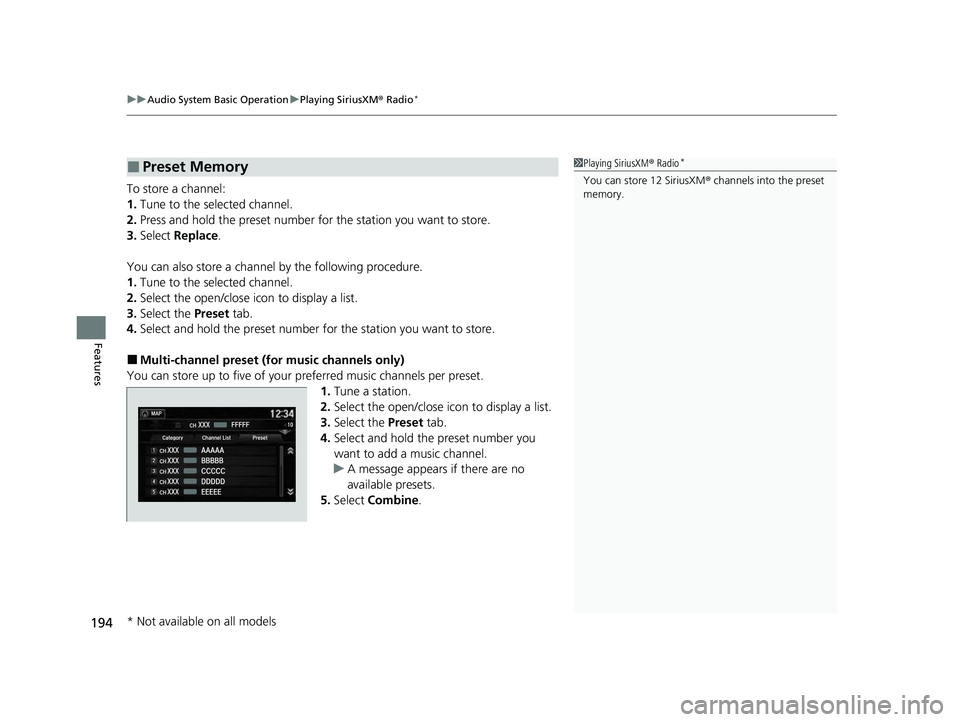
■Multi-channel preset (for music channels only)
You can store up to five of your pr eferred music channels per preset.
1.Tune a station.
2. Select the open/close ic on to display a list.
3. Select the Preset tab.
4. Select and hold the preset number you
want to add a music channel.
u A message appears if there are no
available presets.
5. Select Combine .
■Preset Memory1Playing SiriusXM ® Radio*
You can store 12 SiriusXM ® channels into the preset
memory.
* Not available on all models
22 ACURA NSX PMC-31T6N6500.book 194 ページ 2021年9月28日 火曜日 午後4時7分
Page 198 of 492
uuAudio System Basic Operation uPlaying SiriusXM ® Radio*
196
Features
The system can record up to the last 60 minutes of your currently tuned channel’s
broadcast, as well as the last 30 minutes of your preset channel’s broadcast, starting
from the moment you turn the vehicle on. If you tuned to a preset channel, the
system records up to 60 minutes of a broadcast instead of up to 30 minutes. You
can rewind and replay the last 30 or 60 minutes of a broadcast.
1. Select .
2. Select Playback Position.
3. Move the time marker to the position you want to replay.
To play or pause on playback mode:
1. Select .
2. Select Play/Pause .
■Returning to real-time broadcast
1. Select .
2. Select Play Live Broadcast .
■Replay Function1Replay Function
The system starts storing broadcast in memory when
the power mode is turned ON. You can go back to
the program from that point.
You can no longer repl ay any program once the
power mode is turned off as it erases memory.
You can check how long the program has been
stored in memory from th e audio/information screen.
After 30 or 60 minutes of recording the system will
automatically start deleting the oldest data.
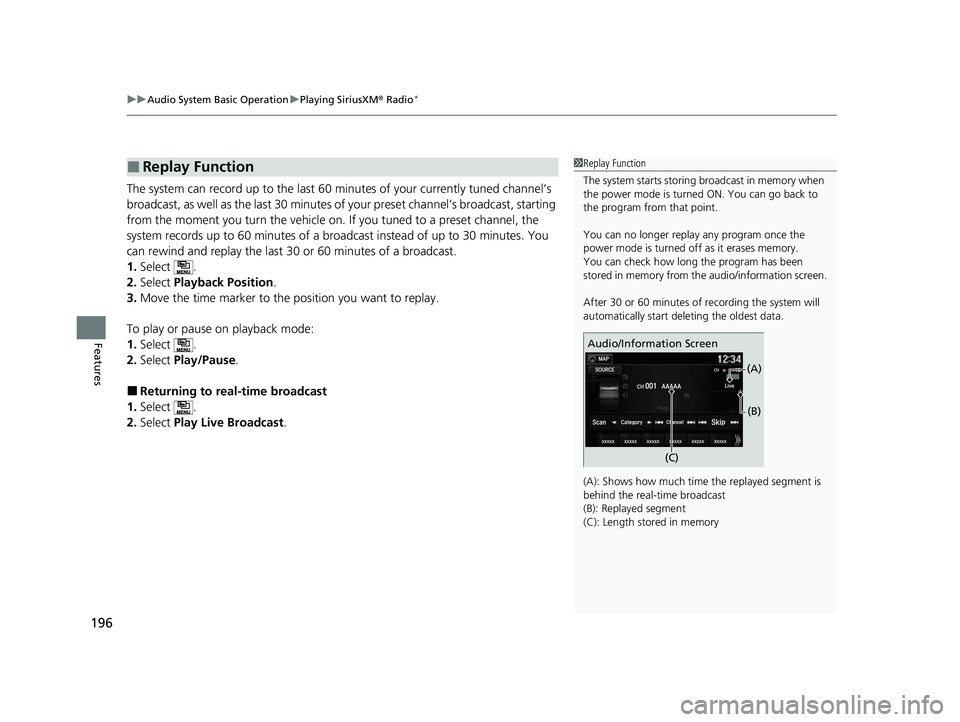
(A): Shows how much time the replayed segment is
behind the real-time broadcast
(B): Replayed segment
(C): Length stored in memory
Audio/Information Screen
(C) (B)
(A)
22 ACURA NSX PMC-31T6N6500.book 196 ページ 2021年9月28日 火曜日 午後4時7分
Page 200 of 492
uuAudio System Basic Operation uPlaying SiriusXM ® Radio*
198
Features
■To set up an alert beep
1. Select .
2. Select Settings .
3. Select Audio .
4. Select the SXM tab.
5. Select SportsFlash Setup( Interrupt Beep).
6. Select On.
■Traffic and Weather Information
You can receive traffic and weather information.
1. Select .
2. Select Settings .
3. Select Audio .
4. Select the SXM tab.
5. Select Traffic & Weather Setup .
6. Select the region.
u When you do not want to rece ive the information, select Unset.
Sample each channel on the selected mode for 10 seconds.
1. Select Scan.
2. Select Scan Channels .
u You can select the desired channel by songs using Scan Songs in Presets .
To turn off scan, select Cancel.
■Scan
1To set up an alert beep
You can also set up a alert beep by the following
procedure.
1. Select Audio.
2. Select .
3. Select Setting .
4. Select SportsFlash Setup(Interrupt Beep) .
1Traffic and Weather Information
The traffic and weather information function in
SiriusXM ® mode only.
You can also set up th e traffic and weather
information by the following procedure.
1. Select Audio.
2. Select .
3. Select Setting .
4. Select Traffic & Weather Setup .
1Scan
The “Scan Songs in Preset” function is based on
TuneScan
TM technology of SiriusXM ®.
The “Featured Channels ” function is based on
Featured Favorites
TM technology of SiriusXM ®.
TuneScan
TM and Featured FavoritesTM are registered
trademarks of SiriusXM ® Radio, Inc.
22 ACURA NSX PMC-31T6N6500.book 198 ページ 2021年9月28日 火曜日 午後4時7分
Page 226 of 492

224
uuAudio Error Messages uAndroid/Apps
Features
Android/Apps
If an error occurs while using the audio system or apps, you may see the following
error messages. If you cannot clear the er ror message, contact an authorized Acura
NSX dealer.
*1:****part is variable characters, and will change depending upon where an error occurs.
Error Message*1Solution
Unfortunately, **** has
stopped.Error has occurred within app, select OK on the screen to close the app.
**** is not responding.
Would you like to close it?
App is not responding.
Select Wait if you can wait for a response from app a littl e longer. If it does not respond even if you keep
waiting, select OK to close the app and start it up. If the error message continues, perform Factory Data
Reset .
2Defaulting All the Settings P. 265
22 ACURA NSX PMC-31T6N6500.book 224 ページ 2021年9月28日 火曜日 午後4時7分
Page 246 of 492
244
uuCustomized Features u
Features
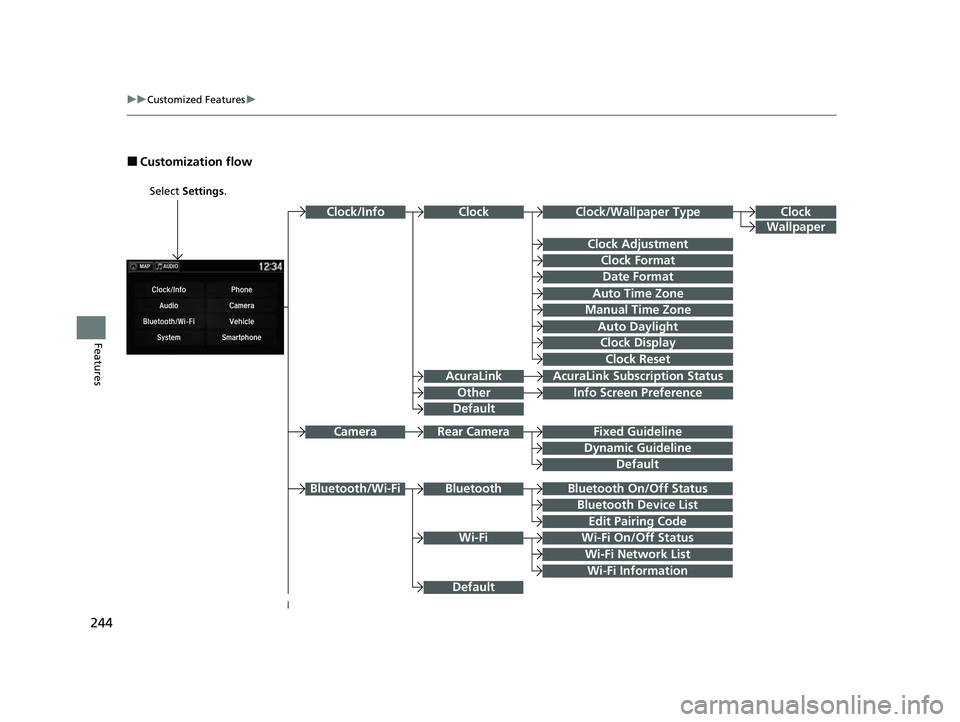
■Customization flow
Select Settings.
Clock
Wallpaper
Other
Clock/Wallpaper Type
Clock Adjustment
Clock Format
ClockClock/Info
Auto Time Zone
Manual Time Zone
Auto Daylight
Clock Display
Clock Reset
Info Screen Preference
AcuraLinkAcuraLink Subscr iption Status
Date Format
Default
Bluetooth On/Off Status
Bluetooth Device List
Edit Pairing Code
Wi-Fi On/Off Status
Wi-Fi Network List
Wi-Fi
BluetoothBluetooth/Wi-Fi
Wi-Fi Information
Fixed Guideline
Dynamic Guideline
Rear CameraCamera
Default
Default
22 ACURA NSX PMC-31T6N6500.book 244 ページ 2021年9月28日 火曜日 午後4時7分
Page 250 of 492
248
uuCustomized Features u
Features
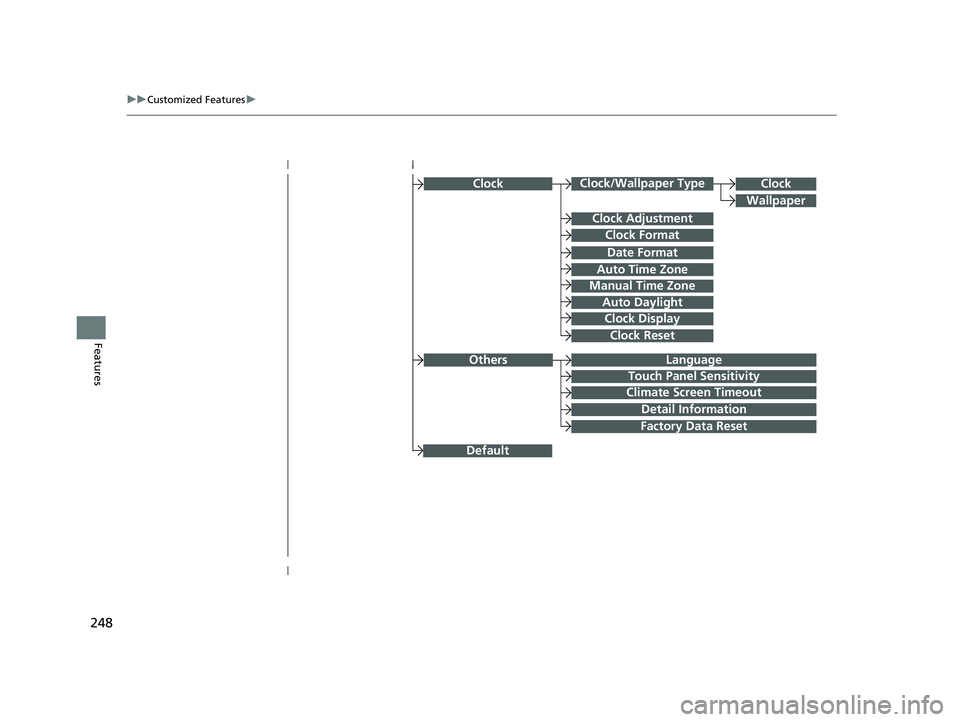
ClockClock/Wallpaper Type
Clock Adjustment
Clock Format
Auto Time Zone
Manual Time Zone
Auto Daylight
Clock Display
Clock Reset
Clock
Wallpaper
Language
Touch Panel Sensitivity
Factory Data Reset
Climate Screen Timeout
Detail Information
Others
Date Format
Default
22 ACURA NSX PMC-31T6N6500.book 248 ページ 2021年9月28日 火曜日 午後4時7分
Page 251 of 492

249
uuCustomized Features u
Continued
Features
Adjust Outside Temp Display
“Trip A” Reset Timing
“Trip B” Reset Timing
VehicleMeter Setup
Display km/Miles
Language Selection
Turn by Turn Display
Easy Entry/ExitDriving Position Setup
Memory Position Link
22 ACURA NSX PMC-31T6N6500.book 249 ページ 2021年9月28日 火曜日 午後4時7分
Page 252 of 492

250
uuCustomized Features u
Features
Lighting SetupInterior Light Dimming Time
Headlight Auto Off Timer
Auto Light Sensitivity*
Auto Interior Illumination Sensitivity
Auto Door Lock
Key and Remote Unlock Mode
Door Setup
Apple CarPlay
Android Auto
Auto Headlight On with Wiper On
Keyless Lock Answer Back
Security Relock Timer
Keyless Access SetupDoor Unlock Mode
Keyless Access Light Flash
Keyless Access Beep
Smartphone
Auto Door Unlock
Maintenance Info
Default
Default
Reset
Dynamic Mode SetupScheduler
* Not available on all models
22 ACURA NSX PMC-31T6N6500.book 250 ページ 2021年9月28日 火曜日 午後4時7分