reset ACURA NSX 2022 Owners Manual
[x] Cancel search | Manufacturer: ACURA, Model Year: 2022, Model line: NSX, Model: ACURA NSX 2022Pages: 492, PDF Size: 16.2 MB
Page 26 of 492
24
Quick Reference Guide
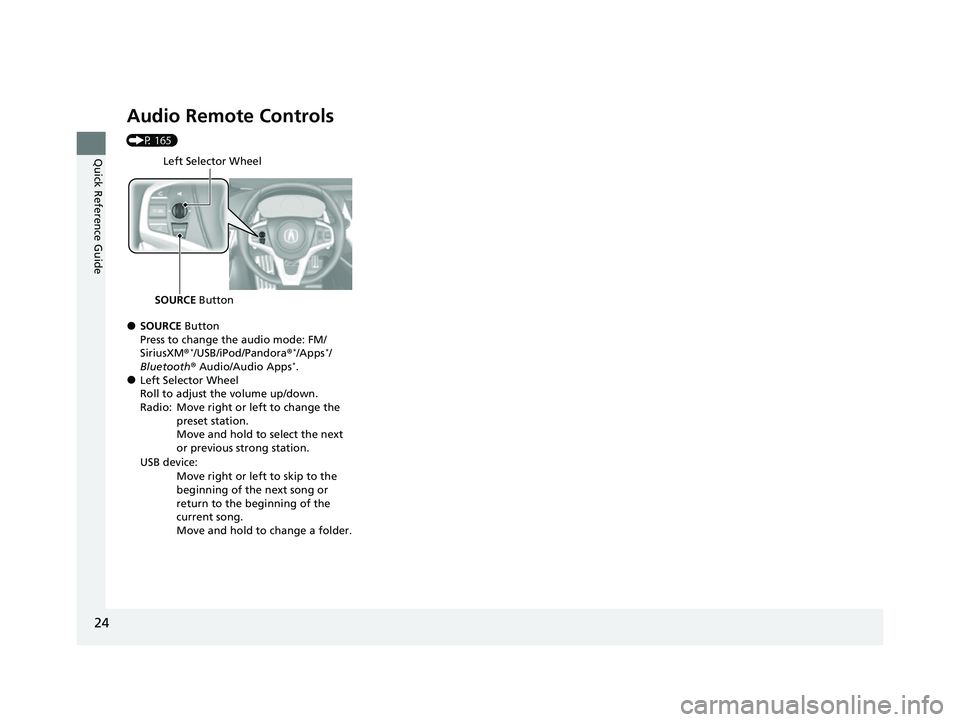
Audio Remote Controls
(P 165)
●SOURCE Button
Press to change the audio mode: FM/
SiriusXM ®
*/USB/iPod/Pandora ®*/Apps*/
Bluetooth ® Audio/Audio Apps*.●Left Selector Wheel
Roll to adjust the volume up/down.
Radio: Move right or left to change the
preset station.
Move and hold to select the next
or previous strong station.
USB device: Move right or left to skip to the
beginning of the next song or
return to the beginning of the
current song.
Move and hold to change a folder.
Left Selector Wheel
SOURCE Button
22 ACURA NSX PMC-31T6N6500.book 24 ページ 2021年9月28日 火曜日 午後4時7分
Page 106 of 492

uuGauges and Displays uDriver Information Interface
104
Instrument Panel
Shows the total number of miles or kilome ters that your vehicle has accumulated.
Shows the total number of miles or kilomete rs driven since the last reset. Meters A
and B can be used to measure two separate trips.
■Resetting a trip meter
To reset a trip meter, display it, then press and hold the TRIP button. The trip meter
is reset to 0.0.
When a trip meter is reset, the average fuel economy, the elapsed time, and the
average speed are also reset.
Shows the outside temperature in Fahr enheit (U.S.) or Celsius (Canada).
■Adjusting the outside temperature display
Adjust the temperature reading up to ± 5° F or ± 3°C if the temperature reading
seems incorrect.
■Odometer
■Trip Meter
■Outside Temperature
1 Trip Meter
Switch between trip meter A and trip meter B by
pressing the TRIP button.
1Outside Temperature
The temperature sensor is in the front bumper.
Road heat and exhaust from another vehicle can
affect the temperature reading when your vehicle
speed is less than 19 mph (30 km/h).
It may take several minutes for the display to be
updated after the temperature reading has stabilized.
Use the audio system’s customized features to
correct the temperature.
2 Customized Features P. 243
22 ACURA NSX PMC-31T6N6500.book 104 ページ 2021年9月28日 火曜日 午後4時7分
Page 107 of 492

Continued105
uuGauges and Displays uDriver Information Interface
Instrument Panel
Shows the estimated average fuel economy of each trip meter in mpg or l/100 km.
The display is updated at set intervals. Wh en a trip meter is reset, the average fuel
economy is also reset.
Shows the instant fuel economy as a bar graph in mpg or l/100 km.
Shows the estimated distance you can travel on the remaining power and fuel. This
distance is estimated from the fuel economy of your previous trips.
Shows the time elapsed since Trip A or Trip B was reset.
Shows the average speed in mph or km/h since Trip A or Trip B was reset.
■Average Fuel Economy
■Instant Fuel Economy
■Range
■Elapsed Time
■Average Speed
1Average Fuel Economy
You can change when to reset the average fuel
economy.
2 Customized Features P. 243
1Range
The displayed ra nge may change even when the
vehicle is stationary.
1 Elapsed Time
You can change when to reset the elapsed time.
2 Customized Features P. 243
1Average Speed
You can change when to reset the average speed.
2 Customized Features P. 243
22 ACURA NSX PMC-31T6N6500.book 105 ページ 2021年9月28日 火曜日 午後4時7分
Page 143 of 492

141
uuOperating the Switches Around the Steering Wheel uDriving Position Memory System
Continued
Controls
Driving Position Memory System
You can store two driver’s seat positions (except for power lumbar) and outside door
mirrors position with the driv ing position memory system.
When you unlock and open the driver’s door with a remote transmitter, or keyless
access system, door mirrors adjust to one of the two preset positions and the seat
adjusts to retracted positions of one of the two preset positions automatically.
The seat will move to the stored position when you set the power mode to
ACCESSORY.
When you enter the vehicle, the driver in formation interface briefly shows you which
remote transmitter you used to unlock the vehicle.
• DRIVER 1 transmitter is linked to memory button 1.
• DRIVER 2 transmitter is linked to memory button 2.
You can confirm DRIVER 1 and DRIVER 2 by removing the built-in key.
2Built-in Key P. 109
The driver’s seat moves rearward depending
on the set seating position once you
•Stop the vehicle.
• Put the transmission in
(P.
• Set the power mode to VEHICLE OFF.
• Open the driv er’s door.
Once the power mode is in the ACCESSORY
position, the driver’s seat moves to the
DRIVER 1 or 2 preset position.
1 Driving Position Memory System
Using the audio/informati on screen, you can disable
the automatic seat and d oor mirrors adjustment
function. 2 Customized Features P. 243
The driver’s seat easy exit feature:
•Will tilt slightly forward and then move rearward to
allow you to more easily exit the vehicle.
•Can be turned ON/OFF. 2Customized Features P. 243
System Operation
The system will not operate if:
•Either memory button is pressed while the seat or
the outside door mirr or are in motion.
•The seat or the outside door mirror position are
adjusted while in operation.
•Either of the memorized positions is set fully to the
rear.
The system may not recognize a key if:
•The key is in close proximity to a cell phone or other
wireless device.
•Both keys are in the vehicle at the same time.
•The Driving Position Memory System is disabled in
customized features.
•Opening driver’s door wi thout fully grabbing door
handle.
DRIVER 1 DRIVER 2
22 ACURA NSX PMC-31T6N6500.book 141 ページ 2021年9月28日 火曜日 午後4時7分
Page 167 of 492
165
uuAudio System uAudio Remote Controls
Features
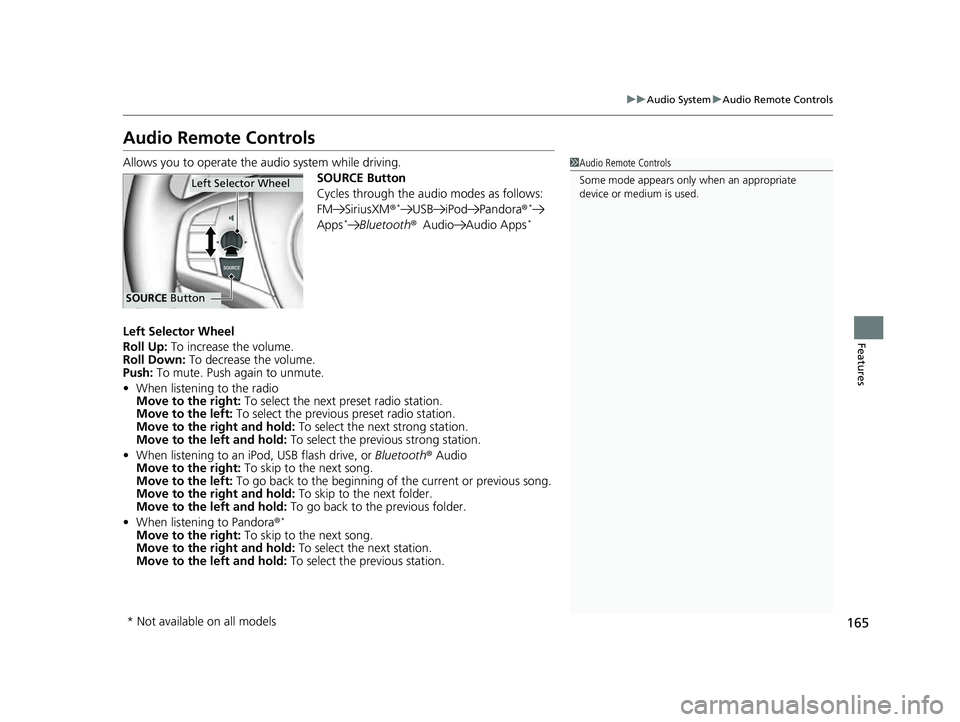
Audio Remote Controls
Allows you to operate the audio system while driving.
SOURCE Button
Cycles through the audio modes as follows:
FM SiriusXM®
*USB iPod Pandora ®*
Apps*Bluetooth®Audio Audio Apps*
Left Selector Wheel
Roll Up: To increase the volume.
Roll Down: To decrease the volume.
Push: To mute. Push again to unmute.
• When listening to the radio
Move to the right: To select the next preset radio station.
Move to the left: To select the previous preset radio station.
Move to the right and hold: To select the next strong station.
Move to the left and hold: To select the previous strong station.
• When listening to an iPod, USB flash drive, or Bluetooth® Audio
Move to the right: To skip to the next song.
Move to the left: To go back to the beginning of the current or previous song.
Move to the right and hold: To skip to the next folder.
Move to the left and hold: To go back to the previous folder.
• When listening to Pandora ®
*
Move to the right: To skip to the next song.
Move to the right and hold: To select the next station.
Move to the left and hold: To select the previous station.
1Audio Remote Controls
Some mode appears only when an appropriate
device or medium is used.
Left Selector Wheel
SOURCE Button
* Not available on all models
22 ACURA NSX PMC-31T6N6500.book 165 ページ 2021年9月28日 火曜日 午後4時7分
Page 170 of 492
168
uuAudio System Basic Operation uAudio/Information Screen
Features
■Phone
Displays the HFL information.
2 Bluetooth ® HandsFreeLink ® P. 269
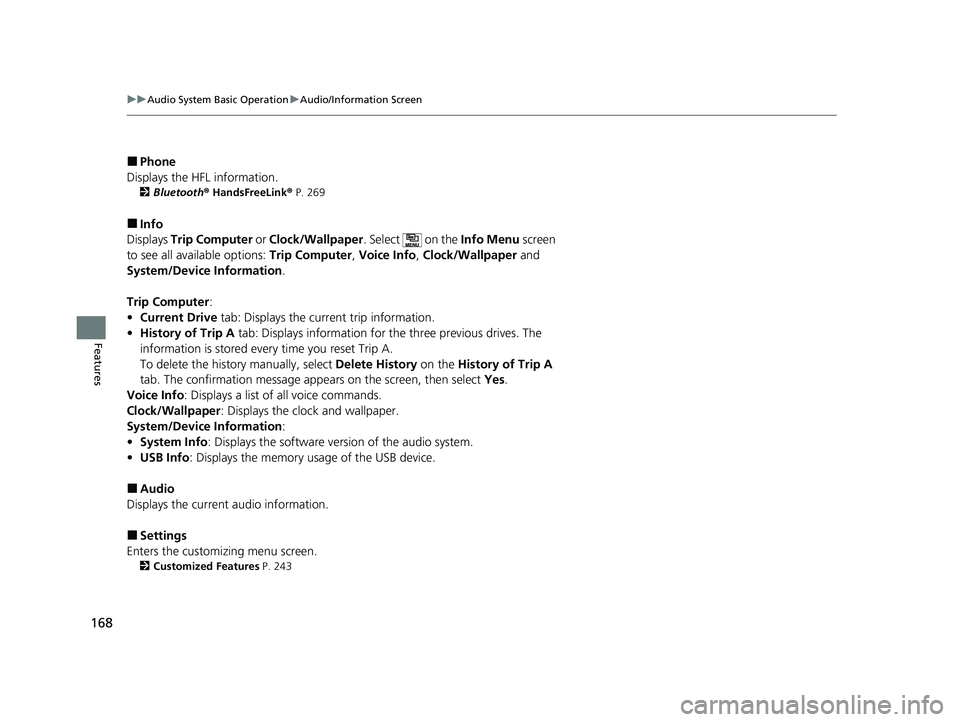
■Info
Displays Trip Computer or Clock/Wallpaper . Select on the Info Menu screen
to see all available options: Trip Computer, Voice Info , Clock/Wallpaper and
System/Device Information .
Trip Computer :
• Current Drive tab: Displays the current trip information.
• History of Trip A tab: Displays information for the three previous drives. The
information is stored every time you reset Trip A.
To delete the history manually, select Delete History on the History of Trip A
tab. The confirmation message ap pears on the screen, then select Yes.
Voice Info : Displays a list of all voice commands.
Clock/Wallpaper : Displays the clock and wallpaper.
System/Device Information :
• System Info: Displays the software version of the audio system.
• USB Info : Displays the memory usage of the USB device.
■Audio
Displays the current audio information.
■Settings
Enters the customiz ing menu screen.
2Customized Features P. 243
22 ACURA NSX PMC-31T6N6500.book 168 ページ 2021年9月28日 火曜日 午後4時7分
Page 176 of 492
uuAudio System Basic Operation uAudio/Information Screen
174
Features
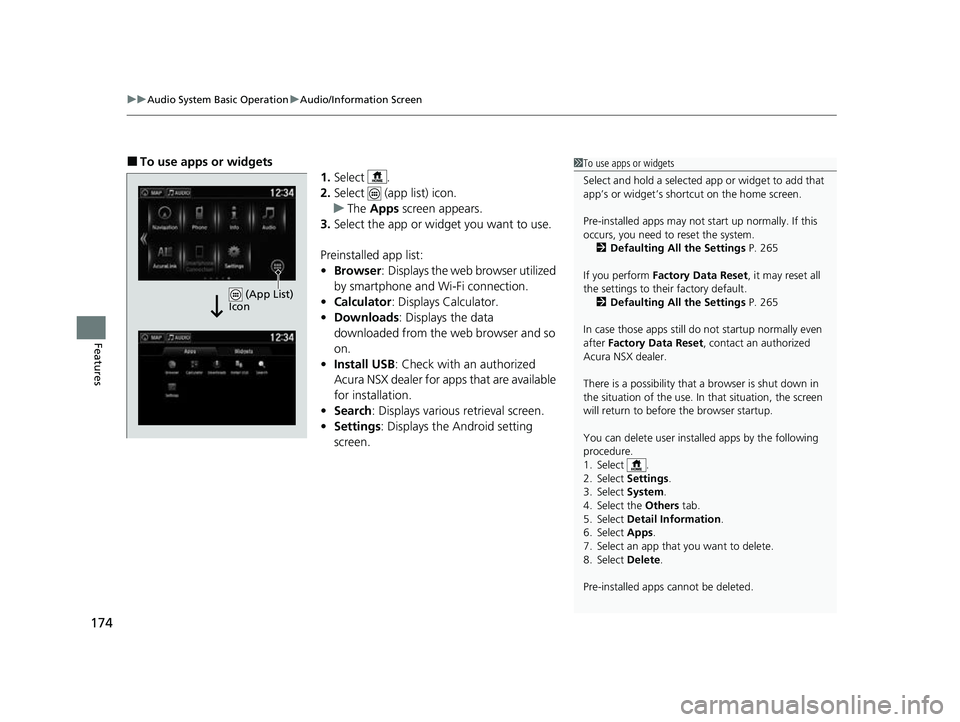
■To use apps or widgets
1.Select .
2. Select (app list) icon.
u The Apps screen appears.
3. Select the app or widget you want to use.
Preinstalled app list:
• Browser : Displays the web browser utilized
by smartphone and Wi-Fi connection.
• Calculator : Displays Calculator.
• Downloads : Displays the data
downloaded from the web browser and so
on.
• Install USB : Check with an authorized
Acura NSX dealer for apps that are available
for installation.
• Search : Displays various retrieval screen.
• Settings : Displays the Android setting
screen.1 To use apps or widgets
Select and hold a selected app or widget to add that
app’s or widget’s shortcut on the home screen.
Pre-installed apps may not start up normally. If this
occurs, you need to reset the system.
2 Defaulting All the Settings P. 265
If you perform Factory Data Reset , it may reset all
the settings to their factory default. 2 Defaulting All the Settings P. 265
In case those apps still do not startup normally even
after Factory Data Reset , contact an authorized
Acura NSX dealer.
There is a possibility that a browser is shut down in
the situation of the use. In that situation, the screen
will return to before the browser startup.
You can delete user installed apps by the following
procedure.
1. Select .
2. Select Settings .
3. Select System .
4. Select the Others tab.
5. Select Detail Information .
6. Select Apps .
7. Select an app that you want to delete.
8. Select Delete .
Pre-installed apps cannot be deleted.
(App List)
Icon
22 ACURA NSX PMC-31T6N6500.book 174 ページ 2021年9月28日 火曜日 午後4時7分
Page 188 of 492
186
uuAudio System Basic Operation uVoice Control Operation
Features
■Voice Help
You can see a list of the available
commands on the screen.
• Useful Commands
• Phone Commands
• Audio Commands
• On Screen Commands
• Music Search Commands
• General Commands
• Climate Control Commands
The system accepts th ese commands on the
voice portal top screen.
• Call
• Call
• What time is it?
• What is today’s date?
*1: Available only on U.S. models.
■Useful Commands
The system accepts these commands on the
dedicated screen for the voice recognition
of the phone.
• Call by Number
• Call by Name
• Call
• Call
The system accepts these commands on the
dedicated screen for the voice recognition
of the audio.
■Radio FM Commands
• Radio tune to <87.7-107.9> FM
• Radio tune to <87.7 -107.9> HD <1-8>
FM
• Radio FM preset <1-12>
■Radio SXM Commands*
•SXM channel <1-999>
• SXM channel
sports team name>
• Radio SXM preset <1-12>
■Phone Commands
■Audio Commands
■Pandora Commands*1
•Pandora play
■iPod Commands
• iPod play
• iPod play track <1-30>
• Music Search
• What album is this?
• What am I listening to?
■USB Commands
• USB play
• USB play track <1-30>
• Music Search
• What album is this?
• What am I listening to?
■Bluetooth ® Audio Commands
• Bluetooth ® Audio play
NOTE:
Bluetooth® Audio commands may not work
on some phones or Bluetooth ® Audio
devices.
* Not available on all models
22 ACURA NSX PMC-31T6N6500.book 186 ページ 2021年9月28日 火曜日 午後4時7分
Page 190 of 492
188
uuAudio System Basic Operation uPlaying FM Radio
Features
Playing FM Radio
*1:Some or all of the lists may not be displayed.
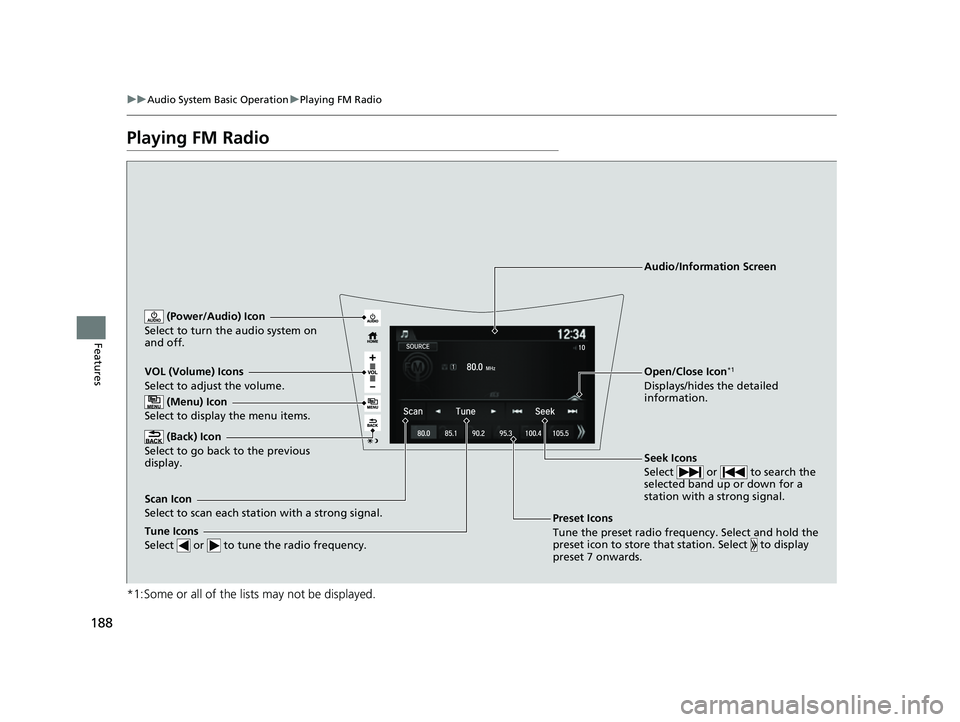
VOL (Volume) Icons
Select to adjust the volume.
(Back) Icon
Select to go back to the previous
display.
Seek Icons
Select or to search the
selected band up or down for a
station with a strong signal.
(Power/Audio) Icon
Select to turn th e audio system on
and off.
Open/Close Icon*1
Displays/hides the detailed
information.
(Menu) Icon
Select to display the menu items.
Tune Icons
Select or to tune the radio frequency.
Audio/Information Screen
Scan Icon
Select to scan each station with a strong signal. Preset Icons
Tune the preset radio frequency. Select and hold the
preset icon to store that station. Select to display
preset 7 onwards.
22 ACURA NSX PMC-31T6N6500.book 188 ページ 2021年9月28日 火曜日 午後4時7分
Page 191 of 492
Continued189
uuAudio System Basic Operation uPlaying FM Radio
Features
To store a station:
1. Tune to the selected station.
2. Select and hold the preset number for the station you want to store.
You can also store a preset station by the following procedure.
1. Tune to the selected station.
2. Select the open/close icon to display a list.
3. Select the Preset tab.
4. Select and hold the preset number for the station you want to store.
Lists the strongest stations on the selected band.
1. Select the open/close icon to display a list.
2. Select the Station List tab.
3. Select the station.
■Manual update
Updates your available st ation list at any time.
1. Select the open/close icon to display a list.
2. Select the Station List tab.
3. Select Refresh .
■Preset Memory
■Station List
1Preset Memory
The ST indicator appears on the display indicating
stereo FM broadcasts.
Switching the Audio Mode
Press the SOURCE button on the steering wheel or
select SOURCE on the screen.
2 Audio Remote Controls P. 165
You can store 12 FM stations into preset memory.
HD Radio Technology manufactured under license
from iBiquity Digi tal Corporation. U.S. and Foreign
Patents. HD Radio
TM and the HD, HD Radio, and
“Arc” logos are proprietary trademarks of iBiquity
Digital Corp.
22 ACURA NSX PMC-31T6N6500.book 189 ページ 2021年9月28日 火曜日 午後4時7分