turn signal ACURA NSX 2022 Owners Manual
[x] Cancel search | Manufacturer: ACURA, Model Year: 2022, Model line: NSX, Model: ACURA NSX 2022Pages: 492, PDF Size: 16.2 MB
Page 9 of 492
7
Quick Reference Guide
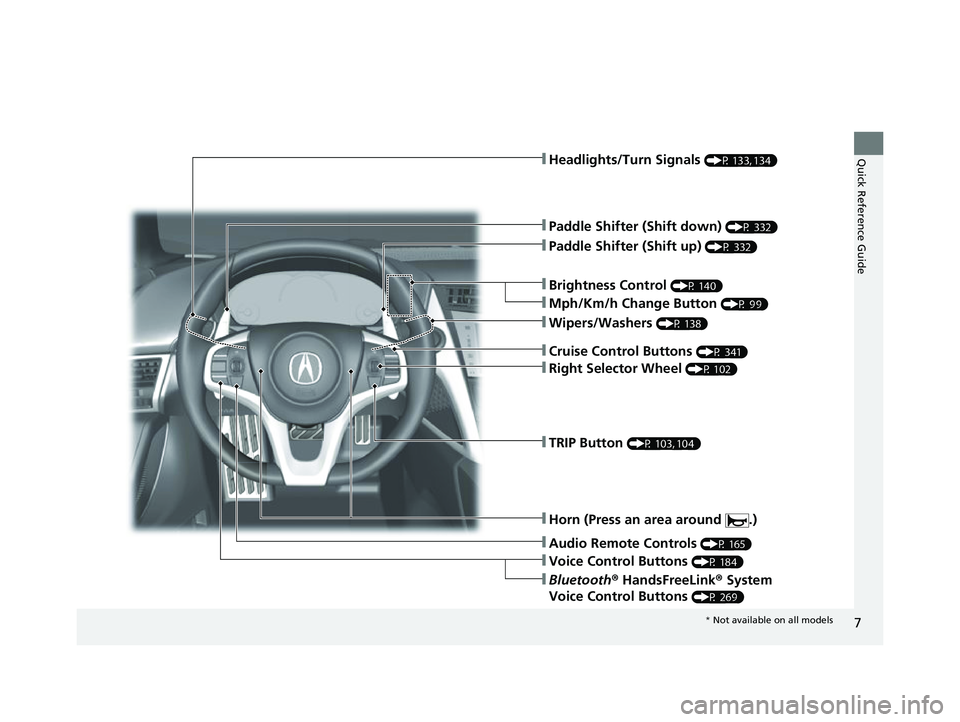
❚Wipers/Washers (P 138)
❚Headlights/Turn Signals (P 133, 134)
❚Paddle Shifter (Shift down) (P 332)
❚Paddle Shifter (Shift up) (P 332)
❚Horn (Press an area around .)
❚Voice Control Buttons (P 184)
❚Bluetooth® HandsFreeLink ® System
Voice Control Buttons
(P 269)
❚TRIP Button (P 103, 104)
❚Right Selector Wheel (P 102)
❚Audio Remote Controls (P 165)
❚Brightness Control (P 140)
❚Mph/Km/h Change Button (P 99)
❚Cruise Control Buttons (P 341)
* Not available on all models
22 ACURA NSX PMC-31T6N6500.book 7 ページ 2021年9月28日 火曜日 午後4時7分
Page 12 of 492

Visual Index
10
Quick Reference Guide❚Maintenance Under the Hood (P 385)
❚Windshield Wipers (P 138, 404)
❚Power Door Mirrors (P 145)
❚Headlights (P 134, 401)
❚How to Refuel (P 370)
❚High-Mount Brake Light (P 403)
❚Opening/Closing the Hatch (P 122)
❚Brake/Taillights (P 402)
❚Front Turn Signal/Parking Lights (P 133, 134, 401)
❚Back-Up Lights (P 402)
❚Rear License Plate Lights (P 403)
❚Hatch Release Button (P 122)
❚Door Lock/Unlock Control (P 111)
❚Front Side Marker Lights (P 134, 401)
❚Daytime Running Lights (P 137, 401)
❚Tires (P 407, 435)
❚Taillights (P 402)
❚Rear Turn Signal Lights (P 402)
❚Rear Side Marker Lights (P 402)
❚Multi-View Rear Camera (P 367)
22 ACURA NSX PMC-31T6N6500.book 10 ページ 2021年9月28日 火曜日 午後4時7分
Page 20 of 492
18
Quick Reference Guide
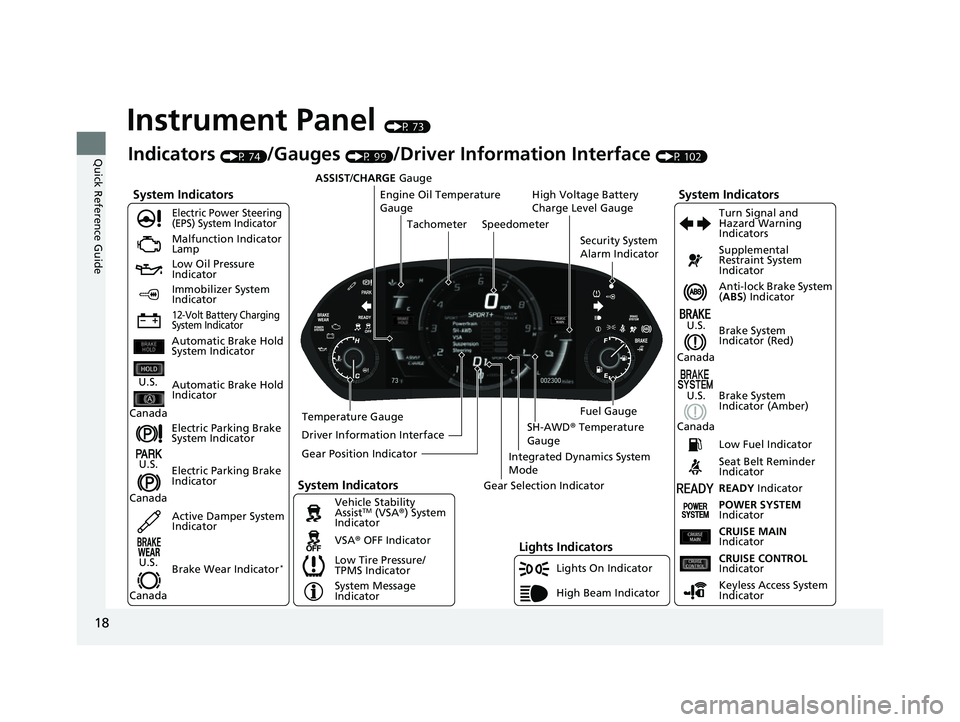
Instrument Panel (P 73)
System Indicators
Malfunction Indicator
Lamp
Low Oil Pressure
Indicator
12-Volt Battery Charging
System Indicator
Anti-lock Brake System
(ABS ) Indicator
Vehicle Stability
Assist
TM (VSA® ) System
Indicator
VSA ® OFF Indicator
Electric Power Steering
(EPS) System Indicator
Lights Indicators
Lights On Indicator
High Beam Indicator
Immobilizer System
Indicator
Seat Belt Reminder
Indicator
System Indicators
System Message
IndicatorBrake System
Indicator (Red) Supplemental
Restraint System
Indicator
Low Fuel Indicator
Indicators (P 74)/Gauges (P 99)/Driver Information Interface (P 102)
Low Tire Pressure/
TPMS Indicator Turn Signal and
Hazard Warning
Indicators
Keyless Access System
Indicator
High Voltage Battery
Charge Level Gauge
Security System
Alarm Indicator
Fuel Gauge
Tachometer
Driver Information Interface Speedometer
Gear Position Indicator Gear Selection Indicator
Electric Parking Brake
System Indicator
Electric Parking Brake
Indicator Automatic Brake Hold
System Indicator
Brake System
Indicator (Amber)
System Indicators
Automatic Brake Hold
IndicatorU.S.
Canada
U.S.
Canada
U.S.
Canada
U.S.
Canada
READY Indicator
POWER SYSTEM
Indicator
Temperature Gauge ASSIST/CHARGE
Gauge
U.S.
Canada Active Damper System
Indicator
Brake Wear Indicator
*
CRUISE MAIN
Indicator
CRUISE CONTROL
Indicator
Engine Oil Temperature
Gauge
Integrated Dynamics System
Mode
SH-AWD ® Temperature
Gauge
22 ACURA NSX PMC-31T6N6500.book 18 ページ 2021年9月28日 火曜日 午後4時7分
Page 21 of 492
19
Quick Reference Guide
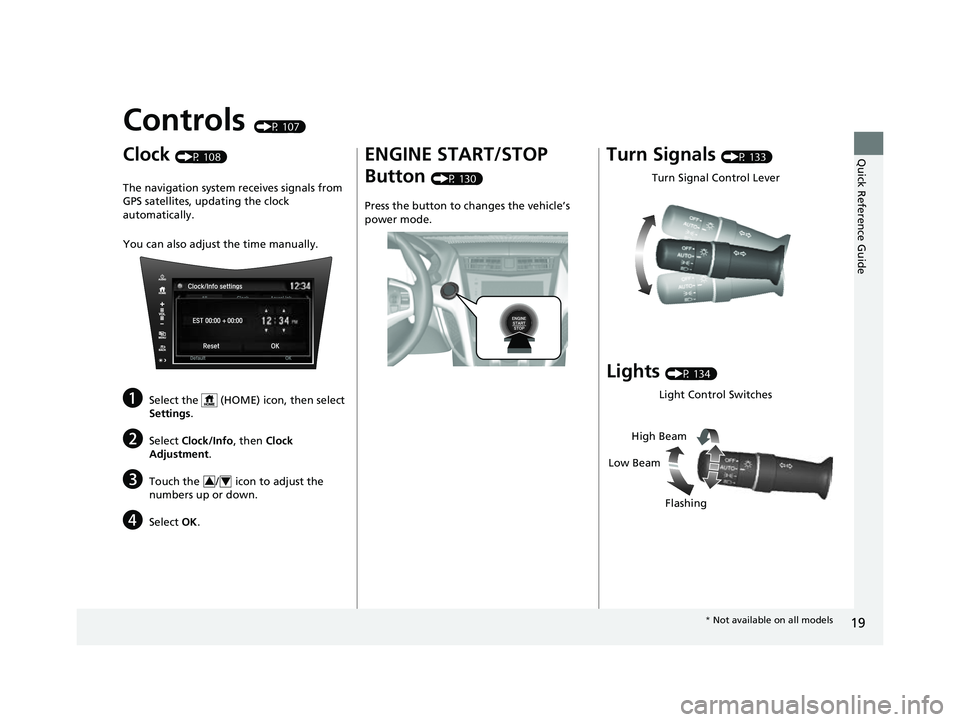
Controls (P 107)
Clock (P 108)
The navigation system receives signals from
GPS satellites, updating the clock
automatically.
You can also adjust the time manually.
aSelect the (HOME) icon, then select
Settings.
bSelect Clock/Info , then Clock
Adjustment .
cTouch the / icon to adjust the
numbers up or down.
dSelect OK.
34
ENGINE START/STOP
Button
(P 130)
Press the button to ch anges the vehicle’s
power mode.
Turn Signals (P 133)
Lights (P 134)
Turn Signal Control Lever
Light Control Switches
Low Beam High Beam
Flashing
* Not available on all models
22 ACURA NSX PMC-31T6N6500.book 19 ページ 2021年9月28日 火曜日 午後4時7分
Page 48 of 492

46
uuAirbags uAirbag System Components
Safe Driving
The front, driver’s knee, side, and side
curtain airbags are deployed according to
the direction and severity of impact. Both
side curtain airbags are deployed in a
rollover. The airbag system includes:
aTwo SRS (Supplemental Restraint System)
front airbags. The driver’s airbag is stored
in the center of the steering wheel; the
passenger’s airbag is stored in the
dashboard. Both are marked SRS
AIRBAG.
bDriver’s knee airbag. The knee airbag is
stored under the steering column. It is
marked SRS AIRBAG.
cTwo side airbags, one for the driver and
one for the passenger. The airbags are
stored in the outer edges of the seat-
backs. Both are marked SIDE AIRBAG .
dTwo side curtain airbags, one for each
side of the vehicle. The airbags are stored
in the ceiling, above the side windows.
The front and rear pillars are marked
SIDE CURTAIN AIRBAG.
eAn electronic control unit that, when the
power system is on, continually monitors
information about the various impact
sensors, seat and buckle sensors, rollover
sensor, airbag activators, seat belt
tensioners, and other vehicle
information. During a crash event the
unit can record such information.
fAutomatic seat belt tensioners. In
addition, the driver’s and passenger’s
seat belt buckles incorporate sensors that
detect whether or not the belts are
fastened.
gWeight sensors in the passenger’s seat.
The sensors are used for occupant
classification to activate or deactivate the
passenger’s airbag.
hImpact sensors that can detect a
moderate-to-severe front or side impact.
iAn indicator on the dashboard that alerts
you that the passenger’s front airbag has
been turned off.
jAn indicator on the instrument panel that
alerts you to a possib le problem with your
airbag system or seat belt tensioners.
kA rollover sensor that can detect if your
vehicle is about to roll over and signal the
control unit to deploy both side curtain
airbags.
22 ACURA NSX PMC-31T6N6500.book 46 ページ 2021年9月28日 火曜日 午後4時7分
Page 87 of 492
85
uuIndicators u
Continued
Instrument Panel
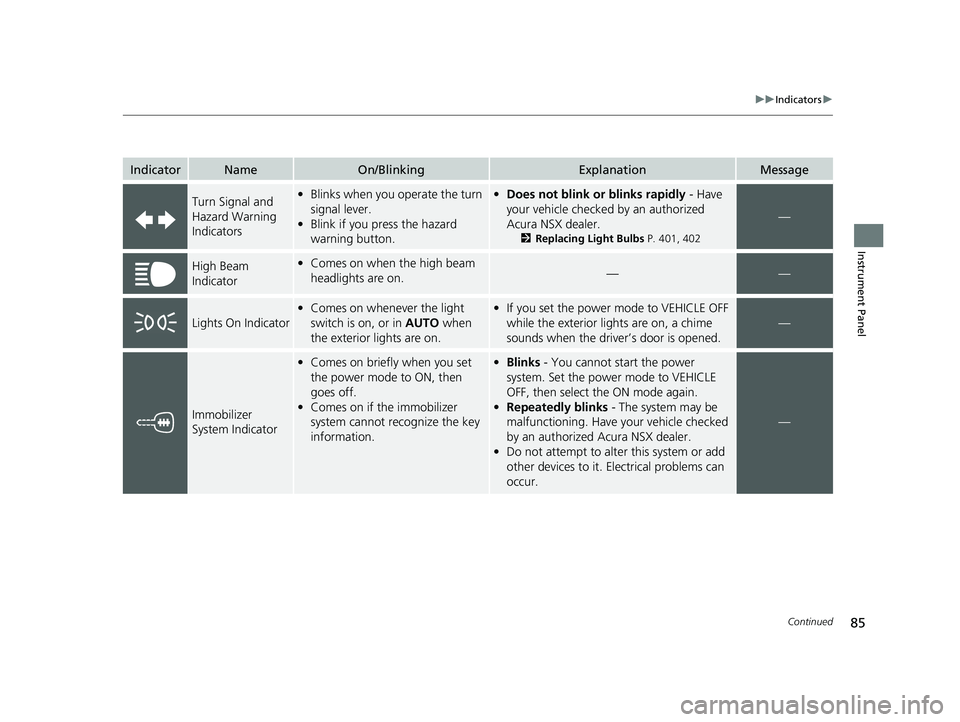
IndicatorNameOn/BlinkingExplanationMessage
Turn Signal and
Hazard Warning
Indicators•Blinks when you operate the turn
signal lever.
• Blink if you press the hazard
warning button.•Does not blink or blinks rapidly - Have
your vehicle checked by an authorized
Acura NSX dealer.
2 Replacing Light Bulbs P. 401, 402
—
High Beam
Indicator•Comes on when the high beam
headlights are on.——
Lights On Indicator
•Comes on whenever the light
switch is on, or in AUTO when
the exterior lights are on.• If you set the power mode to VEHICLE OFF
while the exterior lights are on, a chime
sounds when the driver’s door is opened.
—
Immobilizer
System Indicator
•Comes on briefly when you set
the power mode to ON, then
goes off.
• Comes on if the immobilizer
system cannot recognize the key
information.•Blinks - You cannot start the power
system. Set the power mode to VEHICLE
OFF, then select the ON mode again.
• Repeatedly blinks - The system may be
malfunctioning. Have your vehicle checked
by an authorized Acura NSX dealer.
• Do not attempt to alter this system or add
other devices to it. Electrical problems can
occur.
—
22 ACURA NSX PMC-31T6N6500.book 85 ページ 2021年9月28日 火曜日 午後4時7分
Page 109 of 492
107
Controls
This chapter explains how to operate the various controls necessary for driving.
Clock.................................................. 108
Locking and Unlocking the Doors Key .................................................. 109
Low Keyless Access Remote Signal Strength ......................................... 110
Locking/Unlocking the Doors from the Outside .......................................... 111
Locking/Unlocking the Doors from the Inside ............................................. 118
Auto Door Locking/Unlocking .......... 121
Opening and Closing the Hatch....... 122
Security System ................................ 125 Immobilizer System .......................... 125
Security System Alarm...................... 125
Opening and Closing the Windows.... 128
Operating the Switches Around the
Steering Wheel ENGINE START/STOP Button............. 130
Turn Signals ..................................... 133
Light Switches.................................. 134
Daytime Running Lights ................... 137
Wipers and Washers ........................ 138
Rear Defogger/Heated Door Mirror Button ....139
Brightness Control ........................... 140 Driving Position Memory System ...... 141
Adjusting the Steering Wheel .......... 143
Adjusting the Mirrors ....................... 144
Interior Rearview Mirror ................... 144
Power Door Mirrors ......................... 145
Adjusting the Seats .......................... 146
Interior Convenience Items .............. 150
Climate Control System ................... 156
Using Automatic Climate Control .... 156
Automatic Climate Control Sensors......160
22 ACURA NSX PMC-31T6N6500.book 107 ページ 2021年9月28日 火曜日 午後4時7分
Page 135 of 492
133
uuOperating the Switches Around the Steering Wheel uTurn Signals
Controls
Turn Signals
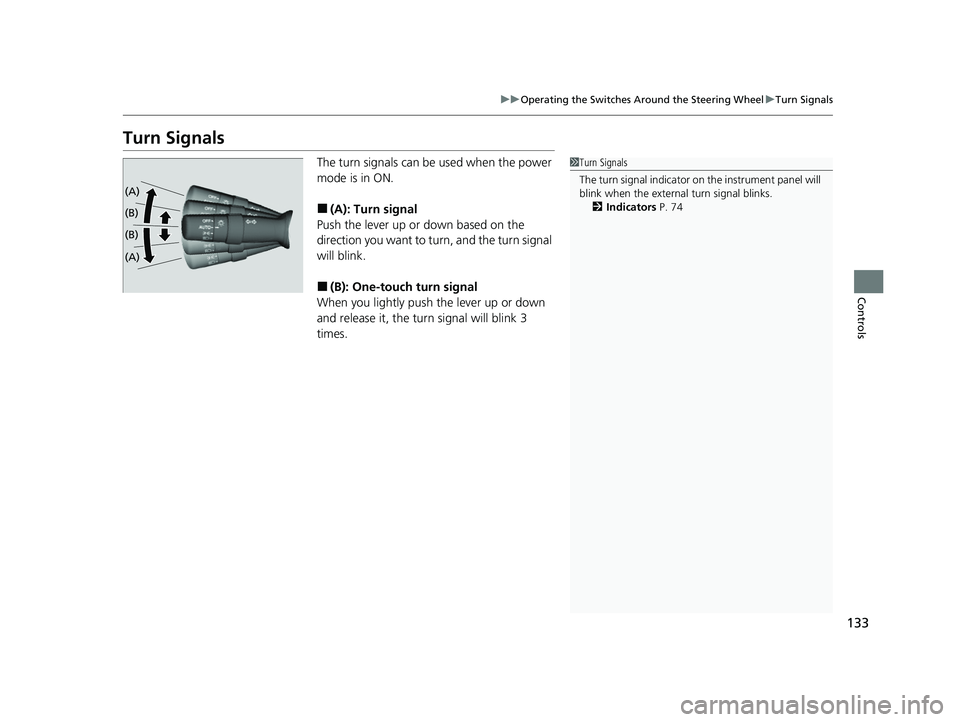
The turn signals can be used when the power
mode is in ON.
■(A): Turn signal
Push the lever up or down based on the
direction you want to turn, and the turn signal
will blink.
■(B): One-touc h turn signal
When you lightly push the lever up or down
and release it, the turn signal will blink 3
times.
1 Turn Signals
The turn signal indicator on the instrument panel will
blink when the external turn signal blinks.
2 Indicators P. 74
(A)
(B)
(B)
(A)
22 ACURA NSX PMC-31T6N6500.book 133 ページ 2021年9月28日 火曜日 午後4時7分
Page 190 of 492
188
uuAudio System Basic Operation uPlaying FM Radio
Features
Playing FM Radio
*1:Some or all of the lists may not be displayed.
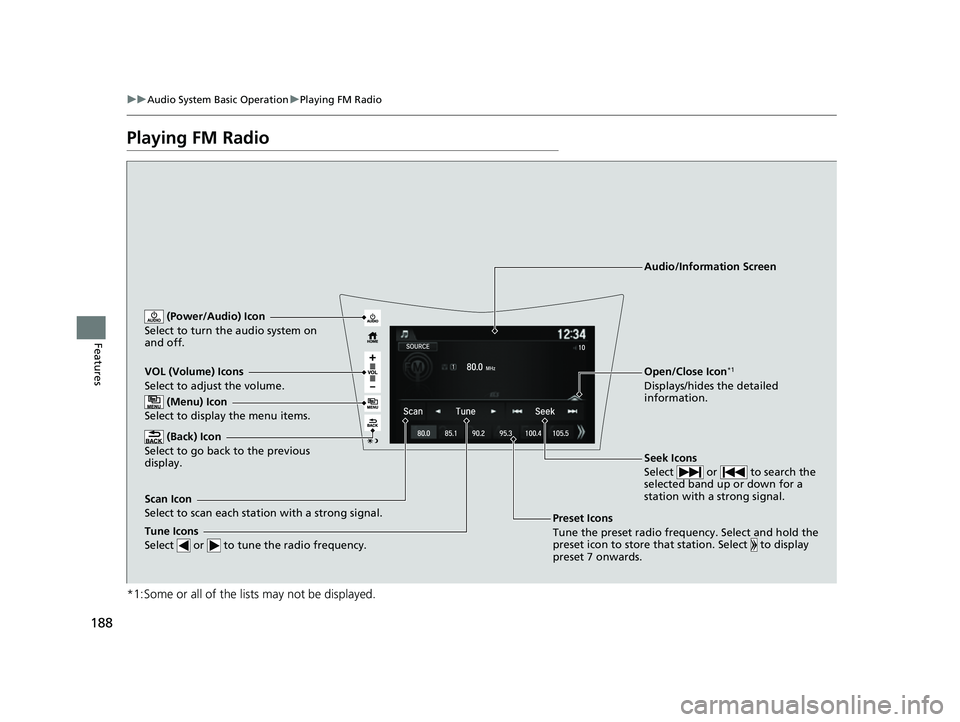
VOL (Volume) Icons
Select to adjust the volume.
(Back) Icon
Select to go back to the previous
display.
Seek Icons
Select or to search the
selected band up or down for a
station with a strong signal.
(Power/Audio) Icon
Select to turn th e audio system on
and off.
Open/Close Icon*1
Displays/hides the detailed
information.
(Menu) Icon
Select to display the menu items.
Tune Icons
Select or to tune the radio frequency.
Audio/Information Screen
Scan Icon
Select to scan each station with a strong signal. Preset Icons
Tune the preset radio frequency. Select and hold the
preset icon to store that station. Select to display
preset 7 onwards.
22 ACURA NSX PMC-31T6N6500.book 188 ページ 2021年9月28日 火曜日 午後4時7分
Page 193 of 492
191
uuAudio System Basic Operation uPlaying FM Radio
Features
Provides text data information related to your selected RDS-capable FM station.
■To find an RDS station from Station List
1. Select the open/close icon to display a list while listening to an FM station.
2. Select the Station List tab.
3. Select the station.
■Manual update
Updates your available st ation list at any time.
1. Select the open/close icon to display a list while listening to an FM station.
2. Select the Station List tab.
3. Select Refresh .
■Radio text
Displays the radio text information of the selected RDS station.
1. Select .
2. Select View Radio Text .
■Radio Data System (RDS)1Radio Data System (RDS)
When you select an RDS-capable FM station, the RDS
automatically turns on, and the frequency display
changes to the station name. However, when the
signals of that station become weak, the display
changes from the statio n name to the frequency.
22 ACURA NSX PMC-31T6N6500.book 191 ページ 2021年9月28日 火曜日 午後4時7分