ignition ACURA RDX 2010 Repair Manual
[x] Cancel search | Manufacturer: ACURA, Model Year: 2010, Model line: RDX, Model: ACURA RDX 2010Pages: 514, PDF Size: 30.21 MB
Page 298 of 514

The security system helps to protect
your vehicle and valuables from
theft. The horn sounds and a
combination of headlights, parking
lights, side marker lights, and
taillights flashes if someone attempts
to break into your vehicle or remove
the radio. This alarm continues for 2
minutes, then the system resets. To
reset an alarming system before the
2 minutes have elapsed, unlock the
driver's door with the key or the
remote transmitter.
The security system automatically
sets 15 seconds after you lock the
doors, hood, and the tailgate. For the
system to activate, you must lock the
doors and the tailgate from the
outside with the key, driver's lock
tab, door lock master switch, or
remote transmitter. The security
system indicator on the instrument
panel starts blinking immediately to
show you the system is setting itself.
Once the security system is set,
opening any door, the tailgate, or the
hood without using the key or the
remote transmitter, will cause the
alarm to activate. It will also activate
if the audio unit is removed from the
dashboard or the wiring is cut.The alarm will also be activated if a
passenger inside the locked vehicle
turns the ignition switch on.
The security system will not set if the
hood, tailgate, or any door is not fully
closed. Before you leave the vehicle,
make sure the doors, tailgate, and
hood are securely closed.
NOTE:
To see if the system is set
after you exit the vehicle, press the
LOCK button on the remote
transmitter within 5 seconds. If the
system is set, a beep will sound.
Do not attempt to alter this system or
add other devices to it.
SECURITY SYSTEM INDICATOR
Security System29409/07/07 15:02:04 10 ACURA RDX MMC North America Owner's M 50 31STK630 enu
ProCarManuals.com
2010 RDX
Page 299 of 514
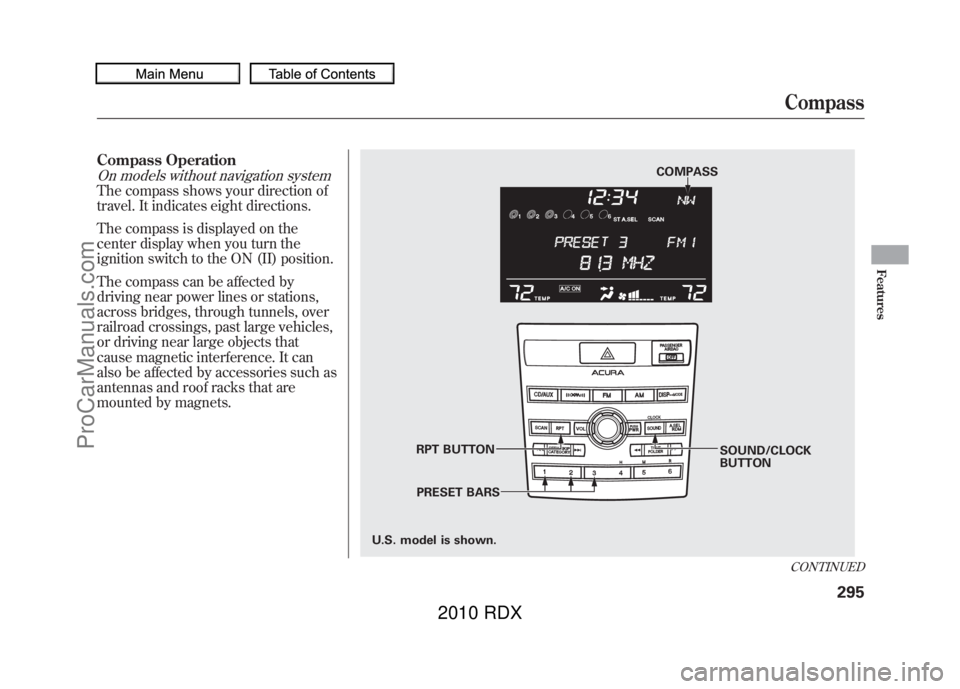
Compass OperationOn models without navigation systemThe compass shows your direction of
travel. It indicates eight directions.
The compass is displayed on the
center display when you turn the
ignition switch to the ON (II) position.
The compass can be affected by
driving near power lines or stations,
across bridges, through tunnels, over
railroad crossings, past large vehicles,
or driving near large objects that
cause magnetic interference. It can
also be affected by accessories such as
antennas and roof racks that are
mounted by magnets.
COMPASSSOUND/CLOCK
BUTTON
RPT BUTTON
PRESET BARS
U.S. model is shown.
CONTINUEDCompass
295
Features
09/07/07 15:02:04 10 ACURA RDX MMC North America Owner's M 50 31STK630 enu
ProCarManuals.com
2010 RDX
Page 314 of 514

How to Use HFL
The ignition switch must be in the ACCESSORY (I) or ON (II) position.
‘‘Pair ’’
‘‘ Phone Setup ’’
Press HFL
Talk button ‘‘
Edit ’’
‘‘ Delete ’’
‘‘ List ’’
‘‘ Status ’’
‘‘ Next Phone ’’
‘‘ Set Pairing
Code ’’
‘‘ Call ’’or ‘‘Dial ’’ ‘‘ 123-555- # # # # ’’
‘‘ Jim Smith ’’Pair a phone to the system (See page
313)
Edit the name of a paired phone (See page 314)
Delete a paired phone from the system (See page 314)
Hear a list of all phones paired to the system (See page 314)
Hear which paired phone is currently linked to the system
(See page 315)
Search for another previously paired phone to link to (See page 315)
Set the pairing code to a ‘‘Fixed ’’or ‘‘Random ’’number (See page 315)
Press and release the HFL Talk button each time you give a command. Enter desired phone number (See page
316)
Once a phonebook entry is stored, you can say a name here.
(See page 316)
Bluetooth
®HandsFreeLink
®
31009/07/07 15:02:04 10 ACURA RDX MMC North America Owner's M 50 31STK630 enu
ProCarManuals.com
2010 RDX
Page 320 of 514

Making a Call
You can make calls using any phone
number or a name in the HFL
phonebook. You can also redial the
last number called.
HFL uses a Class 2 Bluetooth, which
means, the maximum range between
your phone and vehicle is 30 feet (10
meters).
During a call, HFL allows you to talk
up to 30 minutes after you remove
the key from the ignition switch.
However, this may weaken the
vehicle’s battery.
To make a call using a phone
number:Press and release the HFL Talk
button before a command.
1. Say ‘‘Call ’’or ‘‘Dial .’’
2. Follow the HFL prompts and say the phone number you want to
dial.
3. Follow the HFL prompts to confirm the number and say ‘‘Call ’’
or ‘‘Dial .’’
Once connected, you will hear the
person you called through the audio
speakers.
To make a call using a name in the HFL phonebook:Press and release the HFL Talk
button before a command.
1. Say ‘‘Call ’’or ‘‘Dial .’’
2. Follow the HFL prompts and say the name stored in the HFL
phonebook that you want to call.
3. Follow the HFL prompts to confirm the name and make the
call.
Bluetooth
®HandsFreeLink
®
31609/07/07 15:02:04 10 ACURA RDX MMC North America Owner's M 50 31STK630 enu
ProCarManuals.com
2010 RDX
Page 333 of 514
To change your security pass code:Press and release the HFL Talk
button before a command.1. Say ‘‘System setup .’’
2. Say ‘‘Change passcode ’’after the
prompts.
3. Follow the HFL prompts and say the new 4-digit passcode.
4. Follow the HFL prompts to confirm the number.
To select either a ring tone or aprompt as the incoming call
notification
ꭧ:
Press and release the HFL Talk
button before a command.
1. Say ‘‘System setup .’’
2. Say ‘‘Call notification ’’after the
prompts.
3. Follow the HFL prompts and say ‘‘Ring tone ’’or ‘‘Prompt. ’’You can
also say ‘‘Off ’’for no audible
incoming call notification.
ꭧ : The default setting is a ring tone.
To activate or deactivate the auto
transfer function:If you get into the vehicle while you
are on the phone, the call can be
automatically transferred to HFL
with the ignition switch in the
ACCESSORY (I) position.
1. Say ‘‘System setup .’’
2. Say ‘‘Auto transfer ’’after the
prompts.
3. HFL will let you know if auto transfer is on or off, depending on
the previous setting. Follow the
HFL prompts to change the
setting.
CONTINUED
Bluetooth
®HandsFreeLink
®
329
Features
09/07/07 15:02:04 10 ACURA RDX MMC North America Owner's M 50 31STK630 enu
ProCarManuals.com
2010 RDX
Page 352 of 514
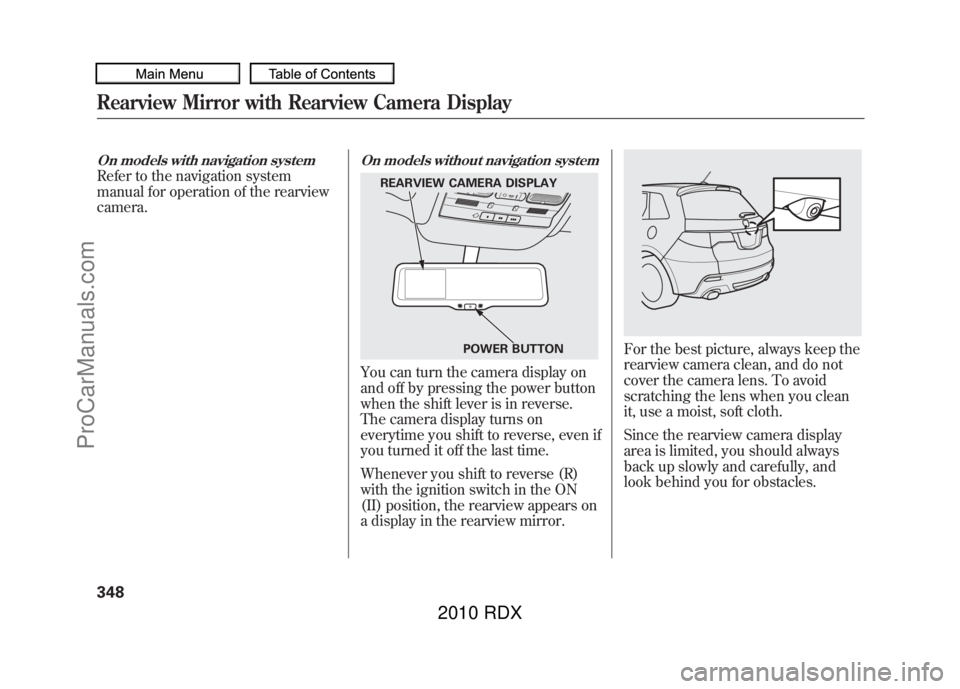
On models with navigation systemRefer to the navigation system
manual for operation of the rearview
camera.
On models without navigation systemYou can turn the camera display on
and off by pressing the power button
when the shift lever is in reverse.
The camera display turns on
everytime you shift to reverse, even if
you turned it off the last time.
Whenever you shift to reverse (R)
with the ignition switch in the ON
(II) position, the rearview appears on
a display in the rearview mirror.
For the best picture, always keep the
rearview camera clean, and do not
cover the camera lens. To avoid
scratching the lens when you clean
it, use a moist, soft cloth.
Since the rearview camera display
area is limited, you should always
back up slowly and carefully, and
look behind you for obstacles.
REARVIEW CAMERA DISPLAYPOWER BUTTON
Rearview Mirror with Rearview Camera Display34809/07/07 15:02:04 10 ACURA RDX MMC North America Owner's M 50 31STK630 enu
ProCarManuals.com
2010 RDX
Page 378 of 514
Your vehicle's starting system has an
auto control mode. When you turn
the ignition switch to the START (III)
position, this feature keeps the
engine's starter motor running until
the engine starts. Follow these
instructions to start the engine:1. Apply the parking brake.
2. In cold weather, turn off all
electrical accessories to reduce the
drain on the battery.
3. Make sure the shift lever is in Park. Press on the brake pedal.
4. Without touching the accelerator pedal, turn the ignition key to the
START (III) position. Do not hold
the key in the START (III) position
for more than 15 seconds at a time.
If the engine does not start right
away, pause for at least 10 seconds
before trying again.
The immobilizer system protects your
vehicle from theft. If an improperly
coded key (or other device) is used, the
engine's fuel system is disabled. For
more information, see page 124.The engine is harder to start in cold
weather. Also, the thinner air found at
altitudes above 8,000 feet (2,400
meters) adds to this problem.
Starting the Engine37409/07/07 15:02:04 10 ACURA RDX MMC North America Owner's M 50 31STK630 enu
ProCarManuals.com
2010 RDX
Page 379 of 514
Your vehicle has an electric vacuum
pump located in the engine
compartment. When you drive in
cold weather or thinner air at high
altitude, the electric vacuum pump
operates more frequently after the
engine is started.
When the electric vacuum pump is in
operation, it makes some mechanical
noises come from the engine
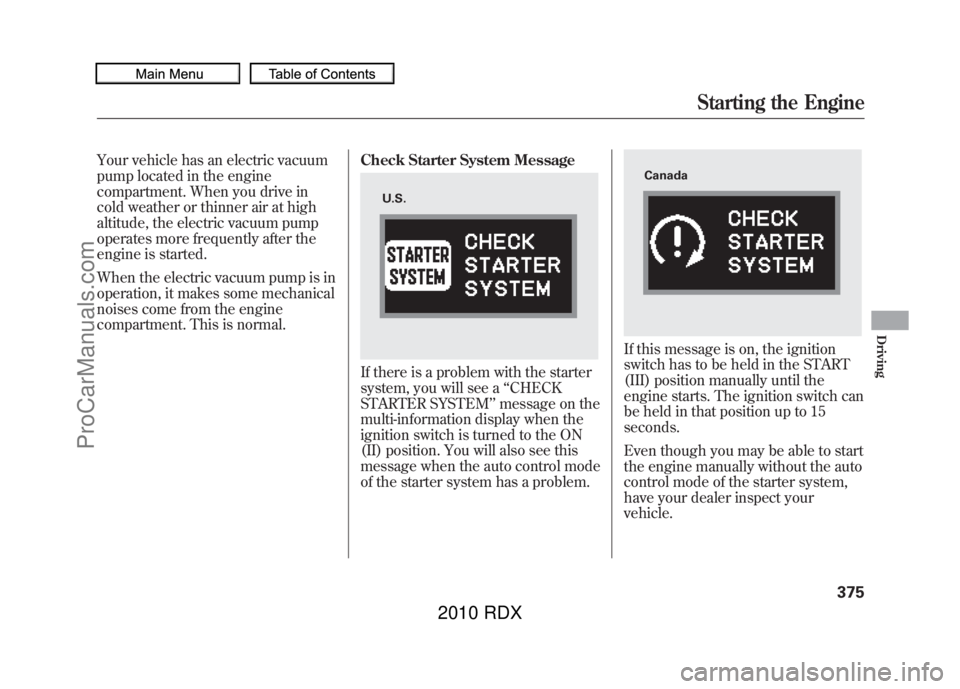
compartment. This is normal.Check Starter System Message
If there is a problem with the starter
system, you will see a
‘‘CHECK
STARTER SYSTEM ’’message on the
multi-information display when the
ignition switch is turned to the ON
(II) position. You will also see this
message when the auto control mode
of the starter system has a problem.
If this message is on, the ignition
switch has to be held in the START
(III) position manually until the
engine starts. The ignition switch can
be held in that position up to 15
seconds.
Even though you may be able to start
the engine manually without the auto
control mode of the starter system,
have your dealer inspect your
vehicle.
U.S.
Canada
Starting the Engine
375
Driving
09/07/07 15:02:04 10 ACURA RDX MMC North America Owner's M 50 31STK630 enu
ProCarManuals.com
2010 RDX
Page 380 of 514
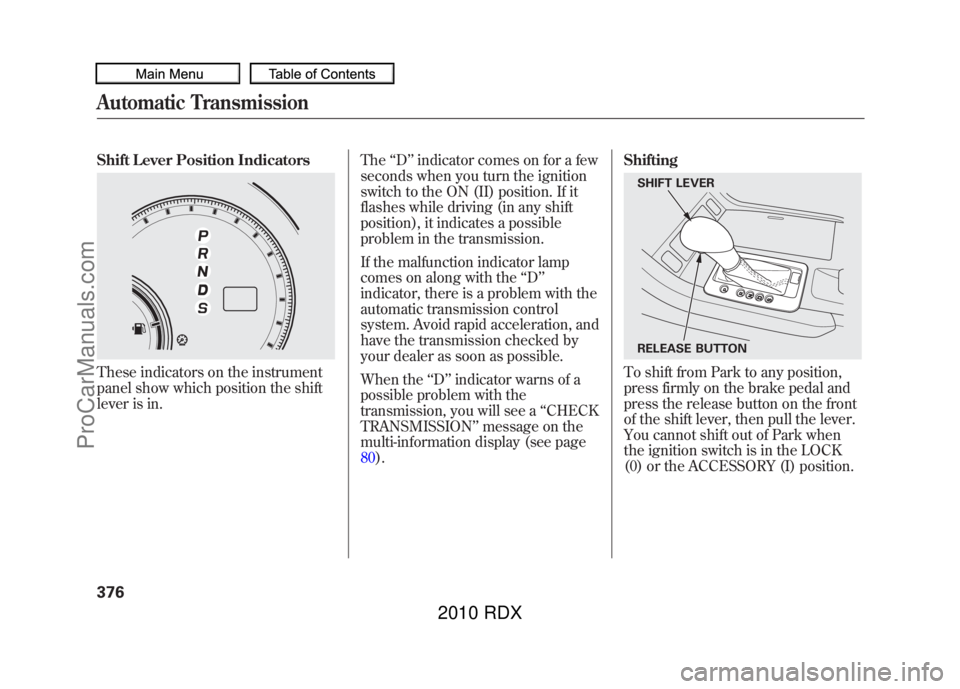
Shift Lever Position IndicatorsThese indicators on the instrument
panel show which position the shift
lever is in.The
‘‘D ’’indicator comes on for a few
seconds when you turn the ignition
switch to the ON (II) position. If it
flashes while driving (in any shift
position), it indicates a possible
problem in the transmission.
If the malfunction indicator lamp
comes on along with the ‘‘D ’’
indicator, there is a problem with the
automatic transmission control
system. Avoid rapid acceleration, and
have the transmission checked by
your dealer as soon as possible.
When the ‘‘D ’’indicator warns of a
possible problem with the
transmission, you will see a ‘‘CHECK
TRANSMISSION ’’message on the
multi-information display (see page
80). Shifting
To shift from Park to any position,
press firmly on the brake pedal and
press the release button on the front
of the shift lever, then pull the lever.
You cannot shift out of Park when
the ignition switch is in the LOCK
(0) or the ACCESSORY (I) position.SHIFT LEVER
RELEASE BUTTON
Automatic Transmission37609/07/07 15:02:04 10 ACURA RDX MMC North America Owner's M 50 31STK630 enu
ProCarManuals.com
2010 RDX
Page 381 of 514

To shift from:Do this:
PtoR Press the brake pedal, and
press the shift lever release
button.
RtoP
NtoR DtoS Press the shift lever release
button.
StoD
DtoN
NtoD
RtoN Move the shift lever.
Park (P)
-This position
mechanically locks the transmission.
Use Park whenever you are turning
off or starting the engine. To shift out
of Park, you must press on the brake
pedal and have your foot off the
accelerator pedal. Press the release
button on the front of the shift lever
to move it.
If you have done all of the above and
still cannot move the lever out of
Park, see Shift Lock Release on
page 379.
To avoid transmission damage, come
to a complete stop before shifting
into Park. You must also press the
release button to shift into Park. The
shift lever must be in Park before
you can remove the key from the
ignition switch. Reverse (R)
-Press the brake
pedal and press the release button on
the front of the shift lever to shift
from Park to reverse. To shift from
reverse to neutral, come to a
complete stop, and then shift. Press
the release button before shifting
into reverse from neutral.
Neutral (N) -Use neutral if you
need to restart a stalled engine, or if
it is necessary to stop briefly with the
engine idling. Shift to the Park
position if you need to leave your
vehicle for any reason. Press on the
brake pedal when you are moving
the shift lever from neutral to
another gear.
CONTINUED
Automatic Transmission
377
Driving
09/07/07 15:02:04 10 ACURA RDX MMC North America Owner's M 50 31STK630 enu
ProCarManuals.com
2010 RDX