ignition ACURA RDX 2010 Workshop Manual
[x] Cancel search | Manufacturer: ACURA, Model Year: 2010, Model line: RDX, Model: ACURA RDX 2010Pages: 514, PDF Size: 30.21 MB
Page 217 of 514

Your vehicle is equipped with aBluetooth
®Audio system, which
allows you to listen to streaming
audio from your
Bluetooth
®Audio
compatible phone. This function is
only available on
Bluetooth
®Audio
Compatible phones that are paired
and linked to the vehicle's
Bluetooth
®HandsFreeLink
®(HFL)
system (see page 313).
Not all Bluetooth-enabled phones
with streaming audio capabilities are
compatible with the system. You can
find an approved phone by visiting
www.acura.com/handsfreelink,
or by
calling the HandsFreeLink
®
consumer support at 1-888-528-7876.
In Canada, visit
www.acura.ca,
or call
1-888-9-ACURA-9.
NOTE: In some states, it may be
illegal to perform some data device
functions while driving. To Play
Bluetooth
®Audio Files
Make sure that your phone is paired
and linked to the HFL.
Press the DISC/AUX button
ꭧwith
the ignition switch in the
ACCESSORY (I) or ON (II) position.
When the phone is recognaized, you
will see the
Bluetooth
®Audio
message and indicator on the center
display, and the system begins to
play. If more than one phone is paired to
the HFL system, there will be delay
before the system begins to play.
To begin to play the audio files, you
may need to operate your phone. If
so, follow the phone maker's
operating instructions.
ꭧ
: If an iPod, USB flash memory
device, or audio unit connected
to the auxiliary input jack was
selected at the last mode, you
will see iPod, USB, or AUX in
the center display. Push the
DISC/AUX button again to play
audio files from your
Bluetooth
®Audio phone.
CONTINUED
Bluetooth
®Audio System (Models without navigation system)
213
Features
09/07/07 15:02:04 10 ACURA RDX MMC North America Owner's M 50 31STK630 enu
ProCarManuals.com
2010 RDX
Page 223 of 514
To Play the Radio
The ignition switch must be in the
ACCESSORY (I) or the ON (II)
position. Press the AUDIO button to
view the audio control display. Turn
the system on by pressing the PWR/
VOL knob or the AM/FM button.
Adjust the volume by turning the
PWR/VOL knob.The band and frequency the radio
was last tuned to are shown on the
upper display. To change bands,
press the AM/FM button. You can
also change bands with the interface
dial. Press the AUDIO button to view
the audio control display and the
band changes to FM1, FM2, or AM
each time you push the selector up.
On the FM bands,
‘‘STEREO ’’will be
shown on the audio control display.
‘‘ ST’’ will also appear on the upper
display if the station is broadcasting
in stereo. Stereo reproduction on AM
is not available.
XM Radio information is available on
page 228. To Select a Station
You can use any of five methods to
find radio stations on the selected
band: TUNE, SEEK, SCAN, the
preset buttons or icons, and AUTO
SELECT.
TUNE
-Use the TUNE/FOLDER
bar to tune the radio to a desired
frequency. Press the
side of the
bar to tune to a higher frequency,
and the
side of the bar to tune to
a lower frequency.
If you press and hold the
or
side of the bar, the frequency will
begin to change rapidly. It will stop
when you release it.
CONTINUED
Playing the FM/AM Radio (Models with navigation system)
219
Features
09/07/07 15:02:04 10 ACURA RDX MMC North America Owner's M 50 31STK630 enu
ProCarManuals.com
2010 RDX
Page 234 of 514

Your vehicle is capable of receiving
XM
®Radio anywhere in the United
States and Canada, except Hawaii,
Alaska, and Puerto Rico. XM is a
registered trademark of Sirius XM
Radio Inc. and XM CANADA
®is a
registered business name of
Canadian Satellite Radio Inc.
XM Radio receives signals from two
satellites to produce clear, high-
quality digital reception. It offers
many channels in several categories.
Along with a large selection of
different types of music, XM Radio
also allows you to view channel and
category selections in the upper
display and the audio control display. Operating the XM Radio
To listen to the XM Radio, turn the
ignition switch to the ACCESSORY
(I) or ON (II) position. Push the
PWR/VOL knob to turn on the audio
system, and press the
button.
To view the audio control display,
press the AUDIO button. Adjust the
volume turning the PWR/VOL knob.
The last channel you listened to will
show on the upper display.
DISP -Each time you press and
release the DISP/MODE button, the
upper display changes in the
following sequence: Channel name,
category, artist name, and music title.
MODE -To switch between the
category mode and channel mode,
press and hold the DISP/MODE
button until the mode changes. A
‘‘ CH ’’(channel) or ‘‘CAT’’ (category)
mode indicator appears on the upper
display.
Playing the XM
®Radio (Models with navigation system)
23009/07/07 15:02:04 10 ACURA RDX MMC North America Owner's M 50 31STK630 enu
ProCarManuals.com
2010 RDX
Page 242 of 514
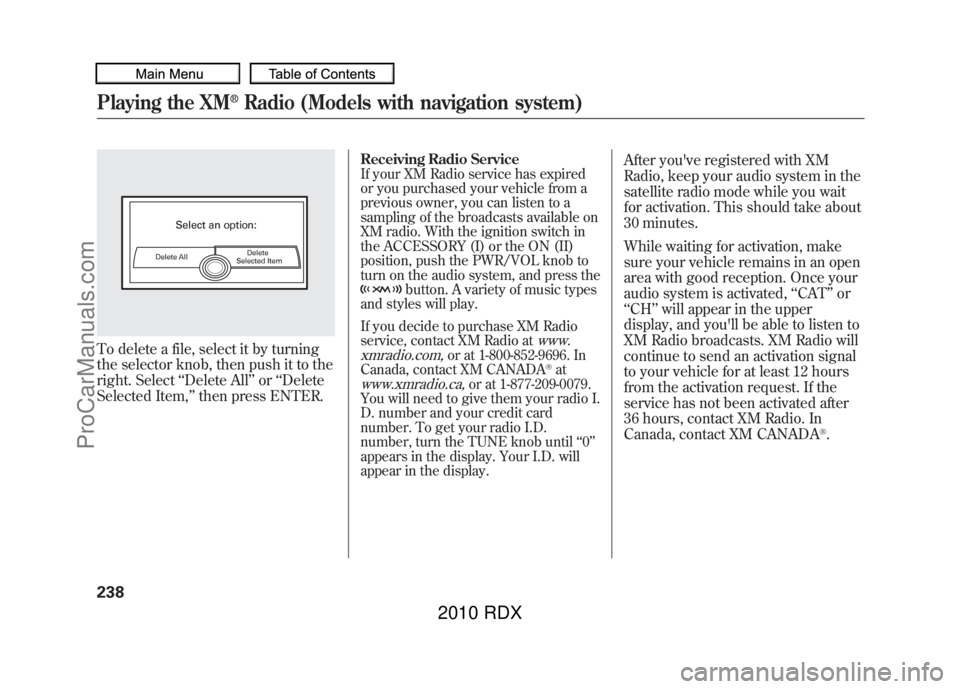
To delete a file, select it by turning
the selector knob, then push it to the
right. Select‘‘Delete All ’’or ‘‘Delete
Selected Item, ’’then press ENTER.
Receiving Radio ServiceIf your XM Radio service has expired
or you purchased your vehicle from a
previous owner, you can listen to a
sampling of the broadcasts available on
XM radio. With the ignition switch in
the ACCESSORY (I) or the ON (II)
position, push the PWR/VOL knob to
turn on the audio system, and press the
button. A variety of music types
and styles will play.
If you decide to purchase XM Radio
service, contact XM Radio at
www.
xmradio.com,
or at 1-800-852-9696. In
Canada, contact XM CANADA
®at
www.xmradio.ca,
or at 1-877-209-0079.
You will need to give them your radio I.
D. number and your credit card
number. To get your radio I.D.
number, turn the TUNE knob until ‘‘0 ’’
appears in the display. Your I.D. will
appear in the display.
After you've registered with XM
Radio, keep your audio system in the
satellite radio mode while you wait
for activation. This should take about
30 minutes.
While waiting for activation, make
sure your vehicle remains in an open
area with good reception. Once your
audio system is activated, ‘‘CAT’’ or
‘‘ CH ’’will appear in the upper
display, and you'll be able to listen to
XM Radio broadcasts. XM Radio will
continue to send an activation signal
to your vehicle for at least 12 hours
from the activation request. If the
service has not been activated after
36 hours, contact XM Radio. In
Canada, contact XM CANADA
®.
Playing the XM
®Radio (Models with navigation system)
23809/07/07 15:02:04 10 ACURA RDX MMC North America Owner's M 50 31STK630 enu
ProCarManuals.com
2010 RDX
Page 245 of 514

Your vehicle's audio system has an
in-dash disc changer with the same
controls used for the radio. To
operate the disc changer, the ignition
switch must be in the ACCESSORY
(I) or the ON (II) position.
The disc changer can play these disc
formats:●CD (CD-DA)●CD-R/RW●DVD-A
The disc packages or jackets should
have one of these marks.
The changer can also play MP3 or
WMA format (see page 245).
DVD-A discs not meeting DVD
verification standards may not be
playable.
The changer cannot play DVD-V or
DVD-R/RW formats.
Some CD-DA and CD-ROM mixed
discs are not playable.
You cannot load and play 3-inch
(8-cm) discs in this system.Do not use discs with adhesive labels.
The label can curl up and cause the
disc to jam in the unit.
CONTINUED
Playing Discs (Models with navigation system)
241
Features
09/07/07 15:02:04 10 ACURA RDX MMC North America Owner's M 50 31STK630 enu
ProCarManuals.com
2010 RDX
Page 257 of 514

Playing a DVD-A Disc
You can play a DVD-A disc in the CD
changer. The disc controls are same
as previously described.
To Pause a Disc
To pause a disc, press the preset
button which corresponds to the
current disc. To play the disc again,
press the preset button again.To Stop Playing a Disc
If you turn the system off while a disc
is playing, either with the PWR/VOL
knob or by turning off the ignition
switch, the disc will stay in the drive.
When you turn the system back on,
the disc will begin playing where it
left off.
To take the system out of disc mode,
press the AM/FM, or DISC/AUX, or
button to switch to the radio,
or satellite radio, or auxiliary input
while a disc is playing. When you
return to disc mode by pressing the
DISC/AUX button, play will continue
at the same point that it left off. Removing Discs from the Changer
To remove the disc that is currently
playing, press and release the eject
(
) button. You will see
‘‘EJECT ’’
on the upper display. When you
remove the disc from the slot, the
system begins the load sequence so
you can load another disc in that
position. If you do not load another
disc within 10 seconds, the system
selects the previous mode (AM,
FM1, FM2, or XM Radio).
If you do not remove the disc from
the slot, the system will reload the
disc after 10 seconds and put the CD
changer in pause mode. To begin
playing the disc, press the DISC/
AUX button.
CONTINUED
Playing Discs (Models with navigation system)
253
Features
09/07/07 15:02:04 10 ACURA RDX MMC North America Owner's M 50 31STK630 enu
ProCarManuals.com
2010 RDX
Page 258 of 514
To remove a different disc from the
changer, first select it by pressing
the corresponding number on the
preset button or turning the interface
knob, and pressing ENTER on the
interface selector. When that disc
begins playing, press the eject
button.
Press and hold the eject button until
you hear a beep to remove all the
discs from the changer.
You can also eject discs when the
ignition switch is off by pressing the
eject button. The disc that was last
selected is ejected first. You can eject
the rest of the discs one at a time.Protecting Discs
For information on how to handle
and protect compact discs, see page
257.
Disc Changer Error Messages
For information, see page
255.
Adjusting the Sound
For information, see page 224.Playing Discs (Models with navigation system)25409/07/07 15:02:04 10 ACURA RDX MMC North America Owner's M 50 31STK630 enu
ProCarManuals.com
2010 RDX
Page 266 of 514
To Play an iPod
®
This audio system can operate the
audio files on the iPod
®with the
same controls used for the in-dash
disc changer. To play an iPod,
connect it to the USB adapter cable
in the console compartment by using
your dock connector, then press the
DISC/AUX button. The ignition
switch must be in the ACCESSORY
(I) or ON (II) position. The iPod will
also be recharged with the ignition
switch in these positions.
The system will only play songs
stored on the iPod with iTunes.
iPod and iTunes are registered
trademarks owned by Apple Inc.
Voice Control SystemYou can select the AUX mode by
using the navigation system voice
control buttons, but cannot operate
the play mode functions. iPods compatible with your audio
system using the USB adapter cable
are:
Model Software
iPod classic Ver. 1.0 or more
iPod with
video
(iPod 5th
generation) Ver. 1.2 or more
iPod nano Ver. 1.2 or more
iPod nano 2nd
generation Ver. 1.1.2 or more
iPod nano 3rd
generation Ver. 1.0 or more
iPod nano 4th
generation Ver. 1.0.2 or more
iPod touch Ver. 1.1.1 or more
iPod touch
2nd generation Ver. 2.1.1 or more
Use only compatible iPods with the
latest software. iPods that are not
compatible will not work in this audio
unit. NOTE:
●Do not connect your iPod using a
hub.●Do not keep the iPod in the
vehicle. Direct sunlight and high
heat will damage it.●Do not use an extension cable
between the USB adapter cable
equipped with your vehicle and
your dock connector.●We recommend backing up your
data before playing it.●Some devices cannot be powered
or charged via the USB adapter, if
this is the case use the accessory
adapter to supply power to your
device.
Playing an iPod (Models with navigation system)26209/07/07 15:02:04 10 ACURA RDX MMC North America Owner's M 50 31STK630 enu
ProCarManuals.com
2010 RDX
Page 276 of 514
To Play a USB Flash Memory
Device
This audio system can operate the
audio files on a USB flash memory
device with the same controls used
for the in-dash disc changer. To play
a USB flash memory device, connect
it to the USB adapter cable in the
console compartment, then press the
DISC/AUX button. The ignition
switch must be in the ACCESSORY
(I) or ON (II) position.
The audio system reads and plays
the audio files on the USB flash
memory device in MP3, WMA or
AAC
ꭧformats. Depending on the
format, the audio control display
shows MP3, WMA or AAC when a
USB flash memory device is playing.
The USB flash memory device limit
is up to 700 folders or up to 65535
files.
ꭧ : Only AAC format files recorded
with iTunes are playable on this
audio unit. The recommended USB flash
memory devices are 256 MB or
higher, and formatted with the FAT
file system. Some digital audio
players may be compatible as well.
Some USB flash memory devices
(such as devices with security lock-
out features, etc.) will not work in
this audio unit.
NOTE:
●Do not use a device such as a card
reader or hard drive as the device
or your files may be damaged.●Do not connect your USB flash
memory device using a hub.●Do not use an extension cable to
the USB adapter cable equipped
with your vehicle.●Do not keep a USB flash memory
device in the vehicle. Direct
sunlight and high heat will damage
it.
●We recommend backing up your
data before playing a USB flash
memory device.●Depending on the type and
number of files, it may take some
time before they begin to play.●Depending on the software the
files were made with, it may not be
possible to play some files, or
display some text data.●Some devices cannot be powered
or charged via the USB adapter, if
this is the case use the accessory
adapter to supply power to your
device.Voice Control SystemYou can select the AUX mode by
using the navigation system voice
control buttons, but cannot operate
the play mode functions.
Playing a USB Flash Memory Device (Models with navigation system)27209/07/07 15:02:04 10 ACURA RDX MMC North America Owner's M 50 31STK630 enu
ProCarManuals.com
2010 RDX
Page 286 of 514

Your vehicle is equipped with aBluetooth
®Audio system, which
allows you to listen to streaming
audio from your
Bluetooth
®Audio
compatible phone. This function is
only available on
Bluetooth
®Audio
Compatible phones that are paired
and linked to the vehicle's
Bluetooth
®HandsFreeLink
®(HFL)
system (see page 313).
Not all Bluetooth-enabled phones
with streaming audio capabilities are
compatible with the system. You can
find an approved phone by visiting
www.acura.com/handsfreelink,
or by
calling the HandsFreeLink
®
consumer support at 1-888-528-7876.
In Canada, visit
www.acura.ca,
or call
1-888-9-ACURA-9. NOTE:
In some states, it may be
illegal to perform some data device
functions while driving. To Play
Bluetooth
®Audio Files
Make sure that your phone is paired
and linked to the HFL.
Press the DISC/AUX button
ꭧwith
the ignition switch in the
ACCESSORY (I) or ON (II) position.
When the phone is recognized, you
will see the
Bluetooth
®Audio
message and indicator on the upper
display and the audio control display
(if selected), and the system begins
to play.
Bluetooth
®Audio System (Models with navigation system)
28209/07/07 15:02:04 10 ACURA RDX MMC North America Owner's M 50 31STK630 enu
ProCarManuals.com
2010 RDX