audio ACURA RDX 2010 Manual PDF
[x] Cancel search | Manufacturer: ACURA, Model Year: 2010, Model line: RDX, Model: ACURA RDX 2010Pages: 514, PDF Size: 30.21 MB
Page 266 of 514
To Play an iPod
®
This audio system can operate the
audio files on the iPod
®with the
same controls used for the in-dash
disc changer. To play an iPod,
connect it to the USB adapter cable
in the console compartment by using
your dock connector, then press the
DISC/AUX button. The ignition
switch must be in the ACCESSORY
(I) or ON (II) position. The iPod will
also be recharged with the ignition
switch in these positions.
The system will only play songs
stored on the iPod with iTunes.
iPod and iTunes are registered
trademarks owned by Apple Inc.
Voice Control SystemYou can select the AUX mode by
using the navigation system voice
control buttons, but cannot operate
the play mode functions. iPods compatible with your audio
system using the USB adapter cable
are:
Model Software
iPod classic Ver. 1.0 or more
iPod with
video
(iPod 5th
generation) Ver. 1.2 or more
iPod nano Ver. 1.2 or more
iPod nano 2nd
generation Ver. 1.1.2 or more
iPod nano 3rd
generation Ver. 1.0 or more
iPod nano 4th
generation Ver. 1.0.2 or more
iPod touch Ver. 1.1.1 or more
iPod touch
2nd generation Ver. 2.1.1 or more
Use only compatible iPods with the
latest software. iPods that are not
compatible will not work in this audio
unit. NOTE:
●Do not connect your iPod using a
hub.●Do not keep the iPod in the
vehicle. Direct sunlight and high
heat will damage it.●Do not use an extension cable
between the USB adapter cable
equipped with your vehicle and
your dock connector.●We recommend backing up your
data before playing it.●Some devices cannot be powered
or charged via the USB adapter, if
this is the case use the accessory
adapter to supply power to your
device.
Playing an iPod (Models with navigation system)26209/07/07 15:02:04 10 ACURA RDX MMC North America Owner's M 50 31STK630 enu
ProCarManuals.com
2010 RDX
Page 267 of 514
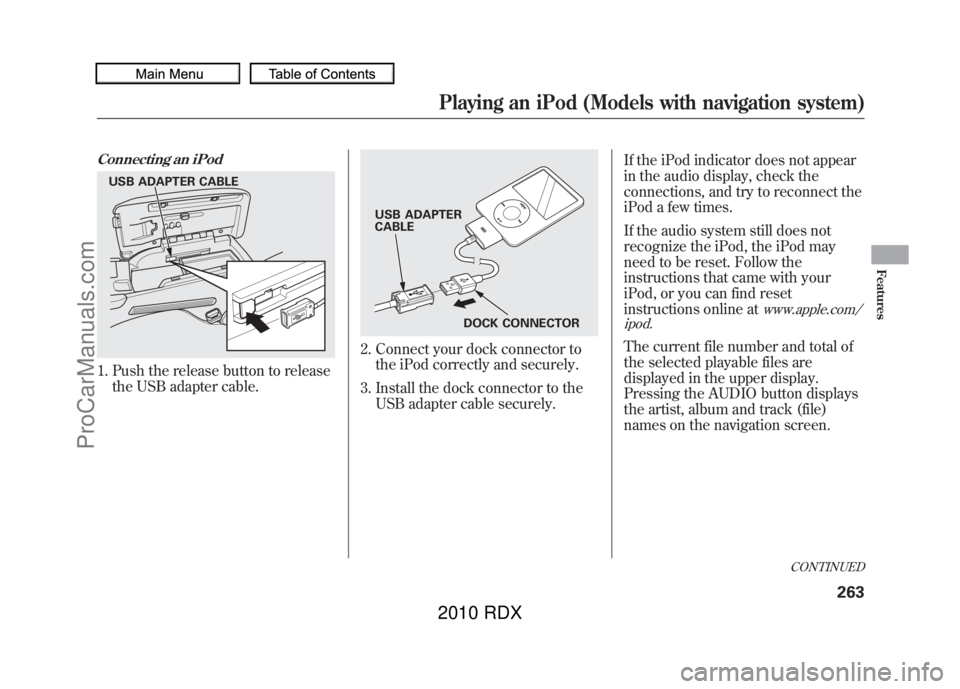
Connecting an iPod1. Push the release button to releasethe USB adapter cable.
2. Connect your dock connector tothe iPod correctly and securely.
3. Install the dock connector to the USB adapter cable securely. If the iPod indicator does not appear
in the audio display, check the
connections, and try to reconnect the
iPod a few times.
If the audio system still does not
recognize the iPod, the iPod may
need to be reset. Follow the
instructions that came with your
iPod, or you can find reset
instructions online at
www.apple.com/
ipod.
The current file number and total of
the selected playable files are
displayed in the upper display.
Pressing the AUDIO button displays
the artist, album and track (file)
names on the navigation screen.
USB ADAPTER CABLE
USB ADAPTER
CABLE
DOCK CONNECTOR
CONTINUED
Playing an iPod (Models with navigation system)
263
Features
09/07/07 15:02:04 10 ACURA RDX MMC North America Owner's M 50 31STK630 enu
ProCarManuals.com
2010 RDX
Page 268 of 514
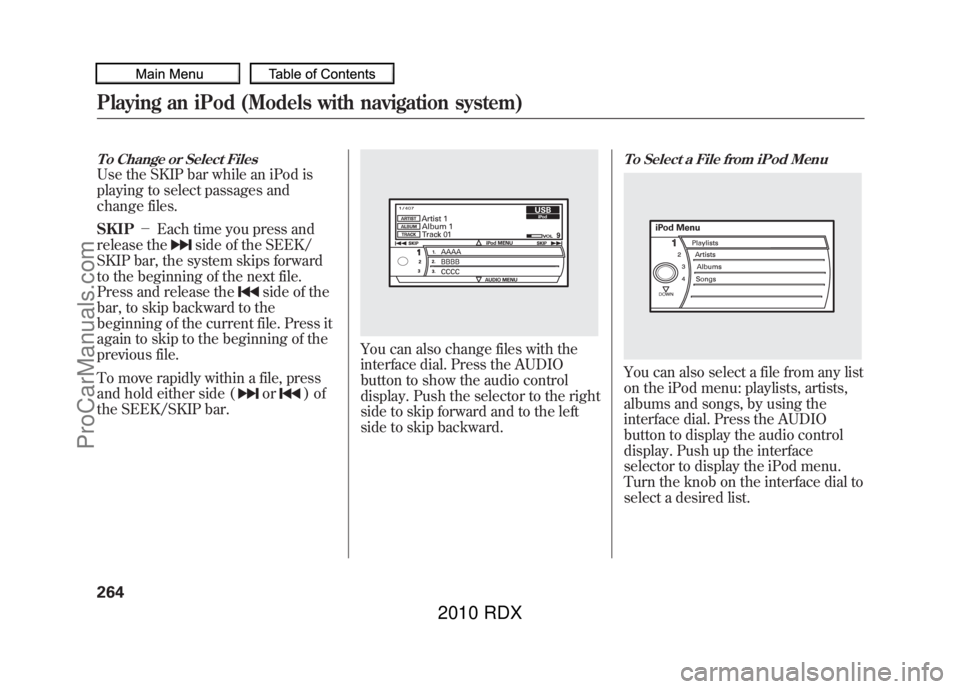
To Change or Select FilesUse the SKIP bar while an iPod is
playing to select passages and
change files.
SKIP-Each time you press and
release the
side of the SEEK/
SKIP bar, the system skips forward
to the beginning of the next file.
Press and release the
side of the
bar, to skip backward to the
beginning of the current file. Press it
again to skip to the beginning of the
previous file.
To move rapidly within a file, press
and hold either side (or
)of
the SEEK/SKIP bar.
You can also change files with the
interface dial. Press the AUDIO
button to show the audio control
display. Push the selector to the right
side to skip forward and to the left
side to skip backward.
To Select a File from iPod MenuYou can also select a file from any list
on the iPod menu: playlists, artists,
albums and songs, by using the
interface dial. Press the AUDIO
button to display the audio control
display. Push up the interface
selector to display the iPod menu.
Turn the knob on the interface dial to
select a desired list.
Playing an iPod (Models with navigation system)26409/07/07 15:02:04 10 ACURA RDX MMC North America Owner's M 50 31STK630 enu
ProCarManuals.com
2010 RDX
Page 269 of 514
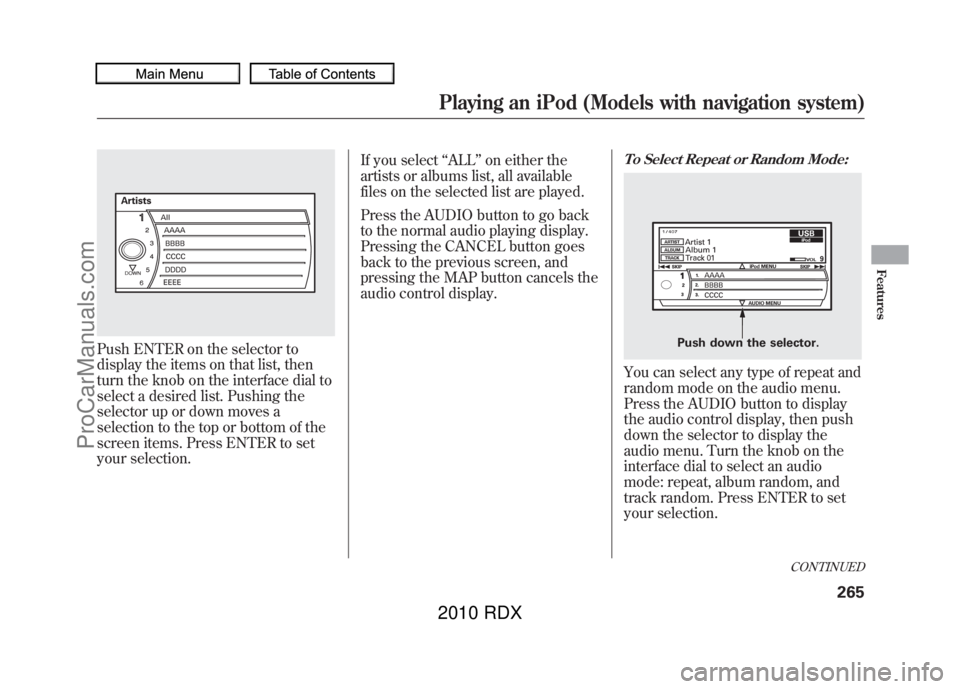
Push ENTER on the selector to
display the items on that list, then
turn the knob on the interface dial to
select a desired list. Pushing the
selector up or down moves a
selection to the top or bottom of the
screen items. Press ENTER to set
your selection.If you select
‘‘ALL ’’on either the
artists or albums list, all available
files on the selected list are played.
Press the AUDIO button to go back
to the normal audio playing display.
Pressing the CANCEL button goes
back to the previous screen, and
pressing the MAP button cancels the
audio control display.
To Select Repeat or Random Mode:You can select any type of repeat and
random mode on the audio menu.
Press the AUDIO button to display
the audio control display, then push
down the selector to display the
audio menu. Turn the knob on the
interface dial to select an audio
mode: repeat, album random, and
track random. Press ENTER to set
your selection.
Push down the selector.
CONTINUED
Playing an iPod (Models with navigation system)
265
Features
09/07/07 15:02:04 10 ACURA RDX MMC North America Owner's M 50 31STK630 enu
ProCarManuals.com
2010 RDX
Page 270 of 514
To cancel the selected mode, press
ENTER again while the highlighted
mode is selected on the audio control
display.
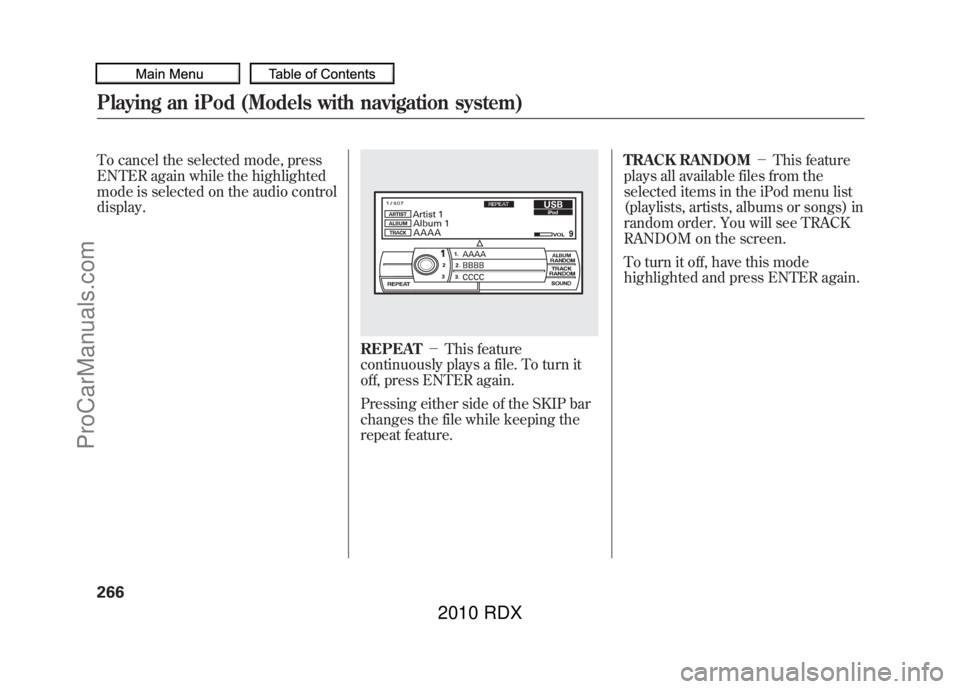
REPEAT-This feature
continuously plays a file. To turn it
off, press ENTER again.
Pressing either side of the SKIP bar
changes the file while keeping the
repeat feature. TRACK RANDOM
-This feature
plays all available files from the
selected items in the iPod menu list
(playlists, artists, albums or songs) in
random order. You will see TRACK
RANDOM on the screen.
To turn it off, have this mode
highlighted and press ENTER again.
Playing an iPod (Models with navigation system)26609/07/07 15:02:04 10 ACURA RDX MMC North America Owner's M 50 31STK630 enu
ProCarManuals.com
2010 RDX
Page 271 of 514

ALBUM RANDOM-This feature
plays all available albums from the
selected items in the iPod menu list
(playlists, artists, albums or songs) in
random order. The files in each
album are played in the recorded
order. You will see ALBUM
RANDOM on the screen. To turn it off, have this mode
highlighted and press ENTER again.
You can also select another list from
the iPod menu while keeping the
random function.
NOTE:
Available operating function varies
on models or versions. Some
functions may not be available on the
vehicle
’s audio system. To Stop Playing Your iPod
To play the radio, press the AM, FM,
or
button. Press the DISC/
AUX button to switch between disc
(if a disc is loaded),
Bluetooth
®
Audio, and the iPod.
CONTINUED
Playing an iPod (Models with navigation system)
267
Features
09/07/07 15:02:04 10 ACURA RDX MMC North America Owner's M 50 31STK630 enu
ProCarManuals.com
2010 RDX
Page 272 of 514
Disconnecting an iPodYou can disconnect the iPod at any
time when you see the‘‘OK to
disconnect ’’message
ꭧin the iPod
display. Always make sure you see
the ‘‘OK to disconnect ’’message in
the iPod display before you
disconnect it. Make sure to follow
the iPod's instructions on how to
disconnect the dock connector from
the USB adapter cable.
ꭧ : The displayed message may
vary on models or versions. On
some models, there is no
message to disconnect.
When you disconnect the iPod while
it is playing, the upper display and
the audio control display (if selected)
show NO DATA. If you reconnect the same iPod, the
system may begin playing where it
left off, depending on what mode the
iPod is in when it is reconnected.
iPod Error Messages
For information, see page
269.
Playing an iPod (Models with navigation system)26809/07/07 15:02:04 10 ACURA RDX MMC North America Owner's M 50 31STK630 enu
ProCarManuals.com
2010 RDX
Page 273 of 514
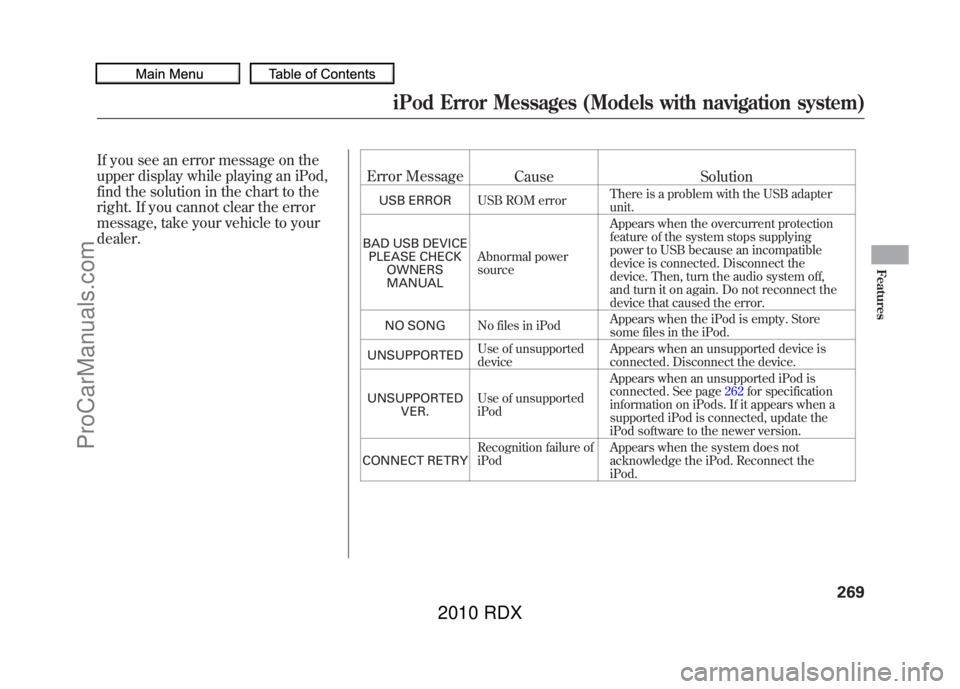
If you see an error message on the
upper display while playing an iPod,
find the solution in the chart to the
right. If you cannot clear the error
message, take your vehicle to your
dealer.Error Message
Cause Solution
USB ERRORUSB ROM error There is a problem with the USB adapter
unit.
BAD USB DEVICE PLEASE CHECK OWNERSMANUAL Abnormal power
source Appears when the overcurrent protection
feature of the system stops supplying
power to USB because an incompatible
device is connected. Disconnect the
device. Then, turn the audio system off,
and turn it on again. Do not reconnect the
device that caused the error.
NO SONG No files in iPod Appears when the iPod is empty. Store
some files in the iPod.
UNSUPPORTED Use of unsupported
device Appears when an unsupported device is
connected. Disconnect the device.
UNSUPPORTED VER. Use of unsupported
iPod Appears when an unsupported iPod is
connected. See page
262for specification
information on iPods. If it appears when a
supported iPod is connected, update the
iPod software to the newer version.
CONNECT RETRY Recognition failure of
iPod Appears when the system does not
acknowledge the iPod. Reconnect the
iPod.iPod Error Messages (Models with navigation system)
269
Features
09/07/07 15:02:04 10 ACURA RDX MMC North America Owner's M 50 31STK630 enu
ProCarManuals.com
2010 RDX
Page 275 of 514
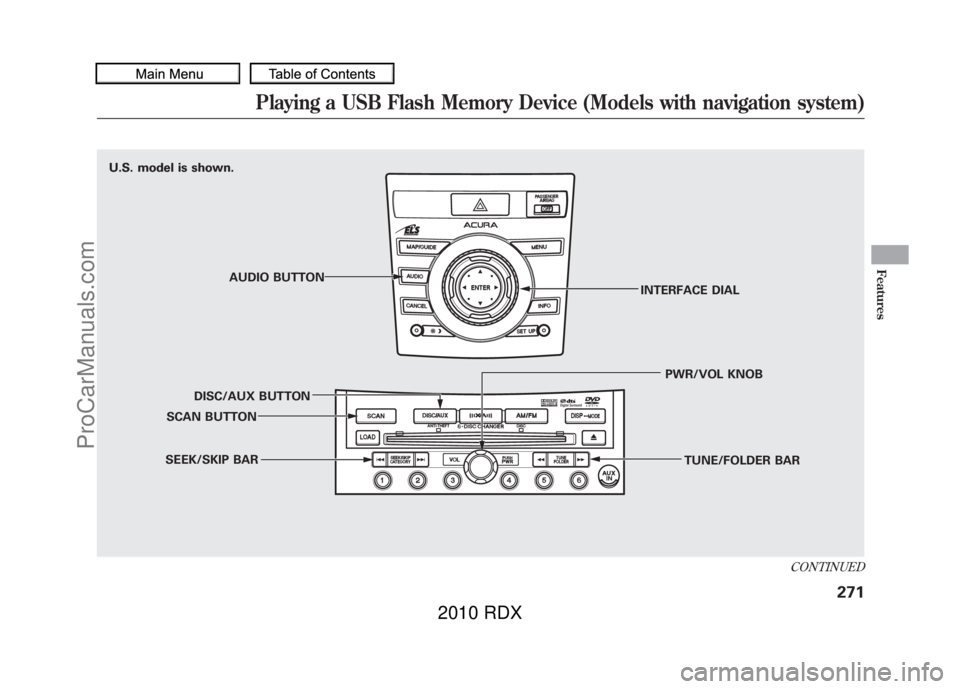
U.S. model is shown.
U.S. model is shown.AUDIO BUTTON
DISC/AUX BUTTON
SCAN BUTTON
SEEK/SKIP BAR TUNE/FOLDER BAR
PWR/VOL KNOB
INTERFACE DIAL
CONTINUED
Playing a USB Flash Memory Device (Models with navigation system)
271
Features
09/07/07 15:02:04 10 ACURA RDX MMC North America Owner's M 50 31STK630 enu
ProCarManuals.com
2010 RDX
Page 276 of 514
To Play a USB Flash Memory
Device
This audio system can operate the
audio files on a USB flash memory
device with the same controls used
for the in-dash disc changer. To play
a USB flash memory device, connect
it to the USB adapter cable in the
console compartment, then press the
DISC/AUX button. The ignition
switch must be in the ACCESSORY
(I) or ON (II) position.
The audio system reads and plays
the audio files on the USB flash
memory device in MP3, WMA or
AAC
ꭧformats. Depending on the
format, the audio control display
shows MP3, WMA or AAC when a
USB flash memory device is playing.
The USB flash memory device limit
is up to 700 folders or up to 65535
files.
ꭧ : Only AAC format files recorded
with iTunes are playable on this
audio unit. The recommended USB flash
memory devices are 256 MB or
higher, and formatted with the FAT
file system. Some digital audio
players may be compatible as well.
Some USB flash memory devices
(such as devices with security lock-
out features, etc.) will not work in
this audio unit.
NOTE:
●Do not use a device such as a card
reader or hard drive as the device
or your files may be damaged.●Do not connect your USB flash
memory device using a hub.●Do not use an extension cable to
the USB adapter cable equipped
with your vehicle.●Do not keep a USB flash memory
device in the vehicle. Direct
sunlight and high heat will damage
it.
●We recommend backing up your
data before playing a USB flash
memory device.●Depending on the type and
number of files, it may take some
time before they begin to play.●Depending on the software the
files were made with, it may not be
possible to play some files, or
display some text data.●Some devices cannot be powered
or charged via the USB adapter, if
this is the case use the accessory
adapter to supply power to your
device.Voice Control SystemYou can select the AUX mode by
using the navigation system voice
control buttons, but cannot operate
the play mode functions.
Playing a USB Flash Memory Device (Models with navigation system)27209/07/07 15:02:04 10 ACURA RDX MMC North America Owner's M 50 31STK630 enu
ProCarManuals.com
2010 RDX