audio ACURA RDX 2010 Owners Manual
[x] Cancel search | Manufacturer: ACURA, Model Year: 2010, Model line: RDX, Model: ACURA RDX 2010Pages: 514, PDF Size: 30.21 MB
Page 311 of 514
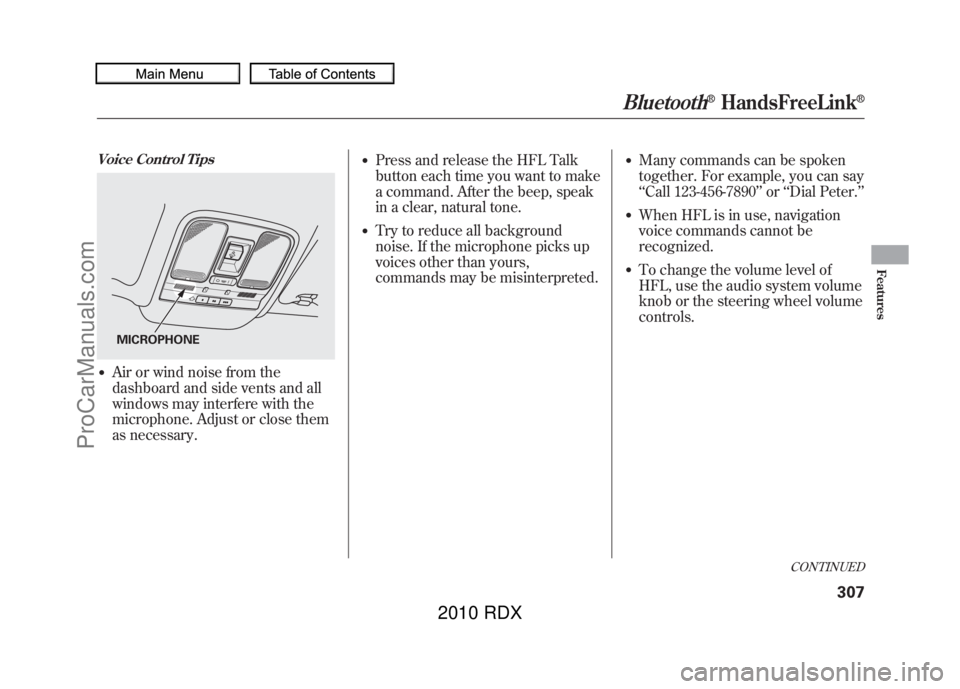
Voice Control Tips●Air or wind noise from the
dashboard and side vents and all
windows may interfere with the
microphone. Adjust or close them
as necessary.
●Press and release the HFL Talk
button each time you want to make
a command. After the beep, speak
in a clear, natural tone.●Try to reduce all background
noise. If the microphone picks up
voices other than yours,
commands may be misinterpreted.
●Many commands can be spoken
together. For example, you can say
‘‘Call 123-456-7890 ’’or ‘‘Dial Peter. ’’●When HFL is in use, navigation
voice commands cannot be
recognized.●To change the volume level of
HFL, use the audio system volume
knob or the steering wheel volume
controls.
MICROPHONE
CONTINUED
Bluetooth
®HandsFreeLink
®
307
Features
09/07/07 15:02:04 10 ACURA RDX MMC North America Owner's M 50 31STK630 enu
ProCarManuals.com
2010 RDX
Page 313 of 514
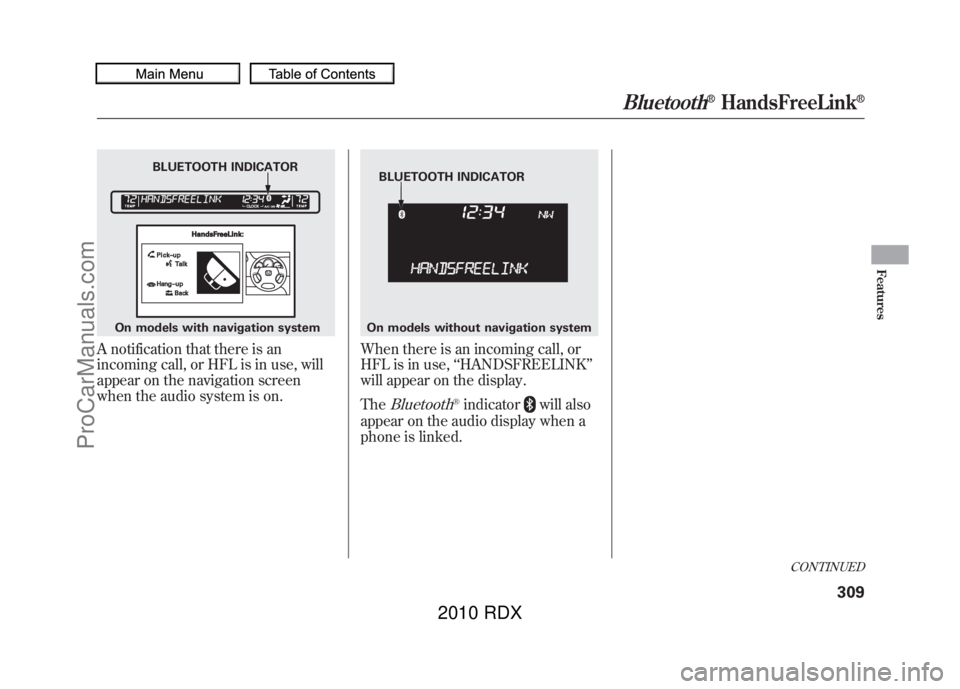
A notification that there is an
incoming call, or HFL is in use, will
appear on the navigation screen
when the audio system is on.
When there is an incoming call, or
HFL is in use,‘‘HANDSFREELINK ’’
will appear on the display.
The
Bluetooth
®indicator
will also
appear on the audio display when a
phone is linked.
BLUETOOTH INDICATOR
On models with navigation system
BLUETOOTH INDICATOR
On models without navigation system
CONTINUED
Bluetooth
®HandsFreeLink
®
309
Features
09/07/07 15:02:04 10 ACURA RDX MMC North America Owner's M 50 31STK630 enu
ProCarManuals.com
2010 RDX
Page 320 of 514

Making a Call
You can make calls using any phone
number or a name in the HFL
phonebook. You can also redial the
last number called.
HFL uses a Class 2 Bluetooth, which
means, the maximum range between
your phone and vehicle is 30 feet (10
meters).
During a call, HFL allows you to talk
up to 30 minutes after you remove
the key from the ignition switch.
However, this may weaken the
vehicle’s battery.
To make a call using a phone
number:Press and release the HFL Talk
button before a command.
1. Say ‘‘Call ’’or ‘‘Dial .’’
2. Follow the HFL prompts and say the phone number you want to
dial.
3. Follow the HFL prompts to confirm the number and say ‘‘Call ’’
or ‘‘Dial .’’
Once connected, you will hear the
person you called through the audio
speakers.
To make a call using a name in the HFL phonebook:Press and release the HFL Talk
button before a command.
1. Say ‘‘Call ’’or ‘‘Dial .’’
2. Follow the HFL prompts and say the name stored in the HFL
phonebook that you want to call.
3. Follow the HFL prompts to confirm the name and make the
call.
Bluetooth
®HandsFreeLink
®
31609/07/07 15:02:04 10 ACURA RDX MMC North America Owner's M 50 31STK630 enu
ProCarManuals.com
2010 RDX
Page 324 of 514
Receiving a Call
When you receive a call, an incoming
call notification (if activated) will play
and interrupt the audio system if it is
on.
Press the HFL Talk button to answer
the call, or the HFL Back button to
hang up.Call WaitingIf your phone has Call Waiting, press
and release the HFL Talk button to
put the original call on hold and
answer the incoming call.
To return to the original call, press
the HFL Talk button again. If you
don’t want to answer the incoming
call, disregard it and continue with
your original call. If you want to hang
up the original call and answer the
new call, press the HFL Back button. Transferring a Call
You can transfer a call from HFL to
your phone, or from your phone to
HFL.
Press and release the HFL Talk
button and say
‘‘Transfer .’’ Muting a Call
You can mute your voice to the
person you are talking to during a
call.
To mute your voice during a call,
press and release the HFL Talk
button and say
‘‘Mute. ’’
To unmute your voice, press and
release the HFL Talk button and say
‘‘ Mute ’’again.Bluetooth
®HandsFreeLink
®
32009/07/07 15:02:04 10 ACURA RDX MMC North America Owner's M 50 31STK630 enu
ProCarManuals.com
2010 RDX
Page 335 of 514

Change LanguageCanadian models onlyTo change the system languagebetween English and French:Press and release the HFL Talk
button before a command.
1. Say ‘‘Change language .’’
2. Follow the HFL prompts to change the language to English or French.
If you have not named your paired
phone in the language you just
selected, HFL will ask you to name it
in the current language.
When French is your currently
selected language, you can give voice
commands in French.
Bluetooth
®Wireless Technology
The
Bluetooth
®name and logos are
registered trademarks owned by
Bluetooth SIG, Inc. and any use of
such marks by Honda Motor Co.,
Ltd. is under license. Other
trademarks and trade names are
those of their respective owners.
HFL Limitations
An incoming call on HFL will
interrupt
Bluetooth
®Audio when it is
playing. Audio will resume when the
call is ended.
U.S. models onlyIn addition, you cannot use HFL
while using AcuraLink.
As required by the FCC:
This device complies with Part 15 of theFCC rules. Operation is subject to the
following two conditions: (1) This devicemay not cause harmful interference, and(2) this device must accept any
interference received, includinginterference that may cause undesiredoperation.
Changes or modifications not expresslyapproved by the party responsible for
compliance could void the user'sauthority to operate the equipment.
This device complies with IndustryCanada Standard RSS-210.
Operation is subject to the following twoconditions: (1) this device may not causeinterference, and (2) this device must
accept any interference that may causeundesired operation of the device.Bluetooth
®HandsFreeLink
®
331
Features
09/07/07 15:02:04 10 ACURA RDX MMC North America Owner's M 50 31STK630 enu
ProCarManuals.com
2010 RDX
Page 336 of 514
On models with navigation systemexcept Alaska, Hawaii, and Puerto RicoAcuraLink enhances your ownership
experience by providing a direct
communication link between your
vehicle and the Acura Server.
Working through the XM radio
satellite, AcuraLink works in
conjunction with the navigation
system,
Bluetooth
®HandsFreeLink
®
(HFL), and audio system in your
vehicle. It displays and receives
several kinds of messages, including:●Operating tips and information on
your vehicle's features.●Important recall and safety
information.●Maintenance information to keep
your vehicle in top condition.●Diagnostic information to provide
information about any problems
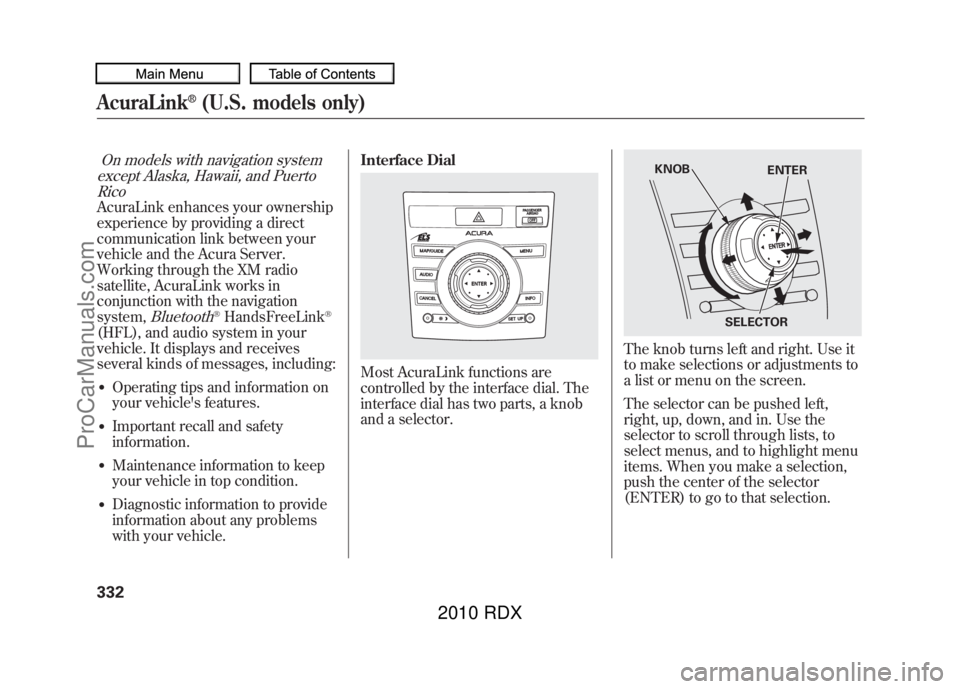
with your vehicle. Interface Dial
Most AcuraLink functions are
controlled by the interface dial. The
interface dial has two parts, a knob
and a selector.
The knob turns left and right. Use it
to make selections or adjustments to
a list or menu on the screen.
The selector can be pushed left,
right, up, down, and in. Use the
selector to scroll through lists, to
select menus, and to highlight menu
items. When you make a selection,
push the center of the selector
(ENTER) to go to that selection.
KNOB
ENTER
SELECTOR
AcuraLink
®(U.S. models only)
33209/07/07 15:02:04 10 ACURA RDX MMC North America Owner's M 50 31STK630 enu
ProCarManuals.com
2010 RDX
Page 366 of 514
Modifying your vehicle, or installing
some non-Acura accessories, can
make your vehicle unsafe. Before
you make any modifications or add
any accessories, be sure to read the
following information.
Accessories
Your dealer has Acura accessories
that allow you to personalize your
vehicle. These accessories have been
designed and approved for your
vehicle, and are covered by warranty.
Although non-Acura accessories may
fit on your vehicle, they may not
meet factory specifications, and could
adversely affect your vehicle's
handling and stability.
Improper accessories or
modifications can affect your
vehicle's handling, stability, and
performance, and cause a
crash in which you can be hurt
or killed.
Follow all instructions in this
owner's manual regarding
accessories and modifications.
When properly installed, cellular
phones, alarms, two-way radios, and
low-powered audio systems should
not interfere with your vehicle's
computer controlled systems, such
as your airbags, anti-lock brakes, and
tire pressure monitoring system. Before installing any accessory:
●Make sure the accessory does not
obscure any lights, or interfere
with proper vehicle operation or
performance.●Be sure electronic accessories do
not overload electrical circuits (see
page
469) or interfere with proper
operation of your vehicle.●Before installing any electronic
accessory, have the installer
contact your dealer for assistance.
If possible, have your dealer
inspect the final installation.●Do not install accessories on the
side pillars or across the rear
windows. Accessories installed in
these areas may interfere with
proper operation of the side
curtain airbags.
Accessories and Modifications36209/07/07 15:02:04 10 ACURA RDX MMC North America Owner's M 50 31STK630 enu
ProCarManuals.com
2010 RDX
Page 413 of 514

This section explains why it is
important to keep your vehicle well
maintained and how to follow basic
maintenance safety precautions.
This section also includes
instructions on how to read the
maintenance minder messages on
the multi-information display, and
instructions for simple maintenance
tasks you may want to take care of
yourself.
If you have the skills and tools to
perform more complex maintenance
tasks on your vehicle, you may want
to purchase the service manual. See
page497for information on how to
obtain a copy, or see your dealer. Maintenance Safety
.....................
410
Maintenance Minder
..................
411
Fluid Locations
...........................
419
Adding Engine Oil
......................
420
Required Engine Oil
...............
420
Changing the Engine Oil and
Filter
.......................................
422
Engine Coolant
...........................
424
Windshield Washers
...................
426
Automatic Transmission Fluid
....
427
Brake Fluid
.................................
429
Power Steering Fluid
..................
430
Lights
..........................................
431
Cleaning the Seat Belts
...............
438
Floor Mats
..................................
438
Audio Antenna
............................
439
Intercooler
..................................
439
Dust and Pollen Filter
.................
439
Wiper Blades
..............................
440
Wheels
........................................
443
Tires
...........................................
444
Checking the Battery
..................
450
Vehicle Storage
...........................
452
Maintenance
409
Maintenance
09/07/07 15:02:04 10 ACURA RDX MMC North America Owner's M 50 31STK630 enu
ProCarManuals.com
2010 RDX
Page 443 of 514
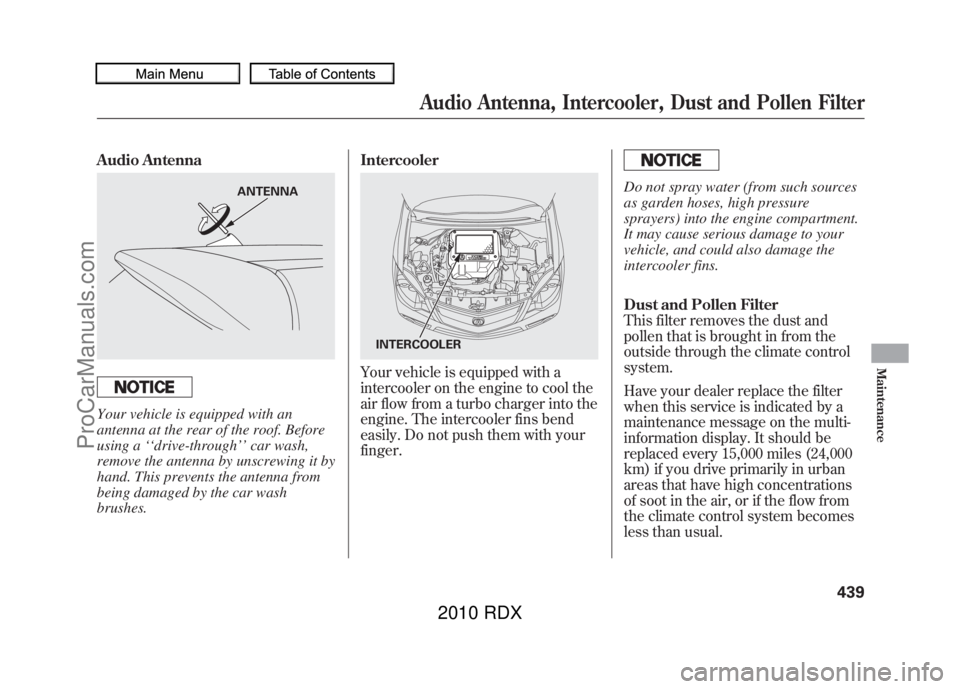
Audio AntennaYour vehicle is equipped with an
antenna at the rear of the roof. Before
using a‘‘drive-through ’’car wash,
remove the antenna by unscrewing it by
hand. This prevents the antenna from
being damaged by the car wash
brushes. Intercooler
Your vehicle is equipped with a
intercooler on the engine to cool the
air flow from a turbo charger into the
engine. The intercooler fins bend
easily. Do not push them with your
finger.
Do not spray water (from such sources
as garden hoses, high pressure
sprayers) into the engine compartment.
It may cause serious damage to your
vehicle, and could also damage the
intercooler fins.
Dust and Pollen Filter
This filter removes the dust and
pollen that is brought in from the
outside through the climate control
system.
Have your dealer replace the filter
when this service is indicated by a
maintenance message on the multi-
information display. It should be
replaced every 15,000 miles (24,000
km) if you drive primarily in urban
areas that have high concentrations
of soot in the air, or if the flow from
the climate control system becomes
less than usual.
ANTENNA
INTERCOOLER
Audio Antenna, Intercooler, Dust and Pollen Filter
439
Maintenance
09/07/07 15:02:04 10 ACURA RDX MMC North America Owner's M 50 31STK630 enu
ProCarManuals.com
2010 RDX
Page 455 of 514
On models without navigation systemIf your vehicle's battery is
disconnected, or goes dead, the time
setting will be reset to 1:00. To set
the time again, follow the setting
procedure (see page293).
If your vehicle's battery is
disconnected or goes dead, the audio
system will disable itself. The next
time you turn on the radio you will
see ‘‘
’’in the frequency
display. Use the preset bars or preset
buttons (depending on models) to
enter the five-digit code (see page
292).
On models with
navigation system
The navigation system will also
disable itself. The next time you turn
on the ignition switch, the system
will require you to enter a PIN before
it can be used. Refer to the
navigation system manual.
Checking the Battery
451
Maintenance
09/07/07 15:02:04 10 ACURA RDX MMC North America Owner's M 50 31STK630 enu
ProCarManuals.com
2010 RDX