ad blue Acura RDX 2011 Navigation Manual
[x] Cancel search | Manufacturer: ACURA, Model Year: 2011, Model line: RDX, Model: Acura RDX 2011Pages: 176, PDF Size: 4.42 MB
Page 55 of 176
54Navigation System
Driving to Your Destination
Viewing the Destination Map
Selecting View Dest. Map displays a
map of the destination vicinity. Press the
CANCEL or NAVI BACK button to
return. You can view the destination
map anytime while en route by saying,
“Display destination map.”
Map Screen
When you select OK on the Calculate
route to screen, the map screen
appears, showing your highlighted route
in real time.
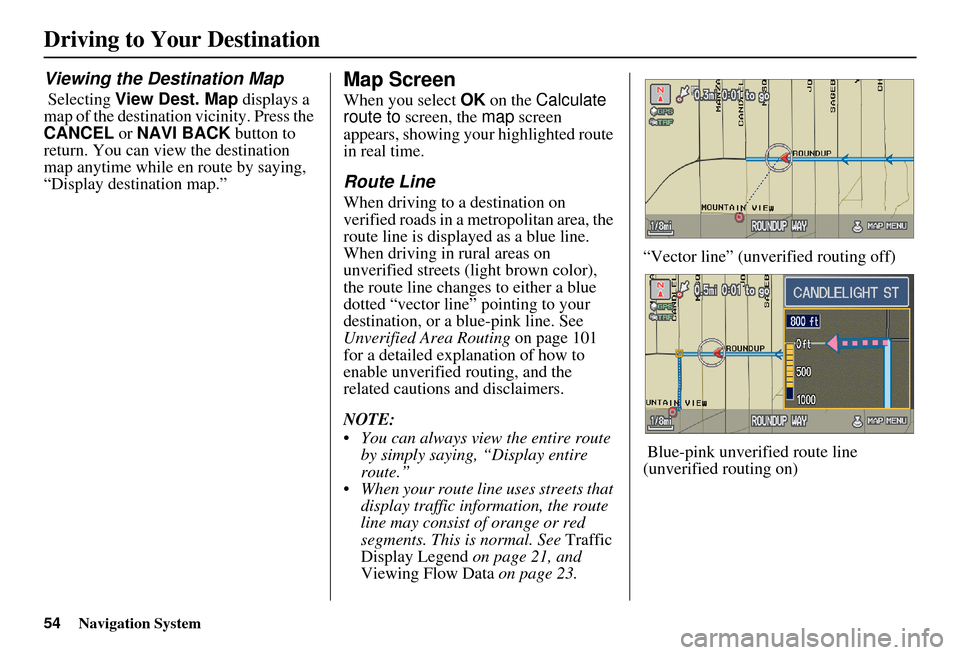
Route Line
When driving to a destination on
verified roads in a metropolitan area, the
route line is displayed as a blue line.
When driving in rural areas on
unverified streets (light brown color),
the route line changes to either a blue
dotted “vector line” pointing to your
destination, or a blue-pink line. See
Unverified Area Routing on page 101
for a detailed explanation of how to
enable unverified routing, and the
related cautions and disclaimers.
NOTE:
You can always view the entire route by simply saying, “Display entire
route.”
When your route line uses streets that display traffic information, the route
line may consist of orange or red
segments. This is normal. See Traffic
Display Legend on page 21, and
Viewing Flow Data on page 23. “Vector line” (unverified routing off)
Blue-pink unverified route line
(unverified routing on)
Page 57 of 176
56Navigation System
Driving to Your Destination
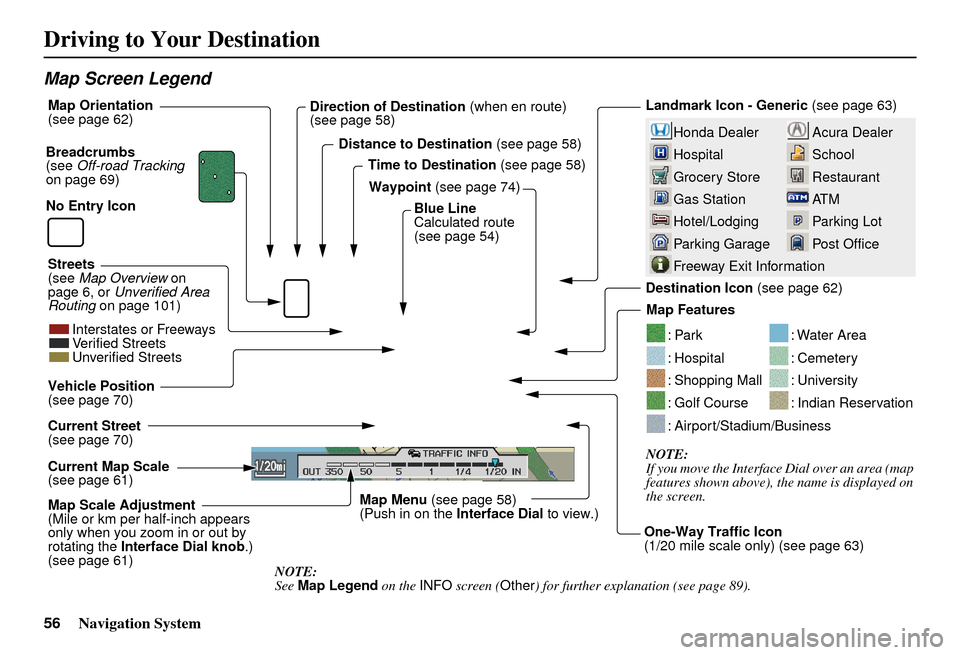
Map Screen Legend
Acura Dealer
School
Restaurant
AT M
Parking Lot
Post OfficeHonda Dealer
Hospital
Grocery Store
Gas Station
Hotel/Lodging
Parking Garage
Freeway Exit Information
Landmark Icon - Generic (see page 63)
Destination Icon (see page 62)
Map Features
NOTE:
If you move the Interface Dial over an area (map
features shown above), the name is displayed on
the screen.
: Par k
: Hospital
: Shopping Mall
: Golf Course
: Water Area
: Cemetery
: University
: Indian Reservation
: Airport/Stadium/Business
Map Scale Adjustment
(Mile or km per half-inch appears
only when you zoom in or out by
rotating the Interface Dial knob .)
(see page 61) NOTE:
See Map Legend on the INFO screen ( Other) for further explanation (see page 89).
Current Map Scale
(see page 61) Current Street
(see page 70) Vehicle Position
(see page 70)
Breadcrumbs
(see
Off-road Tracking
on page 69) Direction of Destination
(when en route)
(see page 58)
Map Orientation
(see page 62)
Distance to Destination (see page 58)
Time to Destination (see page 58)
Waypoint (see page 74)
Blue Line
Calculated route
(see page 54)
Map Menu (see page 58)
(Push in on the Interface Dial to view.)
One-Way Traffic Icon
(1/20 mile scale only) (see page 63)
Streets
(see
Map Overview on
page 6, or Unverified Area
Routing on page 101)
Interstates or Freeways
Verified Streets
Unverified Streets
No Entry Icon
Page 68 of 176
Navigation System67
Showing Icons on the Map
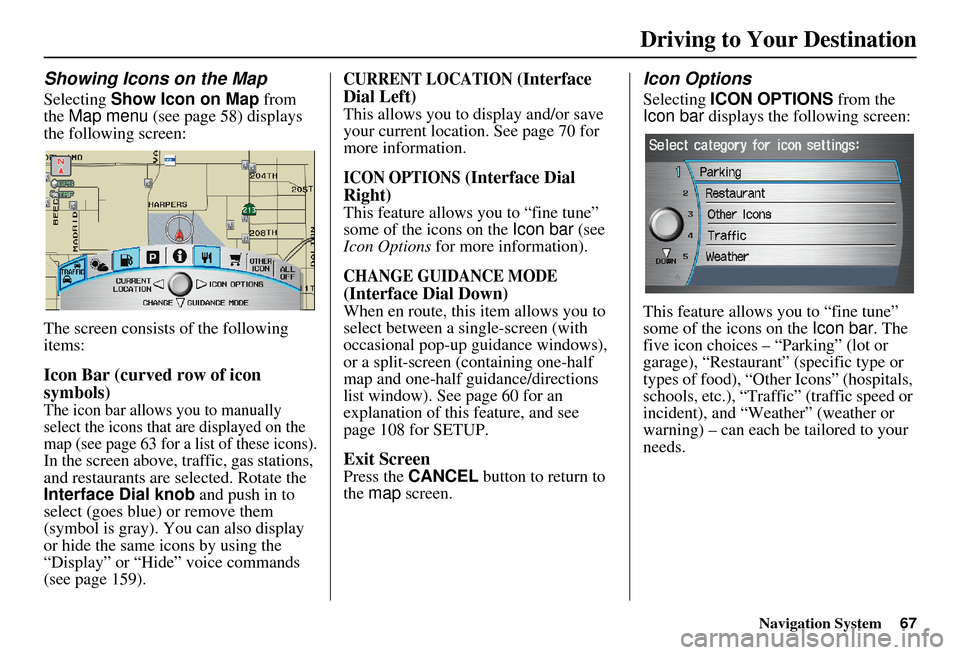
Selecting Show Icon on Map from
the Map menu (see page 58) displays
the following screen:
The screen consists of the following
items:
Icon Bar (curved row of icon
symbols)
The icon bar allows you to manually
select the icons that are displayed on the
map (see page 63 for a list of these icons).
In the screen above, traffic, gas stations,
and restaurants are selected. Rotate the
Interface Dial knob and push in to
select (goes blue) or remove them
(symbol is gray). You can also display
or hide the same icons by using the
“Display” or “Hide” voice commands
(see page 159).
CURRENT LOCATION (Interface
Dial Left)
This allows you to display and/or save
your current location. See page 70 for
more information.
ICON OPTIONS (Interface Dial
Right)
This feature allows you to “fine tune”
some of the icons on the Icon bar (see
Icon Options for more information).
CHANGE GUIDANCE MODE
(Interface Dial Down)
When en route, this item allows you to
select between a single-screen (with
occasional pop-up guidance windows),
or a split-screen (containing one-half
map and one-half guidance/directions
list window). See page 60 for an
explanation of this feature, and see
page 108 for SETUP.
Exit Screen
Press the CANCEL button to return to
the map screen.
Icon Options
Selecting ICON OPTIONS from the
Icon bar displays the following screen:
This feature allows you to “fine tune”
some of the icons on the Icon bar. The
five icon choices – “Parking” (lot or
garage), “Restaurant” (specific type or
types of food), “Other Icons” (hospitals,
schools, etc.), “Traffic” (traffic speed or
incident), and “Weather” (weather or
warning) – can each be tailored to your
needs.
Driving to Your Destination
Page 69 of 176
68Navigation System
Driving to Your Destination
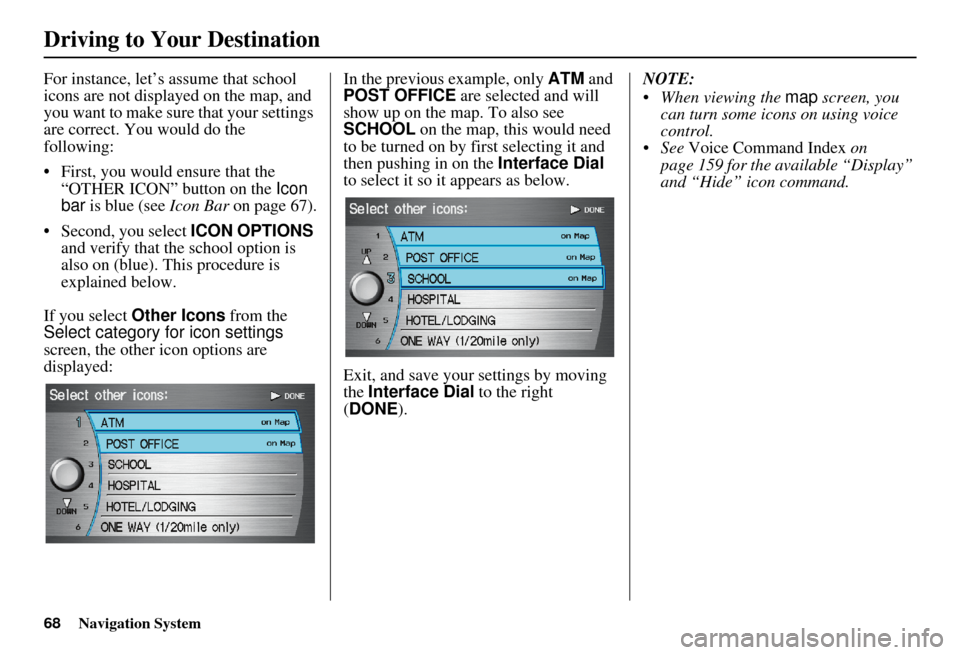
For instance, let’s assume that school
icons are not displayed on the map, and
you want to make sure that your settings
are correct. You would do the
following:
• First, you would ensure that the “OTHER ICON” button on the Icon
bar is blue (see Icon Bar on page 67).
• Second, you select ICON OPTIONS
and verify that the school option is
also on (blue). This procedure is
explained below.
If you select Other Icons from the
Select category for icon settings
screen, the other icon options are
displayed: In the previous example, only
ATM and
POST OFFICE are selected and will
show up on the map. To also see
SCHOOL on the map, this would need
to be turned on by first selecting it and
then pushing in on the Interface Dial
to select it so it appears as below.
Exit, and save your settings by moving
the Interface Dial to the right
(DONE ). NOTE:
When viewing the
map screen, you
can turn some icons on using voice
control.
See Voice Command Index on
page 159 for the available “Display”
and “Hide” icon command.
Page 79 of 176
78Navigation System
Continue Trip Screen
If you restart the vehicle without having
completed your prior trip, you will see
the following screen:
• To continue to your destination or other waypoints, say or select OK.
• To cancel your destination, press the CANCEL button or the NAVI
BACK button on the steering wheel,
or using the voice control system, say
“Cancel” or “Back.”
• If you wish to change the routing method, say or select CHANGE
METHOD by moving the Interface
Dial down.
• For additional information on changing the routing method, see
Changing the Routing Method on
page 52.
AcuraLink Messages
AcuraLink enhances your ownership
experience by providing a direct
communication link between you and
Acura. AcuraLink messages are
displayed on the navigation screen.
Working through the XM Satellite
Radio, AcuraLink works in conjunction
with your vehicle’s navigation,
Bluetooth® HandsFreeLink® (HFL),
and audio systems to send and receive
several kinds of message. These include:
• Operating tips and information on your vehicle’s features.
• Important recall and safety information.
• Maintenance information to keep your vehicle in top condition.
• Diagnostic information to provide information about any problems with
your vehicle.
NOTE:
See your Owner’s Manual for more details on this feature.
AcuraLink relies on a satellite signal. It will not work correctly in Hawaii
and Alaska. When service information is received
from your vehicle or AcuraLink, an
envelope icon is displayed in the upper
right corner of the navigation screen.
The
Interface Dial controls most
AcuraLink functions. For more
information on AcuraLink, refer to:
• The Advanced Technology Guide for features and a function overview.
• Your Owner’s Manual for a detailed explanation of the system.
Driving to Your Destination
Page 80 of 176
Navigation System79
Information Features
The INFO function consists of two main
screens. To display the INFO screen
(Main Info ), say “Information” or press
the INFO button. To change it to the
INFO screen ( Other), select the “Other”
tab. You can switch screens by selecting
the tab.
You can use the voice control system to
select any item on the INFO screen.
NOTE:
If some items appear to be grayed out and cannot be selected, it is because
you did not select OK on the initial
Disclaimer screen (see System Start-
up on page 17), or there is no phone
paired to the system (see Bluetooth ®
HandsFreeLink® page 18).
For information on the available voice commands, see Voice
Command Index on page 158.INFO Screen (Main Info)
When you say “Information” or press
the INFO button, the display changes to:
Messages
See AcuraLink Messages on page 78.
Traffic Incidents
When you say or select Traffic
Incidents, you can view a list of the
traffic incidents near your current
position or along your calculated route.
See Viewing Incident Reports on
page 24 and Traffic Rerouting on
page 72.
NOTE:
To receive traffic information, your XM
traffic/weather subscription must be
paid. See page 11 5 for details.
Page 85 of 176
84Navigation System
Information Features
Elapsed Time
Shows the elapsed time that the ignition
has been on.
Average Speed
Shows you the average speed in miles
per hour (mph) since the trip meter was
last reset.
Range
Shows the estimated distance you can
travel on the fuel remaining in the tank.
This distance is estimated from the
average fuel economy over the last
several miles, so it will vary with
changes in speed, traffic, etc.
NOTE:
Information from the Trip Computer will be displayed only when the
ignition is on.
The “Instant Fuel” and “Average Fuel” may vary from actual fuel
consumed. These values are estimates
only.
The “Range” is only an estimate. Always monitor your vehicle’s fuel
gauge to determine the appropriate
time to refuel.Cellular Phone
The Cellular Phone option allows you
to store up to 1,000 names and 10,000
phone numbers in the phonebook of
Bluetooth ® HandsFreeLink® from your
cellular phonebook. With the HFL, you
can then automatically dial any name or
number in the phonebook.
Say or select Cellular Phone from the
INFO screen ( Main Info ), and the
display changes to:
NOTE:
For more information on this feature, see your Owner’s Manual.
For questions about the HFL Cellular Phonebook, call HandsFreeLink
customer support at 1-888-528-7876,
or visit www.acura.com/
handsfreelink .
Calendar
The Calendar option allows you to
enter events and be reminded of them in
the future. When you say or select
Calendar , the system shows the
calendar with the current calendar day
highlighted.
Dates with an icon indicate there is a
scheduled entry for that date.
Page 88 of 176
Navigation System87
Information Features
4. Select the base unit (e.g., pounds) that
you wish to convert to some other
unit. All other units will change
automatically depending on the base
unit value. In the example below, 100
lbs converts to 1600 ounces, 0.05 ton
(U.S.), etc.
NOTE:
If you do not enter a value to be converted, only “Temperature” units
are selectable.
Conversions using negative values may produce meaningless or
physically impossible values.Roadside Assistance
When you say or select Roadside
Assistance , you will see the following
screen:
An Acura Roadside Assistance number
is provided as a courtesy to Acura
clients. If you have a paired Bluetooth
phone and it is on, then you can call
Acura Roadside A ssistance by using
your system. Select CALL by voice or
by using the Interface Dial , and then
select Yes on the confirmation screen.
INFO Screen (Other)
Select the “Other” tab to view additional
information and the following screen
appears:
Page 90 of 176
Navigation System
Information Features
Map Legend
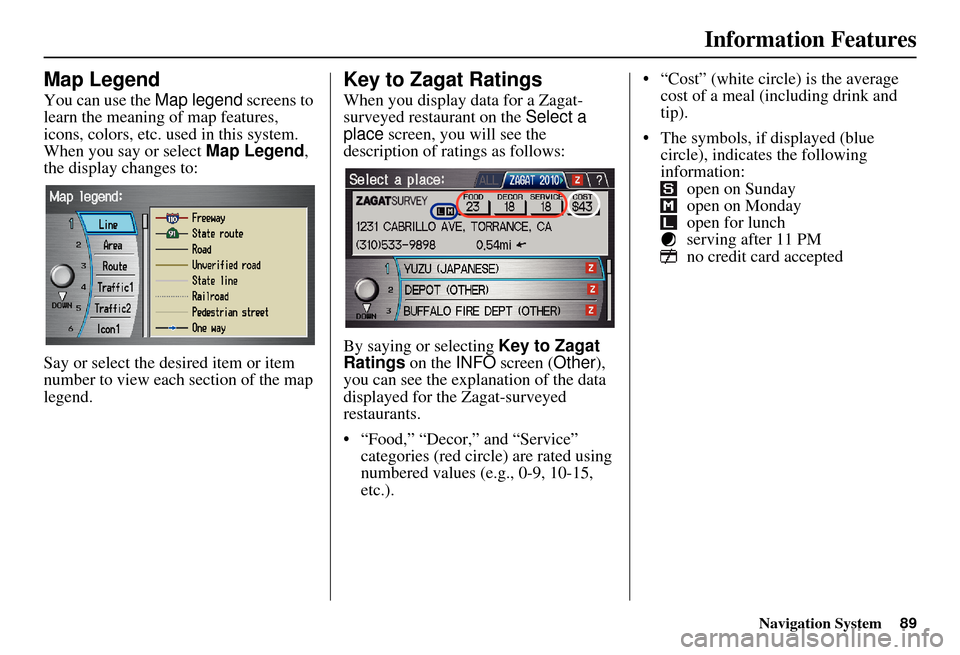
You can use the Map legend screens to
learn the meaning of map features,
icons, colors, etc. us ed in this system.
When you say or select Map Legend,
the display changes to:
Say or select the desired item or item
number to view each section of the map
legend.
Key to Zagat Ratings
When you display data for a Zagat-
surveyed restaurant on the Select a
place screen, you will see the
description of ratings as follows:
By saying or selecting Key to Zagat
Ratings on the INFO screen ( Other),
you can see the explanation of the data
displayed for the Zagat-surveyed
restaurants.
• “Food,” “Decor,” and “Service” categories (red circle) are rated using
numbered values (e.g., 0-9, 10-15,
etc.). “Cost” (white circle) is the average
cost of a meal (including drink and
tip).
The symbols, if displayed (blue circle), indicates the following
information: open on Sunday
open on Monday
open for lunch
serving after 11 PM
no credit card accepted
89
Page 102 of 176
Navigation System101
System Setup
Unverified Area Routing
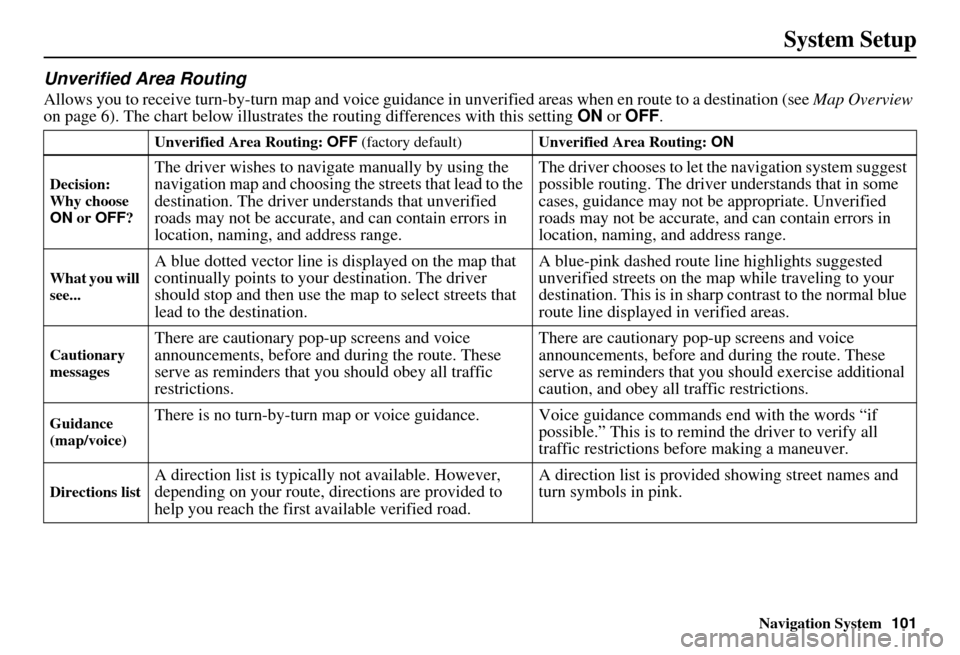
Allows you to receive turn-by-turn ma p and voice guidance in unverified areas when en route to a destination (see Map Overview
on page 6). The chart below illustrates the routing differences with this setting ON or OFF .
Unverified Area Routing: OFF (factory default) Unverified Area Routing: ON
Decision:
Why choose
ON or OFF ?
The driver wishes to navigate manually by using the
navigation map and choosing th e streets that lead to the
destination. The driver un derstands that unverified
roads may not be accurate, and can contain errors in
location, naming, and address range. The driver chooses to let th
e navigation system suggest
possible routing. The driver understands that in some
cases, guidance may not be appropriate. Unverified
roads may not be accurate, and can contain errors in
location, naming, and address range.
What you will
see...A blue dotted vector line is displayed on the map that
continually points to your destination. The driver
should stop and then use the map to select streets that
lead to the destination. A blue-pink dashed route line highlights suggested
unverified streets
on the map while traveling to your
destination. This is in sharp contrast to the normal blue
route line displayed in verified areas.
Cautionary
messagesThere are cautionary pop-up screens and voice
announcements, before and during the route. These
serve as reminders that you should obey all traffic
restrictions. There are cautionary pop-
up screens and voice
announcements, before and during the route. These
serve as reminders that you should exercise additional
caution, and obey all traffic restrictions.
Guidance
(map/voice)There is no turn-by-turn map or voice guidan ce. Voice guidance commands end with the words “if
possible.” This is to remind the driver to verify all
traffic restrictions before making a maneuver.
Directions listA direction list is typically not available. However,
depending on your route, directions are provided to
help you reach the first available verified road. A direction list is provided showing street names and
turn symbols in pink.