engine Acura RDX 2011 User Guide
[x] Cancel search | Manufacturer: ACURA, Model Year: 2011, Model line: RDX, Model: Acura RDX 2011Pages: 517, PDF Size: 27.89 MB
Page 78 of 517
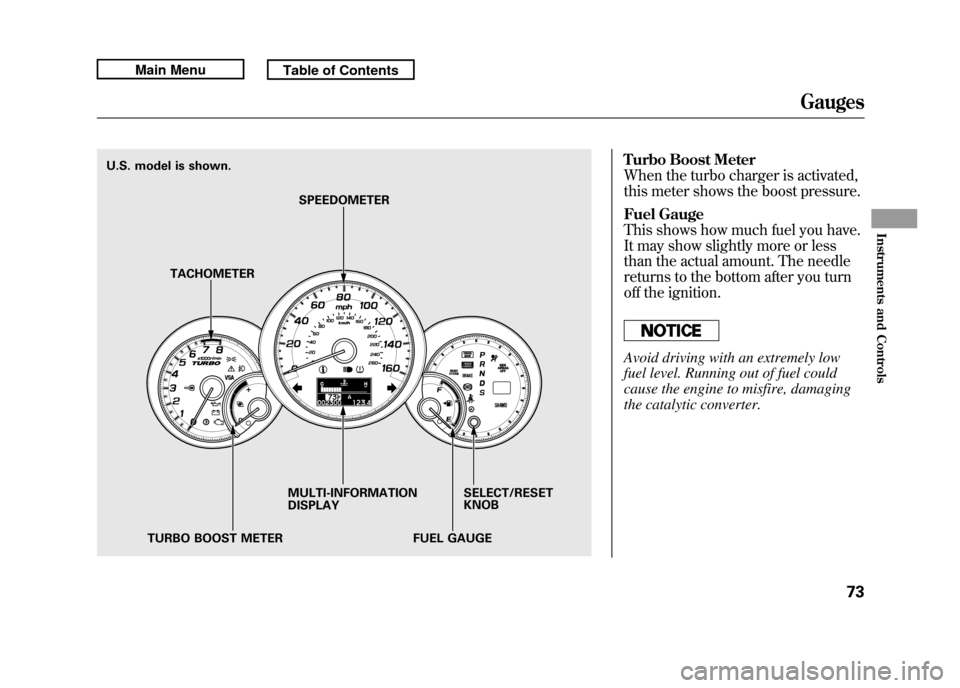
Turbo Boost Meter
When the turbo charger is activated,
this meter shows the boost pressure.
Fuel Gauge
This shows how much fuel you have.
It may show slightly more or less
than the actual amount. The needle
returns to the bottom after you turn
off the ignition.Avoid driving with an extremely low
fuel level. Running out of fuel could
cause the engine to misfire, damaging
the catalytic converter.
MULTI-INFORMATION
DISPLAYSELECT/RESET
KNOB
TURBO BOOST METER FUEL GAUGE
TACHOMETER
SPEEDOMETER
U.S. model is shown.
Gauges
73
Instruments and Controls
10/06/08 17:42:32 11 ACURA RDX MMC North America Owner's M 50 31STK640 enu
Page 81 of 517

Odometer
The odometer shows the total
distance your vehicle has been
driven. It measures miles in U.S.
models and kilometers in Canadian
models. It is illegal under U.S.
federal law and Canadian provincial/
territorial regulations to disconnect,
reset, or alter the odometer with the
intent to change the number of miles
or kilometers indicated.
Trip Meter
This meter shows the number of
miles (U.S.) or kilometers (Canada)
driven since you last reset it. There
are two trip meters: Trip A and Trip
B. Each trip meter works
independently, so you can keep track
of two different distances.
To reset a trip meter, display it, then
press and hold the SEL/RESET
button until the number resets to
‘‘0.0 ’’. When you reset Trip A, AVG.
FUEL A is reset at the same time.
When you reset Trip B, AVG.
FUEL B is reset.
You can customize the Trip A and
AVG. FUEL A reset condition on the
multi-information display (see page
93).
Outside Temperature Display
This shows the outside temperature
in Fahrenheit (U.S. models), or in
Celsius (Canadian models).
The temperature sensor is in the
front bumper. The temperature
reading can be affected by heat
reflection from the road surface,
engine heat, and the exhaust from
surrounding traffic. This can cause
an incorrect temperature reading
when your vehicle speed is under 19
mph (30 km/h). When you start your
trip, the sensor is not fully
acclimatized, therefore it may take
several minutes until the proper
temperature is displayed.
In certain weather conditions,
temperature readings near freezing
(32°F, 0°C) could mean that ice is
forming on the road surface.
You can adjust the outside
temperature display (see page 91).Multi-Information Display7610/06/08 17:42:32 11 ACURA RDX MMC North America Owner's M 50 31STK640 enu
Page 82 of 517

Maintenance Minder
TM
The multi-information display in the
instrument panel shows you the
engine oil life and maintenance
service items when the ignition
switch is in the ON (II) position. This
information helps to keep you aware
of the periodic maintenance your
vehicle needs for continued trouble-
free driving. Refer to page 411 for
more information.
INST. MPG (U.S. models)/INST.
L/100 km (Canadian models)
This shows your instant fuel
economy.
When you turn off the engine, INST.
MPG or INST. L/100 km is also
reset.RANGE
This shows the estimated distance
you can travel on the fuel remaining
in the fuel tank. This distance is
estimated from the fuel economy you
received over the last several miles
(U.S.) or kilometers (Canada), so it
will vary with changes in speed,
traffic, etc.
When the battery is disconnected, or
you refuel, RANGE is also reset.
ELAPSED TIME
This shows the accumulated
traveling time since you last reset it.
When you turn the ignition switch to
the ON (II) position, ELAPSED
TIME is reset.
You can customize the ELAPSED
TIME reset condition on the multi-
information display (see page 95).AVG. SPEED
This shows the average speed you
are traveling in miles per hour (mph)
for U.S. models or kilometers per
hour (km/h) for Canadian models.
When you reset Trip A, AVG. SPEED
is also reset.
AVG. FUEL A/B
This shows your vehicle's average
fuel economy in mpg (U.S. models)
or liter/100 km (Canadian models)
since you last reset Trip A or Trip B.
You can customize the Trip A and
AVG. FUEL A reset condition on the
multi-information display (see page
93).
The average fuel economy will be
reset when you reset the trip meter,
or if the vehicle's battery goes dead
or is disconnected.
CONTINUED
Multi-Information Display
77
Instruments and Controls
10/06/08 17:42:32 11 ACURA RDX MMC North America Owner's M 50 31STK640 enu
Page 83 of 517

SH-AWD Torque Distribution
MonitorOn SH-AWD modelsThis monitor shows how much
torque is being delivered to each
wheel. For more information, see
page 384.
Tire Pressure Monitor
You can see the pressure of each tire
in this monitor. If one or more tire
pressure are low, inflate them to the
correct pressure. For more
information, see page 392.Temperature Gauge
This shows the temperature of the
engine's coolant. During normal
operation, the reading should rise
from the
‘‘C (Cold)’’ mark to about
the middle of the gauge. In severe
driving conditions, such as very hot
weather or a long period of uphill
driving, the reading may rise to near
the ‘‘H (Hot) ’’mark of the gauge. If it
reaches the ‘‘H ’’mark, pull safely to
the side of the road. See page 463 for
instructions and precautions on
checking the engine's coolant
system.
Bluetooth
®HandsFreeLink
®
You can receive or make phone calls
from your cell phone through your
vehicle's
Bluetooth
®HandsFreeLink
®
(HFL) system without touching your
cell phone.
To use the system, your cell phone
and the HFL system must be linked.
Not all cell phones are compatible
with this system. Refer to page 313
for instructions on how to link your
cell phone to HFL and how to receive
or make phone calls, or visit the
acura.com/handsfreelink website. In
Canada, visit
www.acura.ca
, or call 1-
(888) 9-HONDA-9.
Multi-Information Display7810/06/08 17:42:32 11 ACURA RDX MMC North America Owner's M 50 31STK640 enu
Page 84 of 517
System Messages
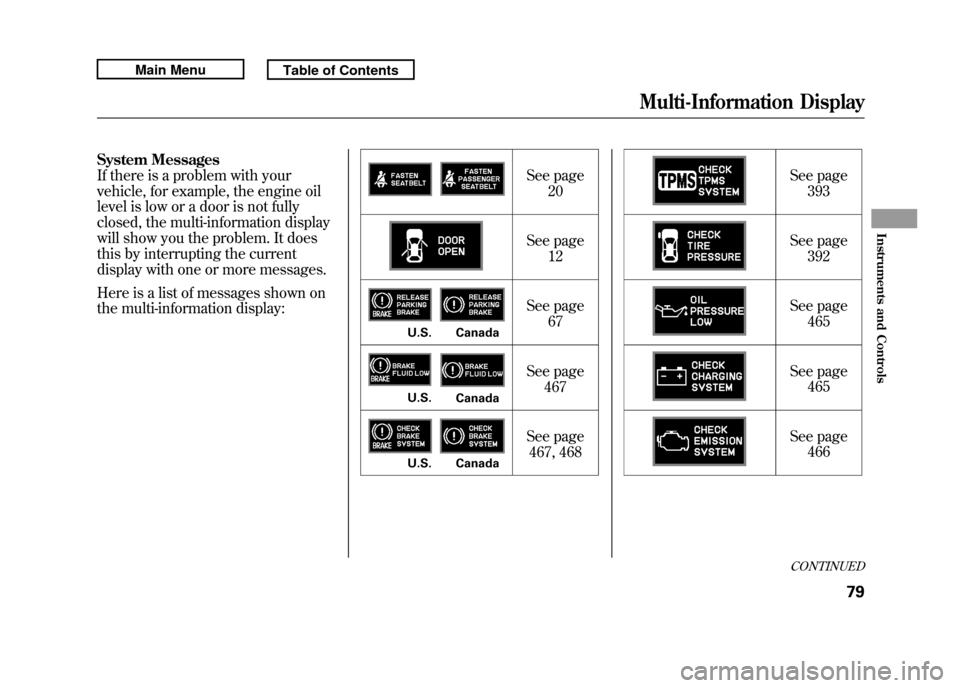
If there is a problem with your
vehicle, for example, the engine oil
level is low or a door is not fully
closed, the multi-information display
will show you the problem. It does
this by interrupting the current
display with one or more messages.
Here is a list of messages shown on
the multi-information display:See page
20
See page 12
See page 67
See page 467
See page 467, 468 See page
393
See page 392
See page 465
See page 465
See page 466
U.S. CanadaU.S. CanadaU.S. Canada
CONTINUED
Multi-Information Display
79
Instruments and Controls
10/06/08 17:42:32 11 ACURA RDX MMC North America Owner's M 50 31STK640 enu
Page 128 of 517

You should have received a key
number tag with your keys. You will
need this key number if you ever
have to get a lost key replaced. Use
only Acura-approved key blanks.
These keys contain electronic
circuits that are activated by the
immobilizer system. They will not
work to start the engine if the circuits
are damaged.●Protect the keys from direct
sunlight, high temperature, and
high humidity.●Do not drop the keys or set heavy
objects on them.●Keep the keys away from liquids.
If they get wet, dry them
immediately with a soft cloth.
The valet key does not contain a
battery. Do not try to take it apart.
Retractable Master KeyThe master key can be retracted into
the remote transmitter. To use the
key, push the release button to
release the key from the transmitter.
The key should be fully extended. To
retract the key, push the release
button and at the same time push the
key into the remote transmitter until
it is securely latched. Always use the fully-extended key
when you insert it to the ignition
switch. If the key does not fully
extend, the immobilizer system may
not operate properly and may
prevent the engine from starting.
The key may come in contact with
your finger while being retracted or
extended. Make sure your fingers do
not touch the pivot of the key when
retracting or extending the key.RELEASE BUTTON
Push
Keys and Locks
123
Instruments and Controls
10/06/08 17:42:32 11 ACURA RDX MMC North America Owner's M 50 31STK640 enu
Page 129 of 517

The immobilizer system protects
your vehicle from theft. If an
improperly coded key (or other
device) is used, the engine's fuel
system is disabled.
When you turn the ignition switch to
the ON (II) position, the immobilizer
system indicator should come on
briefly, then go off. If the indicator
starts to blink, it means the system
does not recognize the coding of the
key. Turn the ignition switch to the
LOCK (0) position, remove the key,
reinsert it, and turn the ignition
switch to the ON (II) position again.The system may not recognize your
key's coding if another immobilizer
key or other metal object (i.e. key
chain) is near the ignition switch
when you insert the key.
If the system repeatedly does not
recognize the coding of your key,
contact your dealer.
Do not attempt to alter this system or
add other devices to it. Electrical
problems could result that may make
your vehicle inoperable.
If you have lost your key and cannot
start the engine, contact your dealer.
Always take the ignition key with you
whenever you leave the vehicle alone.
As required by the FCC:
This device complies with Part 15 of theFCC rules. Operation is subject to the
following two conditions: (1) This devicemay not cause harmful interference, and(2) this device must accept any
interference received, includinginterference that may cause undesiredoperation.
Changes or modifications not expresslyapproved by the party responsible for
compliance could void the user'sauthority to operate the equipment.
This device complies with IndustryCanada Standard RSS-210.
Operation is subject to the following twoconditions: (1) this device may not causeinterference, and (2) this device must
accept any interference that may causeundesired operation of the device.
Immobilizer System12410/06/08 17:42:32 11 ACURA RDX MMC North America Owner's M 50 31STK640 enu
Page 130 of 517
The ignition switch has four
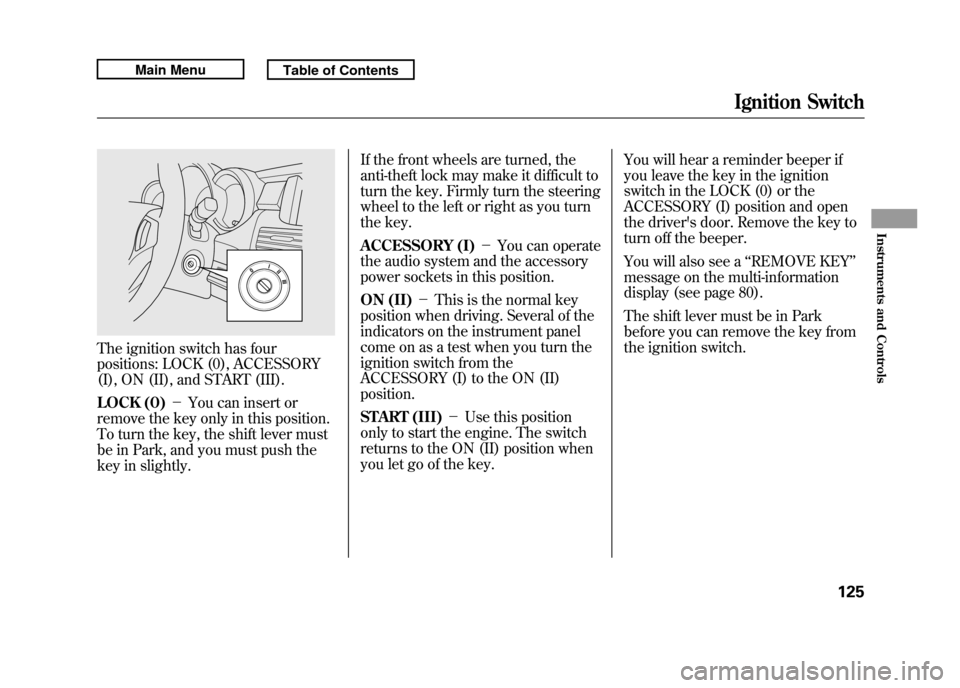
positions: LOCK (0), ACCESSORY
(I), ON (II), and START (III).
LOCK (0)-You can insert or
remove the key only in this position.
To turn the key, the shift lever must
be in Park, and you must push the
key in slightly. If the front wheels are turned, the
anti-theft lock may make it difficult to
turn the key. Firmly turn the steering
wheel to the left or right as you turn
the key.
ACCESSORY (I)
-You can operate
the audio system and the accessory
power sockets in this position.
ON (II) -This is the normal key
position when driving. Several of the
indicators on the instrument panel
come on as a test when you turn the
ignition switch from the
ACCESSORY (I) to the ON (II)
position.
START (III) -Use this position
only to start the engine. The switch
returns to the ON (II) position when
you let go of the key. You will hear a reminder beeper if
you leave the key in the ignition
switch in the LOCK (0) or the
ACCESSORY (I) position and open
the driver's door. Remove the key to
turn off the beeper.
You will also see a
‘‘REMOVE KEY ’’
message on the multi-information
display (see page 80).
The shift lever must be in Park
before you can remove the key from
the ignition switch.
Ignition Switch
125
Instruments and Controls
10/06/08 17:42:32 11 ACURA RDX MMC North America Owner's M 50 31STK640 enu
Page 146 of 517
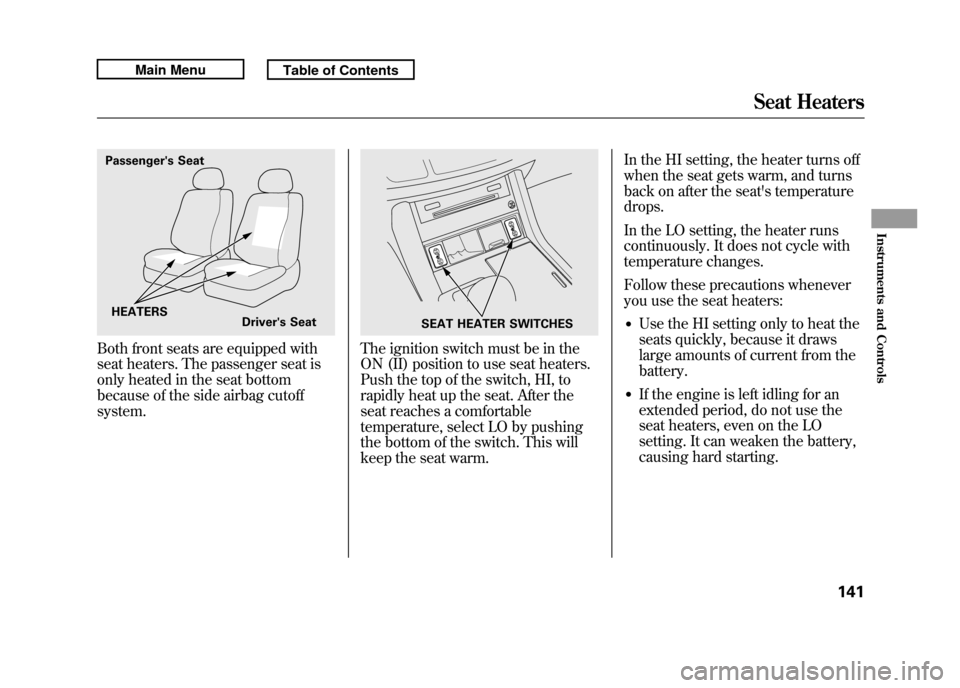
Both front seats are equipped with
seat heaters. The passenger seat is
only heated in the seat bottom
because of the side airbag cutoff
system.
The ignition switch must be in the
ON (II) position to use seat heaters.
Push the top of the switch, HI, to
rapidly heat up the seat. After the
seat reaches a comfortable
temperature, select LO by pushing
the bottom of the switch. This will
keep the seat warm.In the HI setting, the heater turns off
when the seat gets warm, and turns
back on after the seat's temperature
drops.
In the LO setting, the heater runs
continuously. It does not cycle with
temperature changes.
Follow these precautions whenever
you use the seat heaters:
●Use the HI setting only to heat the
seats quickly, because it draws
large amounts of current from the
battery.●If the engine is left idling for an
extended period, do not use the
seat heaters, even on the LO
setting. It can weaken the battery,
causing hard starting.
Passenger's Seat
HEATERS Driver's Seat
SEAT HEATER SWITCHES
Seat Heaters
141
Instruments and Controls
10/06/08 17:42:32 11 ACURA RDX MMC North America Owner's M 50 31STK640 enu
Page 170 of 517

Proper use of the climate control
system can make the interior dry and
comfortable, and keep the windows
clear for best visibility.
For the climate control system to
provide heating and cooling, the
engine must be running.
You can adjust the temperatures of
the driver's side and the passenger's
side independently (see page 169).
Voice Control SystemOn models with navigation systemThe climate control system can also
be operated by voice control. See the
navigation system manual for
complete details.Using Automatic Climate Control
The automatic climate control system
adjusts the fan speed and airflow
levels to maintain the interior
temperature you select.
On models with navigation systemIn AUTO mode, the vehicle's interior
temperature is independently
regulated for the driver and
passenger, based on inputs from
sunlight and temperature sensors
(see page 171). If one side of the
vehicle is getting too much sun, the
system lowers the temperature only
on that side.
1. Press the AUTO button. The
indicator in the button comes on. 2. Set the desired temperature by
pushing the driver's side
temperature control buttons (
or
). The selected temperature will
show in the display.
When you push the passenger's side
temperature control buttons, the
indicator in the DUAL button comes
on and the driver's side and
passenger's side temperature can be
controlled independently (see page
169).
The system automatically selects the
proper mix of conditioned and/or
heated air that will, as quickly as
possible, raise or lower the interior
temperature to your preference.
CONTINUED
Climate Control System
165
Features
10/06/08 17:42:32 11 ACURA RDX MMC North America Owner's M 50 31STK640 enu