engine Acura RDX 2011 Owner's Guide
[x] Cancel search | Manufacturer: ACURA, Model Year: 2011, Model line: RDX, Model: Acura RDX 2011Pages: 517, PDF Size: 27.89 MB
Page 354 of 517
If the engine has just been started, it
may take a short time for the system
to display the rearview.
The camera display brightness is
adjusted automatically by sensors. If
you use the camera display
continuously at high temperature,
the image will gradually dim and
eventually turn off automatically. If
you change to another shift position,
the camera display will come on
again when you return to reverse.
The inside mirror will be hot when
you use the monitor for an extended
period of time.
If a bright light (such as sunlight) is
reflected on the mirror, the image
may be difficult to see.
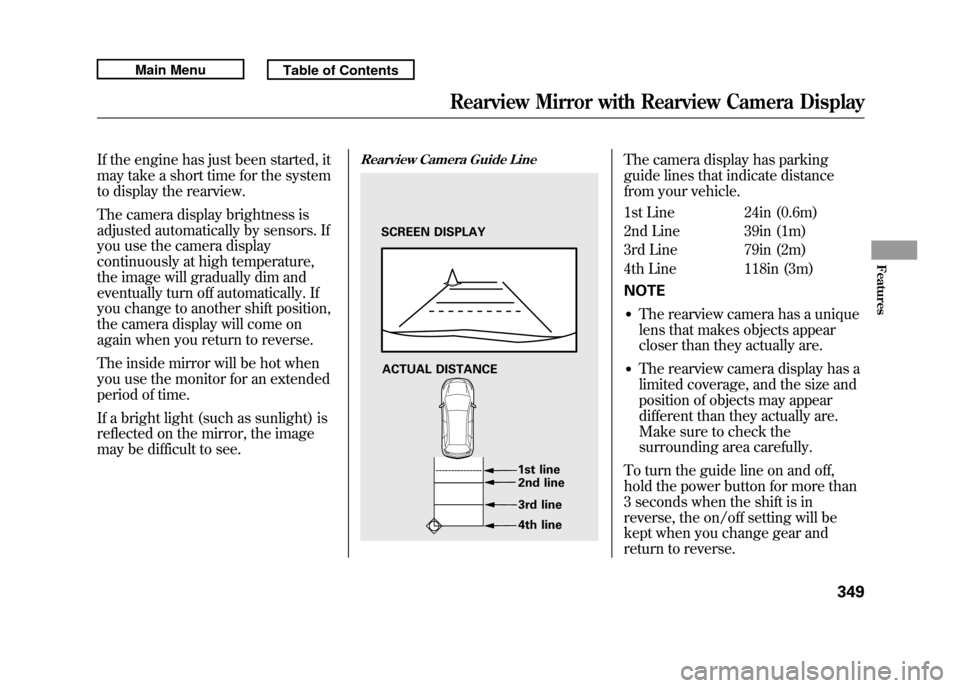
Rearview Camera Guide Line
The camera display has parking
guide lines that indicate distance
from your vehicle.
1st Line 24in (0.6m)
2nd Line 39in (1m)
3rd Line 79in (2m)
4th Line 118in (3m)
NOTE●The rearview camera has a unique
lens that makes objects appear
closer than they actually are.●The rearview camera display has a
limited coverage, and the size and
position of objects may appear
different than they actually are.
Make sure to check the
surrounding area carefully.
To turn the guide line on and off,
hold the power button for more than
3 seconds when the shift is in
reverse, the on/off setting will be
kept when you change gear and
return to reverse.
SCREEN DISPLAY
ACTUAL DISTANCE 1st line2nd line
3rd line
4th line
Rearview Mirror with Rearview Camera Display
349
Features
10/06/08 17:42:32 11 ACURA RDX MMC North America Owner's M 50 31STK640 enu
Page 356 of 517

Before you begin driving your
vehicle, you should know what
gasoline to use and how to check the
levels of important fluids. You also
need to know how to properly store
luggage or packages. The
information in this section will help
you. If you plan to add any
accessories to your vehicle, please
read the information in this section
first.Break-in Period
...........................
352
Fuel Recommendation
................
352
Service Station Procedures
.........
353
Refueling
.................................
353
Tighten Fuel Cap Message
.....
354
Opening and Closing the
Hood
...................................
355
Oil Check
................................
356
Engine Coolant Check
............
357
Fuel Economy
.............................
358
Accessories and
Modifications
..........................
362
Carrying Cargo
...........................
364
Before Driving
351
Before Driving
10/06/08 17:42:32 11 ACURA RDX MMC North America Owner's M 50 31STK640 enu
Page 357 of 517
Break-in Period
Help assure your vehicle's future
reliability and performance by paying
extra attention to how you drive
during the first 600 miles (1,000 km).
During this period:●Avoid full-throttle starts and rapid
acceleration.●Avoid hard braking for the first 200
miles (300 km).●Do not change the oil until the
scheduled maintenance time.●Do not tow a trailer.
You should also follow these
recommendations with an
overhauled or exchanged engine, or
when the brakes are replaced. Fuel Recommendation
Your vehicle is designed to operate
on premium unleaded gasoline with
a pump octane of 91 or higher. If this
octane grade is unavailable, regular
unleaded gasoline with a pump
octane of 87 or higher may be used
temporarily. The use of regular
unleaded gasoline can cause metallic
knocking noises in the engine and
will result in decreased engine
performance. The long-term use of
regular-grade gasoline can lead to
engine damage.
Avoid driving with an extremely low
fuel level. Running out of fuel could
cause the engine to misfire, damaging
the catalytic converter.We recommend using quality
gasolines containing detergent
additives that help prevent fuel
system and engine deposits.
In addition, in order to maintain good
performance, fuel economy, and
emissions control, we strongly
recommend, in areas where it is
available, the use of gasoline that
does NOT contain manganese-based
fuel additives such as MMT.
Use of gasoline with these additives
may adversely affect performance,
and cause the malfunction indicator
lamp on your instrument panel to
come on. If this happens, contact
your authorized dealer for service.
Break-in Period, Fuel Recommendation35210/06/08 17:42:32 11 ACURA RDX MMC North America Owner's M 50 31STK640 enu
Page 358 of 517
Some gasoline today is blended with
oxygenates such as ethanol or
MTBE. Your vehicle is designed to
operate on oxygenated gasoline
containing up to 10% ethanol by
volume and up to 15% MTBE by
volume. Do not use gasoline
containing methanol.
If you notice any undesirable
operating symptoms, try another
service station or switch to another
brand of gasoline.
For further important fuel-related
information for your vehicle, or
information on gasoline that does not
contain MMT, visit My Acura atowners.acura.comIn Canada, visit
www.acura.ca
for
additional information on gasoline. Refueling
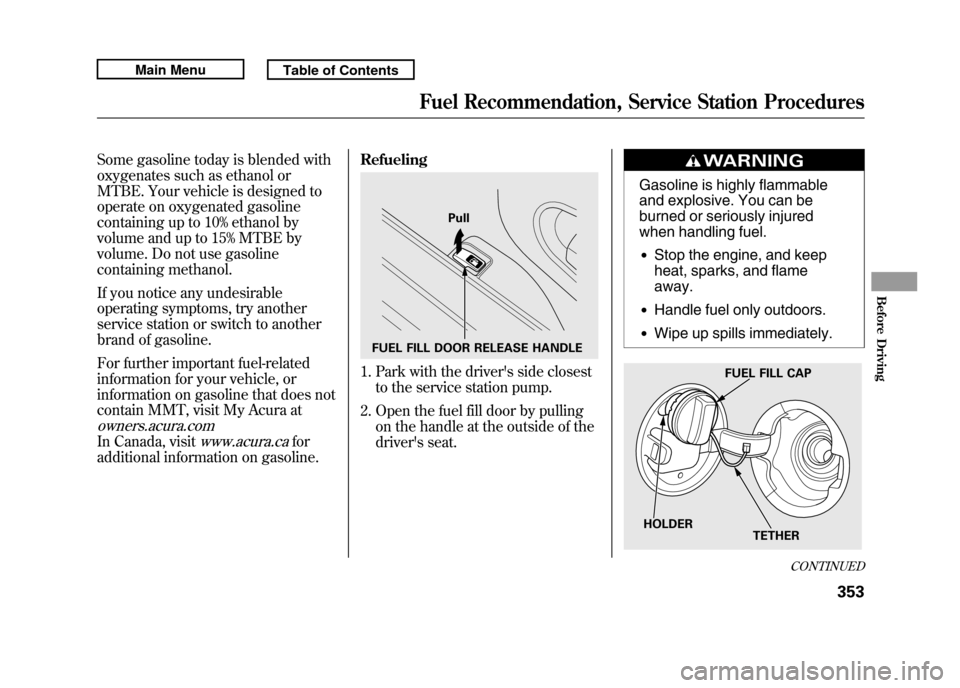
1. Park with the driver's side closest
to the service station pump.
2. Open the fuel fill door by pulling on the handle at the outside of the
driver's seat.
Gasoline is highly flammable
and explosive. You can be
burned or seriously injured
when handling fuel.●Stop the engine, and keep
heat, sparks, and flame
away.●Handle fuel only outdoors.●Wipe up spills immediately.
FUEL FILL DOOR RELEASE HANDLE Pull
FUEL FILL CAP
TETHER
HOLDER
CONTINUED
Fuel Recommendation, Service Station Procedures
353
Before Driving
10/06/08 17:42:32 11 ACURA RDX MMC North America Owner's M 50 31STK640 enu
Page 359 of 517

3. Remove the fuel fill cap slowly.You may hear a hissing sound as
pressure inside the tank equalizes.
Place the cap in the holder on the
fuel fill door.
4. Stop filling the tank after the fuel nozzle automatically clicks off. Do
not try to ‘‘top off ’’the tank. This
leaves some room in the fuel tank
for the fuel to expand with
temperature changes.
If the fuel nozzle keeps clicking off
even though the tank is not full,
there may be a problem with your
vehicle's fuel vapor recovery
system. The system helps keep
fuel vapor from going into the
atmosphere. Try filling at another
pump. If this does not fix the
problem, consult your dealer. 5. Screw the fuel fill cap back on until
it clicks at least once. If you do not
properly tighten the cap, you will
see a ‘‘TIGHTEN FUEL CAP ’’
message on the multi-information
display (see right column on this
page), and the malfunction
indicator lamp may also come on
(see page 466).
6. Push the fuel fill door closed until it latches. Tighten Fuel Cap Message
If your fuel fill cap is loose or
missing, a
‘‘TIGHTEN FUEL CAP ’’
message appears on the multi-
information display after you start the
engine.
Service Station Procedures35410/06/08 17:42:32 11 ACURA RDX MMC North America Owner's M 50 31STK640 enu
Page 360 of 517
Turn the engine off, and confirm the
fuel fill cap is installed. If it is, loosen
it, then retighten it until it clicks at
least once. When you can restart the
engine, the message appears again.
The message goes off after several
days of normal driving once you
tighten or replace the fuel fill cap. To
scroll to another message, press the
INFO (
/
) button.
If the system still detects a leak in
your vehicle's evaporative emissions
system, the malfunction indicator
lamp (MIL) comes on. If the fuel fill
cap was not already tightened, turn
the engine off, and check or
retighten the fuel fill cap until it
clicks at least once. The MIL should
go off after several days of normal
driving once the cap is tightened or
replaced. If the MIL does not go off,
have your vehicle inspected by a
dealer. For more information, see
page 466. Opening and Closing the Hood
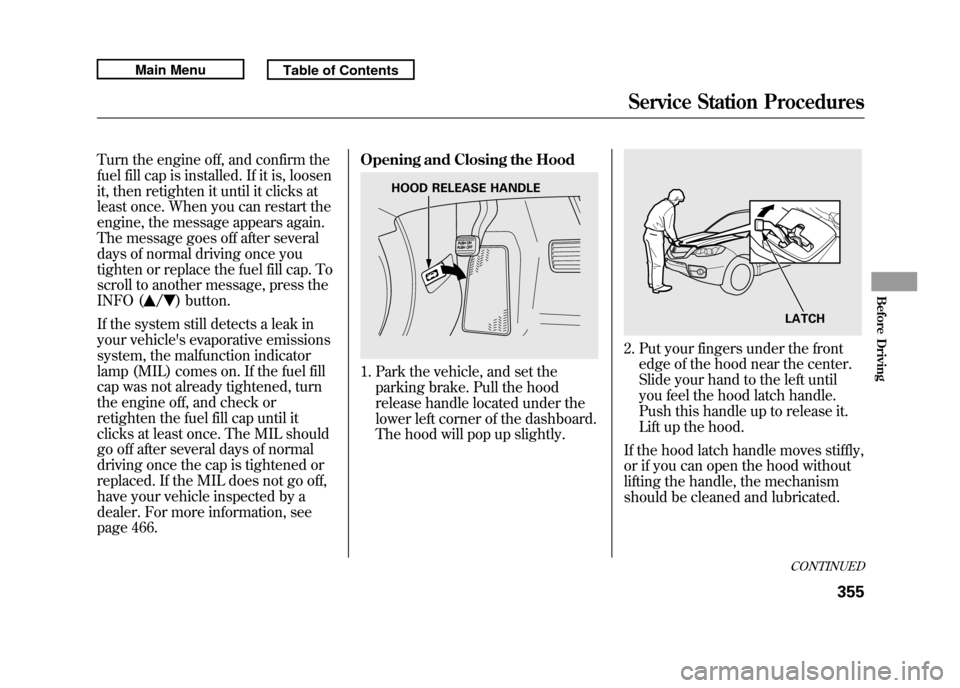
1. Park the vehicle, and set the
parking brake. Pull the hood
release handle located under the
lower left corner of the dashboard.
The hood will pop up slightly.
2. Put your fingers under the frontedge of the hood near the center.
Slide your hand to the left until
you feel the hood latch handle.
Push this handle up to release it.
Lift up the hood.
If the hood latch handle moves stiffly,
or if you can open the hood without
lifting the handle, the mechanism
should be cleaned and lubricated.
HOOD RELEASE HANDLE
LATCHCONTINUED
Service Station Procedures
355
Before Driving
10/06/08 17:42:32 11 ACURA RDX MMC North America Owner's M 50 31STK640 enu
Page 361 of 517
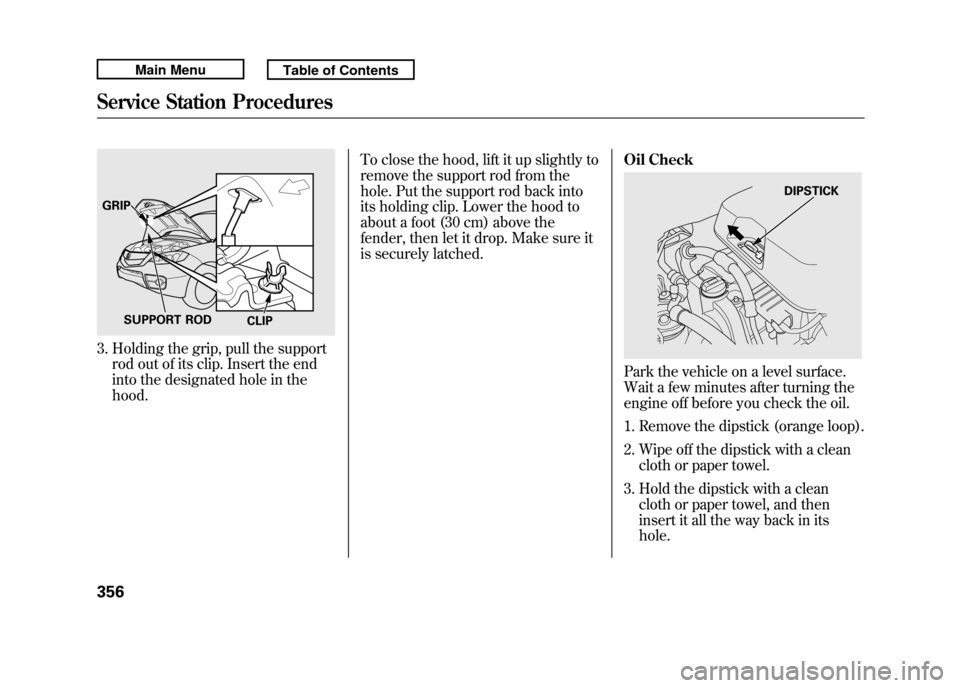
3. Holding the grip, pull the supportrod out of its clip. Insert the end
into the designated hole in the
hood. To close the hood, lift it up slightly to
remove the support rod from the
hole. Put the support rod back into
its holding clip. Lower the hood to
about a foot (30 cm) above the
fender, then let it drop. Make sure it
is securely latched.
Oil Check
Park the vehicle on a level surface.
Wait a few minutes after turning the
engine off before you check the oil.
1. Remove the dipstick (orange loop).
2. Wipe off the dipstick with a clean
cloth or paper towel.
3. Hold the dipstick with a clean cloth or paper towel, and then
insert it all the way back in its
hole.
GRIP
SUPPORT ROD CLIP
DIPSTICK
Service Station Procedures35610/06/08 17:42:32 11 ACURA RDX MMC North America Owner's M 50 31STK640 enu
Page 362 of 517
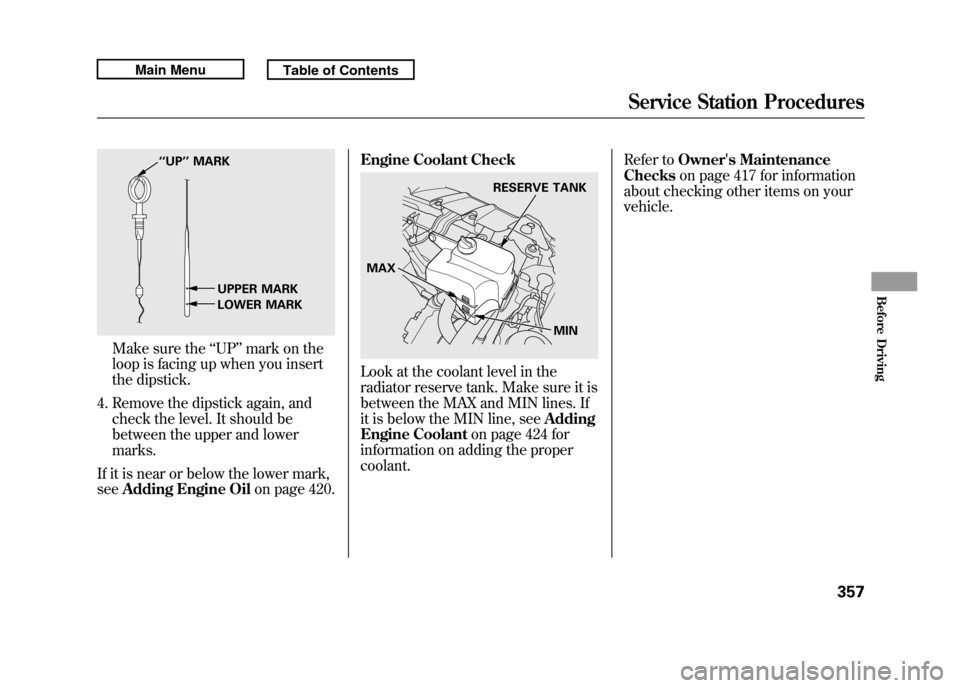
Make sure the‘‘UP ’’mark on the
loop is facing up when you insert
the dipstick.
4. Remove the dipstick again, and check the level. It should be
between the upper and lower
marks.
If it is near or below the lower mark,
see Adding Engine Oil on page 420.Engine Coolant Check
Look at the coolant level in the
radiator reserve tank. Make sure it is
between the MAX and MIN lines. If
it is below the MIN line, see
Adding
Engine Coolant on page 424 for
information on adding the proper
coolant. Refer to
Owner's Maintenance
Checks on page 417 for information
about checking other items on your
vehicle.
‘‘ UP’’ MARK
UPPER MARK
LOWER MARK
RESERVE TANK
MAX MIN
Service Station Procedures
357
Before Driving
10/06/08 17:42:32 11 ACURA RDX MMC North America Owner's M 50 31STK640 enu
Page 364 of 517

Fuel Economy FactorsThe following factors can lower your
vehicle's fuel economy:●Aggressive driving (hard
acceleration and braking)●Excessive idling, accelerating and
braking in stop-and-go traffic●Cold engine operation (engines are
more efficient when warmed up)●Driving with a heavy load or the air
conditioner running●Improperly inflated tires
Improving Fuel EconomyVehicle MaintenanceA properly maintained vehicle
maximizes fuel economy. Poor
maintenance can significantly reduce
fuel economy. Always maintain your
vehicle according to the maintenance
messages displayed on the
information display (seeOwner's
Maintenance Checks on page 417).
For example:●Use the required engine oil (see
page 420).●Maintain proper tire inflation -
An underinflated tire increases
‘‘ rolling resistance, ’’which reduces
fuel economy.●Avoid carrying excess weight in
your vehicle -It puts a heavier
load on the engine, increasing fuel
consumption.
●Keep your vehicle clean -In
particular, a build-up of snow or
mud on your vehicle's underside
adds weight and rolling resistance.
Frequent cleaning helps your fuel
economy.
CONTINUED
Fuel Economy
359
Before Driving
10/06/08 17:42:32 11 ACURA RDX MMC North America Owner's M 50 31STK640 enu
Page 365 of 517

Drive Efficiently●Drive moderately-Rapid
acceleration, abrupt cornering, and
hard braking increase fuel
consumption.●Observe the speed limit -
Aerodynamic drag has a big effect
on fuel economy at speeds above
45 mph (75 km/h). Reduce your
speed and you reduce the drag.
Trailers, car top carriers, roof
racks and bike racks are also big
contributors to increased drag.
●Always drive in the highest gear
possible -If your vehicle has a
manual transmission, you can
boost your fuel economy by up
shifting as early as possible.●Avoid excessive idling -Idling
results in 0 miles per gallon (0 kms
per liter).
●Minimize the use of the air
conditioning system -The A/C
puts an extra load on the engine
which makes it use more fuel. Use
the fresh-air ventilation when
possible.●Plan and combine trips -
Combine several short trips into
one. A warmed-up engine is more
fuel efficient than a cold one.
Fuel Economy36010/06/08 17:42:32 11 ACURA RDX MMC North America Owner's M 50 31STK640 enu