engine Acura RDX 2011 Workshop Manual
[x] Cancel search | Manufacturer: ACURA, Model Year: 2011, Model line: RDX, Model: Acura RDX 2011Pages: 517, PDF Size: 27.89 MB
Page 414 of 517

This section explains why it is
important to keep your vehicle well
maintained and how to follow basic
maintenance safety precautions.
This section also includes
instructions on how to read the
maintenance minder messages on
the multi-information display, and
instructions for simple maintenance
tasks you may want to take care of
yourself.
If you have the skills and tools to
perform more complex maintenance
tasks on your vehicle, you may want
to purchase the service manual. See
page 497 for information on how to
obtain a copy, or see your dealer.U.S. Vehicles:
Maintenance,
replacement, or repair of
emissions control devices and
systems may be done by any
automotive repair establishment
or individual using parts that are
‘‘certified’’ to EPA standards. Maintenance Safety
.....................
410
Maintenance Minder ™
................
411
Fluid Locations
...........................
419
Adding Engine Oil
......................
420
Required Engine Oil
...............
420
Changing the Engine Oil and
Filter
.......................................
422
Engine Coolant
...........................
424
Windshield Washers
...................
426
Automatic Transmission Fluid
....
427
Brake Fluid
.................................
429
Power Steering Fluid
..................
430
Lights
..........................................
431
Cleaning the Seat Belts
...............
438
Floor Mats
..................................
438
Audio Antenna
............................
439
Intercooler
..................................
439
Dust and Pollen Filter
.................
439
Wiper Blades
..............................
440
Wheels
........................................
443
Tires
...........................................
444
Checking the Battery
..................
450
Vehicle Storage
...........................
451
Interior Care
...............................
452
Maintenance
409
Maintenance
10/06/08 17:42:32 11 ACURA RDX MMC North America Owner's M 50 31STK640 enu
Page 415 of 517
All service items not detailed in this
section should be performed by a
certified technician or other qualified
mechanic.
Important Safety Precautions
To eliminate potential hazards, read
the instructions before you begin,
and make sure you have the tools
and skills required.●Make sure your vehicle is parked
on level ground, the parking brake
is set, and the engine is off.●To clean parts, use a commercially
available degreaser or parts
cleaner, not gasoline.●To reduce the possibility of fire or
explosion, keep cigarettes, sparks,
and flames away from the battery
and all fuel-related parts.●Wear eye protection and protective
clothing when working with the
battery or compressed air.
Improperly maintaining this
vehicle, or failing to correct a
problem before driving can
cause a crash in which you can
be seriously hurt or killed.
Always follow the inspection
and maintenance
recommendations and
schedules in this owner's
manual.
Potential Vehicle Hazards●Carbon Monoxide poison from
engine exhaust. Be sure there is
adequate ventilation whenever you
operate the engine.●Burns from hot parts. Let the
engine and exhaust system cool
down before touching any parts.
●Injury from moving parts. Do
not run the engine unless
instructed to do so.Failure to properly follow
maintenance instructions and
precautions can cause you to
be seriously hurt or killed.
Always follow the procedures
and precautions in this owner's
manual.
Some of the most important safety
precautions are given here. However,
we cannot warn you of every
conceivable hazard that can arise in
performing maintenance. Only you
can decide whether or not you
should perform a given task.
Maintenance Safety41010/06/08 17:42:32 11 ACURA RDX MMC North America Owner's M 50 31STK640 enu
Page 416 of 517
One of the most convenient and
important features of the multi-
information display on your vehicle is
the Maintenance Minder
TM.
Based on engine operating
conditions and accumulated engine
revolutions, the onboard computer in
your vehicle calculates the remaining
engine oil life and displays it as a
percentage.
The system also displays the code for
other scheduled maintenance items
needing service. Engine Oil Life
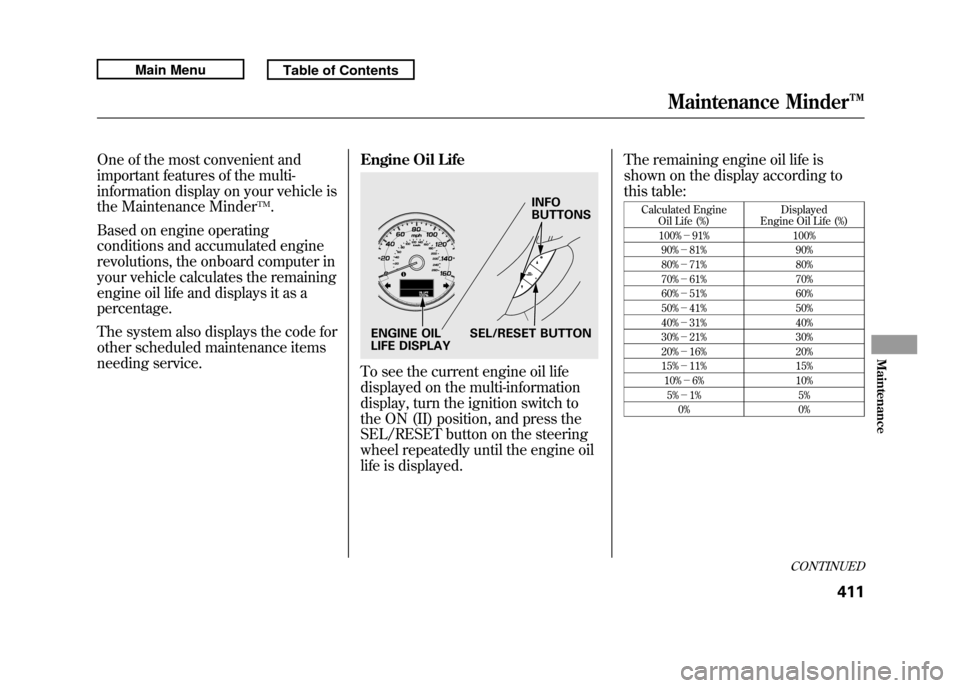
To see the current engine oil life
displayed on the multi-information
display, turn the ignition switch to
the ON (II) position, and press the
SEL/RESET button on the steering
wheel repeatedly until the engine oil
life is displayed.The remaining engine oil life is
shown on the display according to
this table:
Calculated Engine
Oil Life (%) Displayed
Engine Oil Life (%)
100% -91% 100%
90% -81% 90%
80% -71% 80%
70% -61% 70%
60% -51% 60%
50% -41% 50%
40% -31% 40%
30% -21% 30%
20% -16% 20%
15% -11% 15%
10% -6% 10%
5% -1% 5%
0% 0%
INFO
BUTTONS
SEL/RESET BUTTON
ENGINE OIL
LIFE DISPLAY
CONTINUED
Maintenance Minder™
411
Maintenance
10/06/08 17:42:32 11 ACURA RDX MMC North America Owner's M 50 31STK640 enu
Page 417 of 517
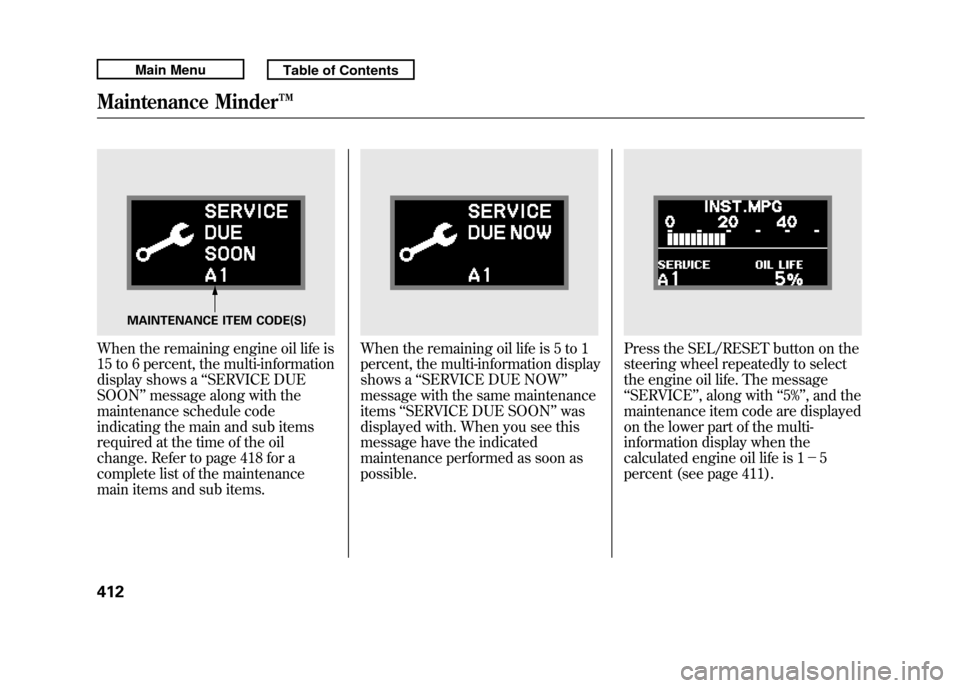
When the remaining engine oil life is
15 to 6 percent, the multi-information
display shows a‘‘SERVICE DUE
SOON ’’message along with the
maintenance schedule code
indicating the main and sub items
required at the time of the oil
change. Refer to page 418 for a
complete list of the maintenance
main items and sub items.
When the remaining oil life is 5 to 1
percent, the multi-information display
shows a ‘‘SERVICE DUE NOW ’’
message with the same maintenance
items ‘‘SERVICE DUE SOON’’ was
displayed with. When you see this
message have the indicated
maintenance performed as soon as
possible.
Press the SEL/RESET button on the
steering wheel repeatedly to select
the engine oil life. The message
‘‘ SERVICE ’’, along with ‘‘5% ’’, and the
maintenance item code are displayed
on the lower part of the multi-
information display when the
calculated engine oil life is 1- 5
percent (see page 411).
MAINTENANCE ITEM CODE(S)
Maintenance Minder™41210/06/08 17:42:32 11 ACURA RDX MMC North America Owner's M 50 31STK640 enu
Page 418 of 517
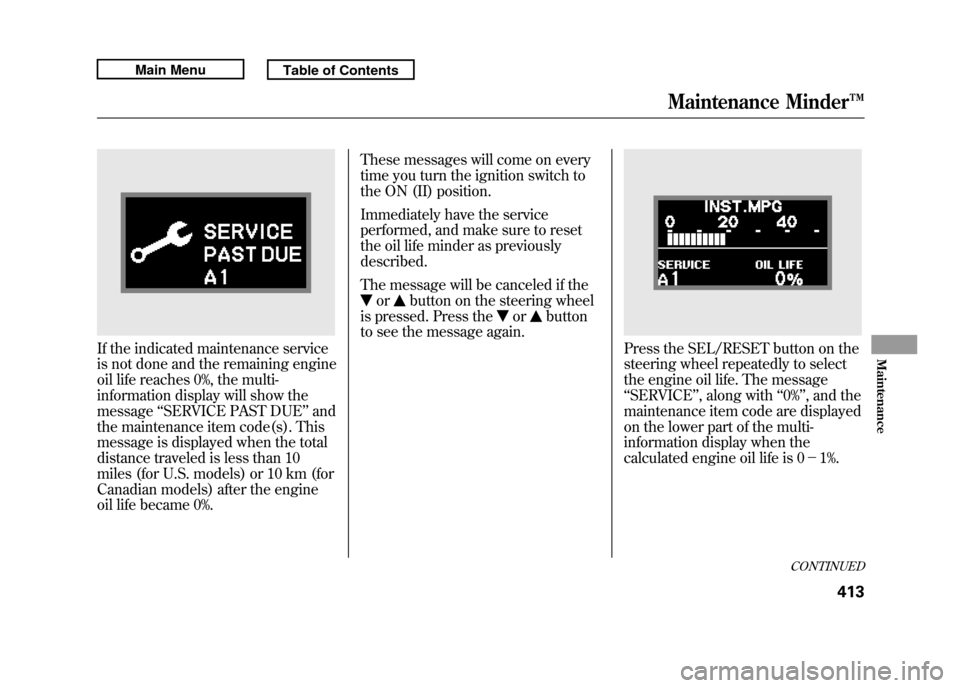
If the indicated maintenance service
is not done and the remaining engine
oil life reaches 0%, the multi-
information display will show the
message‘‘SERVICE PAST DUE ’’and
the maintenance item code(s). This
message is displayed when the total
distance traveled is less than 10
miles (for U.S. models) or 10 km (for
Canadian models) after the engine
oil life became 0%. These messages will come on every
time you turn the ignition switch to
the ON (II) position.
Immediately have the service
performed, and make sure to reset
the oil life minder as previously
described.
The message will be canceled if the
or
button on the steering wheel
is pressed. Press the
or
button
to see the message again.
Press the SEL/RESET button on the
steering wheel repeatedly to select
the engine oil life. The message
‘‘ SERVICE ’’, along with ‘‘0% ’’, and the
maintenance item code are displayed
on the lower part of the multi-
information display when the
calculated engine oil life is 0- 1%.
CONTINUED
Maintenance Minder™
413
Maintenance
10/06/08 17:42:32 11 ACURA RDX MMC North America Owner's M 50 31STK640 enu
Page 419 of 517
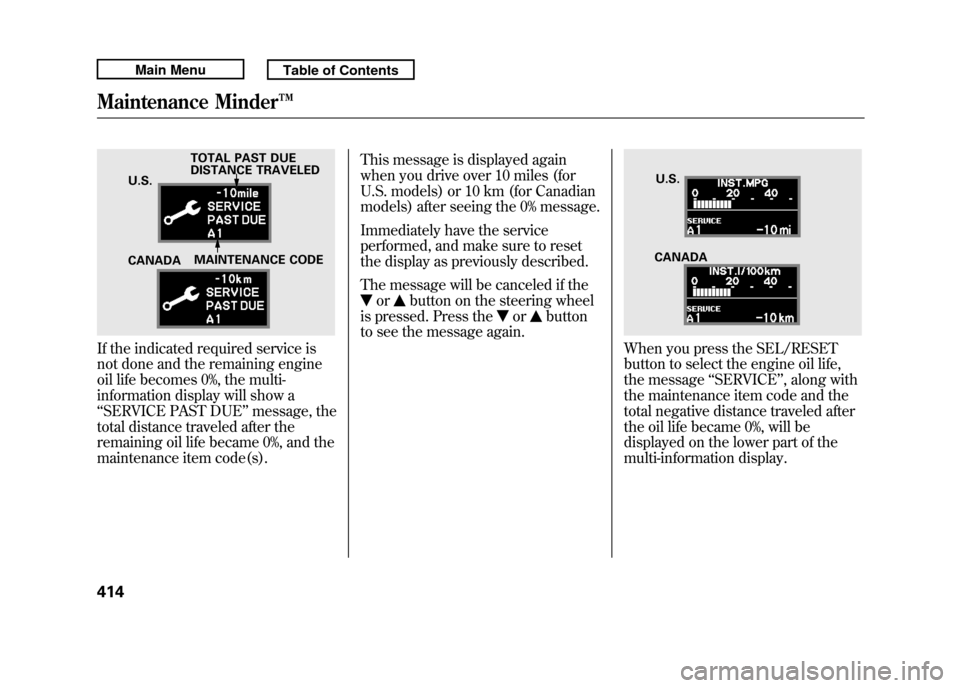
If the indicated required service is
not done and the remaining engine
oil life becomes 0%, the multi-
information display will show a
‘‘SERVICE PAST DUE ’’message, the
total distance traveled after the
remaining oil life became 0%, and the
maintenance item code(s). This message is displayed again
when you drive over 10 miles (for
U.S. models) or 10 km (for Canadian
models) after seeing the 0% message.
Immediately have the service
performed, and make sure to reset
the display as previously described.
The message will be canceled if the
or
button on the steering wheel
is pressed. Press the
or
button
to see the message again.
When you press the SEL/RESET
button to select the engine oil life,
the message ‘‘SERVICE ’’, along with
the maintenance item code and the
total negative distance traveled after
the oil life became 0%, will be
displayed on the lower part of the
multi-information display.
TOTAL PAST DUE
DISTANCE TRAVELED
CANADA MAINTENANCE CODE
U.S.
U.S.
CANADA
Maintenance Minder™41410/06/08 17:42:32 11 ACURA RDX MMC North America Owner's M 50 31STK640 enu
Page 420 of 517
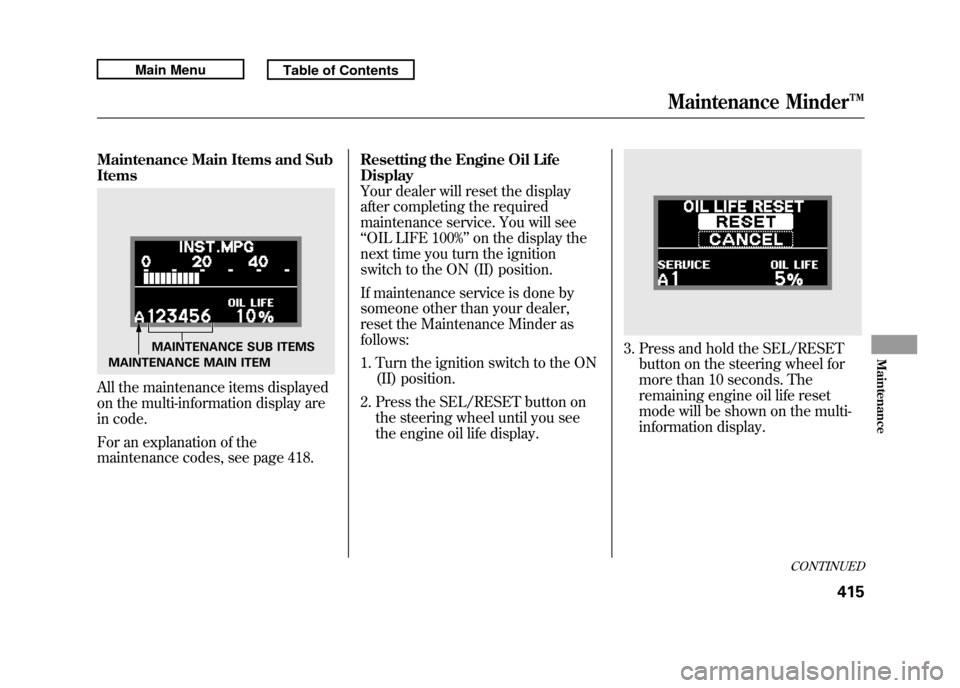
Maintenance Main Items and Sub
ItemsAll the maintenance items displayed
on the multi-information display are
in code.
For an explanation of the
maintenance codes, see page 418.Resetting the Engine Oil Life
Display
Your dealer will reset the display
after completing the required
maintenance service. You will see
‘‘
OIL LIFE 100% ’’on the display the
next time you turn the ignition
switch to the ON (II) position.
If maintenance service is done by
someone other than your dealer,
reset the Maintenance Minder as
follows:
1. Turn the ignition switch to the ON (II) position.
2. Press the SEL/RESET button on the steering wheel until you see
the engine oil life display.
3. Press and hold the SEL/RESETbutton on the steering wheel for
more than 10 seconds. The
remaining engine oil life reset
mode will be shown on the multi-
information display.
MAINTENANCE SUB ITEMS
MAINTENANCE MAIN ITEM
CONTINUED
Maintenance Minder™
415
Maintenance
10/06/08 17:42:32 11 ACURA RDX MMC North America Owner's M 50 31STK640 enu
Page 421 of 517
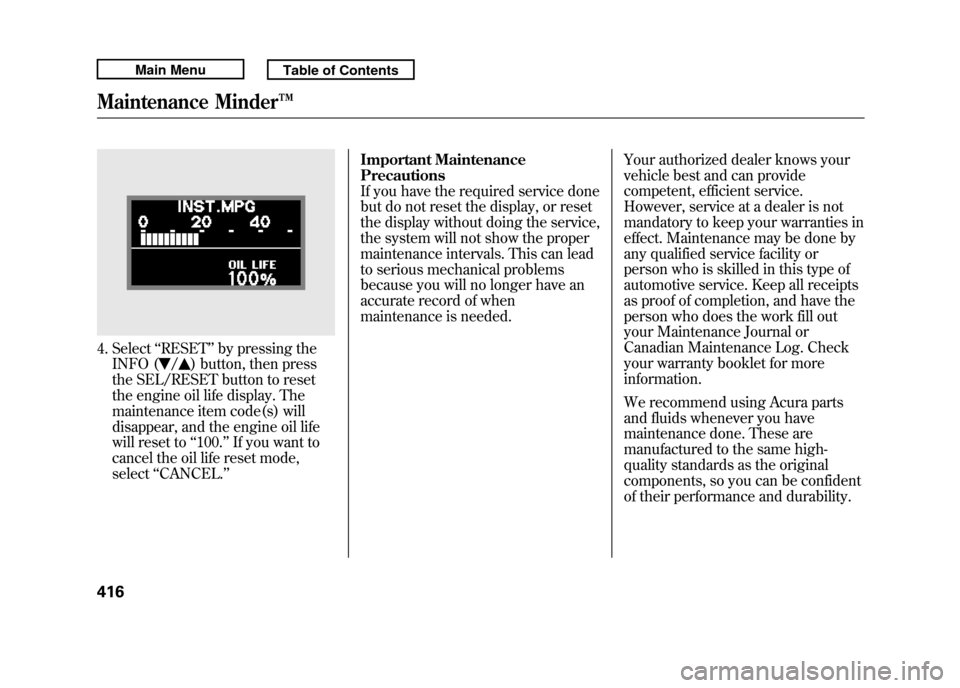
4. Select‘‘RESET ’’by pressing the
INFO (
/
) button, then press
the SEL/RESET button to reset
the engine oil life display. The
maintenance item code(s) will
disappear, and the engine oil life
will reset to ‘‘100. ’’If you want to
cancel the oil life reset mode,
select ‘‘CANCEL. ’’ Important Maintenance
Precautions
If you have the required service done
but do not reset the display, or reset
the display without doing the service,
the system will not show the proper
maintenance intervals. This can lead
to serious mechanical problems
because you will no longer have an
accurate record of when
maintenance is needed.
Your authorized dealer knows your
vehicle best and can provide
competent, efficient service.
However, service at a dealer is not
mandatory to keep your warranties in
effect. Maintenance may be done by
any qualified service facility or
person who is skilled in this type of
automotive service. Keep all receipts
as proof of completion, and have the
person who does the work fill out
your Maintenance Journal or
Canadian Maintenance Log. Check
your warranty booklet for more
information.
We recommend using Acura parts
and fluids whenever you have
maintenance done. These are
manufactured to the same high-
quality standards as the original
components, so you can be confident
of their performance and durability.
Maintenance Minder™41610/06/08 17:42:32 11 ACURA RDX MMC North America Owner's M 50 31STK640 enu
Page 422 of 517

U.S. Vehicles:
According to state and federal
regulations, failure to perform
maintenance on the items marked
with#will not void your emissions
warranties. However, Acura
recommends that all maintenance
services be performed in accordance
with the intervals indicated by the
multi-information display. Owner's Maintenance Checks
You should check the following
items at the specified intervals. If you
are unsure of how to perform any
check, turn to the appropriate page
listed.
●Engine oil level
-Check every
time you fill the fuel tank. See page
356.●Engine coolant level -Check the
radiator reserve tank every time
you fill the fuel tank. See page 357.●Automatic transmission -Check
the fluid level monthly. See page
427.
●Brakes -Check the fluid level
monthly. See page 429.●Tires -Check the tire pressure
monthly. Examine the tread for
wear and foreign objects. See page
445.●Lights -Check the operation of
the headlights, parking lights,
taillights, high-mount brake light,
and license plate lights monthly.
See page 431.
Maintenance Minder™
417
Maintenance
10/06/08 17:42:32 11 ACURA RDX MMC North America Owner's M 50 31STK640 enu
Page 423 of 517

SymbolMaintenance Main Items
A
●Replace engine oil
ꭧ 1
B
●Replace engine oil
ꭧ1and oil filter
●Inspect front and rear brakes●Check parking brake adjustment●Inspect these items:●Tie rod ends, steering gear box, and boots●Suspension components●Driveshaft boots●Brake hoses and lines (including ABS/VSA)●All fluid levels and condition of fluids●Exhaust system
#
●Fuel lines and connections
#
ꭧ1: If the message ‘‘SERVICE ’’does not appear more than 12 months after
the display is reset, change the engine oil every year.
#: See information on maintenance and emissions warranty on page 417.
NOTE:
●Independent of maintenance message in the Information Display,
replace the brake fluid every 3 years.●Inspect idle speed every 160,000 miles (256,000 km).●Adjust the valves during services A, B, 1, 2, or 3 if they are noisy. Symbol Maintenance Sub Items
1
●Rotate tires
2●Replace air cleaner element If you drive in dusty conditions, replace every 15,000
miles (24,000 km).●Replace dust and pollen filterIf you drive primarily in urban areas that have high
concentrations of soot in the air from industry and from
diesel-powered vehicles, replace every 15,000 miles
(24,000 km).●Inspect drive belt
3●Replace transmission and transfer
ꭧ 2fluid
Driving in mountainous areas at very low vehicle speeds
or trailer towing results in higher transmission and
transfer temperatures. This requires transmission and
transfer fluid changes more frequently than
recommended by the Maintenance Minder. If you
regularly drive your vehicle under these conditions, have
the transmission and transfer fluid changed at 60,000
miles (100,000 km), then every 30,000 miles (48,000 km).
4
●Replace spark plugs●Inspect valve clearance
5●Replace engine coolant
6●Replace rear differential fluid
ꭧ 2
Driving in mountainous areas at very low vehicle speeds
or trailer towing results in higher level of mechanical
(shear) stress to fluid. This requires differential fluid
changes more frequently than recommended by the
Maintenance Minder. If you regularly drive your vehicle
under these conditions, have the differential fluid
changed at 7,500 miles (12,000 km), then every 15,000
miles (24,000 km).
ꭧ2: SH-AWD only
Maintenance Minder™
Maintenance Minder
41810/06/08 17:42:32 11 ACURA RDX MMC North America Owner's M 50 31STK640 enu