Rear Acura RDX 2011 Workshop Manual
[x] Cancel search | Manufacturer: ACURA, Model Year: 2011, Model line: RDX, Model: Acura RDX 2011Pages: 517, PDF Size: 27.89 MB
Page 175 of 517
When you set the temperature to its
lower or upper limit, it is displayed as
or
.
Push AUTO or
. The selected
temperatures appear in the display.
When the indicator in the DUAL
button is off, you can adjust both
sides to the same temperature by
adjusting the driver's side
temperature control buttons (
or
).
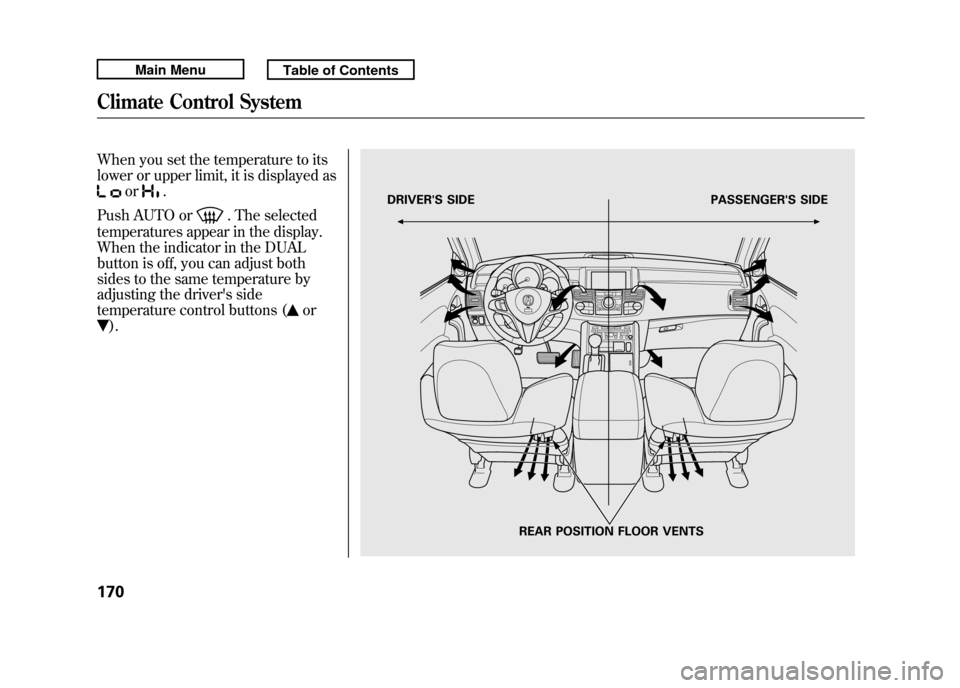
DRIVER'S SIDE PASSENGER'S SIDE
REAR POSITION FLOOR VENTS
Climate Control System17010/06/08 17:42:32 11 ACURA RDX MMC North America Owner's M 50 31STK640 enu
Page 353 of 517

On models with navigation systemRefer to the navigation system
manual for operation of the rearview
camera.
On models without navigation systemYou can turn the camera display on
and off by pressing the power button
when the shift lever is in reverse.
The camera display turns on
everytime you shift to reverse, even if
you turned it off the last time.
Whenever you shift to reverse (R)
with the ignition switch in the ON
(II) position, the rear view appears on
a display in the rearview mirror.
For the best picture, always keep the
rearview camera clean, and do not
cover the camera lens. To avoid
scratching the lens when you clean
it, use a moist, soft cloth.
Since the rearview camera display
area is limited, you should always
back up slowly and carefully, and
look behind you for obstacles.
REARVIEW CAMERA DISPLAYPOWER BUTTON
Rearview Mirror with Rearview Camera Display34810/06/08 17:42:32 11 ACURA RDX MMC North America Owner's M 50 31STK640 enu
Page 354 of 517
If the engine has just been started, it
may take a short time for the system
to display the rearview.
The camera display brightness is
adjusted automatically by sensors. If
you use the camera display
continuously at high temperature,
the image will gradually dim and
eventually turn off automatically. If
you change to another shift position,
the camera display will come on
again when you return to reverse.
The inside mirror will be hot when
you use the monitor for an extended
period of time.
If a bright light (such as sunlight) is
reflected on the mirror, the image
may be difficult to see.
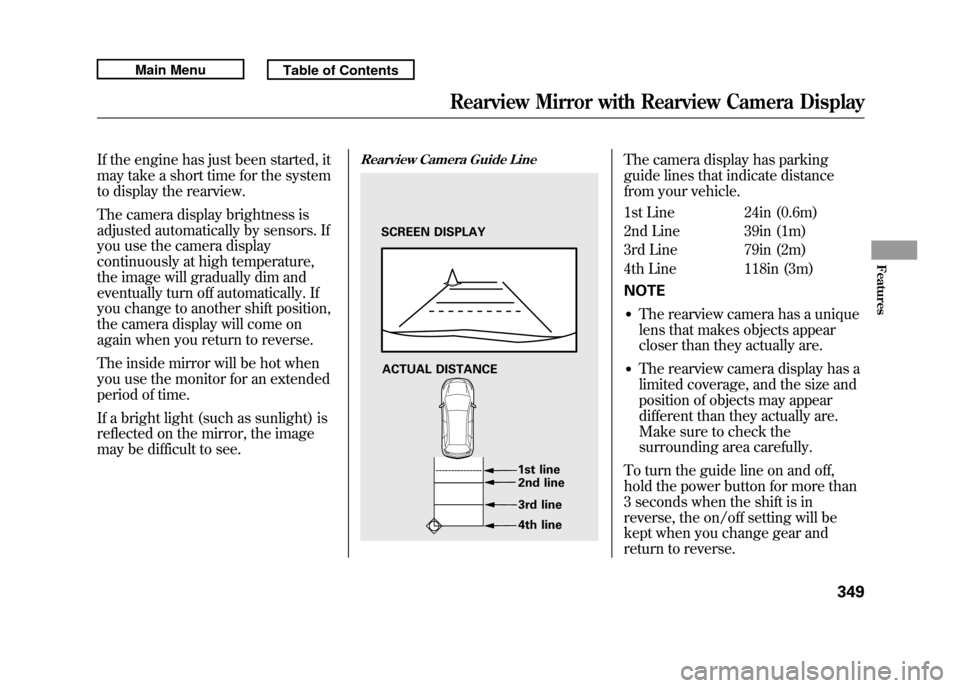
Rearview Camera Guide Line
The camera display has parking
guide lines that indicate distance
from your vehicle.
1st Line 24in (0.6m)
2nd Line 39in (1m)
3rd Line 79in (2m)
4th Line 118in (3m)
NOTE●The rearview camera has a unique
lens that makes objects appear
closer than they actually are.●The rearview camera display has a
limited coverage, and the size and
position of objects may appear
different than they actually are.
Make sure to check the
surrounding area carefully.
To turn the guide line on and off,
hold the power button for more than
3 seconds when the shift is in
reverse, the on/off setting will be
kept when you change gear and
return to reverse.
SCREEN DISPLAY
ACTUAL DISTANCE 1st line2nd line
3rd line
4th line
Rearview Mirror with Rearview Camera Display
349
Features
10/06/08 17:42:32 11 ACURA RDX MMC North America Owner's M 50 31STK640 enu
Page 367 of 517

Modifying your vehicle, or installing
some non-Acura accessories, can
make your vehicle unsafe. Before
you make any modifications or add
any accessories, be sure to read the
following information.
Accessories
Your dealer has Acura accessories
that allow you to personalize your
vehicle. These accessories have been
designed and approved for your
vehicle, and are covered by warranty.
Although non-Acura accessories may
fit on your vehicle, they may not
meet factory specifications, and could
adversely affect your vehicle's
handling, stability, and reliability.
Improper accessories or
modifications can affect your
vehicle's handling, stability, and
performance, and cause a
crash in which you can be hurt
or killed.
Follow all instructions in this
owner's manual regarding
accessories and modifications.
When properly installed, cellular
phones, alarms, two-way radios, and
low-powered audio systems should
not interfere with your vehicle's
computer controlled systems, such
as your airbags, anti-lock brakes, and
tire pressure monitoring system. Before installing any accessory:
●Make sure the accessory does not
obscure any lights, or interfere
with proper vehicle operation or
performance.●Be sure electronic accessories do
not overload electrical circuits (see
page 469) or interfere with proper
operation of your vehicle.●Before installing any electronic
accessory, have the installer
contact your dealer for assistance.
If possible, have your dealer
inspect the final installation.●Do not install accessories on the
side pillars or across the rear
windows. Accessories installed in
these areas may interfere with
proper operation of the side
curtain airbags.
Accessories and Modifications36210/06/08 17:42:32 11 ACURA RDX MMC North America Owner's M 50 31STK640 enu
Page 369 of 517
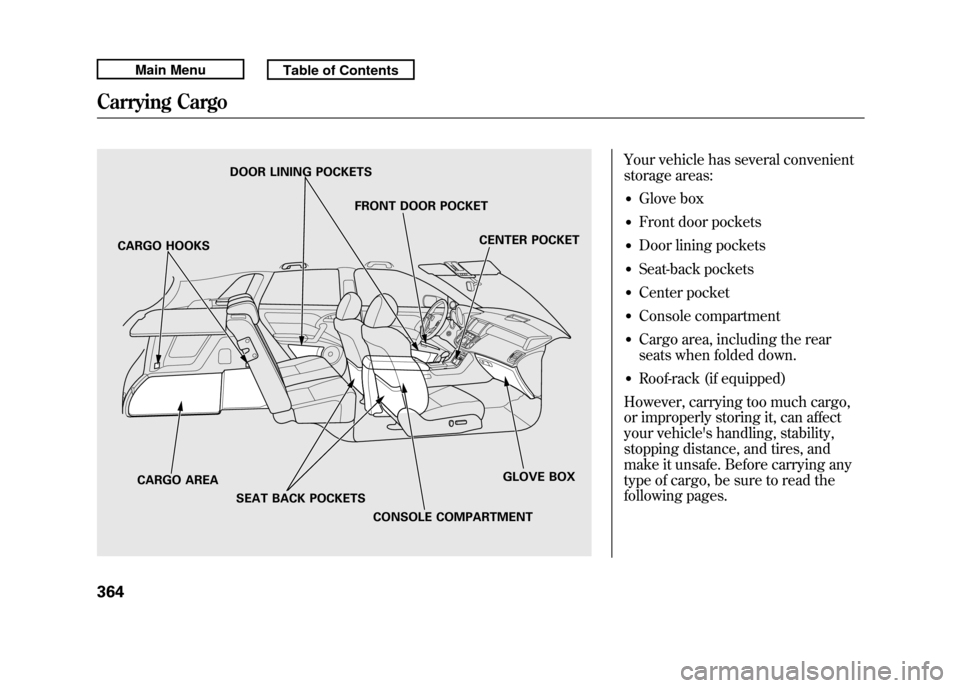
Your vehicle has several convenient
storage areas:●Glove box●Front door pockets●Door lining pockets●Seat-back pockets●Center pocket●Console compartment●Cargo area, including the rear
seats when folded down.●Roof-rack (if equipped)
However, carrying too much cargo,
or improperly storing it, can affect
your vehicle's handling, stability,
stopping distance, and tires, and
make it unsafe. Before carrying any
type of cargo, be sure to read the
following pages.
DOOR LINING POCKETS
FRONT DOOR POCKETCENTER POCKET
GLOVE BOX
CONSOLE COMPARTMENT
CARGO AREA
SEAT BACK POCKETS
CARGO HOOKS
Carrying Cargo36410/06/08 17:42:32 11 ACURA RDX MMC North America Owner's M 50 31STK640 enu
Page 372 of 517

Carrying Cargo in the Passenger
Compartment●Store or secure all items that could
be thrown around and hurt
someone during a crash.●Be sure items placed on the floor
behind the front seats cannot roll
underneath and interfere with the
proper operation of the seats, the
sensors under the seats, or the
driver's ability to operate the
pedals.
●If you fold the rear seats down, tie
down items that could be thrown
about the vehicle during a crash or
sudden stop. Also, keep all cargo
below the bottom of the windows.
If it is higher, it could interfere
with the proper operation of the
side curtain airbags.●Keep the glove box closed while
driving. If it is open, a passenger
could injure their knees during a
crash or sudden stop.●Do not put any items on top of the
cargo area cover. They can block
your view and be thrown around
the vehicle during a crash.Carrying Cargo in the Cargo Area
or on a Roof Rack
●Distribute cargo evenly on the
floor of the cargo area, placing the
heaviest items on the bottom and
as far forward as possible. Tie
down items that could be thrown
about the vehicle during a crash or
sudden stop.●If you fold the rear seats down, tie
down items that could be thrown
about the vehicle during a crash or
sudden stop. Keep all cargo below
the bottom of the windows. If it is
higher, it could interfere with the
proper operation of the side
curtain airbags.
CONTINUED
Carrying Cargo
367
Before Driving
10/06/08 17:42:32 11 ACURA RDX MMC North America Owner's M 50 31STK640 enu
Page 384 of 517
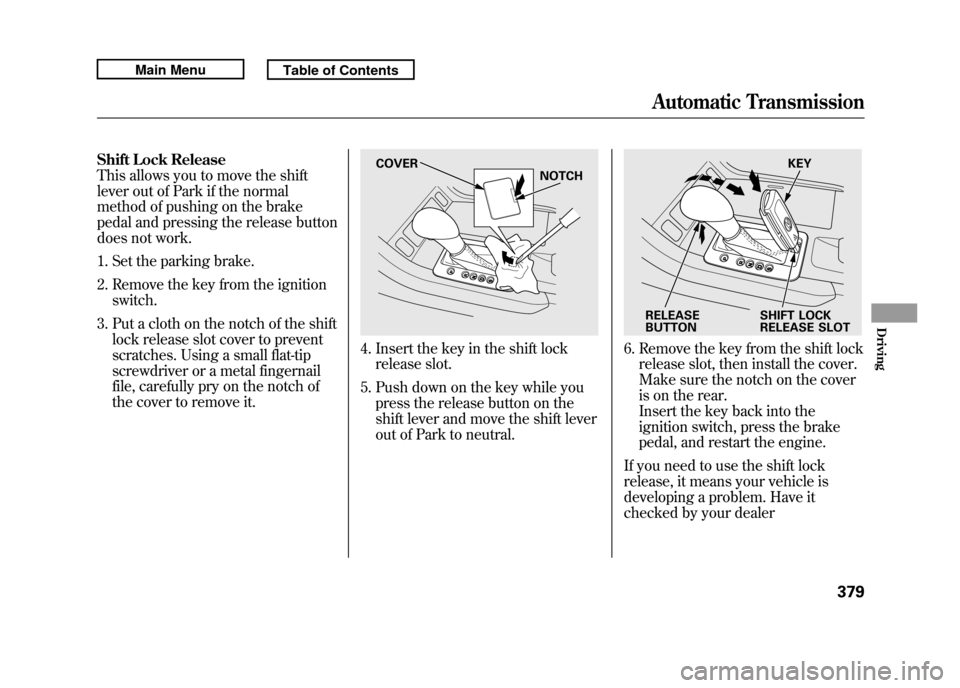
Shift Lock Release
This allows you to move the shift
lever out of Park if the normal
method of pushing on the brake
pedal and pressing the release button
does not work.1. Set the parking brake.
2. Remove the key from the ignition switch.
3. Put a cloth on the notch of the shift lock release slot cover to prevent
scratches. Using a small flat-tip
screwdriver or a metal fingernail
file, carefully pry on the notch of
the cover to remove it.
4. Insert the key in the shift lockrelease slot.
5. Push down on the key while you press the release button on the
shift lever and move the shift lever
out of Park to neutral.
6. Remove the key from the shift lockrelease slot, then install the cover.
Make sure the notch on the cover
is on the rear.
Insert the key back into the
ignition switch, press the brake
pedal, and restart the engine.
If you need to use the shift lock
release, it means your vehicle is
developing a problem. Have it
checked by your dealer
COVER NOTCH
KEY
RELEASE
BUTTON SHIFT LOCK
RELEASE SLOT
Automatic Transmission
379
Driving
10/06/08 17:42:32 11 ACURA RDX MMC North America Owner's M 50 31STK640 enu
Page 389 of 517
Recommended Shift PointsDrive in the highest gear that lets the
engine run and accelerate smoothly.
This will give you good fuel economy
and effective emissions control. The
following shift points are
recommended:Shift up Normal acceleration
1st to 2nd
2nd to 3rd 3rd to 4th4th to 5th 15 mph (24 km/h)
25mph (40 km/h)
40 mph (64 km/h)
47 mph (76 km/h) Super Handling-All Wheel Drive
™
(SH-AWD
®) System
If equippedThe super handling-all wheel drive
(SH-AWD) system is a full time all-
wheel-drive system that
automatically controls and transfers
varying amounts of engine torque to
all wheels independently, according
to the driving conditions.
While the SH-AWD system helps to
enhance the vehicle's driving
stability in all situations, it is still
your responsibility to drive and
corner at reasonable speeds and to
leave a sufficient margin of safety. SH-AWD Torque Distribution
Monitor
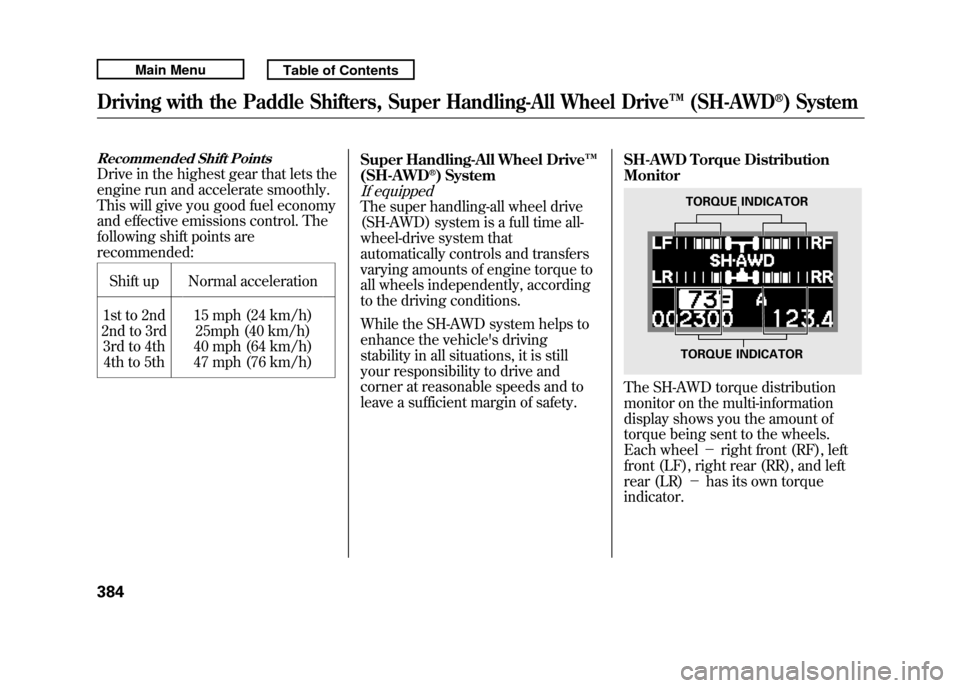
The SH-AWD torque distribution
monitor on the multi-information
display shows you the amount of
torque being sent to the wheels.
Each wheel
-right front (RF), left
front (LF), right rear (RR), and left
rear (LR) -has its own torque
indicator.
TORQUE INDICATOR
TORQUE INDICATOR
Driving with the Paddle Shifters, Super Handling-All Wheel Drive ™(SH-AWD
®) System
38410/06/08 17:42:32 11 ACURA RDX MMC North America Owner's M 50 31STK640 enu
Page 391 of 517

Always use the parking brake when
you park your vehicle. Make sure the
parking brake is set firmly, or your
vehicle may roll if it is parked on an
incline.
Set the parking brake before you put
the transmission in Park. This keeps
the vehicle from moving and putting
pressure on the parking mechanism
in the transmission.Parking Tips
●Make sure the moonroof and the
windows are closed.●Turn off the lights.●Place any packages, valuables, etc.
in the cargo area or take them with
you.●Lock the doors and the tailgate.●Never park over dry leaves, tall
grass, or other flammable
materials. The hot three way
catalytic converter could cause
these materials to catch on fire.
●If the vehicle is facing uphill, turn
the front wheels away from the
curb.●If the vehicle is facing downhill,
turn the front wheels toward the
curb.●Check the indicator on the
instrument panel to verify that the
security system is set.●Make sure the parking brake is
fully released before driving away.
Driving with the parking brake
partially set can overheat or
damage the rear brakes.
Parking38610/06/08 17:42:32 11 ACURA RDX MMC North America Owner's M 50 31STK640 enu
Page 392 of 517

Your vehicle is equipped with disc
brakes at all four wheels. A power
assist using negative pressure
generated by the engine and the
electric vacuum pump helps reduce
the effort needed on the brake pedal.
The anti-lock brake system (ABS)
helps you retain steering control
when braking very hard.
When the electric vacuum pump is in
operation, it makes some mechanical
noises come from the engine
compartment. This is normal.
When you drive in cold weather or
thinner air at high altitude, the
electric vacuum pump operates more
frequently after the engine is started.
For more information about the
electric vacuum pump, see page 468.Resting your foot on the pedal keeps
the brakes applied lightly, builds up
heat, and reduces their effectiveness
and reduces brake pad life. In
addition, fuel economy can be
reduced. It also keeps your brake
lights on all the time, confusing
drivers behind you.
Constant application of the brakes
when going down a long hill builds
up heat and reduces their
effectiveness. Use the engine to
assist the brakes by taking your foot
off the accelerator and downshifting
to a lower gear.
Check your brakes after driving
through deep water. Apply the
brakes moderately to see if they feel
normal. If not, apply them gently and
frequently until they do. Be extra
cautious and alert in your driving.Braking System Design
The hydraulic system that operates
the brakes has two separate circuits.
Each circuit works diagonally across
the vehicle (the left-front brake is
connected with the right-rear brake,
etc.). If one circuit should develop a
problem, you will still have braking
at two wheels.
Brake Pad Wear Indicators
All four brakes have audible brake
wear indicators.
If the brake pads need replacing, you
will hear a distinctive, metallic
screeching sound when you apply
the brake pedal. If you do not have
the brake pads replaced, they will
screech all the time. It is normal for
the brakes to occasionally squeal or
squeak when you apply them.
Braking System
387
Driving
10/06/08 17:42:32 11 ACURA RDX MMC North America Owner's M 50 31STK640 enu