ECO mode Acura RDX 2012 User Guide
[x] Cancel search | Manufacturer: ACURA, Model Year: 2012, Model line: RDX, Model: Acura RDX 2012Pages: 518, PDF Size: 26.43 MB
Page 90 of 518

Customize Entry Customize Group Customize MenuDescriptionCustomize Setup PageCHG SETTING
(P. 86)DOOR SETUP
(P. 102) DOOR LOCK MODE Changes which doors unlock with the remote
transmitter on a first push. DRIVER DOOR
ᤳ
105
ALL DOORS
KEYLESS LOCK
ACKNOWLEDGEMENT The exterior lights flash each time you press
the LOCK or UNLOCK button. A beeper will
also sound when you press the LOCK button
twice. ON
ᤳ
107
OFF
SECURITY RELOCK
TIMER Changes how long it takes (in seconds) for
the doors to relock and the security system to
set after you unlock but do not open the door. 30 sec
ᤳ
109
60 sec
90 sec
AUTO DOOR UNLOCK Changes when the system automatically unlock the driver's/all of the doors. DRIVER DOOR WITH
SHIFT TO P
ᤳ
111
ALL DOORS WITH SHIFT
TO P
DRIVER'S DOOR WITH
IGN OFF
ALL DOORS WITH IGN
OFF
OFF
DEFAULT ALL Returns all settings to the factory default. SET 85
EXIT
ᤳ : Default setting
Multi-Information Display8411/06/16 17:42:51 12 ACURA RDX MMC North America Owner's M 50 31STK650 enu
Page 91 of 518

DEFAULT ALLTo enter the customizing mode,
press and hold the INFO (
/
)
button for more than 3 seconds.
If you want to set the default settings,
press the INFO (
/
) button to
select ‘‘DEFAULT ALL,’’ then press
the SEL/RESET button.
To set the default settings, press the
INFO (
/
) button to select ‘‘SET ’’
then press the SEL/RESET button.
When ‘‘DEFAULT ALL ’’is set, you
will see the above display for several
seconds, then the screen returns to
‘‘ CUSTOMIZE ENTRY. ’’
CONTINUED
Multi-Information Display
85
Instruments and Controls
11/06/16 17:42:51 12 ACURA RDX MMC North America Owner's M 50 31STK650 enu
Page 112 of 518

When your choice is set, you will see
the above display for several
seconds, then the screen goes back
to‘‘CUSTOMIZE MENU.’’
If your choice is not set, you will see
the above display for several
seconds, then the screen goes back
to ‘‘CUSTOMIZE MENU. ’’If this
happens, you need to repeat the
same procedure.
To exit ‘‘DOOR LOCK MODE ’’
without changing the current setting,
select ‘‘EXIT ’’by pressing the INFO (/
) button, and then press the
SEL/RESET button. The screen
goes back to ‘‘CUSTOMIZE MENU.’’
Multi-Information Display10611/06/16 17:42:51 12 ACURA RDX MMC North America Owner's M 50 31STK650 enu
Page 126 of 518

The knob on the instrument panel
controls the brightness of the
instrument panel lights. Turn the
knob to adjust the brightness.
Separate adjustments can be made
when the headlights are on and off.You will hear a beep when maximum
or minimum brightness is reached.
You will also hear a beep when the
maximum level is canceled by
turning the knob a click to the left.
To reduce glare at night, the
instrument panel illumination dims
when you turn the light switch to the
or
position.
The level of brightness is shown on
the multi-information display while
you adjust it. It goes out 5 seconds
after you finish adjusting.
INSTRUMENT PANEL BRIGHTNESS
CONTROL KNOB
U.S. model is shown
Instrument Panel Brightness12011/06/16 17:42:51 12 ACURA RDX MMC North America Owner's M 50 31STK650 enu
Page 132 of 518

Power Door LocksEach front door has a master door
lock switch. Either switch locks and
unlocks all doors and the tailgate.
Push the top of the switch to lock all
doors and the tailgate; push the
bottom to unlock them.
Each door has a lock tab next to the
inside door handle. When you pull
backward on the lock tab on the
driver's door, all the doors and the
tailgate lock. Pushing forward on the
lock tab on the driver's door unlocks
only that door. The lock tab on each
passenger's door locks and unlocks
only that door.When the door is unlocked, you can
see the red indicator on the lock tab
next to the inside door handle.
All doors and the tailgate can be
locked from the outside by using the
key in the driver's door lock. To
unlock only the driver's door, insert
the key, turn the key, and release it.
The remaining doors and the tailgate
unlock when you turn the key a
second time within a few seconds.
You can change the
‘‘DOOR LOCK
MODE ’’setting on the multi-
information display (see page 105).
MASTER DOOR
LOCK SWITCH
Passenger's Side Driver's Side
To unlock
To lock
LOCK TAB
Door Locks12611/06/16 17:42:51 12 ACURA RDX MMC North America Owner's M 50 31STK650 enu
Page 136 of 518

LOCK-Press this button once to
lock all doors and the tailgate. Some
exterior lights will flash. When you
push LOCK twice within 5 seconds,
you will hear a beep to verify that the
doors and tailgate are locked and the
security system has set. This button
does not work if any door or tailgate
is not fully closed.
To change the ‘‘KEYLESS LOCK
ACKNOWLEDGEMENT ’’setting,
see page 107. UNLOCK
-Press this button once
to unlock the driver's door. Push it
twice to unlock the other doors.
Some exterior lights will flash twice
when you push the button. If you do
not open any door or the tailgate
within 30 seconds, they will
automatically relock.
To change the ‘‘DOOR LOCK
MODE ’’setting, see page 105.
To change the ‘‘SECURITY RELOCK
TIMER ’’setting, see page 109. When you press the UNLOCK
button, the ceiling lights (if the front
and rear ceiling light switches are in
the door activated position) will come
on. If you do not open any door, the
lights stay on for about 30 seconds,
then fade out. If you relock the doors
with the remote transmitter before 30
seconds have elapsed, the lights go
off immediately.
To change the
‘‘INTERIOR LIGHT
DIMMING TIME’’ setting, see page
98.
PANIC -Press this button for
about 1 second to attract attention;
the horn will sound, and the exterior
lights will flash for about 30 seconds.
To cancel panic mode, press any
button on the remote transmitter, or
turn the ignition switch to the ON
(II) position.
UNLOCK
BUTTON LOCK
BUTTON
PANIC
BUTTON
Remote Transmitter13011/06/16 17:42:51 12 ACURA RDX MMC North America Owner's M 50 31STK650 enu
Page 181 of 518

To Select a Station
You can use any of five methods to
find radio stations on the selected
band: tune, seek, scan, the preset
bars, and auto select.
TUNE-Use the TUNE/FOLDER
bar to tune the radio to a desired
frequency. Press the
side of the
bar to tune to a higher frequency,
and the
side of the bar to tune to
a lower frequency.
If you press and hold the
or
side of the bar, the frequency will
begin to change rapidly. It will stop
when you release it.
SEEK -The SEEK function
searches up and down from the
current frequency to find a station
with a strong signal. To activate it,
press the
or
side of the
SEEK/SKIP bar, then release it. SCAN
-The SCAN function
samples all stations with strong
signals on the selected band. To
activate it, press the SCAN button,
then release it. You will see ‘‘SCAN ’’
on the center display. When it finds a
strong signal, it will stop and play
that station for about 10 seconds.
If you do nothing, the system will
then scan for the next strong station
and play it for 10 seconds. When it
plays a station you want to listen to,
press the SCAN button again. Preset
-Each side of the bars
(1 - 6) can store one frequency on
AM and two frequencies on FM.
1. Select the desired band, AM or FM. FM1 and FM2 let you store
two frequencies with each side of
the preset bar.
2. Use the TUNE, SEEK, or SCAN function to tune the radio to a
desired station.
3. Pick the preset number (1 -6) for
the station you want to store. Press
the left or right side of the bar, and
hold it until you hear a beep.
4. Repeat steps 1 through 3 to store a total of six stations on AM and
twelve stations on FM.
CONTINUED
Playing the FM/AM Radio (Models without navigation system)
175
Features
11/06/16 17:42:51 12 ACURA RDX MMC North America Owner's M 50 31STK650 enu
Page 182 of 518

AUTO SELECT-If you are
traveling and can no longer receive
your preset stations, you can use the
auto select feature to find stations in
the local area.
To activate it, press the A.SEL/RDM
button. ‘‘A.SEL ’’will flash on the
center display, and the system will go
into scan mode for several seconds.
It stores the frequencies of six AM
and twelve FM stations in the preset
bars (1 -6).
You will see ‘‘0’’ displayed if auto
select cannot find a strong station for
every preset bar. If you do not like the stations auto
select has stored, you can store other
frequencies on the preset bars.
To turn off auto select,
press the
A.SEL/RDM button. This restores
the presets you originally set. Radio Frequencies and Reception
For information on AM/FM radio
frequencies and reception, see page
287.
Adjusting the Sound
For information, see page 177.
Playing the FM/AM Radio (Models without navigation system)17611/06/16 17:42:51 12 ACURA RDX MMC North America Owner's M 50 31STK650 enu
Page 183 of 518
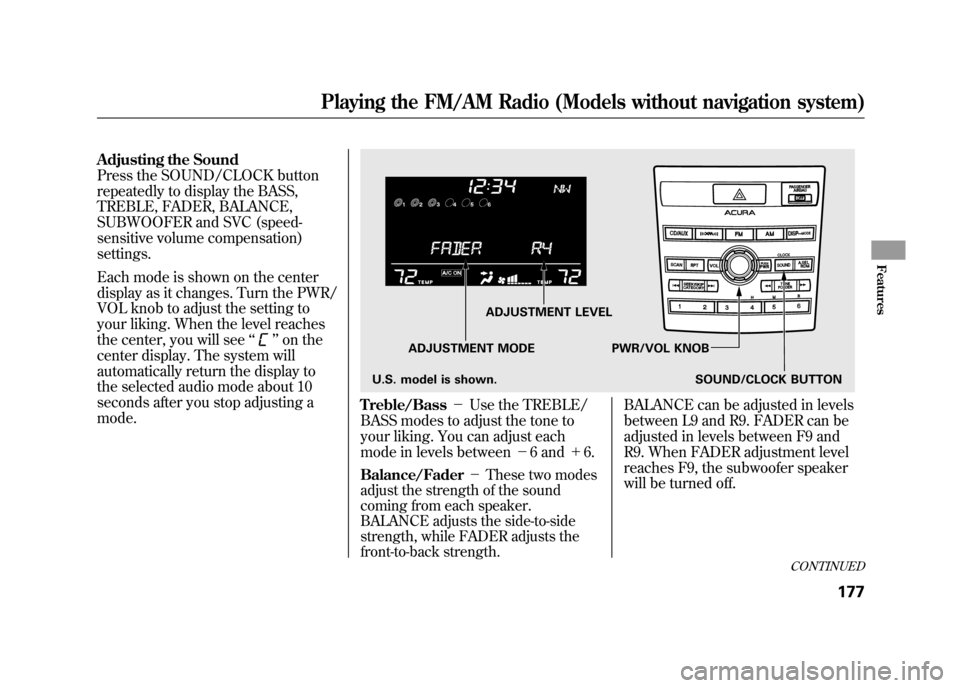
Adjusting the Sound
Press the SOUND/CLOCK button
repeatedly to display the BASS,
TREBLE, FADER, BALANCE,
SUBWOOFER and SVC (speed-
sensitive volume compensation)
settings.
Each mode is shown on the center
display as it changes. Turn the PWR/
VOL knob to adjust the setting to
your liking. When the level reaches
the center, you will see‘‘
’’on the
center display. The system will
automatically return the display to
the selected audio mode about 10
seconds after you stop adjusting a
mode.
Treble/Bass -Use the TREBLE/
BASS modes to adjust the tone to
your liking. You can adjust each
mode in levels between -6 and +6.Balance/Fader -These two modes
adjust the strength of the sound
coming from each speaker.
BALANCE adjusts the side-to-side
strength, while FADER adjusts the
front-to-back strength.
BALANCE can be adjusted in levels
between L9 and R9. FADER can be
adjusted in levels between F9 and
R9. When FADER adjustment level
reaches F9, the subwoofer speaker
will be turned off.
ADJUSTMENT LEVEL
ADJUSTMENT MODE PWR/VOL KNOB SOUND/CLOCK BUTTON
U.S. model is shown.
CONTINUED
Playing the FM/AM Radio (Models without navigation system)
177
Features
11/06/16 17:42:51 12 ACURA RDX MMC North America Owner's M 50 31STK650 enu
Page 184 of 518

SUBWOOFER-Use the
SUBWOOFER mode to adjust the
strength of the sound from the
subwoofer speaker. Turn the PWR/
VOL knob to the desired level (- 6to
+ 6). Even if the adjustment level
reaches -6, the subwoofer is not
turned off. Speed-sensitive volume
compensation (SVC)
-The SVC
mode controls the volume based on
vehicle speed. The faster you go, the
louder the audio volume becomes.
As you slow down, the audio volume
decreases.
The SVC has four modes: SVC OFF,
SVC LOW, SVC MID, and SVC
HIGH. Turn the PWR/VOL knob to
adjust the setting to your liking. Audio System Lighting
You can use the instrument panel
brightness control knob to adjust the
illumination of the audio system (see
page 120). The audio system
illuminates when the parking lights
are on, even if the system is turned
off.Playing the FM/AM Radio (Models without navigation system)17811/06/16 17:42:51 12 ACURA RDX MMC North America Owner's M 50 31STK650 enu