ECO mode Acura RDX 2012 Service Manual
[x] Cancel search | Manufacturer: ACURA, Model Year: 2012, Model line: RDX, Model: Acura RDX 2012Pages: 518, PDF Size: 26.43 MB
Page 228 of 518
To store the frequency on a preset
icon, turn the interface dial to
select a desired preset icon. The
selected preset icon will be
highlighted. Press and hold
ENTER on the selector for more
than 2 seconds to store the
frequency.
4. Repeat steps 1 through 3 to store a total of six stations on AM and
twelve stations on FM.
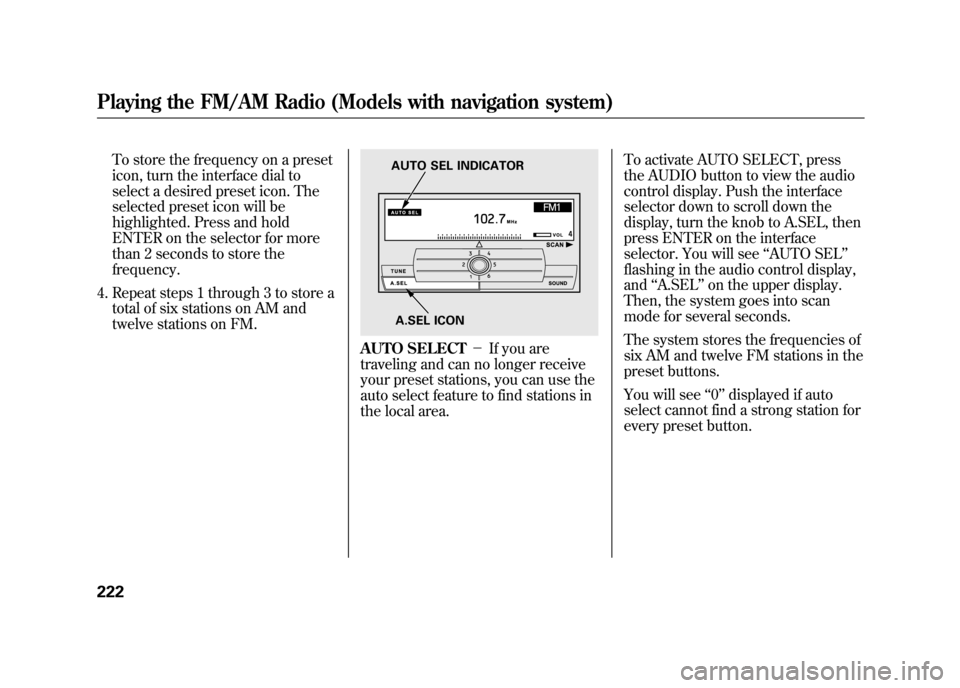
AUTO SELECT -If you are
traveling and can no longer receive
your preset stations, you can use the
auto select feature to find stations in
the local area. To activate AUTO SELECT, press
the AUDIO button to view the audio
control display. Push the interface
selector down to scroll down the
display, turn the knob to A.SEL, then
press ENTER on the interface
selector. You will see
‘‘AUTO SEL’’
flashing in the audio control display,
and ‘‘A.SEL ’’on the upper display.
Then, the system goes into scan
mode for several seconds.
The system stores the frequencies of
six AM and twelve FM stations in the
preset buttons.
You will see ‘‘0’’ displayed if auto
select cannot find a strong station for
every preset button.
A.SEL ICON
AUTO SEL INDICATOR
Playing the FM/AM Radio (Models with navigation system)22211/06/16 17:42:51 12 ACURA RDX MMC North America Owner's M 50 31STK650 enu
Page 231 of 518

The current setting is also shown on
the upper display.
The system will automatically return
the display to the selected audio
mode about 10 seconds after you
stop adjusting a mode.
BASS/TREBLE-To adjust bass
and treble, select BASS or TREBLE,
and press ENTER on the interface
selector. The current setting is
shown on the audio control display.
Turn the interface dial to the desired
level (- 6to+6), and enter your
selection by pressing ENTER.
CURRENT SETTING
CURRENT SETTING
CONTINUED
Playing the FM/AM Radio (Models with navigation system)
225
Features
11/06/16 17:42:51 12 ACURA RDX MMC North America Owner's M 50 31STK650 enu
Page 232 of 518

FADER/BALANCE-These
modes adjust the strength of the
sound coming from each speaker.
Fader adjusts the front-to-back
strength, while balance adjusts the
side-to-side strength. To adjust fader
and balance, select FADER or
BALANCE, then press ENTER on
the interface selector. The current
setting is shown on the audio control
display. Turn the interface dial to the
desired level (fader: F9 to R9,
balance: L9 to R9), and enter your
selection by pressing ENTER. To
equalize the fader or balance, turn
the interface dial until the readings
on the sound grid come to the center
of the adjustment bar. CENTER/SUBWOOFER
-To
adjust the strength of the sound from
the center or subwoofer speaker,
select it and press ENTER on the
interface selector. Turn the interface
dial to the desired level (- 6to+6),
and enter your selection by pressing
ENTER. The current setting is
shown on the audio control display.
Even if the adjustment level reaches
- 6, the sub woofer is not turned off. Dolby PL (Prologic) II
-Dolby PL
(Prologic) II signal processing
creates multi-channel surround
sound from the audio signal
recorded with 2 channel stereo
sources. Dolby prologic II can only
be activated when listening to CD
(CD-DA, MP3/WMA), XM radio,
and AUX. When it activates, ‘‘DPL II’’
is shown on the upper display.Playing the FM/AM Radio (Models with navigation system)22611/06/16 17:42:51 12 ACURA RDX MMC North America Owner's M 50 31STK650 enu
Page 233 of 518

To set this feature on or off, select
Dolby PL II, and press ENTER on
the interface selector. Rotate the
interface dial to ON or OFF, and
press ENTER.
Manufactured under license from
Dolby Laboratories. Dolby, Pro
Logic, MLP Lossless and the double-
D symbol are trademarks of Dolby
Laboratories.Speed-sensitive volume
compensation (SVC)
-The SVC
mode controls the volume based on
vehicle speed. The faster you go, the
louder the audio volume becomes.
As you slow down, the audio volume
decreases. The SVC has four modes: OFF,
LOW, MID, and HIGH.
Turn the interface dial to the desired
setting, and enter your selection by
pressing ENTER.
Playing the FM/AM Radio (Models with navigation system)
227
Features
11/06/16 17:42:51 12 ACURA RDX MMC North America Owner's M 50 31STK650 enu
Page 238 of 518
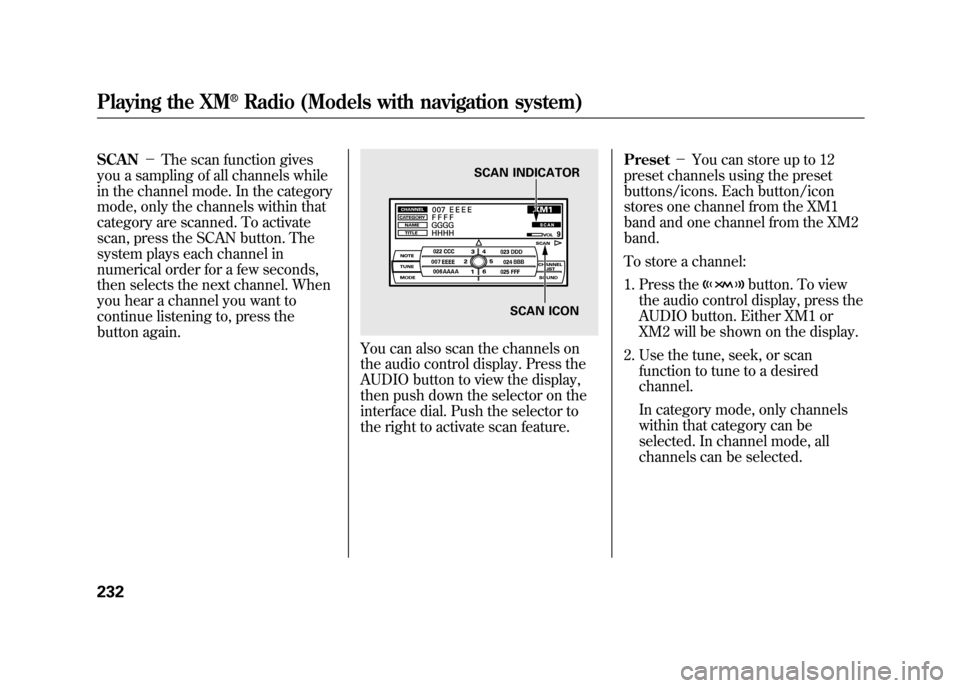
SCAN-The scan function gives
you a sampling of all channels while
in the channel mode. In the category
mode, only the channels within that
category are scanned. To activate
scan, press the SCAN button. The
system plays each channel in
numerical order for a few seconds,
then selects the next channel. When
you hear a channel you want to
continue listening to, press the
button again.
You can also scan the channels on
the audio control display. Press the
AUDIO button to view the display,
then push down the selector on the
interface dial. Push the selector to
the right to activate scan feature. Preset
-You can store up to 12
preset channels using the preset
buttons/icons. Each button/icon
stores one channel from the XM1
band and one channel from the XM2
band.
To store a channel:
1. Press the
button. To view
the audio control display, press the
AUDIO button. Either XM1 or
XM2 will be shown on the display.
2. Use the tune, seek, or scan function to tune to a desired
channel.
In category mode, only channels
within that category can be
selected. In channel mode, all
channels can be selected.
SCAN INDICATOR
SCAN ICON
Playing the XM
®Radio (Models with navigation system)
23211/06/16 17:42:51 12 ACURA RDX MMC North America Owner's M 50 31STK650 enu
Page 239 of 518

3. Pick a preset number for thechannel you want to store. Press
and hold the appropriate button
until you hear a beep.
To store the channel on a preset
icon, rotate the interface dial to
select a desired preset icon. The
selected preset icon will be
highlighted. Press and hold
ENTER on the selector for more
than 2 seconds to store the
channel. 4. Repeat steps 2 and 3 to store the
first six channels.
5. Press the
button again. The
other XM band will be shown.
Store the next six channels by
repeating steps 2 and 3.
Once a channel is stored, press and
release the proper preset button to
tune to it. Adjusting the Sound
For information, see page 224.
XM Radio Reception
For information, see page 235.
PRESET ICONS
CONTINUED
Playing the XM
®Radio (Models with navigation system)
233
Features
11/06/16 17:42:51 12 ACURA RDX MMC North America Owner's M 50 31STK650 enu
Page 243 of 518
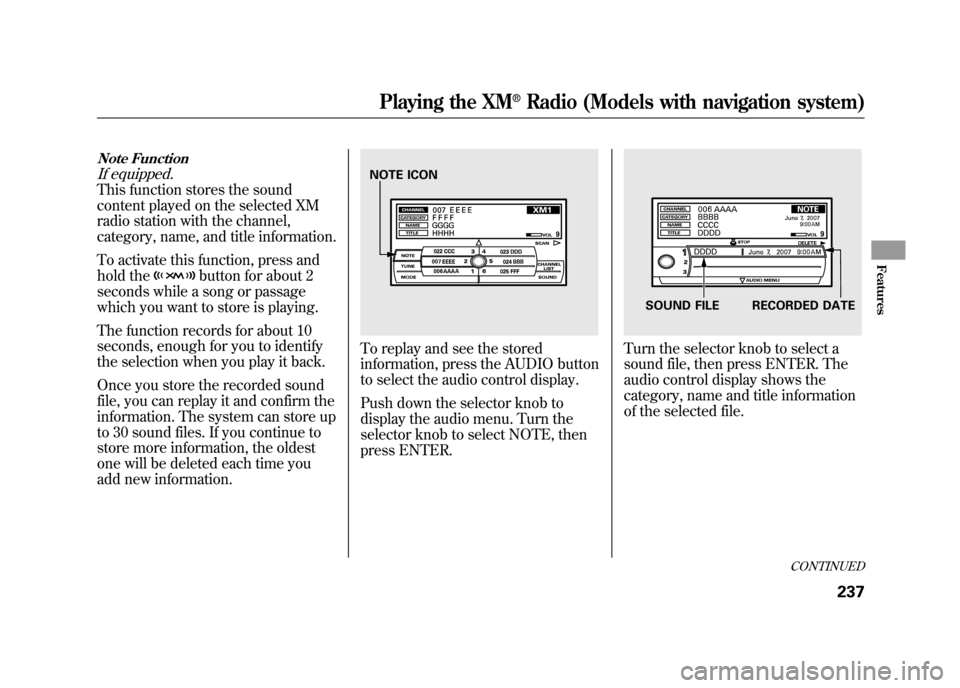
Note FunctionIf equipped.This function stores the sound
content played on the selected XM
radio station with the channel,
category, name, and title information.
To activate this function, press and
hold the
button for about 2
seconds while a song or passage
which you want to store is playing.
The function records for about 10
seconds, enough for you to identify
the selection when you play it back.
Once you store the recorded sound
file, you can replay it and confirm the
information. The system can store up
to 30 sound files. If you continue to
store more information, the oldest
one will be deleted each time you
add new information.
To replay and see the stored
information, press the AUDIO button
to select the audio control display.
Push down the selector knob to
display the audio menu. Turn the
selector knob to select NOTE, then
press ENTER.
Turn the selector knob to select a
sound file, then press ENTER. The
audio control display shows the
category, name and title information
of the selected file.
NOTE ICON
SOUND FILE RECORDED DATE
CONTINUED
Playing the XM
®Radio (Models with navigation system)
237
Features
11/06/16 17:42:51 12 ACURA RDX MMC North America Owner's M 50 31STK650 enu
Page 248 of 518
Manufactured under license under
U.S. Patent #'s: 5,451,942; 5,956,674;
5,974,380; 5,978,762; 6,487,535 &
other U.S. and worldwide patents
issued & pending. DTS and DTS
Digital Surround are registered
trademarks and the DTS logos and
Symbol are trademarks of DTS, Inc.
© 1996-2007 DTS, Inc. All Rights
Reserved.Loading Discs
To load multiple discs in one
operation:
1. Press and hold the LOAD button
on the changer unit until you hear
a beep. You will see ‘‘BUSY ’’on
the upper display, and the disc
load indicator turns red and starts
blinking.
2. Insert the disc into the disc slot when the disc load indicator turns
green and ‘‘LOAD ’’appears in the
upper display at the same time.
Insert it only halfway; the drive will
pull it in the rest of the way. You
will see ‘‘BUSY ’’on the upper
display, and the disc load indicator
turns red again and blinks as the
CD is loaded.
3. When the disc load indicator turns green and ‘‘LOAD ’’appears on the
upper display again, insert the next
CD in the slot. Do not try to insert a disc until
‘‘
LOAD ’’appears. You could
damage the audio unit.
4. Repeat steps 1 through 3 until all six positions are loaded. If you are
not loading all six positions, press
the LOAD button again after the
last CD has loaded. ‘‘DISC READ ’’
appears on the upper display, then
the system begins playing the last
loaded.
If you stop loading discs before all
six positions are filled, the system
will wait for 10 seconds, stop the load
operation, and begin playing the last
disc loaded.
To load a single disc:
1. Press and release the LOAD button on the changer unit. You
will see ‘‘BUSY ’’on the upper
display, and the disc load indicator
turns red and starts blinking.Playing Discs (Models with navigation system)24211/06/16 17:42:51 12 ACURA RDX MMC North America Owner's M 50 31STK650 enu
Page 255 of 518

DISC REPEAT-This feature,
when activated, continuously replays
the current CD. Press the AUDIO
button to view the audio control
display, then push down the selector
on the interface dial. Rotate the
interface dial to select DISC
REPEAT. Press ENTER on the
selector to enter your selection. You
will see ‘‘REPEAT ’’next to the DISC
icon on the audio control display. To
turn off this feature, select the DISC
REPEAT, then press ENTER again.
In MP3/WMA modeFOLDER REPEAT -This feature,
when activated, replays all the files in
the selected folder in the order they
are compressed in MP3/WMA. To
activate folder repeat, press the
AUDIO button to view the audio
control display, then push down the
selector on the interface dial. Rotate
the interface dial to select FOLDER
REPEAT. Press ENTER on the
selector to enter your selection. You will see
‘‘FOLDER REPEAT ’’on
the audio control display. To turn off
this feature, select FOLDER
REPEAT, then press ENTER again.
SCAN -The scan function samples
all tracks (files in a folder in MP3 or
WMA mode) on the disc in the order
they are recorded on the disc. To
activate scan, press and release the
SCAN button. You will also see
‘‘ SCAN ’’and the track/file number
blinking on the upper display. To
hear the rest of the track/file, press
and hold the SCAN button for more
than 2 seconds. If you don't, the
system advances to the next track/
file, plays about 10 seconds of it, and
continues through the rest of the
track/file the same way. When the
system finishes scanning all the
tracks/files on the current disc, the
system returns to the track/file it
first started scanning with, scan is
canceled, and the system begins to
play that track/file normally.
REPEAT INDICATOR
DISC REPEAT ICON
REPEAT INDICATOR
FOLDER REPEAT ICON
CONTINUED
Playing Discs (Models with navigation system)
249
Features
11/06/16 17:42:51 12 ACURA RDX MMC North America Owner's M 50 31STK650 enu
Page 256 of 518

To activate the scan feature on the
audio control display, press the
AUDIO button to view the display.
Push down the selector on the
interface dial, then push the selector
to the left. You will see‘‘SCAN ’’next
to the TRACK icon on the audio
control display. To turn off this
feature, push the selector to the left
again within 10 seconds.
In MP3/WMA modeFOLDER SCAN -The folder scan
function samples the first file of each
folder on the current disc in the
order they are compressed in MP3/
WMA. To activate this feature, press
the SCAN button twice. The first file
of each folder plays for about 10
seconds. You will see ‘‘FOLDER
SCAN ’’next to disc number on the
audio control display. You will also
see ‘‘SCAN ’’and the folder number
blinking on the upper display. To
hear the rest of the file in the folder
currently scanning, press and hold
the SCAN button for more than 2
seconds.
If you don't, the system advances to
the next folder, plays about 10
seconds of it, and continues through
the rest of the folders the same way.
SCAN INDICATOR
TRACK SCAN ICON
SCAN INDICATOR
Playing Discs (Models with navigation system)25011/06/16 17:42:51 12 ACURA RDX MMC North America Owner's M 50 31STK650 enu