ad blue Acura RDX 2013 Navigation Manual
[x] Cancel search | Manufacturer: ACURA, Model Year: 2013, Model line: RDX, Model: Acura RDX 2013Pages: 260, PDF Size: 24.3 MB
Page 97 of 260
96
Driving to Your DestinationViewing the Route
Navigation
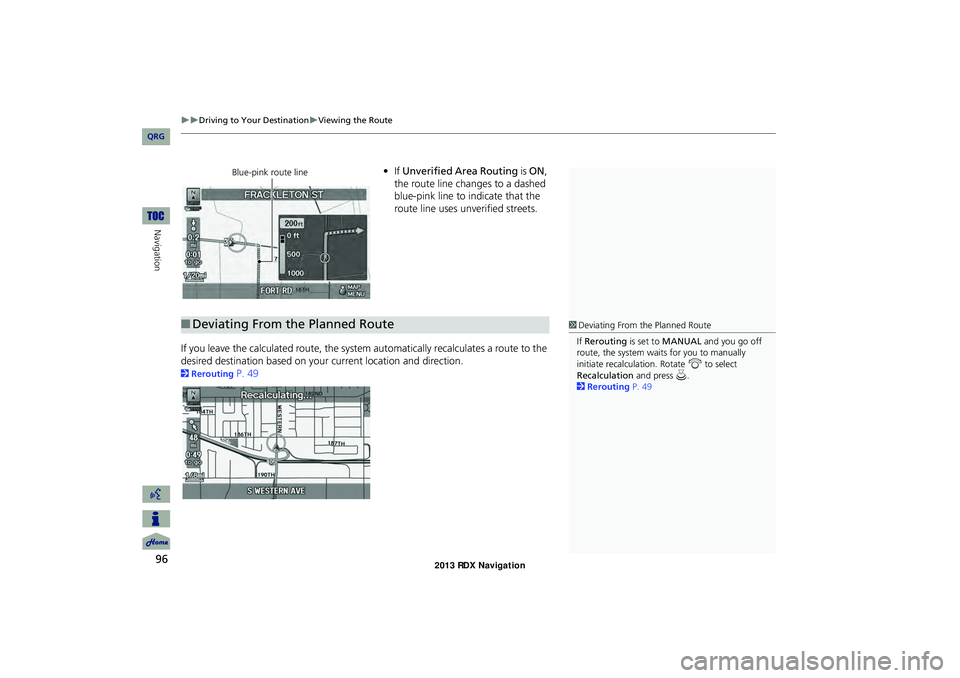
•If Unverified Area Routing is ON,
the route line changes to a dashed
blue-pink line to indicate that the
route line uses unverified streets.
If you leave the calculated route, the system automatically recalculates a route to the
desired destination based on your current location and direction.
2Rerouting P. 49
Blue-pink route line
■Deviating From the Planned Route1 Deviating From the Planned Route
If Rerouting is set to MANUAL and you go off
route, the system wait s for you to manually
initiate recalculation. Rotate i to select
Recalculation and press u.
2 Rerouting P. 49
RDX_KA-31TX4800.book Page 96 Monday, January 30, 2012 11:32 PM
QRG
Page 134 of 260
133
Navigation
Resuming Your Trip
Stop your vehicle en route (e.g., to rest, stop for gas, etc.), and then continue on
your route.
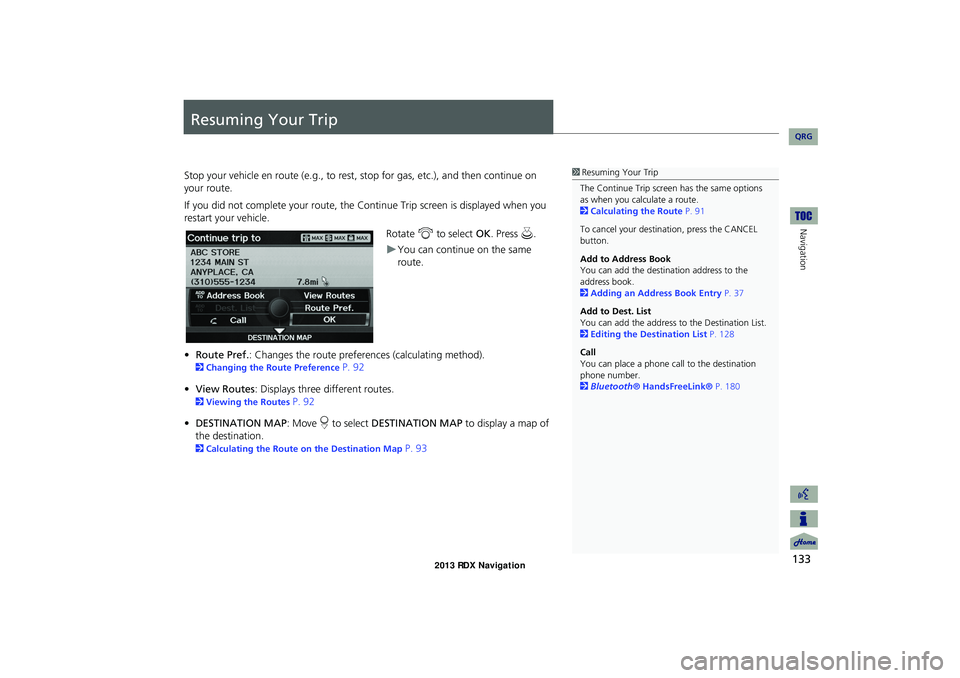
If you did not complete your route, the C ontinue Trip screen is displayed when you
restart your vehicle.
Rotate i to select OK. Press u.
You can continue on the same
route.
• Route Pref. : Changes the route preferences (calculating method).
2Changing the Route Preference P. 92
• View Routes : Displays three different routes.
2Viewing the Routes P. 92
• DESTINATION MAP : Move r to select DESTINATION MAP to display a map of
the destination.
2 Calculating the Route on the Destination Map P. 93
1Resuming Your Trip
The Continue Trip screen has the same options
as when you calculate a route.
2 Calculating the Route P. 91
To cancel your destination, press the CANCEL
button.
Add to Address Book
You can add the destination address to the
address book.
2 Adding an Address Book Entry P. 37
Add to Dest. List
You can add the address to the Destination List.
2 Editing the Destination List P. 128
Call
You can place a phone ca ll to the destination
phone number.
2 Bluetooth® HandsFreeLink® P. 180
RDX_KA-31TX4800.book Page 133 Monday, January 30, 2012 11:32 PM
QRG
Page 136 of 260
135
Audio
This section describes how to operate the audio system. You can play
music from a wide array of media s ources, and control the audio system
using the audio buttons, the Interface Dial, or voice control.
Audio System .................................................. 136
About Your Audio System .............................. 136
Auxiliary Input Jack ......... .......................... .....136
System Theft Protection ................................. 137
Playing FM/AM Radio ..................................... 138
Selecting FM/AM Mode.................................. 138
Audio Screen Control ..................................... 138
Audio Menu .................................................. 139
Radio Data System (RDS) ................................ 140
Playing XM® Radio ......................................... 142
Selecting XM Mode........................................ 142
Audio Screen Control ..................................... 142
Audio Menu .................................................. 143
Note Function ................................................ 144
XM® Radio Service ........................................ 146
Playing a Disc ................................................... 147
Selecting Disc Mode ....................................... 147
Audio Screen Control ..................................... 147Audio Menu ...................................................
148
Playing MP3/WMA/AAC Discs ........................ 149
Recommended Discs ...................................... 150
Playing Hard Disc Drive (HDD) Audio ............ 151
Selecting HDD Mode ...................................... 151
Audio Screen Control ..................................... 152
Audio Menu ................................................... 152
Recording a Music CD to HDD........................ 154
Searching for Music........................................ 156
Editing a Playlist or Album .............................. 157
Editing Track Information ............................... 158
Displaying Music Information ......................... 159
Updating Gracenote® Album Info .................. 160
Playing an iPod® ............................................. 161
Selecting iPod® Mode .................................... 162
Audio Screen Control ..................................... 162
Audio Menu ................................................... 163
Searching for Music........................................ 164Searching for Music Using Song By Voice™
(SBV) ............................................................... 165
Playing Pandora® ........................................... 166
Selecting Pandora® Mode ............................. 166
Audio Screen Control..................................... 167
QuickMix ....................................................... 169
Playing a USB Flash Drive ............................... 170
Selecting USB Mode....................................... 171
Audio Screen Control..................................... 171
Audio Menu .................................................. 172
Playing Tracks in Folders................................. 173
Playing Bluetooth ® Audio............................. 174
Selecting Bluetooth ® Audio Mode ................ 174
Switching to HFL Mode .................................. 175
Audio Screen Control..................................... 175
Adjusting the Sound ....................................... 176
Audio Remote Controls .................................. 177
Steering Wheel Controls ................................ 177
RDX_KA-31TX4800.book Page 135 Monday, January 30, 2012 11:32 PM
QRG
Page 137 of 260
136
Audio
Audio System
About Your Audio System
The audio system features FM/AM radio and XM® Radio. It can also play audio discs,
WMA/MP3/AAC tracks, iPod®, USB flash drives, and Bluetooth® devices.
The audio system is operable from the buttons and switches on the panel, or the
remote controls on the steering wheel.
2 Audio Remote Controls P. 177
2Audio System P. 6
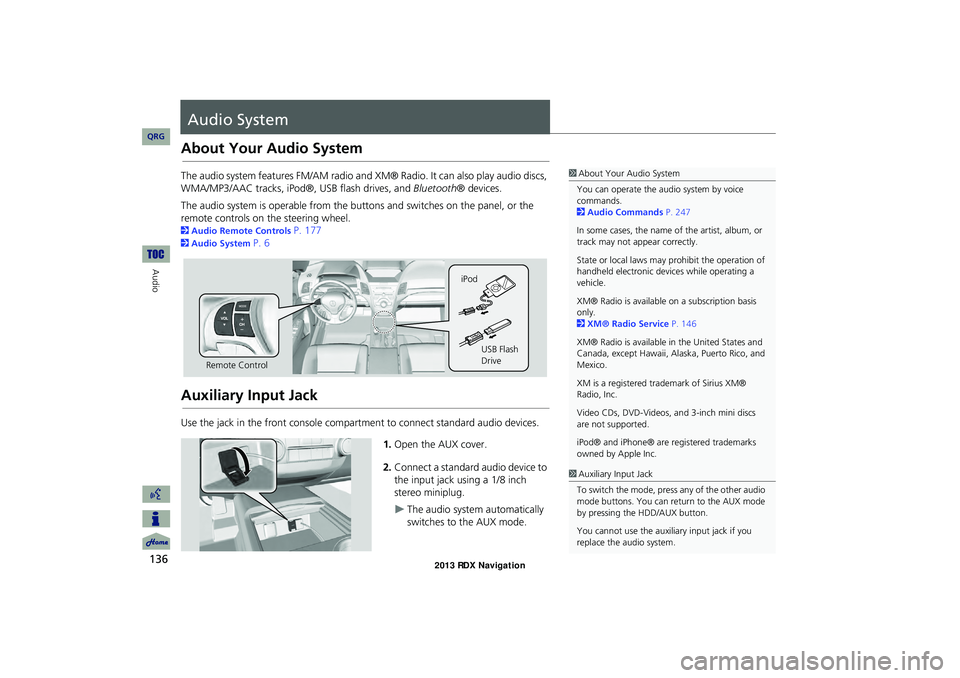
Auxiliary Input Jack
Use the jack in the front console compartment to connect standard audio devices.
1.Open the AUX cover.
2. Connect a standard audio device to
the input jack using a 1/8 inch
stereo miniplug.
The audio system automatically
switches to the AUX mode.
1About Your Audio System
You can operate the audio system by voice
commands.
2 Audio Commands P. 247
In some cases, the name of the artist, album, or
track may not appear correctly.
State or local laws may prohibit the operation of
handheld electronic devices while operating a
vehicle.
XM® Radio is available on a subscription basis
only.
2 XM® Radio Service P. 146
XM® Radio is available in the United States and
Canada, except Hawaii, Al aska, Puerto Rico, and
Mexico.
XM is a registered trademark of Sirius XM®
Radio, Inc.
Video CDs, DVD-Videos, and 3-inch mini discs
are not supported.
iPod® and iPhone® are registered trademarks
owned by Apple Inc.
Remote Control iPod
USB Flash
Drive
1Auxiliary Input Jack
To switch the mode, press any of the other audio
mode buttons. You can return to the AUX mode
by pressing the HDD/AUX button.
You cannot use the auxili ary input jack if you
replace the audio system.
RDX_KA-31TX4800.book Page 136 Monday, January 30, 2012 11:32 PM
QRG
Page 167 of 260
166
Audio
Playing Pandora®
Pandora® is a personalized Internet radio service that selects music based on an
artist, song, or genre a user enters, and streams what is likely to be of interest.
Selecting Pandora® Mode
1. Activate Pandora® on your iPhone®.
2. Connect the iPhone® to the USB adapter cable in the console compartment.
2 Connecting an iPod® P. 161
3. Press the HDD/AUX button until you get to Pandora® mode.
4. Select a station using the CATEGORY bar.
The current station name, artist name, album name, track name, and rating are
displayed.
1 Playing Pandora®
d “Display audio screen” (when in Pandora®
mode)
You can control Pandora® using voice
commands.
2 Pandora® Commands P. 249
A visual guide helps you operate the audio
system.
2 System Controls P. 4
2 Basic Operation P. 6
To use this service in your vehicle, the Pandora®
app must first be installed on your iPhone®. Visit
www.pandora.com for more information.
Pandora® mode and Audi o Screen Control is
only available for iPhone ®. For other phones,
Pandora® can be played through Bluetooth®
Audio.
2 Playing Bluetooth® Audio P. 174
If there is a problem, you may see an error
message on the display.
2 Error Messages P. 225
If Pandora® is not sele cted from your phone,
iPod® music is played.
RDX_KA-31TX4800.book Page 166 Monday, January 30, 2012 11:32 PM
QRG
Page 168 of 260
167
Playing Pandora®Audio Screen Control
Audio
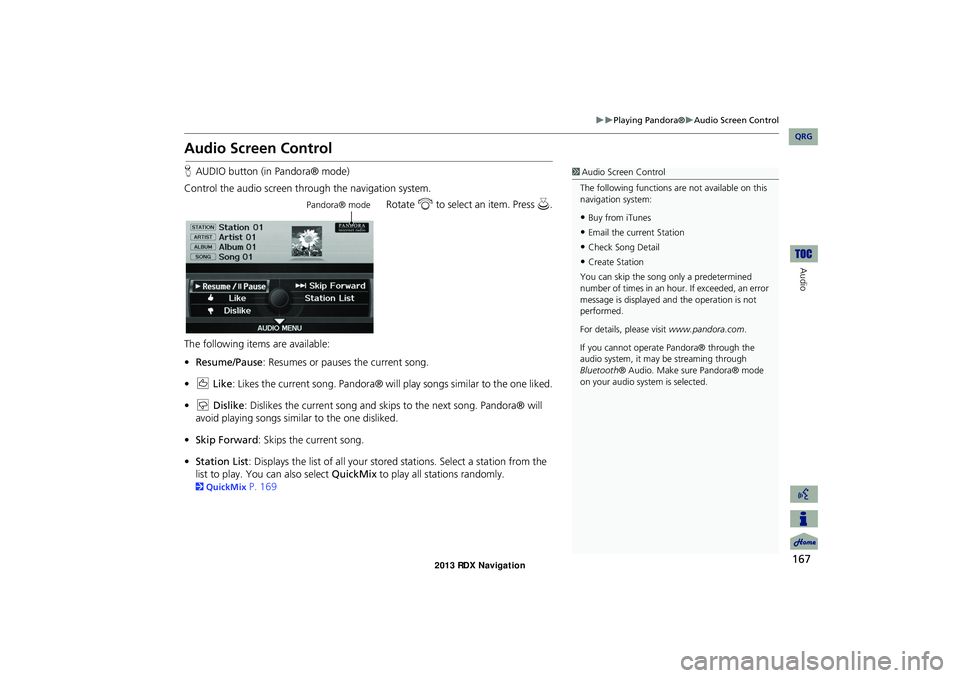
Audio Screen Control
HAUDIO button (in Pandora® mode)
Control the audio screen through the navigation system. Rotate i to select an item. Press u.
The following items are available:
• Resume/Pause : Resumes or pauses the current song.
• e Like : Likes the current song. Pandora® will play songs similar to the one liked.
• w Dislike: Dislikes the current song and skips to the next song. Pandora® will
avoid playing songs similar to the one disliked.
• Skip Forward : Skips the current song.
• Station List : Displays the list of all your stored stations. Select a station from the
list to play. You can also select QuickMix to play all stations randomly.
2QuickMix P. 169
1Audio Screen Control
The following functions ar e not available on this
navigation system:
•Buy from iTunes
•Email the current Station
•Check Song Detail
•Create Station
You can skip the song only a predetermined
number of times in an hour. If exceeded, an error
message is displayed an d the operation is not
performed.
For details, please visit www.pandora.com .
If you cannot operate Pandora® through the
audio system, it may be streaming through
Bluetooth ® Audio. Make sure Pandora® mode
on your audio system is selected.
Pandora® mode
RDX_KA-31TX4800.book Page 167 Monday, January 30, 2012 11:32 PM
QRG
Page 175 of 260
174
Audio
Playing Bluetooth ® Audio
Your audio system allows you to listen to music tracks stored on your Bluetooth-
compatible phone.
This function is available when the phone is linked to the vehicle’s Bluetooth®
HandsFreeLink® (HFL) system.
2 Bluetooth® HandsFreeLink® P. 179
Selecting Bluetooth ® Audio Mode
1.Make sure that your phone is on, paired, and linked to HFL.
2Pairing a Phone P. 182
2. Press the HDD/AUX button to select Bluetooth® Audio mode.
A Bluetooth ® message and icon are displaye d on the display and screen.
3. If necessary, follow the cell phone operating instructions for playing audio tracks.
Check the following if the phone is not recognized:
• Another HFL-compatible phone, which is not compatible for Bluetooth® Audio, is
already connected.
1 Playing Bluetooth ® Audio
d “Display audio screen”
You can control the Bluetooth® Audio using
voice commands.
2 Bluetooth ® Audio Commands P. 249
Not all Bluetooth -enabled phones with
streaming audio capabilities are compatible. To
check if your phone is compatible:
•U.S.: Visit www.acura.com/handsfreelink .
•Canada: Visit www.handsfreelink.ca .
•Call HandsFreeLink customer support at
(888) 528-7876.
In some states, it may be illegal to perform some
data device functions while driving.
Only one phone can be used with HFL at a time.
When there are more than two paired phones in
the vehicle, the first paired phone the system
finds will be automatically linked.
Pressing the TITLE button switches the center
display between the Bluetooth® Audio message
and the device name.
RDX_KA-31TX4800.book Page 174 Monday, January 30, 2012 11:32 PM
QRG
Page 176 of 260
175
Playing Bluetooth® AudioSwitching to HFL Mode
Audio
Switching to HFL Mode
1.If you receive a call when
Bluetooth ® Audio is playing, press
the h (Pick-Up) button on the
steering wheel to answer the call.
2 Bluetooth® HandsFreeLink®
P. 180
2. Press the j (Hang-Up) button to
end the call, and Bluetooth® Audio
is resumed.
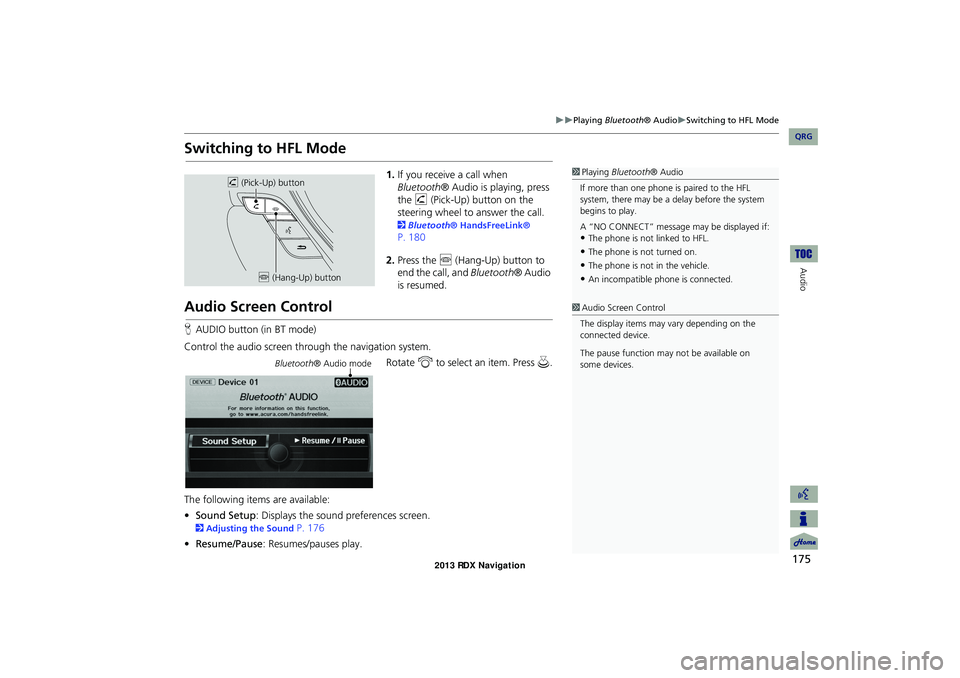
Audio Screen Control
H AUDIO button (in BT mode)
Control the audio screen through the navigation system. Rotate i to select an item. Press u.
The following items are available:
• Sound Setup : Displays the sound preferences screen.
2Adjusting the Sound P. 176
• Resume/Pause : Resumes/pauses play.
1Playing Bluetooth ® Audio
If more than one phone is paired to the HFL
system, there may be a delay before the system
begins to play.
A “NO CONNECT” message may be displayed if:
•The phone is not linked to HFL.
•The phone is not turned on.
•The phone is not in the vehicle.
•An incompatible phone is connected.
h (Pick-Up) button
j (Hang-Up) button
1Audio Screen Control
The display items may vary depending on the
connected device.
The pause function may not be available on
some devices.
Bluetooth ® Audio mode
RDX_KA-31TX4800.book Page 175 Monday, January 30, 2012 11:32 PM
QRG
Page 177 of 260
176
Audio
Adjusting the Sound
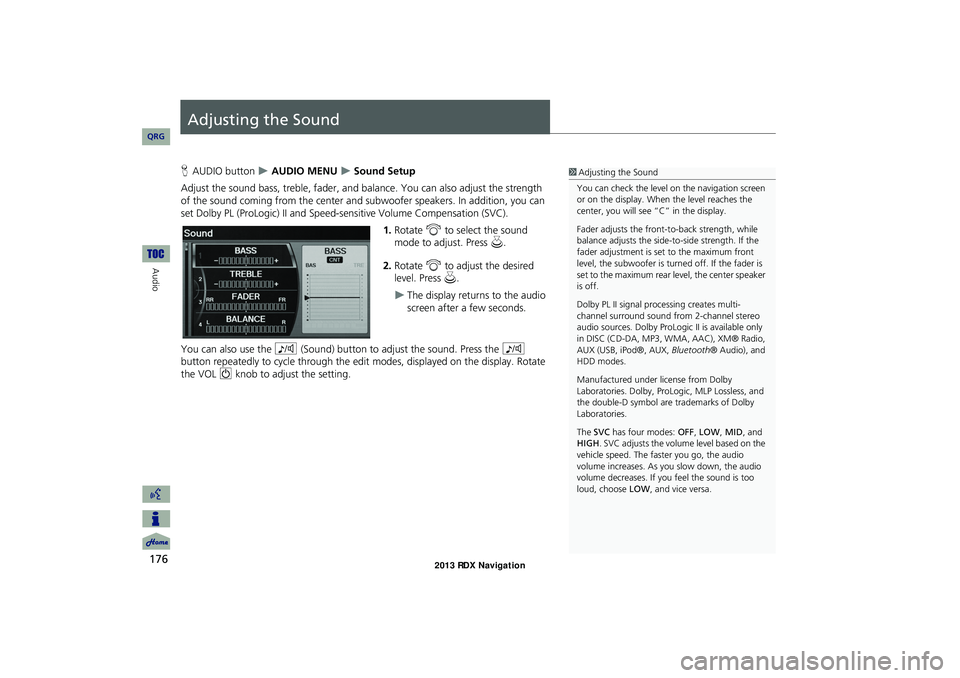
HAUDIO button AUDIO MENU Sound Setup
Adjust the sound bass, treble, fader, and ba lance. You can also adjust the strength
of the sound coming from the center and subwoofer speakers. In addition, you can
set Dolby PL (ProLogic) II and Speed-s ensitive Volume Compensation (SVC).
1.Rotate i to select the sound
mode to adjust. Press u.
2. Rotate i to adjust the desired
level. Press u.
The display returns to the audio
screen after a few seconds.
You can also use the 8 (Sound) button to adjust the sound. Press the 8
button repeatedly to cycle through the edit modes, displayed on the display. Rotate
the VOL 9 knob to adjust the setting.
1Adjusting the Sound
You can check the level on the navigation screen
or on the display. When the level reaches the
center, you will see “C” in the display.
Fader adjusts the front-t o-back strength, while
balance adjusts the side-to-side strength. If the
fader adjustment is set to the maximum front
level, the subwoofer is turned off. If the fader is
set to the maximum rear level, the center speaker
is off.
Dolby PL II signal proc essing creates multi-
channel surround sound fro m 2-channel stereo
audio sources. Dolby ProL ogic II is available only
in DISC (CD-DA, MP3, WMA, AAC), XM® Radio,
AUX (USB, iPod®, AUX, Bluetooth® Audio), and
HDD modes.
Manufactured under license from Dolby
Laboratories. Dolby, ProL ogic, MLP Lossless, and
the double-D symbol are trademarks of Dolby
Laboratories.
The SVC has four modes: OFF, LOW , MID, and
HIGH. SVC adjusts the volume level based on the
vehicle speed. The faster you go, the audio
volume increases. As you slow down, the audio
volume decreases. If you feel the sound is too
loud, choose LOW , and vice versa.
RDX_KA-31TX4800.book Page 176 Monday, January 30, 2012 11:32 PM
QRG
Page 178 of 260
177
Audio
Audio Remote Controls
Steering Wheel Controls
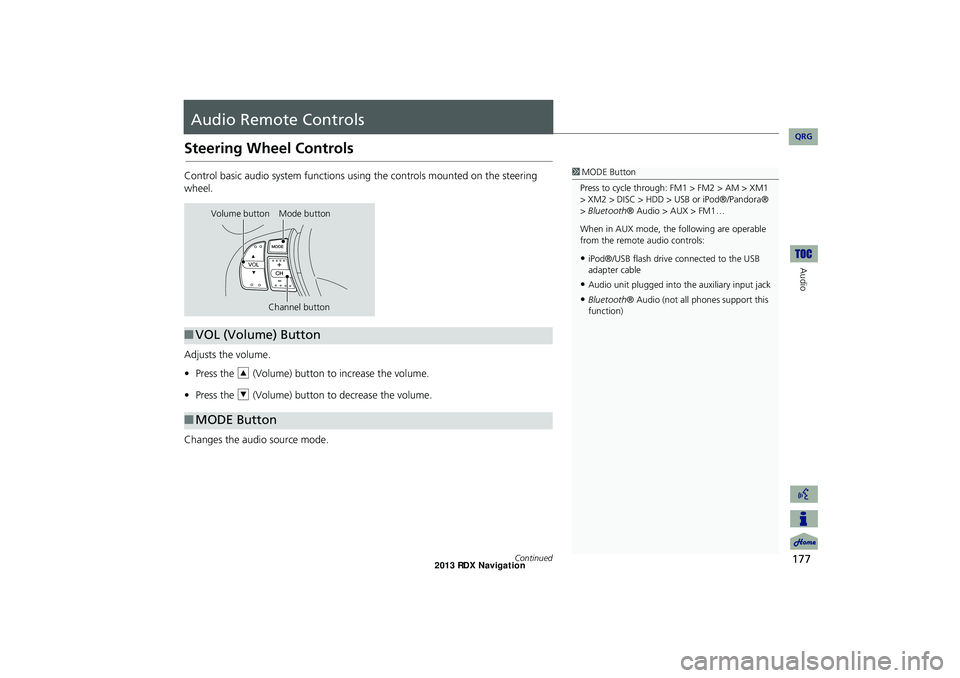
Control basic audio system functions using the controls mounted on the steering
wheel.
Adjusts the volume.
•Press the R (Volume) button to increase the volume.
• Press the U (Volume) button to decrease the volume.
Changes the audio source mode.1 MODE Button
Press to cycle through: FM1 > FM2 > AM > XM1
> XM2 > DISC > HDD > USB or iPod®/Pandora®
> Bluetooth ® Audio > AUX > FM1…
When in AUX mode, the following are operable
from the remote audio controls:
•iPod®/USB flash drive connected to the USB
adapter cable
•Audio unit plugged into th e auxiliary input jack
•Bluetooth® Audio (not all phones support this
function)
Volume button Mode button
Channel button
■VOL (Volume) Button
■MODE Button
Continued
RDX_KA-31TX4800.book Page 177 Monday, January 30, 2012 11:32 PM
QRG