ad blue Acura RDX 2013 Navigation Manual
[x] Cancel search | Manufacturer: ACURA, Model Year: 2013, Model line: RDX, Model: Acura RDX 2013Pages: 260, PDF Size: 24.3 MB
Page 2 of 260
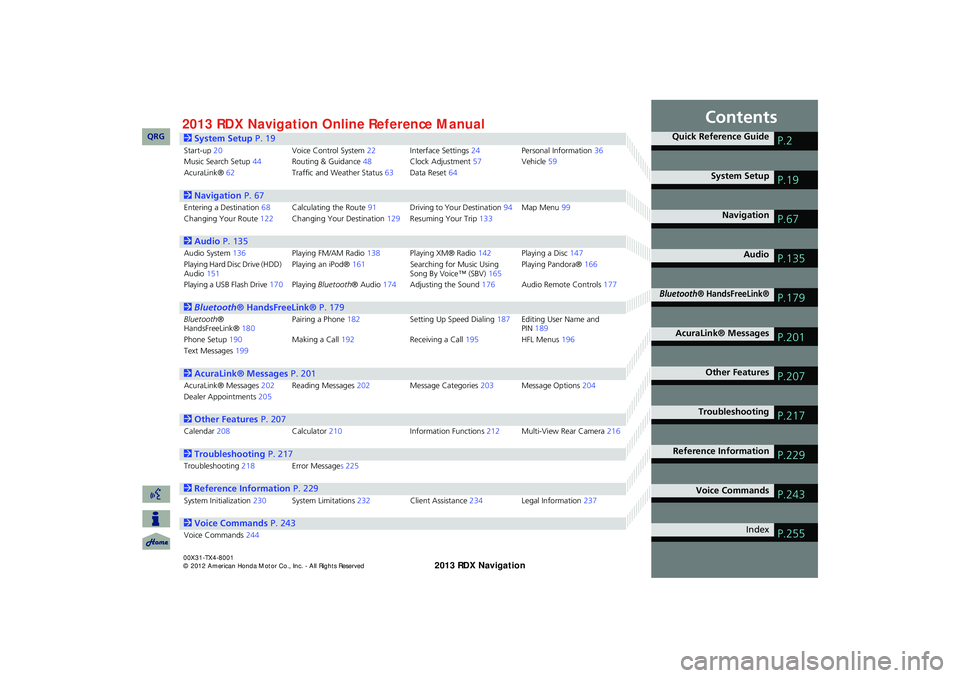
Contents
2System Setup P. 19
Start-up20Voice Control System22Interface Settings24Personal Information36Music Search Setup44Routing & Guidance48Clock Adjustment57Vehicle59AcuraLink®62Traffic and Weather Status63Data Reset64
2Navigation P. 67
Entering a Destination68Calculating the Route91Driving to Your Destination94Map Menu99Changing Your Route122Changing Your Destination129Resuming Your Trip133
2Audio P. 135
Audio System136Playing FM/AM Radio138Playing XM® Radio142Playing a Disc147Playing Hard Disc Drive (HDD) Audio151Playing an iPod®161Searching for Music Using Song By Voice™ (SBV)165Playing Pandora®166
Playing a USB Flash Drive170Playing Bluetooth® Audio174Adjusting the Sound176Audio Remote Controls177
2Bluetooth® HandsFreeLink® P. 179
Bluetooth® HandsFreeLink®180Pairing a Phone182Setting Up Speed Dialing187Editing User Name and PIN189Phone Setup190Making a Call192Receiving a Call195HFL Menus196Text Messages199
2AcuraLink® Messages P. 201
AcuraLink® Messages202Reading Messages202Message Categories203Message Options204Dealer Appointments205
2Other Features P. 207
Calendar208Calculator210Information Functions212Multi-View Rear Camera216
2Troubleshooting P. 217
Troubleshooting218Error Messages 225
2Reference Information P. 229
System Initialization230System Limitations232Client Assistance234Legal Information237
2Voice Commands P. 243
Voice Commands244
Quick Reference GuideP.2
System SetupP.19
NavigationP.67
AudioP.135
Bluetooth® HandsFreeLink®P.179
AcuraLink® MessagesP.201
Other FeaturesP.207
TroubleshootingP.217
Reference InformationP.229
Voice CommandsP.243
IndexP.255
RDX_KA-31TX4800.book Page 1 Monday, January 30, 2012 11:32 PM
QRG2013 Online Reference ManualRDX 00X31-TX4-8001
Page 4 of 260
3
Quick Reference Guide
Other Features
Multi-View Rear Camera (P216)
Helps you check for obstacles around the rear of your vehicle on the navigation screen when reversing.
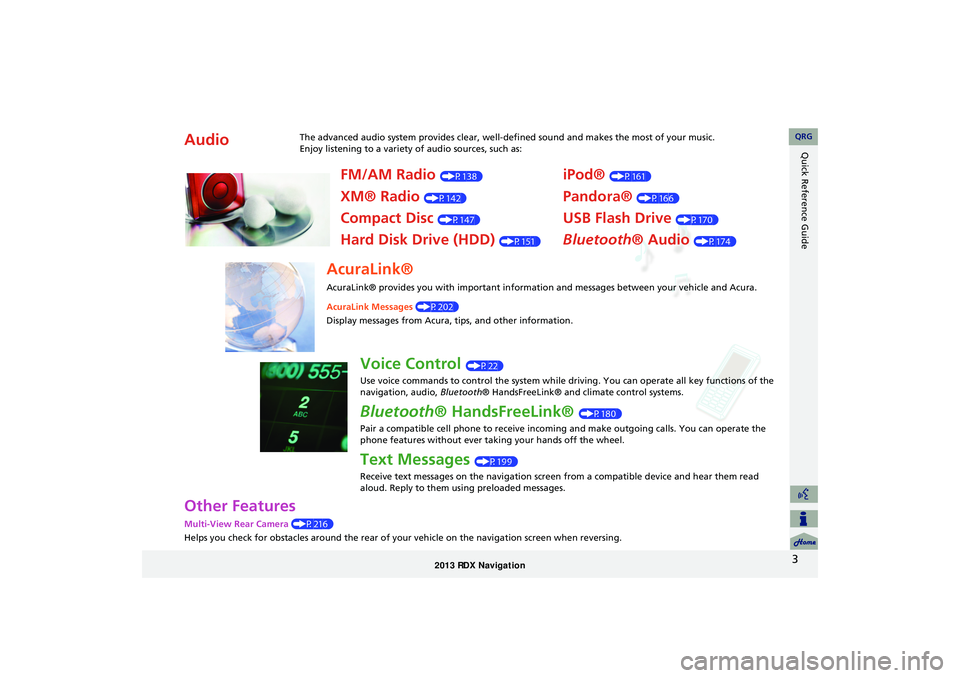
AudioThe advanced audio system provides clear, well-defined sound and makes the most of your music.
Enjoy listening to a variety of audio sources, such as:
FM/AM Radio (P138)
XM® Radio (P142)
Compact Disc (P147)
Hard Disk Drive (HDD) (P151)
iPod® (P161)
Pandora® (P166)
USB Flash Drive (P170)
Bluetooth® Audio (P174)
AcuraLink®
AcuraLink® provides you with important information and messages between your vehicle and Acura.
AcuraLink Messages (P202)
Display messages from Acura, tips, and other information.
Voice Control (P22)
Use voice commands to control the system while driving. You can operate all key functions of the
navigation, audio, Bluetooth® HandsFreeLink® and climate control systems.
Bluetooth® HandsFreeLink® (P180)
Pair a compatible cell phone to receive incoming and make outgoing calls. You can operate the
phone features without ever taking your hands off the wheel.
Text Messages (P199)
Receive text messages on the navigation screen from a compatible device and hear them read
aloud. Reply to them using preloaded messages.
RDX_KA-31TX4800.book Page 3 Monday, January 30, 2012 11:32 PM
QRG
Page 5 of 260
4
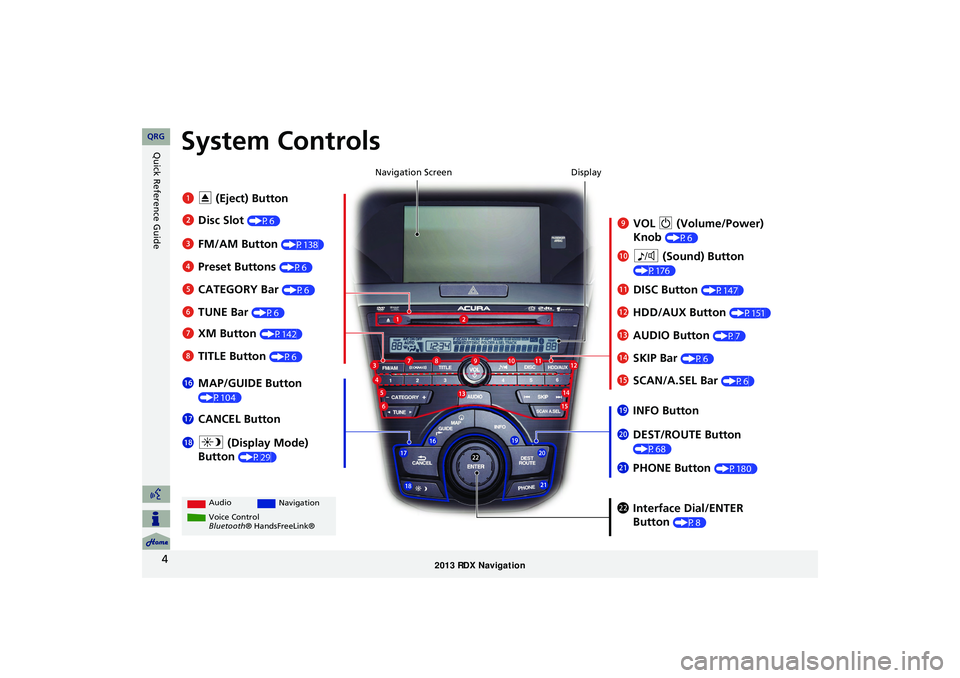
Quick Reference GuideSystem Controls
9VOL 9 (Volume/Power)
Knob
(P6)
Display
la
8 (Sound) Button
(P176)
lcHDD/AUX Button (P151)
3FM/AM Button (P138)
1E (Eject) Button
4 Preset Buttons
(P6)
6TUNE Bar (P6)
ldAUDIO Button (P7)7XM Button (P142)
lbDISC Button (P147)
lgMAP/GUIDE Button
(P104)
lhCANCEL Button
mcInterface Dial/ENTER
Button
(P8)
2Disc Slot (P6) Navigation Screen
Audio
Navigation
Voice Control
Bluetooth® HandsFreeLink®
8 TITLE Button (P6)
5CATEGORY Bar (P6)
lfSCAN/A.SEL Bar (P6)
ljINFO Button
ma DEST/ROUTE Button
(P68)lia (Display Mode)
Button
(P29)
mb PHONE Button (P180)
leSKIP Bar (P6)
RDX_KA-31TX4800.book Page 4 Monday, January 30, 2012 11:32 PM
QRG
Page 8 of 260
7
Quick Reference GuideAudio Control Display
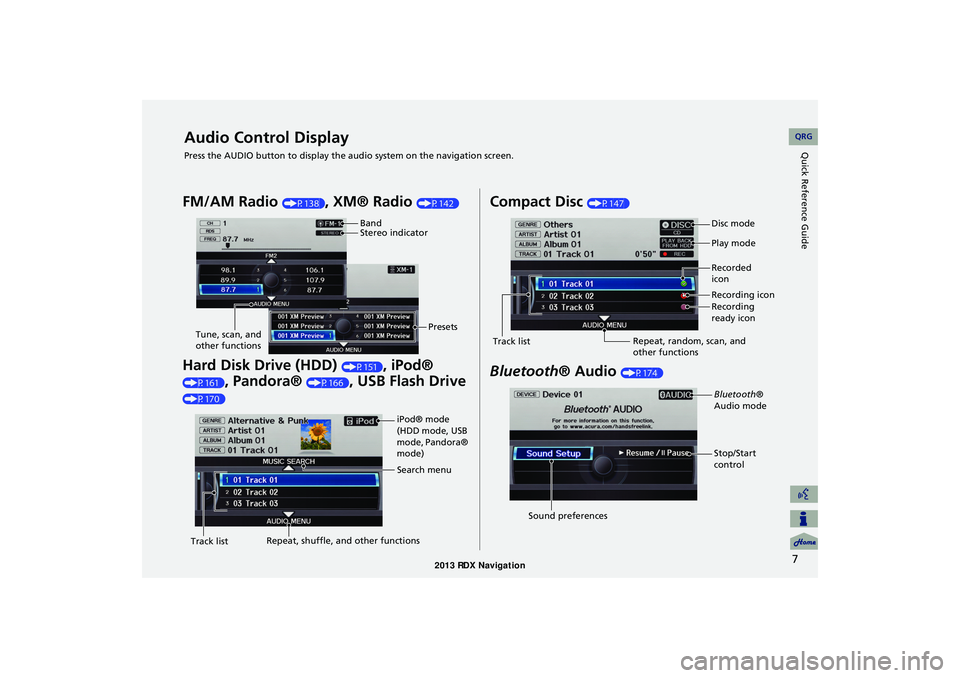
Press the AUDIO button to display the audio system on the navigation screen.
FM/AM Radio (P138), XM® Radio (P142)
Hard Disk Drive (HDD) (P151), iPod®
(P161), Pandora® (P166), USB Flash Drive
(P170)
Band
Stereo indicatorPresets
Tune, scan, and
other functions
iPod® mode
(HDD mode, USB
mode, Pandora®
mode)
Search menu
Track list Repeat, shuffle, and other functions
Compact Disc (P147)
Bluetooth
® Audio (P174)
Disc mode
Play mode
Recorded
icon
Recording icon
Recording
ready icon
Repeat, random, scan, and
other functions
Track list
Bluetooth®
Audio mode
Stop/Start
control
Sound preferences
RDX_KA-31TX4800.book Page 7 Monday, January 30, 2012 11:32 PM
QRG
Page 16 of 260
15
Quick Reference GuideAcuraLink®
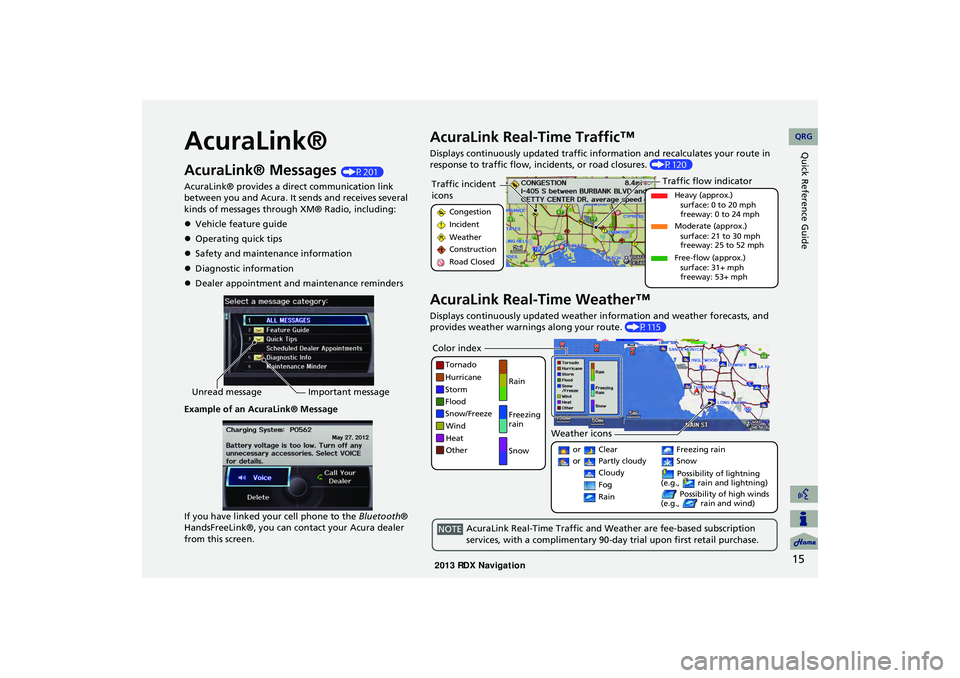
AcuraLink® Messages (P201)
AcuraLink® provides a direct communication link
between you and Acura. It sends and receives several
kinds of messages through XM® Radio, including:
Vehicle feature guide
Operating quick tips
Safety and maintenance information
Diagnostic information
Dealer appointment and maintenance reminders
Example of an AcuraLink® Message
If you have linked your cell phone to the Bluetooth®
HandsFreeLink®, you can contact your Acura dealer
from this screen.
Unread message Important message
AcuraLink Real-Time Traffic™
Displays continuously updated traffic info rmation and recalculates your route in
response to traffic flow, in cidents, or road closures. (P120)
AcuraLink Real-Time Weather™
Displays continuously updated weather information and weather forecasts, and
provides weather warnings along your route. (P115)
Traffic incident
icons
Congestion
Incident
Weather
Construction
Road Closed
Traffic flow indicator
Heavy (approx.)
surface: 0 to 20 mph
freeway: 0 to 24 mph
Moderate (approx.) surface: 21 to 30 mph
freeway: 25 to 52 mph
Free-flow (approx.) surface: 31+ mph
freeway: 53+ mph
Color index
Tornado
Hurricane
Storm
Flood
Snow/Freeze
Wind
Heat
Other Rain
Freezing
rain
Snow
Weather icons
or Clear
or Partly cloudy
Cloudy Possibility of lightning
(e.g., rain and lightning)
Possibility of high winds
(e.g., rain and wind) Fog
Rain
Freezing rain
Snow
AcuraLink Real-Time Traffic and Weather are fee-based subscription
services, with a complimentary 90-day trial upon first retail purchase.NOTE
RDX_KA-31TX4800.book Page 15 Monday, January 30, 2012 11:32 PM
QRG
Page 23 of 260
22
System Setup
Voice Control System
Your vehicle has a voice control system that allows hands-free operation of most of
the navigation system functions. You can also control the audio and climate control
system, and make and rece ive phone calls using Bluetooth ® HandsFreeLink®.
The voice control system uses the d (Talk) and K (Back) buttons on the steering
wheel and a microphone near the map lights on the ceiling.
A “Voice Info” feature provides a tutorial that explains how to use the voice control
system.
2 Voice Help P. 5
Command Input
If the system does not understand a command or you wait too long to give a
command, the system asks y ou to repeat the command.
When you give a command, the system ge nerally either repeats the command as a
confirmation or asks you for further informa tion. If you do not wish to hear this
feedback, you can turn it off. However, list ening to the feedback will help familiarize
you with the way the system expe cts commands to be phrased.
2Basic Settings P. 26
If the system cannot perform a command or the command is not appropriate for the
screen you are on, the system beeps.
On character input screens, a list of possi ble characters is displayed if the system
does not recognize your command.
You can find out which voice commands are available for a particular screen using
the d Help command. The system will disp lay and read the list of available
commands to you.
1 d (Talk) Button
When you press the d (Talk) button, a helpful
prompt asks what you would like to do. Press
and release the d (Talk) button again to bypass
this prompt and give a command.
1 Command Input
The audio system is muted while using the voice
control system.
RDX_KA-31TX4800.book Page 22 Monday, January 30, 2012 11:32 PM
QRG
Page 24 of 260
23
Voice Control SystemVoice Recognition
System Setup
Voice Recognition
To achieve optimum voice recognition when using either the navigation voice
control system or Bluetooth® HandsFreeLink®:
• Make sure the correct screen is displa yed for the voice command that you are
using.
2 Voice Commands P. 244
• Close the windows and moonroof.
• Adjust the dashboard and side vents so air does not blow onto the microphone on
the ceiling.
• Speak clearly in a clear, natural speaking voice without pausing between words.
• Reduce any background noise if possible. The system may misinterpret your
command if more than one person is speaking at the same time.
• Refer to the Voic e Info tutorial.
2Voice Help P. 5
1Voice Recognition
The voice control system can only be used from
the driver’s seat beca use the microphone unit
removes noises from the front passenger’s side.
RDX_KA-31TX4800.book Page 23 Monday, January 30, 2012 11:32 PM
QRG
Page 51 of 260
50
Routing & GuidanceUnverified Area Routing
System Setup
Unverified Area Routing
HINFO button Set up Other Routing & Guidance Unverified Area
Routing
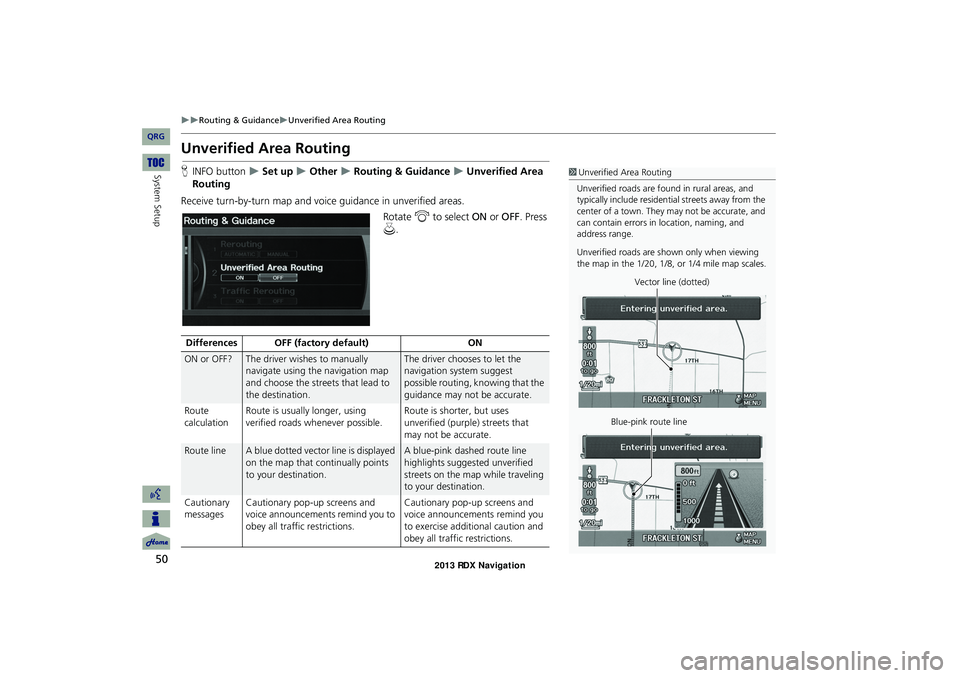
Receive turn-by-turn map and voice guidance in unverified areas. Rotate i to select ON or OFF . Press
u .1Unverified Area Routing
Unverified roads are found in rural areas, and
typically include residential streets away from the
center of a town. They may not be accurate, and
can contain errors in location, naming, and
address range.
Unverified roads are s hown only when viewing
the map in the 1/20, 1/8, or 1/4 mile map scales.
Vector line (dotted)
Blue-pink route line
Differences OFF (factory default) ON
ON or OFF?The driver wishes to manually
navigate using the navigation map
and choose the streets that lead to
the destination.The driver chooses to let the
navigation system suggest
possible routing, knowing that the
guidance may not be accurate.
Route
calculation Route is usually longer, using
verified roads whenever possible. Route is shorter, but uses
unverified (purple) streets that
may not be accurate.
Route lineA blue dotted vector line is displayed
on the map that continually points
to your destination.A blue-pink dashed route line
highlights suggested unverified
streets on the map while traveling
to your destination.
Cautionary
messages Cautionary pop-up screens and
voice announcements remind you to
obey all traffic restrictions. Cautionary pop-up screens and
voice announcements remind you
to exercise additional caution and
obey all traffic restrictions.
RDX_KA-31TX4800.book Page 50 Monday, January 30, 2012 11:32 PM
QRG
Page 92 of 260
91
Navigation
Calculating the Route
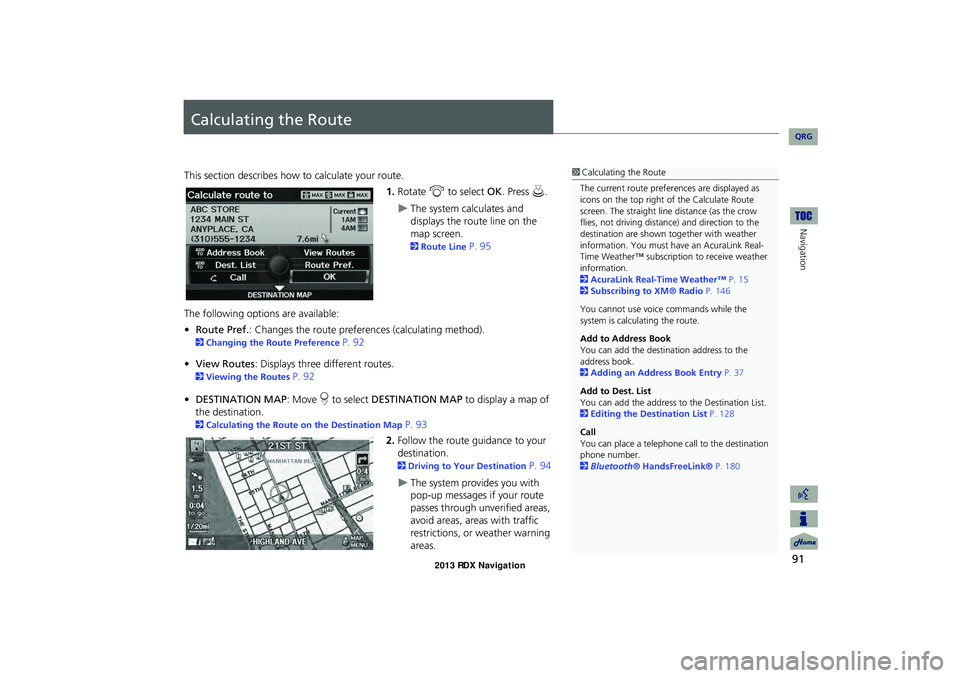
This section describes how to calculate your route.1.Rotate i to select OK. Press u.
The system calculates and
displays the route line on the
map screen.
2Route Line P. 95
The following options are available:
• Route Pref. : Changes the route preferences (calculating method).
2Changing the Route Preference P. 92
• View Routes : Displays three different routes.
2Viewing the Routes P. 92
• DESTINATION MAP : Move r to select DESTINATION MAP to display a map of
the destination.
2 Calculating the Route on the Destination Map P. 93
2. Follow the route guidance to your
destination.
2 Driving to Your Destination P. 94
The system provides you with
pop-up messages if your route
passes through unverified areas,
avoid areas, areas with traffic
restrictions, or weather warning
areas.
1Calculating the Route
The current route prefer ences are displayed as
icons on the top right of the Calculate Route
screen. The straight line distance (as the crow
flies, not driving distan ce) and direction to the
destination are shown t ogether with weather
information. You must have an AcuraLink Real-
Time Weather™ subscripti on to receive weather
information.
2 AcuraLink Real-Time Weather™ P. 15
2 Subscribing to XM® Radio P. 146
You cannot use voice commands while the
system is calculating the route.
Add to Address Book
You can add the destination address to the
address book.
2 Adding an Address Book Entry P. 37
Add to Dest. List
You can add the address to the Destination List.
2 Editing the Destination List P. 128
Call
You can place a telephone ca ll to the destination
phone number.
2 Bluetooth® HandsFreeLink® P. 180
RDX_KA-31TX4800.book Page 91 Monday, January 30, 2012 11:32 PM
QRG
Page 96 of 260
95
Driving to Your DestinationViewing the Route
Navigation
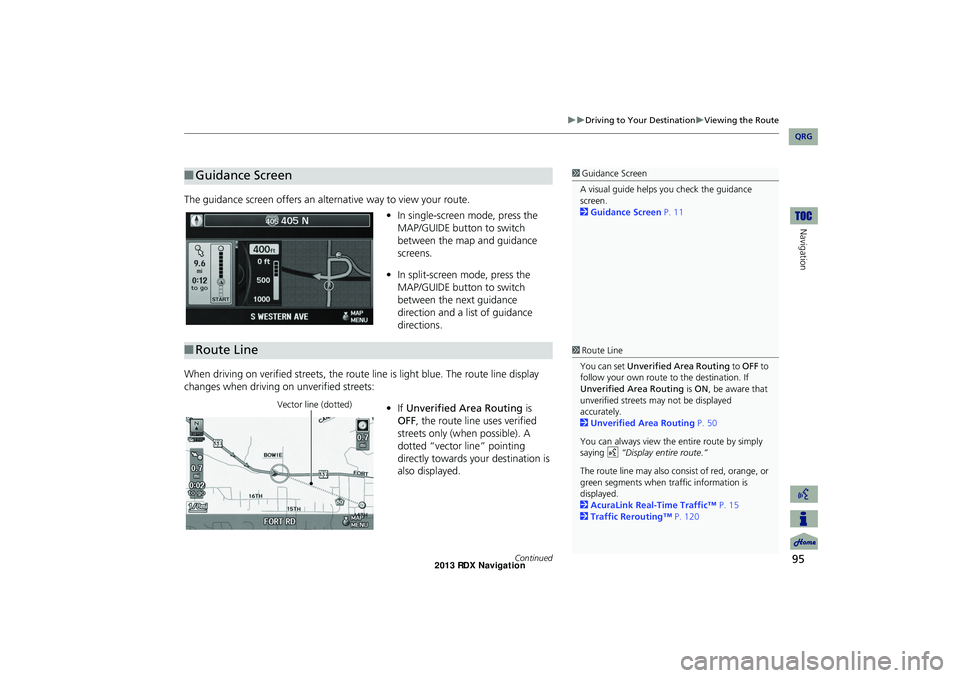
The guidance screen offers an alternative way to view your route.
•In single-screen mode, press the
MAP/GUIDE button to switch
between the map and guidance
screens.
• In split-screen mode, press the
MAP/GUIDE button to switch
between the next guidance
direction and a list of guidance
directions.
When driving on verified streets, the rout e line is light blue. The route line display
changes when driving on unverified streets:
•If Unverified Area Routing is
OFF , the route line uses verified
streets only (when possible). A
dotted “vector line” pointing
directly towards your destination is
also displayed.
■ Guidance Screen1 Guidance Screen
A visual guide helps you check the guidance
screen.
2 Guidance Screen P. 11
■Route Line1 Route Line
You can set Unverified Area Routing to OFF to
follow your own route to the destination. If
Unverified Area Routing is ON , be aware that
unverified streets ma y not be displayed
accurately.
2 Unverified Area Routing P. 50
You can always view the entire route by simply
saying d “Display entire route.”
The route line may also c onsist of red, orange, or
green segments when traffic information is
displayed.
2 AcuraLink Real-Time Traffic™ P. 15
2 Traffic Rerouting™ P. 120
Vector line (dotted)
Continued
RDX_KA-31TX4800.book Page 95 Monday, January 30, 2012 11:32 PM
QRG