wheel Acura RDX 2013 User Guide
[x] Cancel search | Manufacturer: ACURA, Model Year: 2013, Model line: RDX, Model: Acura RDX 2013Pages: 364, PDF Size: 12.54 MB
Page 73 of 364
72
uuIndicators u
Instrument Panel
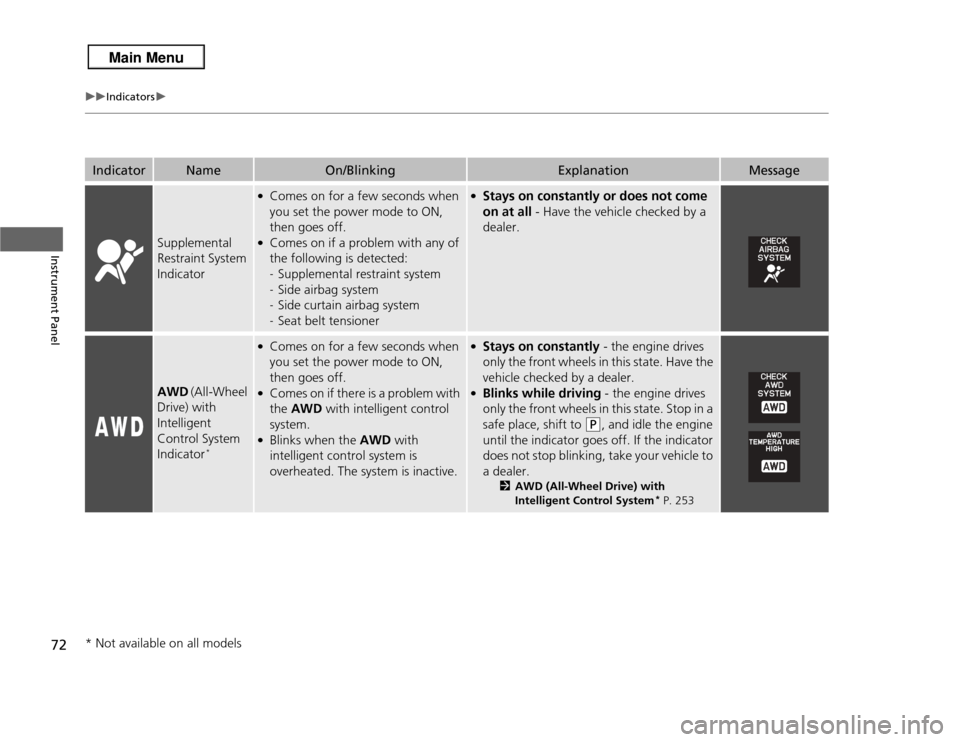
Indicator
Name
On/Blinking
Explanation
Message
Supplemental
Restraint System
Indicator
●Comes on for a few seconds when
you set the power mode to ON,
then goes off.●Comes on if a problem with any of
the following is detected:
-Supplemental restraint system
- Side airbag system
- Side curtain airbag system
- Seat belt tensioner
●Stays on constantly or does not come
on at all - Have the vehicle checked by a
dealer.
AWD (All-Wheel
Drive) with
Intelligent
Control System
Indicator
*
●Comes on for a few seconds when
you set the power mode to ON,
then goes off.●Comes on if there is a problem with
the AWD with intelligent control
system.●Blinks when the AWD with
intelligent control system is
overheated. The system is inactive.
●Stays on constantly - the engine drives
only the front wheels in this state. Have the
vehicle checked by a dealer.●Blinks while driving - the engine drives
only the front wheels in this state. Stop in a
safe place, shift to
(P
, and idle the engine
until the indicator goes off. If the indicator
does not stop blinking, take your vehicle to
a dealer.
2 AWD (All-Wheel Drive) with
Intelligent Control System
* P. 253
* Not available on all models
Page 81 of 364
80
uuIndicators uMulti-Information Display Warning and Information Messages
Instrument Panel
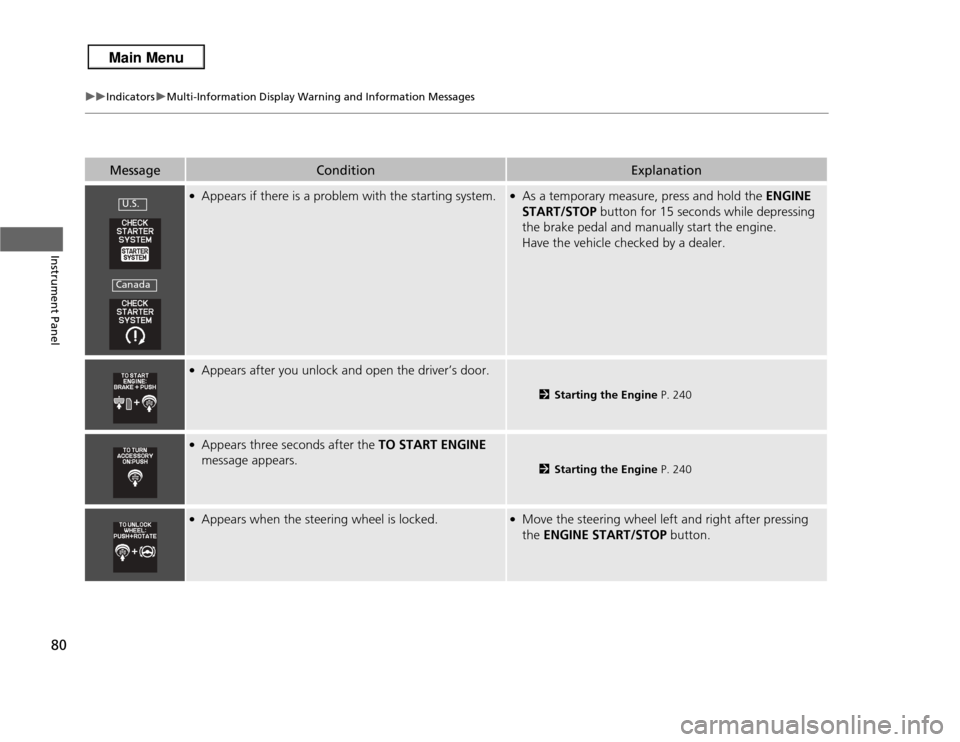
Message
Condition
Explanation
●Appears if there is a problem with the starting system.
●As a temporary measure, press and hold the ENGINE
START/STOP button for 15 seconds while depressing
the brake pedal and manually start the engine.
Have the vehicle checked by a dealer.
●Appears after you unlock and open the driver’s door.
2 Starting the Engine P. 240
●Appears three seconds after the TO START ENGINE
message appears.
2 Starting the Engine P. 240
●Appears when the steering wheel is locked.
●Move the steering wheel left and right after pressing
the ENGINE START/STOP button.
U.S.Canada
Page 96 of 364
95
Controls
This chapter explains how to operate the various controls necessary for driving.
Setting the Clock................................ 96
Locking and Unlocking the Doors Key Types and Functions ... ................. 97
Locking/Unlocking the Doors from the Outside ............................................ 99Low Keyless Access Remote Signal Strength ..... 103
Locking/Unlocking the Doors from the Inside ... 104Childproof Door Locks ..................... 105
Auto Door Locking/Unlocking .......... 106
Opening and Closing the Tailgate ... 107
Security System ................................ 113
Immobilizer System .......................... 113
Security System Alarm ...................... 113
Opening and Closing the Windows .... 115Opening and Closing the Moonroof
....... 118
Operating the Switches Around the
Steering WheelENGINE START/STOP Button............. 119
Turn Signals ..................................... 122
Light Switches.................................. 122
Fog Lights
*...................................... 125
Daytime Running Lights ................... 125
Wipers and Washers ........................ 126
Brightness Control ........................... 128
Rear Defogger/Heated Door Mirror Button ... 129Driving Position Memory System ...... 130 Adjusting the Steering Wheel .......... 132
Adjusting the Mirrors ....................... 133
Interior Rearview Mirror ................... 133
Power Door Mirrors ......................... 134
Adjusting the Seats .......................... 136
Adjusting the Seat Positions ............. 136
Interior Lights/Interior Convenience Items
...... 143
Interior Lights .................................. 143
Interior Convenience Items .............. 145
Climate Control System ................... 152
Using Automatic Climate Control .... 152
Synchronized Mode ......................... 154Automatic Climate Control Sensors.....155
* Not available on all models
Page 120 of 364
119
Continued
Controls
Operating the Switches Around the Steering WheelENGINE START/STOP Button■
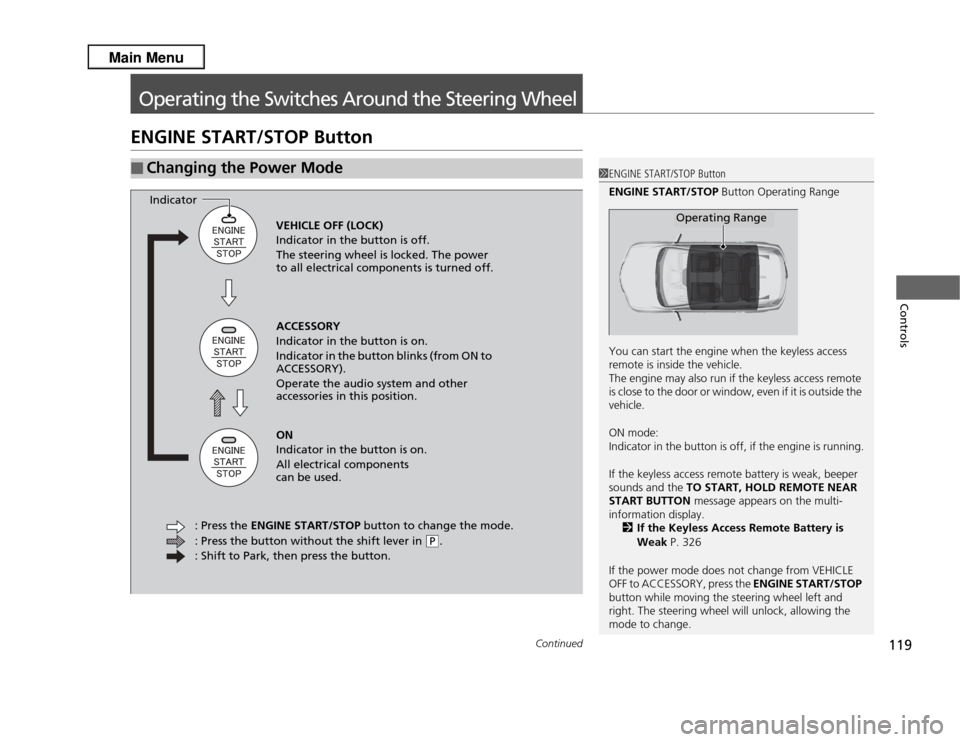
Changing the Power Mode
1ENGINE START/STOP Button
ENGINE START/STOP Button Operating Range
You can start the engine when the keyless access
remote is inside the vehicle.
The engine may also run if the keyless access remote
is close to the door or window, even if it is outside the
vehicle.
ON mode:
Indicator in the button is off, if the engine is running.
If the keyless access remote battery is weak, beeper
sounds and the TO START, HOLD REMOTE NEAR
START BUTTON message appears on the multi-
information display.
2 If the Keyless Access Remote Battery is
Weak P. 326
If the power mode does not change from VEHICLE
OFF to ACCESSORY, press the ENGINE START/STOP
button while moving the steering wheel left and
right. The steering wheel will unlock, allowing the
mode to change.
Operating Range
VEHICLE OFF (LOCK)
Indicator in the button is off.
The steering wheel is locked. The power
to all electrical components is turned off.
ACCESSORY
Indicator in the button is on.
Indicator in the button blinks (from ON to
ACCESSORY).
Operate the audio system and other
accessories in this position.
ON
Indicator in the button is on.
All electrical components
can be used.
: Press the ENGINE START/STOP button to change the mode.
: Press the button without the shift lever in
( P
.
: Shift to Park, then press the button.
Indicator
Page 121 of 364
120
uuOperating the Switches Around the Steering Wheel uENGINE START/STOP Button
Controls
If you leave the vehicle for 30 to 60 minutes with the shift lever in
(P
and the power
mode in ACCESSORY, the vehicle automatically goes into the mode similar to
VEHICLE OFF (LOCK) to avoid the battery drain.
When in this mode:
The steering wheel does not lock.
You cannot lock or unlock doors with the remote transmitter or the keyless access
system.
Press the ENGINE START/STOP button to switch the mode to VEHICLE OFF (LOCK).
■
Automatic Power Off
Page 122 of 364
121
uuOperating the Switches Around the Steering Wheel uENGINE START/STOP Button
Controls
If you open the driver's door when the power mode is set to ACCESSORY, a warning
buzzer sounds.
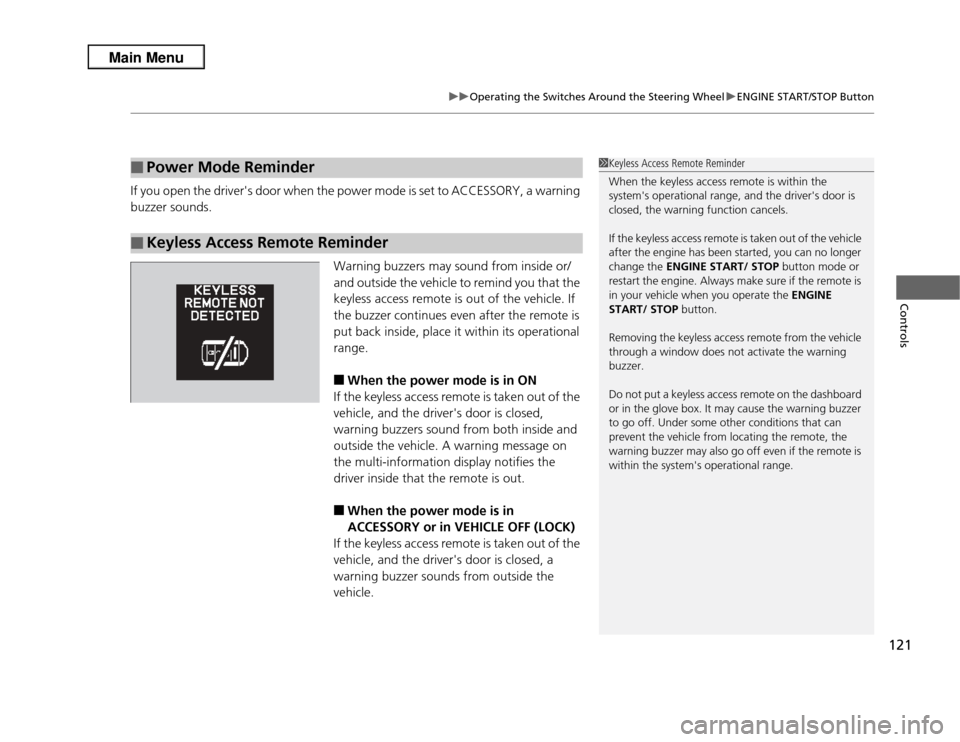
Warning buzzers may sound from inside or/
and outside the vehicle to remind you that the
keyless access remote is out of the vehicle. If
the buzzer continues even after the remote is
put back inside, place it within its operational
range.
■
When the power mode is in ON
If the keyless access remote is taken out of the
vehicle, and the driver's door is closed,
warning buzzers sound from both inside and
outside the vehicle. A warning message on
the multi-information display notifies the
driver inside that the remote is out.
■
When the power mode is in
ACCESSORY or in VEHICLE OFF (LOCK)
If the keyless access remote is taken out of the
vehicle, and the driver's door is closed, a
warning buzzer sounds from outside the
vehicle.
■
Power Mode Reminder
■
Keyless Access Remote Reminder
1 Keyless Access Remote Reminder
When the keyless access remote is within the
system's operational range, and the driver's door is
closed, the warning function cancels.
If the keyless access remote is taken out of the vehicle
after the engine has been started, you can no longer
change the ENGINE START/ STOP button mode or
restart the engine. Always make sure if the remote is
in your vehicle when you operate the ENGINE
START/ STOP button.
Removing the keyless access remote from the vehicle
through a window does not activate the warning
buzzer.
Do not put a keyless access remote on the dashboard
or in the glove box. It may cause the warning buzzer
to go off. Under some other conditions that can
prevent the vehicle from locating the remote, the
warning buzzer may also go off even if the remote is
within the system's operational range.
Page 123 of 364
122
uuOperating the Switches Around the Steering Wheel uTurn Signals
Controls
Turn Signals
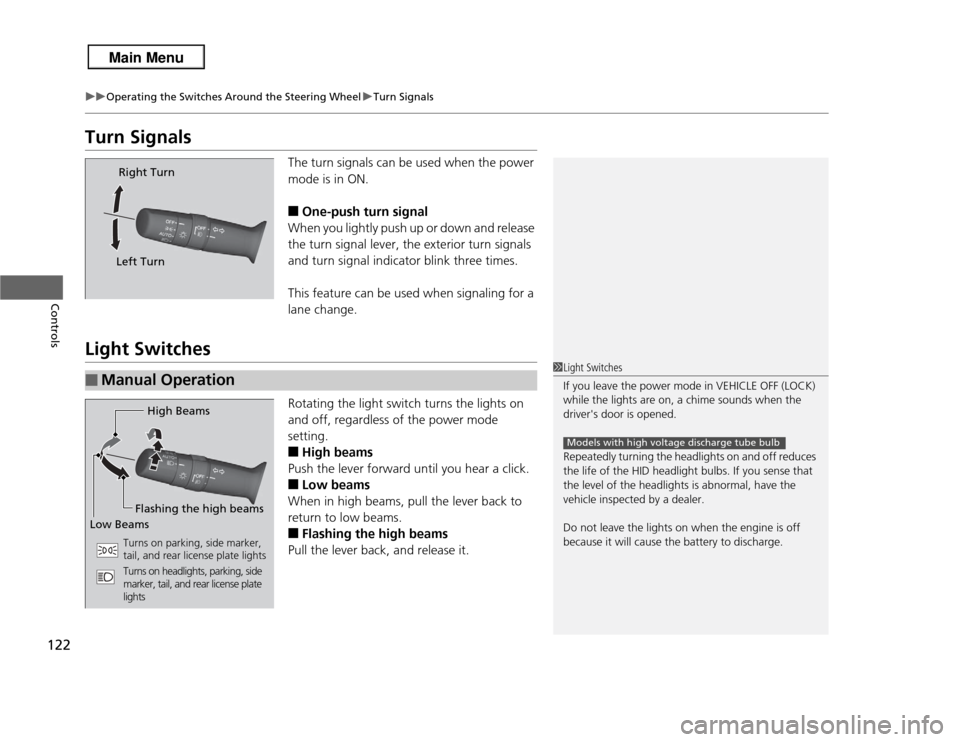
The turn signals can be used when the power
mode is in ON.■
One-push turn signal
When you lightly push up or down and release
the turn signal lever, the exterior turn signals
and turn signal indicator blink three times.
This feature can be used when signaling for a
lane change.
Light Switches
Rotating the light switch turns the lights on
and off, regardless of the power mode
setting.■
High beams
Push the lever forward until you hear a click.
■
Low beams
When in high beams, pull the lever back to
return to low beams.
■
Flashing the high beams
Pull the lever back, and release it.
Right Turn
Left Turn
■
Manual Operation
1 Light Switches
If you leave the power mode in VEHICLE OFF (LOCK)
while the lights are on, a chime sounds when the
driver's door is opened.
Repeatedly turning the headlights on and off reduces
the life of the HID headlight bulbs. If you sense that
the level of the headlights is abnormal, have the
vehicle inspected by a dealer.
Do not leave the lights on when the engine is off
because it will cause the battery to discharge.
Models with high voltage discharge tube bulb
High Beams
Flashing the high beams
Low Beams
Turns on parking, side marker,
tail, and rear license plate lights
Turns on headlights, parking, side
marker, tail, and rear license plate
lights
Page 124 of 364
Continued
123
uuOperating the Switches Around the Steering Wheel uLight Switches
Controls
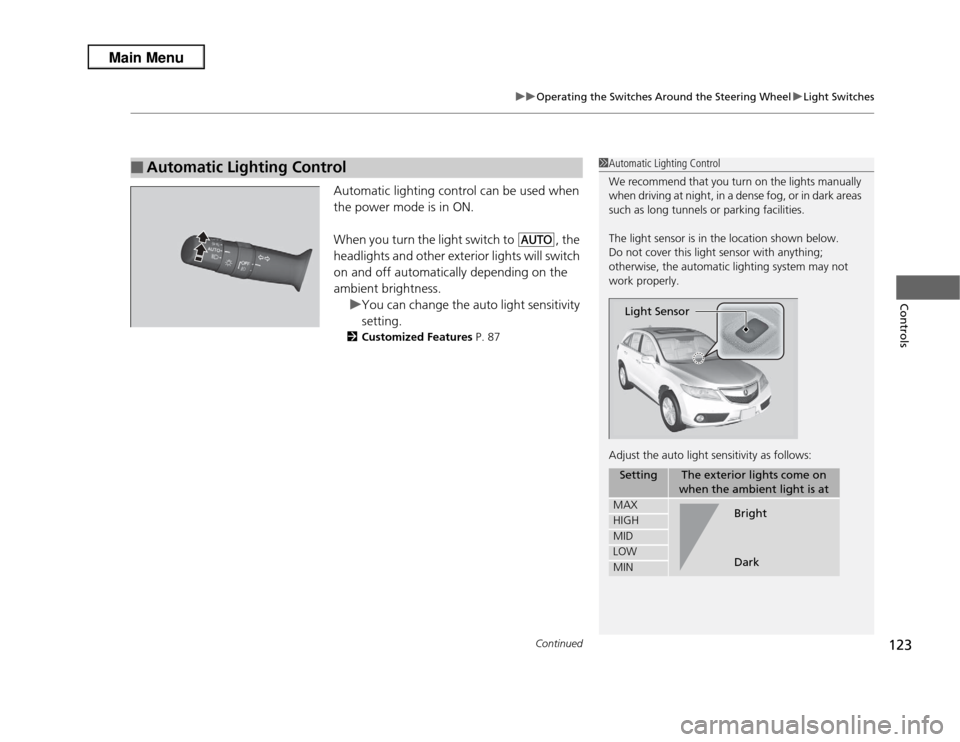
Automatic lighting control can be used when
the power mode is in ON.
When you turn the light switch to
#Y
, the
headlights and other exterior lights will switch
on and off automatically depending on the
ambient brightness. uYou can change the auto light sensitivity
setting.
2 Customized Features P. 87
■
Automatic Lighting Control
1Automatic Lighting Control
We recommend that you turn on the lights manually
when driving at night, in a dense fog, or in dark areas
such as long tunnels or parking facilities.
The light sensor is in the location shown below.
Do not cover this light sensor with anything;
otherwise, the automatic lighting system may not
work properly.
Adjust the auto light sensitivity as follows:
Setting
The exterior lights come on
when the ambient light is at
MAXHIGHMIDLOWMINLight Sensor
Bright
Dark
Page 125 of 364

uuOperating the Switches Around the Steering Wheel uLight Switches
124Controls
The headlights automatically come on when the wipers are used several times within
certain number of intervals while the headlight switch is in
#Y
.The headlights
automatically go off a few minutes after the wipers are stopped.
The headlights, all other exterior lights, and the instrument panel lights turn off
within 15 seconds after you set the power mode to VEHICLE OFF (LOCK), take the
remote with you, and close the driver's door.
uYou can change the headlight auto off timer setting.
2 Customized Features P. 87
If you set the power mode to VEHICLE OFF (LOCK) with the headlight switch on, but
do not open the door, the lights turn off after 10 minutes (three minutes, if the
switch is in the
#Y
position).
The lights turn on again when you unlock or open the driver's door. If you unlock
the door, but do not open it within 15 seconds, the lights go off. If you open the
driver's door, you will hear a lights on reminder chime.
■
Headlight Integration with Wiper
■
Automatic Lighting Off Feature
1 Headlight Integration with Wiper
*
This feature activates while the headlights are in #Y
. The instrument panel brightness does not
change when the headlights come on.
If the ambient light is dark, the automatic lighting
control overrides this feature, and the headlights
come on whether or not the wipers cycle several
times.
* Not available on all models
Page 126 of 364
125
uuOperating the Switches Around the Steering Wheel uFog Lights
*
Controls
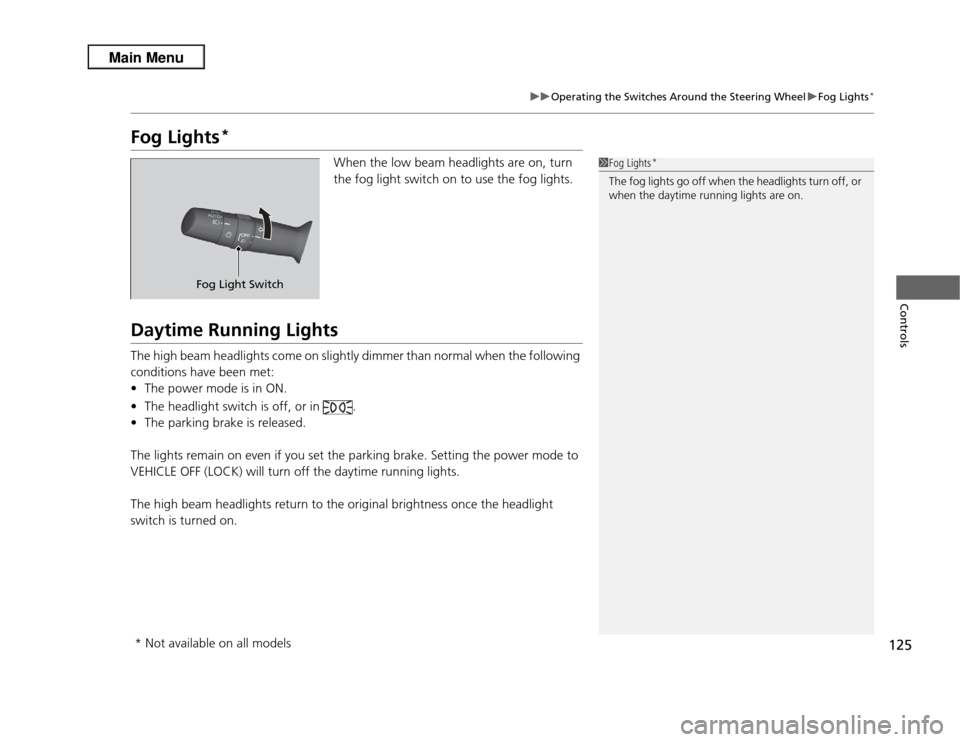
Fog Lights
*
When the low beam headlights are on, turn
the fog light switch on to use the fog lights.
Daytime Running LightsThe high beam headlights come on slightly dimmer than normal when the following
conditions have been met:
• The power mode is in ON.
• The headlight switch is off, or in .
• The parking brake is released.
The lights remain on even if you set the parking brake. Setting the power mode to
VEHICLE OFF (LOCK) will turn off the daytime running lights.
The high beam headlights return to the original brightness once the headlight
switch is turned on.
1 Fog Lights
*
The fog lights go off when the headlights turn off, or
when the daytime running lights are on.
Fog Light Switch
* Not available on all models