wheel Acura RDX 2013 Service Manual
[x] Cancel search | Manufacturer: ACURA, Model Year: 2013, Model line: RDX, Model: Acura RDX 2013Pages: 364, PDF Size: 12.54 MB
Page 249 of 364
248
uuWhen Driving uCruise Control
Driving
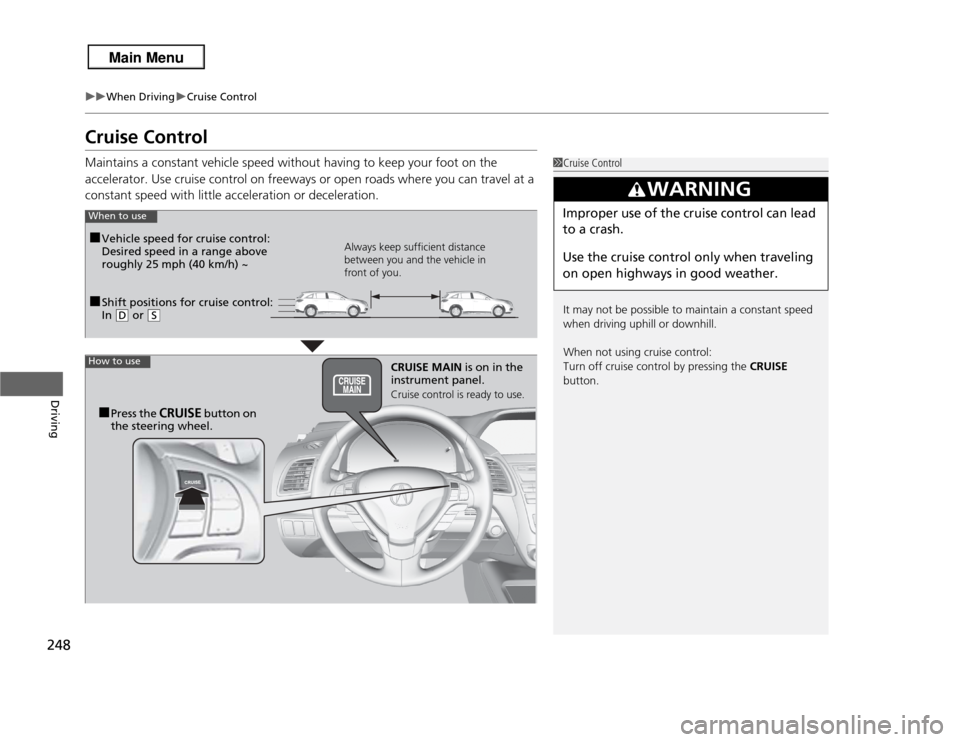
Cruise ControlMaintains a constant vehicle speed without having to keep your foot on the
accelerator. Use cruise control on freeways or open roads where you can travel at a
constant speed with little acceleration or deceleration.
1Cruise Control
It may not be possible to maintain a constant speed
when driving uphill or downhill.
When not using cruise control:
Turn off cruise control by pressing the CRUISE
button.
3
WARNING
Improper use of the cruise control can lead
to a crash.
Use the cruise control only when traveling
on open highways in good weather.
■Shift positions for cruise control:
In
( D
or
(S
When to use
Always keep sufficient distance
between you and the vehicle in
front of you.
■Vehicle speed for cruise control:
Desired speed in a range above
roughly 25 mph (40 km/h) ~
How to use
CRUISE MAIN is on in the
instrument panel.Cruise control is ready to use.
■Press the
CRUISE
button on
the steering wheel.
Page 251 of 364
uuWhen Driving uCruise Control
250Driving
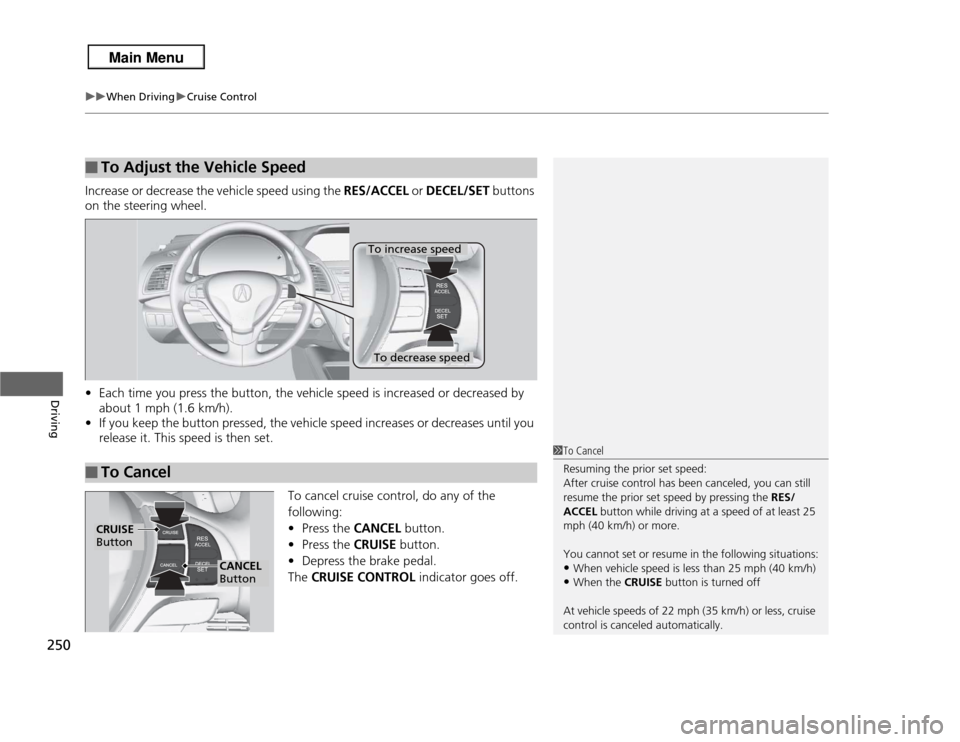
Increase or decrease the vehicle speed using the RES/ACCEL or DECEL/SET buttons
on the steering wheel.
• Each time you press the button, the vehicle speed is increased or decreased by
about 1 mph (1.6 km/h).
• If you keep the button pressed, the vehicle speed increases or decreases until you
release it. This speed is then set.
To cancel cruise control, do any of the
following:
•Press the CANCEL button.
• Press the CRUISE button.
• Depress the brake pedal.
The CRUISE CONTROL indicator goes off.■
To Adjust the Vehicle Speed
■
To Cancel
To decrease speedTo increase speed
1To Cancel
Resuming the prior set speed:
After cruise control has been canceled, you can still
resume the prior set speed by pressing the RES/
ACCEL button while driving at a speed of at least 25
mph (40 km/h) or more.
You cannot set or resume in the following situations:•When vehicle speed is less than 25 mph (40 km/h)•When the CRUISE button is turned off
At vehicle speeds of 22 mph (35 km/h) or less, cruise
control is canceled automatically.
CRUISE
Button
CANCEL
Button
Page 254 of 364
253
uuWhen Driving uAWD (All-Wheel Drive) with Intelligent Control System
*
Continued
Driving
AWD (All-Wheel Drive) with Intelligent Control System
*
Your vehicle is equipped with the AWD with intelligent control system. When the
system senses a loss of front wheel traction, it automatically transfers some power
to the rear wheels. This allows you to utilize all available traction and may increase
mobility.
You still need to exercise the same care when accelerating, steering, and braking
that you would in a two wheel drive vehicle.
If you excessively spin all four wheels and overheat the AWD with intelligent control
system, only the front wheels receive power. Stop until the system cools down.TPMS (Tire Pressure Monitoring System)
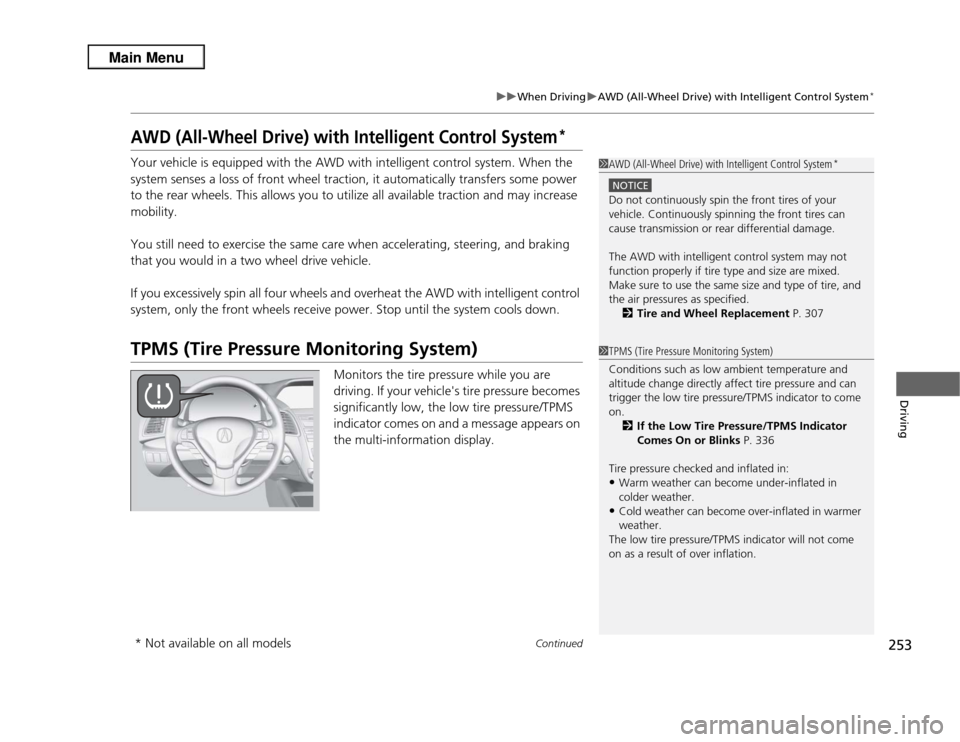
Monitors the tire pressure while you are
driving. If your vehicle's tire pressure becomes
significantly low, the low tire pressure/TPMS
indicator comes on and a message appears on
the multi-information display.
1AWD (All-Wheel Drive) with Intelligent Control System
*
NOTICEDo not continuously spin the front tires of your
vehicle. Continuously spinning the front tires can
cause transmission or rear differential damage.
The AWD with intelligent control system may not
function properly if tire type and size are mixed.
Make sure to use the same size and type of tire, and
the air pressures as specified.
2 Tire and Wheel Replacement P. 3071TPMS (Tire Pressure Monitoring System)
Conditions such as low ambient temperature and
altitude change directly affect tire pressure and can
trigger the low tire pressure/TPMS indicator to come
on.
2 If the Low Tire Pressure/TPMS Indicator
Comes On or Blinks P. 336
Tire pressure checked and inflated in:•Warm weather can become under-inflated in
colder weather.•Cold weather can become over-inflated in warmer
weather.
The low tire pressure/TPMS indicator will not come
on as a result of over inflation.
* Not available on all models
Page 257 of 364

256
uuWhen Driving uTire Pressure Monitoring System (TPMS) - Required Federal Explanation
Driving
correct tire pressure, even if under-inflation has not reached the
level to trigger illumination of the TPMS low tire pressure telltale.
Your vehicle has also been equipped with a TPMS malfunction
indicator to indicate when the system is not operating properly.
The TPMS malfunction indicator is combined with the low tire
pressure telltale. When the system detects a malfunction, the
telltale will flash for approximately one minute and then remain
continuously illuminated. This se quence will continue upon
subsequent vehicle start-ups as long as the malfunction exists.
When the malfunction indicator is illuminated, the system may
not be able to detect or signal low tire pressure as intended.
TPMS malfunctions may occur for a vari ety of reasons, including
the installation of replacement or alternate tires or wheels on the
vehicle that prevent the TPMS from functioning properly.
Always check the TPMS malfunction telltale after replacing one or
more tires or wheels on your vehicle to ensure that the
replacement or alternate tires and wheels allow the TPMS to
continue to function properly.
Page 259 of 364
uuBraking uBrake System
258Driving
Your vehicle is equipped with disc brakes at all four wheels. A vacuum power assist
helps reduce the effort needed on the brake pedal. The brake assist system increases
the stopping force when you depress the brake pedal hard in an emergency
situation. The anti-lock brake system (ABS) helps you retain steering control when
braking very hard.
2 Brake Assist System P. 260
2 ABS (Anti-lock Brake System) P. 259
■
Foot Brake
1Foot Brake
Check the brakes after driving through deep water,
or if there is a buildup of road surface water. If
necessary, dry the brakes by lightly depressing the
pedal several times.
If you hear a continuous metallic friction sound when
applying the brakes, the brake pads need to be
replaced. Have the vehicle checked by a dealer.
Constantly using the brake pedal while going down a
long hill builds up heat, which reduces the brake
effectiveness. Apply engine braking by taking your
foot off the accelerator pedal and downshifting to a
lower gear.
Do not rest your foot on the brake pedal while
driving, as it will lightly apply the brakes and cause
them to lose effectiveness over time and reduce pad
life. It will also confuse drivers behind you.
Your vehicle is equipped with a hydraulic brake
booster that, under certain conditions, such as
braking at high altitudes, supplements the vacuum
power assist. When the hydraulic brake booster
activates, you may hear a motor sound and a slight
vibration in the pedal. This is normal.
Page 260 of 364
259
uuBraking uABS (Anti-lock Brake System)
Driving
ABS (Anti-lock Brake System)Helps prevent the wheels from locking up, and helps you retain steering control by
pumping the brakes rapidly, much faster than you.
The electronic brake distribution (EBD) system, which is part of the ABS, also
balances the front-to-rear braking distribution according to vehicle loading.
You should never pump the brake pedal. Let the ABS work for you by always
keeping firm, steady pressure on the brake pedal. This is sometimes referred to as
“stomp and steer.”■
ABS operation
The brake pedal may pulsate slightly when the ABS is working. Keep holding the
pedal firmly down. On dry pavement, you will need to press on the brake pedal very
hard before the ABS activates. However, you may feel the ABS activate immediately
if you are trying to stop on snow or ice.
When the vehicle speed goes under 6 mph (10 km/h), the ABS stops.
■
ABS
1 ABS (Anti-lock Brake System)
NOTICEThe ABS may not function correctly if you use an
incorrect tire type and size.
When the ABS indicator comes on while driving,
there may be a problem with the system.
While normal braking is not affected, there is a
possibility of the ABS not operating. Have the vehicle
checked by a dealer immediately.
The ABS does not reduce the time or distance it takes
to stop the vehicle. It only helps with steering control
during hard braking.
In the following cases, your vehicle may need more
stopping distance than a vehicle without the ABS:•When driving on rough road surfaces, including
when driving on uneven surfaces, such as gravel or
snow.•When tire chains are installed.
You may hear a motor sound coming from the
engine compartment while system checks are being
performed immediately after starting the engine or
while driving. This is normal.
Page 262 of 364
261Driving
Parking Your VehicleWhen Stopped1.Depress the brake pedal firmly with the shift lever in
(D
.
2. Firmly apply the parking brake.
3. Move the shift lever from
(D
to
(P
.
4. Turn off the engine.
Always set the parking brake firmly, in particular if you are parked on an incline.
1 Parking Your Vehicle
Do not park your vehicle near flammable objects,
such as dry grass, oil, or timber.
Heat from the exhaust can cause a fire.1When Stopped
NOTICEThe following can damage the transmission:•Depressing the accelerator and brake pedals
simultaneously.•Holding the vehicle in place when facing uphill by
depressing the accelerator pedal.•Moving the shift lever into
(P
before the vehicle
stops completely.
Raise the wiper arms when snow is expected.
In extremely cold temperatures, the parking brake
may freeze in the applied position. To prevent this,
use a block or wheel chock to prevent the wheels
from moving.
Page 268 of 364
267
Maintenance
This chapter discusses basic maintenance.
Before Performing MaintenanceInspection and Maintenance ............ 268Safety When Performing Maintenance..... 269Parts and Fluids Used in Maintenance Service ........................................... 270
Maintenance Minder
TM..................... 271
Maintenance Under the Hood
Maintenance Items Under the Hood ..... 275Opening the Hood ........................... 276
Recommended Engine Oil ...... .......... 277
Oil Check ......................................... 278
Adding Engine Oil ............................ 279Changing the Engine Oil and Oil Filter ..... 280
Engine Coolant ................................ 282
Transmission Fluid ............................ 284
Brake Fluid ....................................... 285
Refilling Window Washer Fluid......... 286
Replacing Light Bulbs ....................... 287Checking and Maintaining Wiper Blades
.... 297
Checking and Maintaining Tires
Checking Tires ................................. 301Tire and Loading Information Label ...... 302Tire Labeling .................................... 302DOT Tire Quality Grading (U.S. Vehicles)....... 304Wear Indicators................................ 306
Tire Service Life ................................ 306 Tire and Wheel Replacement ........... 307
Tire Rotation .................................... 308
Winter Tires ..................................... 309
Battery ............................................... 310
Remote Transmitter Care Replacing the Button Battery ........... 311
Climate Control System Maintenance
..... 312
Cleaning
Interior Care .................................... 313
Exterior Care.................................... 315
Page 290 of 364
289
uuReplacing Light Bulbs uFog Light Bulbs
*
Continued
Maintenance
Fog Light Bulbs
*
When replacing, use the following bulbs.
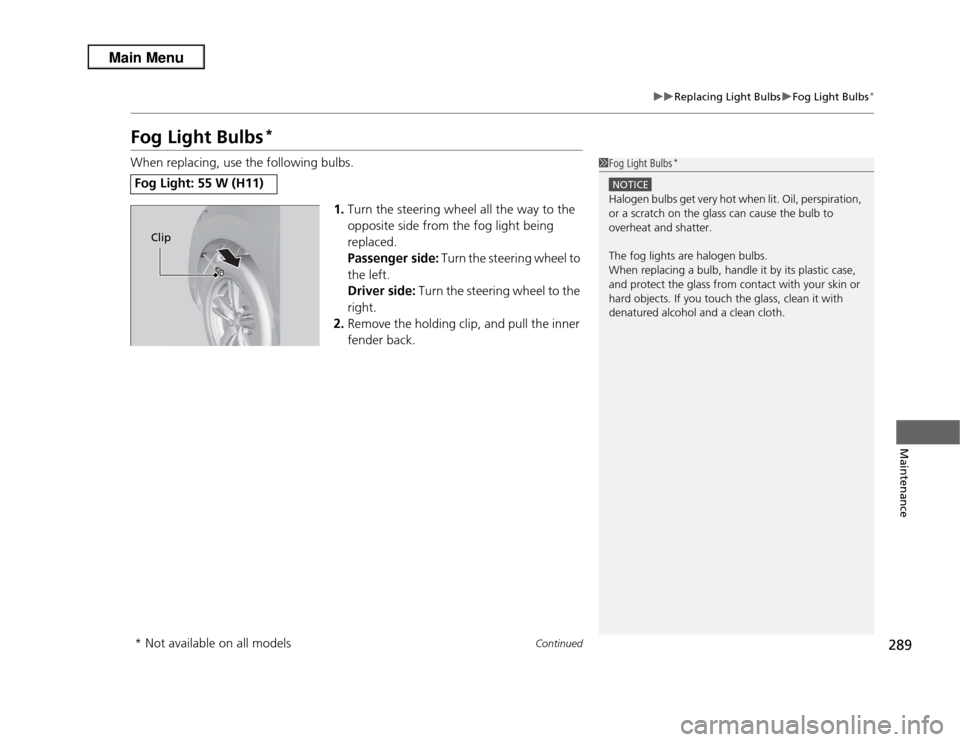
1.Turn the steering wheel all the way to the
opposite side from the fog light being
replaced.
Passenger side: Turn the steering wheel to
the left.
Driver side: Turn the steering wheel to the
right.
2. Remove the holding clip, and pull the inner
fender back.Fog Light: 55 W (H11)
1Fog Light Bulbs
*
NOTICEHalogen bulbs get very hot when lit. Oil, perspiration,
or a scratch on the glass can cause the bulb to
overheat and shatter.
The fog lights are halogen bulbs.
When replacing a bulb, handle it by its plastic case,
and protect the glass from contact with your skin or
hard objects. If you touch the glass, clean it with
denatured alcohol and a clean cloth.
Clip
* Not available on all models
Page 292 of 364
291
uuReplacing Light Bulbs uFront Turn Signal/Parking Light and Front Side Marker Light Bulbs
Maintenance
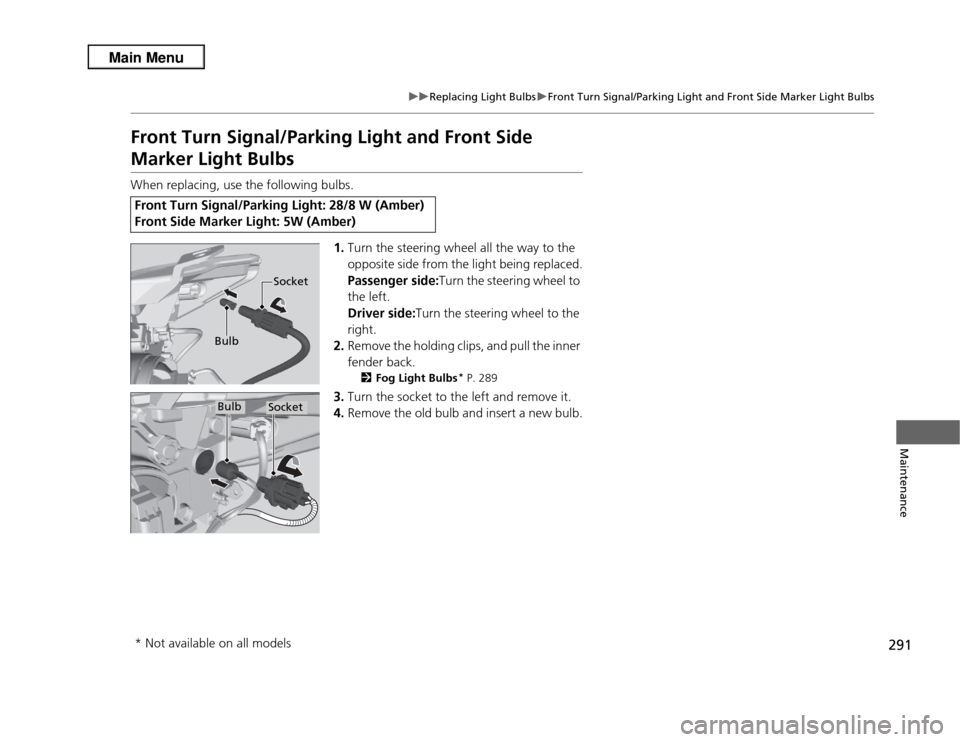
Front Turn Signal/Parking Light and Front Side Marker Light BulbsWhen replacing, use the following bulbs.
1.Turn the steering wheel all the way to the
opposite side from the light being replaced.
Passenger side:Turn the steering wheel to
the left.
Driver side: Turn the steering wheel to the
right.
2. Remove the holding clips, and pull the inner
fender back.
2 Fog Light Bulbs
* P. 289
3.Turn the socket to the left and remove it.
4. Remove the old bulb and insert a new bulb.
Front Turn Signal/Parking Light: 28/8 W (Amber)
Front Side Marker Light: 5W (Amber)
Bulb SocketBulb
Socket
* Not available on all models