power steering Acura RDX 2015 Owner's Guide
[x] Cancel search | Manufacturer: ACURA, Model Year: 2015, Model line: RDX, Model: Acura RDX 2015Pages: 71, PDF Size: 18.23 MB
Page 3 of 71
TABLE OF
CONTENTS
VISUAL INDEX
SAFETY
INFORMATION
INSTRUMENT PANEL
VEHICLE
CONTROLS
AUDIO AND
CONNECTIVITY
BLUETOOTH®
HANDSFREELINK®
ACURALINK®
INDEX
VOICE COMMAND INDEX
CLIENT
INFORMATION
SPECIFICATIONS
MAINTENANCE
HANDLING THE UNEXPECTED
DRIVING
NAVIGATION
This Owner’s Guide is intended to help you quickly get acquainted with your 2015
Acura RDX. It provides basic information and instructions on technology and
convenience features, as well as emergency procedures and how to get assistance.
This guide is for vehicles sold in the United States and Canada. It covers all RDX
models, so you may find descriptions of features and equipment that are not in
your vehicle.
Images throughout this guide are from U.S. vehicles and represent features and
equipment that are available on some, but not all, models. Images shown in this
guide should be considered examples and used for demonstration purposes only.
This guide is not intended to be a substitute for the Owner’s Manual. The Owner
Information CD enclosed in your glove box kit includes the Owner’s Manual,
Navigation Manual, Consumer Information Book, and vehicle and tire warranties
in electronic format. This information can be viewed on a computer (PC or Mac
platform) and saved or printed for your reference. In addition, you can visit
owners.acura.com to view the complete and most current information.
If you are the first registered owner of your vehicle, you may request a
complimentary printed copy of the Owner’s Manual, Navigation Manual, Vehicle
Warranty, or Consumer Information Book. To request a copy, visit owners.acura.
com and create or log in to your account. In Canada, please request a copy from
your Acura dealer.
American Honda Motor Company strives to be proactive in protecting our
environment and natural resources. By using electronic delivery for a considerable
portion of the information typically found in a vehicle owner’s manual, we are
further reducing our impact on the environment.
Acura Total Luxury Care Roadside Assistance
Your Acura TLC Roadside Assistance representative is here to help you 24 hours
a day, 7 days a week. Under your 4-year/50,000-mile (80,000 km) warranty, the
following benefits are available:
• Towing services—full cost of towing to the closest Acura dealer
• Roadside assistance—jump starting, fuel delivery, lockout, and flat tire
• Trip planning—detailed trip routing, emergency services, and more
Call (800) 594-8500 (U.S.) or (800) 565-7587 (Canada)
Acura Client Relations Your authorized Acura dealer should be able to answer any questions you have
about your vehicle. However, if you are dissatisfied with the information you
receive, you can call Acura Client Relations (see page 122).
Call (800) 382-2238 (U.S.) or (888) 922-8729 (Canada)
INTRODUCTION TABLE OF CONTENTS
VISUAL INDEX ................................... 1
Steering Wheel and Nearby
Controls ................................................. 1
Dashboard and Ceiling Controls ........ 2
SAFETY INFORMATION .................. 3
Important Safety Information ........... 3
Seat Belts ............................................... 5
Airbags ................................................... 9
Child Safety ......................................... 15
Safety Label Locations ...................... 21
Reporting Safety Defects .................. 22
INSTRUMENT P ANEL .................... 23
Malfunction Indicators ...................... 23
Condition Indicators .......................... 24
On/Off Indicators .............................. 25
Multi-Information Display ...............26
Customized Settings .......................... 27
VEHICLE CONTROLS ..................... 28
Using the Remote Transmitter ....... 28
Keyless Access System ..................... 28
Power Tailgate Operation* ............... 29
Door Operation from Inside the
Vehicle ................................................. 30
Power Window Operation ................ 31
Power Moonroof Operation ............32
Interior and Exterior Lights ............. 33
One-Touch Turn Signal ..................... 34
Wiper Operation ................................ 35
Adjusting the Seats ............................ 37
Adjusting the Steering Wheel ......... 40
Adjusting the Mirrors ........................ 40
Driving Position Memory
System ................................................. 41
HomeLink® Garage Opener ............ 42Climate Control System ..................
43
Seat Heaters ....................................... 43
Setting the Clock ............................... 44
AUDIO AND CONNECTIVITY ...... 45
Basic Audio Operation ...................... 45
FM/AM Radio ..................................... 48
XM® Radio .......................................... 50
Compact Disc (CD) ............................ 52
iPod® ................................................... 54
USB Flash Drive .................................. 56
Bluetooth® Audio .............................. 58
Pandora®* .......................................... 60
Hard Disc Drive (HDD) Audio* ........62
BLUETOOTH® HANDSFREELINK ® 63
Basic HFL Operation ......................... 63
Pairing a Phone ........................... 64, 68
Making a Call ................................ 65, 69
SMS Text Messaging ................... 66, 70
A CURALINK
®* .................................. 71
AcuraLink Messages ........................... 71
NAVIGATION* ............................... 72
Basic Navigation Operation ............. 72
Entering a Destination ...................... 75
Routing ................................................. 76
DRIVING .......................................... 78
Before Driving ..................................... 78
Maximum Load Limit ........................ 80
Towing a Trailer .................................. 82
Starting to Drive ................................ 83
Braking ................................................ 86
Vehicle Stability Assist (VSA®), aka
Electronic Stability Control (ESC)
System ................................................. 87
Cruise Control .................................... 88
*if equipped
Page 4 of 71
| 1
VISUAL INDEX
INDEX
VOICE COMMAND
INDEX
CLIENT
INFORMATION
SPECIFICATIONS
MAINTENANCE
HANDLING THE UNEXPECTED
DRIVING
NAVIGATION
TABLE OF
CONTENTS
VISUAL INDEX
SAFETY
INFORMATION
INSTRUMENT PANEL
VEHICLE
CONTROLS
AUDIO AND
CONNECTIVITY
BLUETOOTH®
HANDSFREELINK®
ACURALINK®
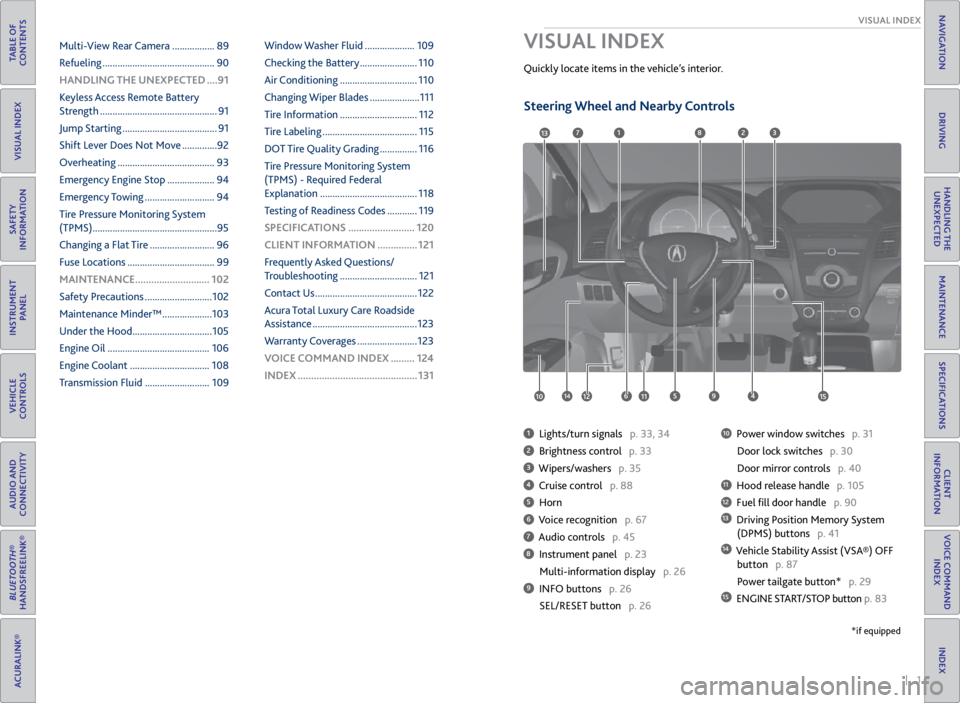
1 Lights/turn signals p. 33, 34
2 Brightness control p. 33
3 Wipers/washers p. 35
4 Cruise control p. 88
5 Horn
6 Voice recognition p. 67
7 Audio controls p. 45
8 Instrument panel p. 23
Multi-information display p. 26
9 INFO buttons p. 26
SEL/RESET button p. 26
10 Power window switches p. 31
Door lock switches p. 30
Door mirror controls p. 40
11 Hood release handle p. 105
12 Fuel fill door handle p. 90
13 Driving Position Memory System
(DPMS) buttons p. 41
14 Vehicle Stability Assist (VSA®) OFF
button p. 87
Power tailgate button* p. 29
15 ENGINE START/STOP button p. 83
VISUAL INDEX
Quickly locate items in the vehicle’s interior.
1
45961012
7283
11
13
1415
*if equipped
Multi-View Rear Camera ................. 89
Refueling ............................................. 90
HANDLING THE UNEXPECTED ....91
Keyless Access Remote Battery
Strength ............................................... 91
Jump Starting ...................................... 91
Shift Lever Does Not Move .............. 92
Overheating ....................................... 93
Emergency Engine Stop ................... 94
Emergency Towing ............................ 94
Tire Pressure Monitoring System
(TPMS) .................................................. 95
Changing a Flat Tire .......................... 96
Fuse Locations ................................... 99
MAINTENANCE ............................ 102
Safety Precautions ........................... 102
Maintenance Minder™ .................... 103
Under the Hood ................................ 105
Engine Oil ......................................... 106
Engine Coolant ................................ 108
Transmission Fluid .......................... 109Window Washer Fluid ....................
109
Checking the Battery ....................... 110
Air Conditioning ............................... 110
Changing Wiper Blades .................... 111
Tire Information ............................... 112
Tire Labeling ...................................... 115
DOT Tire Quality Grading ............... 116
Tire Pressure Monitoring System
(TPMS) - Required Federal
Explanation ....................................... 118
Testing of Readiness Codes ............ 119
SPECIFICATIONS ......................... 120
CLIENT INFORMATION ............... 121
Frequently Asked Questions/
Troubleshooting ............................... 121
Contact Us ......................................... 122
Acura Total Luxury Care Roadside
Assistance .......................................... 123
Warranty Coverages ........................ 123
V OICE COMMAND INDEX ......... 124
INDEX ............................................. 131
Steering Wheel and Nearby Controls
Page 16 of 71
24 || 25
INSTRUMENT P
ANEL
INSTRUMENT P ANEL
TABLE OF
CONTENTS
VISUAL INDEX
SAFETY
INFORMATION
INSTRUMENT PANEL
VEHICLE
CONTROLS
AUDIO AND
CONNECTIVITY
BLUETOOTH®
HANDSFREELINK®
ACURALINK®
INDEX
VOICE COMMAND INDEX
CLIENT
INFORMATION
SPECIFICATIONS
MAINTENANCE
HANDLING THE UNEXPECTED
DRIVING
NAVIGATION
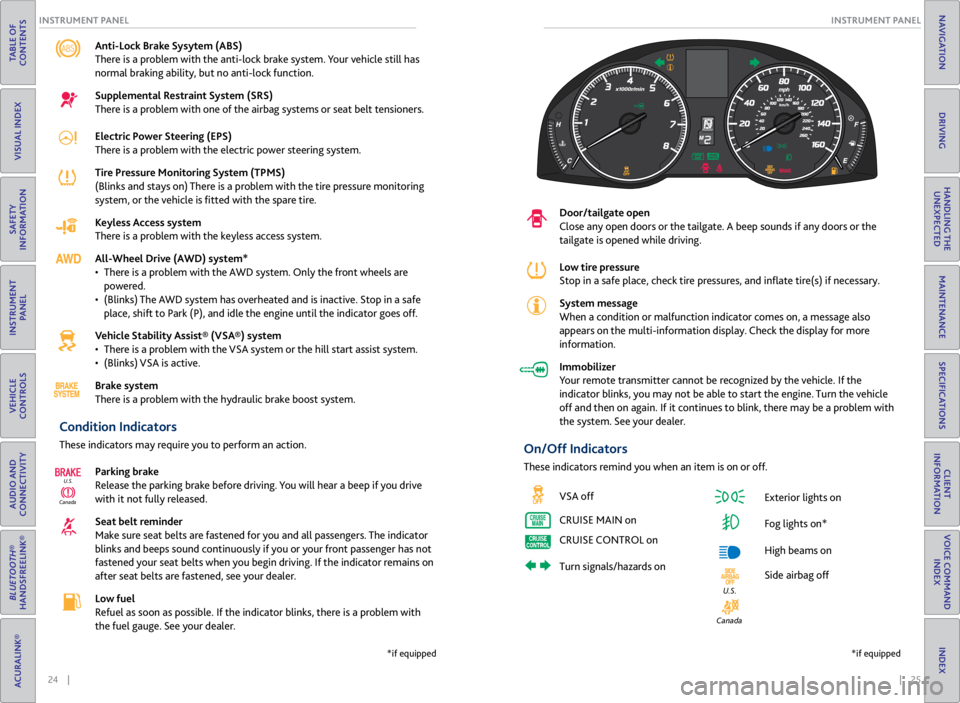
Anti-Lock Brake Sysytem (ABS)
There is a problem with the anti-lock brake system. Your vehicle still has
normal braking ability, but no anti-lock function.
Supplemental Restraint System (SRS)
There is a problem with one of the airbag systems or seat belt tensioners.
Electric Power Steering (EPS)
There is a problem with the electric power steering system.
Tire Pressure Monitoring System (TPMS)
(Blinks and stays on) There is a problem with the tire pressure monitoring
system, or the vehicle is fitted with the spare tire.
Keyless Access system
There is a problem with the keyless access system.
All-Wheel Drive (AWD) system*
• There is a problem with the AWD system. Only the front wheels are
powered.
• (Blinks) The AWD system has overheated and is inactive. Stop in a safe
place, shift to Park (P), and idle the engine until the indicator goes off.
Vehicle Stability Assist® (VSA®) system
• There is a problem with the VSA system or the hill start assist system.
• (Blinks) VSA is active.
Brake system
There is a problem with the hydraulic brake boost system.
Condition Indicators
These indicators may require you to perform an action.
Parking brake
Release the parking brake before driving. You will hear a beep if you drive
with it not fully released.
Seat belt reminder
Make sure seat belts are fastened for you and all passengers. The indicator
blinks and beeps sound continuously if you or your front passenger has not
fastened your seat belts when you begin driving. If the indicator remains on
after seat belts are fastened, see your dealer.
Low fuel
Refuel as soon as possible. If the indicator blinks, there is a problem with
the fuel gauge. See your dealer.
CanadaU.S.
*if equipped
Door/tailgate open
Close any open doors or the tailgate. A beep sounds if any doors or the
tailgate is opened while driving.
Low tire pressure
Stop in a safe place, check
tire pressures, and inflate tire(s) if necessary.
System message
When a condition or malfunction indicator comes on, a message also
appears on the multi-information display. Check the display for more
information.
Immobilizer
Your remote transmitter cannot be recognized by the vehicle. If the
indicator blinks, you may not be able to start the engine. Turn the vehicle
off and then on again. If it continues to blink, there may be a problem with
the system. See your dealer.
On/Off Indicators
These indicators remind you when an item is on or off.
VSA off
CRUISE MAIN on
CRUISE CONTROL on
Turn signals/hazards on Exterior lights on
Fog lights on*
High beams on
Side airbag off
Canada
U.S.
*if equipped
Page 18 of 71

28 || 29
VEHICLE CONTROLS
VEHICLE CONTROLS
TABLE OF
CONTENTS
VISUAL INDEX
SAFETY
INFORMATION
INSTRUMENT PANEL
VEHICLE
CONTROLS
AUDIO AND
CONNECTIVITY
BLUETOOTH®
HANDSFREELINK®
ACURALINK®
INDEX
VOICE COMMAND INDEX
CLIENT
INFORMATION
SPECIFICATIONS
MAINTENANCE
HANDLING THE UNEXPECTED
DRIVING
NAVIGATION
Learn about the various controls necessary for operating and driving the vehicle.
Using the Remote Transmitter
Lock or unlock the doors and tailgate.
Keyless Access System
When you carry the remote transmitter (for example, in a pocket or purse) and it
is outside the vehicle and within range (about 32 inches or 80 cm), you can lock or
unlock the doors and tailgate without handling the transmitter.
Unlocking/Locking the Doors
To unlock: Grab either front door handle when the
vehicle is off.
To lock: Press the door lock button on either front
door handle when the vehicle is off. If the remote
transmitter is inside the vehicle, the doors will not
lock.
VEHICLE CONTROLS
Leaving the keyless access remote in the vehicle can result in theft or accidental
movement of the vehicle. Always take the key with you whenever you leave the
vehicle unattended.
NOTICE
Door lock
button
Unlocking/Locking the Tailgate
To unlock: Press and hold the tailgate release
button under the tailgate handle to unlock the
tailgate and all doors. The vehicle can be on or off.
To lock: Press the tailgate lock button to lock the
tailgate and all doors. If the remote transmitter is
inside the vehicle, the tailgate and doors will not
lock.
Power Tailgate Operation*
Use these methods to operate the power tailgate.
Power Tailgate Release Button The vehicle must be in Park (P) with all doors unlocked.
Press and hold the power tailgate button on the
dashboard to the left of the steering column to open
the tailgate. Press it again at any time to close it.
Lock
Button
Lock
Button
Tailgate release button
Lock
button
Power tailgate
button
Power tailgate
close button
Power Tailgate Close Button Press the power tailgate close button to
automatically close the tailgate. Press it again
to stop the tailgate operation and reverse its
direction.
Closing the power tailgate while anyone is in the path of the tailgate can
cause serious injury.
Make sure everyone is clear before closing the tailgate.
WARNING
*if equipped
HOLD
Unlock button: Press once
to unlock the driver’s door.
Press again to unlock all
doors and the tailgate.
Release button: Press to
release the built-in key for
valet use.
Power tailgate button:
Press to unlock and open
the power tailgate. Press
again to close it. Lock button: Press to lock the
doors and tailgate. Press again
for audible verification.
Panic button: Press to sound
the alarm for 30 seconds.
Press again to cancel.
Page 24 of 71
40 || 41
VEHICLE CONTROLS
VEHICLE CONTROLS
TABLE OF
CONTENTS
VISUAL INDEX
SAFETY
INFORMATION
INSTRUMENT PANEL
VEHICLE
CONTROLS
AUDIO AND
CONNECTIVITY
BLUETOOTH®
HANDSFREELINK®
ACURALINK®
INDEX
VOICE COMMAND INDEX
CLIENT
INFORMATION
SPECIFICATIONS
MAINTENANCE
HANDLING THE UNEXPECTED
DRIVING
NAVIGATION
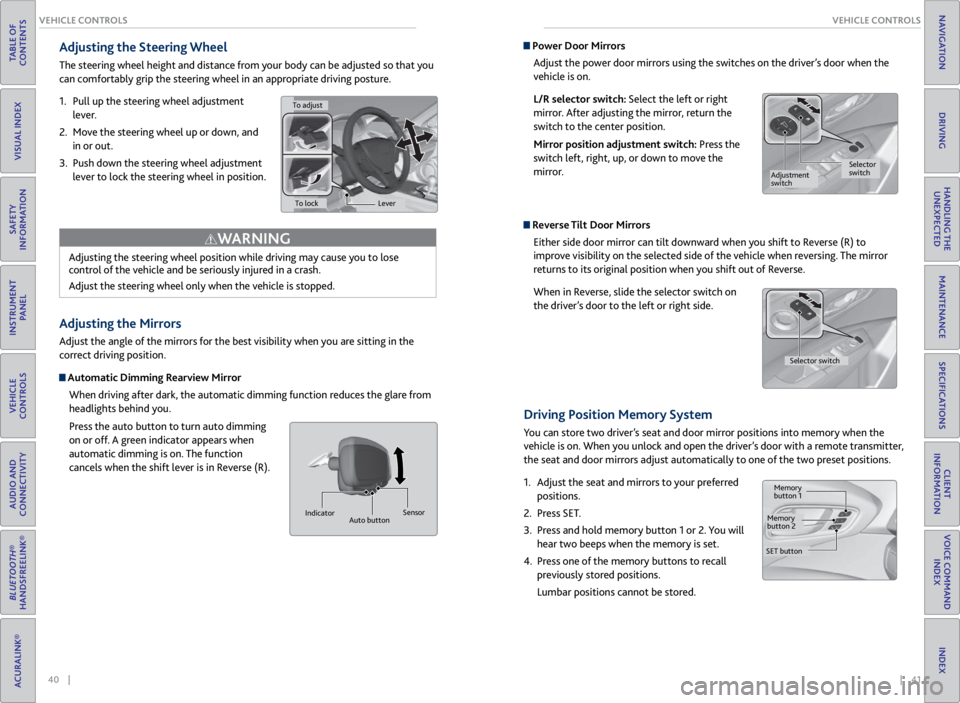
Adjusting the Steering Wheel
The steering wheel height and distance from your body can be adjusted so that you
can comfortably grip the steering wheel in an appropriate driving posture.
1. Pull up the steering wheel adjustment
lever.
2. Move the steering wheel up or down, and
in or out.
3. Push down the steering wheel adjustment
lever to lock the steering wheel in position.
Adjusting the Mirrors
Adjust the angle of the mirrors for the best visibility when you are sitting in the
correct driving position.
Automatic Dimming Rearview Mirror
When driving after dark, the automatic dimming function reduces the glare from
headlights behind you.
Press the auto button to turn auto dimming
on or off. A green indicator appears when
automatic dimming is on. The function
cancels when the shift lever is in Reverse (R).
Adjusting the steering wheel position while driving may cause you to lose
control of the vehicle and be seriously injured in a crash.
Adjust the steering wheel only when the vehicle is stopped.
WARNING
Indicator
Auto button Sensor
Power Door Mirrors
Adjust the power door mirrors using the switches on the driver’s door when the
vehicle is on.
L/R selector switch: Select the left or right
mirror. After adjusting the mirror, return the
switch to the center position.
Mirror position adjustment switch: Press the
switch left, right, up, or down to move the
mirror.
Reverse Tilt Door MirrorsEither side door mirror can tilt downward when you shift to Reverse (R) to
improve visibility on the selected side of the vehicle when reversing. The mirror
returns to its original position when you shift out of Reverse.
When in Reverse, slide the selector switch on
the driver’s door to the left or right side.
Driving Position Memory System
You can store two driver’s seat and door mirror positions into memory when the
vehicle is on. When you unlock and open the driver’s door with a remote transmitter,
the seat and door mirrors adjust automatically to one of the two preset positions.
1. Adjust the seat and mirrors to your preferred
positions.
2. Press SET.
3. Press and hold memory button 1 or 2. You will
hear two beeps when the memory is set.
4. Press one of the memory buttons to recall
previously stored positions.
Lumbar positions cannot be stored.
To adjust
To lock Lever
Selector
switch
Adjustment
switch
Memory
button 1
Memory
button 2
SET button Selector switch
Page 43 of 71

78 || 79
DRIVING
DRIVING
TABLE OF
CONTENTS
VISUAL INDEX
SAFETY
INFORMATION
INSTRUMENT PANEL
VEHICLE
CONTROLS
AUDIO AND
CONNECTIVITY
BLUETOOTH®
HANDSFREELINK®
ACURALINK®
INDEX
VOICE COMMAND INDEX
CLIENT
INFORMATION
SPECIFICATIONS
MAINTENANCE
HANDLING THE UNEXPECTED
DRIVING
NAVIGATION
Learn about preparation for driving and other features.
Before Driving
Check the following items before you begin driving.
Exterior Checks
• Make sure there are no obstructions on the windows, door mirrors, exterior
lights, or other parts of the vehicle.
• Remove any frost, snow, or ice.
• Make sure the hood is securely closed.
• Heat from the engine and exhaust can ignite flammable materials left under
the hood, causing a fire. If you’ve parked your vehicle for an extended period,
inspect and remove any debris that may have collected, such as dried grass
and leaves that have fallen or have been carried in for use as a nest by a small
animal. Also check under the hood for leftover flammable materials after you
or someone else has performed maintenance on your vehicle.
• Make sure the tires are in good condition.
• Make sure there are no people or objects behind or around the vehicle.
DRIVING
If the doors are frozen shut, use warm water around the door edges to melt any
ice. Do not try to force them open, as this can damage the rubber trim around the
doors. When done, wipe dry to avoid further freezing.
NOTICE
Interior Checks
• Store or secure all items on board properly.
• Do not pile items higher than the seat height.
• Do not place anything in the front seat footwells. Make sure to secure the floor
mats.
• If you have any animals on board, do not let them move freely in the vehicle.
• Securely close and lock all doors and the tailgate.
• Adjust your seating position, mirrors, and steering wheel properly.
• Be sure items placed on the floor behind the front seats cannot roll under the
seats.
• Everyone in the vehicle must fasten their seat belt.
Make sure that the indicators in the instrument panel come on when you start the
vehicle, and go off soon after.
Driving Guidelines for Your Utility Vehicle
Utility vehicles have a significantly higher rollover rate than other types of
vehicles. To prevent rollovers or loss of control:
• Take corners at slower speeds than you would with a passenger vehicle.
• Avoid sharp turns and abrupt maneuvers whenever possible.
• Do not modify your vehicle in any way that raises its center of gravity.
• Never carry more than 165 lbs (75 kg) of cargo on the roof rack (Acura
accessory).
In addition:
• During the first 600 miles (1,000 km) of operation, avoid sudden acceleration
or full throttle operation so as not to damage the engine or powertrain.
• Avoid hard braking for the first 200 miles (300 km). You should also follow this
when the brake pads are replaced.
Improperly operating this vehicle on or off pavement can cause a crash or
rollover in which you and your passengers can be seriously injured or killed.
Follow all instructions and guidelines in this guide.
Keep your speed low, and don’t drive faster than conditions permit.
WARNING
Improper accessories or modifications can affect your vehicle’s handling,
stability, and performance, and cause a crash in which you can be seriously hurt
or killed.
Follow all instructions in the vehicle owner’s manual regarding accessories and
modifications.
WARNING
Page 45 of 71
82 || 83
DRIVING
DRIVING
TABLE OF
CONTENTS
VISUAL INDEX
SAFETY
INFORMATION
INSTRUMENT PANEL
VEHICLE
CONTROLS
AUDIO AND
CONNECTIVITY
BLUETOOTH®
HANDSFREELINK®
ACURALINK®
INDEX
VOICE COMMAND INDEX
CLIENT
INFORMATION
SPECIFICATIONS
MAINTENANCE
HANDLING THE UNEXPECTED
DRIVING
NAVIGATION
Pre-tow checklist
When preparing to tow, and before driving away, be sure to check the following:
• Avoid towing a trailer during your vehicle’s first 600 miles (1,000 km).
• The vehicle has been properly serviced, and the suspension and the cooling
system are in good operating condition.
• The trailer has been properly serviced and is in good condition.
• All weights and loads are within limits. Never exceed the gross weight ratings.
• Check if all loads are within limits at a public scale. If a public scale is not
available, add the estimated weight of your cargo load to the weight of your
trailer (as quoted by the manufacturer) and the tongue load.
• The hitch, safety chains, and any other attachments are secure.
• All items in or on the trailer are properly secured and cannot shift while you
drive.
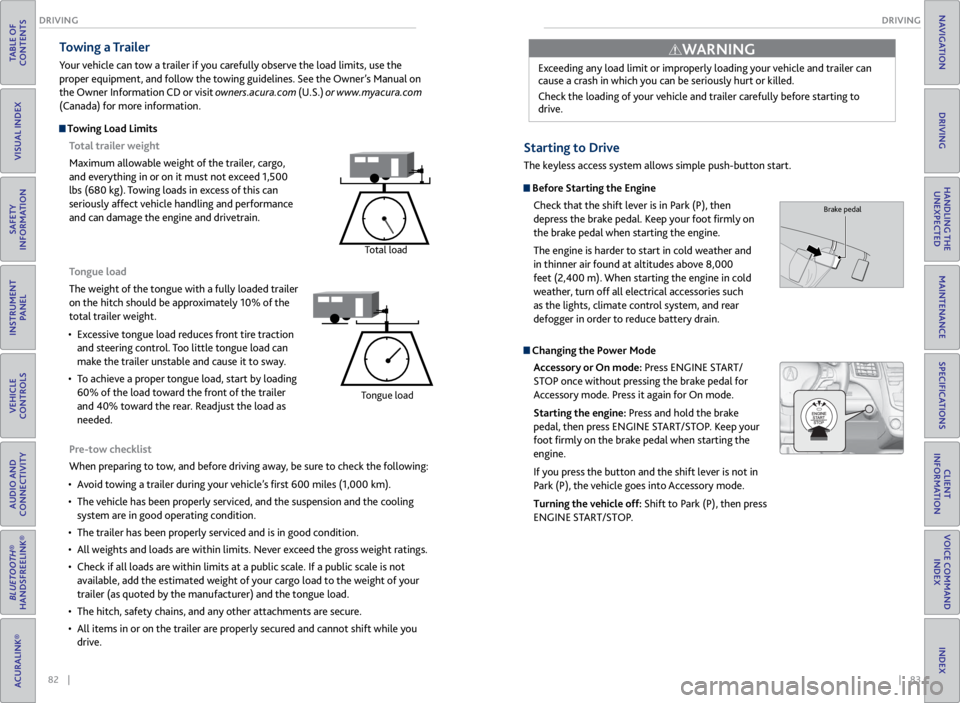
Towing a Trailer
Your vehicle can tow a trailer if you carefully observe the load limits, use the
proper equipment, and follow the towing guidelines. See the Owner’s Manual on
the Owner Information CD or visit owners.acura.com (U.S.) or www.myacura.com
(Canada) for more information.
Towing Load Limits
Total trailer weight
Maximum allowable weight of the trailer, cargo,
and everything in or on it must not exceed 1,500
lbs (680 kg). Towing loads in excess of this can
seriously affect vehicle handling and performance
and can damage the engine and drivetrain.
Total load
Tongue load
The weight of the tongue with a fully loaded trailer
on the hitch should be approximately 10% of the
total trailer weight.
• Excessive tongue load reduces front tire traction
and steering control. Too little tongue load can
make the trailer unstable and cause it to sway.
• To achieve a proper tongue load, start by loading
60% of the load toward the front of the trailer
and 40% toward the rear. Readjust the load as
needed.
Tongue load
Exceeding any load limit or improperly loading your vehicle and trailer can
cause a crash in which you can be seriously hurt or killed.
Check the loading of your vehicle and trailer carefully before starting to
drive.
WARNING
Starting to Drive
The keyless access system allows simple push-button start.
Before Starting the Engine
Check that the shift lever is in Park (P), then
depress the brake pedal. Keep your foot firmly on
the brake pedal when starting the engine.
The engine is harder to start in cold weather and
in thinner air found at altitudes above 8,000
feet (2,400 m). When starting the engine in cold
weather, turn off all electrical accessories such
as the lights, climate control system, and rear
defogger in order to reduce battery drain.
Changing the Power Mode
Accessory or On mode: Press ENGINE START/
STOP once without pressing the brake pedal for
Accessory mode. Press it again for On mode.
Starting the engine: Press and hold the brake
pedal, then press ENGINE START/STOP. Keep your
foot firmly on the brake pedal when starting the
engine.
If you press the button and the shift lever is not in
Park (P), the vehicle goes into Accessory mode.
Turning the vehicle off: Shift to Park (P), then press
ENGINE START/STOP.
Brake pedal
Page 51 of 71

94 || 95
HANDLING THE UNEXPECTED
HANDLING THE UNEXPECTED
TABLE OF
CONTENTS
VISUAL INDEX
SAFETY
INFORMATION
INSTRUMENT PANEL
VEHICLE
CONTROLS
AUDIO AND
CONNECTIVITY
BLUETOOTH®
HANDSFREELINK®
ACURALINK®
INDEX
VOICE COMMAND INDEX
CLIENT
INFORMATION
SPECIFICATIONS
MAINTENANCE
HANDLING THE UNEXPECTED
DRIVING
NAVIGATION
Emergency Engine Stop
The ENGINE START/STOP button may be used to stop the engine due to an
emergency situation even while driving. If you must stop the engine, choose one of
the following operations:
• Press and hold the ENGINE START/STOP
button for three seconds, OR
• Firmly press the ENGINE START/STOP button
three times.
The steering wheel will not lock. The power mode changes to ACCESSORY, unless
the shift lever is in Park (P), in which case the power mode changes to VEHICLE OFF.
Because turning off the engine also disables the power assist the engine provides to
the steering and braking systems, it will require significantly more physical effort
and time to steer and slow the vehicle. Downshift gears and use both feet on the
brake pedal, if necessary, to slow the vehicle and stop immediately in a safe place.
Trying to lift or tow your vehicle by the bumpers will cause serious damage. The
bumpers are not designed to support the vehicle’s weight.
Improper towing such as towing behind a motorhome or other motor vehicle can
damage the transmission.
NOTICE
NOTICE
Emergency Towing
Call a professional towing service if you need to tow your vehicle.
All models
Flat bed equipment: The operator loads your vehicle on the back of a truck. This is
the best way to transport your vehicle.
2WD models
Wheel lift equipment: The tow truck uses two pivoting arms that go under the front
tires and lift them off the ground. The rear tires remain on the ground. This is an
acceptable way to tow your vehicle. Do not press the button while driving unless it is absolutely necessary for the
engine to be switched off.
Tire Pressure Monitoring System (TPMS)
Monitors the tire pressure while you are driving.
If your vehicle’s tire pressure becomes significantly low, the low tire pressure
indicator comes on and a message appears on the multi-information display.
What to Do
Stop your vehicle in a safe place. Adjust the tire pressure to the specified level on
a label on the driver’s doorjamb.
Driving on an extremely underinflated tire can cause it to overheat. An overheated
tire can fail. Always inflate your tires to the specified pressure.
NOTICE
Press the INFO button to
scroll to the tire pressure
monitor to see which
tire(s) have low pressure.
Tire
pressure
monitor
The
specific
tire is
displayed.
Page 55 of 71

102 || 103
MAINTENANCE
MAINTENANCE
TABLE OF
CONTENTS
VISUAL INDEX
SAFETY
INFORMATION
INSTRUMENT PANEL
VEHICLE
CONTROLS
AUDIO AND
CONNECTIVITY
BLUETOOTH®
HANDSFREELINK®
ACURALINK®
INDEX
VOICE COMMAND INDEX
CLIENT
INFORMATION
SPECIFICATIONS
MAINTENANCE
HANDLING THE UNEXPECTED
DRIVING
NAVIGATION
Learn about basic maintenance that you can perform on the vehicle yourself, as
well as information about how to best maintain the vehicle.
Safety Precautions
Some of the most important safety precautions are listed below; however,
we cannot warn you of every conceivable hazard that can arise in performing
maintenance. Only you can decide whether or not you should perform a given task.
Maintenance Safety
• To reduce the possibility of fire or explosion, keep cigarettes, sparks, and flames
away from the battery and all fuel-related parts.
• Never leave rags, towels, or other flammable objects under the hood.
• To clean parts, use a commercially available degreaser or parts cleaner, not
gasoline.
• Wear eye protection and protective clothing when working with the battery or
compressed air.
• Do not run the engine in confined spaces where carbon monoxide gas can
accumulate.
Vehicle Safety
• The vehicle must be stationary, and parked on level ground with the parking
brake set and the engine off.
• Be aware that hot parts can burn you.
• Be aware that moving parts can injure you.
MAINTENANCE
Improperly maintaining this vehicle or failing to correct a problem before
driving can cause a crash in which you can be seriously hurt or killed.
Always follow the inspection and maintenance recommendations according to
the schedules in this guide.
WARNING
Failure to properly follow maintenance instructions and precautions can cause
you to be seriously hurt or killed.
Always follow the procedures and precautions in this guide.
WARNING
Maintenance Minder™
Reminds you when indicated maintenance service is due.
When maintenance is due, the system message indicator comes on and the
Maintenance Minder appears on the multi-information display every time you turn
the vehicle on. Press the info button to change displays.
Maintenance Minder Service Codes
These codes indicate what services are due on your vehicle.
*1: If the message SERVICE does not appear more than 12 months after the display is\
reset, change the
engine oil every year .
#: See information on maintenance and emissions warranty.*2:If you drive in dusty conditions, replace the air cleaner element every 15,000 miles (24,000 km).
*3: If you drive primarily in urban areas that have high concentrations of i\
ndustrial soot and pollution from
diesel-powered vehicles, replace the dust and pollen lter every 15,000 miles (24,000 km).
CODEMaintenance Main Items
A•Replace engine oi l*1
B•Replace engine oil*1 and oil lter•Inspect front and rear brakes, service as necessary•Check parking brake adjustment•Inspect tie rod ends, steering gearbox, and boot s•Inspect suspension components•Inspect driveshaft boots•Inspect brake hoses and lines (Including ABS/VSA)•Inspect all uid levels and condition of uid s•Inspect exhaust system#
•Inspect fuel lines and connections#
*4:If you drive regularly in very high temperatures (over 110 °F, 43 °C), \
in very low temperatures (under -
20 °F, -29 °C), or tow a tra iler, repl ace ever y 60,000 mi les/100,000 km .
CODE Maintenance Sub Items
1
•Rotate tires
2
•Replace air cleaner element*2
•Replace dust and pollen lte r*3
•Inspect drive belt
3
•Replace transmission and transfer uid*
4•Replace spark plugs•Replace timing belt an d inspect water pump*4
•Inspect valve clearance
5
•Replace engine coolant
6
•Replace rear differential uid*
System
message
indicator
Main
itemSub item
Maintenance Minder
Page 56 of 71
104 || 105
MAINTENANCE
MAINTENANCE
TABLE OF
CONTENTS
VISUAL INDEX
SAFETY
INFORMATION
INSTRUMENT PANEL
VEHICLE
CONTROLS
AUDIO AND
CONNECTIVITY
BLUETOOTH®
HANDSFREELINK®
ACURALINK®
INDEX
VOICE COMMAND INDEX
CLIENT
INFORMATION
SPECIFICATIONS
MAINTENANCE
HANDLING THE UNEXPECTED
DRIVING
NAVIGATION
*1: If the message SERVICE does not appear more than 12 months after the display is\
reset, change the
engine oil every year .
#: See information on maintenance and emissions warranty.*2:If you drive in dusty conditions, replace the air cleaner element every 15,000 miles (24,000 km).
*3: If you drive primarily in urban areas that have high concentrations of i\
ndustrial soot and pollution from
diesel-powered vehicles, replace the dust and pollen lter every 15,000 miles (24,000 km).
CODE Maintenance Main Items
A
•Replace engine oi l*1
B•Replace engine oil*1 and oil lter•Inspect front and rear brakes, service as necessary•Check parking brake adjustment•Inspect tie rod ends, steering gearbox, and boot s•Inspect suspension components•Inspect driveshaft boots•Inspect brake hoses and lines (Including ABS/VSA)•Inspect all uid levels and condition of uid s•Inspect exhaust system#
•Inspect fuel lines and connections#
*4:If you drive regularly in very high temperatures (over 110 °F, 43 °C), \
in very low temperatures (under -
20 °F, -29 °C), or tow a tra iler, repl ace ever y 60,000 mi les/100,000 km .
CODEMaintenance Sub Item s
1
•Rotate tires
2•Replace air cleaner element*2
•Replace dust and pollen lte r*3
•Inspect drive belt
3
•Replace transmission and transfer uid*
4•Replace spark plugs•Replace timing belt an d inspect water pump*4
•Inspect valve clearance
5
•Replace engine coolant
6•Replace rear differential uid*
• Independent of the Maintenance Minder information, replace the brake fluid
every 3 years.
• Inspect idle speed every 160,000 miles (256,000 km).
• Adjust the valves during services A, B, 1, 2, or 3 if they are noisy.
U.S. models
Maintenance, replacement, or repair of emissions control devices and systems
may be done by any automotive repair establishment or individuals using
parts that are certified to EPA standards.
According to state and federal regulations, failure to perform maintenance on the
maintenance main items marked with # will not void your emissions warranties.
However, all maintenance services should be performed in accordance with the
intervals indicated by the multi-information display.
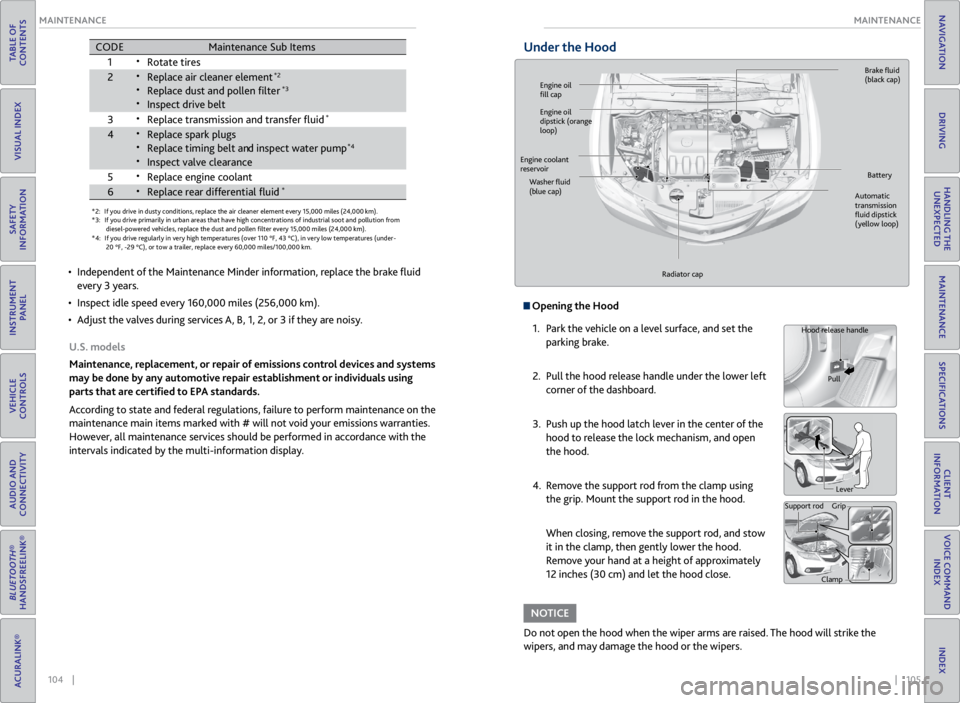
Under the Hood
Opening the Hood
1. Park the vehicle on a level surface, and set the
parking brake.
2. Pull the hood release handle under the lower left
corner of the dashboard.
3. Push up the hood latch lever in the center of the
hood to release the lock mechanism, and open
the hood.
4. Remove the support rod from the clamp using
the grip. Mount the support rod in the hood.
When closing, remove the support rod, and stow
it in the clamp, then gently lower the hood.
Remove your hand at a height of approximately
12 inches (30 cm) and let the hood close.
Do not open the hood when the wiper arms are raised. The hood will strike the
wipers, and may damage the hood or the wipers.
NOTICE
Hood release handle
Pull
Lever
Support rod Grip
Clamp
Engine oil
fill cap Brake
fluid
(black cap)
Automatic
transmission
fluid dipstick
(yellow loop)
Washer
fluid
(blue cap) Battery
Engine coolant
reservoir
Radiator cap
Engine oil
dipstick (orange
loop)