low power mode Acura RDX 2018 User Guide
[x] Cancel search | Manufacturer: ACURA, Model Year: 2018, Model line: RDX, Model: Acura RDX 2018Pages: 453, PDF Size: 20.13 MB
Page 76 of 453
75
uuIndicators u
Continued
Instrument Panel
*1:On the left: Models wi thout full color display
On the right: Models with full color display
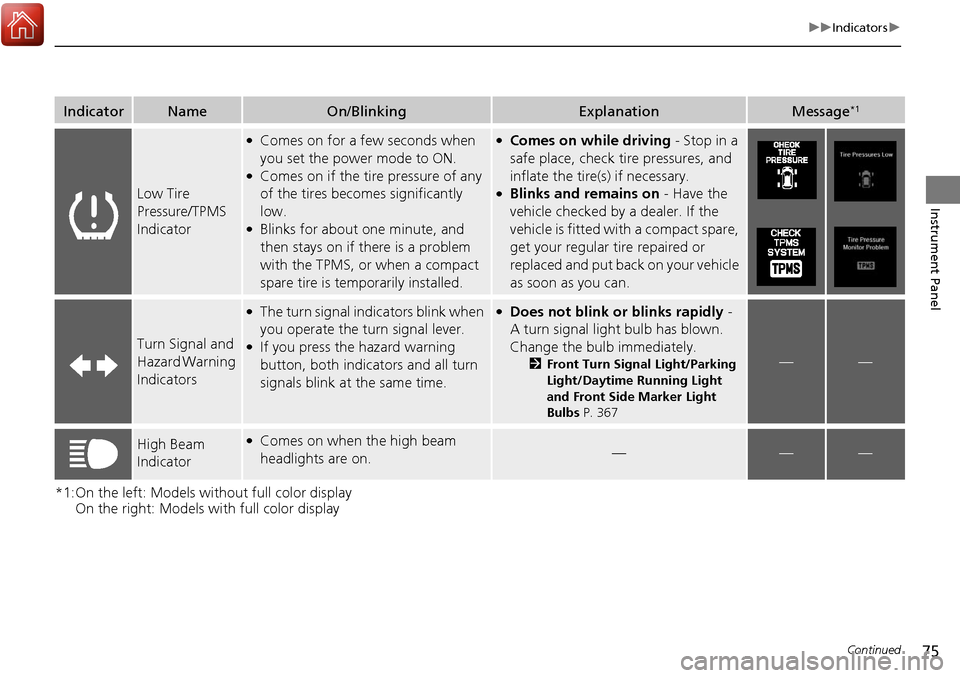
IndicatorNameOn/BlinkingExplanationMessage*1
Low Tire
Pressure/TPMS
Indicator
●Comes on for a few seconds when
you set the power mode to ON.
●Comes on if the tire pressure of any
of the tires becomes significantly
low.
●Blinks for about one minute, and
then stays on if there is a problem
with the TPMS, or when a compact
spare tire is temporarily installed.
●Comes on while driving - Stop in a
safe place, check tire pressures, and
inflate the tire(s) if necessary.
●Blinks and remains on - Have the
vehicle checked by a dealer. If the
vehicle is fitted with a compact spare,
get your regular tire repaired or
replaced and put back on your vehicle
as soon as you can.
Turn Signal and
Hazard Warning
Indicators
●The turn signal indicators blink when
you operate the turn signal lever.
●If you press the hazard warning
button, both indicators and all turn
signals blink at the same time.
●Does not blink or blinks rapidly -
A turn signal light bulb has blown.
Change the bulb immediately.
2 Front Turn Signal Light/Parking
Light/Daytime Running Light
and Front Side Marker Light
Bulbs P. 367——
High Beam
Indicator●Comes on when the high beam
headlights are on.———
Page 86 of 453
85
uuIndicators uMulti-Information Display Warning and Information Messages
Continued
Instrument Panel
*1:On the left: Models wi thout full color display
On the right: Models with full color display
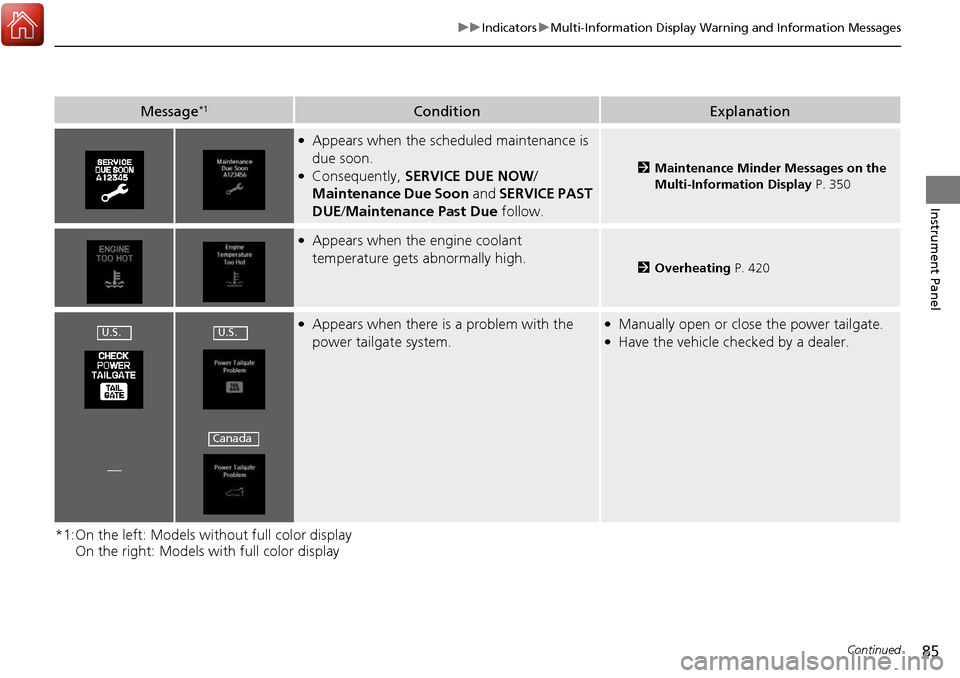
Message*1ConditionExplanation
●Appears when the scheduled maintenance is
due soon.
●Consequently, SERVICE DUE NOW /
Maintenance Due Soon and SERVICE PAST
DUE /Maintenance Past Due follow.2Maintenance Minder Messages on the
Multi-Information Display P. 350
●Appears when the engine coolant
temperature gets abnormally high.
2Overheating P. 420
●Appears when there is a problem with the
power tailgate system.●Manually open or close the power tailgate.●Have the vehicle checked by a dealer.
—
U.S.U.S.
Canada
Page 96 of 453
95
Instrument Panel
Gauges and Multi-Information Display
Gauges
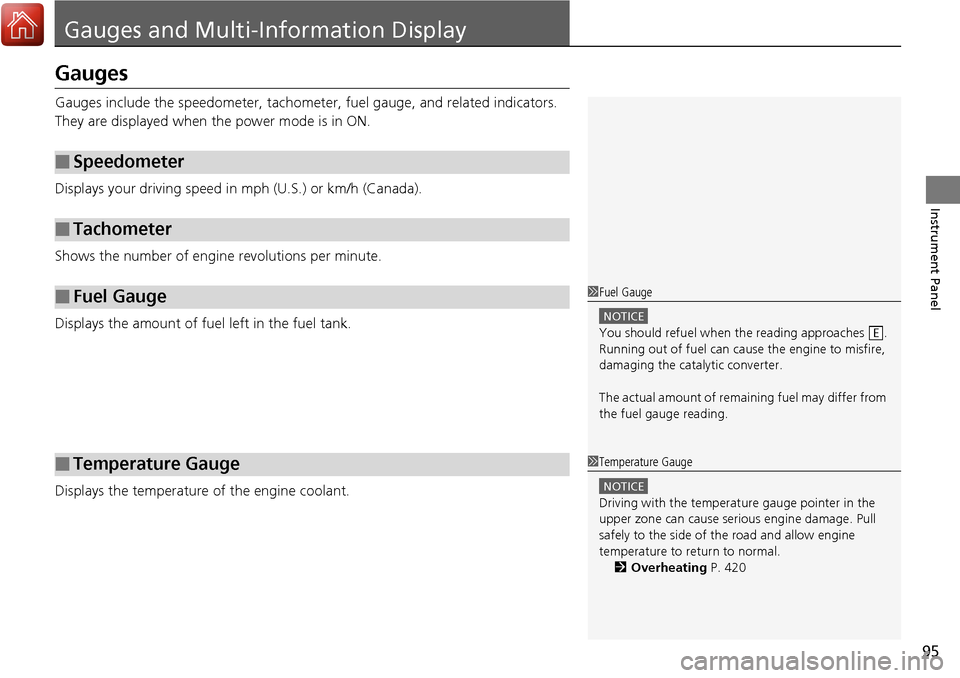
Gauges include the speedometer, tachometer, fuel gauge, and related indicators.
They are displayed when the power mode is in ON.
Displays your driving speed in mph (U.S.) or km/h (Canada).
Shows the number of engine revolutions per minute.
Displays the amount of fuel left in the fuel tank.
Displays the temperature of the engine coolant.
■Speedometer
■Tachometer
■Fuel Gauge
■Temperature Gauge
1Fuel Gauge
NOTICE
You should refuel when the reading approaches .
Running out of fuel can cause the engine to misfire,
damaging the cata lytic converter.
The actual amount of remain ing fuel may differ from
the fuel gauge reading.E
1 Temperature Gauge
NOTICE
Driving with the temperat ure gauge pointer in the
upper zone can cause serious engine damage. Pull
safely to the side of th e road and allow engine
temperature to return to normal.
2 Overheating P. 420
Page 120 of 453
119
Controls
This chapter explains how to operate the various controls necessary for driving.
Setting the Clock.............................. 120
Locking and Unlocking the Doors Key Types and Functions .................. 121
Low Keyless Access Remote Signal Strength ..... 124Locking/Unlocking the Doors from the Outside .......................................... 125
Locking/Unlocking the Doors from the Inside ... 130Childproof Door Locks ..................... 131
Auto Door Locking/Unlocking .......... 132
Opening and Closing the Tailgate ... 133
Security System Immobilizer System .......................... 139
Security System Alarm ...................... 139
Opening and Closing the Windows .... 142Opening and Closing the Moonroof....... 145Operating the Switches Around the
Steering Wheel ENGINE START/STOP Button............. 146
Turn Signals ..................................... 149
Light Switches.................................. 149
Fog Lights
*...................................... 152
Daytime Running Lights ................... 152
Wipers and Washers ........................ 153
Brightness Control ........................... 156
Rear Defogger/Heated Door Mirror Button ... 157Driving Position Memory System ...... 158 Adjusting the Steering Wheel .......... 160
Adjusting the Mirrors Interior Rearview Mirror ................... 161
Power Door Mirrors ......................... 162
Adjusting the Seats Adjusting the Seat Positions ............. 164
Interior Lights/Interior Convenience ItemsInterior Lights .................................. 171
Interior Convenience Items .............. 173
Climate Control System Using Automatic Climate Control .... 182
Synchronized Mode ......................... 184
Automatic Climate Control Sensors.....185
* Not available on all models
Page 126 of 453
125
uuLocking and Unlocking the Doors uLocking/Unlocking the Doors from the Outside
Continued
Controls
Locking/Unlocking the Doors from the Outside
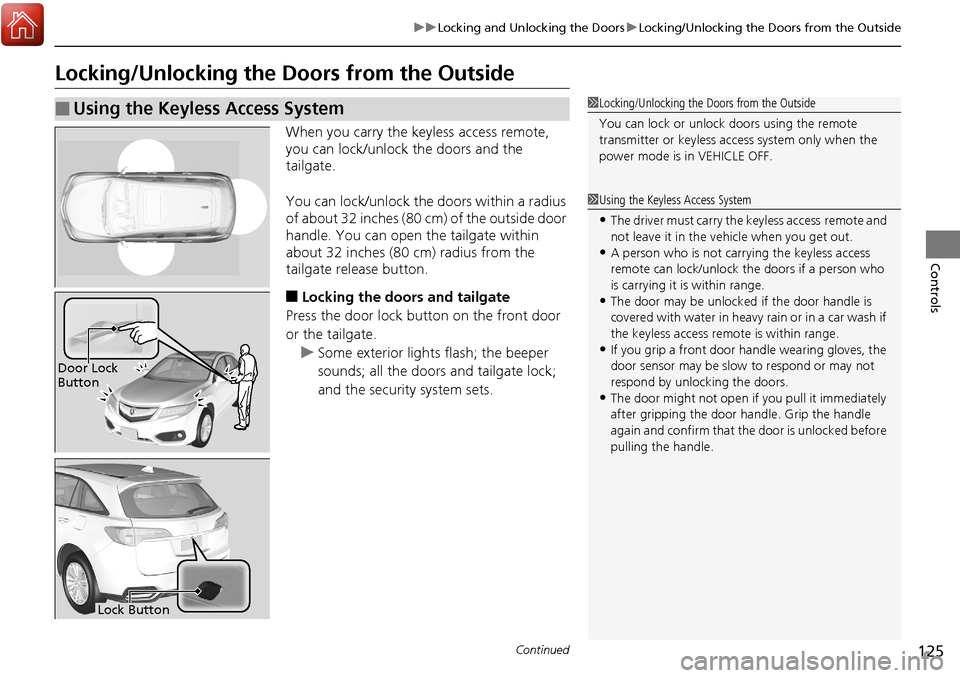
When you carry the keyless access remote,
you can lock/unlock the doors and the
tailgate.
You can lock/unlock the doors within a radius
of about 32 inches (80 cm) of the outside door
handle. You can open the tailgate within
about 32 inches (80 cm) radius from the
tailgate release button.
■Locking the doors and tailgate
Press the door lock button on the front door
or the tailgate.
u Some exterior lights flash; the beeper
sounds; all the doors and tailgate lock;
and the security system sets.
■Using the Keyless Access System1Locking/Unlocking the Doors from the Outside
You can lock or unlock doors using the remote
transmitter or keyless access system only when the
power mode is in VEHICLE OFF.
1Using the Keyless Access System
•The driver must carry the keyless access remote and
not leave it in the ve hicle when you get out.
•A person who is not carryi ng the keyless access
remote can lock/unlock the doors if a person who
is carrying it is within range.
•The door may be unlocked if the door handle is
covered with water in heavy rain or in a car wash if
the keyless access remote is within range.
•If you grip a front door handle wearing gloves, the
door sensor may be slow to respond or may not
respond by unlocking the doors.
•The door might not open if you pull it immediately
after gripping the door handle. Grip the handle
again and confirm that th e door is unlocked before
pulling the handle.
Door Lock
Button
Lock Button
Page 128 of 453
Continued127
uuLocking and Unlocking the Doors uLocking/Unlocking the Doors from the Outside
Controls
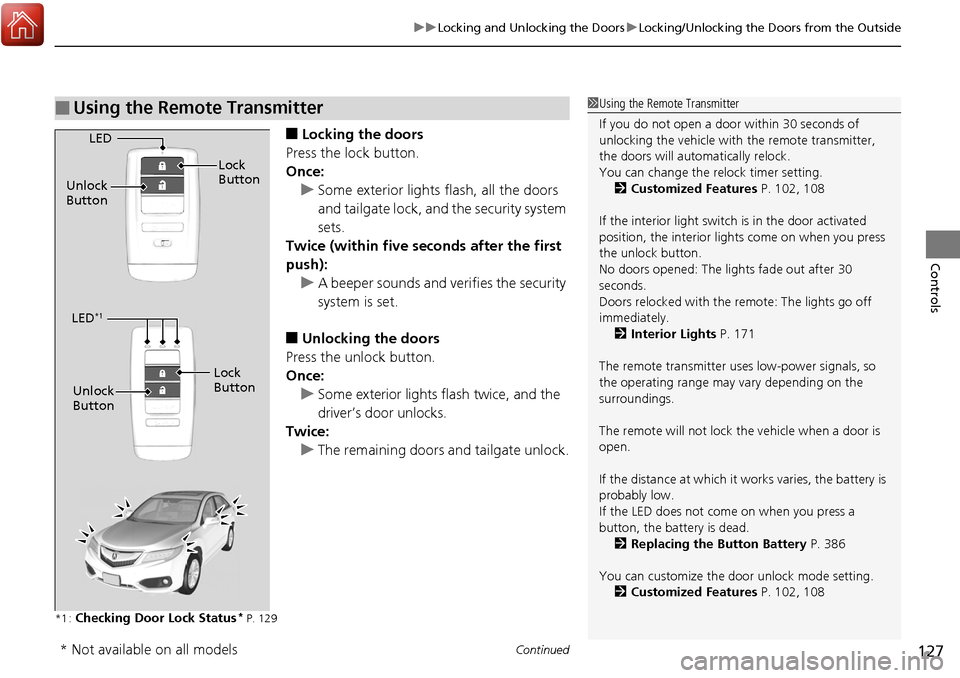
■Locking the doors
Press the lock button.
Once: u Some exterior lights flash, all the doors
and tailgate lock, and the security system
sets.
Twice (within five se conds after the first
push):
u A beeper sounds and verifies the security
system is set.
■Unlocking the doors
Press the unlock button.
Once: u Some exterior lights flash twice, and the
driver’s door unlocks.
Twice:
u The remaining doors and tailgate unlock.
*1 :Checking Door Lock Status* P. 129
■Using the Remote Transmitter1Using the Remote Transmitter
If you do not open a door within 30 seconds of
unlocking the vehicle with the remote transmitter,
the doors will auto matically relock.
You can change the relock timer setting. 2 Customized Features P. 102, 108
If the interior light switch is in the door activated
position, the interior light s come on when you press
the unlock button.
No doors opened: The li ghts fade out after 30
seconds.
Doors relocked with the remote: The lights go off
immediately. 2 Interior Lights P. 171
The remote transmitter us es low-power signals, so
the operating range may vary depending on the
surroundings.
The remote will not lock th e vehicle when a door is
open.
If the distance at which it works varies, the battery is
probably low.
If the LED does not come on when you press a
button, the battery is dead. 2 Replacing the Button Battery P. 386
You can customize the door unlock mode setting. 2 Customized Features P. 102, 108
LED
Unlock
Button Lock
Button
LED*1
Unlock
Button
Lock
Button
* Not available on all models
Page 139 of 453
uuOpening and Closing the Tailgate uOpening/Closing the Power Tailgate
138
Controls
The power tailgate fail-safe mode detects if there is an extra load on the tailgate (for
example, it is covered with snow). If an extra load is detected, the tailgate opens
completely then lowers to the close position.
■Power Tailgate Fail-safe Mode1Power Tailgate Fail-safe Mode
If you try to manually close the power tailgate
immediately after it full y opens, the power tailgate
fail-safe mode may activate.
Once the power tailgate fail-safe mode activates,
wait until the power tailgate fully closes. Keep away
from the power tailgate when it is in motion.
If the power tailgate fa il-safe mode constantly
activates, consult at a dealer.
Page 140 of 453
139Continued
Controls
Security System
Immobilizer System
The immobilizer system prevents a key that has not been pre-registered from
starting the engine. Each key contains electronic transmitters that use electronic
signals to verify the key.
Pay attention to the following when selecting the ACCESSORY mode with the
ENGINE START/STOP button:
• Do not allow objects that emit strong radio waves near the ENGINE START/
STOP button.
• Make sure the key is not covered by or touching a metal object.
• Do not bring a key from another vehicle’s immobilizer system with the keyless
access remote.
Security System Alarm
The security system alarm activates when the doors, tailgate, or hood are opened
without the key, remote transmitt er or keyless access system.
However, the alarm goes off when a door is opened with the key, then the shift
lever is moved out of
( P or the hood is opened before the power mode is set to ON.
■When the security system alarm activates
The horn sounds intermittently, an d all of the exterior lights flash.
■To deactivate the security system alarm
Unlock the vehicle using the remote tra nsmitter, or keyless access system. The
system, along with the horn and flashing lights, is deactivated.
1 Immobilizer System
NOTICE
Leaving the keyless access re mote in the vehicle can
result in theft or accidental movement of the vehicle.
Always take the key with you whenever you leave the
vehicle unattended.
Do not alter the system or add other devices to it.
Doing so may damage the system and make your
vehicle inoperable.
1 Security System Alarm
The security alarm continues for a maximum of two
minutes until the security system alarm deactivates.
Page 141 of 453
uuSecurity System uSecurity System Alarm
140
Controls
■Setting the security system alarm
The security system alarm automatically sets when the following conditions have
been met:
• The power mode is in VEHICLE OFF (LOCK).
• The hood is closed.
• All doors and the tailgate are locked from outside with the key, remote
transmitter, or keyless access system.
■When the security system alarm sets
The security system alarm indicator in the instrument panel blinks. When the
blinking interval changes after about 15 se conds, the security system alarm is set.
■To cancel the security system alarm
The security system alarm is canceled when the vehicle is unlocked using the remote
transmitter, keyless ac cess system, or the power mode is set to ON. The security
system alarm indicator goe s off at the same time.
1Security System Alarm
Do not set the security system alarm when someone
is in the vehicle or a window is open. The system can
accidentally activate when:
•Unlocking the door with the lock tab.•Moving the shift lever out of ( P.
If the battery goes dead after you have set the
security system alarm, the security alarm may go off
once the battery is re charged or replaced.
If this occurs, deactivate the security system alarm by
unlocking a door using the remote transmitter, or
keyless access system.
Do not attempt to alter th is system or add another
device to it.
Page 142 of 453
141
uuSecurity System uSecurity System Alarm
Controls
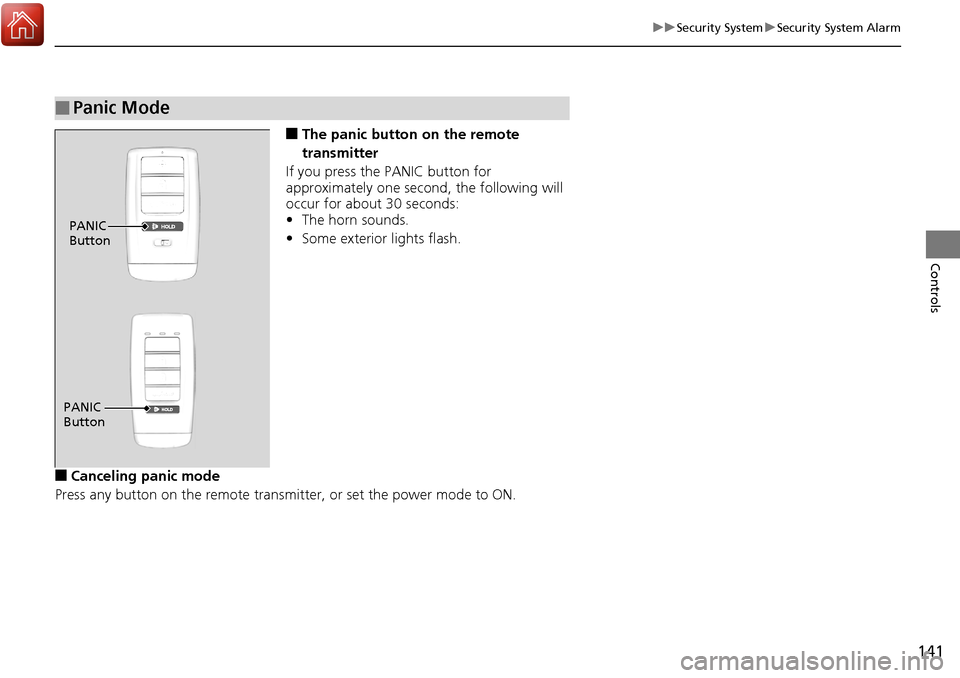
■The panic button on the remote
transmitter
If you press the PANIC button for
approximately one second, the following will
occur for about 30 seconds:
• The horn sounds.
• Some exterior lights flash.
■Canceling panic mode
Press any button on the remote transmi tter, or set the power mode to ON.
■Panic Mode
PANIC
Button
PANIC
Button