Econ Acura RDX 2019 Owners Manual
[x] Cancel search | Manufacturer: ACURA, Model Year: 2019, Model line: RDX, Model: Acura RDX 2019Pages: 649, PDF Size: 33 MB
Page 391 of 649
uuAcuraLink ®u
390
Features
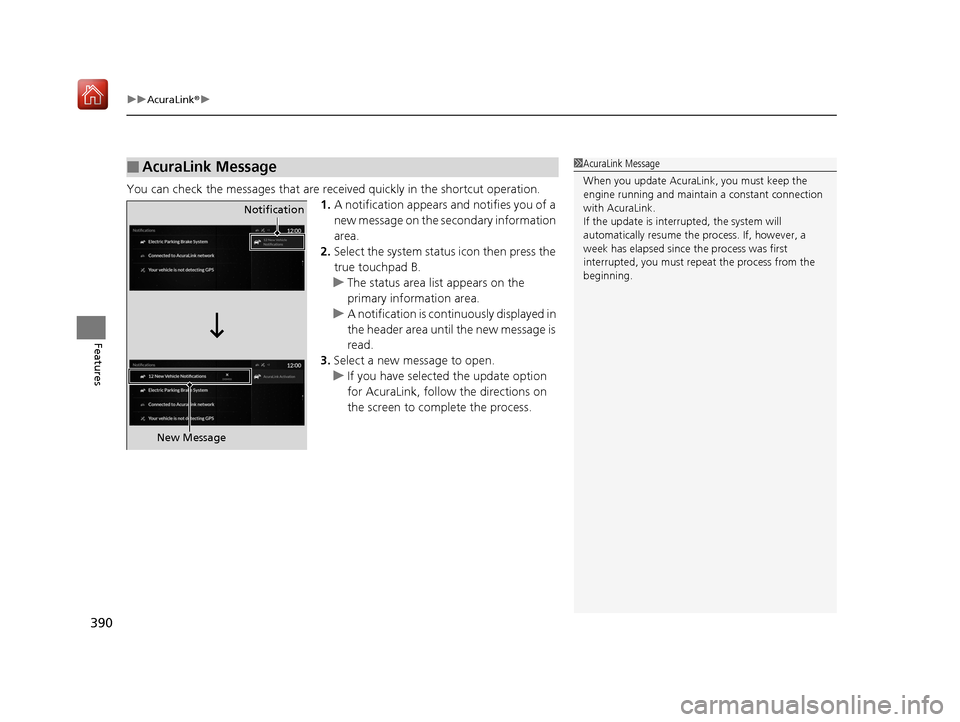
You can check the messages that are rece ived quickly in the shortcut operation.
1. A notification appears and notifies you of a
new message on the secondary information
area.
2. Select the system status icon then press the
true touchpad B.
u The status area list appears on the
primary information area.
u A notification is continuously displayed in
the header area until the new message is
read.
3. Select a new message to open.
u If you have selected the update option
for AcuraLink, follow the directions on
the screen to complete the process.
■AcuraLink Message1AcuraLink Message
When you update AcuraLink, you must keep the
engine running and maintain a constant connection
with AcuraLink.
If the update is interr upted, the system will
automatically resume the process. If, however, a
week has elapsed since the process was first
interrupted, you must repeat the process from the
beginning.
Notification
New Message
19 ACURA RDX-31TJB6000.book 390 ページ 2018年4月26日 木曜日 午後4時51分
Page 394 of 649
Continued393
uuAcuraLink ®u
Features
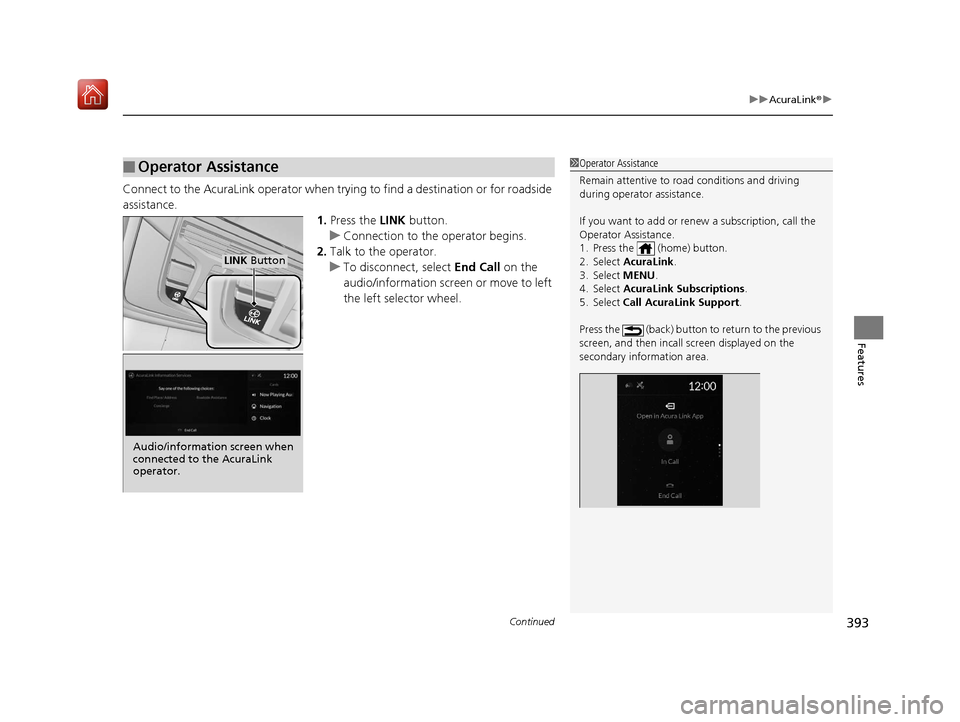
Connect to the AcuraLink operator when trying to find a destination or for roadside
assistance.
1.Press the LINK button.
u Connection to the operator begins.
2. Talk to the operator.
u To disconnect, select End Call on the
audio/information screen or move to left
the left selector wheel.
■Operator Assistance1 Operator Assistance
Remain attentive to road conditions and driving
during operator assistance.
If you want to add or re new a subscription, call the
Operator Assistance.
1. Press the (home) button.
2. Select AcuraLink .
3. Select MENU .
4. Select AcuraLink Subscriptions.
5. Select Call AcuraLink Support .
Press the (back) button to return to the previous
screen, and then incall screen displayed on the
secondary information area.
LINK Button
Audio/information screen when
connected to the AcuraLink
operator.
19 ACURA RDX-31TJB6000.book 393 ページ 2018年4月26日 木曜日 午後4時51分
Page 395 of 649
uuAcuraLink ®u
394
Features
Your subscribed telematics service provider can check your vehicle’s condition. For
maximum functionality download AcuraLink app in your smartphone and connect it
with the vehicle.
■Automatic Collision Notifications
A live agent will reach out and check on you and request that help be sent in the
event of a crash.
■Send Destination
Search for destinations on your phone and in stantly beam turn-by-turn directions to
your navigation system
*. Requires In-vehicle Navigation System*.
■Stolen Vehicle Locator
Get door and lock status as we ll as mileage, fuel, oil life, and tire pressure readings
on your phone.
■Remote Start & Stop
Arrive at your vehicle with the engine warmed up and the interior set to a
comfortable temperature.
■Remote Lock & Unlock
Lock and unlock your vehicle with your smartphone.
■Find My Car
Find your parked vehicle and flash/sound your horns remotely using your
smartphone.
■Connection Features1 Connection Features
The contact information of your provider, your user
ID and PIN will be given when you subscribe to
AcuraLink. If you forget any of the above, contact a
Acura dealer, or go to owners.acura.com (U.S.) or
www.acura.ca/owners/acuralink (Canada).
You can also activate the remote door lock/unlock
and vehicle finder features from the Internet or using
your smartphone app. As k a dealer, or visit
owners.acura.com (U.S.) or www.acura.ca/owners/
acuralink (Canada) for details.
1Find My Car
The lights will stop flas hing and horn will stop
sounding under the following:
•When conditions 30 seconds have elapsed.
•You unlock the doors using the remote transmitter.
•You unlock the doors using the keyless access
system.
•You unlock the doors using the built-in key.
•The power mode is set to ACCESSORY or ON.
* Not available on all models
19 ACURA RDX-31TJB6000.book 394 ページ 2018年4月26日 木曜日 午後4時51分
Page 398 of 649
397
Driving
This chapter discusses driving and refueling.
Before Driving................................... 398
Towing a Trailer ................................ 403
Off-Highway Driving Guidelines ..... 409
When Driving Starting the Engine .......................... 411
Precautions While Driving................. 416
Automatic Transmission ................... 417
Shifting ............................................ 418
Integrated Dynamics System............. 426
Auto Idle Stop .................................. 428
Vehicle Stability Assist® (VSA®), aka Electronic
Stability Control (ESC), System ................. 434
Agile Handling Assist ....................... 436
Super Handling-All Wheel DriveTM (SH-AWD®)*.. 437
Blind spot information System*........ 438
Tire Pressure Monitoring System (TPMS) with Tire Fill Assist .......................... 441
Tire Pressure Monitoring System (TPMS) - Required Federal Explanation ......... 443
AcuraWatch
TM................................... 445
Collision Mitigati on Braking SystemTM
(CMBSTM) ....................................... 446
Adaptive Cruise Control (ACC) with Low Speed Follow (LSF) ......................... 455 Lane Keeping Assist System (LKAS) .. 471
Road Departure Mi
tigation (RDM)
System ........................................ 479
Front Sensor Camera ....................... 483
Radar Sensor ................................... 485
Braking .............................................. 486
Parking Your Vehicle ........................ 495
Multi-View Rear Camera .................. 505
Surround View Camera System
*..... 507
Refueling ........................................... 515
Fuel Economy and CO
2 Emissions .... 518
Turbo Engine Vehicle ....................... 519
* Not available on all models
19 ACURA RDX-31TJB6000.book 397 ページ 2018年4月26日 木曜日 午後4時51分
Page 412 of 649

411Continued
Driving
When Driving
Starting the Engine
1.Make sure the parkin g brake is applied.
u The Parking Brake and Brake System
indicator (red) comes on for 30 seconds
when you press the electric parking
brake switch.
u The parking brake must be applied to
start the engine.
2. Depress the brake pedal.
u Although it is possible to start the vehicle
in
(N with the parking brake is applied, it
is safer to start it in
(P.
3. Press the ENGINE START/STOP button
without depressing the accelerator pedal.
1 Starting the Engine
Keep your foot firmly on the brake pedal when
starting the engine.
The engine is harder to start in cold weather and in thinner
air found at altitudes above 8,000 feet (2,400 meters).
When starting the engine in cold weather, turn off all
electrical accessories such as the lights, climate
control system, and rear de fogger in order to reduce
battery drain.
If you live in a region where winter is extremely cold,
an engine block heater will improve starting and
warming of the engine. Cons ult a dealer for details.
If the exhaust system sounds abnormal or you can
smell exhaust gas inside the vehicle, have your vehicle
checked by a dealer. There may be a problem with
the engine or exhaust system.
Bring the keyless access remote close to the ENGINE
START/STOP button if the batte ry in the keyless
access remote is weak. 2 If the Keyless Access Remote Battery is
Weak P. 602
The engine may not start if the keyless access remote
is subjected to strong radio waves.
Do not hold the ENGINE START/STOP button to
start the engine.
If the engine does not star t, set the power mode to
OFF and wait at least 30 se conds before trying again.
Electric Parking
Brake Switch
Brake Pedal
19 ACURA RDX-31TJB6000.book 411 ページ 2018年4月26日 木曜日 午後4時51分
Page 415 of 649
uuWhen Driving uStarting the Engine
414
Driving
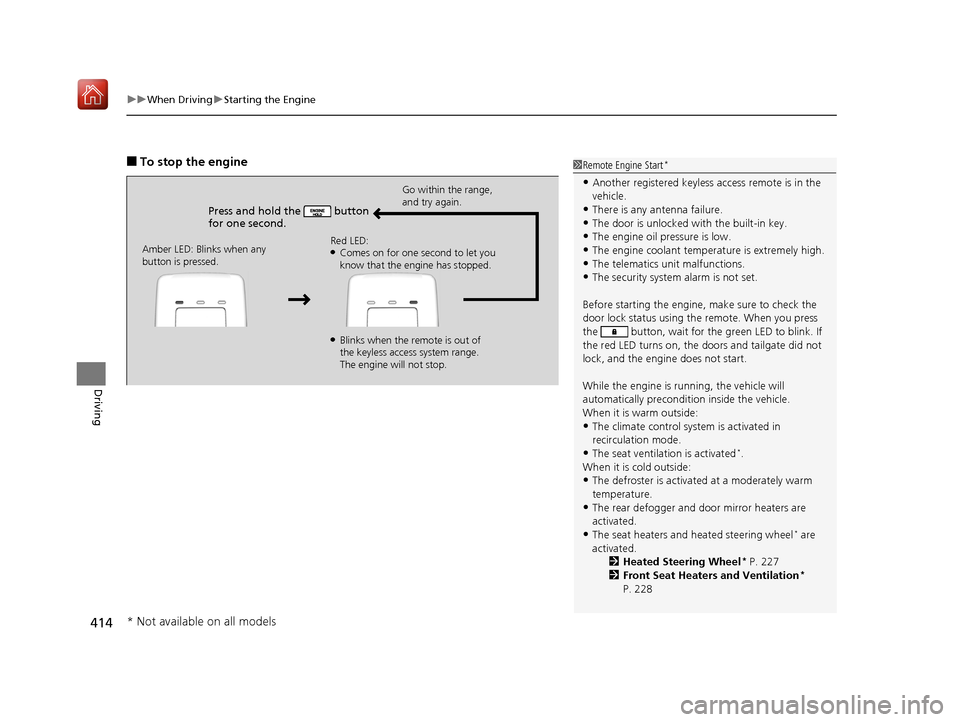
■To stop the engine
Press and hold the button
for one second.
Go within the range,
and try again.
Amber LED: Blinks when any
button is pressed. Red LED:
●Comes on for one second to let you
know that the engine has stopped.
●Blinks when the remote is out of
the keyless access system range.
The engine will not stop.
1
Remote Engine Start*
•Another registered keyless access remote is in the
vehicle.
•There is any antenna failure.
•The door is unlocked with the built-in key.•The engine oil pressure is low.
•The engine coolant temper ature is extremely high.
•The telematics unit malfunctions.•The security system alarm is not set.
Before starting the engine, make sure to check the
door lock status using the remote. When you press
the button, wait for the green LED to blink. If
the red LED turns on, the doors and tailgate did not
lock, and the engine does not start.
While the engine is running, the vehicle will
automatically preconditi on inside the vehicle.
When it is warm outside:
•The climate control system is activated in
recirculation mode.
•The seat ventilation is activated*.
When it is cold outside:
•The defroster is activated at a moderately warm
temperature.
•The rear defogger and door mirror heaters are
activated.
•The seat heaters and heated steering wheel* are
activated. 2Heated Steering Wheel
* P. 227
2 Front Seat Heaters and Ventilation*
P. 228
* Not available on all models
19 ACURA RDX-31TJB6000.book 414 ページ 2018年4月26日 木曜日 午後4時51分
Page 423 of 649
![Acura RDX 2019 Owners Manual uuWhen Driving uShifting
422
Driving
■If you want to keep the transmission in (N position [car wash mode]
With the engine running:
1. Press and hold the brake pedal.
2. Select
(N, then release the](/img/32/9763/w960_9763-422.png "Acura RDX 2019 Owners Manual uuWhen Driving uShifting
422
Driving
■If you want to keep the transmission in (N position [car wash mode]
With the engine running:
1. Press and hold the brake pedal.
2. Select
(N, then release the")
uuWhen Driving uShifting
422
Driving
■If you want to keep the transmission in (N position [car wash mode]
With the engine running:
1. Press and hold the brake pedal.
2. Select
(N, then release the button to display (N (Neutral) hold mode on the
multi-information display.
3. Press and hold
(N again for two seconds.
u This puts the vehicle in car wash mode which must be used when your vehicle
is pulled through a conveyor type automatic car wash where you or an
attendant do not remain in the vehicle.
If the ENGINE START/STOP button is pressed
after car wash mode has been activated, the
power mode will change to ACCESSORY and
a message will be displayed on the multi-
information display.u The gear position remains in
(N with the
power mode in ACCESSORY for 15
minutes, then, it automatically changes
to
(P and the power mode changes to
OFF.
u Manually press the ENGINE START/
STOP button cancels ACCESSORY
mode. The
(P indicator comes on and
the power mode changes to OFF. You
must always press the ENGINE START/
STOP button when car wash mode is no
longer needed.
1 If you want to keep the transmission in (N position [car wash
mode]
The transmission may not stay in
(N position while
the following indicators ar e on or when the message
below appears:
•Malfunction indicator lamp
•Transmission system indicator
•Charging system indicator•The Charging System Problem message on the
multi-information display.
19 ACURA RDX-31TJB6000.book 422 ページ 2018年4月26日 木曜日 午後4時51分
Page 425 of 649
424
uuWhen Driving uShifting
Driving
Use the paddle shifters to change between 1st and 10th gears without releasing
your hands from the steering wheel. The tr ansmission will switch to the sequential
mode.
■When the transmission is in (D:
The vehicle will go into the sequential mo de momentarily, and the sequential mode
gear selection indicator will come on.
When the vehicle goes into the sequential mode by
(- paddle shifter and the lower
gear is available, the trans mission properly selects single or double gear change.
Once you start traveling at a constant sp eed, the sequential mode will automatically
switch off, and the sequential mode gear selection indicator will go off.
Hold the
(+ paddle shifter for two seconds or push the button to return to
normal drive.
■When the transmission is in (S:
The vehicle will go into th e sequential mode, and the M (sequential mode) indicator
and sequential mode gear selection indicator will come on.
If the vehicle speed increases and the engi ne speed reaches near the tachometer’s
red zone, the transmission automatica lly shifts up to the next gear.
You can cancel this mode by holding the
(+ paddle shifter for two seconds or push
the button. When the se quential mode is canceled, the sequential mode
indicator and sequential mode gear selection indicator will turn off.
■Sequential Mode
D/S
D/S
19 ACURA RDX-31TJB6000.book 424 ページ 2018年4月26日 木曜日 午後4時51分
Page 429 of 649
428
uuWhen Driving uAuto Idle Stop
Driving
Auto Idle Stop
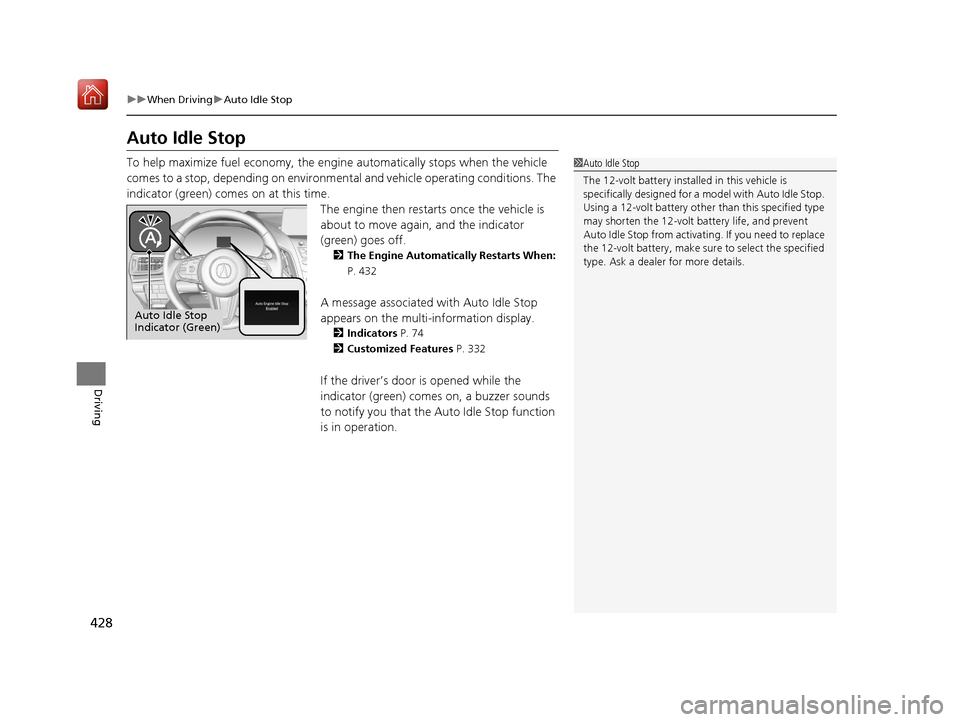
To help maximize fuel econ omy, the engine automatica lly stops when the vehicle
comes to a stop, depending on environmental and vehicle operating conditions. The
indicator (green) comes on at this time. The engine then restarts once the vehicle is
about to move again, and the indicator
(green) goes off.
2 The Engine Automatically Restarts When:
P. 432
A message associated with Auto Idle Stop
appears on the multi-information display.
2Indicators P. 74
2 Customized Features P. 332
If the driver’s door is opened while the
indicator (green) comes on, a buzzer sounds
to notify you that the Auto Idle Stop function
is in operation.
1Auto Idle Stop
The 12-volt battery insta lled in this vehicle is
specifically designed for a m odel with Auto Idle Stop.
Using a 12-volt battery other than this specified type
may shorten the 12-volt ba ttery life, and prevent
Auto Idle Stop from activati ng. If you need to replace
the 12-volt battery, make sure to select the specified
type. Ask a dealer for more details.
Auto Idle Stop
Indicator (Green)
19 ACURA RDX-31TJB6000.book 428 ページ 2018年4月26日 木曜日 午後4時51分
Page 439 of 649
438
uuWhen Driving uBlind spot information System*
Driving
Blind spot information System*
Is designed to detect vehicl es in specified alert zones adjacent to your vehicle,
particularly in harder to see areas commonly known as “blind spots.”
When the system detects vehi cles approaching from behind in adjacent lanes, the
appropriate indicator comes on for a few se conds, providing assistance when you
change lanes.
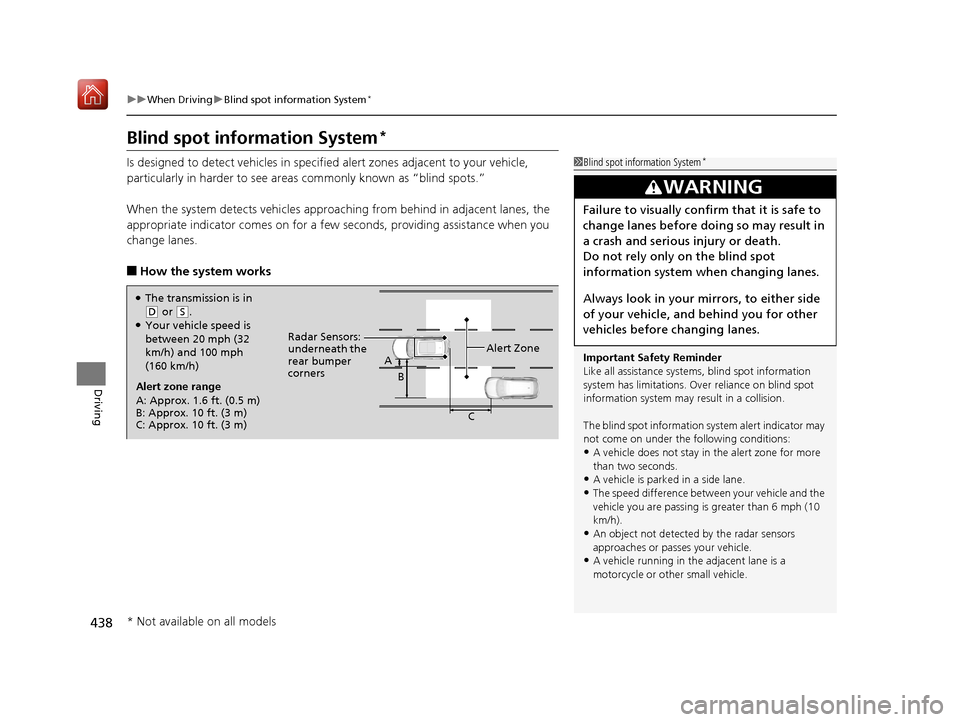
■How the system works
1 Blind spot information System*
Important Safety Reminder
Like all assistance systems, blind spot information
system has limitations. Over reliance on blind spot
information system may result in a collision.
The blind spot information system alert indicator may
not come on under the following conditions:
•A vehicle does not stay in the alert zone for more
than two seconds.
•A vehicle is parked in a side lane.
•The speed difference betw een your vehicle and the
vehicle you are passing is greater than 6 mph (10
km/h).
•An object not detected by the radar sensors
approaches or passes your vehicle.
•A vehicle running in the adjacent lane is a
motorcycle or other small vehicle.
3WARNING
Failure to visually confirm that it is safe to
change lanes before doing so may result in
a crash and serious injury or death.
Do not rely only on the blind spot
information system wh en changing lanes.
Always look in your mirrors, to either side
of your vehicle, and behind you for other
vehicles before changing lanes.
●The transmission is in
( D or (S.●Your vehicle speed is
between 20 mph (32
km/h) and 100 mph
(160 km/h)
Alert zone range
A: Approx. 1.6 ft. (0.5 m)
B: Approx. 10 ft. (3 m)
C: Approx. 10 ft. (3 m) Radar Sensors:
underneath the
rear bumper
corners
Alert Zone
A
B
C
* Not available on all models
19 ACURA RDX-31TJB6000.book 438 ページ 2018年4月26日 木曜日 午後4時51分