brake Acura RDX 2019 Owner's Manual
[x] Cancel search | Manufacturer: ACURA, Model Year: 2019, Model line: RDX, Model: Acura RDX 2019Pages: 649, PDF Size: 33 MB
Page 588 of 649
587
uuIf a Tire Goes Flat uTemporarily Repairing a Flat Tire
Continued
Handling the Unexpected
Temporarily Repairing a Flat Tire
If the tire has a large cut or is otherwise severely damaged, you will need to have the
vehicle towed. If the tire only has a small puncture, from a nail for instance, you can
use the temporary tire repair kit so that you can drive to the nearest service station
for a more permanent repair.
If a tire goes flat while driving, grasp the steering wheel firmly, and brake gradually
to reduce speed. Then stop in a safe place.
1. Park the vehicle on a firm, level, and n on-slippery surface and apply the parking
brake.
2. Change the gear position to
(P.
3. Turn on the hazard warning lights an d set the power mode to VEHICLE OFF
(LOCK).
Vehicles with temporary tire repair kit
1 Temporarily Repairing a Flat Tire
The kit should not be used in the following situations.
Instead, contact a dealer or roadside assistant to have
the vehicle towed.
•The tire sealant has expired.
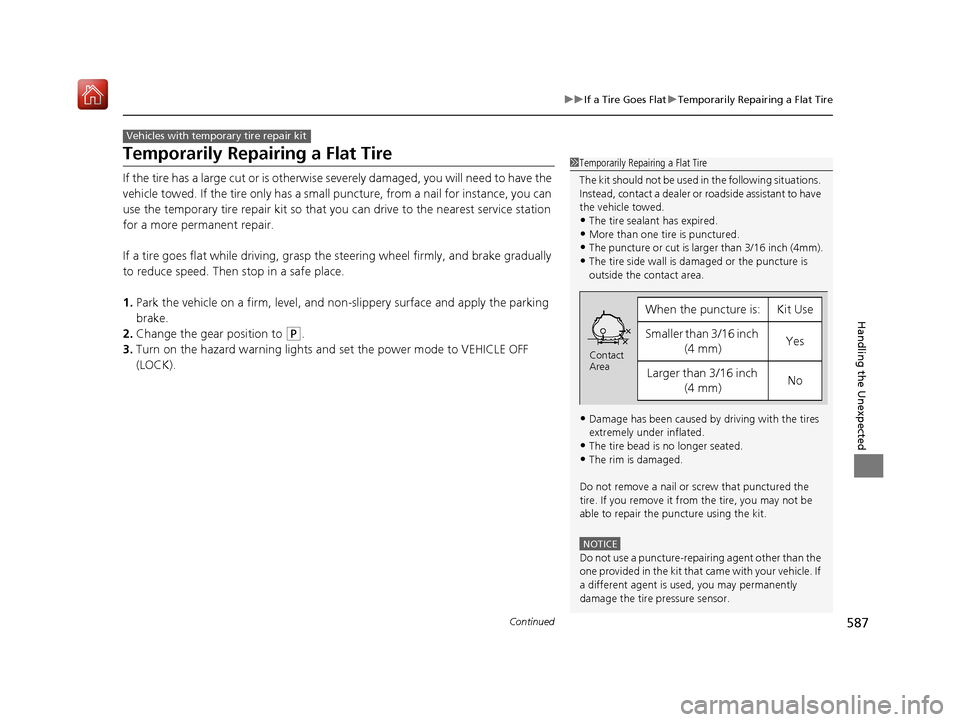
•More than one tire is punctured.•The puncture or cut is larger than 3/16 inch (4mm).
•The tire side wall is da maged or the puncture is
outside the contact area.
•Damage has been caused by driving with the tires
extremely under inflated.
•The tire bead is no longer seated.
•The rim is damaged.
Do not remove a nail or screw that punctured the
tire. If you remove it from the tire, you may not be
able to repair the puncture using the kit.
NOTICE
Do not use a puncture-repairing agent other than the
one provided in the kit that came with your vehicle. If
a different agent is used, you may permanently
damage the tire pressure sensor.
When the puncture is:Kit Use
Smaller than 3/16 inch (4 mm)Yes
Larger than 3/16 inch (4 mm)No
Contact
Area
19 ACURA RDX-31TJB6000.book 587 ページ 2018年4月26日 木曜日 午後4時51分
Page 603 of 649
602
uuEngine Does Not Start uIf the Keyless Access Remote Battery is Weak
Handling the Unexpected
If the Keyless Access Re mote Battery is Weak
If the beeper sounds, the To Start, Hold Remote Near Start Button message
appears on the multi-information display, the ENGINE START/STOP button flashes,
and the engine won’t start, start the engine as follows:
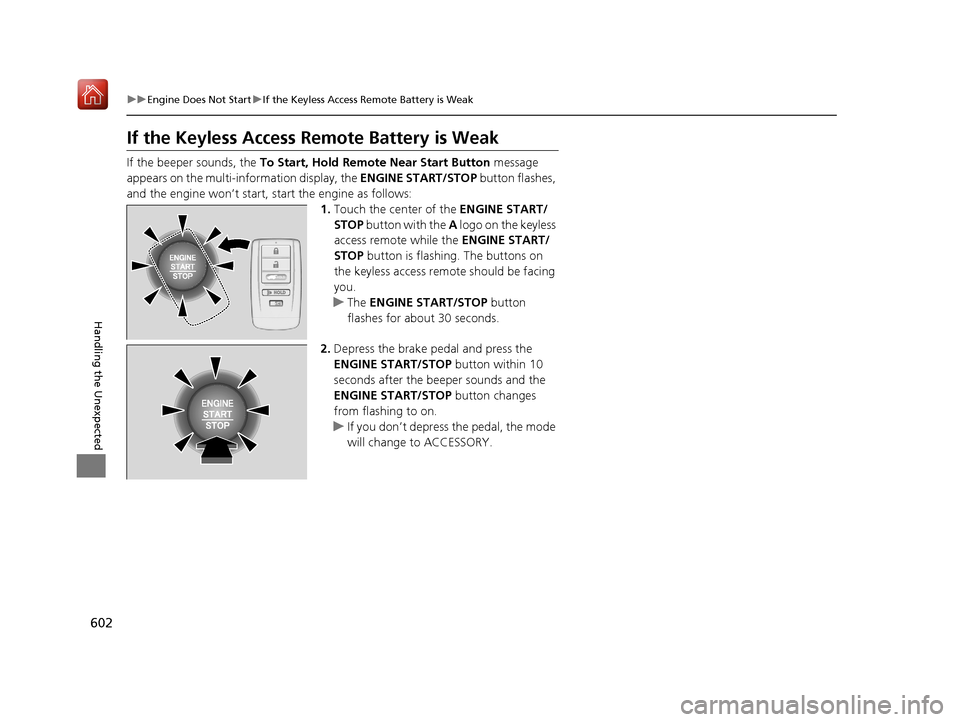
1.Touch the center of the ENGINE START/
STOP button with the A logo on the keyless
access remote while the ENGINE START/
STOP button is flashing. The buttons on
the keyless access remo te should be facing
you.
u The ENGINE START/STOP button
flashes for about 30 seconds.
2. Depress the brake pedal and press the
ENGINE START/STOP button within 10
seconds after the beeper sounds and the
ENGINE START/STOP button changes
from flashing to on.
u If you don’t depress the pedal, the mode
will change to ACCESSORY.
HOLD
19 ACURA RDX-31TJB6000.book 602 ページ 2018年4月26日 木曜日 午後4時51分
Page 604 of 649

603
uuEngine Does Not Start uEmergency Engine Stop
Handling the Unexpected
Emergency Engine Stop
The ENGINE START/STOP button may be used to stop the engine due to an
emergency situation even while driving. If you must stop the engine, do either of the
following operations:
• Press and hold the ENGINE START/STOP button for two seconds.
• Firmly press the ENGINE START/STOP button three times.
The steering wheel will not lock. However, because turning off the engine disables
the power assist the engine provides to the steering and braking systems, it will
require significantly more physical effort an d time to steer and slow the vehicle. Use
both feet on the brake pedal to slow down the vehicle and stop immediately in a
safe place.
The gear position auto matically changes to
(P after the vehicle comes to a complete
stop. Then, the power mode changes to VEHICLE OFF.
The gear position auto matically changes to
(P after the vehicle comes to a complete
stop. Then press the ENGINE START/STOP button twice without depressing the
brake pedal to change the mode to VEHICLE OFF.
1 Emergency Engine Stop
Do not press the button while driving unless it is
absolutely necessary for the engine to be turned off.
Vehicles with U.S. models
Vehicles with Canada models
19 ACURA RDX-31TJB6000.book 603 ページ 2018年4月26日 木曜日 午後4時51分
Page 611 of 649
610
uuIndicator, Coming On/BlinkinguIf the Brake System Indicator (Red) Comes On or Blinks
Handling the Unexpected
If the Brake System Indicator (Red) Comes On or
Blinks
■Reasons for the indicator to come on
• The brake fluid is low.
• There is a malfunction in the brake system.
■What to do when the indicator comes on while driving
Depress the brake pedal lightly to check pedal pressure.
• If normal, check the brake fluid level the next time you stop.
• If abnormal, take immediate action . If necessary, downshift the
transmission to slow the vehicle using engine braking.
■Reasons for the indicator to blink
• There is a problem with the electric parking brake system.
■What to do when the indicator blinks
• Avoid using the parking brake and ha ve your vehicle checked by a
dealer immediately.
1 If the Brake System Indicator (Red) Comes On or Blinks
Have your vehicle re paired immediately.
It is dangerous to drive with low brake fluid. If there
is no resistance from the brake pedal, stop
immediately in a safe plac e. If necessary downshift
the gears.
If the brake system indicator and ABS indicator come
on simultaneously, the elec tronic brake distribution
system is not working. Th is can result in vehicle
instability under sudden braking.
Have your vehicle inspecte d by a dealer immediately.
If the Brake System Indicator (Red) blinks at the same
time when the Brake System Indicator (Amber) comes
on, the parking br ake may not work.
Avoid using the parking brak e and have your vehicle
checked by a dealer immediately. 2 If the Brake System Indicator (Red) Comes
On or Blinks at the Same Time When the
Brake System Indicator (Amber) Comes On
P. 612
If you repeatedly operate th e electric parking brake in
a short period of time, the brake stops operating to
prevent heating of the system and the indicator
blinks.
It returns to its original state in approximately 1
minute.
U.S.
Canada
19 ACURA RDX-31TJB6000.book 610 ページ 2018年4月26日 木曜日 午後4時51分
Page 613 of 649
612
uuIndicator, Coming On/BlinkinguIf the Brake System Indicator (Red) Comes On or Blinks at the Same Time When the Brake System Indicator (Amber) Comes On
Handling the Unexpected
If the Brake System Indicator (Red) Comes On or
Blinks at the Same Time When the Brake System
Indicator (Amber) Comes On
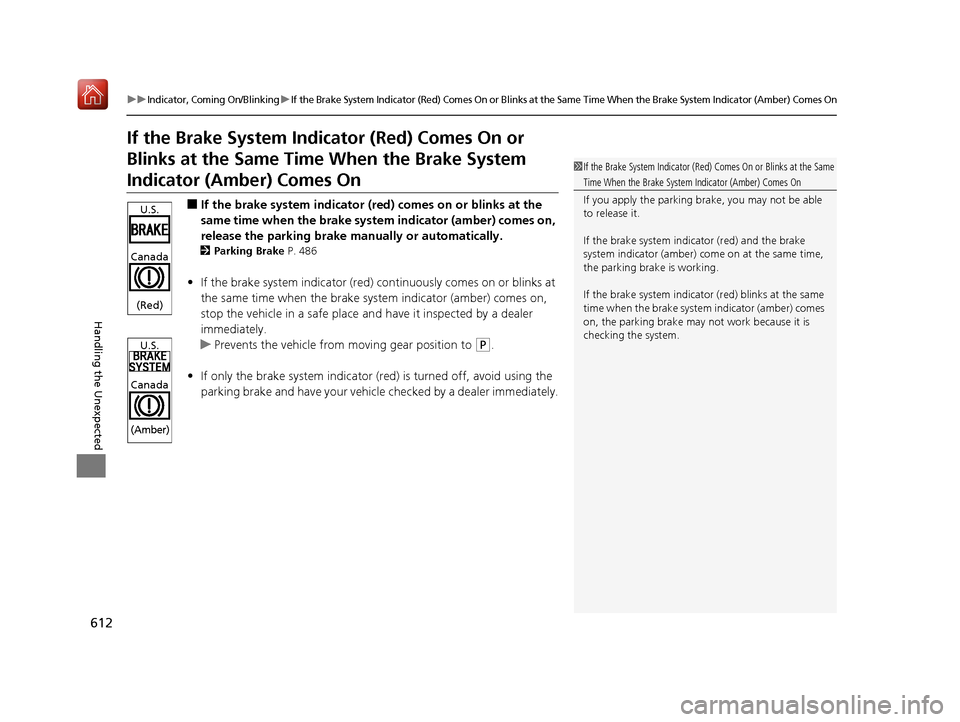
■If the brake system indicator (red) comes on or blinks at the
same time when the brake system indicator (amber) comes on,
release the parking brake manually or automatically.
2 Parking Brake P. 486
•If the brake system indicator (red) co ntinuously comes on or blinks at
the same time when the brake system indicator (amber) comes on,
stop the vehicle in a safe place an d have it inspected by a dealer
immediately.
u Prevents the vehicle from moving gear position to
(P.
• If only the brake system indicator (red ) is turned off, avoid using the
parking brake and have your vehicle checked by a dealer immediately.
1If the Brake System Indicator (Red) Comes On or Blinks at the Same
Time When the Brake System Indicator (Amber) Comes On
If you apply the parking br ake, you may not be able
to release it.
If the brake system indicator (red) and the brake
system indicator (amber) come on at the same time,
the parking brake is working.
If the brake system indicator (red) blinks at the same
time when the brake system indicator (amber) comes
on, the parking brake may not work because it is
checking the system.U.S.
Canada
(Red)
U.S.
Canada
(Amber)
19 ACURA RDX-31TJB6000.book 612 ページ 2018年4月26日 木曜日 午後4時51分
Page 615 of 649
614
uuIndicator, Coming On/BlinkinguIf the Transmission System Indicator Blinks along with the Warning Message
Handling the Unexpected
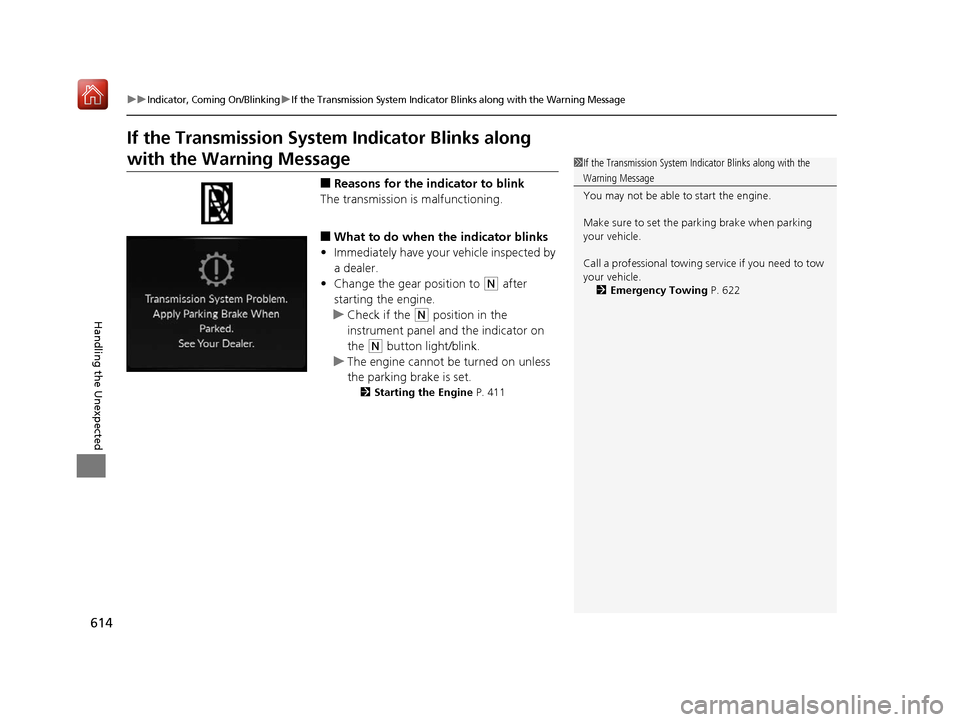
If the Transmission System Indicator Blinks along
with the Warning Message
■Reasons for the indicator to blink
The transmission is malfunctioning.
■What to do when the indicator blinks
• Immediately have your vehicle inspected by
a dealer.
• Change the gear position to
(N after
starting the engine.
u Check if the
(N position in the
instrument panel and the indicator on
the
(N button light/blink.
u The engine cannot be turned on unless
the parking brake is set.
2 Starting the Engine P. 411
1If the Transmission System In dicator Blinks along with the
Warning Message
You may not be able to start the engine.
Make sure to set the pa rking brake when parking
your vehicle.
Call a professional towing service if you need to tow
your vehicle. 2 Emergency Towing P. 622
19 ACURA RDX-31TJB6000.book 614 ページ 2018年4月26日 木曜日 午後4時51分
Page 629 of 649
628
Information
Specifications
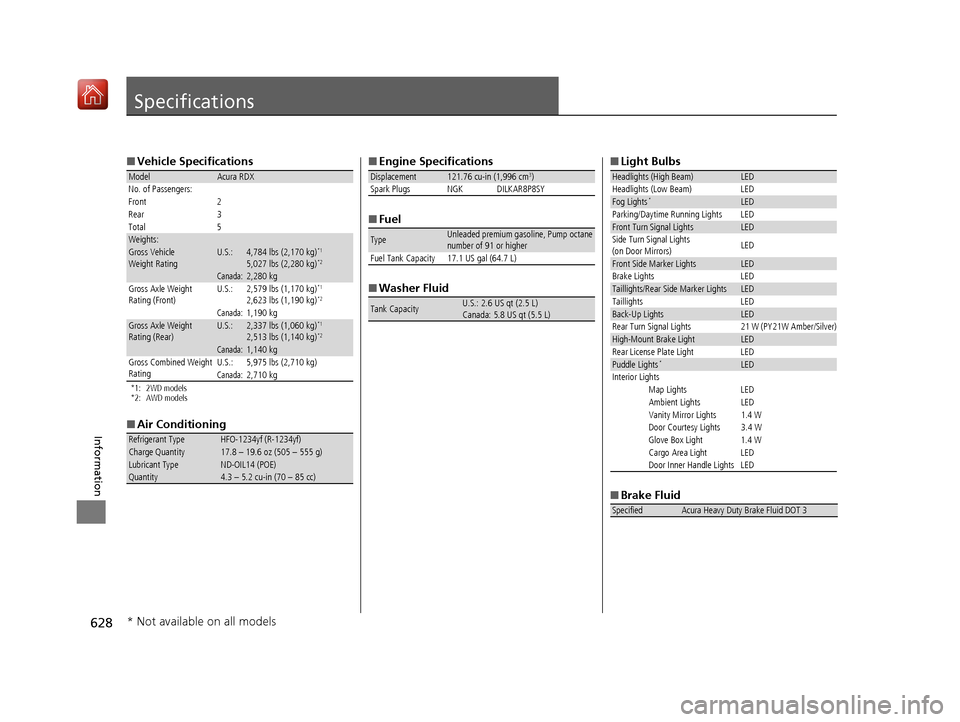
■Vehicle Specifications
*1: 2WD models
*2: AWD models
■Air Conditioning
ModelAcura RDX
No. of Passengers:
Front 2
Rear 3
Total 5
Weights:Gross Vehicle
Weight RatingU.S.:4,784 lbs (2,170 kg)*1
5,027 lbs (2,280 kg)*2
Canada:2,280 kgGross Axle Weight
Rating (Front)U.S.:2,579 lbs (1,170 kg)*1
2,623 lbs (1,190 kg)*2
Canada:1,190 kgGross Axle Weight
Rating (Rear)U.S.:2,337 lbs (1,060 kg)*1
2,513 lbs (1,140 kg)*2
Canada:1,140 kg
Gross Combined Weight
Rating U.S.: 5,975 lbs (2,710 kg)
Canada:2,710 kg
Refrigerant TypeHFO-1234yf (R-1234yf)Charge Quantity17.8 – 19.6 oz (505 – 555 g)Lubricant TypeND-OIL14 (POE)Quantity4.3 – 5.2 cu-in (70 – 85 cc)
■
Engine Specifications
■ Fuel
■ Washer Fluid
Displacement121.76 cu-in (1,996 cm3)
Spark Plugs NGK DILKAR8P8SY
TypeUnleaded premium gasoline, Pump octane
number of 91 or higher
Fuel Tank Capacity 17.1 US gal (64.7 L)
Tank CapacityU.S.: 2.6 US qt (2.5 L)
Canada: 5.8 US qt (5.5 L)
■ Light Bulbs
■ Brake Fluid
Headlights (High Beam)LED
Headlights (Low Beam) LED
Fog Lights*LED
Parking/Daytime Running Lights LED
Front Turn Signal LightsLED
Side Turn Signal Lights
(on Door Mirrors) LED
Front Side Marker LightsLED
Brake Lights LED
Taillights/Rear Side Marker LightsLED
Taillights LED
Back-Up LightsLED
Rear Turn Signal Lights 21 W (PY21W Amber/Silver)
High-Mount Brake LightLED
Rear License Plate Light LED
Puddle Lights*LED
Interior Lights Map Lights LED
Ambient Lights LED
Vanity Mirror Lights 1.4 W
Door Courtesy Lights 3.4 W
Glove Box Light 1.4 W
Cargo Area Light LED
Door Inner Handle Lights LED
SpecifiedAcura Heavy Duty Brake Fluid DOT 3
* Not available on all models
19 ACURA RDX-31TJB6000.book 628 ページ 2018年4月26日 木曜日 午後4時51分
Page 636 of 649
635
uuEmissions Testing uTesting of Readiness Codes
Information
7. Select a nearby, lightly traveled major hi ghway where you can maintain a speed
of 50 to 60 mph (80 to 97 km/h) for at least 20 minutes. Drive on the highway in
(D. Do not use cruise control. When traffi c allows, drive for 90 seconds without
moving the accelerator pedal. (V ehicle speed may vary slightly; this is okay.) If you
cannot do this for a continuous 90 seconds because of traffic conditions, drive for
at least 30 seconds, then repeat it two more times (for a total of 90 seconds).
8. Drive in city or suburban traffic for at l east 10 minutes. When traffic conditions
allow, let the vehicle coast for several se conds without using the accelerator pedal
or the brake pedal.
9. Park the vehicle and leave the engine off for 30 minutes.
19 ACURA RDX-31TJB6000.book 635 ページ 2018年4月26日 木曜日 午後4時51分
Page 641 of 649
Index
640
Index
Index
A
ABS (Anti-lock Brake System)................... 493
Accessories and Modifications ................. 574
Accessory Power Socket ........................... 225
AcuraLink® ................................................ 387
AcuraWatch
TM............................................. 22
Adaptive Cruise Control (ACC) ................... 91
Adaptive Cruise Control (ACC) with
Low Speed Follow (LSF) .................... 91, 455
Adaptive Front Lighting System (AFS) ..... 189
Additives
Coolant ................................................... 540
Engine Oil ................................................ 535
Washer .................................................... 544
Additives, Engine Oil ................................ 535
Adjusting Armrest ................................................... 218
Front Seats .............................................. 207
Head Restraints........................................ 212
Mirrors .................................................... 204
Rear Seats................................................ 216
Steering Wheel ........................................ 203
Agile Handling Assist ................................ 436
Air Conditioning System (Climate Control System) .................................................... 230
Changing the Mode ................................ 230
Defrosting the Windshield and Windows ............................................... 232
Dust and Pollen Filter ............................... 568
Rear Temperature Control Dial................. 234
Recirculation/Fresh Air Mode ................... 230 Sensors ................................................... 235
Synchronized Mode................................. 233
Using Automatic Climate Control ............ 230
Air Pressure ....................................... 555, 629
Airbags ........................................................ 42
Advanced Airbags ..................................... 48
After a Collision ........................................ 45
Airbag Care............................................... 57
Front Airbags (SRS) .................................... 45
Indicator.............................................. 55, 84
Knee Airbags............................................. 49
Passenger Airbag Off Indicator .................. 56
Sensors ..................................................... 42
Side Airbags .............................................. 52
Side Curtain Airbags.................................. 54
AM/FM Radio ............................................ 274
Anti-lock Brake System (ABS) .................. 493
Indicator.................................................... 84
Apple CarPlay
TM........................................ 303
Armrest ..................................................... 218
Audio Remote Controls ........................... 243
Audio System ............................................ 238
Adjusting the Sound................................ 269
Audio/Information Screen........................ 249
Auxiliary Input Jack.................................. 241
Display Setup .......................................... 270
Error Messages ........................................ 307
General Information ................................ 310
Home Screen........................................... 254
How to Update Wirelessly ....................... 263
How to Update with a USB Device........... 267 How to use Siri
® Eyes Free....................... 302
iPod ........................................................ 291
Limitations for Manual Operation ............ 270
MP3/WMA/AAC ..................................... 294
Reactivating ............................................ 242
Remote Controls ..................................... 243
Security Code ......................................... 242
Status Area ............................................. 259
System Updates ...................................... 263
Theft Protection ...................................... 242
USB Flash Drives.............................. 294, 312
USB Ports ................................................ 239
Audio/Information Screen ....................... 249
Authorized Manuals ................................ 638
Auto Door Locking/Unlocking ................ 162
Auto High-Beam ...................................... 191
Indicator ................................................... 87
Auto Idle Stop .......................................... 428
OFF Button ............................................. 429
Automatic Brake Hold ............................. 491
Indicator ........................................... 77, 491
Automatic Folding Door Mirror .............. 206
Automatic Intermittent Wipers .............. 195
Automatic Lighting .................................. 187
Automatic Transmission .......................... 417
Creeping................................................. 417
Fluid ....................................................... 542
Kickdown ............................................... 417
Operating the Shift Button ...................... 420
Sequential Shift Mode............................. 424
Shifting ................................................... 418
19 ACURA RDX-31TJB6000.book 640 ページ 2018年4月26日 木曜日 午後4時51分
Page 642 of 649
641
Index
Auxiliary Input Jack................................. 241
Average Fuel Economy ............................ 131
AWD ......................................................... 437
B
Battery ...................................................... 563
Charging System Indicator ................ 79, 609
Jump Starting ......................................... 604
Maintenance (Checking the Battery) ....... 563
Belts (Seat) .................................................. 35
Beverage Holders ..................................... 223
Blind spot information System ................ 438
Bluetooth ® Audio ..................................... 297
Bluetooth ® HandsFreeLink ®.................... 358
Booster Seats (For Children) ...................... 70
Brake System ............................................ 486
Anti-lock Brake System (ABS) .................. 493
Automatic Brake Hold ............................. 491
Brake Assist System................................. 494
Fluid ....................................................... 543
Foot Brake .............................................. 490
Indicator ..................................... 75, 76, 610
Indicator (Red) ........................................ 612
Parking Brake.......................................... 486
Brightness Control (Instrument Panel) ... 198
Built-in Key ............................................... 147
Bulb Replacement .................................... 545
Back-Up Light and Taillight ..................... 548
Fog Lights ............................................... 545 Front Turn Signal,
Parking/Daytime
Running and Front Side Marker Lights ... 545
Headlights ............................................... 545
High-Mount Brake Light .......................... 548
Puddle Lights ........................................... 548
Rear License Plate Light ........................... 548
Rear Turn Signal Light Bulbs .................... 546
Side Turn Signal/Em ergency Indicator
Lights .................................................... 545
Taillights, Brake and Rear Side Marker
Lights .................................................... 547
Taillights/Brake and Back-Up Lights .......... 548
Bulb Specifications ................................... 628
C
CAMERA Button....................................... 508
Carbon Monoxide Gas ................................ 71
Carrying Cargo .................................. 399, 401
Certification Label .................................... 630
Changing Bulbs ......................................... 545
Charging System Indicator ................. 79, 609
Child Safety ................................................. 58
Childproof Door Locks ............................. 161
Child Seat .................................................... 58
Booster Seats ............................................. 70
Child Seat for Infants ................................. 60
Child Seat for Small Children ..................... 61
Installing a Child Seat with a Lap/Shoulder Seat Belt .................................................. 65
Larger Children .......................................... 69 Rear-facing Child Seat ............................... 60
Selecting a Child Seat ................................ 62
Childproof Door Locks ............................. 161
Cleaning the Exterior ............................... 571
Cleaning the Interior ................................ 569
Client Service Information ....................... 639
Climate Control System ............................ 230
Changing the Mode ................................ 230
Defrosting the Windshield and Windows ............................................... 232
Dust and Pollen Filter............................... 568
Rear Temperature Control Dial ................ 234
Recirculation/Fresh Air Mode ................... 230
Sensors ................................................... 235
Synchronized Mode................................. 233
Using Automatic Climate Control ............ 230
Clock .......................................................... 144
CMBSTM (Collision Mitigation Braking
SystemTM) ................................................. 446
Coat Hook ................................................. 225
Collision Mitigation Braking System
TM
(CMBSTM) ................................................. 446
Compact Spare Tire .......................... 579, 629
Console Compartment ............................. 222
Controls ..................................................... 143
Coolant (Engine) ...................................... 540
Adding to the Radiator ............................ 541
Adding to the Reserve Tank..................... 540
Overheating ............................................ 606
Creeping (Automatic Transmission) ........ 417
Cross Traffic Monitor ............................... 501
19 ACURA RDX-31TJB6000.book 641 ページ 2018年4月26日 木曜日 午後4時51分