Change Acura RDX 2019 Owner's Manual
[x] Cancel search | Manufacturer: ACURA, Model Year: 2019, Model line: RDX, Model: Acura RDX 2019Pages: 649, PDF Size: 33 MB
Page 511 of 649
uuSurround View Camera System*uDisplaying an Image From the Surround View Cameras
510
Driving
Following can be displayed when the system is on.
Guide lines: Help you to get a sense of a distance between your vehicle and the
rear surroundings. The distan ce may appear differently than the actual distance.
Projection lines: Indicate vehicle direction while the steering wheel is in the current
position.
■Reference Lines and Guides1 Reference Lines and Guides
The positions/distances indi cated by the guide lines
and camera views on the display may differ from the
actual positions/distances due to the changes in the
vehicle height, road conditions, and other factors.
The guide lines should be used as a reference only.
The guide lines can be tu rned on and off using the
audio/information screen.
2 Customized Features P. 358
If you turn the guide lines off, they remain off until
you turn them back on.
19 ACURA RDX-31TJB6000.book 510 ページ 2018年4月26日 木曜日 午後4時51分
Page 512 of 649
511
uuSurround View Camera System*uUsing the Surround View Camera System
Continued
Driving
Using the Surround View Camera System
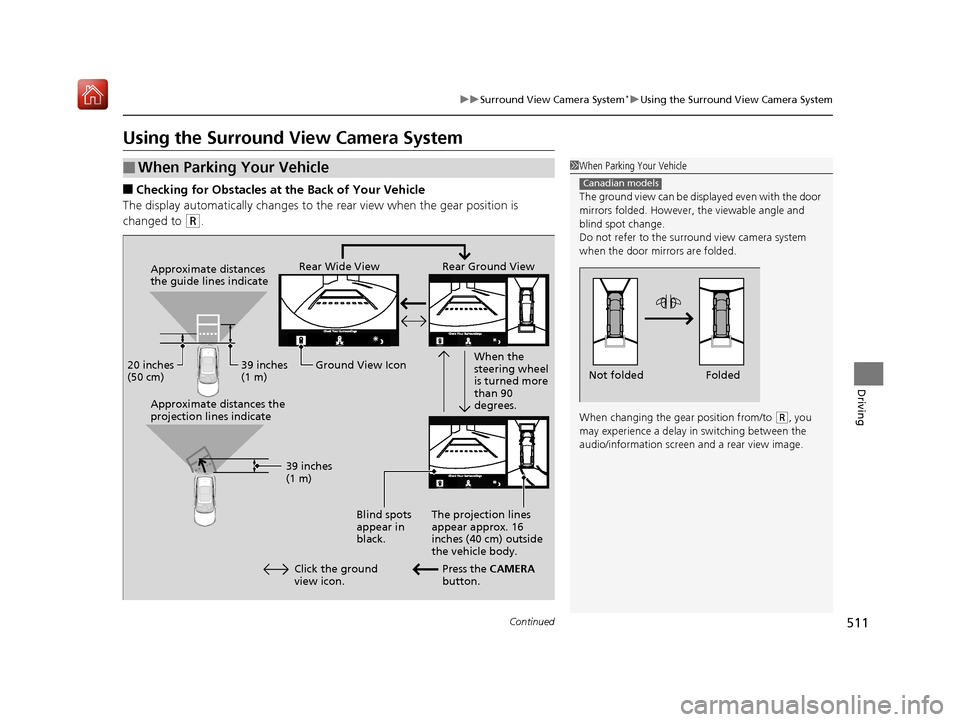
■Checking for Obstacles at the Back of Your Vehicle
The display automatically changes to the rear view when the gear position is
changed to
(R.
■When Parking Your Vehicle1 When Parking Your Vehicle
The ground view can be disp layed even with the door
mirrors folded. However, the viewable angle and
blind spot change.
Do not refer to the surround view camera system
when the door mirrors are folded.
When changing the gear position from/to
( R, you
may experience a delay in switching between the
audio/information screen and a rear view image.
Canadian models
Folded
Not folded
Rear Wide View Rear Ground View
When the
steering wheel
is turned more
than 90
degrees.
The projection lines
appear approx. 16
inches (40 cm) outside
the vehicle body.
Blind spots
appear in
black.
Press the CAMERA
button.
Approximate distances
the guide lines indicate
Approximate distances the
projection lines indicate
39 inches
(1 m)
20 inches
(50 cm)
39 inches
(1 m)
Ground View Icon
Click the ground
view icon.
19 ACURA RDX-31TJB6000.book 511 ページ 2018年4月26日 木曜日 午後4時51分
Page 513 of 649
uuSurround View Camera System*uUsing the Surround View Camera System
512
Driving
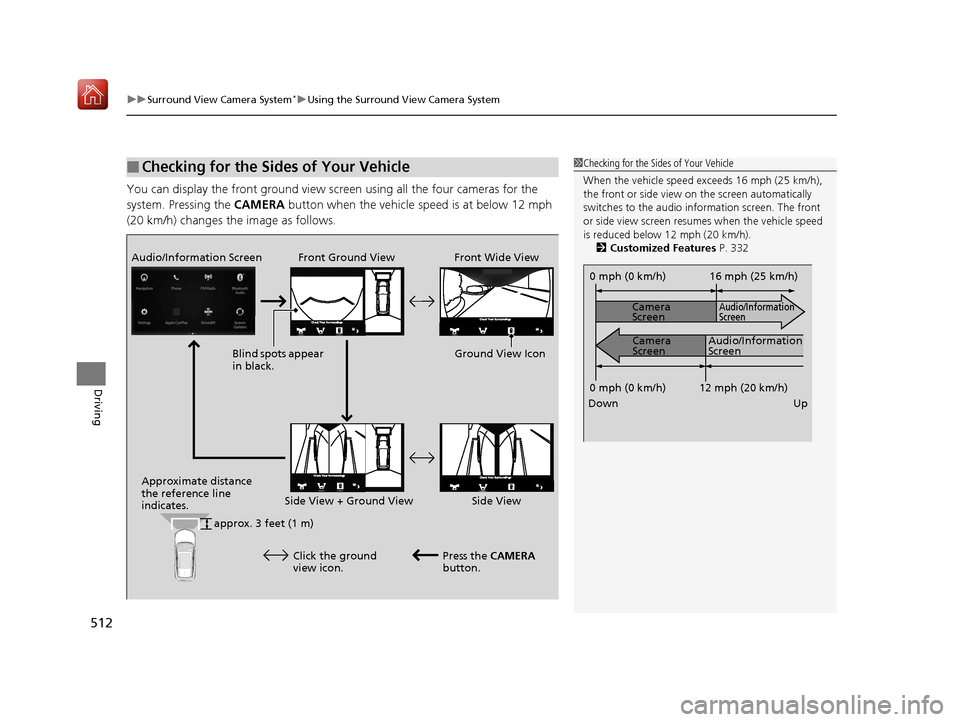
You can display the front ground view screen using all the four cameras for the
system. Pressing the CAMERA button when the vehicle speed is at below 12 mph
(20 km/h) changes the image as follows.
■Checking for the Sides of Your Vehicle1 Checking for the Sides of Your Vehicle
When the vehicle speed exceeds 16 mph (25 km/h),
the front or side view on the screen automatically
switches to the audio information screen. The front
or side view screen resumes when the vehicle speed
is reduced below 12 mph (20 km/h).
2 Customized Features P. 332
0 mph (0 km/h)
Down Up Camera
Screen
Camera
Screen
Audio/Information
Screen
Audio/Information
Screen 16 mph (25 km/h)
12 mph (20 km/h)
0 mph (0 km/h)
Front Ground View Front Wide View
Audio/Information Screen
Approximate distance
the reference line
indicates. Press the CAMERA
button.
approx. 3 feet (1 m) Blind spots appear
in black.
Click the ground
view icon. Ground View Icon
Side View + Ground View Side View
19 ACURA RDX-31TJB6000.book 512 ページ 2018年4月26日 木曜日 午後4時51分
Page 515 of 649
514
uuSurround View Camera System*uUsing the Surround View Camera System
Driving
The system may not work properly under the following conditions.
■Surround View Camera System Limitations
ConditionsSolutions
The images may not
appear clearly when:●You activate the system in bad weather (heavy rain,
snow, fog, etc.) or in the dark.
●Camera temperatures are high.●A sudden change between lig ht and dark such as an
entrance or exit of a tunnel.
●You drive into the sunlight (e.g., at dawn or dusk.)
Do not use the surround view camera system but rely
only on visual confirmation until the conditions allow
the system to work properly.
●A camera lens is covered with dirt, moisture, or
debris.
●A camera lens is scratched.
Clean rear camera lenses with the rearview camera
washer* or a soft cloth moisturized with water, mild
detergent or glass cleaner.
2 Rear Wiper/Washer P. 196
The audio/information screen is dirty.Wipe off the screen using a soft dry cloth.
A camera angle is
altered.A camera or the area around the camera has been
severely impacted.Do not use the surround view camera system and
contact a dealer.
An error message is displayed while the surround view camera system is in use.
* Not available on all models
19 ACURA RDX-31TJB6000.book 514 ページ 2018年4月26日 木曜日 午後4時51分
Page 518 of 649
517
uuRefueling uHow to Refuel
Driving
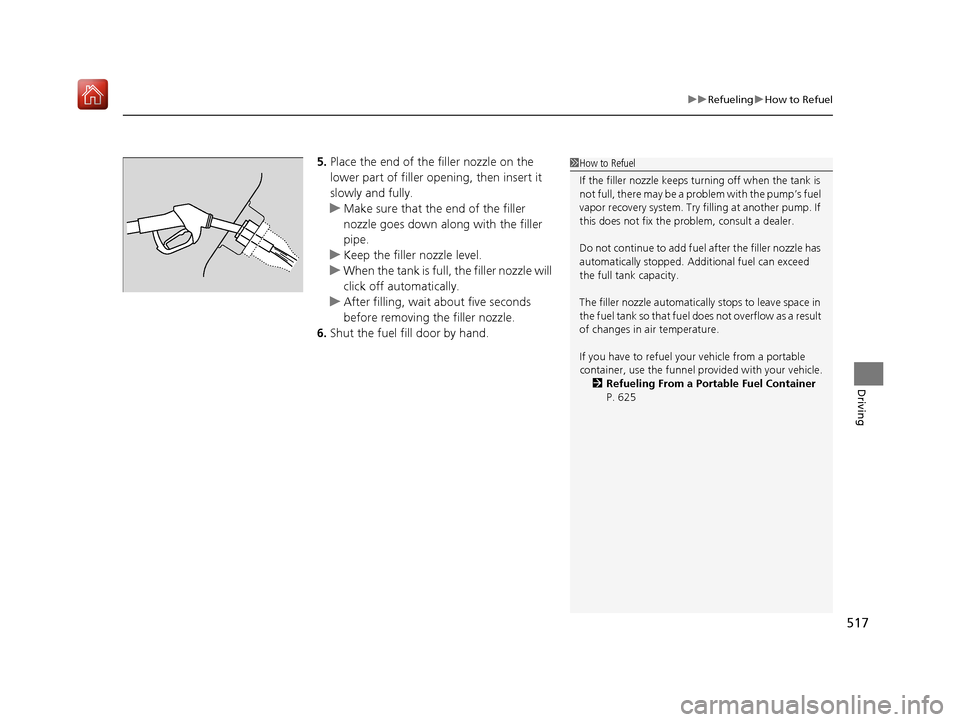
5. Place the end of the filler nozzle on the
lower part of filler opening, then insert it
slowly and fully.
u Make sure that the end of the filler
nozzle goes down along with the filler
pipe.
u Keep the filler nozzle level.
u When the tank is full, the filler nozzle will
click off automatically.
u After filling, wait about five seconds
before removing the filler nozzle.
6. Shut the fuel fill door by hand.1How to Refuel
If the filler nozzle keeps tu rning off when the tank is
not full, there may be a problem with the pump’s fuel
vapor recovery system. Try fi lling at another pump. If
this does not fix the problem, consult a dealer.
Do not continue to add fuel after the filler nozzle has
automatically stopped. Addi tional fuel can exceed
the full tank capacity.
The filler nozzle automatically stops to leave space in
the fuel tank so that fuel does not overflow as a result
of changes in air temperature.
If you have to refuel y our vehicle from a portable
container, use the funnel pr ovided with your vehicle.
2 Refueling From a Portable Fuel Container
P. 625
19 ACURA RDX-31TJB6000.book 517 ページ 2018年4月26日 木曜日 午後4時51分
Page 526 of 649
525
Maintenance
Maintenance MinderTM
If the engine oil life is less than 15%, you will see the Maintenance Minder messages
appear on the multi-information display ev ery time you set the power mode to ON.
The messages notify you when to change the engine oil, or when to bring your
vehicle to a dealer for indicated maintenance services.
19 ACURA RDX-31TJB6000.book 525 ページ 2018年4月26日 木曜日 午後4時51分
Page 528 of 649
527
uuMaintenance MinderTMuTo Use Maintenance MinderTM
Continued
Maintenance
■Maintenance Minder Messages on the Multi-Information
Display (MID)
Maintenance MessageOil Life DisplayExplanationInformation
—
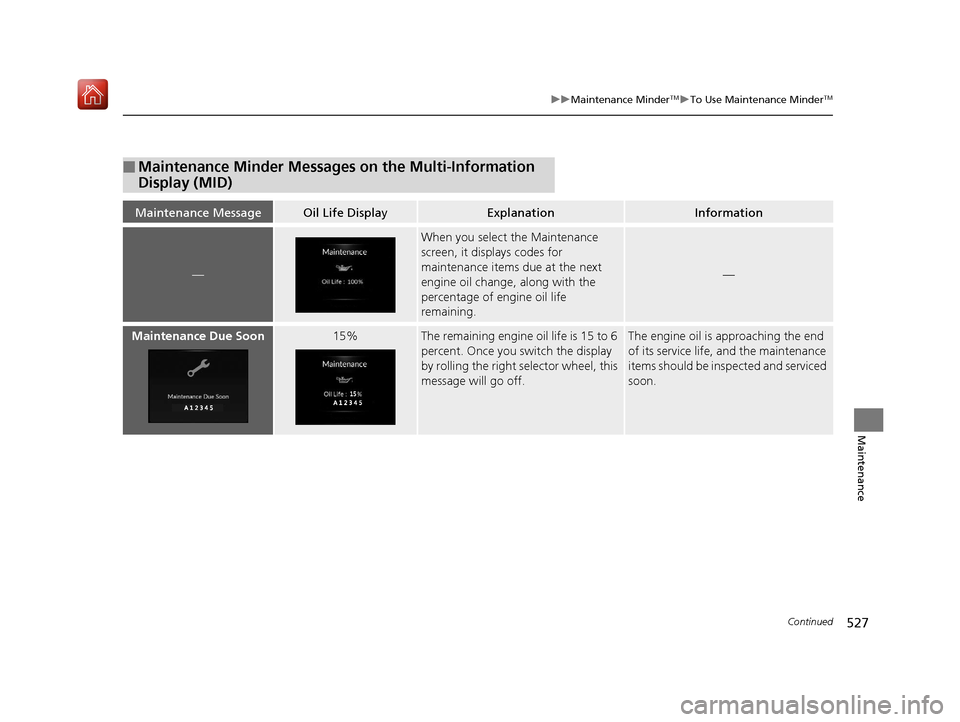
When you select the Maintenance
screen, it displays codes for
maintenance items due at the next
engine oil change, along with the
percentage of engine oil life
remaining.
—
Maintenance Due Soon15%The remaining engine oil life is 15 to 6
percent. Once you switch the display
by rolling the right selector wheel, this
message will go off.The engine oil is approaching the end
of its service life, and the maintenance
items should be insp ected and serviced
soon.
19 ACURA RDX-31TJB6000.book 527 ページ 2018年4月26日 木曜日 午後4時51分
Page 530 of 649
529
uuMaintenance MinderTMuTo Use Maintenance MinderTM
Continued
Maintenance
■Maintenance Service Items1Maintenance Service Items
•Adjust the valves during services A, B, 1, 2, or 3 if
they are noisy.
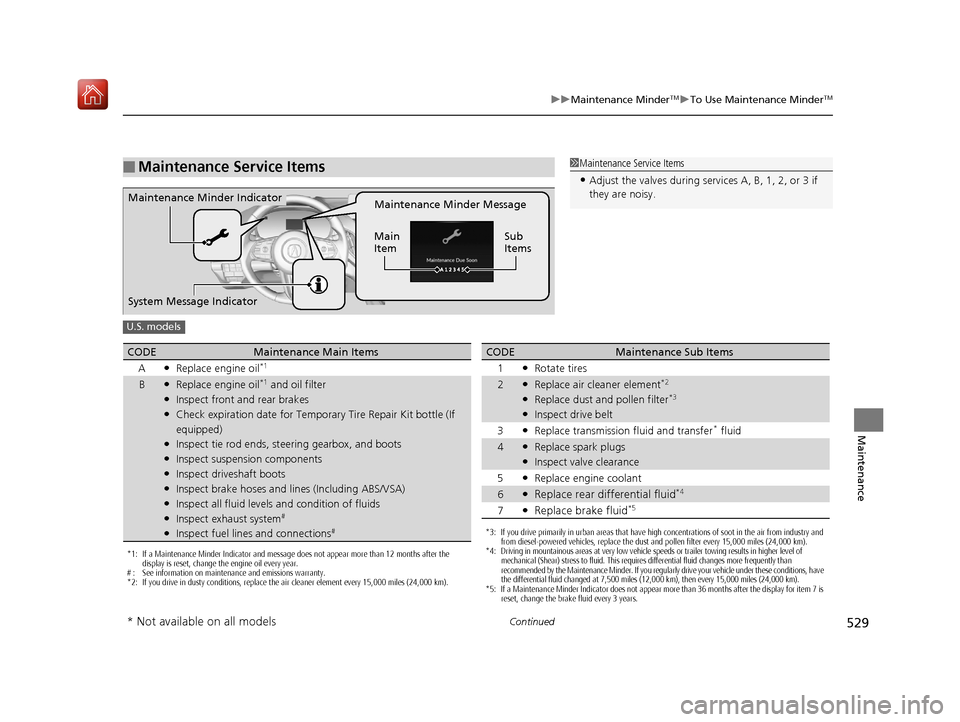
Maintenance Minder Message
Main
Item Sub
ItemsMaintenance Minder Indicator
System Message Indicator
U.S. models
*1: If a Maintenance Minder Indicator and message does not appear more than 12 months after the
display is reset, change the engine oil every year.
# : See information on maintenance and emissions warranty.
*2: If you drive in dusty conditions, replace the air cleaner element every 15,000 miles (24,000 km).
CODEMaintenance Main Items
A
●Replace engine oil*1
B●Replace engine oil*1 and oil filter●Inspect front and rear brakes●Check expiration date for Temporary Tire Repair Kit bottle (If
equipped)
●Inspect tie rod ends, steering gearbox, and boots●Inspect suspension components●Inspect driveshaft boots●Inspect brake hoses and lin es (Including ABS/VSA)●Inspect all fluid levels and condition of fluids●Inspect exhaust system#
●Inspect fuel lines and connections#*3: If you drive primarily in urban areas that have high concentrations of soot in the air from industry and
from diesel-powered vehicles, replace the dust and pollen filter every 15,000 miles (24,000 km).
*4: Driving in mountainous areas at very low vehicle speeds or trailer towing results in higher level of
mechanical (Shear) stress to fluid. This requires differential fluid changes more frequently than
recommended by the Maintenance Minder. If you regularly drive your vehicle under these conditions, have
the differential fluid changed at 7,500 miles (12,000 km), then every 15,000 miles (24,000 km).
*5: If a Maintenance Minder Indicator does not appear more than 36 months after the display for item 7 is reset, change the brake fluid every 3 years.
CODEMaintenance Sub Items
1
●Rotate tires
2●Replace air cleaner element*2
●Replace dust and pollen filter*3
●Inspect drive belt
3
●Replace transmission fluid and transfer* fluid
4●Replace spark plugs●Inspect valve clearance
5
●Replace engine coolant
6●Replace rear differential fluid*4
7●Replace brake fluid*5
* Not available on all models
19 ACURA RDX-31TJB6000.book 529 ページ 2018年4月26日 木曜日 午後4時51分
Page 531 of 649
530
uuMaintenance MinderTMuTo Use Maintenance MinderTM
Maintenance
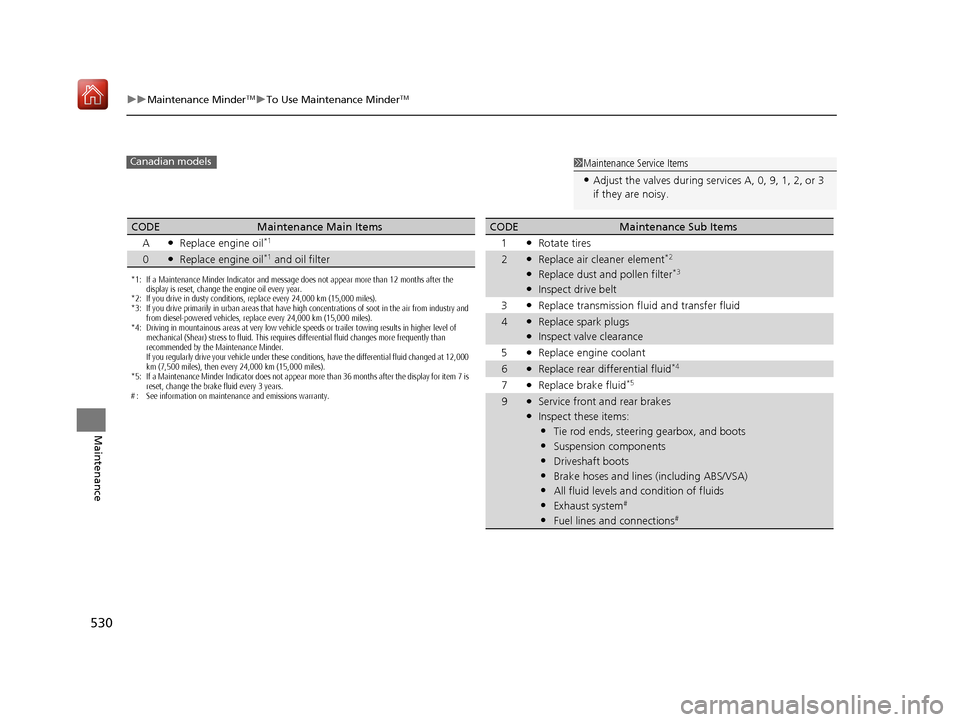
1Maintenance Service Items
•Adjust the valves during services A, 0, 9, 1, 2, or 3
if they are noisy.
Canadian models
*1: If a Maintenance Minder Indicator and message does not appear more than 12 months after the
display is reset, change the engine oil every year.
*2: If you drive in dusty conditions, replace every 24,000 km (15,000 miles).
*3: If you drive primarily in urban areas that have high concentrations of soot in the air from industry and
from diesel-powered vehicles, replace every 24,000 km (15,000 miles).
*4: Driving in mountainous areas at very low vehicle speeds or trailer towing results in higher level of mechanical (Shear) stress to fluid. This requires differential fluid changes more frequently than
recommended by the Maintenance Minder.
If you regularly drive your vehicle under these conditions, have the differential fluid changed at 12,000
km (7,500 miles), then every 24,000 km (15,000 miles).
*5: If a Maintenance Minder Indicator does not appear more than 36 months after the display for item 7 is reset, change the brake fluid every 3 years.
# : See information on maintenance and emissions warranty.
CODEMaintenance Main Items
A
●Replace engine oil*1
0●Replace engine oil*1 and oil filter
CODEMaintenance Sub Items
1
●Rotate tires
2●Replace air cleaner element*2
●Replace dust and pollen filter*3
●Inspect drive belt
3
●Replace transmission fl uid and transfer fluid
4●Replace spark plugs●Inspect valve clearance
5
●Replace engine coolant
6●Replace rear differential fluid*4
7●Replace brake fluid*5
9●Service front and rear brakes●Inspect these items:
•Tie rod ends, steeri ng gearbox, and boots
•Suspension components
•Driveshaft boots
•Brake hoses and lines (including ABS/VSA)
•All fluid levels and condition of fluids
•Exhaust system#
•Fuel lines and connections#
19 ACURA RDX-31TJB6000.book 530 ページ 2018年4月26日 木曜日 午後4時51分
Page 539 of 649
538
uuMaintenance Under the Hood uChanging the Engine Oil and Oil Filter
Maintenance
Changing the Engine Oil and Oil Filter
You must change the engine oil and oil filter regularly in order to maintain the
engine’s lubrication. The engine may be damaged if they are not changed regularly.
Change the oil and filter in accordance with the maintenance message on the multi-
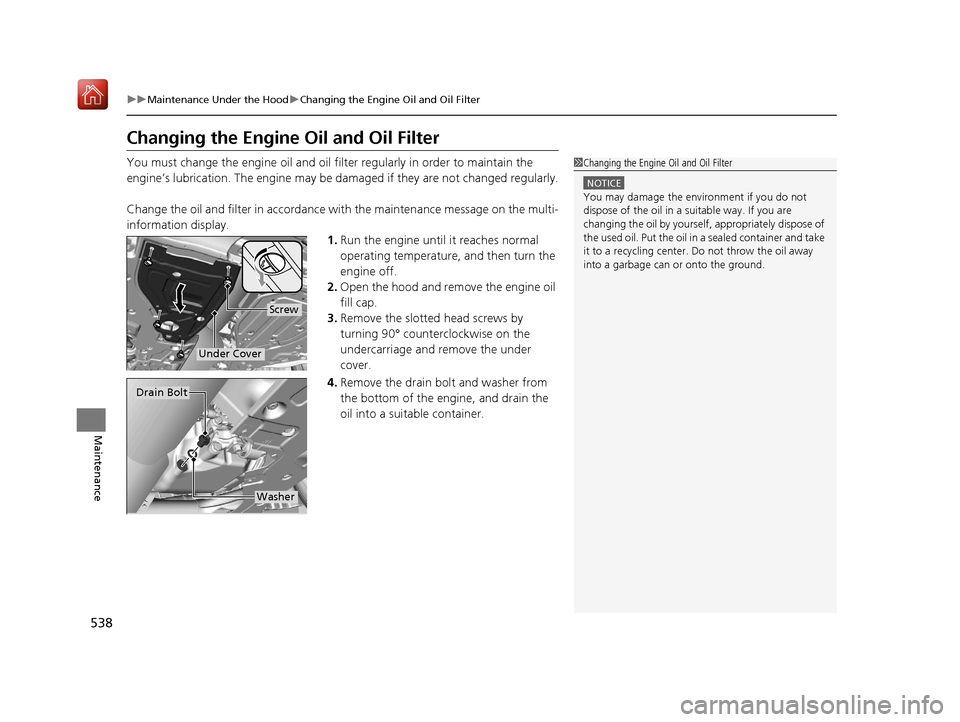
information display. 1.Run the engine until it reaches normal
operating temperature, and then turn the
engine off.
2. Open the hood and remove the engine oil
fill cap.
3. Remove the slotted head screws by
turning 90° counterclockwise on the
undercarriage and remove the under
cover.
4. Remove the drain bolt and washer from
the bottom of the engine, and drain the
oil into a suitable container.1Changing the Engine Oil and Oil Filter
NOTICE
You may damage the environment if you do not
dispose of the oil in a suitable way. If you are
changing the oil by yourself , appropriately dispose of
the used oil. Put the oil in a sealed container and take
it to a recycling center. Do not throw the oil away
into a garbage can or onto the ground.
Screw
Under Cover
Drain Bolt
Washer
19 ACURA RDX-31TJB6000.book 538 ページ 2018年4月26日 木曜日 午後4時51分