eco Acura RDX 2019 Owner's Manual
[x] Cancel search | Manufacturer: ACURA, Model Year: 2019, Model line: RDX, Model: Acura RDX 2019Pages: 649, PDF Size: 33 MB
Page 473 of 649
uuAcuraWatchTMuLane Keeping Assist System (LKAS)
472
Driving
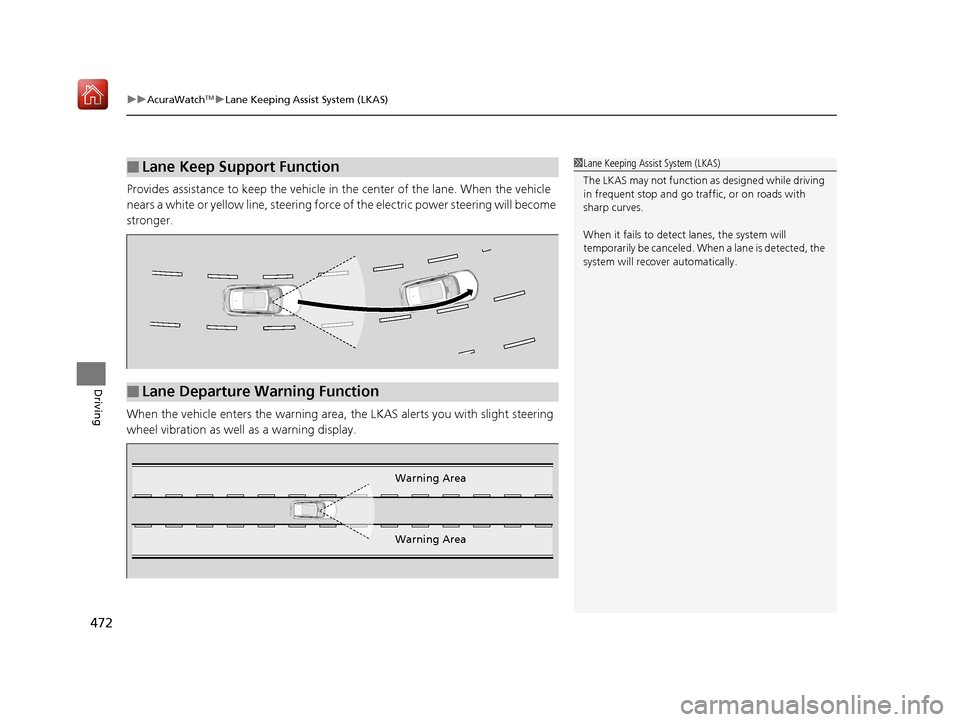
Provides assistance to keep the vehicle in the center of the lane. When the vehicle
nears a white or yellow line, steering force of the electric power steering will become
stronger.
When the vehicle enters the warning area, the LKAS alerts you with slight steering
wheel vibration as well as a warning display.
■Lane Keep Support Function1 Lane Keeping Assist System (LKAS)
The LKAS may not function as designed while driving
in frequent stop and go traf fic, or on roads with
sharp curves.
When it fails to detect lanes, the system will
temporarily be canceled. When a lane is detected, the
system will recover automatically.
■Lane Departure Warning Function
Warning Area
Warning Area
19 ACURA RDX-31TJB6000.book 472 ページ 2018年4月26日 木曜日 午後4時51分
Page 479 of 649
478
uuAcuraWatchTMuLane Keeping Assist System (LKAS)
Driving
• When objects on the road (c urb, guard rail, pylons, etc.) are recognized as white
lines (or yellow lines).
• Driving on roads with double lines.
■Vehicle conditions
• Headlight lenses are dirty or the headlights are not properly adjusted.
• The outside of the windshield is streake d or blocked by dirt, mud, leaves, wet
snow, etc.
• The inside of the windshield is fogged.
• The camera temperature gets too high.
• An abnormal tire or wheel condition (wrong sized, varied size or construction,
improperly inflated, compact spare tire
*, etc.).
• The vehicle is tilted due to a heav y load or suspension modifications.
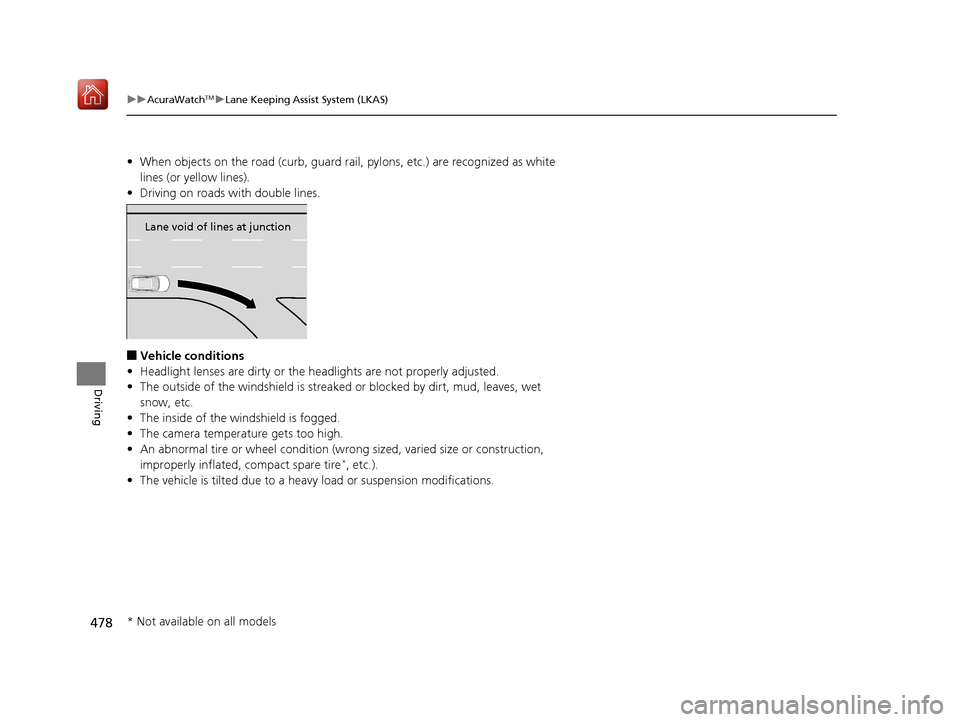
Lane void of lines at junction
* Not available on all models
19 ACURA RDX-31TJB6000.book 478 ページ 2018年4月26日 木曜日 午後4時51分
Page 481 of 649
uuAcuraWatchTMuRoad Departure Mitigation (RDM) System
480
Driving
The system becomes ready to start sear ching for lane markings when all the
following conditions are met:
• The vehicle is traveling between about 45 and 90 mph (72 and 145 km/h).
• The vehicle is on a straight or slightly curved road.
• The turn signals are off.
• The brake pedal is not depressed.
• The wipers are not in continuous operation.
• The vehicle is not accelerating or braking, and the steering wheel is not being
turned.
• The system makes a determination that the driver is not actively accelerating,
braking or steering.
■How the System Activates1How the System Activates
The RDM system may automa tically shut off and the
indicator comes and stays on.
2 Indicators P. 74
RDM system function can be impacted when the
vehicle is:
•Not driven within a traffic lane.•Driven on the inside edge of a curve, or outside of
a lane.
•Driven in a narrow lane.
19 ACURA RDX-31TJB6000.book 480 ページ 2018年4月26日 木曜日 午後4時51分
Page 483 of 649
482
uuAcuraWatchTMuRoad Departure Mitigation (RDM) System
Driving
■Roadway conditions
• Driving on a snowy or wet roadway (obscured lane marking, vehicle tracks,
reflected lights, road spray, high contrast).
• Driving on a road with temporary lane markings.
• Faint, multiple, or varied lane markings are visible on the roadway due to road
repairs or old lane markings.
• The roadway has merging, split, or crossing lines (e.g., such as at an intersection
or crosswalk).
• The lane markings are extremely narrow, wide, or changing.
• The vehicle in front of you is driving near the lane lines.
• The road is hilly or the vehicle is approaching the crest of a hill.
• Driving on rough or unpaved roads, or over bumpy surfaces.
• When objects on the road (c urb, guard rail, pylons, etc.) are recognized as white
lines (or yellow lines).
• Driving on roads with double lines.
■Vehicle conditions
• Headlight lenses are dirty or the headlights are not properly adjusted.
• The outside of the windshield is streake d or blocked by dirt, mud, leaves, wet
snow, etc.
• The inside of the windshield is fogged.
• The camera temperature gets too high.
• An abnormal tire or wheel condition (wrong sized, varied size or construction,
improperly inflated, compact spare tire
*, etc.).
• The vehicle is tilted due to a heav y load or suspension modifications.
• When tire chains are installed.
* Not available on all models
19 ACURA RDX-31TJB6000.book 482 ページ 2018年4月26日 木曜日 午後4時51分
Page 484 of 649

483
uuAcuraWatchTMuFront Sensor Camera
Continued
Driving
Front Sensor Camera
The camera, used in systems such as LKAS, RDM, ACC with LSF, and CMBSTM, is
designed to detect an object that tri ggers any of the systems to operate its
functions.
This camera is located behind the rearview
mirror.
To help reduce the likelihood that high interior
temperatures will cause the camera’s sensing
s y s t e m t o s h u t o f f , w h e n p a r k i n g , f i n d a s h a d y
area or face the front of the vehicle away from
the sun. If you use a reflective sun shade, do
not allow it to cover the camera housing.
Covering the camera can concentrate heat on
it.
■Camera Location and Handling Tips
1Front Sensor Camera
Never apply a film or attach any objects to the
windshield, the hood, or th e front grille that could
obstruct the camera’s fiel d of vision and cause the
system to operate abnormally.
Scratches, nicks, and othe r damage to the windshield
within the camera’s fiel d of vision can cause the
system to operate abnormall y. If this occurs, we
recommend that you replac e the windshield with a
genuine Acura replacement windshield. Making even
minor repairs within the ca mera’s field of vision or
installing an aftermarke t replacement windshield
may also cause the system to operate abnormally.
After replacing the winds hield, have a dealer
recalibrate the camera. Pr oper calibration of the
camera is necessary for the system to operate
properly.
Do not place an object on the top of the instrument
panel. It may reflect onto the windshield and prevent
the system from detecting lane lines properly.
Front Sensor
Camera
19 ACURA RDX-31TJB6000.book 483 ページ 2018年4月26日 木曜日 午後4時51分
Page 490 of 649

Continued489
uuBraking uBrake System
Driving
■Activating and deactivating the automatic parking brake feature
With the power mode is in ON, carry out th e following steps to either activate or
deactivate the automatic parking brake feature.
1. Put the transmission into
(P.
2. Without depressing the brake pedal, pres s and release the parking brake switch.
u Check that the Parking Brake and Brake System indicator (red) has come on.
3. Press and hold the parking brake switch. Wh en you hear a beeping sound, release
the switch and within 3 seconds pu ll up and hold the switch again.
4. When you hear a sound indicating that the procedure is completed, release the
switch.
u Two beeps indicates that the feature has been activated.
u One beep indicates that the feature has been deactivated.
u When you have completed activating the feature, the parking brake will
remain applied after you turn off the engine.
u To confirm that the parkin g brake is applied, check if the Parking Brake and
Brake System indicator (red) is on.
If you need to temporarily deactivate th e feature for when putting your vehicle
through a conveyor type car wash, you can follow the procedure explained below.
1. Depress the brake pedal and bring the vehicle to a stop.
2. Set the power mode to VEHICLE OFF and then within 2 seconds pull up the
parking brake switch.
u Activation and deactivation settings for the feature will not be affected.
u Before temporarily deactivating the feat ure, make sure to first turn off both
ACC with LSF and the automatic brake hold system.
u To confirm that the parkin g brake is applied, check if the Parking Brake and
Brake System indicator (red) is on.
1 Parking Brake
In cold climates, the parking brake may freeze in
place if applied.
When parking the vehicle, chock the wheels and
make sure the automatic parking brake feature is
deactivated.
Also, when putting your vehicle through a conveyor-
type car wash or when ha ving your vehicle towed,
deactivate the automatic parking brake feature and
leave the parking brake released.
19 ACURA RDX-31TJB6000.book 489 ページ 2018年4月26日 木曜日 午後4時51分
Page 496 of 649
495Continued
Driving
Parking Your Vehicle
When Stopped
1.Depress the brake pedal firmly.
2. With the brake pedal depressed, press th e electric parking brake switch slowly,
but fully.
3. Change the shift position to
(P.
4. Turn off the engine.
The Parking Brake and Brake System indica tor (red) goes off in about 30 seconds.
1Parking Your Vehicle
Do not park your vehicle near flammable objects,
such as dry grass, oil, or timber.
Heat from the exhaust can cause a fire.
1 When Stopped
NOTICE
The following can dama ge the transmission:•Depressing the accelerator and brake pedals
simultaneously.
•Holding the vehicle in place when facing uphill by
depressing the accelerator pedal.
•Changing into ( P before the vehicle stops
completely.
3WARNING
The vehicle can roll aw ay if left unattended
without confirming that Park is engaged.
A vehicle that rolls away could cause a crash
resulting in serious injury or death.
Always keep your foot on the brake pedal
until you have confirmed that
( P is shown
on the gear position Indicator.
19 ACURA RDX-31TJB6000.book 495 ページ 2018年4月26日 木曜日 午後4時51分
Page 500 of 649

499
uuParking Your Vehicle uParking Sensor System*
Continued
Driving
■When the distance between your vehicle and obstacles becomes shorter
*1: At this stage, only the center sensors detect obstacles.
Direction
Length of the intermittent beepDistance between the Bumper and Obstacle
IndicatorAudio/information
screen
Corner SensorsCenter Sensors
Forward
Moderate—Front: About 30-24 in (75-60 cm)
Rear: About 43-28 in (110-70 cm)Blinks in
Yellow*1
ShortFront: About 24-18 in (60-45 cm) Rear: About 28-18 in (70-45 cm)Front: About 24-18 in (60-45 cm)Rear: About 28-18 in (70-45 cm)Blinks in Amber
Very shortAbout 18-14 in (45-35 cm)About 18-14 in (45-35 cm)
ContinuousAbout 14 in (35 cm) or lessAbout 14 in (35 cm) or lessBlinks in Red
Backward
Moderate—Front: About 32-26 in (80-65 cm)
Rear: About 45-30 in (115-75 cm)Blinks in
Yellow*1
ShortFront: About 26-20 in (65-50 cm) Rear: About 30-20 in (75-50 cm)Front: About 26-20 in (65-50 cm)Rear: About 30-20 in (75-50 cm)Blinks in Amber
Very shortAbout 20-16 in (50-40 cm)About 20-16 in (50-40 cm)
ContinuousAbout 16 in (40 cm) or lessAbout 16 in (40 cm) or lessBlinks in Red
Indicators light where
the sensor detects an
obstacle
19 ACURA RDX-31TJB6000.book 499 ページ 2018年4月26日 木曜日 午後4時51分
Page 501 of 649

uuParking Your Vehicle uParking Sensor System*
500
Driving
1. Make sure that the parking sensor system is not activated. Set the power mode to
VEHICLE OFF (LOCK).
2. Press and hold the parking sensor system button, and set the power mode to ON.
3. Keep pressing the button for 10 seconds. Release the button when the indicator
in the button flashes.
4. Press the button again. The indi cator in the button goes off.
u The beeper sounds twice. The re ar sensors are now turned off.
To turn the rear sensors on again, follow the above procedure. The beeper sounds
three times when the rear sensors come back on.
■Turning off All Rear Sensors1 Turning off All Rear Sensors
When you shift to
(R, the indicator in the parking
sensor system button blinks as a reminder that the
rear sensors have been turned off.
19 ACURA RDX-31TJB6000.book 500 ページ 2018年4月26日 木曜日 午後4時51分
Page 507 of 649
506
uuMulti-View Rear Camera uAbout Your Multi-View Rear Camera
Driving
You can view three different camera mode s on the rearview display. Swipe to
highlight the view mode icon and click the true touchpad A to change the mode.
2 True Touchpad Operation P. 246
: Wide view mode
: Normal view mode
: Top down view mode
• If the last used viewing mo de was Wide or Normal view mode, the same mode is
selected the next time you put the transmission into
(R.
• If Top down view mode was last used be fore you turned the power mode to OFF,
Wide View mode is selected next time you set the power mode to ON and put the
transmission into
(R.
• If Top down view mode was last used more than 10 second s after you change
from
(R, Wide View mode is selected the ne xt time you put the transmission into
(R.
19 ACURA RDX-31TJB6000.book 506 ページ 2018年4月26日 木曜日 午後4時51分