eco Acura RDX 2019 Owner's Manual
[x] Cancel search | Manufacturer: ACURA, Model Year: 2019, Model line: RDX, Model: Acura RDX 2019Pages: 649, PDF Size: 33 MB
Page 398 of 649
397
Driving
This chapter discusses driving and refueling.
Before Driving................................... 398
Towing a Trailer ................................ 403
Off-Highway Driving Guidelines ..... 409
When Driving Starting the Engine .......................... 411
Precautions While Driving................. 416
Automatic Transmission ................... 417
Shifting ............................................ 418
Integrated Dynamics System............. 426
Auto Idle Stop .................................. 428
Vehicle Stability Assist® (VSA®), aka Electronic
Stability Control (ESC), System ................. 434
Agile Handling Assist ....................... 436
Super Handling-All Wheel DriveTM (SH-AWD®)*.. 437
Blind spot information System*........ 438
Tire Pressure Monitoring System (TPMS) with Tire Fill Assist .......................... 441
Tire Pressure Monitoring System (TPMS) - Required Federal Explanation ......... 443
AcuraWatch
TM................................... 445
Collision Mitigati on Braking SystemTM
(CMBSTM) ....................................... 446
Adaptive Cruise Control (ACC) with Low Speed Follow (LSF) ......................... 455 Lane Keeping Assist System (LKAS) .. 471
Road Departure Mi
tigation (RDM)
System ........................................ 479
Front Sensor Camera ....................... 483
Radar Sensor ................................... 485
Braking .............................................. 486
Parking Your Vehicle ........................ 495
Multi-View Rear Camera .................. 505
Surround View Camera System
*..... 507
Refueling ........................................... 515
Fuel Economy and CO
2 Emissions .... 518
Turbo Engine Vehicle ....................... 519
* Not available on all models
19 ACURA RDX-31TJB6000.book 397 ページ 2018年4月26日 木曜日 午後4時51分
Page 406 of 649
Continued405
uuTowing a Trailer uTowing Preparation
Driving
Towing equipment varies by th e size of your trailer, how much load you are towing,
and where you are towing.
■Hitches
The hitch must be of an approved type and properly bolted to the underbody.
■Safety chains
Always use safety chains when you tow a trailer. Leave enough slack to allow the
trailer to turn corners easily, but do not allow the chains to drag on the ground.
■Trailer brakes
Recommended for any trailer with a total weight of 1,000 lbs (450 kg) or more:
There are two common types of trailer bra kes: surge and electric. Surge brakes are
common for boat trailers, since the brakes will get wet. If you choose electric brakes,
be sure they are electronically actuated. Do not attempt to attach trailer brakes to
your vehicle’s hydraulic system, as it wi ll lower braking effectiveness and create a
potential hazard.
■Additional towing equipment
Many states and provinces/territories requ ire special outside mirrors when towing a
trailer. Even if mirrors are not required in your locale, you should install special
mirrors if visibility is restricted in any way.
■Towing Equipment and Accessories1Towing Equipment and Accessories
Make sure that all equipment is properly installed and
maintained, and that it meets federal, state, province/
territory, and lo cal regulations.
Consult your traile r sales or rental agency if any other
items are recommended or required for your towing
situation.
The lighting and wiring of tra ilers can vary by type
and brand. If a connector is required, it should only
be installed by a qua lified technician.
19 ACURA RDX-31TJB6000.book 405 ページ 2018年4月26日 木曜日 午後4時51分
Page 410 of 649
409
Driving
Off-Highway Driving Guidelines
General Information
Your vehicle has been designed primarily for use on pavement, however, its higher
ground clearance allows you to occasionally travel on unpaved roads. It is not
designed for trail-blazing, or other challenging off-highway activities.
If you decide to drive on unpaved roads, you will find that it requires somewhat
different driving skills and that your vehicl e will handle somewhat differently than it
does on pavement. Pay attention to the precau tions and tips in this section, and get
acquainted with your vehicle before leaving the pavement.
Important Safety Precautions
To avoid loss of control or rollover, be sure to follow all precautions and
recommendations:
• Be sure to store cargo properly and do not exceed your cargo load limits.
2 Maximum Load Limit P. 401
•Whenever you drive, make su re you and your passengers always wear seat belts.
• Keep your speed low, and never go faster than the conditions allow.
• It’s up to you to continually assess the situation and drive within the limits.
1Off-Highway Driving Guidelines
Failure to operate your vehi cle correctly might result
in a crash or a rollover. 2 Important Handling Information P. 32
2 Precautions While Driving P. 416
Spinning the tires can al so damage the SH-AWD ®
system.
3WARNING
Improperly operating this vehicle on or off-
pavement can cause a crash or rollover in
which you and your passengers could be
seriously injured or killed.
• Follow all instructions and guidelines in
this owner’s manual.
• Keep your speed low, and don’t drive
faster than conditions permit.
Models with SH-AWD ®
19 ACURA RDX-31TJB6000.book 409 ページ 2018年4月26日 木曜日 午後4時51分
Page 411 of 649
410
uuOff-Highway Driving Guidelines uAvoiding Trouble
Driving
Avoiding Trouble
• Check Out Your Vehicle before you leave the pavement and make sure that all
scheduled maintenance has been comple ted. Pay special attention to the
condition of the tires, an d check the tire pressures.
• Remember the route you choose presents limit s (too steep or bumpy), you have
limits (driving skill and comfort), and your vehicle has limits (traction, stability, and
power). Failing to recognize these limits will likely put you and your passengers in
a hazardous situation.
• Accelerating and Braking should be done slowly and gradually. Trying to start
or stop too fast can cause a loss of traction and you could lose control.
• Avoiding Obstacles and Debris in the road reduces the likelihood of a rollover
or damage to your suspension or other components.
• Driving on Slopes increases your risk of a rollover, particularly if you attempt to
drive across a slope that is too steep. Going straight up or down a slope is usually
the safest. If you can’t clearly see all cond itions or obstacles on a slope, walk it
before you drive it. If there is any doubt whether you can safely pass, don’t try it.
Find another route. If you get stuck when climbing, do not try to turn around.
Back down slowly following the same route you took up the hill.
• Crossing a Stream - Avoid driving through deep water. If you encounter water
in your route (a small stream or large pu ddle, for example), evaluate it carefully
before going ahead. Make sure it is shallow, flowing slowly, and has firm ground
underneath. If you are not sure of the depth or the ground, turn around and find
another route. Driving through deep water can also damage your vehicle. The
water can get into the transmission and differential, diluting the lubricant and
causing an eventual failure. It can also wash the grease out of the wheel bearings.
• If You Get Stuck , carefully go in the direction that you think will get you
unstuck. Do not spin the tires as this will only make things worse and could
damage the transmission. If you are unable to free yourself, your vehicle will need
to be towed. Front and rear tow hooks are provided for this purpose.
19 ACURA RDX-31TJB6000.book 410 ページ 2018年4月26日 木曜日 午後4時51分
Page 412 of 649

411Continued
Driving
When Driving
Starting the Engine
1.Make sure the parkin g brake is applied.
u The Parking Brake and Brake System
indicator (red) comes on for 30 seconds
when you press the electric parking
brake switch.
u The parking brake must be applied to
start the engine.
2. Depress the brake pedal.
u Although it is possible to start the vehicle
in
(N with the parking brake is applied, it
is safer to start it in
(P.
3. Press the ENGINE START/STOP button
without depressing the accelerator pedal.
1 Starting the Engine
Keep your foot firmly on the brake pedal when
starting the engine.
The engine is harder to start in cold weather and in thinner
air found at altitudes above 8,000 feet (2,400 meters).
When starting the engine in cold weather, turn off all
electrical accessories such as the lights, climate
control system, and rear de fogger in order to reduce
battery drain.
If you live in a region where winter is extremely cold,
an engine block heater will improve starting and
warming of the engine. Cons ult a dealer for details.
If the exhaust system sounds abnormal or you can
smell exhaust gas inside the vehicle, have your vehicle
checked by a dealer. There may be a problem with
the engine or exhaust system.
Bring the keyless access remote close to the ENGINE
START/STOP button if the batte ry in the keyless
access remote is weak. 2 If the Keyless Access Remote Battery is
Weak P. 602
The engine may not start if the keyless access remote
is subjected to strong radio waves.
Do not hold the ENGINE START/STOP button to
start the engine.
If the engine does not star t, set the power mode to
OFF and wait at least 30 se conds before trying again.
Electric Parking
Brake Switch
Brake Pedal
19 ACURA RDX-31TJB6000.book 411 ページ 2018年4月26日 木曜日 午後4時51分
Page 415 of 649
uuWhen Driving uStarting the Engine
414
Driving
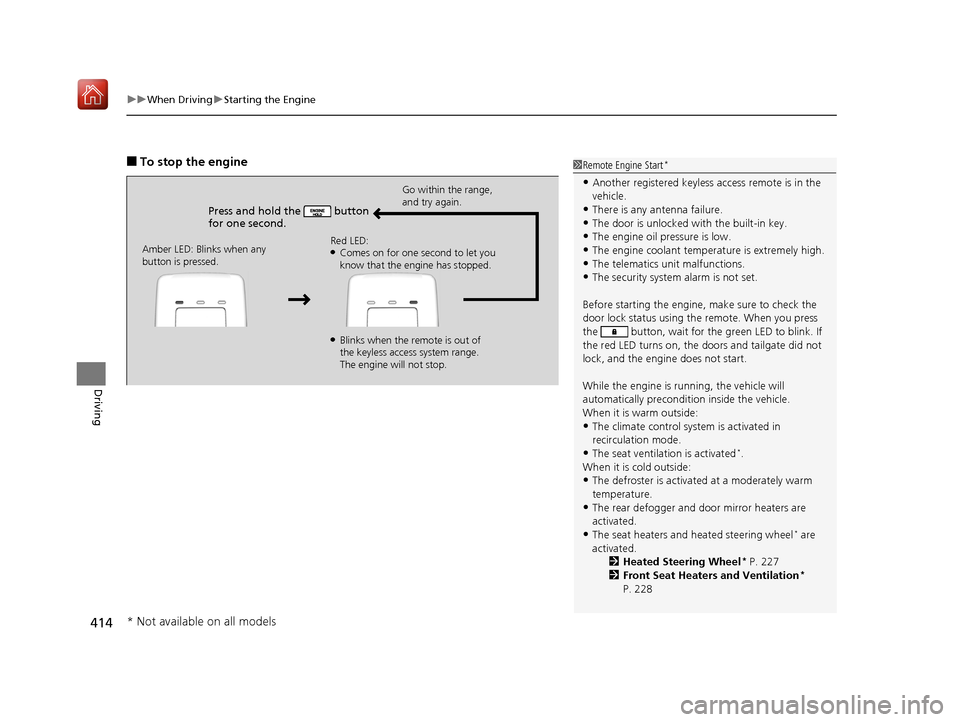
■To stop the engine
Press and hold the button
for one second.
Go within the range,
and try again.
Amber LED: Blinks when any
button is pressed. Red LED:
●Comes on for one second to let you
know that the engine has stopped.
●Blinks when the remote is out of
the keyless access system range.
The engine will not stop.
1
Remote Engine Start*
•Another registered keyless access remote is in the
vehicle.
•There is any antenna failure.
•The door is unlocked with the built-in key.•The engine oil pressure is low.
•The engine coolant temper ature is extremely high.
•The telematics unit malfunctions.•The security system alarm is not set.
Before starting the engine, make sure to check the
door lock status using the remote. When you press
the button, wait for the green LED to blink. If
the red LED turns on, the doors and tailgate did not
lock, and the engine does not start.
While the engine is running, the vehicle will
automatically preconditi on inside the vehicle.
When it is warm outside:
•The climate control system is activated in
recirculation mode.
•The seat ventilation is activated*.
When it is cold outside:
•The defroster is activated at a moderately warm
temperature.
•The rear defogger and door mirror heaters are
activated.
•The seat heaters and heated steering wheel* are
activated. 2Heated Steering Wheel
* P. 227
2 Front Seat Heaters and Ventilation*
P. 228
* Not available on all models
19 ACURA RDX-31TJB6000.book 414 ページ 2018年4月26日 木曜日 午後4時51分
Page 417 of 649
416
uuWhen Driving uPrecautions While Driving
Driving
Precautions While Driving
Utility vehicles have a significantly higher rollover rate than other types of vehicles.
To prevent rollovers or loss of control:
• Take corners at slower speeds than yo u would with a passenger vehicle.
• Avoid sharp turns and abrupt maneuvers whenever possible.
• Do not modify your vehicle in any way that you would raise the center of gravity.
• Do not carry heavy cargo on the roof.
Never carry more than 165 lbs (75 kg) of cargo on the roof rack (Acura accessory).
Avoid driving in deep water and on flooded roads. This can damage the engine or
driveline, or cause elec trical component failure.
If there is a strong impact with something under the vehicle, stop in a safe location.
Check the underside of the vehicle for damage or any fluid leaks.
■Driving Guidelines for Your Utility Vehicle
■In Rain
■Other Precautions
1 Precautions While Driving
NOTICE
Do not change the transmi ssion while pressing the
accelerator pedal. You could damage the transmission.
NOTICE
If you repeatedly turn the steering wheel at an
extremely low speed, or hold the steering wheel in the
full left or right position for a while, the electric power
steering (EPS) system heats up . The system goes into a
protective mode, and limits its performance. The
steering wheel becomes harder and harder to operate.
Once the system cools down, the EPS system is restored.
Repeated operation under these conditions can
eventually damage the system.
If the power mode is set to ACCESSORY while
driving, the engine will shut down and all steering
and brake power assist functi ons will stop, making it
difficult to control the vehicle.
Do not put the transmission into
( N, as you will lose
engine braking (and acce leration) performance.
During the first 600 miles (1,000 km) of operation,
avoid sudden acceleration or full throttle operation so
as not to damage the engine or powertrain.
Avoid hard braking for the first 200 miles (300 km). You
should also follow this when the brake pads are replaced.
1Driving Guidelines for Your Utility Vehicle
Failure to operate your vehicle correctly might result
in a crash or a rollover. 2 Important Handling Information P. 32
19 ACURA RDX-31TJB6000.book 416 ページ 2018年4月26日 木曜日 午後4時51分
Page 423 of 649
![Acura RDX 2019 Owners Manual uuWhen Driving uShifting
422
Driving
■If you want to keep the transmission in (N position [car wash mode]
With the engine running:
1. Press and hold the brake pedal.
2. Select
(N, then release the](/img/32/9763/w960_9763-422.png "Acura RDX 2019 Owners Manual uuWhen Driving uShifting
422
Driving
■If you want to keep the transmission in (N position [car wash mode]
With the engine running:
1. Press and hold the brake pedal.
2. Select
(N, then release the")
uuWhen Driving uShifting
422
Driving
■If you want to keep the transmission in (N position [car wash mode]
With the engine running:
1. Press and hold the brake pedal.
2. Select
(N, then release the button to display (N (Neutral) hold mode on the
multi-information display.
3. Press and hold
(N again for two seconds.
u This puts the vehicle in car wash mode which must be used when your vehicle
is pulled through a conveyor type automatic car wash where you or an
attendant do not remain in the vehicle.
If the ENGINE START/STOP button is pressed
after car wash mode has been activated, the
power mode will change to ACCESSORY and
a message will be displayed on the multi-
information display.u The gear position remains in
(N with the
power mode in ACCESSORY for 15
minutes, then, it automatically changes
to
(P and the power mode changes to
OFF.
u Manually press the ENGINE START/
STOP button cancels ACCESSORY
mode. The
(P indicator comes on and
the power mode changes to OFF. You
must always press the ENGINE START/
STOP button when car wash mode is no
longer needed.
1 If you want to keep the transmission in (N position [car wash
mode]
The transmission may not stay in
(N position while
the following indicators ar e on or when the message
below appears:
•Malfunction indicator lamp
•Transmission system indicator
•Charging system indicator•The Charging System Problem message on the
multi-information display.
19 ACURA RDX-31TJB6000.book 422 ページ 2018年4月26日 木曜日 午後4時51分
Page 425 of 649
424
uuWhen Driving uShifting
Driving
Use the paddle shifters to change between 1st and 10th gears without releasing
your hands from the steering wheel. The tr ansmission will switch to the sequential
mode.
■When the transmission is in (D:
The vehicle will go into the sequential mo de momentarily, and the sequential mode
gear selection indicator will come on.
When the vehicle goes into the sequential mode by
(- paddle shifter and the lower
gear is available, the trans mission properly selects single or double gear change.
Once you start traveling at a constant sp eed, the sequential mode will automatically
switch off, and the sequential mode gear selection indicator will go off.
Hold the
(+ paddle shifter for two seconds or push the button to return to
normal drive.
■When the transmission is in (S:
The vehicle will go into th e sequential mode, and the M (sequential mode) indicator
and sequential mode gear selection indicator will come on.
If the vehicle speed increases and the engi ne speed reaches near the tachometer’s
red zone, the transmission automatica lly shifts up to the next gear.
You can cancel this mode by holding the
(+ paddle shifter for two seconds or push
the button. When the se quential mode is canceled, the sequential mode
indicator and sequential mode gear selection indicator will turn off.
■Sequential Mode
D/S
D/S
19 ACURA RDX-31TJB6000.book 424 ページ 2018年4月26日 木曜日 午後4時51分
Page 429 of 649
428
uuWhen Driving uAuto Idle Stop
Driving
Auto Idle Stop
To help maximize fuel econ omy, the engine automatica lly stops when the vehicle
comes to a stop, depending on environmental and vehicle operating conditions. The
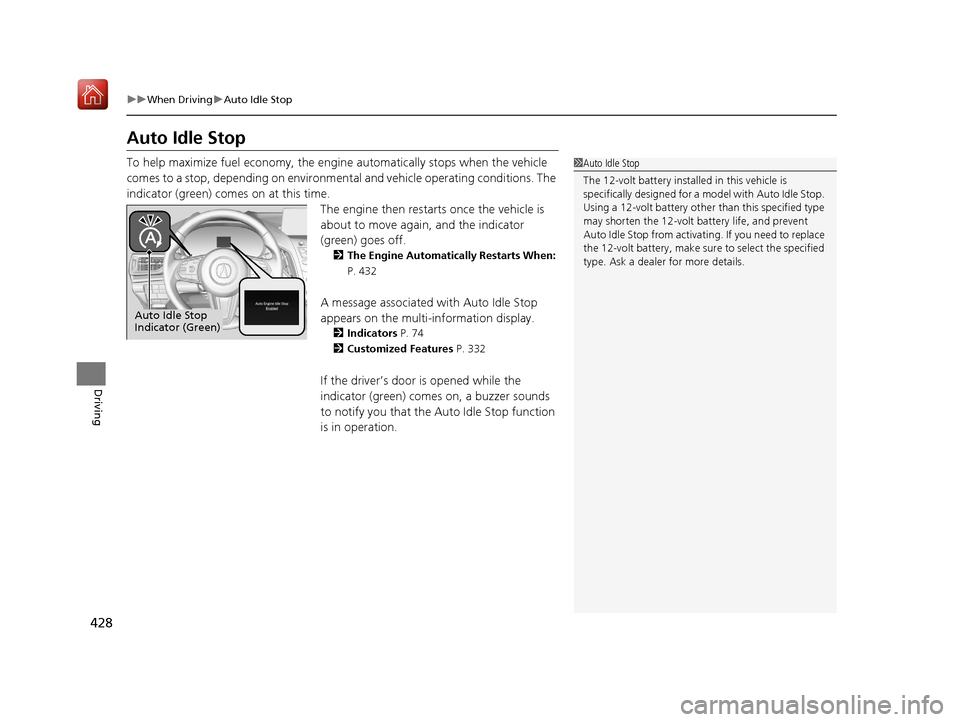
indicator (green) comes on at this time. The engine then restarts once the vehicle is
about to move again, and the indicator
(green) goes off.
2 The Engine Automatically Restarts When:
P. 432
A message associated with Auto Idle Stop
appears on the multi-information display.
2Indicators P. 74
2 Customized Features P. 332
If the driver’s door is opened while the
indicator (green) comes on, a buzzer sounds
to notify you that the Auto Idle Stop function
is in operation.
1Auto Idle Stop
The 12-volt battery insta lled in this vehicle is
specifically designed for a m odel with Auto Idle Stop.
Using a 12-volt battery other than this specified type
may shorten the 12-volt ba ttery life, and prevent
Auto Idle Stop from activati ng. If you need to replace
the 12-volt battery, make sure to select the specified
type. Ask a dealer for more details.
Auto Idle Stop
Indicator (Green)
19 ACURA RDX-31TJB6000.book 428 ページ 2018年4月26日 木曜日 午後4時51分