Change Acura RDX 2019 Owner's Guide
[x] Cancel search | Manufacturer: ACURA, Model Year: 2019, Model line: RDX, Model: Acura RDX 2019Pages: 649, PDF Size: 33 MB
Page 141 of 649
140
uuGauges and Displays uHead-Up Display*
Instrument Panel
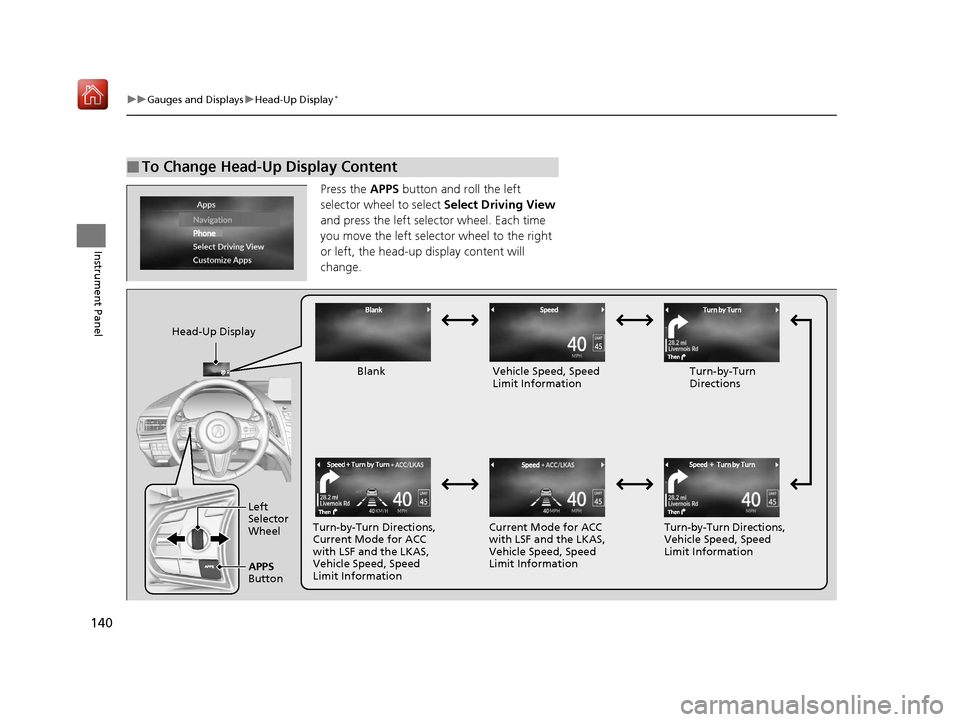
Press the APPS button and roll the left
selector wheel to select Select Driving View
and press the left selector wheel. Each time
you move the left selector wheel to the right
or left, the head-up display content will
change.
■To Change Head-Up Display Content
Head-Up Display
Blank Vehicle Speed, Speed Limit Information Turn-by-Turn
Directions
Turn-by-Turn Directions,
Current Mode for ACC
with LSF and the LKAS,
Vehicle Speed, Speed
Limit Information Current Mode for ACC
with LSF and the LKAS,
Vehicle Speed, Speed
Limit Information
Turn-by-Turn Directions,
Vehicle Speed, Speed
Limit Information
Left
Selector
Wheel
APPS
Button
19 ACURA RDX-31TJB6000.book 140 ページ 2018年4月26日 木曜日 午後4時51分
Page 153 of 649

uuLocking and Unlocking the Doors uLocking/Unlocking the Doors from the Outside
152
Controls
■Locking the doors and tailgate (Walk
away auto lock ®)
When you walk away from the vehicle while
carrying the keyless acce ss remote, the doors
will automatically lock.
The auto lock function activates when all
doors and tailgate are closed, and the keyless
access remote is within about 5 feet (1.5 m)
radius of the outside door handle.
Exit vehicle while carrying keyless access
remote and close door(s).
1. While within about 5 feet (1.5 m) radius of
the vehicle.
u The beeper sounds; the auto lock
function will be activated.
2. Carry the keyless access remote beyond
about 5 feet (1.5 m) from the vehicle and
remain outside this range for 2 or more
seconds.
u Some exterior lights flash; the beeper
sounds; all doors and tailgate will then
lock.1Locking the doors and tailg ate (Walk away auto lock®)
The auto lock function is set to OFF as the factory
default setting. The auto lo ck function can be set to
ON using the audio/information screen.
If you set the auto lock function to ON using the
audio/information screen, only the remote
transmitter that was used to unlock the driver’s door
prior to the setting change can activate auto lock. 2 Customized Features P. 332
After the auto lock function has been activated,
when you stay within the locking/unlocking
operation range, the indica tor on the keyless access
remote will continue to flash until the doors are
locked.
When you stay beside the vehicle within the
operation range, the doors wi ll automatically lock
approximately 30 seconds after the auto lock
function activating beeper sounds.
When you open a door after the auto lock function
activating beeper sounds, the auto lock function will
be delayed until all doors and tailgate are closed.
Under the following circumstances, the auto lock
function will not activate:
•The keyless access remote is inside the vehicle.
•The keyless access remote is taken out of its
operational range be fore all the doors and tailgate
are closed. u The beeper will not sound.
u The beeper will sound.
The activation range of
the auto lock function is
about 5 feet (1.5 m)
19 ACURA RDX-31TJB6000.book 152 ページ 2018年4月26日 木曜日 午後4時51分
Page 156 of 649
Continued155
uuLocking and Unlocking the Doors uLocking/Unlocking the Doors from the Outside
Controls
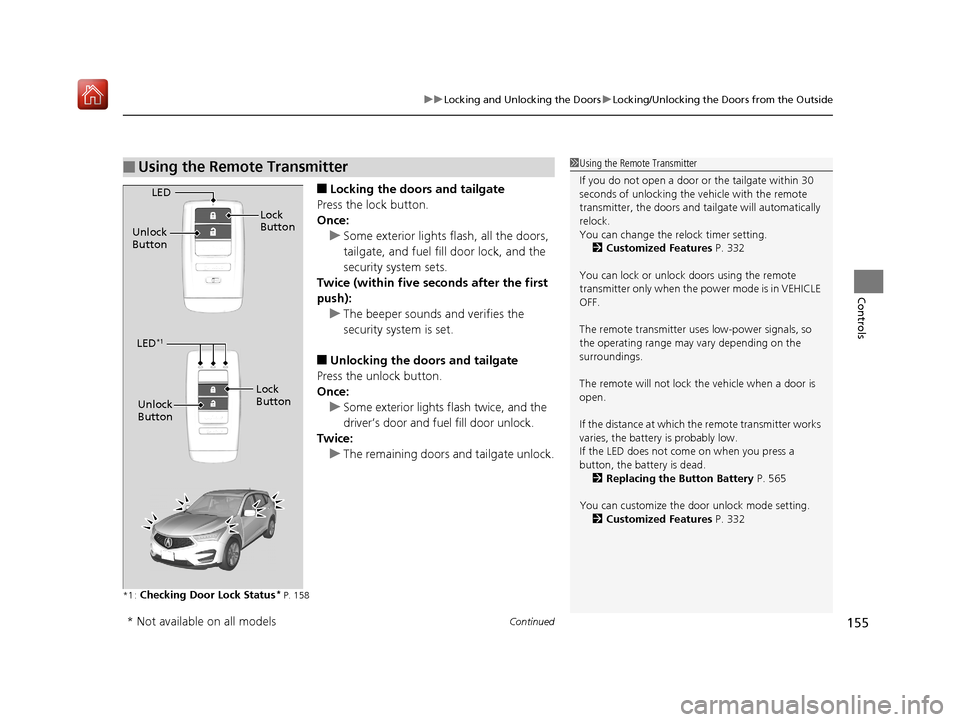
■Locking the doors and tailgate
Press the lock button.
Once: u Some exterior lights flash, all the doors,
tailgate, and fuel fill door lock, and the
security system sets.
Twice (within five se conds after the first
push):
u The beeper sounds and verifies the
security system is set.
■Unlocking the doors and tailgate
Press the unlock button.
Once: u Some exterior lights flash twice, and the
driver’s door and fuel fill door unlock.
Twice:
u The remaining doors and tailgate unlock.
*1 :Checking Door Lock Status* P. 158
■Using the Remote Transmitter1Using the Remote Transmitter
If you do not open a door or the tailgate within 30
seconds of unlocking the vehicle with the remote
transmitter, the doors and ta ilgate will automatically
relock.
You can change the relock timer setting. 2 Customized Features P. 332
You can lock or unlock doors using the remote
transmitter only when the power mode is in VEHICLE
OFF.
The remote transmitter us es low-power signals, so
the operating range may vary depending on the
surroundings.
The remote will not lock th e vehicle when a door is
open.
If the distance at which the remote transmitter works
varies, the batter y is probably low.
If the LED does not come on when you press a
button, the battery is dead.
2 Replacing the Button Battery P. 565
You can customize the door unlock mode setting. 2 Customized Features P. 332
LED
Unlock
Button Lock
Button
LED*1
Unlock
Button
Lock
Button
* Not available on all models
19 ACURA RDX-31TJB6000.book 155 ページ 2018年4月26日 木曜日 午後4時51分
Page 169 of 649

uuOpening and Closing the Tailgate uOpening/Closing the Power Tailgate
168
Controls
If you press the outer handle of the tailgate for
no longer than one second, the tailgate opens
automatically.
u The beeper sounds.
u If you want to open the tailgate
manually, press the button for more than
one second.
2 Opening/Closing the Tailgate P. 172
If you are carrying the keyless access remote,
you do not have to unlock the tailgate before
opening it.
If you press the outer handle again while the
power tailgate is moving, it will stop.
Press the outer handle again, and the power
tailgate will reverse direction.
■Using the Tailgate Outer Handle1Opening/Closing the Power Tailgate
Do not leave the keyless access remote in the cargo
area before closing the tailgate.
Even if you are not carrying the keyless access
remote, you can lock/unl ock the tailgate while
someone else with the remote is within range.
You can change the power tailgate operation setting
on and off. 2 Customized Features P. 332
Outer Handle
19 ACURA RDX-31TJB6000.book 168 ページ 2018年4月26日 木曜日 午後4時51分
Page 175 of 649
uuSecurity System uSecurity System Alarm
174
Controls
■Setting the security system alarm
The security system alarm automatically sets when the following conditions have
been met:
• The power mode is set to VEHICLE OFF (LOCK).
• The hood is closed.
• All doors and the tailgate are locked from outside with the key, remote
transmitter, or keyless access system.
■When the security system alarm sets
The security system alarm indicator in the instrument panel blinks. When the
blinking interval changes after about 15 seconds, the security system alarm is set.
■To cancel the security system alarm
The security system alarm is canceled when the vehicle is unlocked using the remote
transmitter, keyless ac cess system, or the power mode is set to ON. The security
system alarm indicator goe s off at the same time.
1Security System Alarm
Do not set the security system alarm when someone
is in the vehicle or a window is open. The system can
accidentally activate when:
•Unlocking the door with the lock tab.•Opening the hood with the hood release.
If the battery goes dead after you have set the
security system alarm, the security alarm may go off
once the battery is re charged or replaced.
If this occurs, deactivate the security system alarm by
unlocking a door using the key, remote transmitter or
keyless access system.
19 ACURA RDX-31TJB6000.book 174 ページ 2018年4月26日 木曜日 午後4時51分
Page 180 of 649
179Continued
Controls
Panoramic Roof
You can only operate the panoramic roof and sunshade when the power mode is in
ON. Use the switch in the front of the ceiling to open and close the panoramic roof
and sunshade.1Panoramic Roof
NOTICE
Opening the panoramic roof in below freezing
temperature or when it is covered with snow or ice
can damage the panoramic roof panel or motor.
The panoramic roof and s unshade can be operated
for up to 10 minutes after y ou set the power mode to
VEHICLE OFF (LOCK).
Opening either front door cancels this function.
When resistance is detected, the auto reverse
function causes the panoramic roof and sunshade to
change directions, then stop. Auto reverse stops
sensing when the panoramic roof and sunshade are
almost closed to ensure that it fully closes. Make sure
that all objects, including fingers, are clear of the
panoramic roof and sunshade.
3WARNING
Opening or closing the panoramic roof and
sunshade on someone’s hands or fingers
can cause serious injury.
Make sure all hands and fingers are clear of
the panoramic roof and sunshade before
opening or closing it.
19 ACURA RDX-31TJB6000.book 179 ページ 2018年4月26日 木曜日 午後4時51分
Page 185 of 649
uuOperating the Switches Around the Steering Wheel uENGINE START/STOP Button
184
Controls
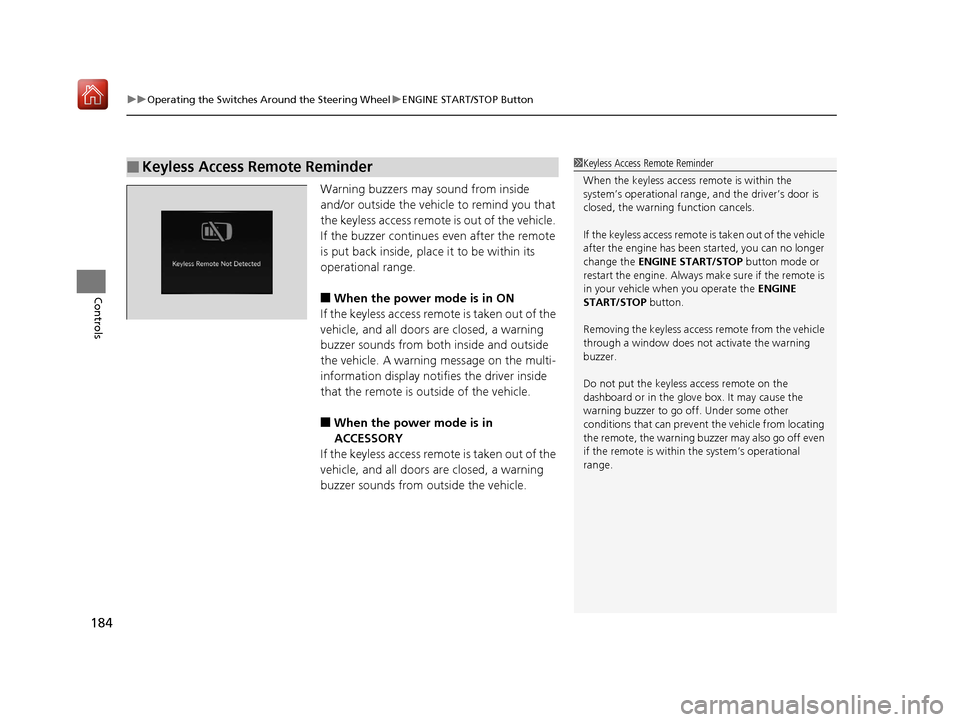
Warning buzzers may sound from inside
and/or outside the vehicle to remind you that
the keyless access remote is out of the vehicle.
If the buzzer continues even after the remote
is put back inside, place it to be within its
operational range.
■When the power mode is in ON
If the keyless access remo te is taken out of the
vehicle, and all doors are closed, a warning
buzzer sounds from both inside and outside
the vehicle. A warning message on the multi-
information display notifies the driver inside
that the remote is outside of the vehicle.
■When the power mode is in
ACCESSORY
If the keyless access remo te is taken out of the
vehicle, and all doors are closed, a warning
buzzer sounds from outside the vehicle.
■Keyless Access Remote Reminder1 Keyless Access Remote Reminder
When the keyless access remote is within the
system’s operational range, and the driver’s door is
closed, the warni ng function cancels.
If the keyless access remote is taken out of the vehicle
after the engine has been started, you can no longer
change the ENGINE START/STOP button mode or
restart the engine. Always make sure if the remote is
in your vehicle when you operate the ENGINE
START/STOP button.
Removing the keyless access remote from the vehicle
through a window does not activate the warning
buzzer.
Do not put the keyless access remote on the
dashboard or in the glove box. It may cause the
warning buzzer to go of f. Under some other
conditions that can prevent the vehicle from locating
the remote, the warning buzzer may also go off even
if the remote is within the system’s operational
range.
19 ACURA RDX-31TJB6000.book 184 ページ 2018年4月26日 木曜日 午後4時51分
Page 186 of 649
185
uuOperating the Switches Around the Steering Wheel uTurn Signals
Controls
Turn Signals
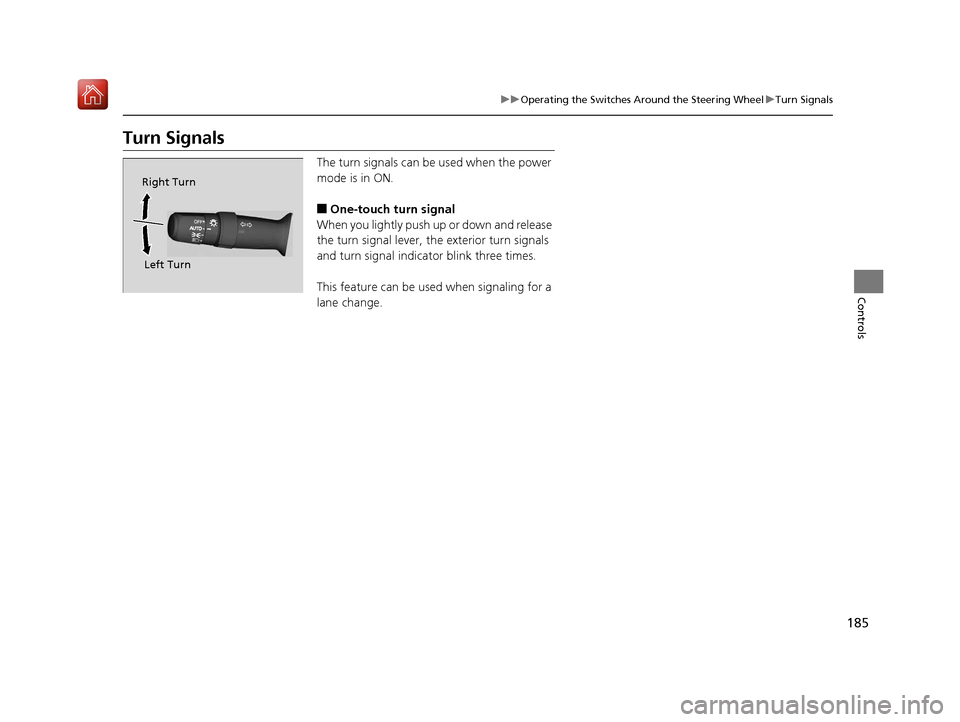
The turn signals can be used when the power
mode is in ON.
■One-touch turn signal
When you lightly push up or down and release
the turn signal lever, th e exterior turn signals
and turn signal indicator blink three times.
This feature can be used when signaling for a
lane change.
Right Turn
Left Turn
19 ACURA RDX-31TJB6000.book 185 ページ 2018年4月26日 木曜日 午後4時51分
Page 188 of 649
Continued187
uuOperating the Switches Around the Steering Wheel uLight Switches
Controls
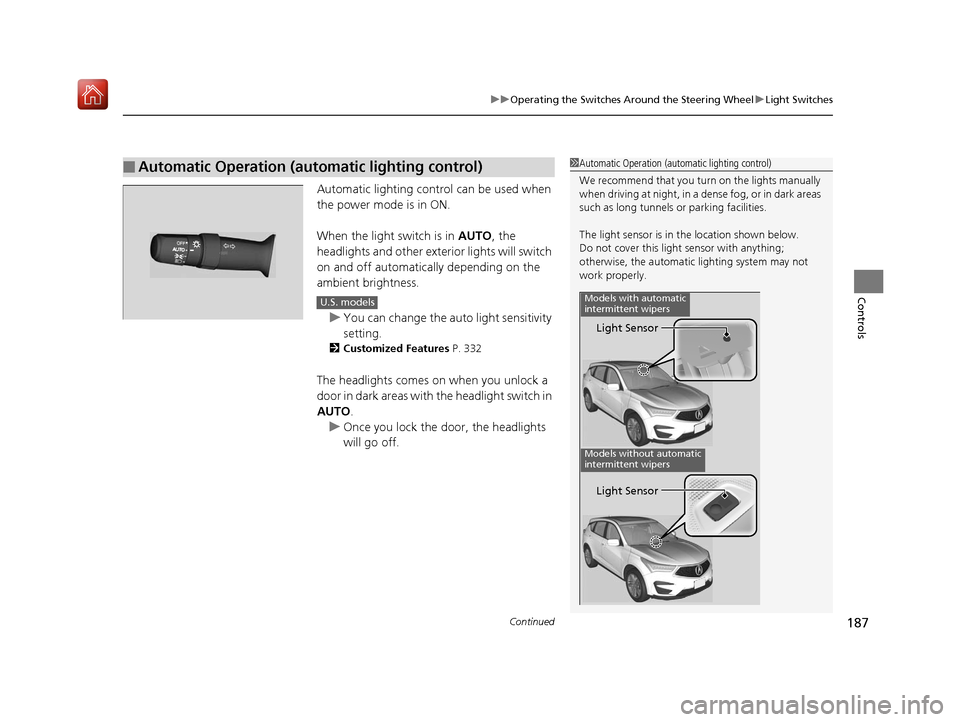
Automatic lighting control can be used when
the power mode is in ON.
When the light switch is in AUTO, the
headlights and other exterior lights will switch
on and off automatically depending on the
ambient brightness.
u You can change the auto light sensitivity
setting.
2 Customized Features P. 332
The headlights comes on when you unlock a
door in dark areas with the headlight switch in
AUTO .
u Once you lock the door, the headlights
will go off.
■Automatic Operation (automatic lighting control)1 Automatic Operation (aut omatic lighting control)
We recommend that you tu rn on the lights manually
when driving at night, in a dense fog, or in dark areas
such as long tunnels or parking facilities.
The light sensor is in the location shown below.
Do not cover this light sensor with anything;
otherwise, the automatic lighting system may not
work properly.
Light Sensor
Models with automatic
intermittent wipers
Models without automatic
intermittent wipers
Light Sensor
U.S. models
19 ACURA RDX-31TJB6000.book 187 ページ 2018年4月26日 木曜日 午後4時51分
Page 189 of 649
uuOperating the Switches Around the Steering Wheel uLight Switches
188
Controls
The headlights automatically co me on when the wipers are used several times within
a certain number of intervals wi th the headlight switch in AUTO.
The headlights automatically go off a few minutes later if the wipers are stopped.
The headlights, all other exterior lights, an d the instrument panel lights turn off 15
seconds after you set the power mode to VE HICLE OFF (LOCK), take the remote with
you, and close th e driver’s door.
If you set the power mode to VEHICLE OFF (LOCK) with the headlight switch on, but
do not open the door, the lights turn off after 10 minutes (3 minutes, if the switch
is in the AUTO position).
The lights turn on again when you unlock or open the driver’s door. If you unlock
the door, but do not open it within 15 seconds, the lights go off. If you open the
driver’s door, you will hear a lights on reminder chime.
■Headlight Integration with Wiper
■Automatic Lighting Off Feature
1Automatic Operation (aut omatic lighting control)
Adjust the auto light sensitivity as follows:
SettingThe exterior lights come on
when the ambient light is at
Max
High
Mid
Low
Min
U.S. models
Bright
Dark
1 Headlight Integration with Wiper
This feature activates while the headlights are off in
AUTO .
The instrument panel br ightness does not change
when the headlights come on.
At dark ambient light levels, the automatic lighting
control feature turns on the headlights, regardless of
the number of wiper sweeps.
1 Automatic Lighting Off Feature
You can change the headlight auto off timer setting.
2 Customized Features P. 332
19 ACURA RDX-31TJB6000.book 188 ページ 2018年4月26日 木曜日 午後4時51分