Change Acura RDX 2019 Workshop Manual
[x] Cancel search | Manufacturer: ACURA, Model Year: 2019, Model line: RDX, Model: Acura RDX 2019Pages: 649, PDF Size: 33 MB
Page 279 of 649
278
uuAudio System Basic Operation uPlaying SiriusXM ® Radio
Features
Playing SiriusXM ® Radio
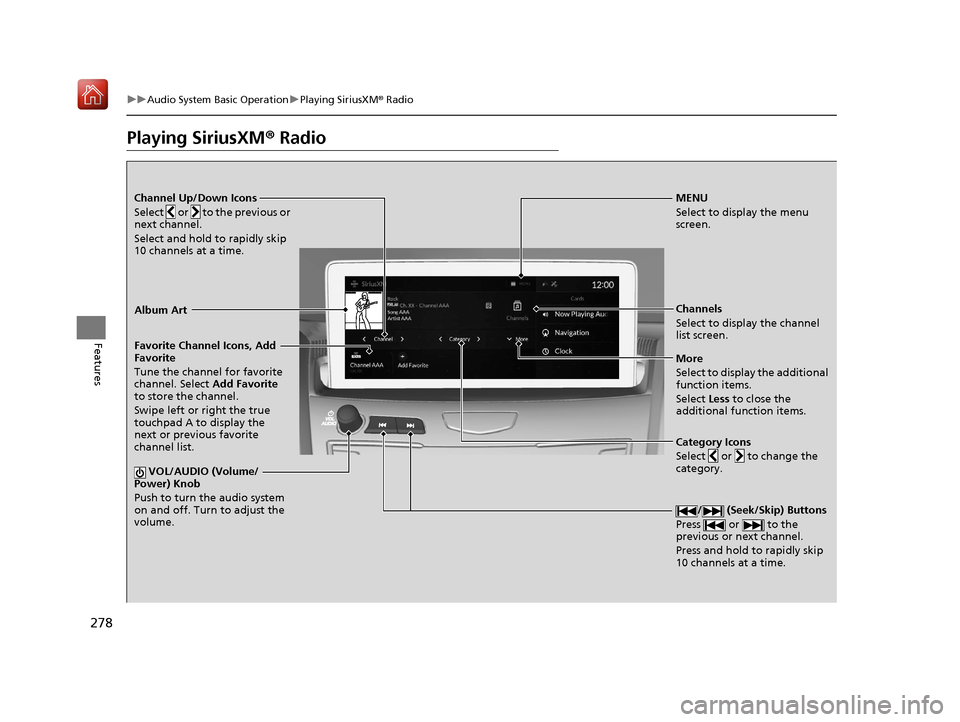
Channel Up/Down Icons
Select or to the previous or
next channel.
Select and hold to rapidly skip
10 channels at a time.MENU
Select to display the menu
screen.
Channels
Select to display the channel
list screen.
More
Select to display the additional
function items.
Select Less to close the
additional function items.
Favorite Channel Icons, Add
Favorite
Tune the channel for favorite
channel. Select
Add Favorite
to store the channel.
Swipe left or right the true
touchpad A to display the
next or previous favorite
channel list.
VOL/AUDIO (Volume/
Power) Knob
Push to turn the audio system
on and off. Turn to adjust the
volume.
/ (Seek/Skip) Buttons
Press or to the
previous or next channel.
Press and hold to rapidly skip
10 channels at a time.
Album Art
Category Icons
Select or to change the
category.
19 ACURA RDX-31TJB6000.book 278 ページ 2018年4月26日 木曜日 午後4時51分
Page 280 of 649

Continued279
uuAudio System Basic Operation uPlaying SiriusXM ® Radio
Features
1. Select MENU .
2. Select SiriusXM Settings.
3. Select Tune Mode .
4. Select All Channels or Within Category .
■To Change the Tune Mode1Playing SiriusXM ® Radio
In the channel mode, all available channels are
selectable. In the categor y mode, you can select a
channel within a ca tegory (Jazz, Rock, Classical, etc.).
There may be instances when SiriusXM ® Radio does
not broadcast all the data fi elds (artist name, title).
This does not indicate a problem with your audio
system.
SiriusXM ® Radio stations load in ascending order,
which can take about a minute. Once they have
loaded you will be able to scroll up or down to make
your selections.
Switching the Audio Mode
Press the APPS button on the steering wheel, then
select an item or select the audio source icon on the
home screen. 2 Audio Remote Controls P. 243
Tune Start:
When you change to a favo rite channel, a song being
played on that channel restarts from the beginning
with this function. This can be turned on or off by the
following procedure.
1. Select MENU.
2. Select SiriusXM Settings .
3. Select Tune Start .
4. Select On or Off.
To change a category, select Category icons, or
select Channels and then select category item.
19 ACURA RDX-31TJB6000.book 279 ページ 2018年4月26日 木曜日 午後4時51分
Page 288 of 649
Continued287
uuAudio System Basic Operation uPlaying SiriusXM ® Radio
Features
You can view a channel schedule or receiv e a alert when your favorite program is
about to start.
■To view a channel schedule
1. Select MENU .
2. Select Channel Schedule .
■To set up an alert message
1. Select MENU .
2. Select Channel Schedule .
3. Select a program.
4. Select Set Program Alert .
5. Select One Time or Every Time .
■Channel Schedule1Channel Schedule
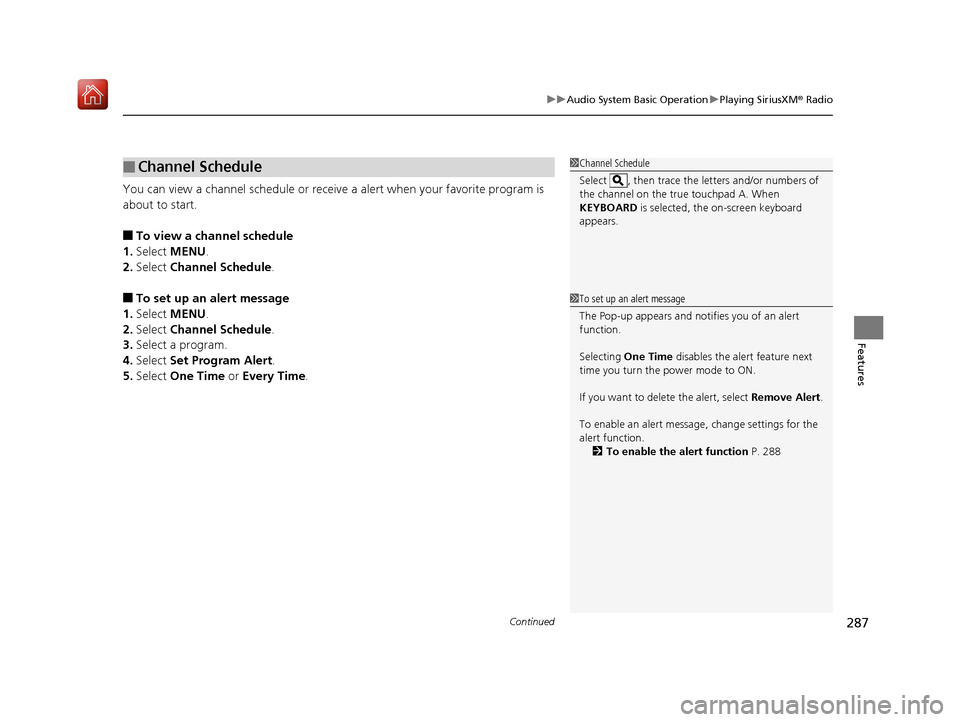
Select , then trace the le tters and/or numbers of
the channel on the true touchpad A. When
KEYBOARD is selected, the on-screen keyboard
appears.
1 To set up an alert message
The Pop-up appears and not ifies you of an alert
function.
Selecting One Time disables the alert feature next
time you turn the power mode to ON.
If you want to delete the alert, select Remove Alert.
To enable an alert message, change settings for the
alert function. 2 To enable the alert function P. 288
19 ACURA RDX-31TJB6000.book 287 ページ 2018年4月26日 木曜日 午後4時51分
Page 289 of 649
288
uuAudio System Basic Operation uPlaying SiriusXM ® Radio
Features
You can change settings for the alert function.
■To enable the alert function
1. Select MENU .
2. Select SiriusXM Settings .
3. Select Manage Program Alerts.
4. Select Notifications.
5. Select On or Off .
■To remove an alert
1. Select MENU .
2. Select SiriusXM Settings .
3. Select Manage Program Alerts.
4. Select Alerts Set .
5. Select an item you want to delete.
u A confirmation message appears on the screen. Select Delete.
■Manage Program Alert
19 ACURA RDX-31TJB6000.book 288 ページ 2018年4月26日 木曜日 午後4時51分
Page 290 of 649
Continued289
uuAudio System Basic Operation uPlaying SiriusXM ® Radio
Features
Sample each channel on the selected mode for 10 seconds.
1. Select More.
2. Select Scan.
You can change a scan mode by the following procedure.
1. Select MENU .
2. Select SiriusXM Settings.
3. Select Scan Mode .
4. Select Channels or Favorites.
To turn off scan, select Stop.
■Scan1Scan
The favorites scan func tion is based on TuneScan
TM
technology of SiriusXM ®.
The “Featured Channels ” function is based on
Featured Favorites
TM technology of SiriusXM ®.
TuneScan
TM and Featured FavoritesTM are registered
trademarks of SiriusXM ® Radio, Inc.
19 ACURA RDX-31TJB6000.book 289 ページ 2018年4月26日 木曜日 午後4時51分
Page 291 of 649
290
uuAudio System Basic Operation uPlaying SiriusXM ® Radio
Features
You can set the SiriusXM ® notifications setting for receiving a SiriusXM ® notification.
1. Select MENU .
2. Select SiriusXM Notifications .
3. Select On.
Change the SiriusXM ® settings.
1. Select MENU .
2. Select SiriusXM Settings .
3. Select an option.
• Tune Mode: Choose whether to group by category or channel number when
changing channels.
• Scan Mode: Select the scan mode from all channels or favorites.
• Tune Start: Start the currently playing song at the beginning when you switch to
a music channel favorite.
• Sports Notifi cation Setup: Set to receive sports alerts such as scores from your
favorite teams.
2 Live Sports Alert P. 284
•Traffic & Weather Setup: Set to receive traffic and weather information.
2Traffic and Weather Information P. 286
•Manage Program Alerts: Change settings for the alert function.
2Manage Program Alert P. 288
■SiriusXM Notifications Setting
■SiriusXM Settings
19 ACURA RDX-31TJB6000.book 290 ページ 2018年4月26日 木曜日 午後4時51分
Page 292 of 649
291
uuAudio System Basic Operation uPlaying an iPod
Continued
Features
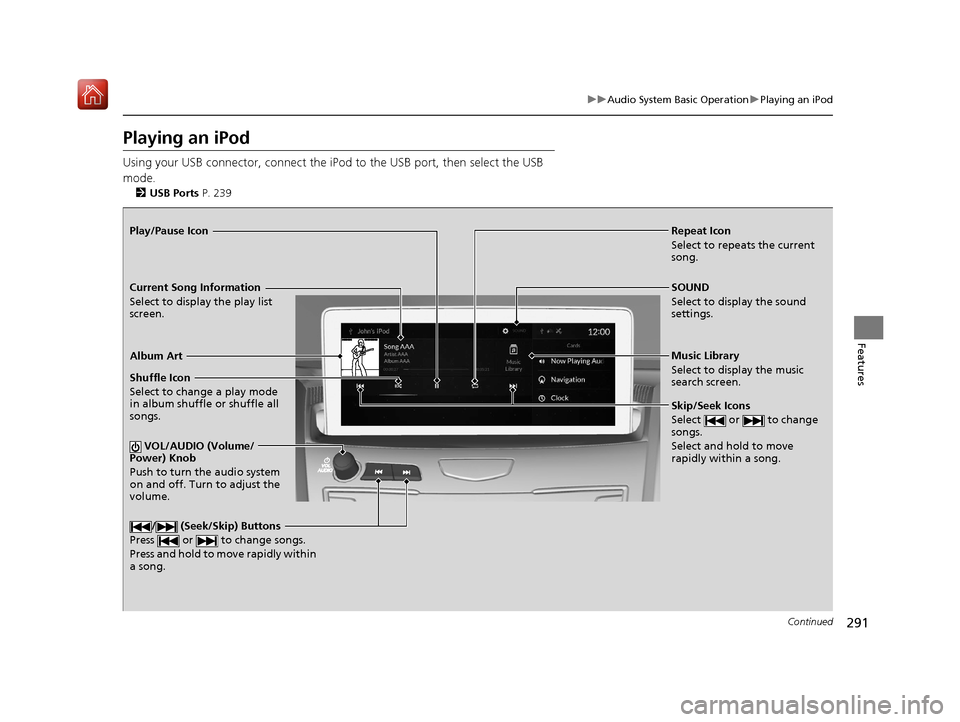
Playing an iPod
Using your USB connector, connect the iPod to the USB port, then select the USB
mode.
2 USB Ports P. 239
Repeat Icon
Select to repeats the current
song.
SOUND
Select to display the sound
settings.
Music Library
Select to display the music
search screen.
Skip/Seek Icons
Select or to change
songs.
Select and hold to move
rapidly within a song.
Shuffle Icon
Select to change a play mode
in album shuffle or shuffle all
songs.
VOL/AUDIO (Volume/
Power) Knob
Push to turn the audio system
on and off. Turn to adjust the
volume.
/ (Seek/Skip) Buttons
Press or to change songs.
Press and hold to move rapidly within
a song.
Play/Pause Icon
Album Art
Current Song Information
Select to display the play list
screen.
19 ACURA RDX-31TJB6000.book 291 ページ 2018年4月26日 木曜日 午後4時51分
Page 294 of 649
293
uuAudio System Basic Operation uPlaying an iPod
Features
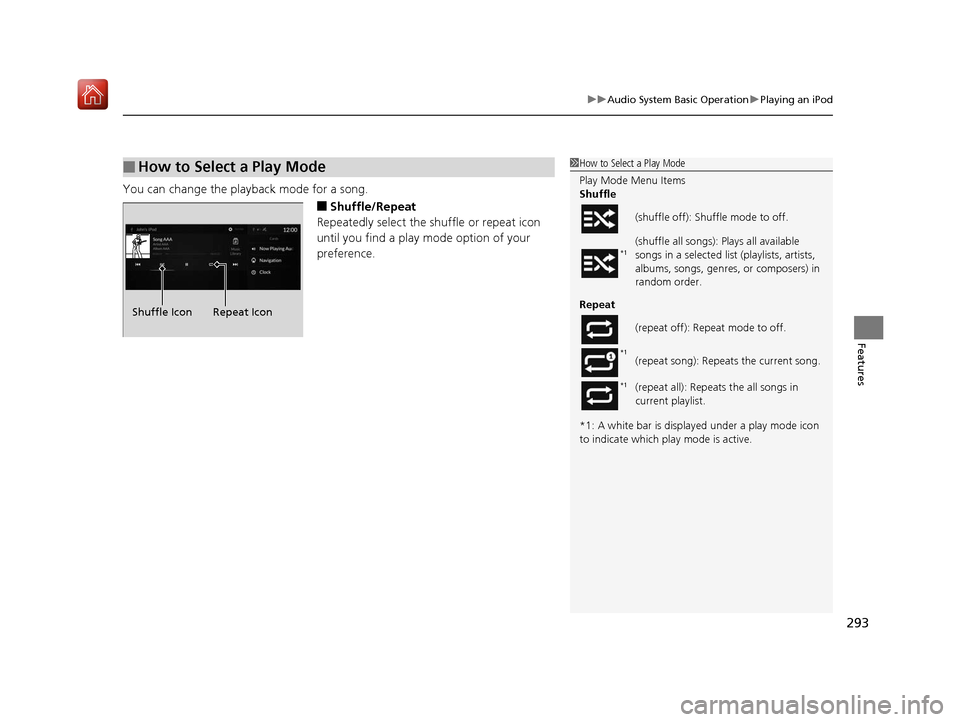
You can change the playback mode for a song.
■Shuffle/Repeat
Repeatedly select the shuffle or repeat icon
until you find a play mode option of your
preference.
■How to Select a Play Mode1 How to Select a Play Mode
Play Mode Menu Items
Shuffle
Repeat
*1: A white bar is displa yed under a play mode icon
to indicate which pl ay mode is active.
(shuffle off): Shuffle mode to off.
(shuffle all songs): Pl
ays all available
songs in a selected list (playlists, artists,
albums, songs, genres, or composers) in
random order.
(repeat off): Repe at mode to off.
(repeat song): Repeats the current song.
(repeat all): Repeat s the all songs in
current playlist.
*1
*1
*1
Shuffle Icon Repeat Icon
19 ACURA RDX-31TJB6000.book 293 ページ 2018年4月26日 木曜日 午後4時51分
Page 295 of 649
294
uuAudio System Basic Operation uPlaying a USB Flash Drive
Features
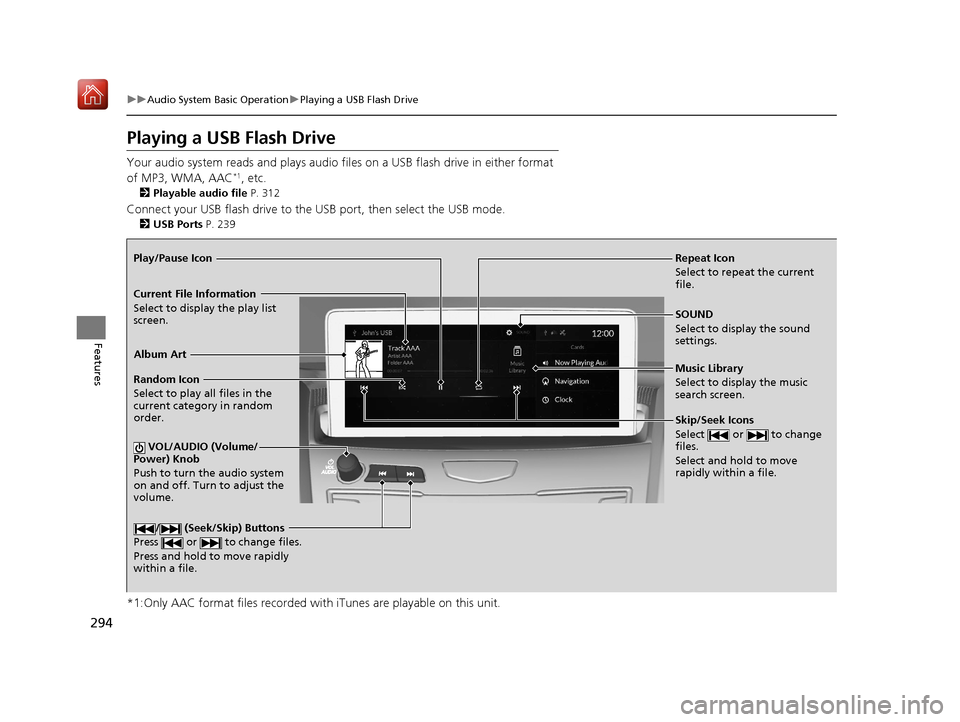
Playing a USB Flash Drive
Your audio system reads and plays audio file s on a USB flash drive in either format
of MP3, WMA, AAC*1, etc.
2 Playable audio file P. 312
Connect your USB flash drive to the USB port, then select the USB mode.
2USB Ports P. 239
*1:Only AAC format files recorded with iTunes are playable on this unit.
Repeat Icon
Select to repeat the current
file.
SOUND
Select to display the sound
settings.
Music Library
Select to display the music
search screen.
Skip/Seek Icons
Select or to change
files.
Select and hold to move
rapidly within a file.
Random Icon
Select to play all files in the
current category in random
order.
VOL/AUDIO (Volume/
Power) Knob
Push to turn the audio system
on and off. Turn to adjust the
volume.
/ (Seek/Skip) Buttons
Press or to change files.
Press and hold to move rapidly
within a file.
Play/Pause Icon
Album Art
Current File Information
Select to display the play list
screen.
19 ACURA RDX-31TJB6000.book 294 ページ 2018年4月26日 木曜日 午後4時51分
Page 298 of 649
297
uuAudio System Basic Operation uPlaying Bluetooth ® Audio
Continued
Features
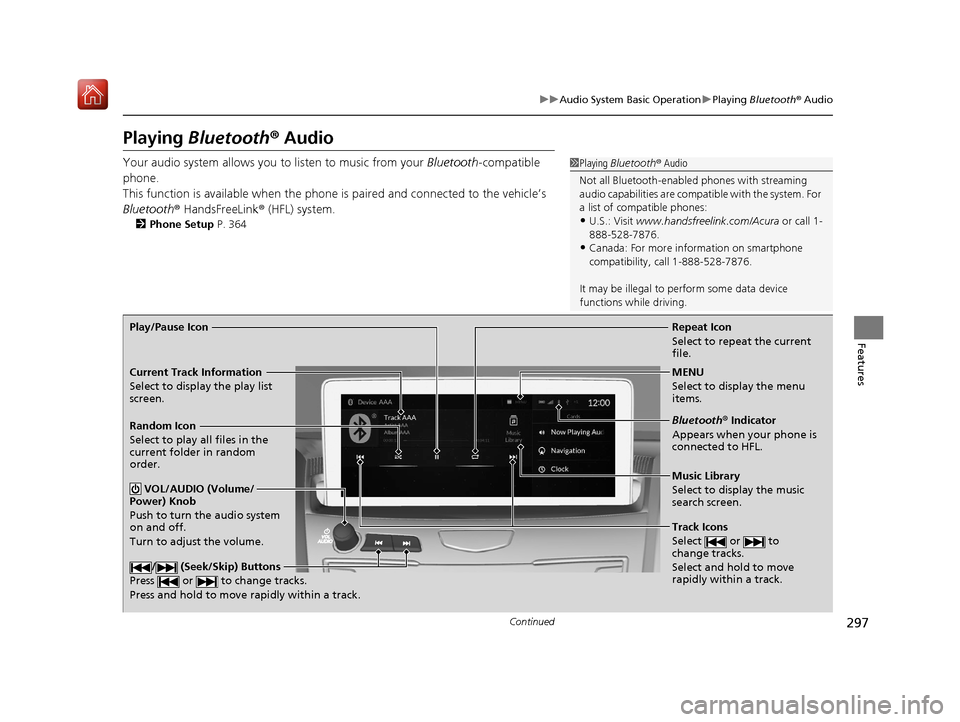
Playing Bluetooth ® Audio
Your audio system allows you to listen to music from your Bluetooth-compatible
phone.
This function is available when the phone is paired an d connected to the vehicle’s
Bluetooth ® HandsFreeLink ® (HFL) system.
2Phone Setup P. 364
1Playing Bluetooth ® Audio
Not all Bluetooth-enable d phones with streaming
audio capabilities are compat ible with the system. For
a list of compatible phones:
•U.S.: Visit www.handsfreelink.com/Acura or call 1-
888-528-7876.
•Canada: For more info rmation on smartphone
compatibility, call 1-888-528-7876.
It may be illegal to pe rform some data device
functions while driving.
Repeat Icon
Select to repeat the current
file.
Music Library
Select to display the music
search screen.
Track Icons
Select or to
change tracks.
Select and hold to move
rapidly within a track.
Random Icon
Select to play all files in the
current folder in random
order.
VOL/AUDIO (Volume/
Power) Knob
Push to turn the audio system
on and off.
Turn to adjust the volume.
/ (Seek/Skip) Buttons
Press or to change tracks.
Press and hold to move rapidly within a track.
Play/Pause Icon
MENU
Select to display the menu
items.
Bluetooth® Indicator
Appears when your phone is
connected to HFL.
Current Track Information
Select to display the play list
screen.
19 ACURA RDX-31TJB6000.book 297 ページ 2018年4月26日 木曜日 午後4時51分