on mode Acura RDX 2020 Owner's Manual
[x] Cancel search | Manufacturer: ACURA, Model Year: 2020, Model line: RDX, Model: Acura RDX 2020Pages: 657, PDF Size: 33.2 MB
Page 315 of 657
314
uuGeneral Information on the Audio System uCompatible iPod, iPad, iPhone, and USB Flash Drives
Features
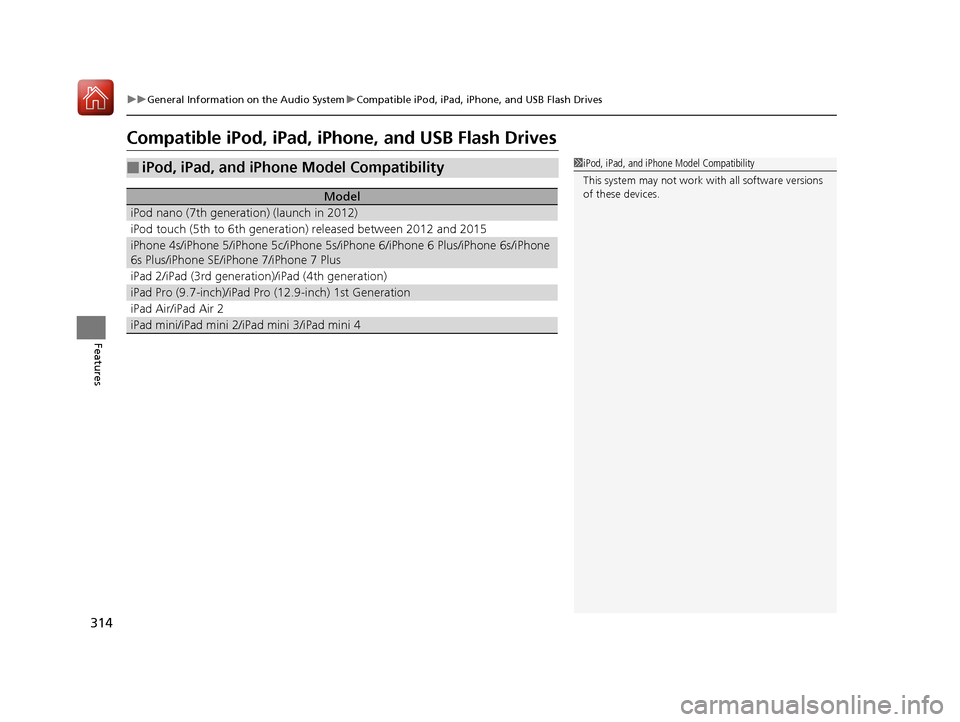
Compatible iPod, iPad, iPhone, and USB Flash Drives
■iPod, iPad, and iPhone Model Compatibility
Model
iPod nano (7th generation) (launch in 2012)
iPod touch (5th to 6th generation) released between 2012 and 2015
iPhone 4s/iPhone 5/iPhone 5c/iPhone 5s/i Phone 6/iPhone 6 Plus/iPhone 6s/iPhone
6s Plus/iPhone SE/iPhone 7/iPhone 7 Plus
iPad 2/iPad (3rd generation)/iPad (4th generation)
iPad Pro (9.7-inch)/iPad Pr o (12.9-inch) 1st Generation
iPad Air/iPad Air 2
iPad mini/iPad mini 2/iPad mini 3/iPad mini 4
1iPod, iPad, and iPhone Model Compatibility
This system may not work with all software versions
of these devices.
20 ACURA RDX-31TJB6111.book 314 ページ 2020年2月11日 火曜日 午後2時6分
Page 336 of 657
335Continued
Features
Customized Features
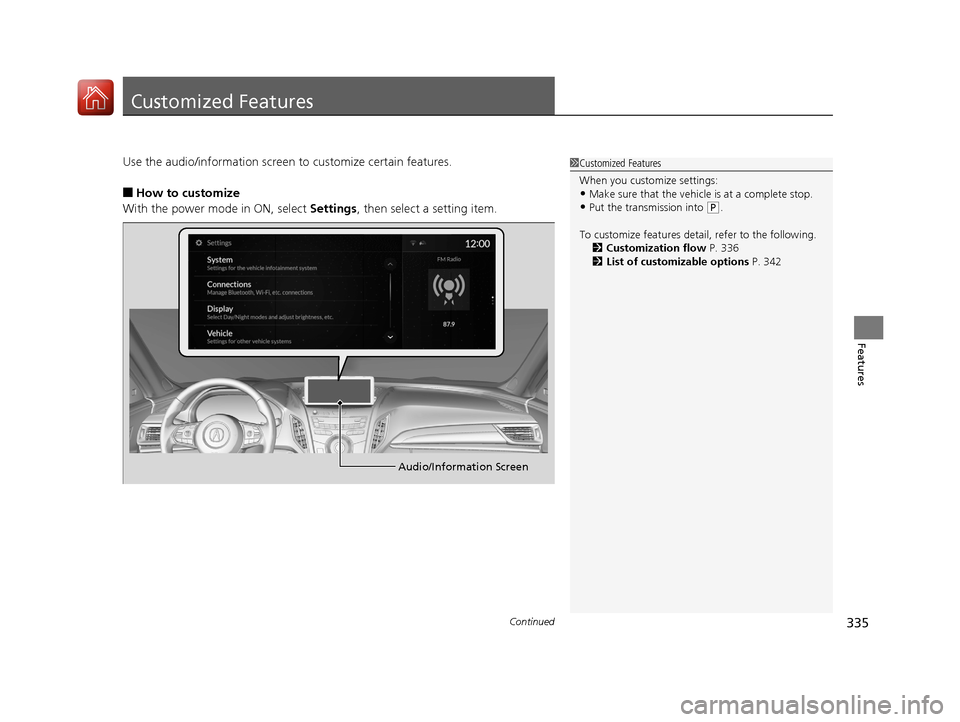
Use the audio/information screen to customize certain features.
■How to customize
With the power mode in ON, select Settings, then select a setting item.
1Customized Features
When you customize settings:
•Make sure that the vehicle is at a complete stop.
•Put the transmission into (P.
To customize features detail, refer to the following. 2 Customization flow P. 336
2 List of customizable options P. 342
Audio/Information Screen
20 ACURA RDX-31TJB6111.book 335 ページ 2020年2月11日 火曜日 午後2時6分
Page 338 of 657
337
uuCustomized Features u
Continued
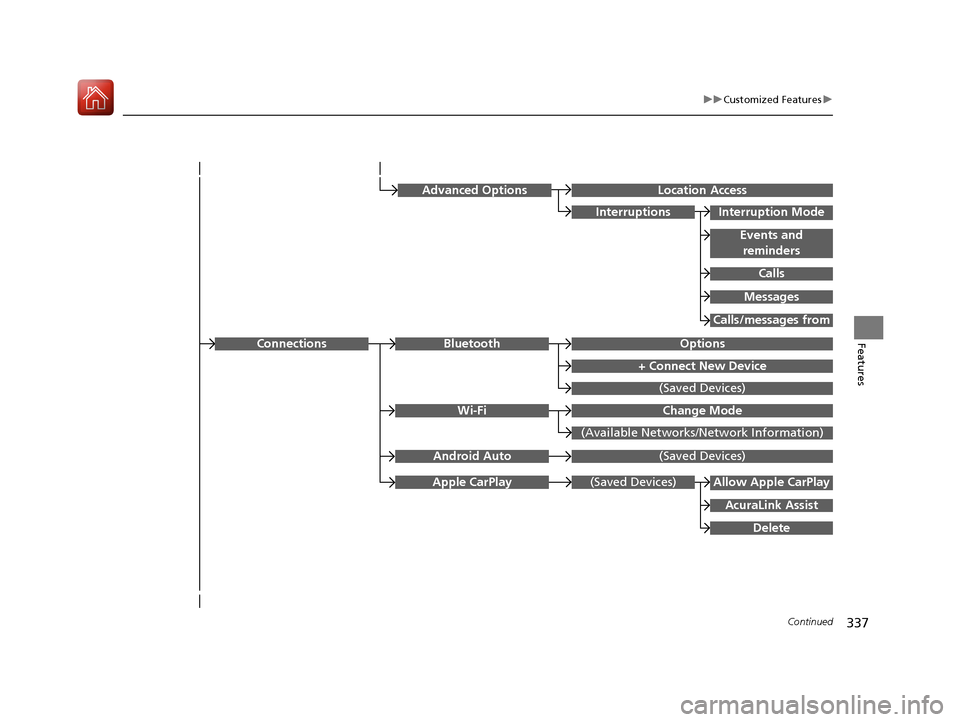
FeaturesOptionsBluetooth
+ Connect New Device
(Saved Devices)
Change Mode
(Available Networks/N etwork Information)
Wi-Fi
Connections
(Saved Devices)
AcuraLink Assist
Allow Apple CarPlay
Delete
Apple CarPlay
Advanced OptionsLocation Access
Events and
reminders
Interruption Mode
Calls
Interruptions
Messages
Calls/messages from
(Saved Devices)Android Auto
20 ACURA RDX-31TJB6111.book 337 ページ 2020年2月11日 火曜日 午後2時6分
Page 339 of 657
338
uuCustomized Features u
Features
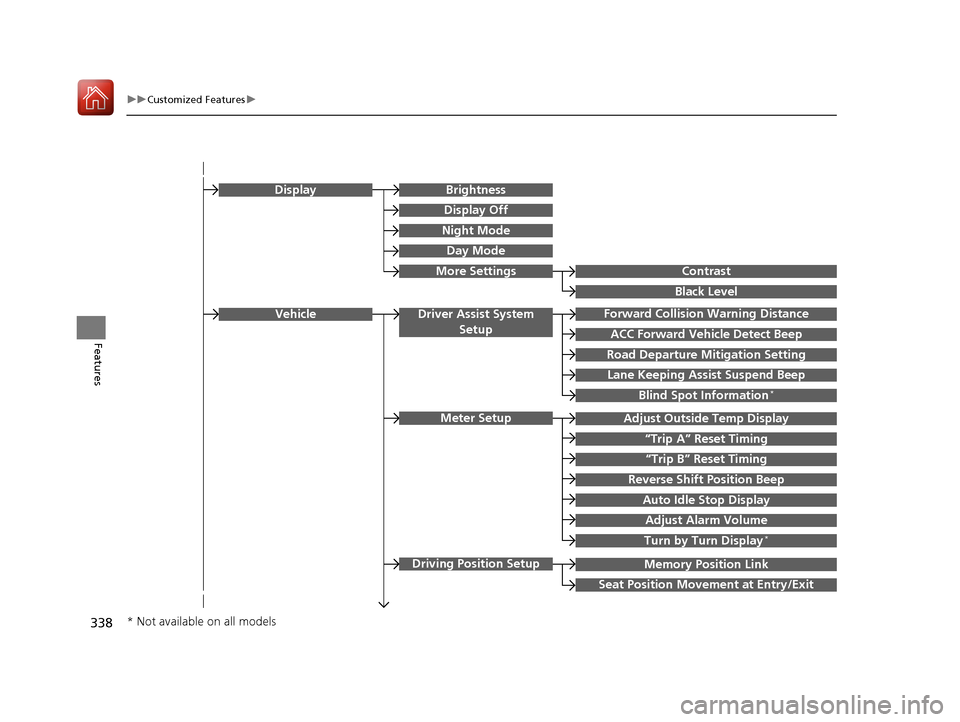
Memory Position Link
“Trip B” Reset Timing
Seat Position Movement at Entry/Exit
Adjust Outside Temp Display
“Trip A” Reset Timing
Meter Setup
Vehicle
Driving Position Setup
Reverse Shift Position Beep
Auto Idle Stop Display
Adjust Alarm Volume
Turn by Turn Display*
Road Departure Mitigation Setting
Forward Collision Warning Distance
ACC Forward Vehicle Detect Beep
Lane Keeping Assist Suspend Beep
Blind Spot Information*
Driver Assist System
Setup
Night Mode
Day Mode
BrightnessDisplay
Contrast
Black Level
More Settings
Display Off
* Not available on all models
20 ACURA RDX-31TJB6111.book 338 ページ 2020年2月11日 火曜日 午後2時6分
Page 340 of 657
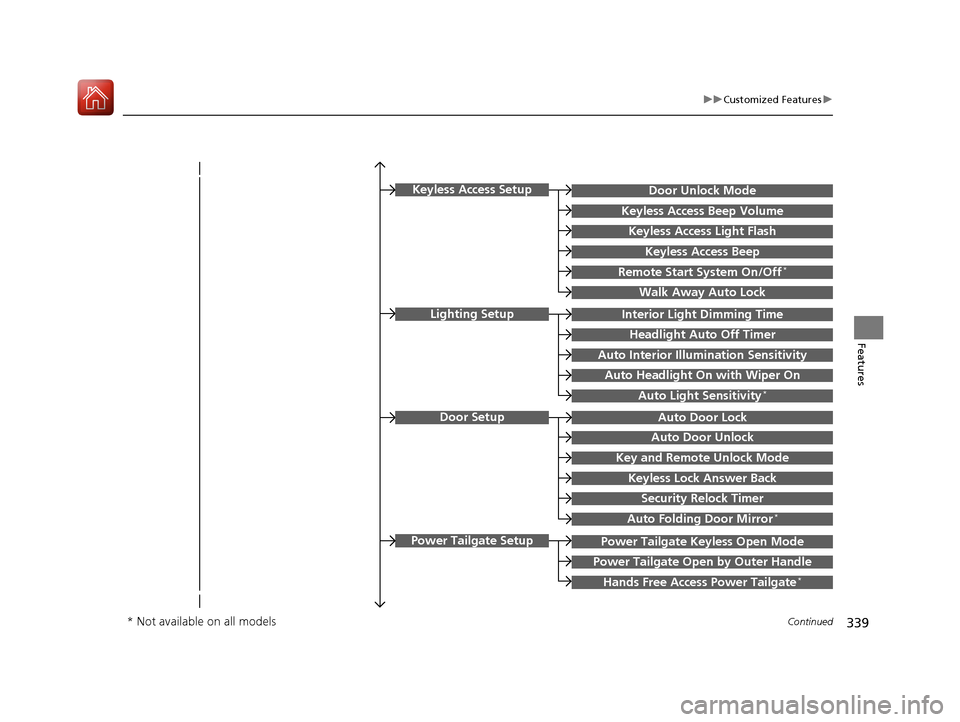
339
uuCustomized Features u
Continued
Features
Key and Remote Unlock Mode
Auto Door Lock
Auto Door Unlock
Door Setup
Keyless Lock Answer Back
Security Relock Timer
Interior Light Dimming Time
Headlight Auto Off Timer
Auto Interior Illu mination Sensitivity
Auto Headlight On with Wiper On
Auto Light Sensitivity*
Lighting Setup
Auto Folding Door Mirror*
Power Tailgate Keyless Open Mode
Power Tailgate Open by Outer Handle
Hands Free Access Power Tailgate*
Power Tailgate Setup
Door Unlock Mode
Keyless Access Beep Volume
Keyless Access Light Flash
Keyless Access Beep
Remote Start System On/Off*
Walk Away Auto Lock
Keyless Access Setup
* Not available on all models
20 ACURA RDX-31TJB6111.book 339 ページ 2020年2月11日 火曜日 午後2時6分
Page 341 of 657
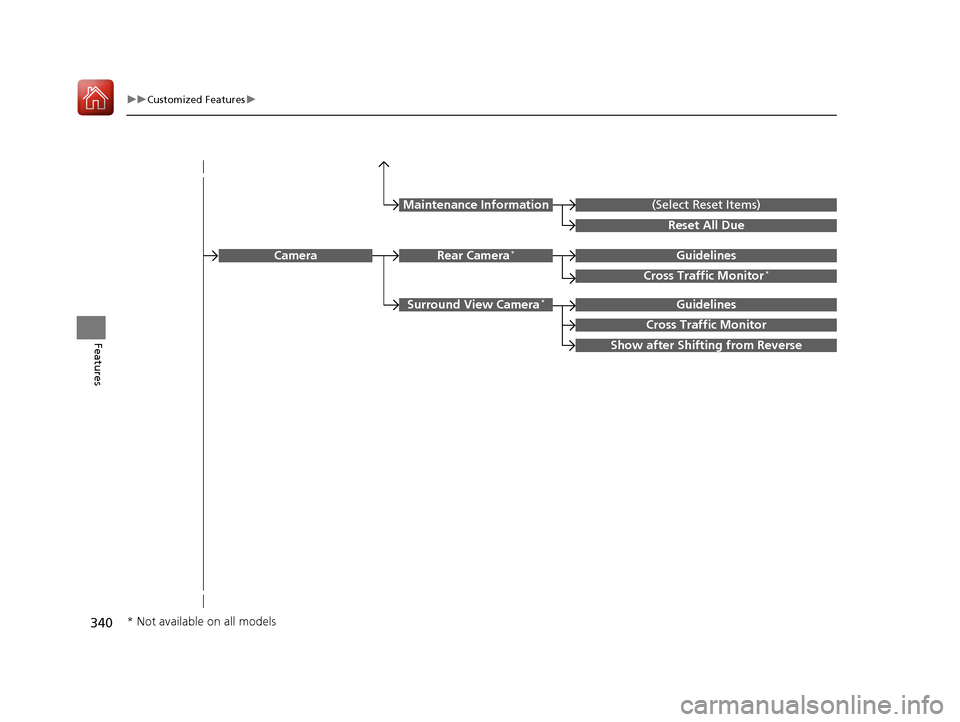
340
uuCustomized Features u
Features
Guidelines
Cross Traffic Monitor*
Guidelines
Cross Traffic Monitor
Rear Camera*Camera
Surround View Camera*
Show after Shifting from Reverse
(Select Reset Items)Maintenance Information
Reset All Due
* Not available on all models
20 ACURA RDX-31TJB6111.book 340 ページ 2020年2月11日 火曜日 午後2時6分
Page 342 of 657

341
uuCustomized Features u
Continued
Features
Rear Only
Reset to Default
Front Only
Full Vehicle
Driver Only
Roof Speaker Volume
Center Speaker Volume
Reset to Default
Roof / Center Volume*
Sound
Speed Volume
Compensation
DTS Neural Surround*
Notifications
Compressed Audio
Enhancement*
Treble
Midrange
Bass
Bass / Treble
Center Speaker Volume
Reset to Default
Center Volume*
Reset to Default
Audio Zones & Balance /
Fader*
Reset to DefaultBalance / Fader*
* Not available on all models
20 ACURA RDX-31TJB6111.book 341 ページ 2020年2月11日 火曜日 午後2時6分
Page 344 of 657
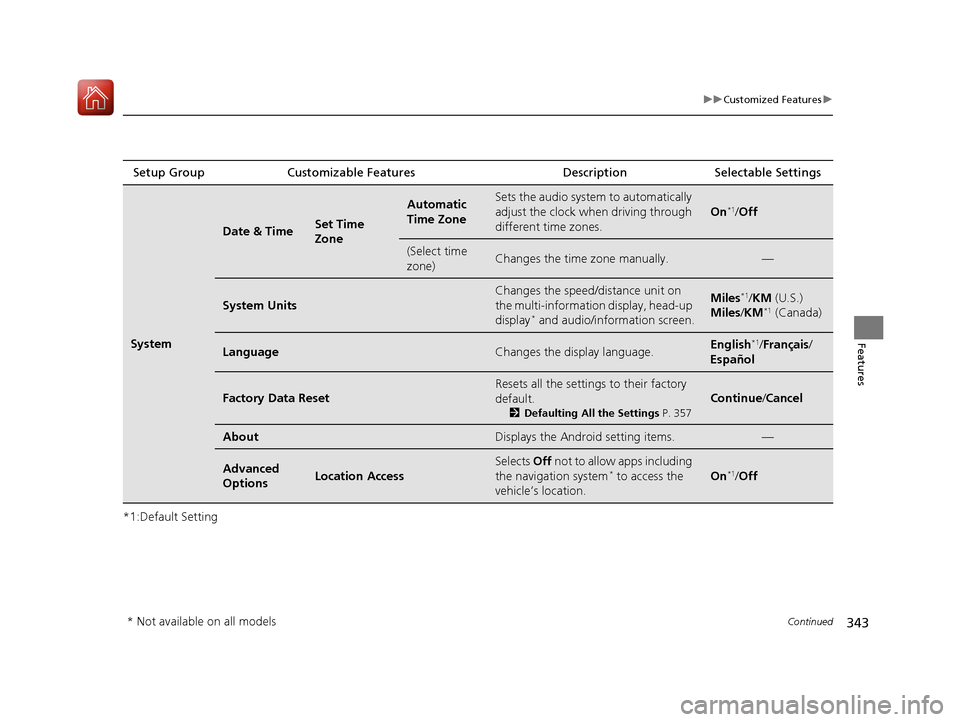
343
uuCustomized Features u
Continued
Features
*1:Default SettingSetup Group Customizable Features
Description Selectable Settings
System
Date & TimeSet Time
Zone
Automatic
Time ZoneSets the audio system to automatically
adjust the clock when driving through
different time zones.
On*1/Off
(Select time
zone)Changes the time zone manually.—
System Units
Changes the speed/distance unit on
the multi-information display, head-up
display
* and audio/information screen.
Miles*1/KM (U.S.)
Miles/ KM*1 (Canada)
LanguageChanges the display language.English*1/Français /
Español
Factory Data Reset
Resets all the settings to their factory
default.
2 Defaulting All the Settings P. 357
Continue/Cancel
AboutDisplays the Android setting items.—
Advanced
OptionsLocation Access
Selects Off not to allow apps including
the navigation system* to access the
vehicle’s location.On*1/ Off
* Not available on all models
20 ACURA RDX-31TJB6111.book 343 ページ 2020年2月11日 火曜日 午後2時6分
Page 345 of 657
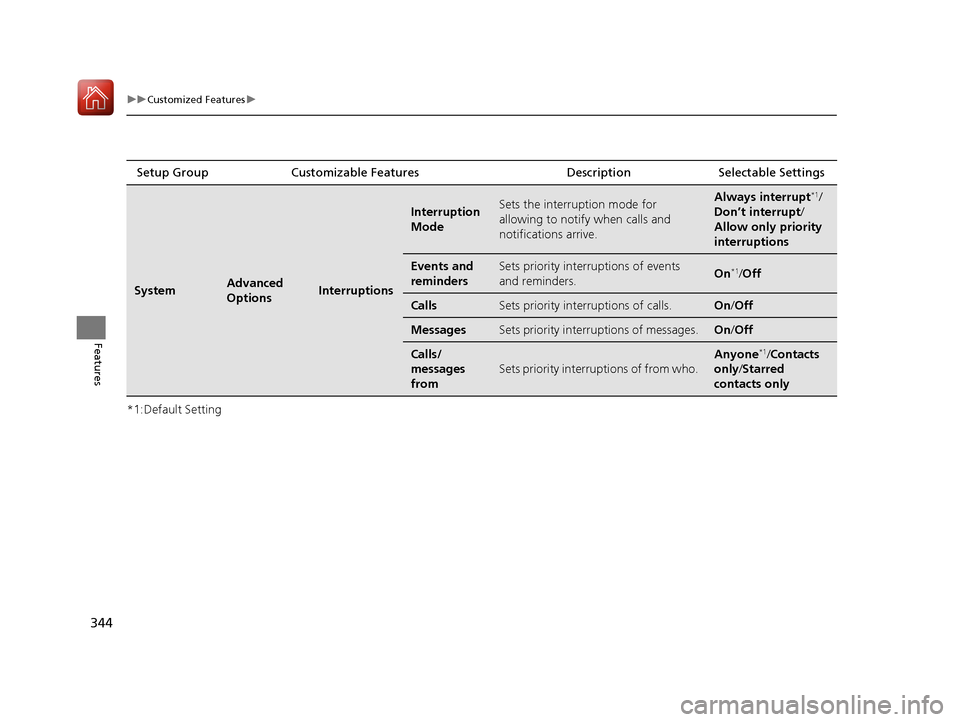
344
uuCustomized Features u
Features
*1:Default SettingSetup Group Customizable Features Description Selectable Settings
SystemAdvanced
OptionsInterruptions
Interruption
ModeSets the interruption mode for
allowing to notify when calls and
notifications arrive.Always interrupt*1/
Don’t interrupt/
Allow only priority
interruptions
Events and
remindersSets priority interruptions of events
and reminders.On*1/ Off
CallsSets priority interruptions of calls.On /Off
MessagesSets priority interruptions of messages.On /Off
Calls/
messages
from
Sets priority interruptions of from who.
Anyone*1/Contacts
only /Starred
contacts only
20 ACURA RDX-31TJB6111.book 344 ページ 2020年2月11日 火曜日 午後2時6分
Page 347 of 657
346
uuCustomized Features u
Features
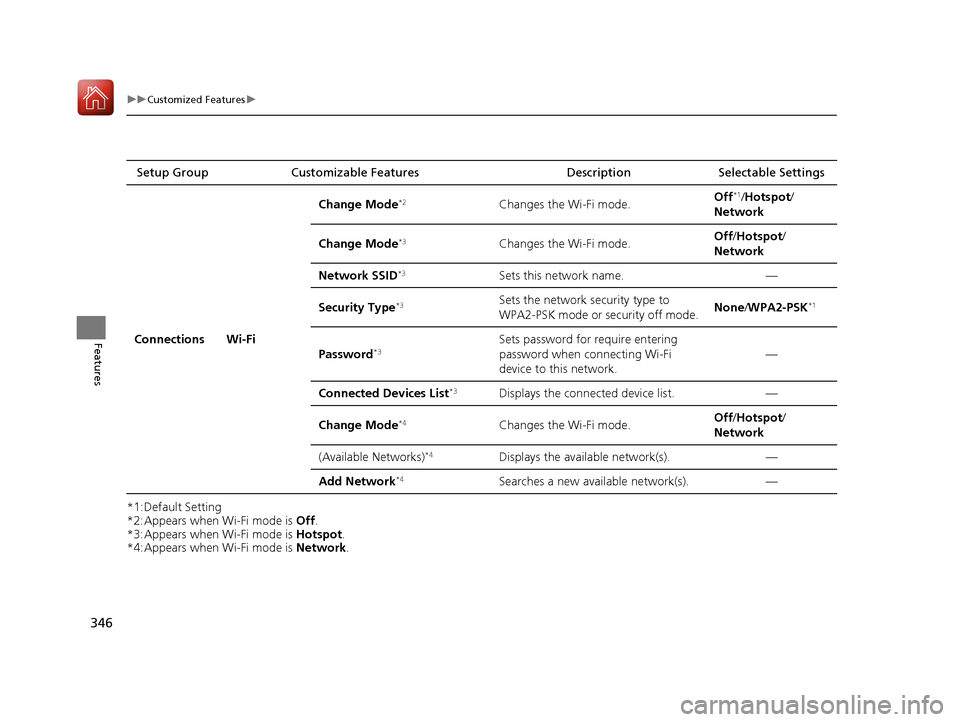
*1:Default Setting
*2:Appears when Wi-Fi mode is Off.
*3:Appears when Wi-Fi mode is Hotspot.
*4:Appears when Wi-Fi mode is Network.
Setup Group
Customizable Features DescriptionSelectable Settings
Connections Wi-Fi Change Mode
*2Changes the Wi-Fi mode.
Off*1/
Hotspot /
Network
Change Mode
*3Changes the Wi-Fi mode. Off
/Hotspot/
Network
Network SSID
*3Sets this network name. —
Security Type
*3Sets the network security type to
WPA2-PSK mode or security off mode. None
/WPA2-PSK*1
Password*3Sets password for require entering
password when connecting Wi-Fi
device to this network. —
Connected Devices List
*3Displays the connected device list. —
Change Mode
*4Changes the Wi-Fi mode. Off
/Hotspot/
Network
(Available Networks)
*4Displays the available network(s). —
Add Network
*4Searches a new available network(s). —
20 ACURA RDX-31TJB6111.book 346 ページ 2020年2月11日 火曜日 午後2時6分