on mode Acura RDX 2020 Owner's Manual
[x] Cancel search | Manufacturer: ACURA, Model Year: 2020, Model line: RDX, Model: Acura RDX 2020Pages: 657, PDF Size: 33.2 MB
Page 390 of 657

389
uuBluetooth ® HandsFreeLink ®u Text Message
Features
1. Press the (home) button.
2. Select Messages.
3. Select Send Message to Contact .
4. Select a contact name.
u You can sort by First Name or Last
Name. Select the icon on the upper right
of the screen.
5. Select a number.
6. Select the reply message.
u The pop-up menu appears on the screen.
7. Select Send to send the message.
u Message sent appears on the screen
when the reply message was successfully
sent.
■Send Message to Contact1 Send Message to Contact
You can make a call or set a navigation route
* to
contact address other than sending a message on this
feature.
2 Making a Call P. 374
2 Refer to Navigation System Manual
* Not available on all models
20 ACURA RDX-31TJB6111.book 389 ページ 2020年2月11日 火曜日 午後2時6分
Page 393 of 657

uuAcuraLink ®u
392
Features
■Vehicle Notifications
Displays the diagnostic information, re call or important safety information*1, or
general information by connecting to the Acura server using HFL.
■Contact Acura
Connect to the AcuraLink opera tor when trying to find a destination or for roadside
assistance.
■My Acura Dealer
Calls your Acura dealer using HFL or sets a destination of the navigation* to the
dealer.
■MENU
Displays the AcuraLink menu screen.
• Vehicle Data Collection : Displays the AcuraLink connection setting screen.
2To enable the AcuraLink P. 390
•AcuraLink Subscriptions : Displays your current Acur aLink subscription status.
• Connect Bluetooth Device : Displays the Bluetooth® setup screen.
2To change the currently paired phone P. 369
*1: When you select Roadside Assistance, the system connect to the AcuraLink operator
through the telematics control unit (TCU).
1 Vehicle Notifications
Some messages can be deleted manually; some
others will automatica lly disappear when the
malfunction is fixed, cont act a dealer if necessary.
* Not available on all models
20 ACURA RDX-31TJB6111.book 392 ページ 2020年2月11日 火曜日 午後2時6分
Page 396 of 657
Continued395
uuAcuraLink ®u
Features
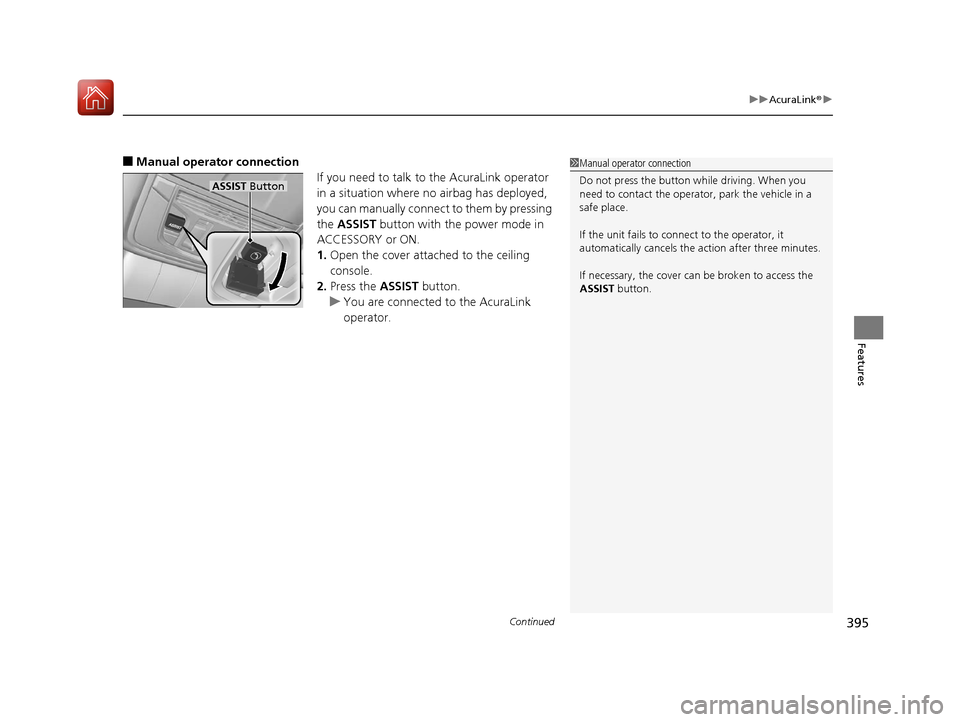
■Manual operator connection
If you need to talk to the AcuraLink operator
in a situation where no airbag has deployed,
you can manually connect to them by pressing
the ASSIST button with the power mode in
ACCESSORY or ON.
1. Open the cover attached to the ceiling
console.
2. Press the ASSIST button.
u You are connected to the AcuraLink
operator.1Manual operator connection
Do not press the button while driving. When you
need to contact the operato r, park the vehicle in a
safe place.
If the unit fails to connect to the operator, it
automatically cancels the action after three minutes.
If necessary, the cover can be broken to access the
ASSIST button.
ASSIST Button
20 ACURA RDX-31TJB6111.book 395 ページ 2020年2月11日 火曜日 午後2時6分
Page 398 of 657
Continued397
uuAcuraLink ®u
Features
Your subscribed telematics service provid er can check your vehicle’s condition. For
maximum functionality download AcuraLink app in your smartphone and connect it
with the vehicle.
■Automatic Collisio n Notifications
A live agent will reach out and check on you and request that help be sent in the
event of a crash.
■Send Destination
Search for destinations on your phone and instantly beam turn-by-turn directions to
your navigation system
*. Requires In-vehicle Navigation System*.
■Stolen Vehicle Locator
Get door and lock status as well as mileage, fuel, oil life, and tire pressure readings
on your phone.
■Remote Start & Stop
Arrive at your vehicle with the engine warmed up and the interior set to a
comfortable temperature.
■Remote Lock & Unlock
Lock and unlock your vehicle with your smartphone.
■Find My Car
Find your parked vehicle and flash/sound your horns remotely using your
smartphone.
■Connection Features1 Connection Features
The contact information of your provider, your user
ID and PIN will be given when you subscribe to
AcuraLink. If you forget any of the above, contact a
Acura dealer, or go to owners.acura.com (U.S.) or
www.acura.ca/owners/acuralink (Canada).
You can also activate the remote door lock/unlock
and vehicle finder features from the Internet or using
your smartphone app. As k a dealer, or visit
owners.acura.com (U.S.) or www.acura.ca/owners/
acuralink (Canada) for details.
1Find My Car
The lights will stop flas hing and horn will stop
sounding under the following:
•When conditions 30 seconds have elapsed.
•You unlock the doors using the remote transmitter.
•You unlock the doors using the keyless access
system.
•You unlock the doors us ing the built-in key.
•The power mode is set to ACCESSORY or ON.
* Not available on all models
20 ACURA RDX-31TJB6111.book 397 ページ 2020年2月11日 火曜日 午後2時6分
Page 399 of 657
398
uuAcuraLink ®u
Features
■Vehicle Status
Get door and lock status as we ll as mileage, fuel, oil life, and tire pressure readings
on your phone.
■Emergency Call
A live agent will stay on the call with you an d request that help be sent in the event
of an emergency.
■Security Alarm Alert
Receive alerts if vehicle se curity alarm is triggered.
■Destination by Voice
Talk to a live assistant who will search and send turn by turn directions to your
vehicle’s navigation system
*. Requires In-vehicle Navigation System*.
■Last Mile
Receive walking directions to your final destination right when you get out of your
Acura. Requires In-vehicle Navigation System
*.
* Not available on all models
20 ACURA RDX-31TJB6111.book 398 ページ 2020年2月11日 火曜日 午後2時6分
Page 400 of 657
399
Driving
This chapter discusses driving and refueling.
Before Driving................................... 400
Towing a Trailer ................................ 405
Off-Highway Driving Guidelines ..... 411
When Driving Starting the Engine .......................... 413
Precautions While Driving................. 418
Automatic Transmission ................... 419
Shifting ............................................ 420
Integrated Dynamics System............. 428
Auto Idle Stop .................................. 430
Vehicle Stability AssistTM (VSA®), aka Electronic
Stability Control (ESC), System ................. 436
Agile Handling Assist ....................... 438
Super Handling-All Wheel DriveTM (SH-AWD®)*.. 439
Tire Pressure Monitoring System (TPMS) with Tire Fill Assist .......................... 440
Tire Pressure Monitoring System (TPMS) - Required Federal Explanation ......... 442
Blind spot information System
*........ 444
AcuraWatchTM................................... 447
Collision Mitigati on Braking SystemTM
(CMBSTM) ....................................... 450
Adaptive Cruise Control (ACC) with Low Speed Follow ................................. 460 Lane Keeping Assist System (LKAS) .. 477
Road Departure Mi
tigation (RDM)
System ........................................ 485
Front Sensor Camera ....................... 489
Radar Sensor ................................... 491
Braking .............................................. 492
Parking Your Vehicle ........................ 501
Multi-View Rear Camera .................. 511
Surround View Camera System
*..... 513
Refueling ........................................... 521
Fuel Economy and CO
2 Emissions .... 524
Turbo Engine Vehicle ....................... 525
* Not available on all models
20 ACURA RDX-31TJB6111.book 399 ページ 2020年2月11日 火曜日 午後2時6分
Page 406 of 657
405Continued
Driving
Towing a Trailer
Towing Preparation
Your vehicle can tow a trailer if you carefully observe the load limits, use the proper
equipment, and follow the towing guidelin es. Check the load limits before driving.
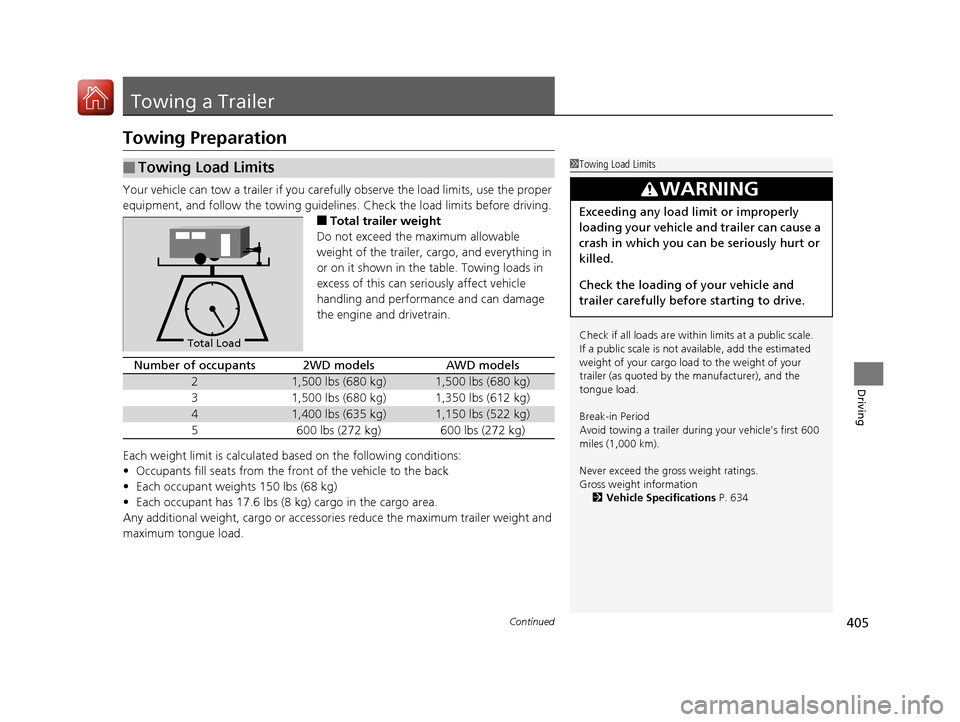
■Total trailer weight
Do not exceed the maximum allowable
weight of the trailer, cargo, and everything in
or on it shown in the table. Towing loads in
excess of this can seriously affect vehicle
handling and performance and can damage
the engine and drivetrain.
Each weight limit is calculated based on the following conditions:
• Occupants fill seats from the front of the vehicle to the back
• Each occupant weights 150 lbs (68 kg)
• Each occupant has 17.6 lbs (8 kg) cargo in the cargo area.
Any additional weight, cargo or accessories reduce the maximum trailer weight and
maximum tongue load.
■Towing Load Limits1 Towing Load Limits
Check if all loads are within limits at a public scale.
If a public scale is not av ailable, add the estimated
weight of your cargo load to the weight of your
trailer (as quoted by th e manufacturer), and the
tongue load.
Break-in Period
Avoid towing a trailer duri ng your vehicle’s first 600
miles (1,000 km).
Never exceed the gross weight ratings.
Gross weight information 2 Vehicle Specifications P. 634
3WARNING
Exceeding any load limit or improperly
loading your vehicle and trailer can cause a
crash in which you can be seriously hurt or
killed.
Check the loading of your vehicle and
trailer carefully before starting to drive.
Total Load
Number of occupants2WD modelsAWD models
21,500 lbs (680 kg)1,500 lbs (680 kg)
31,500 lbs (680 kg)1,350 lbs (612 kg)
41,400 lbs (635 kg)1,150 lbs (522 kg)
5600 lbs (272 kg)600 lbs (272 kg)
20 ACURA RDX-31TJB6111.book 405 ページ 2020年2月11日 火曜日 午後2時6分
Page 412 of 657
411
Driving
Off-Highway Driving Guidelines
General Information
Your vehicle has been designed primarily for use on pavement, however, its higher
ground clearance allows you to occasionally travel on unpaved roads. It is not
designed for trail-blazing, or other challenging off-highway activities.
If you decide to drive on unpaved roads, you will find that it requires somewhat
different driving skills and that your vehicl e will handle somewhat differently than it
does on pavement. Pay attention to the precau tions and tips in this section, and get
acquainted with your vehicle before leaving the pavement.
Important Safety Precautions
To avoid loss of control or rollover, be sure to follow all precautions and
recommendations:
• Be sure to store cargo properly and do not exceed your cargo load limits.
2 Maximum Load Limit P. 403
•Whenever you drive, make su re you and your passengers always wear seat belts.
• Keep your speed low, and never go faster than the conditions allow.
• It’s up to you to continually assess the situation and drive within the limits.
1Off-Highway Driving Guidelines
Failure to operate your vehicle correctly might result
in a crash or a rollover.
2 Important Handling Information P. 32
2 Precautions While Driving P. 418
Spinning the tires can also damage the SH-AWD ®
system.
3WARNING
Improperly operating this vehicle on or off-
pavement can cause a crash or rollover in
which you and your passengers could be
seriously injured or killed.
• Follow all instructions and guidelines in
this owner’s manual.
• Keep your speed low, and don’t drive
faster than conditions permit.
Models with SH-AWD ®
20 ACURA RDX-31TJB6111.book 411 ページ 2020年2月11日 火曜日 午後2時6分
Page 416 of 657

Continued415
uuWhen Driving uStarting the Engine
Driving
You can remotely start the engine usin g the two-way keyless access remote from
extended distances.
■To start the engine
The engine runs for up to 10 minu tes without you starting the vehicle.
To extend the run time for another 10 mi nutes during the first run, press the
button, then press an d hold the button.
u The amber LED blinks, then the green LED comes back on if a 10-minute
extension request was transmitted successfully.
After pressing the button, wait for the gr een LED to blink. This indicates that
the all the doors and the tailgate are locked.
■Remote Engine Start*1 Remote Engine Start*
The remote engine start may violate local laws.
Before using the remote e ngine start, check your
local laws.
If there are buildings an d obstacles between your
vehicle and the remote, th e range will be reduced.
This distance may vary by external electrical
interference.
The engine may not start by the remote engine start if:
•You have disabled a remote engine start setting
using the audio/information screen.
•The power mode is not in VEHICLE OFF (LOCK).
•The transmission is in a position other than ( P.•The hood is open, or any door or the tailgate is
unlocked.
•You have already used the remote twice to start
the engine.
3WARNING
Carbon monoxide ga s is toxic and can
rapidly accumulate in closed or even partly
enclosed areas.
Breathing it can cause unconsciousness and
even kill you.
Never use the remote engine starter with
the vehicle parked in a garage or other
areas with limited ventilation.
Press the button, then press and hold
the button.
Amber LED: Blinks when any button is pressed.
Continues to blink
during a vehicle
self check until the
engine starts. Go within the range,
and try again.
Green LED: Comes on while
the engine is running. Red LED: Blinks when the
remote is out of the keyless
access system range.
* Not available on all models
20 ACURA RDX-31TJB6111.book 415 ページ 2020年2月11日 火曜日 午後2時6分
Page 417 of 657
uuWhen Driving uStarting the Engine
416
Driving
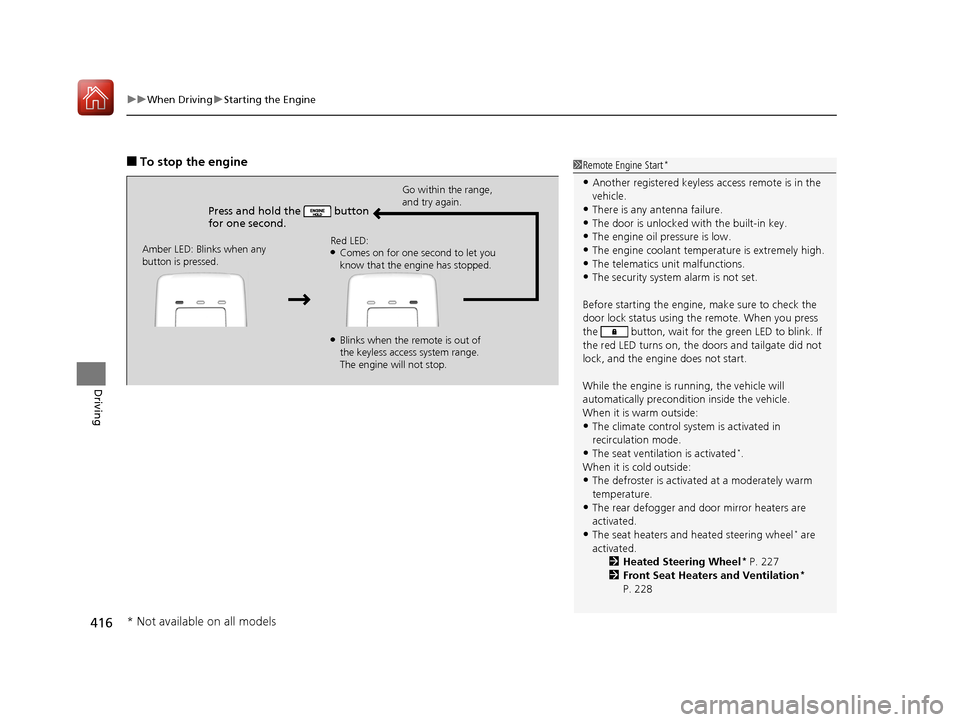
■To stop the engine
Press and hold the button
for one second.
Go within the range,
and try again.
Amber LED: Blinks when any
button is pressed. Red LED:
●Comes on for one second to let you
know that the engine has stopped.
●Blinks when the remote is out of
the keyless access system range.
The engine will not stop.
1
Remote Engine Start*
•Another registered keyless access remote is in the
vehicle.
•There is any antenna failure.
•The door is unlocked with the built-in key.•The engine oil pressure is low.
•The engine coolant temper ature is extremely high.
•The telematics unit malfunctions.•The security system alarm is not set.
Before starting the engine, make sure to check the
door lock status using the remote. When you press
the button, wait for the green LED to blink. If
the red LED turns on, the doors and tailgate did not
lock, and the engine does not start.
While the engine is running, the vehicle will
automatically preconditi on inside the vehicle.
When it is warm outside:
•The climate control system is activated in
recirculation mode.
•The seat ventilation is activated*.
When it is cold outside:
•The defroster is activated at a moderately warm
temperature.
•The rear defogger and door mirror heaters are
activated.
•The seat heaters and heated steering wheel* are
activated. 2Heated Steering Wheel
* P. 227
2 Front Seat Heaters and Ventilation*
P. 228
* Not available on all models
20 ACURA RDX-31TJB6111.book 416 ページ 2020年2月11日 火曜日 午後2時6分