on mode Acura RDX 2020 Owner's Manual
[x] Cancel search | Manufacturer: ACURA, Model Year: 2020, Model line: RDX, Model: Acura RDX 2020Pages: 657, PDF Size: 33.2 MB
Page 243 of 657
242
uuAudio System uAudio System Theft Protection
Features
Audio System Theft Protection
The audio system is disabled when it is di sconnected from the power source, such as
when the battery is disconnected or goes dead. In certain conditions, the system
may display a code entry screen. If this occurs, reactivate the audio system.
■Reactivating th e audio system
1. Set the power mode to ON.
2. Turn on the audio system.
3. Press and hold the audio system power knob for more than two seconds.
u The audio system is reac tivated when the audio co ntrol unit establishes a
connection with the vehicle control unit. If the control unit fails to recognize
the audio unit, you must go to a dealer and have the audio unit checked.
20 ACURA RDX-31TJB6111.book 242 ページ 2020年2月11日 火曜日 午後2時6分
Page 244 of 657
243
uuAudio System uAudio Remote Controls
Continued
Features
Audio Remote Controls
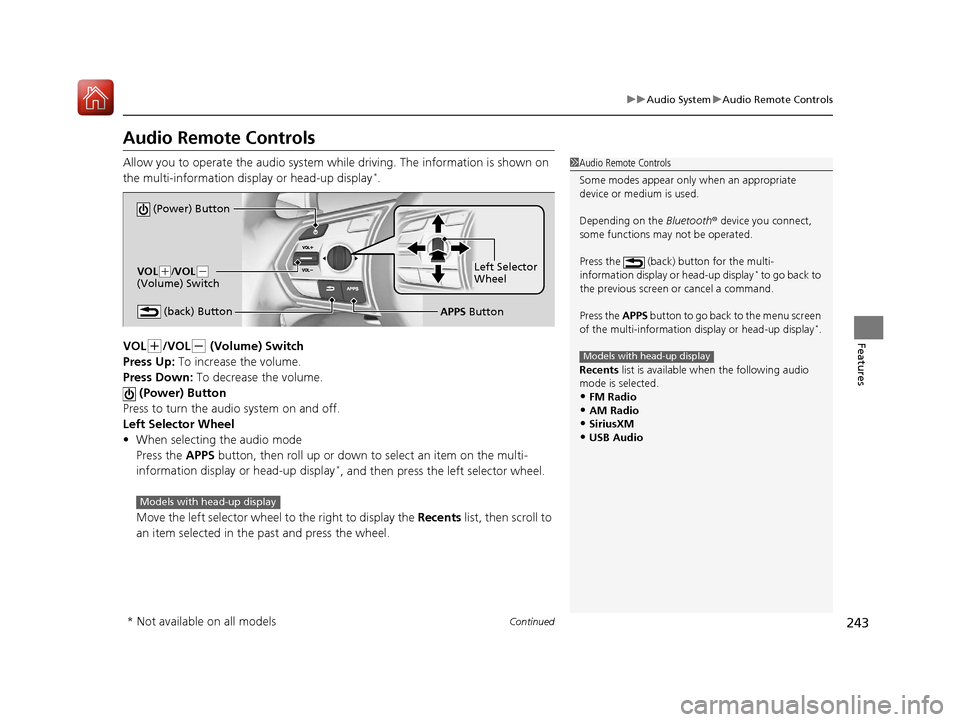
Allow you to operate the audio system whil e driving. The information is shown on
the multi-information display or head-up display*.
VOL
(+/VOL(- (Volume) Switch
Press Up: To increase the volume.
Press Down: To decrease the volume.
(Power) Button
Press to turn the audio system on and off.
Left Selector Wheel
• When selecting the audio mode
Press the APPS button, then roll up or down to select an item on the multi-
information display or head-up display
*, and then press the left selector wheel.
Move the left selector wheel to the right to display the Recents list, then scroll to
an item selected in the past and press the wheel.
1 Audio Remote Controls
Some modes appear only when an appropriate
device or medium is used.
Depending on the Bluetooth® device you connect,
some functions ma y not be operated.
Press the (back) button for the multi-
information display or head-up display
* to go back to
the previous screen or cancel a command.
Press the APPS button to go back to the menu screen
of the multi-information di splay or head-up display
*.
Recents list is available when the following audio
mode is selected.
•FM Radio
•AM Radio•SiriusXM
•USB Audio
Models with head-up display
(Power) Button
VOL( +/VOL(-
(Volume) Switch
(back) ButtonLeft Selector
Wheel
APPS Button
Models with head-up display
* Not available on all models
20 ACURA RDX-31TJB6111.book 243 ページ 2020年2月11日 火曜日 午後2時6分
Page 245 of 657
uuAudio System uAudio Remote Controls
244
Features
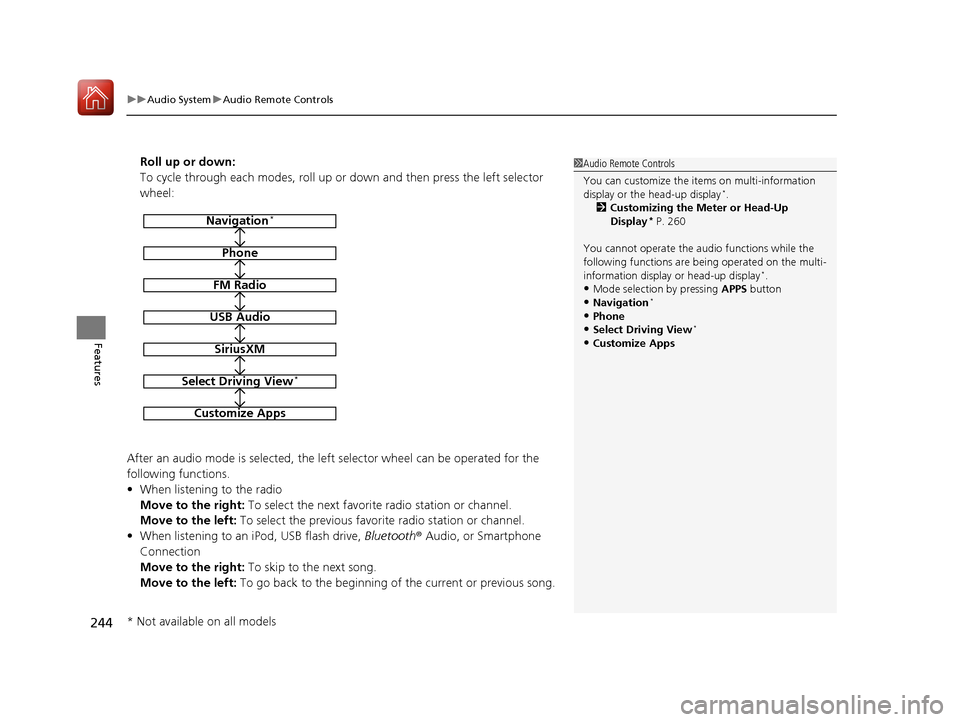
Roll up or down:
To cycle through each modes, roll up or down and then press the left selector
wheel:
After an audio mode is selected, the left selector wheel can be operated for the
following functions.
• When listening to the radio
Move to the right: To select the next favorite radio station or channel.
Move to the left: To select the previous favorite radio station or channel.
• When listening to an iPod, USB flash drive, Bluetooth® Audio, or Smartphone
Connection
Move to the right: To skip to the next song.
Move to the left: To go back to the beginning of the current or previous song.1Audio Remote Controls
You can customize the items on multi-information
display or the head-up display
*.
2 Customizing the Meter or Head-Up
Display
* P. 260
You cannot operate the a udio functions while the
following functions are be ing operated on the multi-
information display or head-up display
*.•Mode selection by pressing APPS button
•Navigation*
•Phone
•Select Driving View*
•Customize Apps
Navigation*
Phone
FM Radio
USB Audio
SiriusXM
Select Driving View*
Customize Apps
* Not available on all models
20 ACURA RDX-31TJB6111.book 244 ページ 2020年2月11日 火曜日 午後2時6分
Page 246 of 657
245
Features
Audio System Basic Operation
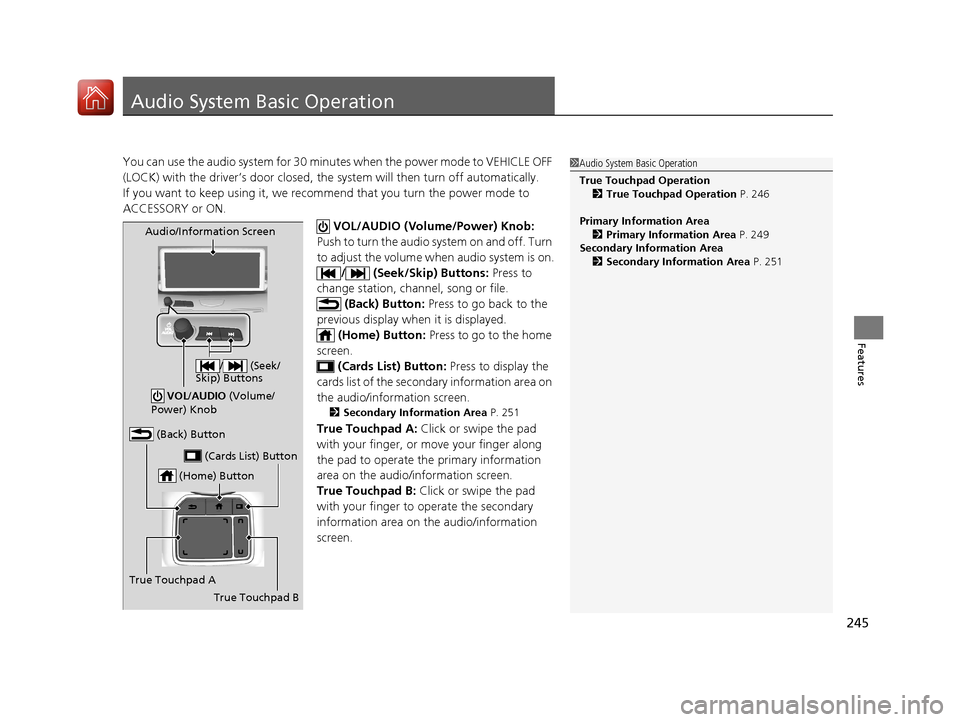
You can use the audio system for 30 minutes when the power mode to VEHICLE OFF
(LOCK) with the driver’s door closed, the system will then turn off automatically.
If you want to keep using it, we recomme nd that you turn the power mode to
ACCESSORY or ON.
VOL/AUDIO (Volume/Power) Knob:
Push to turn the audio system on and off. Turn
to adjust the volume wh en audio system is on.
/ (Seek/Skip) Buttons: Press to
change station, channel, song or file.
(Back) Button: Press to go back to the
previous display when it is displayed. (Home) Button: Press to go to the home
screen. (Cards List) Button: Press to display the
cards list of the second ary information area on
the audio/information screen.
2 Secondary Information Area P. 251
True Touchpad A: Click or swipe the pad
with your finger, or move your finger along
the pad to operate the primary information
area on the audio/information screen.
True Touchpad B: Click or swipe the pad
with your finger to operate the secondary
information area on th e audio/information
screen.
1 Audio System Basic Operation
True Touchpad Operation
2 True Touchpad Operation P. 246
Primary Information Area 2 Primary Information Area P. 249
Secondary Information Area 2 Secondary Information Area P. 251
(Home) Button
(Back) Button
True Touchpad A (Cards List) Button
Audio/Information Screen
/ (Seek/
Skip) Buttons
VOL /AUDIO (Volume/
Power) Knob
True Touchpad B
20 ACURA RDX-31TJB6111.book 245 ページ 2020年2月11日 火曜日 午後2時6分
Page 247 of 657

246
uuAudio System Basic Operation uTrue Touchpad Operation
Features
True Touchpad Operation
You can operate the system using yo ur finger(s) on the true touchpad.
■Click
Lightly press true touchpad A to select an
item.
■Press and hold
Press and hold to initiate edit mode
throughout the system.
■Swipe
Swipe or drag your finger in various directions
to operate each screen.
■True Touchpad A Operation
1 True Touchpad Operation
True Touchpad Operation
•Some items may be grayed out during driving to
reduce the potential for distraction.
•You can select them when the vehicle is stopped or
use voice commands.
•Wearing gloves may limit or prevent true touchpad
response.
•Some electronics like inverters may cause slow
response while using the true touchpad.
You can operate the true touchpad using gloves
when you set the Touchpad Sensitivity setting to
High . However, the insulated gloves can not be
operated the true touchpad.
2 Customized Features P. 335
20 ACURA RDX-31TJB6111.book 246 ページ 2020年2月11日 火曜日 午後2時6分
Page 248 of 657
247
uuAudio System Basic Operation uTrue Touchpad Operation
Continued
Features
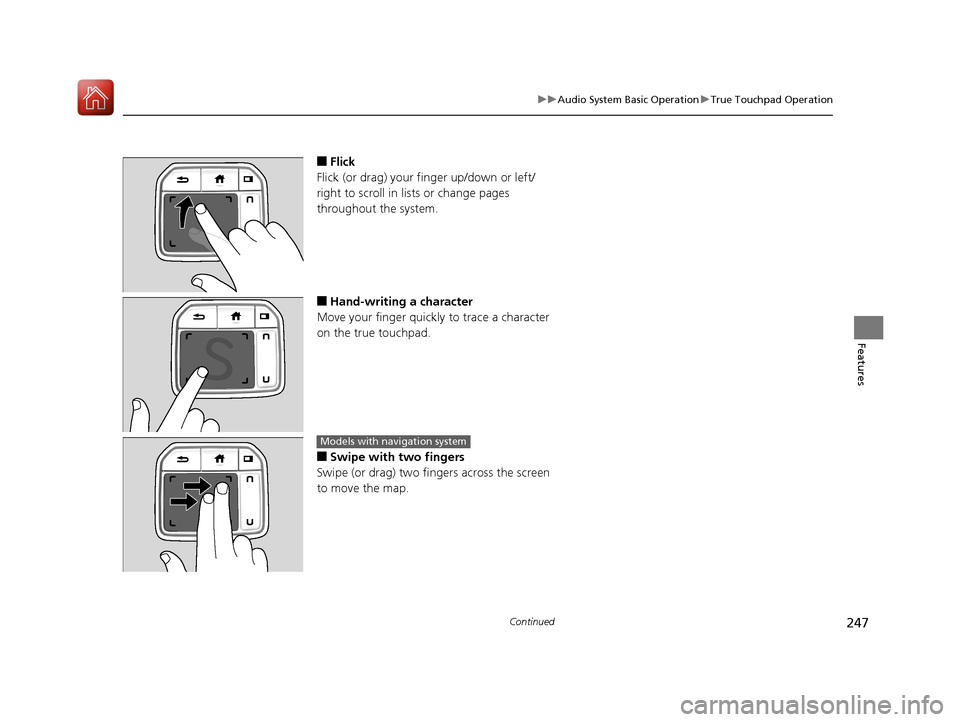
■Flick
Flick (or drag) your finger up/down or left/
right to scroll in lists or change pages
throughout the system.
■Hand-writing a character
Move your finger quickly to trace a character
on the true touchpad.
■Swipe with two fingers
Swipe (or drag) two finge rs across the screen
to move the map.
Models with navigation system
20 ACURA RDX-31TJB6111.book 247 ページ 2020年2月11日 火曜日 午後2時6分
Page 250 of 657
249
uuAudio System Basic Operation uAudio/Information Screen
Continued
Features
Audio/Information Screen
Displays each mode status. From this display, you can go to various setup options.
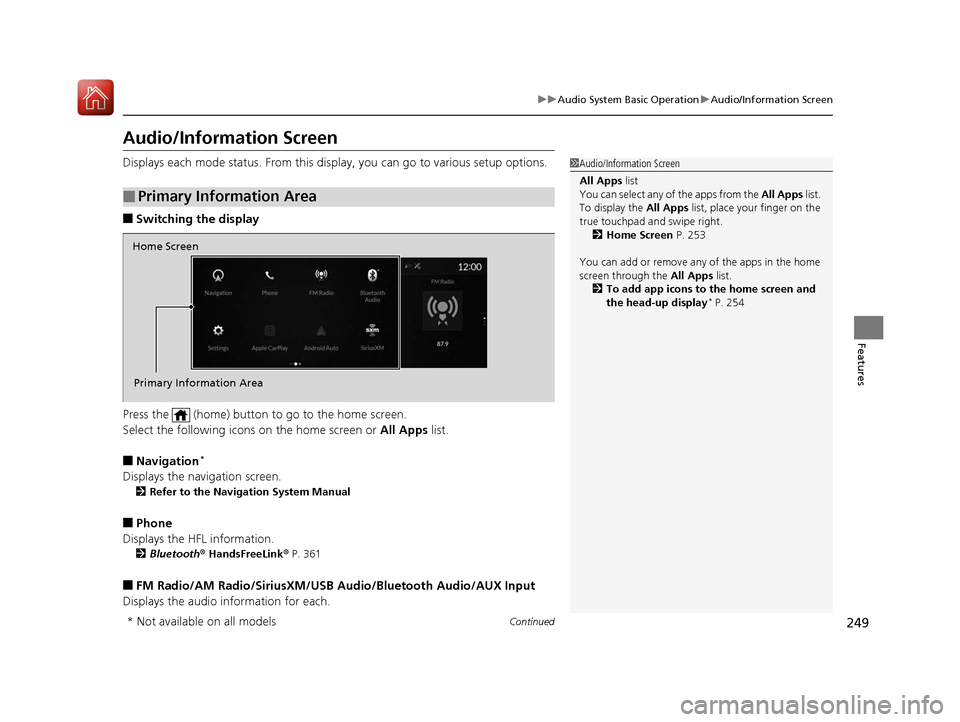
■Switching the display
Press the (home) button to go to the home screen.
Select the following icons on the home screen or All Apps list.
■Navigation*
Displays the navigation screen.
2Refer to the Navigation System Manual
■Phone
Displays the HFL information.
2 Bluetooth ® HandsFreeLink ® P. 361
■FM Radio/AM Radio/SiriusXM/USB Audio/Bluetooth Audio/AUX Input
Displays the audio information for each.
■Primary Information Area
1 Audio/Information Screen
All Apps list
You can select any of the apps from the All Apps list.
To display the All Apps list, place your finger on the
true touchpad and swipe right. 2 Home Screen P. 253
You can add or remove any of the apps in the home
screen through the All Apps list.
2 To add app icons to the home screen and
the head-up display
* P. 254
Home Screen
Primary Information Area
* Not available on all models
20 ACURA RDX-31TJB6111.book 249 ページ 2020年2月11日 火曜日 午後2時6分
Page 252 of 657
Continued251
uuAudio System Basic Operation uAudio/Information Screen
Features
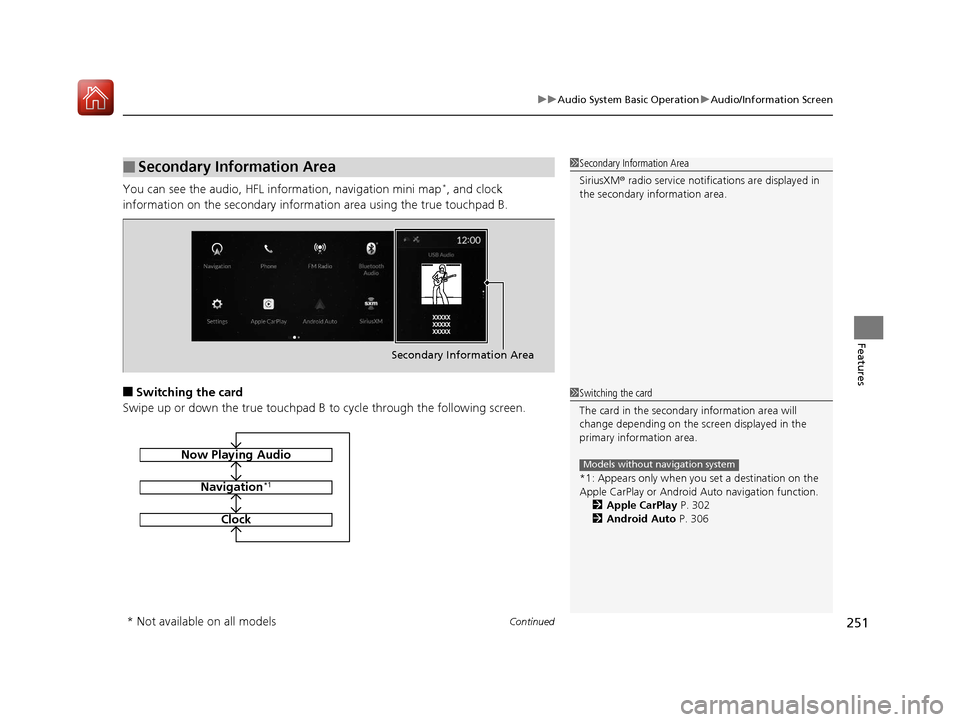
You can see the audio, HFL information, navigation mini map*, and clock
information on the secondary informa tion area using the true touchpad B.
■Switching the card
Swipe up or down the true touchpad B to cycle through the following screen.
■Secondary Information Area1Secondary Information Area
SiriusXM ® radio service notifications are displayed in
the secondary information area.
Secondary Information Area
1 Switching the card
The card in the secondary information area will
change depending on the sc reen displayed in the
primary information area.
*1: Appears only when you set a destination on the
Apple CarPlay or Android Auto navigation function.
2 Apple CarPlay P. 302
2 Android Auto P. 306
Models without navigation systemNow Playing Audio
Navigation*1
Clock
* Not available on all models
20 ACURA RDX-31TJB6111.book 251 ページ 2020年2月11日 火曜日 午後2時6分
Page 255 of 657

uuAudio System Basic Operation uAudio/Information Screen
254
Features
■To add app icons to the home screen and the head-up display*
You can add app icons to the home screen and the head-up display.
1. Press the (home) button.
2. Swipe right to display the All Apps screen.
3. Go to an app on the list, then press and
hold true touchpad A.
4. From the pop-up menu, select Add to
Home Page or Add to Heads-Up
Display
*.
u The icon or HUD* appears next to
the app on the list when the
corresponding icon has been added to
the home screen or head-up display.
1 To add app icons to the home screen and the head-up display*
Pre-installed apps may not start up normally. If this
occurs, you need to reset the system.
2 Defaulting All the Settings P. 357
If you perform Factory Data Reset , it may reset all
the settings to their factory default. 2 Defaulting All the Settings P. 357
In case those apps still do not startup normally, even
after Factory Data Reset , contact your dealer.
Each item with HUD is listed on the head-up display
menu.
If you want to hide the it em from the head-up display
menu, select Remove from Heads-Up Display .
Models with head-up display
* Not available on all models
20 ACURA RDX-31TJB6111.book 254 ページ 2020年2月11日 火曜日 午後2時6分
Page 256 of 657

Continued255
uuAudio System Basic Operation uAudio/Information Screen
Features
■To add shortcut icons to the home screen and the head-up display*
Shortcut icons for items stored in Favorite can be added to the home screen and the
head-up display.
1.Select a favorite item, then press and hold
true touchpad A.
u A pop-up menu will appear on the
screen.
2. Select Add to Home Page or Add to
Heads-Up Display
*.
u A short cut icon will be added to the
home screen or the head-up display.
1To add shortcut icons to the home screen and the head-up
display*
You can add an icon to the head-up display directly
from the home screen. Select an icon on the home
screen, then press and hold the true touchpad A.
After that, select Add to Heads-Up Display, and
then press the (back) button or the (home)
button to confirm the change.
Note that icons for Messages, Settings , and
System Update cannot be added to the head-up
display.
Models with head-up display
* Not available on all models
20 ACURA RDX-31TJB6111.book 255 ページ 2020年2月11日 火曜日 午後2時6分