Hold Acura RDX 2020 User Guide
[x] Cancel search | Manufacturer: ACURA, Model Year: 2020, Model line: RDX, Model: Acura RDX 2020Pages: 657, PDF Size: 33.2 MB
Page 64 of 657

Continued63
uuChild Safety uSafety of Infants and Small Children
Safe DrivingA LATCH-compatible child seat can be installe d in either of the two outer rear seats.
A child seat is attached to th e lower anchors with either th e rigid or flexible type of
connectors. 1.Raise the head restraint to its highest
position.
2. Locate the anchor marks affixed to the base
of the seat cushion.
3. Pull out the anchor cove rs with the marks to
expose the lower anchors.
4. Place the child seat on the vehicle seat, then
attach the child seat to the lower anchors
according to the instructions that came
with the child seat.
u When installing the child seat, make sure
that the lower anchors are not
obstructed by the seat belt or any other
object.
■Installing a LATCH-Compatible Child Seat1 Installing a LATCH-Compatible Child Seat
For your child’s safety, when using a child seat
installed using the LATCH system, make sure that the
child seat is properly secured to the vehicle.
A child seat that is not properly secured will not
adequately protect a child in a crash and may cause
injury to the child or other vehicle occupants.
3WARNING
Never attach two child seats to the same
anchor. In a collision, one anchor may not
be strong enough to hold two child seat
attachments and may break, causing
serious injury or death.
Marks
Covers
Rigid Type
Lower Anchors
20 ACURA RDX-31TJB6111.book 63 ページ 2020年2月11日 火曜日 午後2時6分
Page 75 of 657
74
Instrument Panel
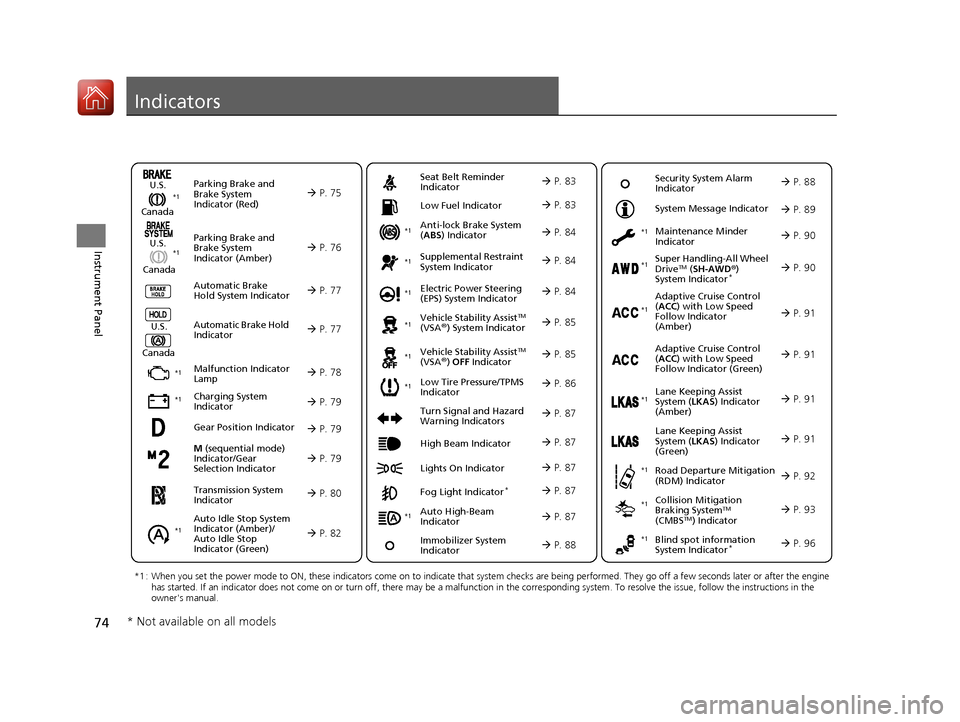
Indicators
M (sequential mode)
Indicator/Gear
Selection Indicator P. 79
Parking Brake and
Brake System
Indicator (Red)
Parking Brake and
Brake System
Indicator (Amber)
U.S.
Canada
U.S.
Canada Automatic Brake
Hold System Indicator
Automatic Brake Hold
IndicatorU.S.
Canada
*1 : When you set the power mode to ON, these indicators come on to indicate that system checks are being performed. They go off a few seconds later or after the engine
has started. If an indicator does not come on or turn off, ther e may be a malfunction in the corresponding system. To resolve the issue, follow the instructions in the
owner's manual.
P. 75*1
Malfunction Indicator
Lamp
Charging System
Indicator
Anti-lock Brake System
(ABS ) Indicator
Seat Belt Reminder
Indicator
Low Fuel Indicator
Vehicle Stability AssistTM
(VSA®) System Indicator
Vehicle Stability Assist
TM
(VSA®) OFF Indicator
Supplemental Restraint
System Indicator
Auto High-Beam
Indicator
Low Tire Pressure/TPMS
Indicator Electric Power Steering
(EPS) System Indicator
Turn Signal and Hazard
Warning Indicators
Lights On Indicator High Beam Indicator
Fog Light Indicator*
Maintenance Minder
Indicator
System Message Indicator
Super Handling-All Wheel
DriveTM (
SH-AWD ®)
System Indicator*
Adaptive Cruise Control
( ACC ) with Low Speed
Follow Indicator
(Amber)
Lane Keeping Assist
System ( LKAS) Indicator
(Amber)
Road Departure Mitigation
(RDM) Indicator
Blind spot information
System Indicator*
P. 76
P. 77
P. 77
P. 78
P. 79*1
*1
P. 86*1
*1
Gear Position Indicator P. 79
Transmission System
Indicator P. 80
Auto Idle Stop System
Indicator (Amber)/
Auto Idle Stop
Indicator (Green)
P. 82
P. 83
P. 83
P. 84
P. 84
P. 87
P. 85
*1
*1
*1
P. 85
*1 P. 84
P. 87
P. 91
*1
P. 87
P. 87
P. 90
P. 87
Immobilizer System
Indicator P. 88
Security System Alarm
Indicator P. 88
P. 89
P. 90
P. 91
P. 92
P. 96
*1
Adaptive Cruise Control
(ACC ) with Low Speed
Follow Indicator (Green) P. 91
*1
Lane Keeping Assist
System ( LKAS) Indicator
(Green) P. 91
*1
*1 *1 *1
*1
Collision Mitigation
Braking SystemTM
(CMBSTM) Indicator
*1 P. 93*1
* Not available on all models
20 ACURA RDX-31TJB6111.book 74 ページ 2020年2月11日 火曜日 午後2時6分
Page 78 of 657
77
uuIndicators u
Continued
Instrument Panel
IndicatorNameOn/BlinkingExplanationMessage
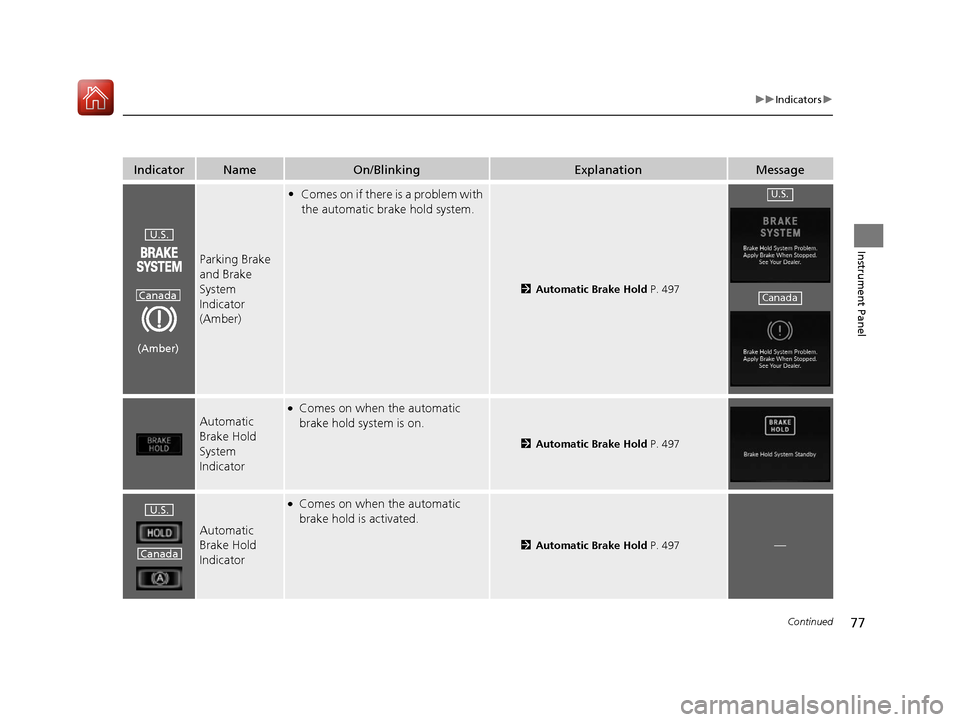
Parking Brake
and Brake
System
Indicator
(Amber)
•Comes on if there is a problem with
the automatic brake hold system.
2 Automatic Brake Hold P. 497
Automatic
Brake Hold
System
Indicator
●Comes on when the automatic
brake hold system is on.
2Automatic Brake Hold P. 497
Automatic
Brake Hold
Indicator
●Comes on when the automatic
brake hold is activated.
2Automatic Brake Hold P. 497—
U.S.
Canada
(Amber)
U.S.
Canada
U.S.
Canada
20 ACURA RDX-31TJB6111.book 77 ページ 2020年2月11日 火曜日 午後2時6分
Page 89 of 657
88
uuIndicators u
Instrument Panel
*1:Canadian models only: Apply and hold the brake pedal before selecting the ON mode.
IndicatorNameOn/BlinkingExplanationMessage*1
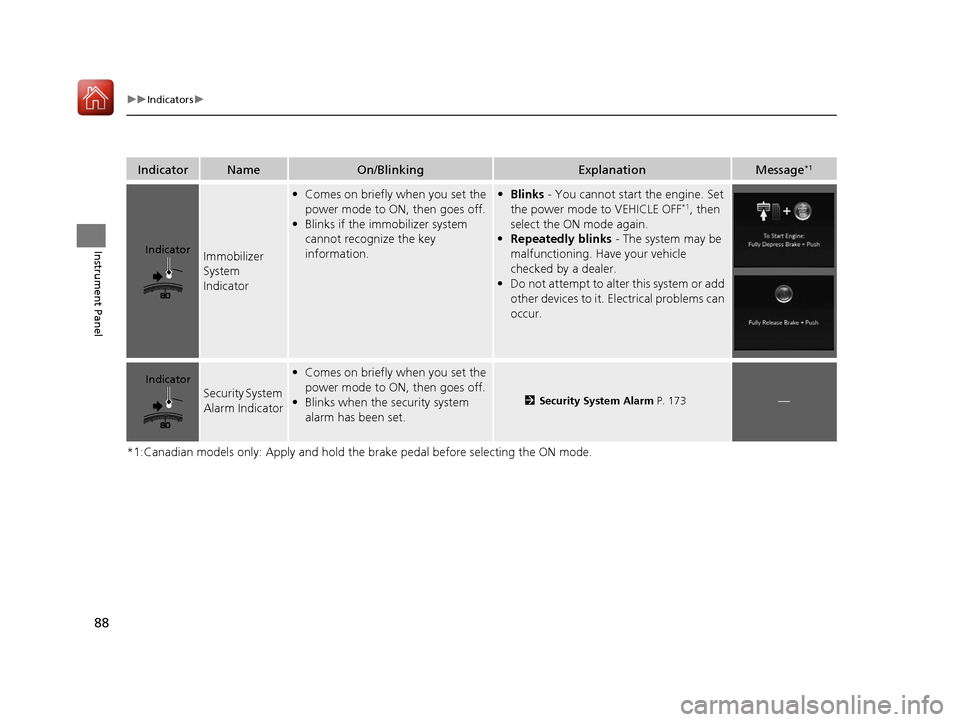
Immobilizer
System
Indicator
•Comes on briefly when you set the
power mode to ON, then goes off.
• Blinks if the immobilizer system
cannot recognize the key
information.• Blinks - You cannot start the engine. Set
the power mode to VEHICLE OFF*1, then
select the ON mode again.
• Repeatedly blinks - The system may be
malfunctioning. Have your vehicle
checked by a dealer.
• Do not attempt to alter this system or add
other devices to it. Electrical problems can
occur.
Security System
Alarm Indicator
•Comes on briefly when you set the
power mode to ON, then goes off.
• Blinks when the security system
alarm has been set.
2 Security System Alarm P. 173—
Indicator
Indicator
20 ACURA RDX-31TJB6111.book 88 ページ 2020年2月11日 火曜日 午後2時6分
Page 100 of 657
99
uuIndicators uMulti-Information Display Warning and Information Messages
Continued
Instrument Panel
MessageConditionExplanation
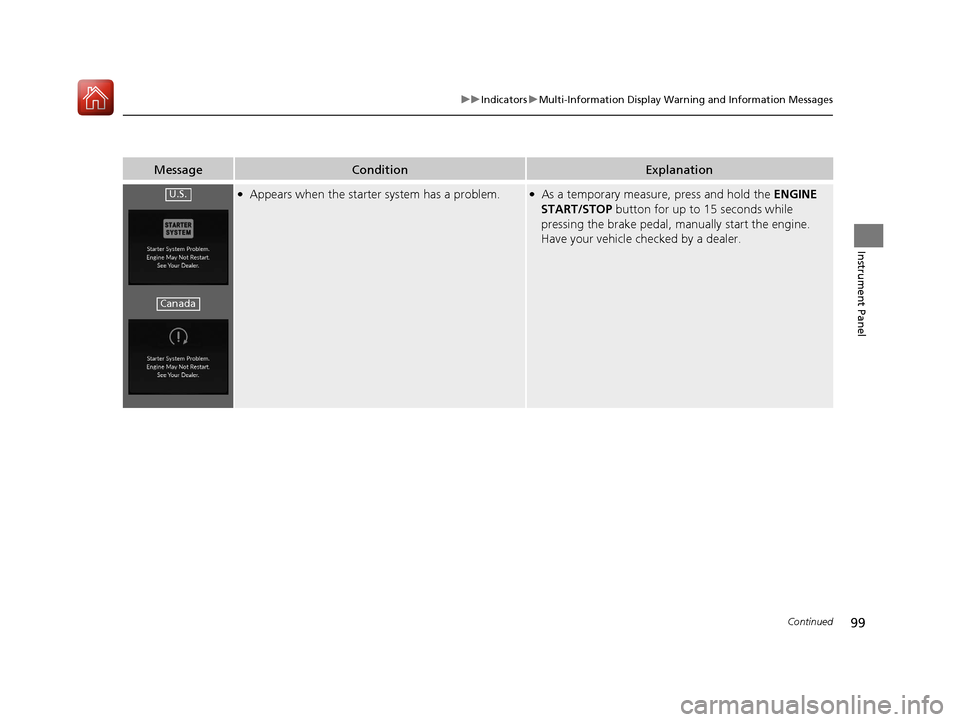
●Appears when the starter system has a problem.●As a temporary measur e, press and hold the ENGINE
START/STOP button for up to 15 seconds while
pressing the brake pedal, manually start the engine.
Have your vehicle checked by a dealer.U.S.
Canada
20 ACURA RDX-31TJB6111.book 99 ページ 2020年2月11日 火曜日 午後2時6分
Page 104 of 657

103
uuIndicators uMulti-Information Display Warning and Information Messages
Continued
Instrument Panel
MessageConditionExplanation
●Appears when the automatic brake hold system is
turned off.
2 Automatic Brake Hold P. 497
●Appears when the automatic brake hold button is
pressed without wearing the driver’s seat belt.●Fasten the driver’s seat belt.
2Automatic Brake Hold P. 497
●Appears when the automatic brake hold button is
pressed without depressing the brake pedal while
the automatic brake hold is in operation.●Press the automatic brake hold button with the brake
pedal depressed.
2 Automatic Brake Hold P. 497
●Appears when the parking brake is applied
automatically while it is in operation.
2Automatic Brake Hold P. 497
2 Parking Brake P. 492
20 ACURA RDX-31TJB6111.book 103 ページ 2020年2月11日 火曜日 午後2時6分
Page 105 of 657

104
uuIndicators uMulti-Information Display Warn ing and Information Messages
Instrument Panel
MessageConditionExplanation
●Appears if the automatic brake hold is automatically
canceled while it is in operation.●Immediately depress the brake pedal.
●Appears when the electric parking brake switch is
pulled without depressing the brake pedal while the
electric parking brake is in operation.●Pull the electric parking brake switch with the brake
pedal depressed.
2Parking Brake P. 492
20 ACURA RDX-31TJB6111.book 104 ページ 2020年2月11日 火曜日 午後2時6分
Page 109 of 657
108
uuIndicators uMulti-Information Display Warn ing and Information Messages
Instrument Panel
MessageConditionExplanation
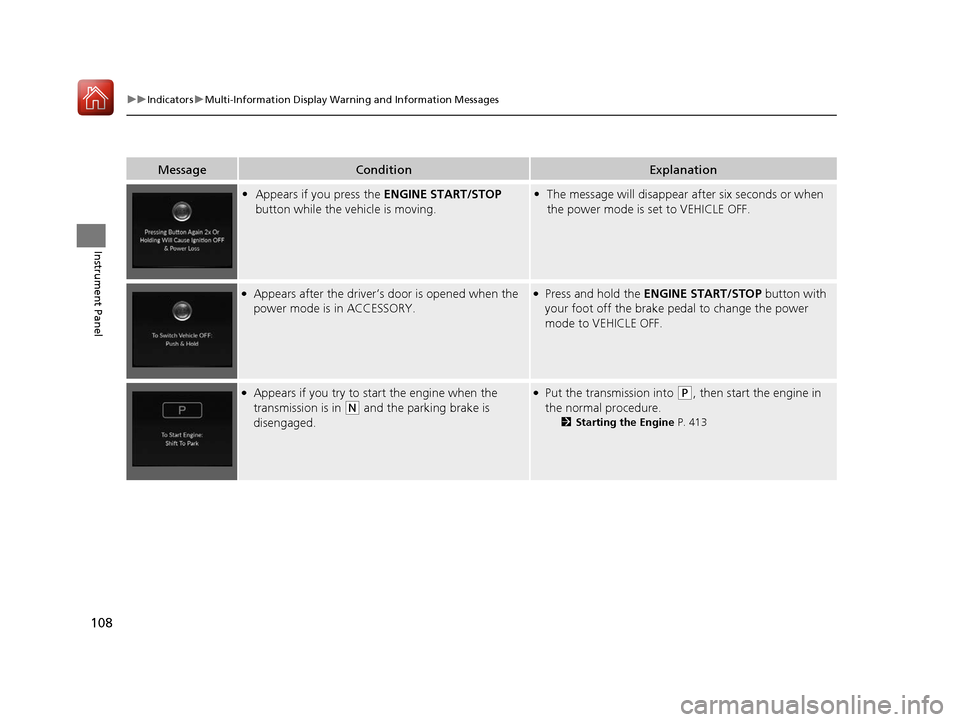
•Appears if you press the ENGINE START/STOP
button while the vehicle is moving.• The message will disappear after six seconds or when
the power mode is set to VEHICLE OFF.
●Appears after the driver’s door is opened when the
power mode is in ACCESSORY.●Press and hold the ENGINE START/STOP button with
your foot off the brake pedal to change the power
mode to VEHICLE OFF.
●Appears if you try to start the engine when the
transmission is in
(N and the parking brake is
disengaged.
●Put the transmission into (P, then start the engine in
the normal procedure.
2 Starting the Engine P. 413
20 ACURA RDX-31TJB6111.book 108 ページ 2020年2月11日 火曜日 午後2時6分
Page 115 of 657

114
uuIndicators uMulti-Information Display Warn ing and Information Messages
Instrument Panel
MessageConditionExplanation
•Appears when you press and hold (N button for
more than two seconds.• Disappears when you set the gear position to a gear
other than
(N.
2 If you want to keep the transmission in (N
position [car wash mode] P. 424
• Appears for a few seconds if you have not pressed
the
(N button long enough to initiate Neutral-Hold
mode.
2 If you want to keep the transmission in (N
position [car wash mode] P. 424
• Appears if there is a problem with the transmission
and it is not possible to select
(R.
•Have your vehicle checked by a dealer.
•Appears when neutral hold mode is not available
due to the transmission being too hot.•When the transmission is to o hot, neutral hold mode
may not be available. Let the engine idle until the
transmission has cooled down.
2 If you want to keep the transmission in (N
position [car wash mode] P. 424
20 ACURA RDX-31TJB6111.book 114 ページ 2020年2月11日 火曜日 午後2時6分
Page 131 of 657

130
uuGauges and Displays uMulti-Information Display
Instrument Panel
Move the right selector wheel to the right or left to switch between trip computer A
and trip computer B.
■Trip meter
Shows the total number of miles or kilomete rs driven since the last reset. Meters A
and B can be used to measure two separate trips.
Resetting a trip meter
To reset the trip meter, display it, pr ess and hold the right selector wheel.
u The trip meter is reset to 0.0.
■Trip Computer
Trip Computer A Trip Meter
Range Average Fuel Economy
Instant Fuel Economy
20 ACURA RDX-31TJB6111.book 130 ページ 2020年2月11日 火曜日 午後2時6分