Hold Acura RDX 2020 Service Manual
[x] Cancel search | Manufacturer: ACURA, Model Year: 2020, Model line: RDX, Model: Acura RDX 2020Pages: 657, PDF Size: 33.2 MB
Page 247 of 657

246
uuAudio System Basic Operation uTrue Touchpad Operation
Features
True Touchpad Operation
You can operate the system using yo ur finger(s) on the true touchpad.
■Click
Lightly press true touchpad A to select an
item.
■Press and hold
Press and hold to initiate edit mode
throughout the system.
■Swipe
Swipe or drag your finger in various directions
to operate each screen.
■True Touchpad A Operation
1 True Touchpad Operation
True Touchpad Operation
•Some items may be grayed out during driving to
reduce the potential for distraction.
•You can select them when the vehicle is stopped or
use voice commands.
•Wearing gloves may limit or prevent true touchpad
response.
•Some electronics like inverters may cause slow
response while using the true touchpad.
You can operate the true touchpad using gloves
when you set the Touchpad Sensitivity setting to
High . However, the insulated gloves can not be
operated the true touchpad.
2 Customized Features P. 335
20 ACURA RDX-31TJB6111.book 246 ページ 2020年2月11日 火曜日 午後2時6分
Page 255 of 657

uuAudio System Basic Operation uAudio/Information Screen
254
Features
■To add app icons to the home screen and the head-up display*
You can add app icons to the home screen and the head-up display.
1. Press the (home) button.
2. Swipe right to display the All Apps screen.
3. Go to an app on the list, then press and
hold true touchpad A.
4. From the pop-up menu, select Add to
Home Page or Add to Heads-Up
Display
*.
u The icon or HUD* appears next to
the app on the list when the
corresponding icon has been added to
the home screen or head-up display.
1 To add app icons to the home screen and the head-up display*
Pre-installed apps may not start up normally. If this
occurs, you need to reset the system.
2 Defaulting All the Settings P. 357
If you perform Factory Data Reset , it may reset all
the settings to their factory default. 2 Defaulting All the Settings P. 357
In case those apps still do not startup normally, even
after Factory Data Reset , contact your dealer.
Each item with HUD is listed on the head-up display
menu.
If you want to hide the it em from the head-up display
menu, select Remove from Heads-Up Display .
Models with head-up display
* Not available on all models
20 ACURA RDX-31TJB6111.book 254 ページ 2020年2月11日 火曜日 午後2時6分
Page 256 of 657

Continued255
uuAudio System Basic Operation uAudio/Information Screen
Features
■To add shortcut icons to the home screen and the head-up display*
Shortcut icons for items stored in Favorite can be added to the home screen and the
head-up display.
1.Select a favorite item, then press and hold
true touchpad A.
u A pop-up menu will appear on the
screen.
2. Select Add to Home Page or Add to
Heads-Up Display
*.
u A short cut icon will be added to the
home screen or the head-up display.
1To add shortcut icons to the home screen and the head-up
display*
You can add an icon to the head-up display directly
from the home screen. Select an icon on the home
screen, then press and hold the true touchpad A.
After that, select Add to Heads-Up Display, and
then press the (back) button or the (home)
button to confirm the change.
Note that icons for Messages, Settings , and
System Update cannot be added to the head-up
display.
Models with head-up display
* Not available on all models
20 ACURA RDX-31TJB6111.book 255 ページ 2020年2月11日 火曜日 午後2時6分
Page 257 of 657
uuAudio System Basic Operation uAudio/Information Screen
256
Features
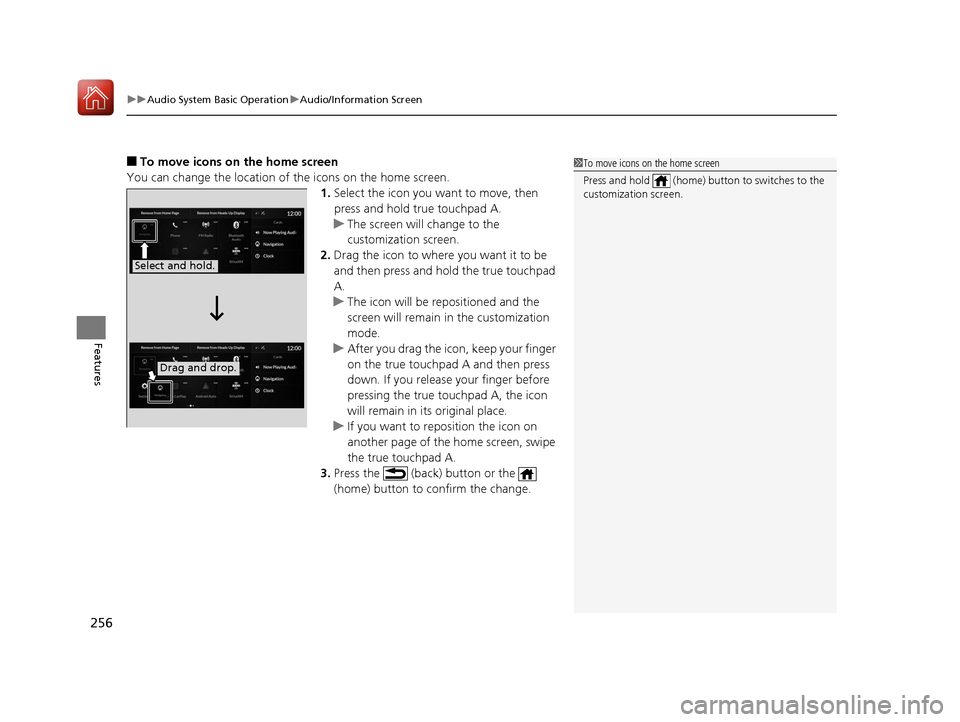
■To move icons on the home screen
You can change the location of the icons on the home screen. 1.Select the icon you want to move, then
press and hold true touchpad A.
u The screen will change to the
customization screen.
2. Drag the icon to where you want it to be
and then press and ho ld the true touchpad
A.
u The icon will be repositioned and the
screen will remain in the customization
mode.
u After you drag the ic on, keep your finger
on the true touchpad A and then press
down. If you release your finger before
pressing the true touchpad A, the icon
will remain in its original place.
u If you want to reposition the icon on
another page of the home screen, swipe
the true touchpad A.
3. Press the (back) button or the
(home) button to confirm the change.1To move icons on the home screen
Press and hold (home) button to switches to the
customization screen.
Select and hold.
Drag and drop.
20 ACURA RDX-31TJB6111.book 256 ページ 2020年2月11日 火曜日 午後2時6分
Page 258 of 657

Continued257
uuAudio System Basic Operation uAudio/Information Screen
Features
■To remove icons from the home screen and the head-up display*
You can remove icons from the home screen and the head-up display.
1.From the home screen, se lect the icon that
you want to remove, then press and hold
true touchpad A.
u The screen will switch to the
customization screen.
2. Go to Remove from Home Page or
Remove from Heads-Up Display
* and
press the true touchpad A.
u The icon will be removed from the home
screen or the head-up display, and the
screen will remain in the customization
mode.
3. Press the (back) button or the
(home) button to confirm the change.
You can also remove an icon from the home
screen or head-up disp lay directly from the All
Apps list.
1. Go to an item you want to remove, then
press and hold th e true touchpad A.
2. Go to Remove from Home Page or
Remove from Heads-Up Display
* and
press the true touchpad A.
u The icon will be removed from the home
screen or the head-up display.
3. Press the (back) button or the
(home) button to confirm the change.
1To remove icons from the home screen and the head-up display*
Removing an icon from the home screen does not
result in the deletion of the corresponding app.
Press and hold (home) button to switches to the
customization screen.
If you remove a shortcut icon from the home screen,
the function of selected icon also remove from the
head-up display.
Models with head-up displaySelect and hold.
* Not available on all models
20 ACURA RDX-31TJB6111.book 257 ページ 2020年2月11日 火曜日 午後2時6分
Page 275 of 657
uuAudio System Basic Operation uPlaying AM/FM Radio
274
Features
To add a favorite station:
1. Tune to the selected station.
2. Select Add Favorite , then select Current Station.
u When you select From Station List , you can store a station from the station
list.
■Editing a favorite station
Select and hold to desire d favorite station icon.
The following items are available:
• Remove Favorite : Delete the favorite station icon from the favorite station list.
• Replace with (number): Replace the stor ed favorite station icon.
• Add to Home Page : Add the shortcut icon of the stored favorite station to the
home screen.
• Add to Heads-Up Display
*: Add the shortcut item of the stored favorite station
to the head-up display menu.
■Favorite Station1 Favorite Station
The ST indicator appears on the display indicating
stereo FM broadcasts.
Stereo reproduction in AM is not available.
Switching the Audio Mode
Press the APPS button on the steering wheel, then
select an item or select the audio source icon on the
home screen.
2 Audio Remote Controls P. 243
You can store 12 AM/FM st ations into favorite
station.
HD Radio Technology manufactured under license
from iBiquity Digi tal Corporation. U.S. and Foreign
Patents. For patents see http://dts.com/patents. HD
Radio, Artist Experience, and the HD, HD Radio, and
“ARC” logos are registered trademarks or
trademarks of iBiquity Di gital Corporation in the
United States and/ or other countries.
* Not available on all models
20 ACURA RDX-31TJB6111.book 274 ページ 2020年2月11日 火曜日 午後2時6分
Page 278 of 657
277
uuAudio System Basic Operation uPlaying SiriusXM ® Radio
Continued
Features
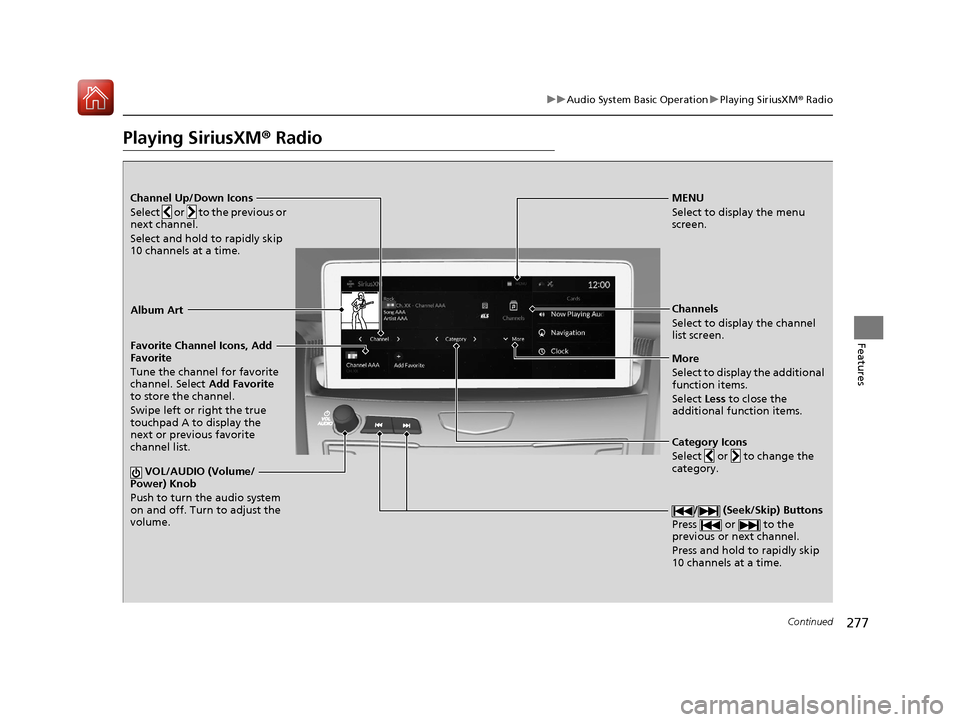
Playing SiriusXM® Radio
Channel Up/Down Icons
Select or to the previous or
next channel.
Select and hold to rapidly skip
10 channels at a time.MENU
Select to display the menu
screen.
Channels
Select to display the channel
list screen.
More
Select to display the additional
function items.
Select Less to close the
additional function items.
Favorite Channel Icons, Add
Favorite
Tune the channel for favorite
channel. Select
Add Favorite
to store the channel.
Swipe left or right the true
touchpad A to display the
next or previous favorite
channel list.
VOL/AUDIO (Volume/
Power) Knob
Push to turn the audio system
on and off. Turn to adjust the
volume.
/ (Seek/Skip) Buttons
Press or to the
previous or next channel.
Press and hold to rapidly skip
10 channels at a time.
Album Art
Category Icons
Select or to change the
category.
20 ACURA RDX-31TJB6111.book 277 ページ 2020年2月11日 火曜日 午後2時6分
Page 280 of 657
Continued279
uuAudio System Basic Operation uPlaying SiriusXM ® Radio
Features
To add a favorite channel:
1. Tune to the selected channel.
2. Select Add Favorite , then select CURRENT CHANNEL .
u When you select From Channels, you can store a channel from the channel
list.
■Editing a favorite channel
Select and hold to desired favorite channel.
The following items are available:
• Remove Favorite : Delete the favorite channel from the favorite channel list.
• Replace with Ch (number): Replace the stored favorite channel.
• Create TuneMix : Create a favorite multi-channel.
• Add to Home Page : Add the shortcut icon of the st ored favorite channel to the
home screen.
• Add to Heads-Up Display
*: Add the shortcut item of the stored favorite channel
to the head-up display menu.
■Favorite Channel1 Favorite Channel
You can store 12 SiriusXM ® channels in the favorite
channel list.
* Not available on all models
20 ACURA RDX-31TJB6111.book 279 ページ 2020年2月11日 火曜日 午後2時6分
Page 281 of 657
uuAudio System Basic Operation uPlaying SiriusXM ® Radio
280
Features
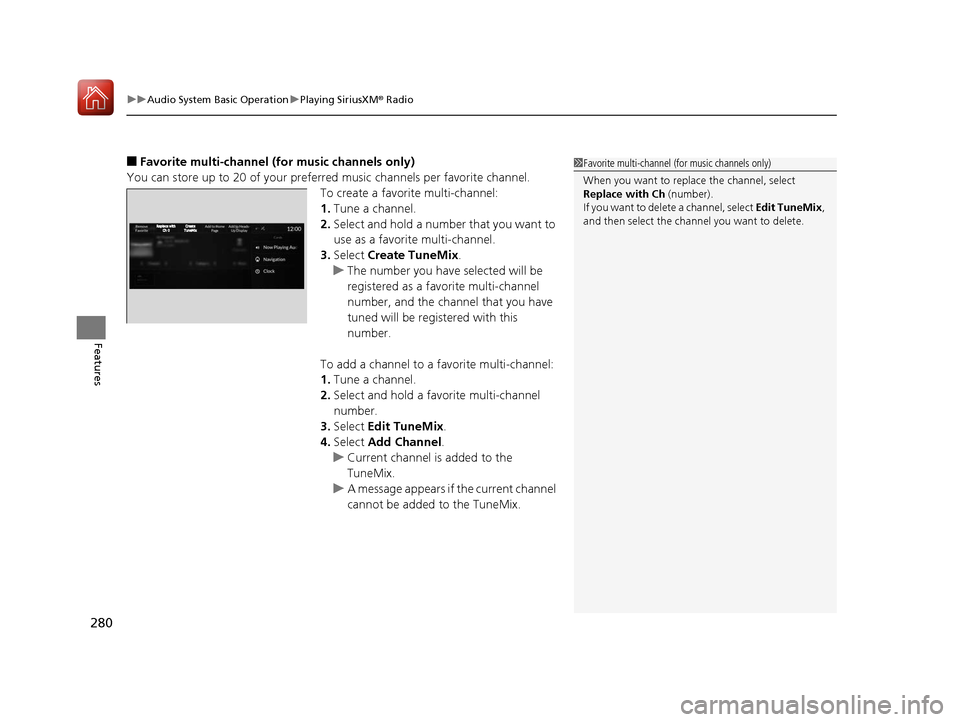
■Favorite multi-channel (for music channels only)
You can store up to 20 of your preferre d music channels per favorite channel.
To create a favorite multi-channel:
1. Tune a channel.
2. Select and hold a number that you want to
use as a favorite multi-channel.
3. Select Create TuneMix .
u The number you have selected will be
registered as a favorite multi-channel
number, and the channel that you have
tuned will be registered with this
number.
To add a channel to a favorite multi-channel:
1. Tune a channel.
2. Select and hold a favo rite multi-channel
number.
3. Select Edit TuneMix .
4. Select Add Channel .
u Current channel is added to the
TuneMix.
u A message appears if the current channel
cannot be added to the TuneMix.1Favorite multi-channel (for music channels only)
When you want to replac e the channel, select
Replace with Ch (number).
If you want to delete a channel, select Edit TuneMix,
and then select the channel you want to delete.
20 ACURA RDX-31TJB6111.book 280 ページ 2020年2月11日 火曜日 午後2時6分
Page 283 of 657
uuAudio System Basic Operation uPlaying SiriusXM ® Radio
282
Features
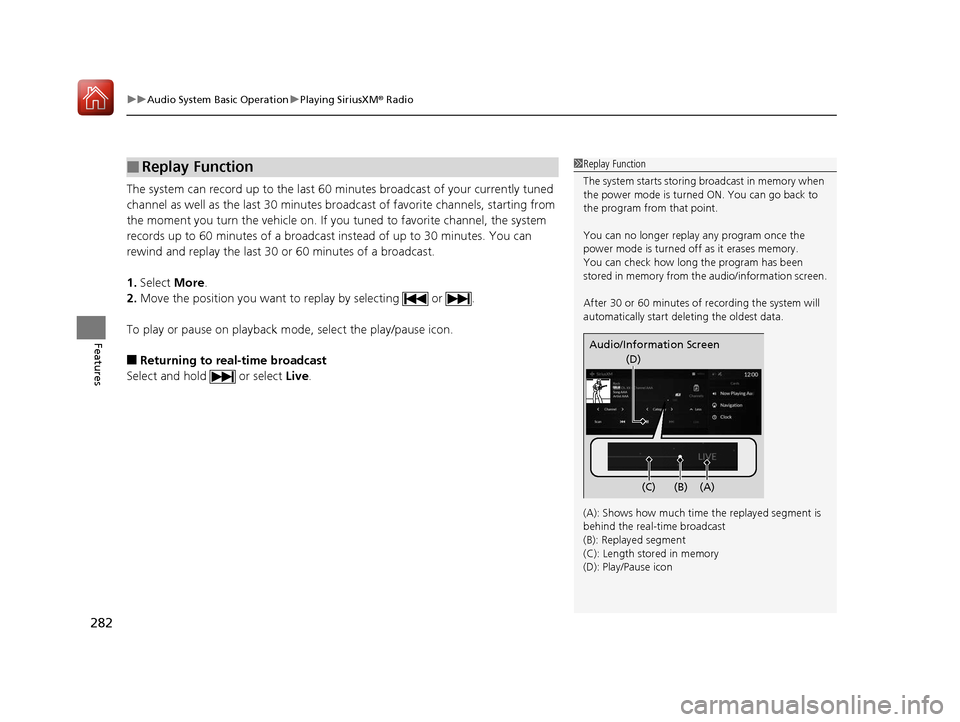
The system can record up to the last 60 minutes broadcast of your currently tuned
channel as well as the last 30 minutes br oadcast of favorite channels, starting from
the moment you turn the vehicle on. If yo u tuned to favorite channel, the system
records up to 60 minutes of a broadcast instead of up to 30 minutes. You can
rewind and replay the last 30 or 60 minutes of a broadcast.
1. Select More.
2. Move the position you want to replay by selecting or .
To play or pause on playback m ode, select the play/pause icon.
■Returning to real-time broadcast
Select and hold or select Live.
■Replay Function1Replay Function
The system starts storing broadcast in memory when
the power mode is turned ON. You can go back to
the program from that point.
You can no longer repl ay any program once the
power mode is turned off as it erases memory.
You can check how long the program has been
stored in memory from th e audio/information screen.
After 30 or 60 minutes of recording the system will
automatically start deleting the oldest data.
(A): Shows how much time the replayed segment is
behind the real-time broadcast
(B): Replayed segment
(C): Length stored in memory
(D): Play/Pause icon
Audio/Information Screen
(C) (B) (A)
(D)
20 ACURA RDX-31TJB6111.book 282 ページ 2020年2月11日 火曜日 午後2時6分