on mode Acura RDX 2020 Manual Online
[x] Cancel search | Manufacturer: ACURA, Model Year: 2020, Model line: RDX, Model: Acura RDX 2020Pages: 657, PDF Size: 33.2 MB
Page 164 of 657
163Continued
Controls
Opening and Closing the Tailgate
Precautions for Opening/Closing the Tailgate
Always make sure individuals and objects are clear of the tailgate before opening or
closing it.
Keep the tailgate closed while driving to: u Avoid possible damage.
u Prevent exhaust gas from leaking into the vehicle.
2 Carbon Monoxide Gas P. 71
1Precautions for Opening/Closing the Tailgate
Be careful not to hit your head on the tailgate or to
put your hands between th e tailgate and the cargo
area when closing the tailgate.
When you are storing or pi cking up luggage from the
cargo area, or by using a forward and back kicking
motion under the center of the rear bumper for
hands free access
*, while the engine is idling, do not
stand in front of the ex haust pipe. You may get
burned.
Do not allow any passenger in the cargo space. They
may get hurt during hard braking, a sudden
acceleration, or a crash.
3WARNING
Anyone caught in the path of a tailgate
that is being opened or closed can be
seriously injured.
Make sure that all people are clear of the
tailgate before opening or closing it.
* Not available on all models
20 ACURA RDX-31TJB6111.book 163 ページ 2020年2月11日 火曜日 午後2時6分
Page 165 of 657
uuOpening and Closing the Tailgate uPrecautions for Openi ng/Closing the Tailgate
164
Controls
The power tailgate can be operated by pressing the power tailgate button on the
remote transmitter, pressing the power tailg ate button on the driver’s door, pressing
the outer handle on the tailgate, or by using a forward and back kicking motion
under the center of the rear bumper for hands free access
*.
The power tailgate can be opened/c losed when the transmission is in
(P.
1Precautions for Opening/Closing the Tailgate
NOTICE
Do not push or pull on the power tailgate when it is
being automatically opened or closed.
Forcibly opening or closing the power tailgate while
in operation can deform the tailgate frame.
When operating the power tailgate, make sure there
is enough space around your ve hicle. People near the
tailgate may be se riously hurt if the tailgate hits or
closes on their heads. Be especially cautious if
children are around.
The power tailgate may not open or close under the
following conditions:
•You start the engine while the tailgate is
automatically openi ng or closing.
•The vehicle is parked on a steep hill.•The vehicle is swayed in a strong wind.
•The tailgate or the roof is covered with snow or ice.
* Not available on all models
20 ACURA RDX-31TJB6111.book 164 ページ 2020年2月11日 火曜日 午後2時6分
Page 166 of 657

165
uuOpening and Closing the Tailgate uOpening/Closing the Power Tailgate
Continued
Controls
Opening/Closing the Power Tailgate
Use a forward and back kicking motion under
the center of the rear bumper to open or close
the power tailgate while carrying the keyless
access remote.
u Some exterior lights flash twice and a
beeper sounds once, then the tailgate
begins to move.
■Using the Hands Free Access*1Opening/Closing the Power Tailgate
During rain or in other instances when the vehicle
becomes wet, the sensor may not properly detect
your foot motion.
When performing work on or around the rear section
of the vehicle, you may in advertently open or close
the tailgate.
To prevent this from happe ning, select Customized
Features on the audio/information screen and then
select OFF for the feature. 2 Customized Features P. 335
If you hold your foot under the bumper for too long,
the power tailgate doe s not open or close.
This function will not opera te if you don’t have the
keyless access remote on you. Please make sure you
have the keyless access remote on you.
The duration of the kicking motion should be
approximately one second.
Models with Hands Free Access
1 sec.
* Not available on all models
20 ACURA RDX-31TJB6111.book 165 ページ 2020年2月11日 火曜日 午後2時6分
Page 167 of 657
uuOpening and Closing the Tailgate uOpening/Closing the Power Tailgate
166
Controls
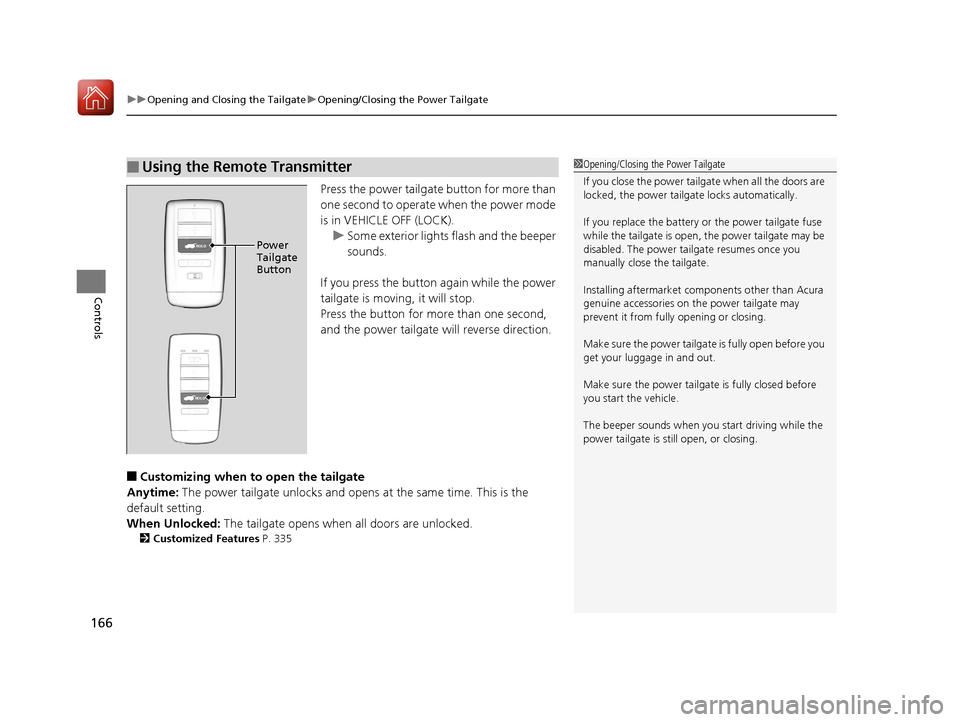
Press the power tailgate button for more than
one second to operate when the power mode
is in VEHICLE OFF (LOCK).
u Some exterior lights flash and the beeper
sounds.
If you press the button again while the power
tailgate is moving, it will stop.
Press the button for more than one second,
and the power tailgate will reverse direction.
■Customizing when to open the tailgate
Anytime: The power tailgate unlocks and opens at the same time. This is the
default setting.
When Unlocked: The tailgate opens when all doors are unlocked.
2Customized Features P. 335
■Using the Remote Transmitter1Opening/Closing the Power Tailgate
If you close the power tail gate when all the doors are
locked, the power tailgate locks automatically.
If you replace the battery or the power tailgate fuse
while the tailgate is open, the power tailgate may be
disabled. The power tail gate resumes once you
manually close the tailgate.
Installing aftermarket com ponents other than Acura
genuine accessories on the power tailgate may
prevent it from fully opening or closing.
Make sure the power tailgate is fully open before you
get your luggage in and out.
Make sure the power tailgate is fully closed before
you start the vehicle.
The beeper sounds when you start driving while the
power tailgate is still open, or closing.
HOLDPower
Tailgate
Button
HOLD
20 ACURA RDX-31TJB6111.book 166 ページ 2020年2月11日 火曜日 午後2時6分
Page 174 of 657
173Continued
Controls
Security System
Immobilizer System
The immobilizer system prevents a key that has not been pre-registered from
starting the engine. Each key contains electronic transmitters that use electronic
signals to verify the key.
Pay attention to the follo wing when pressing the ENGINE START/STOP button:
• Do not allow objects that emit strong radio waves near the ENGINE START/
STOP button.
• Make sure the key is not covered by or touching a metal object.
• Do not bring a key from another vehicle’s immobilizer system near the ENGINE
START/STOP button.
• Do not put the key near magnetic items. Electronic devices, such as televisions
and audio systems emit strong magnetic fields. Note that even a key chain can
become magnetic.
Security System Alarm
The security system alarm activates when the tailgate, hood or doors are forcibly
opened. The alarm does not activate if the tailgate or doors are opened with the key,
remote transmitter or keyless access system.
However, the alarm activates if a door is opened with the key and then the hood is
opened before the power mode is set to ON.
■When the security system alarm activates
The horn sounds intermittently and some exterior lights flash.
■To deactivate the security system alarm
Unlock the vehicle using the key, remote transmitter or keyless access system. The
system, along with the horn and flashing lights, is deactivated.
1 Immobilizer System
NOTICE
Leaving the key in the vehicl e can result in theft or
accidental movement of the vehicle.
Always take the key with you whenever you leave the
vehicle unattended.
Do not alter the system or add other devices to it.
Doing so may damage the system and make your
vehicle inoperable.
Canadian models only : Apply and hold the brake
pedal before turning the vehicle on the first time after
the battery has been disconnected.
1 Security System Alarm
Do not alter the system or add other devices to it.
Doing so may damage the system and make your
vehicle inoperable.
The security alarm continues for a maximum of two
minutes until the security system alarm deactivates.
20 ACURA RDX-31TJB6111.book 173 ページ 2020年2月11日 火曜日 午後2時6分
Page 175 of 657
uuSecurity System uSecurity System Alarm
174
Controls
■Setting the security system alarm
The security system alarm automatically sets when the following conditions have
been met:
• The power mode is set to VEHICLE OFF (LOCK).
• The hood is closed.
• All doors and the tailgate are locked from outside with the key, remote
transmitter, or keyless access system.
■When the security system alarm sets
The security system alarm indicator in the instrument panel blinks. When the
blinking interval changes after about 15 seconds, the security system alarm is set.
■To cancel the security system alarm
The security system alarm is canceled when the vehicle is unlocked using the remote
transmitter, keyless ac cess system, or the power mode is set to ON. The security
system alarm indicator goe s off at the same time.
1Security System Alarm
Do not set the security system alarm when someone
is in the vehicle or a window is open. The system can
accidentally activate when:
•Unlocking the door with the lock tab.•Opening the hood with the hood release.
If the battery goes dead after you have set the
security system alarm, the security alarm may go off
once the battery is re charged or replaced.
If this occurs, deactivate the security system alarm by
unlocking a door using the key, remote transmitter or
keyless access system.
20 ACURA RDX-31TJB6111.book 174 ページ 2020年2月11日 火曜日 午後2時6分
Page 176 of 657
175
uuSecurity System uSecurity System Alarm
Controls
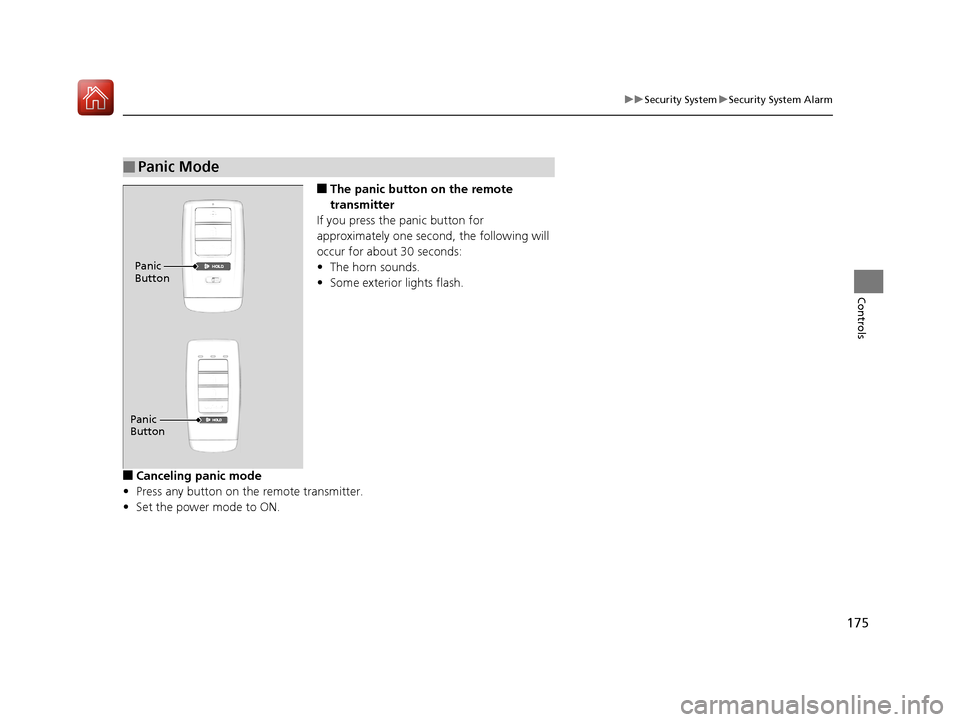
■The panic button on the remote
transmitter
If you press the panic button for
approximately one second, the following will
occur for about 30 seconds:
• The horn sounds.
• Some exterior lights flash.
■Canceling panic mode
• Press any button on the remote transmitter.
• Set the power mode to ON.
■Panic Mode
Panic
Button
Panic
Button
20 ACURA RDX-31TJB6111.book 175 ページ 2020年2月11日 火曜日 午後2時6分
Page 177 of 657
176
Controls
Opening and Closing the Windows
Opening/Closing the Power Windows
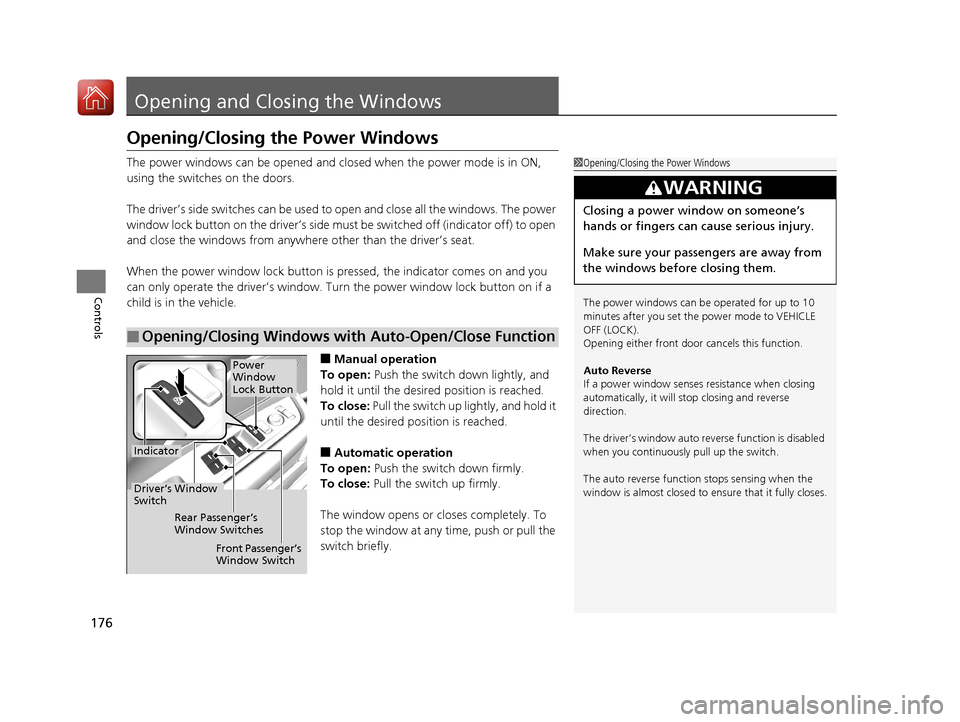
The power windows can be opened and closed when the power mode is in ON,
using the switches on the doors.
The driver’s side switches can be used to open and close all the windows. The power
window lock button on the driver’s side must be switched off (indicator off) to open
and close the windows from anywhere other than the driver’s seat.
When the power window lock button is pressed, the indicator comes on and you
can only operate the driver’s window. Turn the power window lock button on if a
child is in the vehicle.
■Manual operation
To open: Push the switch down lightly, and
hold it until the desired position is reached.
To close: Pull the switch up lightly, and hold it
until the desired position is reached.
■Automatic operation
To open: Push the switch down firmly.
To close: Pull the switch up firmly.
The window opens or cl oses completely. To
stop the window at any time, push or pull the
switch briefly.
■Opening/Closing Windows with Auto-Open/Close Function
1 Opening/Closing the Power Windows
The power windows can be operated for up to 10
minutes after you set the power mode to VEHICLE
OFF (LOCK).
Opening either front door cancels this function.
Auto Reverse
If a power window senses resistance when closing
automatically, it will stop closing and reverse
direction.
The driver’s window auto re verse function is disabled
when you continuously pull up the switch.
The auto reverse function stops sensing when the
window is almost closed to en sure that it fully closes.
3WARNING
Closing a power window on someone’s
hands or fingers can cause serious injury.
Make sure your passengers are away from
the windows before closing them.
Power
Window
Lock Button
Indicator
Driver’s Window
Switch
Front Passenger’s
Window Switch
Rear Passenger’s
Window Switches
20 ACURA RDX-31TJB6111.book 176 ページ 2020年2月11日 火曜日 午後2時6分
Page 180 of 657
179Continued
Controls
Panoramic Roof
You can only operate the panoramic roof and sunshade when the power mode is in
ON. Use the switch in the front of the ceiling to open and close the panoramic roof
and sunshade.1Panoramic Roof
NOTICE
Opening the panoramic roof in below freezing
temperature or when it is covered with snow or ice
can damage the panoramic roof panel or motor.
The panoramic roof and s unshade can be operated
for up to 10 minutes after y ou set the power mode to
VEHICLE OFF (LOCK).
Opening either front door cancels this function.
When resistance is detected, the auto reverse
function causes the panoramic roof and sunshade to
change directions, then stop. Auto reverse stops
sensing when the panoramic roof and sunshade are
almost closed to ensure that it fully closes. Make sure
that all objects, including fingers, are clear of the
panoramic roof and sunshade.
3WARNING
Opening or closing the panoramic roof and
sunshade on someone’s hands or fingers
can cause serious injury.
Make sure all hands and fingers are clear of
the panoramic roof and sunshade before
opening or closing it.
20 ACURA RDX-31TJB6111.book 179 ページ 2020年2月11日 火曜日 午後2時6分
Page 183 of 657
182
Controls
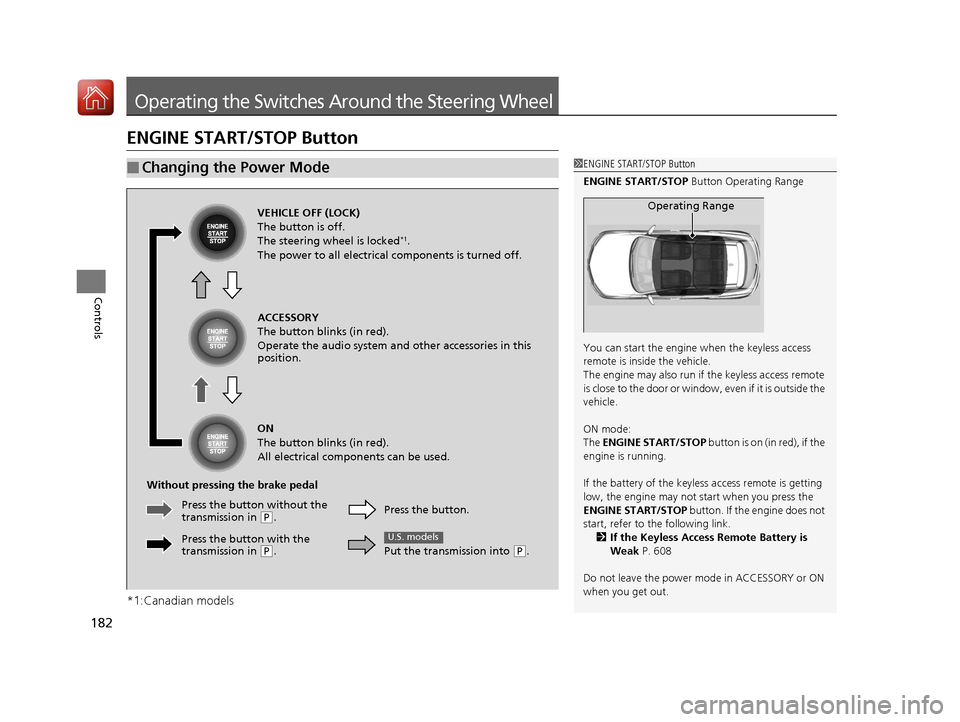
Operating the Switches Around the Steering Wheel
ENGINE START/STOP Button
*1:Canadian models
■Changing the Power Mode1ENGINE START/STOP Button
ENGINE START/STOP Button Operating Range
You can start the engine when the keyless access
remote is inside the vehicle.
The engine may also run if the keyless access remote
is close to the door or window, even if it is outside the
vehicle.
ON mode:
The ENGINE START/STOP button is on (in red), if the
engine is running.
If the battery of the keyless access remote is getting
low, the engine may not start when you press the
ENGINE START/STOP button. If the engine does not
start, refer to the following link. 2 If the Keyless Access Remote Battery is
Weak P. 608
Do not leave the power mode in ACCESSORY or ON
when you get out.
Operating RangeVEHICLE OFF (LOCK)
The button is off.
The steering wheel is locked
*1.
The power to all electrical components is turned off.
ACCESSORY
The button blinks (in red).
Operate the audio system and other accessories in this
position.
ON
The button blinks (in red).
All electrical components can be used.
Without pressing the brake pedal Press the button.
Put the transmission into
(P.
U.S. models
Press the butto n without the
transmission in ( P.
Press the button with the
transmission in
( P.
20 ACURA RDX-31TJB6111.book 182 ページ 2020年2月11日 火曜日 午後2時6分