on mode Acura RDX 2020 Owner's Manual
[x] Cancel search | Manufacturer: ACURA, Model Year: 2020, Model line: RDX, Model: Acura RDX 2020Pages: 657, PDF Size: 33.2 MB
Page 206 of 657
205
uuAdjusting the Mirrors uPower Door Mirrors
Continued
Controls
Power Door Mirrors
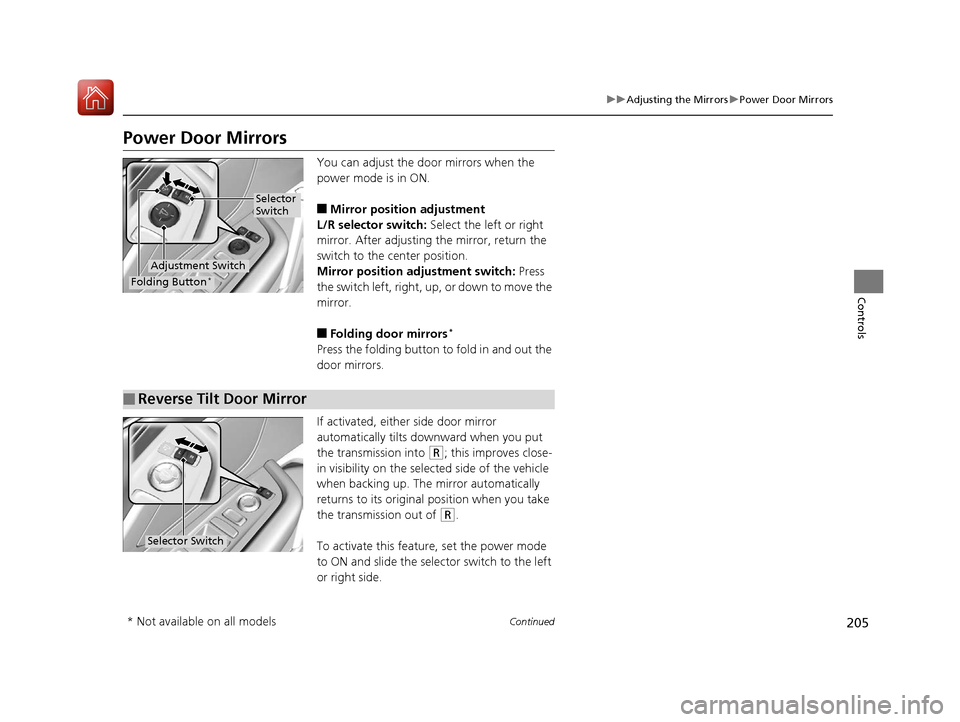
You can adjust the door mirrors when the
power mode is in ON.
■Mirror position adjustment
L/R selector switch: Select the left or right
mirror. After adjusting the mirror, return the
switch to the center position.
Mirror positi on adjustment switch: Press
the switch left, right, up, or down to move the
mirror.
■Folding door mirrors*
Press the folding button to fold in and out the
door mirrors.
If activated, either side door mirror
automatically tilts do wnward when you put
the transmission into
(R; this improves close-
in visibility on the selected side of the vehicle
when backing up. The mirror automatically
returns to its original position when you take
the transmission out of
(R.
To activate this feature, set the power mode
to ON and slide the sele ctor switch to the left
or right side.
Selector
Switch
Adjustment Switch
Folding Button*
■Reverse Tilt Door Mirror
Selector Switch
* Not available on all models
20 ACURA RDX-31TJB6111.book 205 ページ 2020年2月11日 火曜日 午後2時6分
Page 207 of 657
uuAdjusting the Mirrors uPower Door Mirrors
206
Controls
■Folding in the door mirrors
Lock the driver’s door with the key, press the lock button on the remote transmitter,
touch the door lock sensor on any door, or press the door lock button on the
tailgate. u The mirrors start folding in automatically.
■Folding out the door mirrors
Unlock the driver’s door us ing the key, remote transmitter or keyless access system.
u The mirrors start folding out automatically.
■Automatic Folding Door Mirror Function*1Automatic Folding Door Mirror Function*
You cannot turn the automatic folding out
automatically if they have been folded in using the
folding button.
You can turn the automa tic folding door mirror
function on and off. 2 Customized Features P. 335
Door mirrors will not fold automatically when locking
from inside the vehicle usi ng lock tab or master door
lock switch.
* Not available on all models
20 ACURA RDX-31TJB6111.book 206 ページ 2020年2月11日 火曜日 午後2時6分
Page 208 of 657
207Continued
Controls
Adjusting the Seats
Front Seats
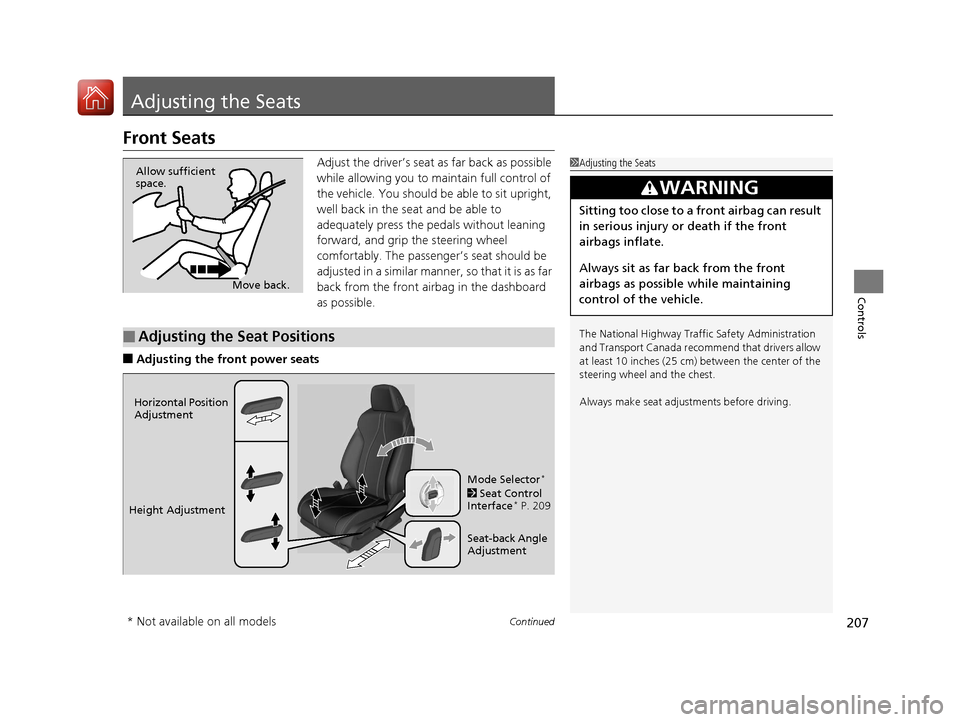
Adjust the driver’s seat as far back as possible
while allowing you to ma intain full control of
the vehicle. You should be able to sit upright,
well back in the seat and be able to
adequately press the pedals without leaning
forward, and grip the steering wheel
comfortably. The passenger’s seat should be
adjusted in a similar manner, so that it is as far
back from the front airbag in the dashboard
as possible.
■Adjusting the fro nt power seats
1Adjusting the Seats
The National Highway Traffic Safety Administration
and Transport Cana da recommend that drivers allow
at least 10 inches (25 cm) between the center of the
steering wheel and the chest.
Always make seat adjustments before driving.
3WARNING
Sitting too close to a front airbag can result
in serious injury or death if the front
airbags inflate.
Always sit as far back from the front
airbags as possible while maintaining
control of the vehicle.
Move back.
Allow sufficient
space.
■Adjusting the Seat Positions
Horizontal Position
Adjustment
Height Adjustment Seat-back Angle
Adjustment Mode Selector
*
2 Seat Control
Interface* P. 209
* Not available on all models
20 ACURA RDX-31TJB6111.book 207 ページ 2020年2月11日 火曜日 午後2時6分
Page 209 of 657
208
uuAdjusting the Seats uFront Seats
Controls
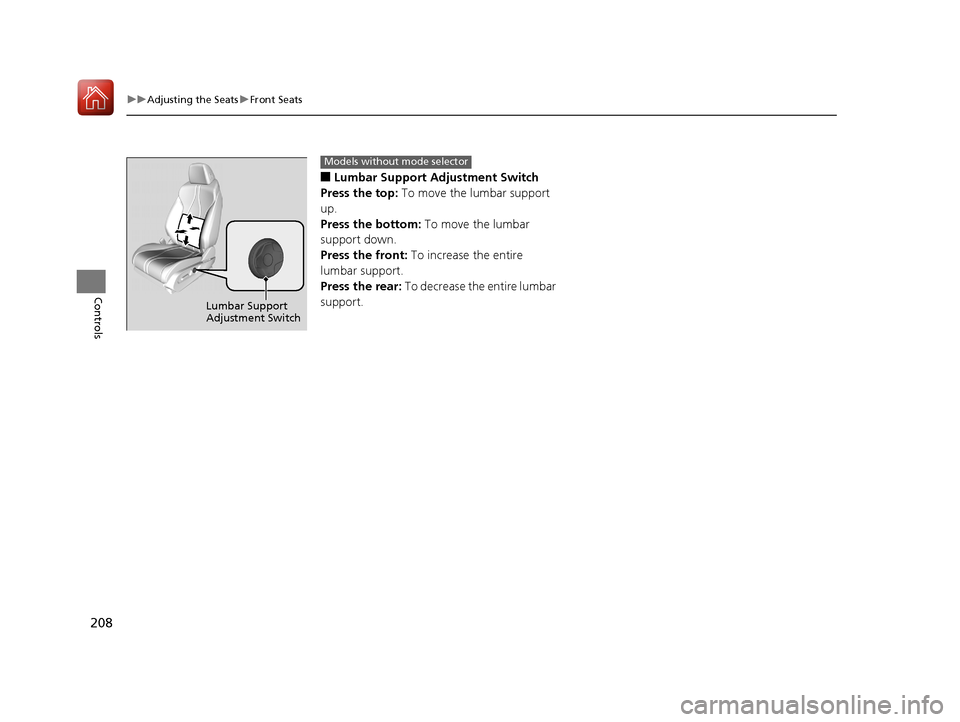
■Lumbar Support Adjustment Switch
Press the top: To move the lumbar support
up.
Press the bottom: To move the lumbar
support down.
Press the front: To increase the entire
lumbar support.
Press the rear: To decrease the entire lumbar
support.
Lumbar Support
Adjustment Switch
Models without mode selector
20 ACURA RDX-31TJB6111.book 208 ページ 2020年2月11日 火曜日 午後2時6分
Page 210 of 657
Continued209
uuAdjusting the Seats uFront Seats
Controls
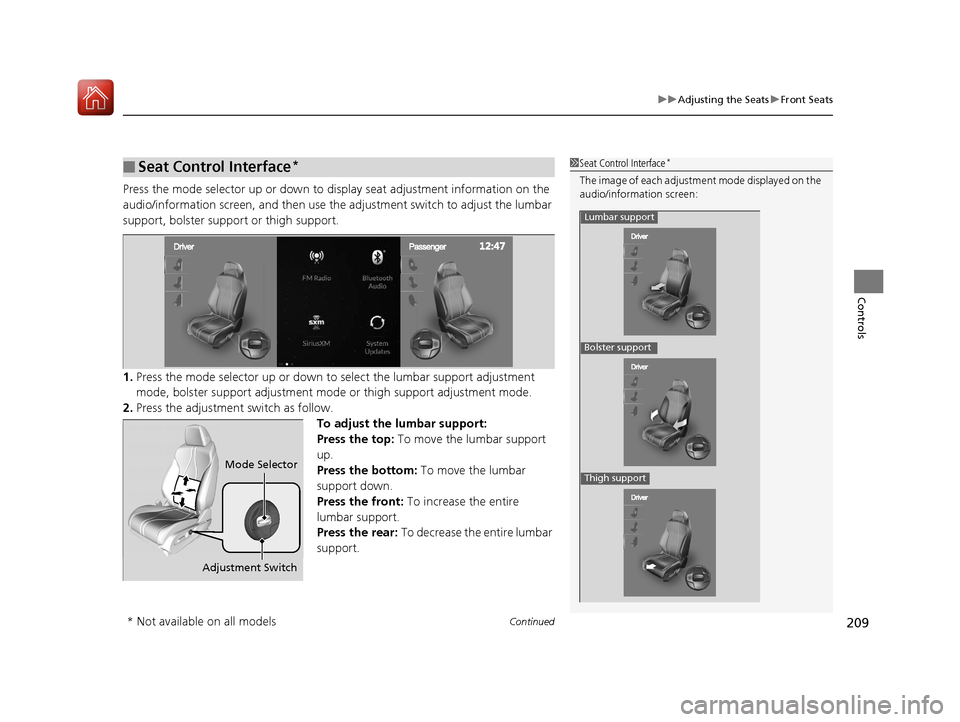
Press the mode selector up or down to display seat adjustment information on the
audio/information screen, and then use the ad justment switch to adjust the lumbar
support, bolster supp ort or thigh support.
1. Press the mode selector up or down to select the lumbar support adjustment
mode, bolster support adjustment mode or thigh support adjustment mode.
2. Press the adjustment switch as follow.
To adjust the lumbar support:
Press the top: To move the lumbar support
up.
Press the bottom: To move the lumbar
support down.
Press the front: To increase the entire
lumbar support.
Press the rear: To decrease the entire lumbar
support.
■Seat Control Interface*1 Seat Control Interface*
The image of each adjustment mode displayed on the
audio/information screen:
Lumbar support
Bolster support
Thigh support
Adjustment Switch
Mode Selector
* Not available on all models
20 ACURA RDX-31TJB6111.book 209 ページ 2020年2月11日 火曜日 午後2時6分
Page 211 of 657
uuAdjusting the Seats uFront Seats
210
Controls
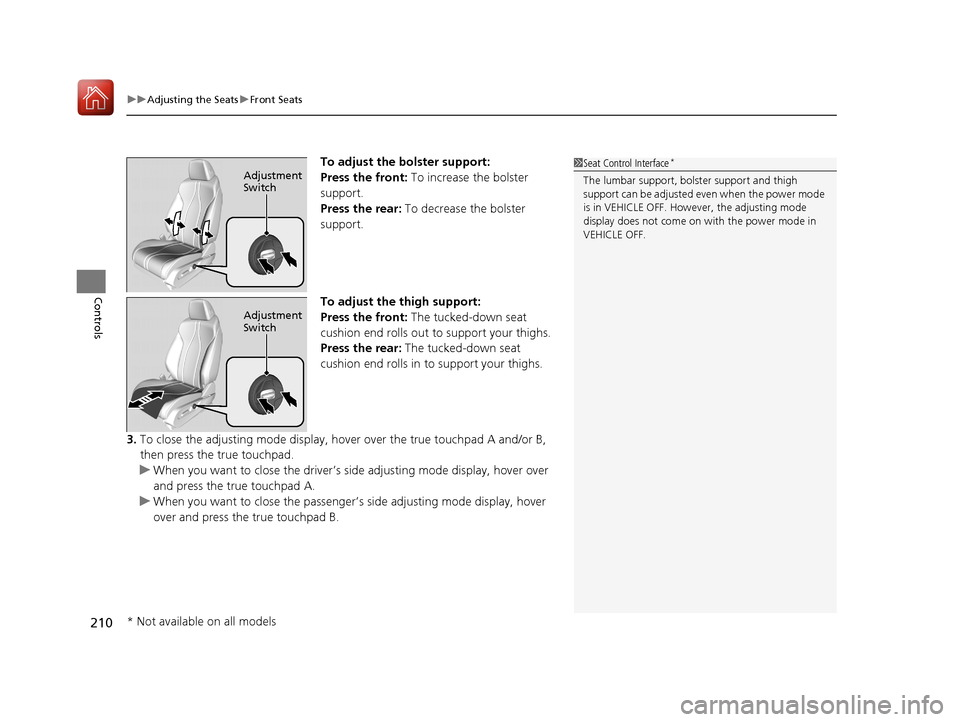
To adjust the bolster support:
Press the front: To increase the bolster
support.
Press the rear: To decrease the bolster
support.
To adjust the thigh support:
Press the front: The tucked-down seat
cushion end rolls out to support your thighs.
Press the rear: The tucked-down seat
cushion end rolls in to support your thighs.
3. To close the adjusting mode display, hover over the true touchpad A and/or B,
then press the true touchpad.
u When you want to close the driver’s side adjusting mode display, hover over
and press the true touchpad A.
u When you want to close the passenger’s side adjusting mode display, hover
over and press the true touchpad B.1 Seat Control Interface*
The lumbar support, bolster support and thigh
support can be adjusted even when the power mode
is in VEHICLE OFF. However, the adjusting mode
display does not come on with the power mode in
VEHICLE OFF.Adjustment
Switch
Adjustment
Switch
* Not available on all models
20 ACURA RDX-31TJB6111.book 210 ページ 2020年2月11日 火曜日 午後2時6分
Page 220 of 657
219Continued
Controls
Interior Lights/Interior Convenience Items
Interior Lights
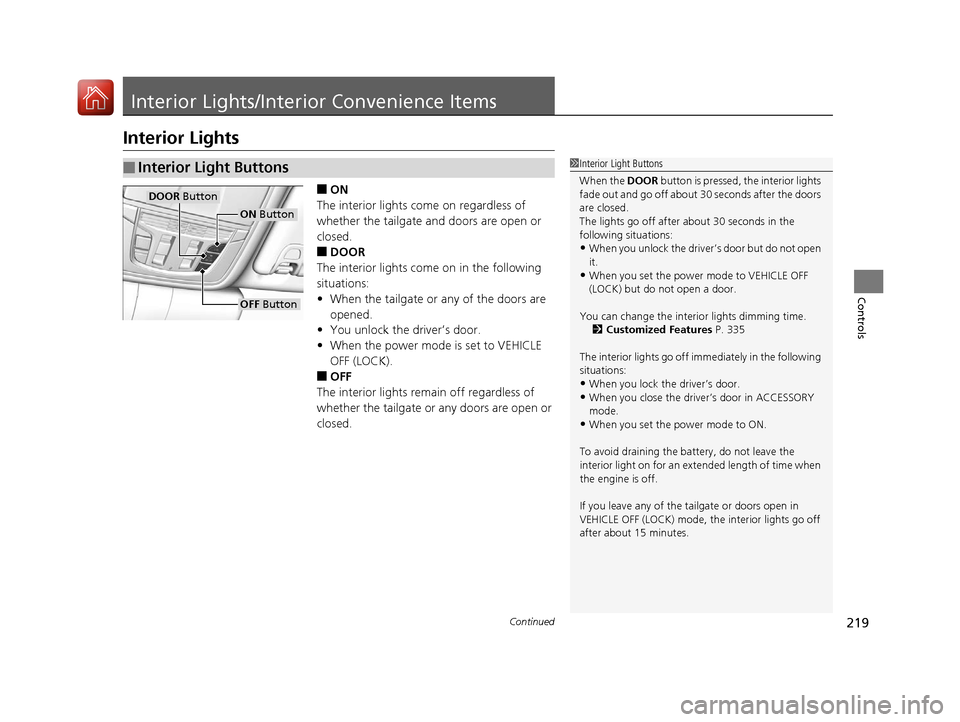
■ON
The interior lights come on regardless of
whether the tailgate and doors are open or
closed.
■DOOR
The interior lights come on in the following
situations:
• When the tailgate or any of the doors are
opened.
• You unlock the driver’s door.
• When the power mode is set to VEHICLE
OFF (LOCK).
■OFF
The interior lights remain off regardless of
whether the tailgate or any doors are open or
closed.
■Interior Light Buttons1 Interior Light Buttons
When the DOOR button is pressed, the interior lights
fade out and go off about 30 seconds after the doors
are closed.
The lights go off after about 30 seconds in the
following situations:
•When you unlock the driver’s door but do not open
it.
•When you set the power mode to VEHICLE OFF
(LOCK) but do not open a door.
You can change the interi or lights dimming time.
2 Customized Features P. 335
The interior lights go off i mmediately in the following
situations:
•When you lock the driver’s door.
•When you close the driver’s door in ACCESSORY
mode.
•When you set the power mode to ON.
To avoid draining the ba ttery, do not leave the
interior light on for an extended length of time when
the engine is off.
If you leave any of the tailgate or doors open in
VEHICLE OFF (LOCK) mode, th e interior lights go off
after about 15 minutes.
DOOR Button
OFF Button
ON Button
20 ACURA RDX-31TJB6111.book 219 ページ 2020年2月11日 火曜日 午後2時6分
Page 226 of 657

Continued225
uuInterior Lights/Interior Convenience Items uInterior Convenience Items
Controls
The accessory power socket can be used when the power mode is in ACCESSORY or
ON.
■Accessory power socket (front panel)
Open the cover to use it.
There are coat hooks on the rear grab handle
of both sides. Pull it down to use it.
■Accessory Power Socket1 Accessory Power Socket
NOTICE
Do not insert an automotive type cigarette lighter
element.
This can overheat the power socket.
The accessory power socket is designed to supply
power for 12-volt DC accessories that are rated 180
watts (15 amps) or less.
To prevent battery drain, only use the power socket
with the engine running.
■Coat Hooks1 Coat Hooks
The coat hooks are not desi gned for large or heavy
items.
20 ACURA RDX-31TJB6111.book 225 ページ 2020年2月11日 火曜日 午後2時6分
Page 228 of 657

Continued227
uuInterior Lights/Interior Convenience Items uInterior Convenience Items
Controls
To open the sunglasses holder, press and
release the indent. To close, press it again until
it latches.
You can store eyeglasses and other small
items in this holder.
The power mode must be in ON to use the
heated steering wheel.
Press the button on the left side of the
steering wheel.
When a comfortable temp erature is reached,
press the button again to turn it off.
The heated steering wheel is turned off every
time you start the engine, even if you turned it
on the last time you drove the vehicle.
■Sunglasses Holder1 Sunglasses Holder
Keep the holder closed wh ile driving except when
accessing stored items.
Press
■Heated Steering Wheel*1 Heated Steering Wheel*
Do not use the heated st eering wheel continuously
when the engine is off. Under such conditions, the
battery may be weaken ed, making the engine
difficult to start.
Heated Steering Wheel Button
Indicator
* Not available on all models
20 ACURA RDX-31TJB6111.book 227 ページ 2020年2月11日 火曜日 午後2時6分
Page 229 of 657
uuInterior Lights/Interior Convenience Items uInterior Convenience Items
228
Controls
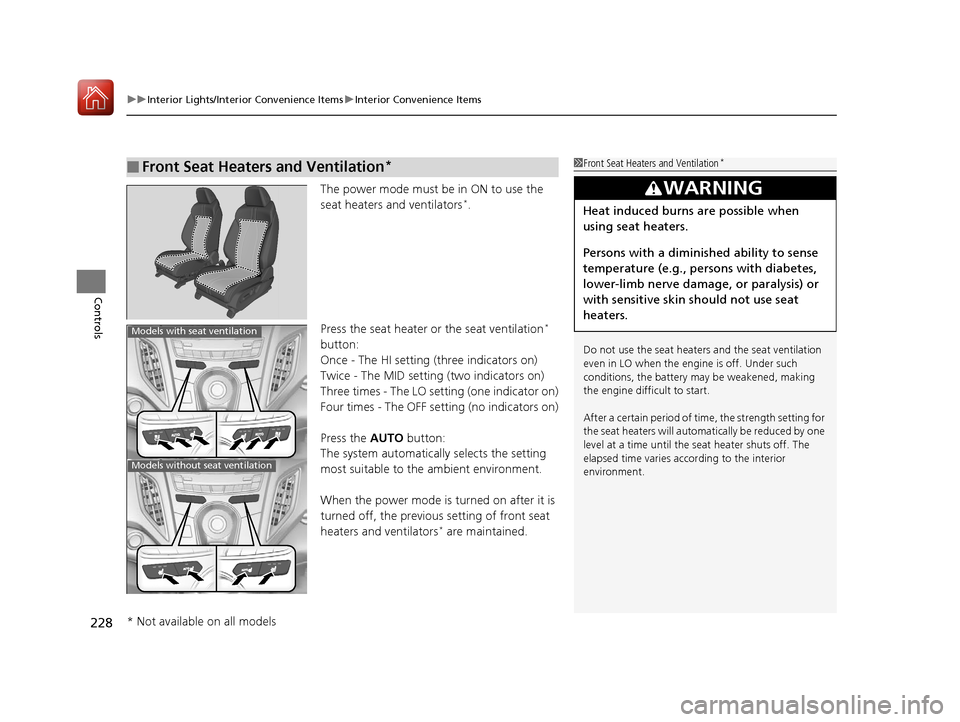
The power mode must be in ON to use the
seat heaters and ventilators*.
Press the seat heater or the seat ventilation
*
button:
Once - The HI setting (three indicators on)
Twice - The MID setting (two indicators on)
Three times - The LO setting (one indicator on)
Four times - The OFF se tting (no indicators on)
Press the AUTO button:
The system automatically selects the setting
most suitable to the ambient environment.
When the power mode is turned on after it is
turned off, the previous setting of front seat
heaters and ventilators
* are maintained.
■Front Seat Heaters and Ventilation*1 Front Seat Heaters and Ventilation*
Do not use the seat heater s and the seat ventilation
even in LO when the engine is off. Under such
conditions, the battery ma y be weakened, making
the engine difficult to start.
After a certain period of time, the strength setting for
the seat heaters will automatically be reduced by one
level at a time until the seat heater shuts off. The
elapsed time varies according to the interior
environment.
3WARNING
Heat induced burns are possible when
using seat heaters.
Persons with a diminished ability to sense
temperature (e.g., persons with diabetes,
lower-limb nerve damage, or paralysis) or
with sensitive skin should not use seat
heaters.
Models with seat ventilation
Models without seat ventilation
* Not available on all models
20 ACURA RDX-31TJB6111.book 228 ページ 2020年2月11日 火曜日 午後2時6分