on mode Acura RDX 2020 Owner's Manual
[x] Cancel search | Manufacturer: ACURA, Model Year: 2020, Model line: RDX, Model: Acura RDX 2020Pages: 657, PDF Size: 33.2 MB
Page 230 of 657
229
uuInterior Lights/Interior Convenience Items uInterior Convenience Items
Controls
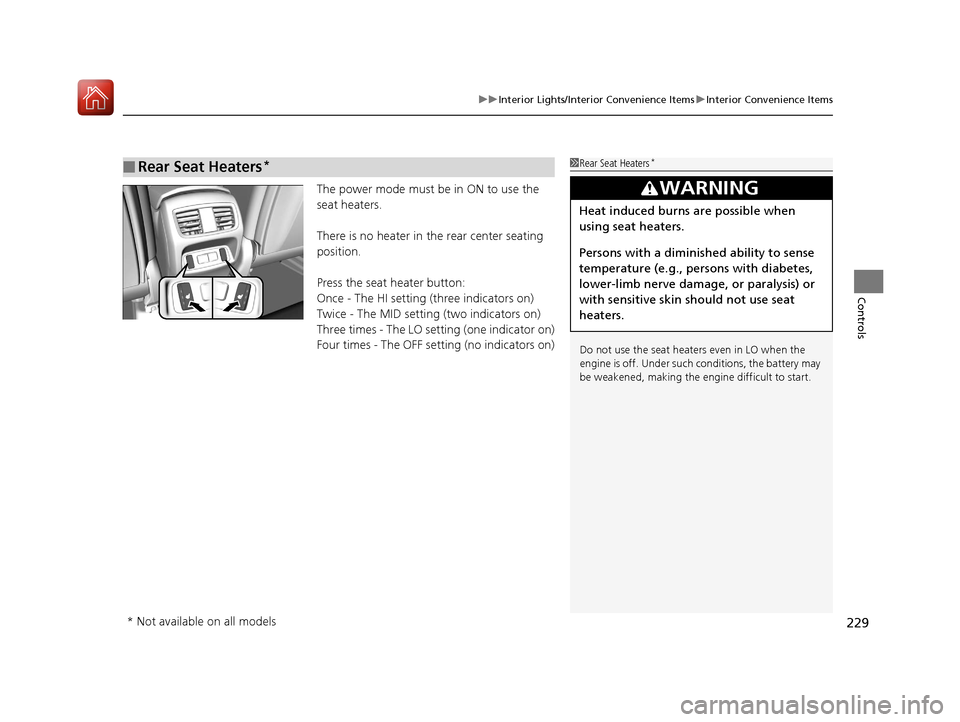
The power mode must be in ON to use the
seat heaters.
There is no heater in the rear center seating
position.
Press the seat heater button:
Once - The HI setting (three indicators on)
Twice - The MID setting (two indicators on)
Three times - The LO setting (one indicator on)
Four times - The OFF setting (no indicators on)
■Rear Seat Heaters*1 Rear Seat Heaters*
Do not use the seat heaters even in LO when the
engine is off. Under such conditions, the battery may
be weakened, making the engine difficult to start.
3WARNING
Heat induced burns are possible when
using seat heaters.
Persons with a diminished ability to sense
temperature (e.g., persons with diabetes,
lower-limb nerve damage, or paralysis) or
with sensitive skin should not use seat
heaters.
* Not available on all models
20 ACURA RDX-31TJB6111.book 229 ページ 2020年2月11日 火曜日 午後2時6分
Page 231 of 657
230
Controls
Climate Control System
Using Automatic Climate Control
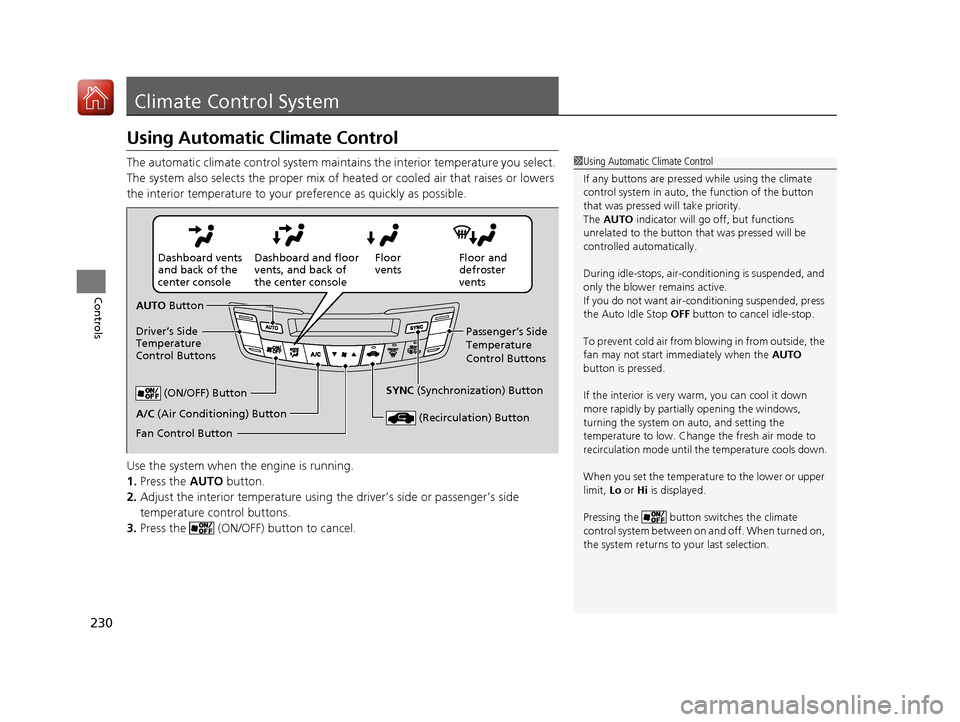
The automatic climate control system maintains the interior temperature you select.
The system also selects the proper mix of heated or cooled air that raises or lowers
the interior temperature to your preference as quickly as possible.
Use the system when the engine is running.
1. Press the AUTO button.
2. Adjust the interior temperature using the driver’s side or passenger’s side
temperature control buttons.
3. Press the (ON/OFF) button to cancel.1Using Automatic Climate Control
If any buttons are presse d while using the climate
control system in auto, the function of the button
that was pressed will take priority.
The AUTO indicator will go off, but functions
unrelated to the button th at was pressed will be
controlled automatically.
During idle-stops, air-conditioning is suspended, and
only the blower remains active.
If you do not want air-cond itioning suspended, press
the Auto Idle Stop OFF button to cancel idle-stop.
To prevent cold air from bl owing in from outside, the
fan may not start i mmediately when the AUTO
button is pressed.
If the interior is very warm, you can cool it down
more rapidly by partial ly opening the windows,
turning the system on auto, and setting the
temperature to low. Change the fresh air mode to
recirculation mode until the temperature cools down.
When you set the temperat ure to the lower or upper
limit, Lo or Hi is displayed.
Pressing the button switches the climate
control system between on and off. When turned on,
the system returns to your last selection.
Floor and
defroster
vents
Floor
vents
Dashboard and floor
vents, and back of
the center console
Dashboard vents
and back of the
center console
AUTO Button
Driver’s Side
Temperature
Control Buttons Passenger’s Side
Temperature
Control Buttons
A/C (Air Conditioning) Button (ON/OFF) Button
Fan Control Button SYNC
(Synchronization) Button
(Recirculation) Button
20 ACURA RDX-31TJB6111.book 230 ページ 2020年2月11日 火曜日 午後2時6分
Page 232 of 657
Continued231
uuClimate Control System uUsing Automatic Climate Control
Controls
■Switching between the recirc ulation and fresh air modes
Press the (recirculation) button and switch the mode depending on
environmental conditions.
Recirculation mode (indicator on): Recirculat es air from the vehicle’s interior through
the system.
Fresh air mode (indicator off): Maintains outside ventilation. Keep the system in
fresh air mode in normal situations.1 Using Automatic Climate Control
When you unlock the doors with your remote, the
driver’s ID (DRIVER 1 or DRIVER 2) is detected, and
the climate control settings are turned to the
respective mode automatically when you set the
power mode to ON.
20 ACURA RDX-31TJB6111.book 231 ページ 2020年2月11日 火曜日 午後2時6分
Page 233 of 657
uuClimate Control System u
232
Controls
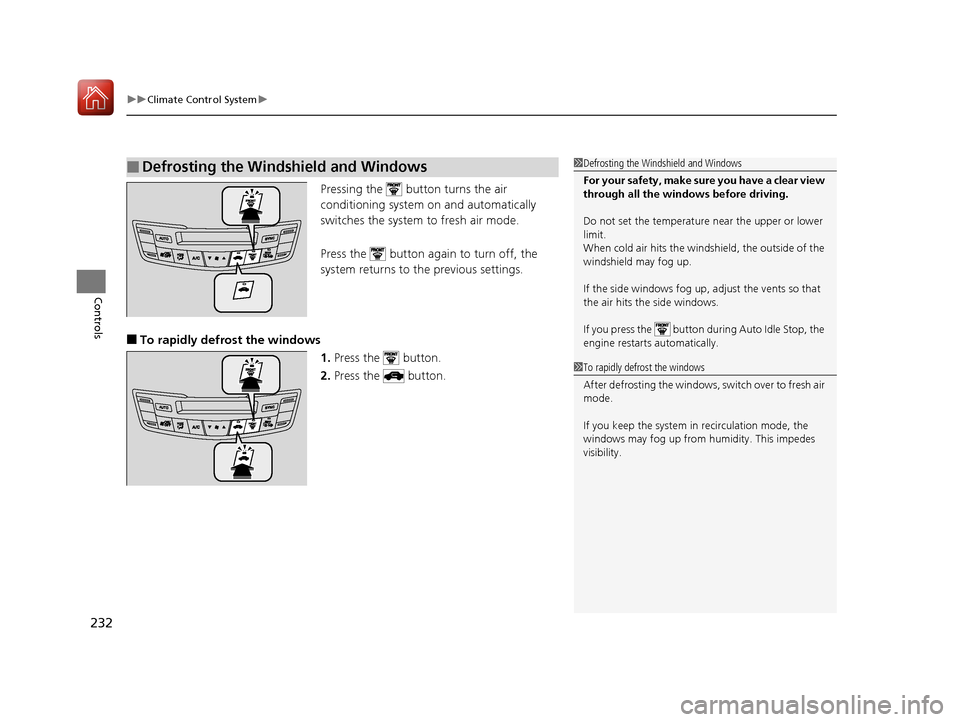
Pressing the button turns the air
conditioning system on and automatically
switches the system to fresh air mode.
Press the button again to turn off, the
system returns to the previous settings.
■To rapidly defrost the windows 1.Press the button.
2. Press the button.
■Defrosting the Windshield and Windows1Defrosting the Windshield and Windows
For your safety, make sure you have a clear view
through all the windows before driving.
Do not set the temperatur e near the upper or lower
limit.
When cold air hits the windshield, the outside of the
windshield may fog up.
If the side windows fog up, adjust the vents so that
the air hits the side windows.
If you press the button during Auto Idle Stop, the
engine restarts automatically.
1 To rapidly defrost the windows
After defrosting the windows, switch over to fresh air
mode.
If you keep the system in recirculation mode, the
windows may fog up from humidity. This impedes
visibility.
20 ACURA RDX-31TJB6111.book 232 ページ 2020年2月11日 火曜日 午後2時6分
Page 234 of 657
Continued233
uuClimate Control System u
Controls
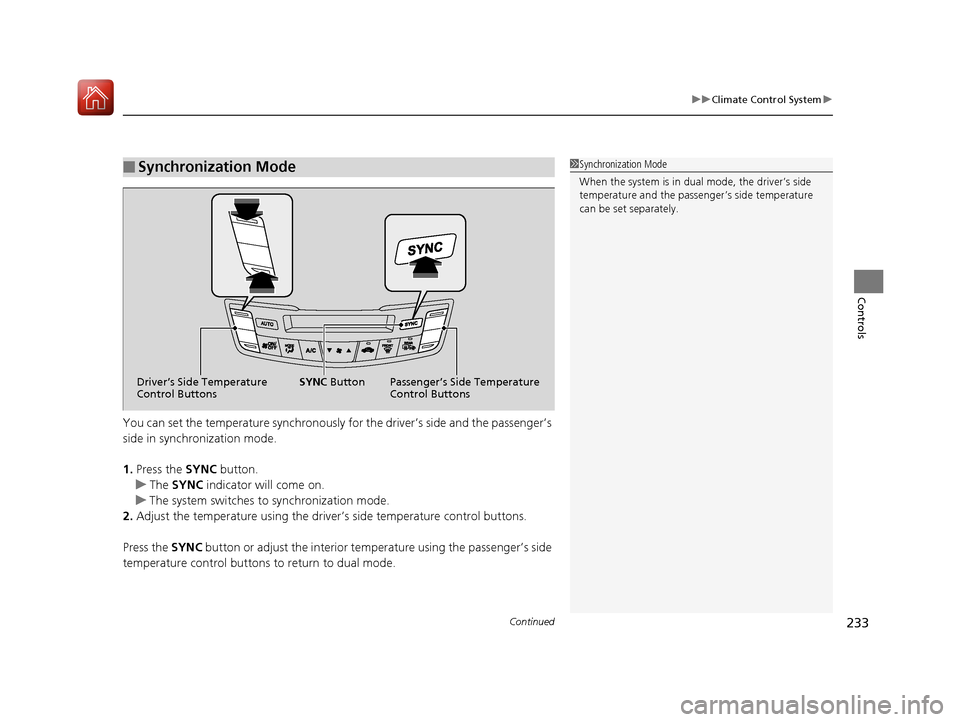
You can set the temperature synchronously for the driver’s side and the passenger’s
side in synchronization mode.
1.Press the SYNC button.
u The SYNC indicator will come on.
u The system switches to synchronization mode.
2. Adjust the temperature using the driver’s side temperature control buttons.
Press the SYNC button or adjust the interior temp erature using the passenger’s side
temperature control buttons to return to dual mode.
■Synchronization Mode1Synchronization Mode
When the system is in dua l mode, the driver’s side
temperature and the passe nger’s side temperature
can be set separately.
Driver’s Side Temperature
Control Buttons Passenger’s Side Temperature
Control Buttons
SYNC
Button
20 ACURA RDX-31TJB6111.book 233 ページ 2020年2月11日 火曜日 午後2時6分
Page 235 of 657
uuClimate Control System u
234
Controls
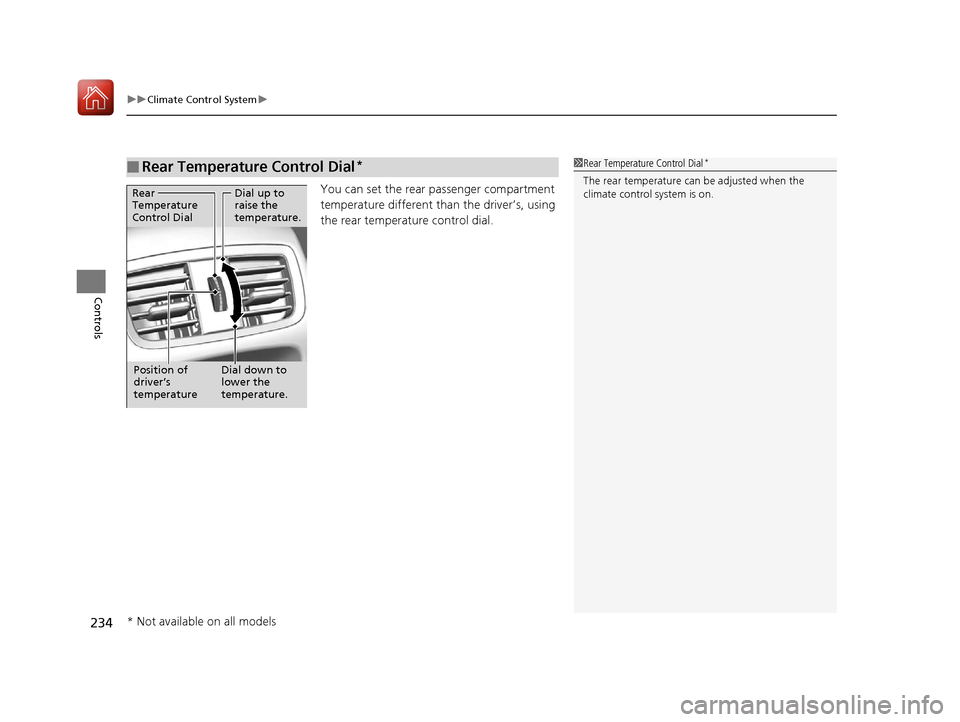
You can set the rear passenger compartment
temperature different than the driver’s, using
the rear temperature control dial.
■Rear Temperature Control Dial*1 Rear Temperature Control Dial*
The rear temperature can be adjusted when the
climate control system is on.Dial up to
raise the
temperature.
Dial down to
lower the
temperature.
Rear
Temperature
Control Dial
Position of
driver’s
temperature
* Not available on all models
20 ACURA RDX-31TJB6111.book 234 ページ 2020年2月11日 火曜日 午後2時6分
Page 239 of 657
238
Features
Audio System
About Your Audio System
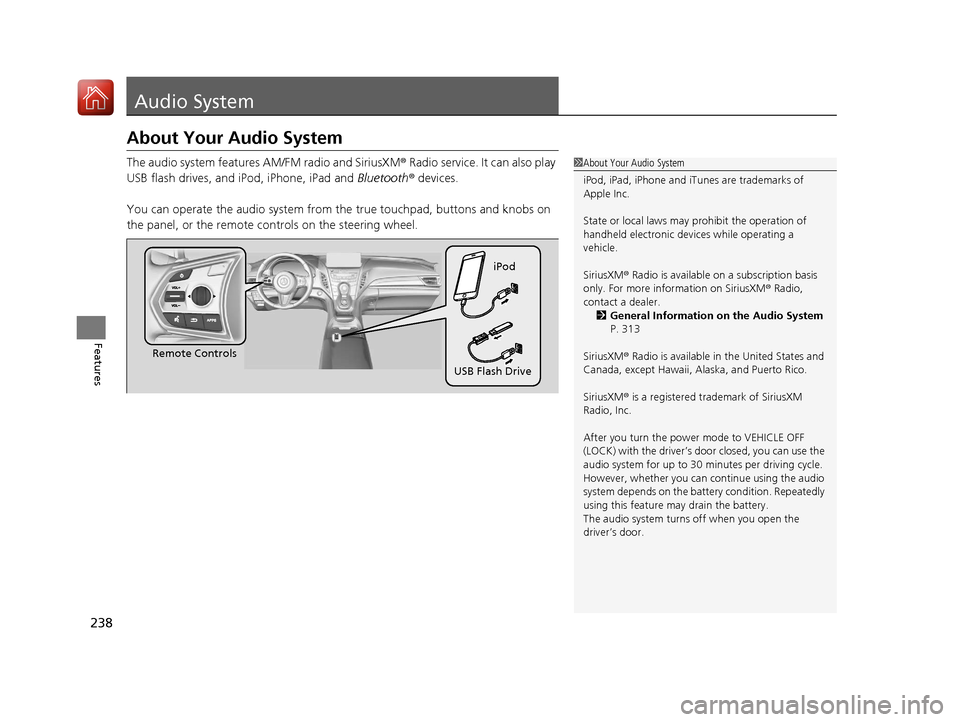
The audio system features AM/FM radio and SiriusXM® Radio service. It can also play
USB flash drives, and iPod, iPhone, iPad and Bluetooth® devices.
You can operate the audio system from the true touchpad, buttons and knobs on
the panel, or the remote c ontrols on the steering wheel.1About Your Audio System
iPod, iPad, iPhone and iT unes are trademarks of
Apple Inc.
State or local laws may pr ohibit the operation of
handheld electronic devices while operating a
vehicle.
SiriusXM ® Radio is available on a subscription basis
only. For more information on SiriusXM ® Radio,
contact a dealer. 2 General Information on the Audio System
P. 313
SiriusXM ® Radio is available in the United States and
Canada, except Ha waii, Alaska, and Puerto Rico.
SiriusXM ® is a registered trademark of SiriusXM
Radio, Inc.
After you turn the power mode to VEHICLE OFF
(LOCK) with the driver’s door closed, you can use the
audio system for up to 30 minutes per driving cycle.
However, whether you can continue using the audio
system depends on the batter y condition. Repeatedly
using this feature ma y drain the battery.
The audio system turns off when you open the
driver’s door.
Remote Controls iPod
USB Flash Drive
20 ACURA RDX-31TJB6111.book 238 ページ 2020年2月11日 火曜日 午後2時6分
Page 240 of 657
239
uuAudio System uUSB Ports
Continued
Features
USB Ports
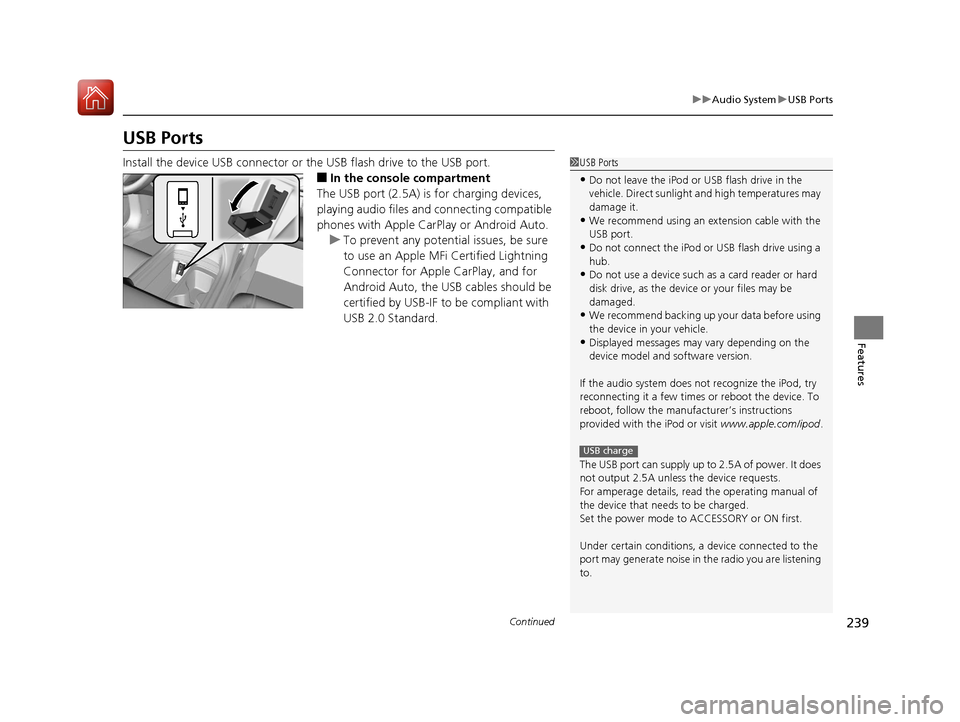
Install the device USB connector or the USB flash drive to the USB port.
■In the consol e compartment
The USB port (2.5A) is for charging devices,
playing audio files and connecting compatible
phones with Apple CarPlay or Android Auto. u To prevent any potenti al issues, be sure
to use an Apple MFi Certified Lightning
Connector for Apple CarPlay, and for
Android Auto, the USB cables should be
certified by USB-IF to be compliant with
USB 2.0 Standard.
1 USB Ports
•Do not leave the iPod or USB flash drive in the
vehicle. Direct sunlight and high temperatures may
damage it.
•We recommend using an ex tension cable with the
USB port.
•Do not connect the iPod or USB flash drive using a
hub.
•Do not use a device such as a card reader or hard
disk drive, as the device or your files may be
damaged.
•We recommend backing up yo ur data before using
the device in your vehicle.
•Displayed messages may vary depending on the
device model and software version.
If the audio system does not recognize the iPod, try
reconnecting it a few times or reboot the device. To
reboot, follow the manufac turer’s instructions
provided with the iPod or visit www.apple.com/ipod.
The USB port can supply up to 2.5A of power. It does
not output 2.5A unless the device requests.
For amperage details, read the operating manual of
the device that ne eds to be charged.
Set the power mode to ACCESSORY or ON first.
Under certain condi tions, a device connected to the
port may generate noise in the radio you are listening
to.
USB charge
20 ACURA RDX-31TJB6111.book 239 ページ 2020年2月11日 火曜日 午後2時6分
Page 241 of 657

uuAudio System uUSB Ports
240
Features
■On the front panel
The USB port (2.5A) is only for charging
devices.
■On the back of the console
compartment*
The USB ports (2.5A) are only for charging
devices.
1 On the front panel
This port is for battery charge only. You cannot play
music even if you have connected music players to
them.
Under certain condi tions, a device connected to the
port may generate noise in the radio you are listening
to.
1 On the back of the console compartment*
These ports are for battery charge only. You cannot
play music even if you ha ve connected music players
to them.
Under certain condi tions, a device connected to the
port may generate noise in the radio you are listening
to.
* Not available on all models
20 ACURA RDX-31TJB6111.book 240 ページ 2020年2月11日 火曜日 午後2時6分
Page 242 of 657
241
uuAudio System uAuxiliary Input Jack
Features
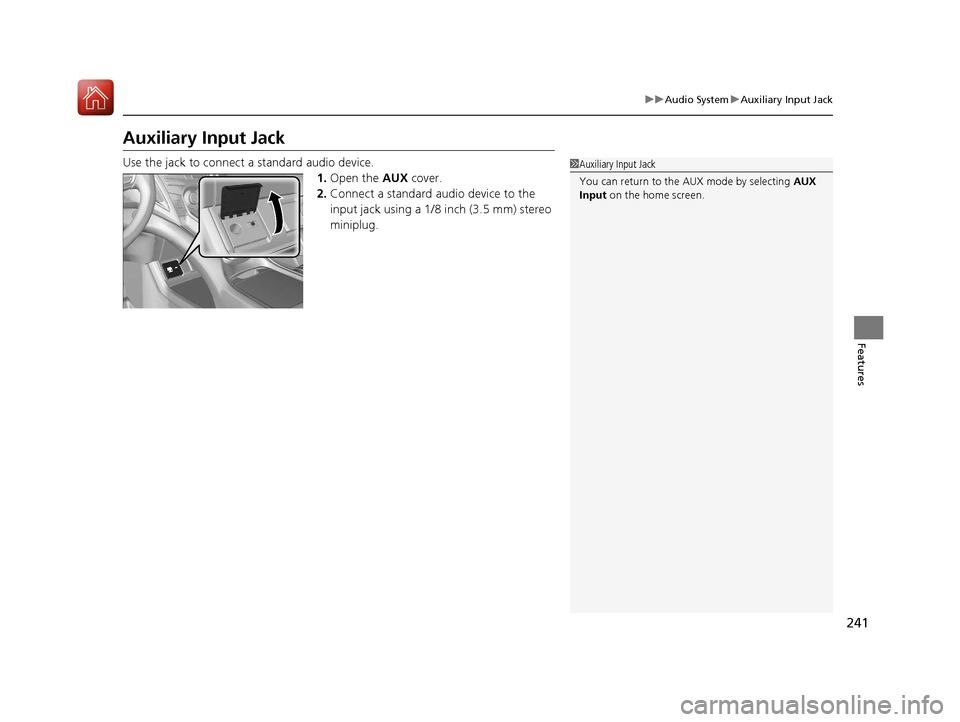
Auxiliary Input Jack
Use the jack to connect a standard audio device.
1.Open the AUX cover.
2. Connect a standard audio device to the
input jack using a 1/8 inch (3.5 mm) stereo
miniplug.1Auxiliary Input Jack
You can return to the AUX mode by selecting AUX
Input on the home screen.
20 ACURA RDX-31TJB6111.book 241 ページ 2020年2月11日 火曜日 午後2時6分