warning ACURA RDX 2022 Workshop Manual
[x] Cancel search | Manufacturer: ACURA, Model Year: 2022, Model line: RDX, Model: ACURA RDX 2022Pages: 709, PDF Size: 25.22 MB
Page 227 of 709

225
uuSeats uHead Restraints
Continued
Controls
Head Restraints
Your vehicle is equipped with head restraints in all seating positions.
Head restraints are most effective for
protection against whiplash and other rear-
impact crash injuries when the center of the
back of the occupant’s head rests against the
center of the restraint. The tops of the
occupant’s ears should be level with the
center height of the restraint.
■Adjusting the Front and Rear Outer Head Restraint Positions
1Head Restraints
In order for the head restraint system to work
properly:
•Do not hang any items on the head restraints, or
from the restraint legs.
•Do not place any objects between an occupant and
the seat-back.
•Install each restraint in its proper location.
3WARNING
Improperly positioning head restraints
reduces their effectiveness and increases
the likelihood of serious injury in a crash.
Make sure head restraints are in place and
positioned properly before driving.
Position head in the center
of the head restraint.
22 ACURA RDX-31TJB6300.book 225 ページ 2021年8月2日 月曜日 午前11時0分
Page 229 of 709

227
uuSeats uHead Restraints
Controls
A passenger sitting in a center back seating
position should adjust the height of their head
restraint to an appropriate position before the
vehicle begins moving.
To raise the head restraint:
Pull it upward.
To lower the head restraint:
Push it down while pressing the release
button.
Head restraints can be removed for cleaning or repair.
To remove a head restraint:
Pull the restraint up as far as it will go. Then, push the release button and pull the
restraint up and out.
To reinstall a head restraint:
Insert the legs back in place, then adjust the head restraint to an appropriate height
while pressing the release button. Pull up on the restraint to make sure it is locked
in position.
■Changing the Rear Center Seat Head Restraint Position
■Removing and Reinstalling the Head Restraints1 Removing and Reinstalling the Head Restraints
3WARNING
Failure to reinstall, or correctly reinstall, the
head restraints can result in severe injury
during a crash.
Always replace the he ad restraints before
driving.
22 ACURA RDX-31TJB6300.book 227 ページ 2021年8月2日 月曜日 午前11時0分
Page 230 of 709
228
uuSeats uMaintain a Proper Sitting Position
Controls
Maintain a Proper Sitting Position
After all occupants have adjusted their seats and head restraints, and put on their
seat belts, it is very important that they continue to sit upright, well back in their
seats, with their feet on the floor, until the vehicle is safely parked and the engine is
off.
Sitting improperly can increase the chance of injury during a crash. For example, if
an occupant slouches, lies down, turns si deways, sits forward, leans forward or
sideways, or puts one or both feet up, the chance of injury during a crash is greatly
increased.
In addition, an occupant who is out of position in the front seat can be seriously or
fatally injured in a crash by striking interior parts of the vehicle or being struck by an
inflating front airbag.1 Maintain a Proper Sitting Position
3WARNING
Sitting improperly or out of position can
result in serious injury or death in a crash.
Always sit upright, well back in the seat,
with your feet on the floor.
22 ACURA RDX-31TJB6300.book 228 ページ 2021年8月2日 月曜日 午前11時0分
Page 235 of 709

233
uuInterior Convenience Items uStorage Items
Continued
Controls
Storage Items
Press the button to open the glove box. You
can lock the glove box with the built-in key.
■Removable shelf
The shelf in the glove box is detachable. To
remove it, disengage the tabs.
The removable shelf can be stored upside
down in the glove box.
■Glove Box1 Glove Box
The glove box light comes on when the parking lights
are on.
3WARNING
An open glove box can cause serious injury
to your passenger in a crash, even if the
passenger is wearing the seat belt.
Always keep the glove box closed while
driving.
Glove Box
To Lock
Shelf
Tabs
22 ACURA RDX-31TJB6300.book 233 ページ 2021年8月2日 月曜日 午前11時0分
Page 247 of 709
Continued245
uuInterior Convenience Items uOther Interior Convenience Items
Controls
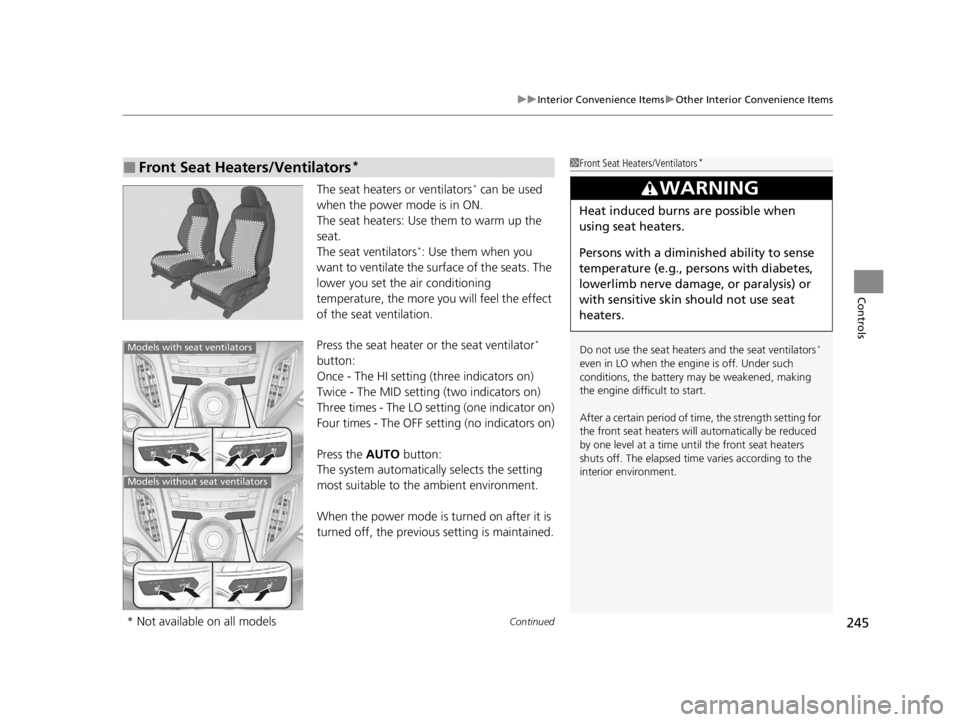
The seat heaters or ventilators* can be used
when the power mode is in ON.
The seat heaters: Use them to warm up the
seat.
The seat ventilators
*: Use them when you
want to ventilate the surface of the seats. The
lower you set the air conditioning
temperature, the more you will feel the effect
of the seat ventilation.
Press the seat heater or the seat ventilator
*
button:
Once - The HI setting (three indicators on)
Twice - The MID setting (two indicators on)
Three times - The LO setting (one indicator on)
Four times - The OFF setting (no indicators on)
Press the AUTO button:
The system automatically selects the setting
most suitable to the ambient environment.
When the power mode is turned on after it is
turned off, the previous setting is maintained.
■Front Seat Heaters/Ventilators*1 Front Seat Heaters/Ventilators*
Do not use the seat heaters and the seat ventilators*
even in LO when the engine is off. Under such
conditions, the battery ma y be weakened, making
the engine difficult to start.
After a certain period of time, the strength setting for
the front seat heaters will automatically be reduced
by one level at a time unt il the front seat heaters
shuts off. The elapsed time varies according to the
interior environment.
3WARNING
Heat induced burns are possible when
using seat heaters.
Persons with a diminished ability to sense
temperature (e.g., persons with diabetes,
lowerlimb nerve damage, or paralysis) or
with sensitive skin should not use seat
heaters.
Models with seat ventilators
Models without seat ventilators
* Not available on all models
22 ACURA RDX-31TJB6300.book 245 ページ 2021年8月2日 月曜日 午前11時0分
Page 248 of 709

uuInterior Convenience Items uOther Interior Convenience Items
246
Controls
The seat heaters can be used when the power
mode is in ON.
There is no heater in the rear center seating
position.
Press the seat heater button:
Once - The HI setting (three indicators on)
Twice - The MID setting (two indicators on)
Three times - The LO setting (one indicator on)
Four times - The OFF se tting (no indicators on)
■Rear Seat Heaters*1Rear Seat Heaters*
Do not use the seat heaters even in LO when the
engine is off. Under such conditions, the battery may
be weakened, making the engine difficult to start.
3WARNING
Heat induced burns are possible when
using seat heaters.
Persons with a diminished ability to sense
temperature (e.g., persons with diabetes,
lowerlimb nerve damage, or paralysis) or
with sensitive skin should not use seat
heaters.
* Not available on all models
22 ACURA RDX-31TJB6300.book 246 ページ 2021年8月2日 月曜日 午前11時0分
Page 345 of 709
343
uuGeneral Information on the Audio System uHonda App License Agreement
Continued
Features
5. Unauthorized Use and Abuse. You are responsible for ensuring your (and any aut horized third parties’) use of the SOFTWARE and
SERVICES remains in compliance with this AGREEMENT and all other applicable HONDA TERMS and PR OVIDER TERMS. You acknowledge
and agree that any use of the SOFTWARE or SERVICES occurring through your VEHICLE will be deemed your actions and that HONDA and
PROVIDERS may rely upon such actions. You agree to immediately notify us if you suspect fraudulent or abusive activity involvin g the
SOFTWARE or SERVICES. If you so notify us or if we otherwise suspect fraudulent or abusive activity, you agree to cooperate with us in any
fraud investigation and to use any fraud prevention measures we pr escribe. Your failure to immediately notify us or cooperate to use such
measures will result in your liability for all fraudulent usage or abusive activity associated with your VEHICLE.
6. SOFTWARE Updates.
The SOFTWARE and SERVICES may be updated when your VEHICLE is serviced by a DEALER or remotely, over-the-
air, by HONDA from time to time; such updates may occur with or without further notice or your future consent. The SOFTWARE may be
updated at HONDA’s discretion and for any purpose including, with out limitation, to patch or otherwise improve the SOFTWARE or
SERVICES functionality, security, or stability. All updates to the SOFTWARE and SERVICES are subject to this AGREEMENT and any other
applicable HONDA TERMS and PROVIDER TERMS.
7. Uninstalling, Removing, and Replacing the SOFTWARE.
Replacing SOFTWARE or HONDA SERVICE S with software or firmware not
provided and installed by HONDA or a DEAL ER will render all representations and warranties for the SOFTWARE, HONDA SERVICES, an d
VEHICLE functionality reliant upon the SOFTWARE or HONDA SERVICES null and void.
D. SOFTWARE Operationa l Notices and Warnings
1. Vehicle Geolocation Information.
You acknowledge that your VEHICLE may be equi pped with certain traffic and map features. The
traffic feature will automatically collect and transmit, through GPS technology, your Vehicle’s cu rrent location (longitude and latitude),
travel direction and speed (“VEHICLE GEOLOCATION INFORMATION”) to HONDA and PROVIDERS. The VEHICLE GEOLOCATION
INFORMATION is used by HONDA and PROVIDERS to provide traffic and navigation-related information to you, but may also be used to
provide other SERVICES or offers to you. HONDA will not use such VEHICLE GEOLOCATION INFORMATION for its own marketing efforts,
or provide such information to unaffiliated third parti es for their own purposes, without your express consent.
22 ACURA RDX-31TJB6300.book 343 ページ 2021年8月2日 月曜日 午前11時0分
Page 347 of 709

345
uuGeneral Information on the Audio System uHonda App License Agreement
Continued
Features
E. Information Collection and Storage
1. Information Collection , Use, Transmission and Storage of Data. Consent to Use of Data:
You agree that HONDA and PROVIDERS may
collect and use your information gathered in any manner as part of product support services related to the SOFTWARE or related services.
HONDA may share such information with third parties, including, without limitation, PR OVIDERS, third party software and services
suppliers, their affiliates and/or their designated agents, solely to improve their products or to provide services or technolo gies to you.
HONDA, third party software and syst ems suppliers, their affiliates and/or their de signated agent may disclose this information to others,
but not in a form that pe rsonally identifies you.
2. Information Storage.
Depending on the type of mult imedia system you have in your VEHICLE, certain information may be stored for ease
of use of the SOFTWARE including, without limitation, search hi story, location history in certain applications, previous and saved
destinations, map locations within certain applications, and device numbers and contact information.
(a) Vehicle Health Information.
Your VEHICLE may remotely transmit information re garding the status and health of your VEHICLE
(“VEHICLE INFORMATION”) to HONDA without notification to you. VEHICLE INFORMATION may contain VEHICLE maintenance and
malfunction status that is derived from VEHICLE diagnostic data and includes, but is not limited to, status of powered doors and windows,
battery life data, battery charging data, VE HICLE speed, coolant temperature, air comp ressor revolution, output power, warning codes,
diagnostic trouble codes, fuel injection volume, and engine rotati ons per minute. VEHICLE HEALTH INFORMATION may be used by HON DA
for research and development, to deliver HONDA SERVICES and informat ion to you, and to contact you, and is retained only for a period
of time necessary to fulfill these goals.
(b) VEHICLE Geolocation Data (non-navigation/map based).
If you opt-in to geolocation-based SERVICES, your vehicle’s geolocation data
(latitude and longitude) will be automatically sent from your VEHICLE to HONDA and PROVIDERS.
(c) You understand that the inputting or uploading of information to your VEHICLE’s multimedia system or the SOFTWARE or SERVIC ES is
at your own risk and that HONDA is not responsible for unauthori zed access to or use of any personal or other information. All information
uploaded to the SOFTWARE and SERVICES may be stored on your VEHICLES’s multimedia system and you understand that the security and
safety of your VEHICLE’s multimedia system is your sole responsibility.
22 ACURA RDX-31TJB6300.book 345 ページ 2021年8月2日 月曜日 午前11時0分
Page 365 of 709

363
uuCustomized Features u
Continued
Features
Memory Position Link
“Trip B” Reset Timing
Seat Position Movement at Entry/Exit
Adjust Outside Temp Display
“Trip A” Reset Timing
Meter Setup
Vehicle
Driving Position Setup
Reverse Shift Position Beep
Adjust Alarm Volume
Turn by Turn Display
Road Departure Mitigation Setting
Forward Collision Warning Distance
ACC Forward Vehicle Detect Beep
Lane Keeping Assist Suspend Beep
Blind Spot Information
Driver Assist System
Setup
Night Mode
Day Mode
BrightnessDisplay
Contrast
Black Level
More Settings
Display Off
Rear Seat Reminder
Speed Limit Information
22 ACURA RDX-31TJB6300.book 363 ページ 2021年8月2日 月曜日 午前11時0分
Page 377 of 709

375
uuCustomized Features u
Continued
Features
*1:Default SettingSetup Group Customizable Features
DescriptionSelectable Settings
Vehicle Driver Assist
System
SetupForward Collision Warning
Distance
Changes Collision Mitigation Braking
System (CMBS
TM) alert distance.Long
/Normal
*1/
Short
ACC Forward Vehicle Detect
Beep Causes the system to beep when the
system detects a vehicle, or when the
vehicle goes out of the ACC with Low
Speed Follow range.
On
/Off
*1
Road Departure Mitigation
Setting Changes the setting for the road
departure mitigation system. Normal*1/
Wide /
Warning Only /
Narrow
Lane Keeping Assist Suspend
Beep Causes the system to beep when Lane
Keeping Assist System (LKAS) is
suspended.
On
/Off
*1
Blind Spot Information Changes the setting for the blind spot
information. Audible and Visual
Alert*1/
Visual Alert
22 ACURA RDX-31TJB6300.book 375 ページ 2021年8月2日 月曜日 午前11時0分