cruise control ACURA RDX 2023 Owner's Guide
[x] Cancel search | Manufacturer: ACURA, Model Year: 2023, Model line: RDX, Model: ACURA RDX 2023Pages: 713, PDF Size: 21.99 MB
Page 516 of 713
514
uuAcuraWatchTMuAdaptive Cruise Control (ACC) with Low Speed Follow
Driving
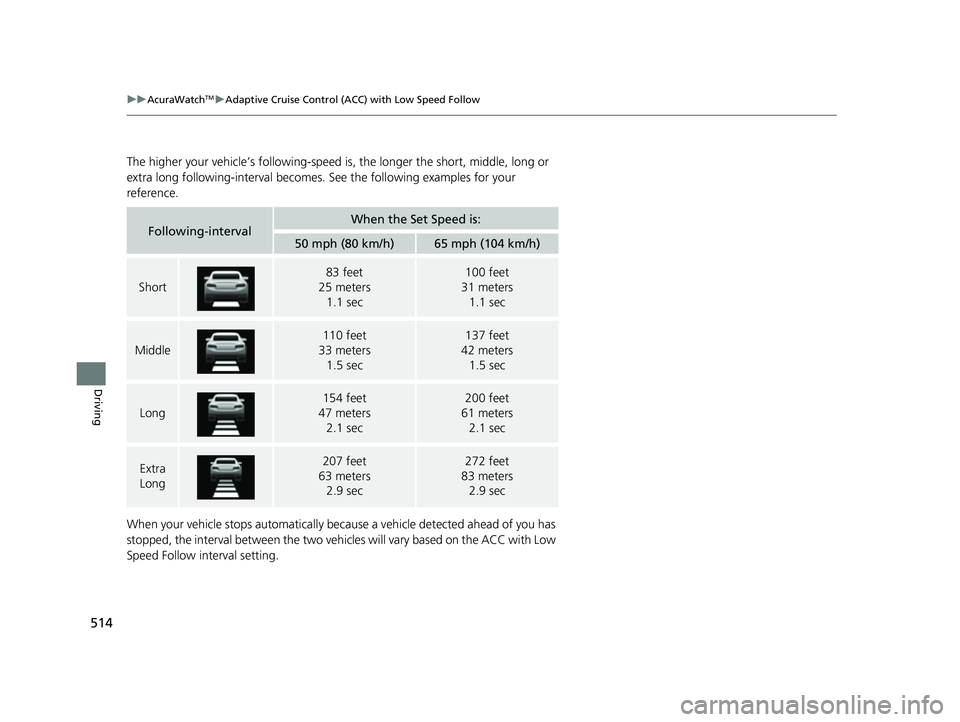
The higher your vehicle’s following-speed is, the longer the short, middle, long or
extra long following-interval becomes. See the following examples for your
reference.
When your vehicle stops automatically beca use a vehicle detected ahead of you has
stopped, the interval between the two vehi cles will vary based on the ACC with Low
Speed Follow interval setting.
Following-intervalWhen the Set Speed is:
50 mph (80 km/h)65 mph (104 km/h)
Short
83 feet
25 meters
1.1 sec100 feet
31 meters
1.1 sec
Middle
110 feet
33 meters
1.5 sec137 feet
42 meters
1.5 sec
Long
154 feet
47 meters 2.1 sec200 feet
61 meters 2.1 sec
Extra
Long207 feet
63 meters 2.9 sec272 feet
83 meters 2.9 sec
23 ACURA RDX-31TJB6400.book 514 ページ 2022年8月4日 木曜日 午後1時51分
Page 517 of 713

Continued515
uuAcuraWatchTMuAdaptive Cruise Control (ACC) with Low Speed Follow
Driving
To cancel ACC with Low Speed Follow, do any
of the following:
• Press the CANCEL button.
u The indicator (green) on the multi-
information display changes to the
indicator (white).
• Press the button.
u indicator (green) goes off.
• Depress the brake pedal while the vehicle is
moving forward.
u The indicator (green) on the multi-
information display changes to the
indicator (white).
■To Cancel1To Cancel
Resuming the prior set speed: After you have
canceled ACC with Low Speed Follow, you can
activate the ACC with Low Speed Follow with the
prior set speed displayed on the multi-information
display (in gray) by pressing the RES/+ /SET/– switch
up even if the vehicle is stopped.
When you turn the ACC with Low Speed Follow off
by pressing the CANCEL button or depressing the
brake pedal, the prior set speed is displayed on the
multi-information display in gray.
When pressing the RES/+/SET/– switch, the ACC
with Low Speed Follow is activated with displayed
speed.
If the indicator (white) is displayed and you press
the RES/+ /SET/– switch up, but no prior set speed (in
gray) is displayed, the sp eed will be set to your
vehicle's current speed.
CANCEL
Button
Button
23 ACURA RDX-31TJB6400.book 515 ページ 2022年8月4日 木曜日 午後1時51分
Page 518 of 713
uuAcuraWatchTMuAdaptive Cruise Control (ACC) with Low Speed Follow
516
Driving
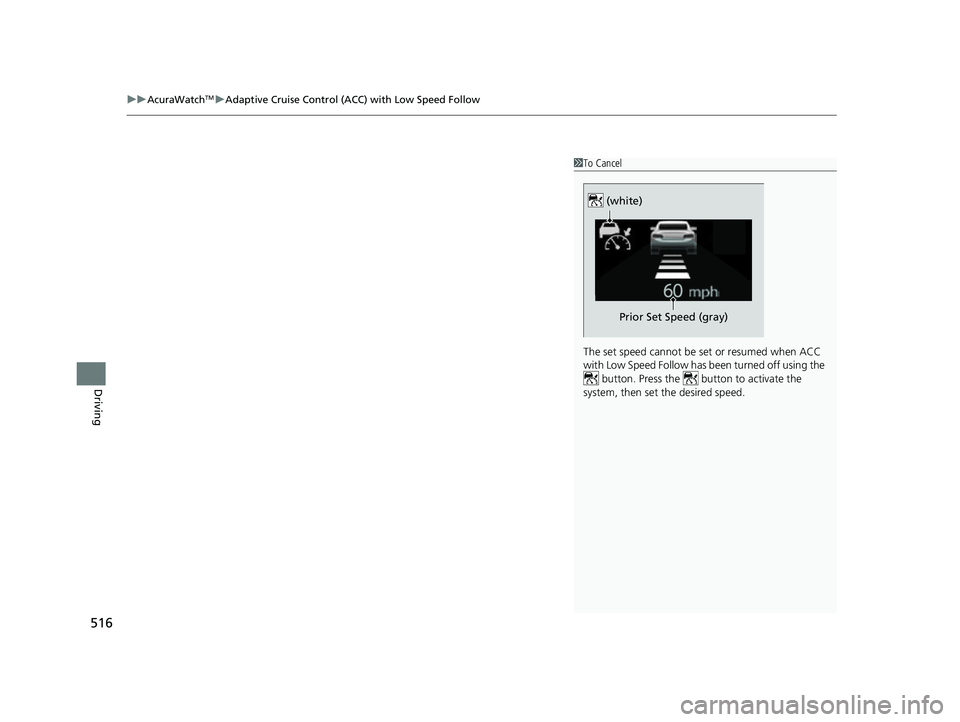
1To Cancel
The set speed cannot be set or resumed when ACC
with Low Speed Follow has been turned off using the button. Press the button to activate the
system, then set the desired speed.
(white)
Prior Set Speed (gray)
23 ACURA RDX-31TJB6400.book 516 ページ 2022年8月4日 木曜日 午後1時51分
Page 519 of 713

517
uuAcuraWatchTMuAdaptive Cruise Control (ACC) with Low Speed Follow
Continued
Driving
■Automatic cancellation
The beeper sounds and a message appears on the multi-information display when
ACC with Low Speed Follow is automatically canceled. Any of these conditions may
cause the ACC with Low Speed Fo llow to automatically cancel:
• Bad weather (rain, fog, snow, etc.)
• When the radar sensor behind the emblem gets dirty.
• The vehicle ahead of yo u cannot be detected.
• An abnormal tire condition is detected, or the tires are skidding.
• Driving on a mountainous road for extended periods, or driving off road.
• Abrupt steering wheel movement.
• When the ABS, VSA ®, CMBS
TM, or Low Speed Braking Control* is activated.
• When the ABS or VSA ® system indicator comes on.
• When the vehicle is stopped on a very steep slope.
• When you manually apply the parking brake.
• When the detected vehicle within the AC C with Low Speed Follow range is too
close to your vehicle.
• The camera behind the rearview mirror, or the area around the camera, including
the windshield, gets dirty.
• When the Maximum Load Limit is exceeded.
• When passing through an enclosed space, such as tunnel.
• The vehicle has repeatedly applied the brakes to maintain the set speed (for
example, you are descending a long slope).
The ACC with Low Speed Follow automatic ca ncellation can be also triggered by the
following causes. In these cases, the parking brake will be automatically applied.
• The driver’s seat belt is unfastene d when the vehicle is stationary.
• The vehicle stops for more than 10 minutes.
• The engine is turned off.
* Not available on all models
23 ACURA RDX-31TJB6400.book 517 ページ 2022年8月4日 木曜日 午後1時51分
Page 520 of 713

uuAcuraWatchTMuAdaptive Cruise Control (ACC) with Low Speed Follow
518
Driving
Press and hold the interval button for one
second. Cruise Mode Selected appears on
the multi-information display for two seconds,
and then the mode switches to Cruise.
The comes on.
• Green: The system is on.
• White: The system is standby.
To switch back to ACC with Low Speed
Follow, press and hold the interval button
again for one second.
■When to use
Desired speed in a range above roughly 25 mph (40 km/h).
Take your foot off the pedal and press the RES/+ /SET/– switch down when you
reach the desired speed.
The moment you release the RES/+/SET/– switch, the set speed is fixed, and cruise
control begins. The indicator (green) comes on.
When you use cruise control, Straight Driving Assist (a feature of the Electric Power
Steering system) is activated.
By enabling the steering system to automa tically compensate for natural steering
pull, Straight Driving Assist makes it easier for you to keep your vehicle in a straight
line.
■To Switch ACC with Low Speed Follow to Cruise Control1 To Switch ACC with Low Speed Follow to Cruise Control
Always be aware which mode you are in. When you
are driving in Cruise mode, the system will not assist
you to maintain a following-interval from a vehicle
ahead of you.
You can switch the displayed set speed
measurements on the multi- information display or
audio/information screen between mph and km/h.
2 Speedometer P. 136
2 Customized Features P. 359
ACC with
Low Speed
Follow ONCruise
Control ON
Press and hold the
interval button
(white) (white)
Interval Button
■To Set the Vehicle Speed
23 ACURA RDX-31TJB6400.book 518 ページ 2022年8月4日 木曜日 午後1時51分
Page 521 of 713
519
uuAcuraWatchTMuAdaptive Cruise Control (ACC) with Low Speed Follow
Continued
Driving
Each time you press the RES/+/SET/– switch up or down, the vehicle speed is
increased or decreased by about 1 mph (1.6 km/h).
If you keep the RES/+ /SET/– switch pressed up or down, the vehicle speed increases
or decreases until you release it. This speed is then set.
■To Adjust the Vehicle Speed
23 ACURA RDX-31TJB6400.book 519 ページ 2022年8月4日 木曜日 午後1時51分
Page 522 of 713

uuAcuraWatchTMuAdaptive Cruise Control (ACC) with Low Speed Follow
520
Driving
To cancel cruise control, do any of the following:
• Press the CANCEL button.
u The indicator (gr een) on the multi-information display changes to the
indicator (white).
• Press the button.
u indicator (green) goes off.
• Depress the brake pedal.
u The indicator (gr een) on the multi-information display changes to the
indicator (white).
■To Cancel1 To Cancel
Resuming the prior set speed:
After you have canceled cruise mode, you can
activate the cruise mode with the prior set speed
displayed on the multi-information display (in gray)
by pressing the RES/+/SET/− switch up while driving
at a speed of at least 25 mph (40 km/h) or more.
When you turn the cruise mode off by pressing the
CANCEL button or depressing the brake pedal, the
prior set speed is displayed on the multi-information
display in gray.
When pressing the RES/+/SET/− switch up, the
cruise mode is activate d with displayed speed.
If the indicator (white) is displayed and you press
the RES/+ /SET/– switch up, but no prior set speed (in
gray) is displayed, the sp eed will be set to your
vehicle's current speed.
23 ACURA RDX-31TJB6400.book 520 ページ 2022年8月4日 木曜日 午後1時51分
Page 523 of 713
521
uuAcuraWatchTMuAdaptive Cruise Control (ACC) with Low Speed Follow
Driving
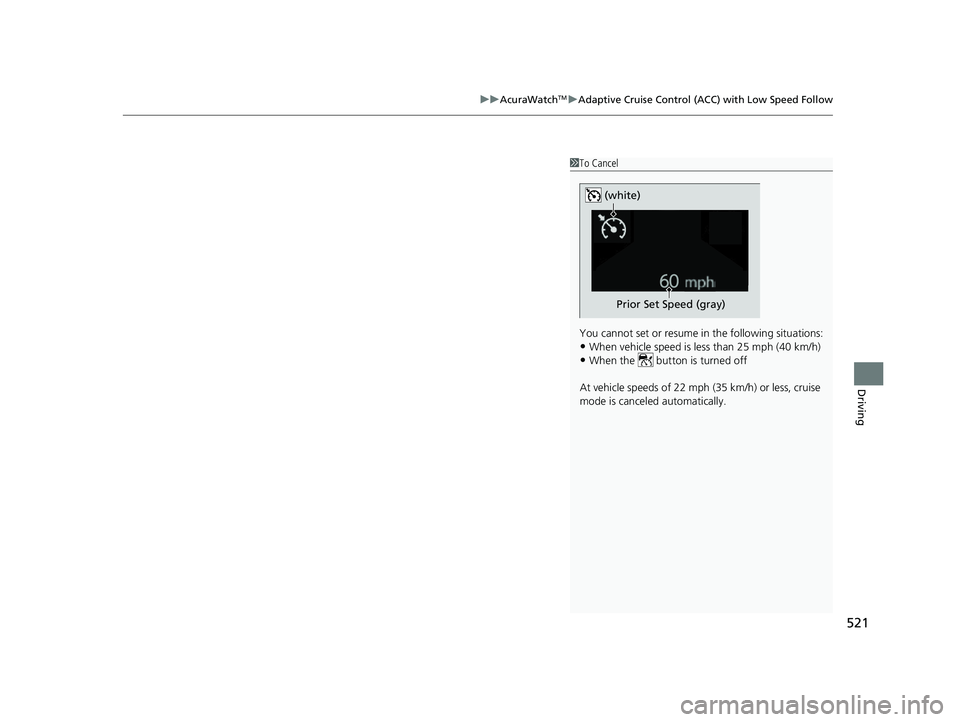
1To Cancel
You cannot set or resume in the following situations:
•When vehicle speed is less than 25 mph (40 km/h)
•When the button is turned off
At vehicle speeds of 22 m ph (35 km/h) or less, cruise
mode is canceled automatically.
Prior Set Speed (gray)
(white)
23 ACURA RDX-31TJB6400.book 521 ページ 2022年8月4日 木曜日 午後1時51分
Page 543 of 713

541
uuAcuraWatchTMuFront Sensor Camera
Continued
Driving
Front Sensor Camera
The camera, used in systems such as Lane Keeping Assist System (LKAS), Road
Departure Mitigation system, Adaptive Cruise Control (ACC) with Low Speed
Follow, Traffic Sign Recognition system, and Collision Mitigation Braking System
TM
(CMBSTM), is designed to detect an object that triggers any of the systems to operate
their functions.
This camera is located behind the rearview
mirror.
To help reduce the likelihood that high interior
temperatures will cause the camera’s sensing
system to shut off, when parking, find a shady
area or face the front of the vehicle away from
the sun. If you use a reflective sun shade, do
not allow it to cover the camera housing.
Covering the camera can concentrate heat on
it.
■Camera Location and Handling Tips
1 Front Sensor Camera
Never apply a film or attach any objects to the
windshield, the hood, or th e front grille that could
obstruct the camera’s fiel d of vision and cause the
system to operate abnormally.
Scratches, nicks, and othe r damage to the windshield
within the camera’s fiel d of vision can cause the
system to operate abnormall y. If this occurs, we
recommend that you replac e the windshield with a
genuine Acura replacement windshield. Making even
minor repairs within the ca mera’s field of vision or
installing an aftermarke t replacement windshield
may also cause the system to operate abnormally.
After replacing the winds hield, have a dealer
recalibrate the camera. Pr oper calibration of the
camera is necessary for the system to operate
properly.
Do not place an object on the top of the instrument
panel. It may reflect onto the windshield and prevent
the system from detecting lane lines properly.
Front Sensor
Camera
23 ACURA RDX-31TJB6400.book 541 ページ 2022年8月4日 木曜日 午後1時51分
Page 698 of 713
696
uuEmissions Testing uTesting of Readiness Codes
Information
7. Select a nearby, lightly traveled major hi ghway where you can maintain a speed
of 50 to 60 mph (80 to 97 km/h) for at least 20 minutes. Drive on the highway in
(D. Do not use cruise control. When tra ffic allows, drive for 90 seconds without
moving the accelerator pedal. (Vehicle spee d may vary slightly; this is okay.) If you
cannot do this for a continuous 90 seconds because of traffic conditions, drive for
at least 30 seconds, then repeat it two mo re times (for a total of 90 seconds).
8. Drive in city or suburban traffic for at le ast 10 minutes. When traffic conditions
allow, let the vehicle coast for several se conds without using the accelerator pedal
or the brake pedal.
9. Park the vehicle and leave the engine off for 30 minutes.
23 ACURA RDX-31TJB6400.book 696 ページ 2022年8月4日 木曜日 午後1時51分