lights ACURA RDX 2023 Owner's Guide
[x] Cancel search | Manufacturer: ACURA, Model Year: 2023, Model line: RDX, Model: ACURA RDX 2023Pages: 713, PDF Size: 21.99 MB
Page 203 of 713
201
uuOperating the Switches Around the Steering Wheel uAuto High-Beam
Continued
Controls
Auto High-Beam
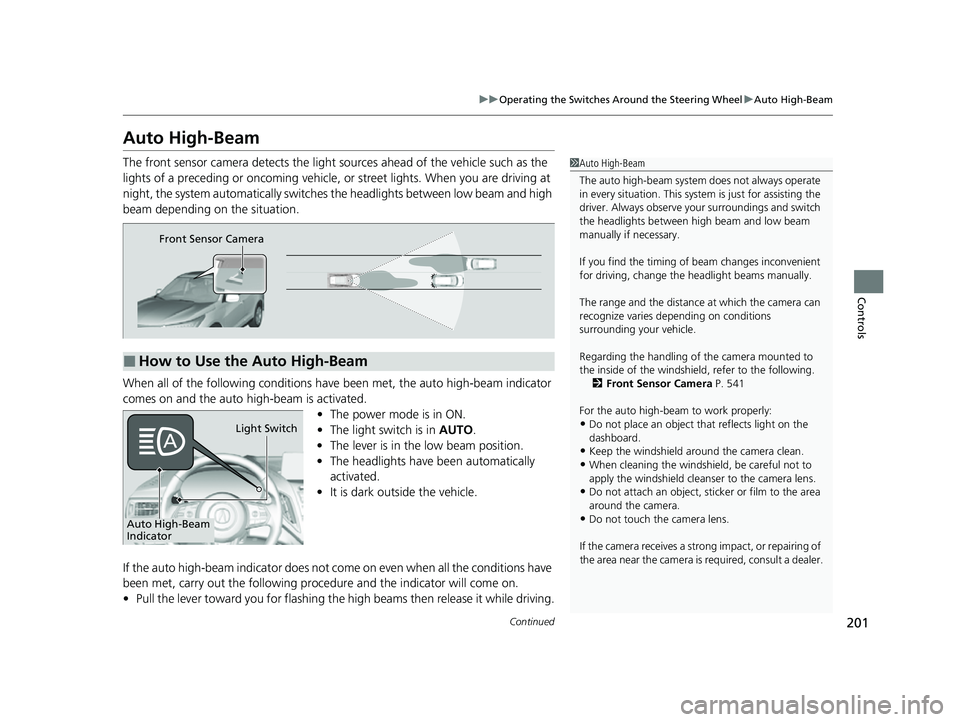
The front sensor camera detects the light sources ahead of the vehicle such as the
lights of a preceding or oncoming vehicle, or street lights. When you are driving at
night, the system automatically switches the headlights between low beam and high
beam depending on the situation.
When all of the following conditions have been met, the auto high-beam indicator
comes on and the auto high-beam is activated. •The power mode is in ON.
• The light switch is in AUTO.
• The lever is in the low beam position.
• The headlights have been automatically
activated.
• It is dark outside the vehicle.
If the auto high-beam indica tor does not come on even when all the conditions have
been met, carry out the following procedure and the indicator will come on.
• Pull the lever toward you for flashing the high beams then release it while driving.1Auto High-Beam
The auto high-beam system does not always operate
in every situation. This syst em is just for assisting the
driver. Always observe your surroundings and switch
the headlights between high beam and low beam
manually if necessary.
If you find the timing of beam changes inconvenient
for driving, change the headlight beams manually.
The range and the distance at which the camera can
recognize varies de pending on conditions
surrounding your vehicle.
Regarding the handling of the camera mounted to
the inside of the windshiel d, refer to the following.
2 Front Sensor Camera P. 541
For the auto high-beam to work properly:
•Do not place an object that reflects light on the
dashboard.
•Keep the windshield around the camera clean.
•When cleaning the windshield, be careful not to
apply the windshield cleans er to the camera lens.
•Do not attach an object, sticker or film to the area
around the camera.
•Do not touch the camera lens.
If the camera receives a st rong impact, or repairing of
the area near the camera is required, consult a dealer.
■How to Use the Auto High-Beam
Front Sensor Camera
Auto High-Beam
IndicatorLight Switch
23 ACURA RDX-31TJB6400.book 201 ページ 2022年8月4日 木曜日 午後1時51分
Page 204 of 713
uuOperating the Switches Around the Steering Wheel uAuto High-Beam
202
Controls
■Automatic switching between high-beam and low-beam
When auto high-beam is ac tive, the headlights switch between high beam and low
beam based on the following conditions.
■Manual switching between high-beam and low-beam
If you want to manually switch the headlights between high beam and low beam,
follow either of the proced ures below. Note that when you do this, the auto high-
beam indicator will turn off and the auto high-beam will be deactivated.
Using the lever:
Pull the lever toward you fo r flashing the high beams then release it within about
one second while driving. u To reactivate the auto high-beam, pull the lever toward you for flashing the
high beams then release it while driving. The auto high-beam indicator will
come on.
Using the light switch:
Turn the light switch to . u To reactivate the auto high-be am, turn the light switch to AUTO when the
lever is in the low beam position, the auto high-beam indicator will come on.
Switching to high beam:Switching to low beam:
All of the following conditions must
be met before the high beams turn
on.
●Your vehicle speed is 25 mph (40
km/h) or more.
●There are no preceding or
oncoming vehicle with headlights
or taillights turned on.
●There are few street lights on the
road ahead.
One of the following conditions
must be met before the low beams
turn on.
●Your vehicle speed is 15 mph (24
km/h) or less.
●There is a preceding or oncoming
vehicle with headlights or
taillights turned on.
●There are many street lights on
the road ahead.
1 How to Use the Auto High-Beam
In the following cases, th e auto high-beam system
may not switch the head lights properly or the
switching timing may be ch anged. In case of the
automatic switching operati on does not fit for your
driving habits, please swit ch the headlights manually.
•The brightness of the lights from the preceding or
oncoming vehicle is intense or poor.
•Visibility is poor due to the weather (rain, snow,
fog, windshield frost, etc.).
•Surrounding light sources, such as street lights,
electric billboards and traf fic lights are illuminating
the road ahead.
•The brightness level of th e road ahead constantly
changes.
•The road is bumpy or has many curves.•A vehicle suddenly appears in front of you, or a
vehicle in front of you is not in the preceding or
oncoming direction.
•Your vehicle is tilted with a heavy load in the rear.•A traffic sign, mirror, or other reflective object
ahead is reflecting strong light toward the vehicle.
•The oncoming vehicle freq uently disappears under
roadside trees or be hind median barriers.
•The preceding or oncoming vehicle is a motorcycle,
bicycle, mobility scooter, or other small vehicle.
The auto high-beam system keeps the headlight low
beam when:
•Windshield wipers are op erating at a high speed.
•The camera has detected a dense fog.
23 ACURA RDX-31TJB6400.book 202 ページ 2022年8月4日 木曜日 午後1時51分
Page 210 of 713

208
uuOperating the Switches Around the Steering Wheel uBrightness Control
Controls
Brightness Control
When the power mode is in ON, you can use
the
(+ or (- button to adjust instrument
panel brightness.
Brighten: Press the
(+ button.
Dim: Press the
(- button.
You will hear a beep when the brightness
reaches minimum or maximum. Several
seconds after adjusting the brightness, you
will be returned to the previous screen.
■Brightness level indicator
The brightness level is shown on the display
while you are adjusting it.
■Adjusting the Instrument Panel Brightness1 Brightness Control
The brightness of the in strument panel will be
reduced when the following conditions:
•The power mode is in ON.
•The light switch is in any position other than off
and it is da rk outside.
The brightness can be set differently for when the
exterior lights are on, and when they are off.
( - Button
(+ Button
23 ACURA RDX-31TJB6400.book 208 ページ 2022年8月4日 木曜日 午後1時51分
Page 215 of 713
213
Controls
Mirrors
Interior Rearview Mirror
Adjust the angle of the rearview mirror when you are sitting in the correct driving
position.
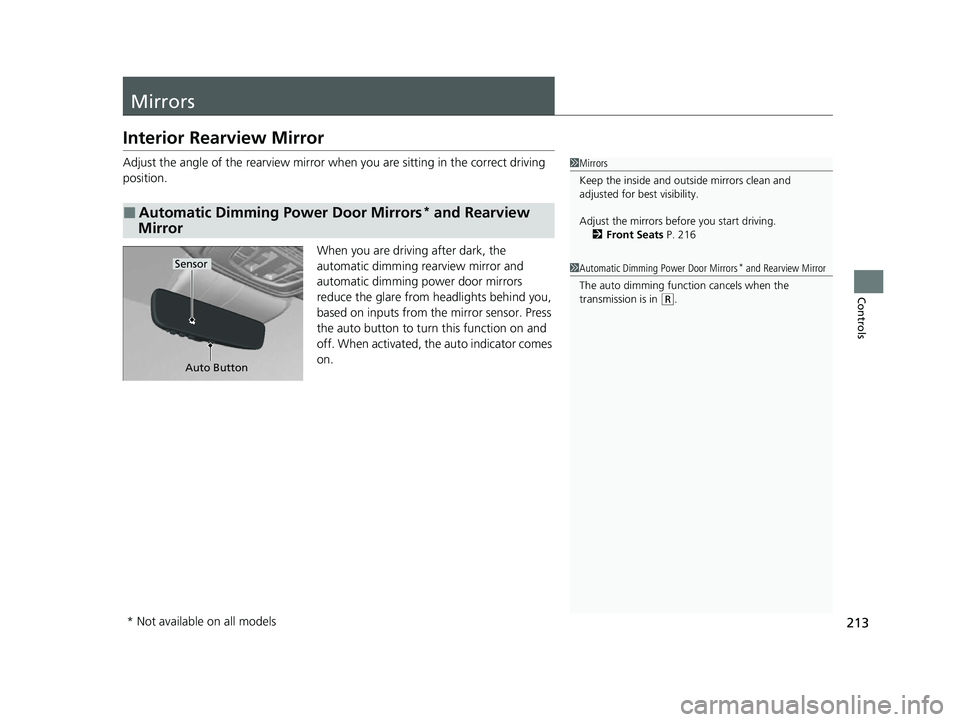
When you are driving after dark, the
automatic dimming rearview mirror and
automatic dimming power door mirrors
reduce the glare from headlights behind you,
based on inputs from the mirror sensor. Press
the auto button to turn this function on and
off. When activated, the auto indicator comes
on.
■Automatic Dimming Power Door Mirrors* and Rearview
Mirror
1 Mirrors
Keep the inside and out side mirrors clean and
adjusted for best visibility.
Adjust the mirrors before you start driving. 2 Front Seats P. 216
Auto Button
Sensor1Automatic Dimming Power Door Mirrors* and Rearview Mirror
The auto dimming function cancels when the
transmission is in
( R.
* Not available on all models
23 ACURA RDX-31TJB6400.book 213 ページ 2022年8月4日 木曜日 午後1時51分
Page 232 of 713
230
Controls
Interior Convenience Items
Interior Lights
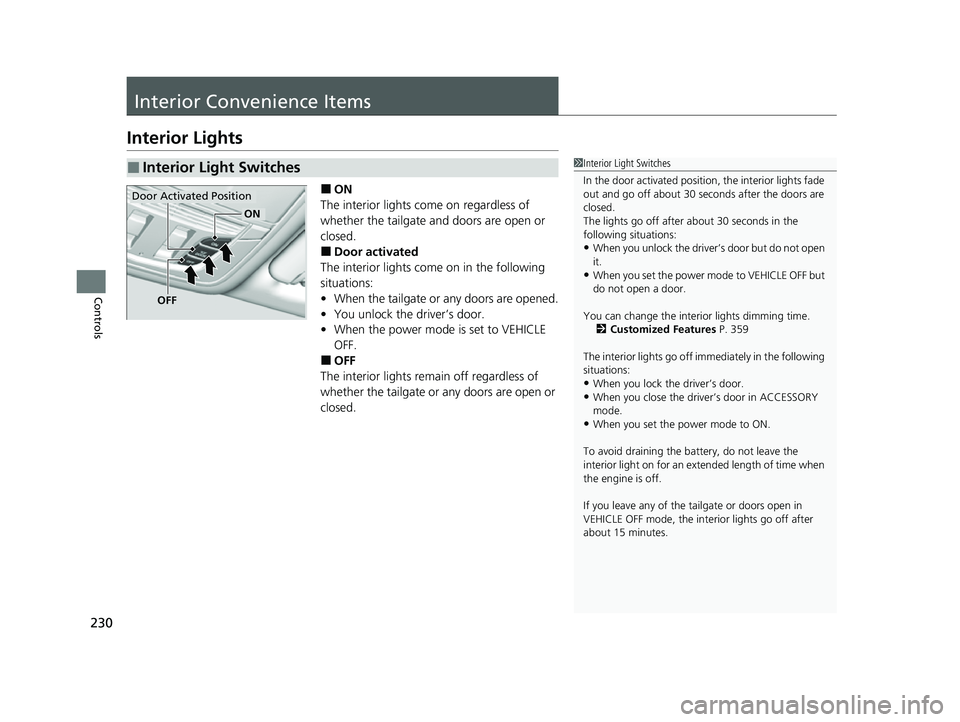
■ON
The interior lights come on regardless of
whether the tailgate and doors are open or
closed.
■Door activated
The interior lights come on in the following
situations:
• When the tailgate or any doors are opened.
• You unlock the driver’s door.
• When the power mode is set to VEHICLE
OFF.
■OFF
The interior lights remain off regardless of
whether the tailgate or any doors are open or
closed.
■Interior Light Switches1 Interior Light Switches
In the door activated position, the interior lights fade
out and go off about 30 seconds after the doors are
closed.
The lights go off after about 30 seconds in the
following situations:
•When you unlock the driver’s door but do not open
it.
•When you set the power mode to VEHICLE OFF but
do not open a door.
You can change the interi or lights dimming time.
2 Customized Features P. 359
The interior lights go off im mediately in the following
situations:
•When you lock the driver’s door.•When you close the driver’s door in ACCESSORY
mode.
•When you set the power mode to ON.
To avoid draining the ba ttery, do not leave the
interior light on for an extended length of time when
the engine is off.
If you leave any of the tailgate or doors open in
VEHICLE OFF mode, the inte rior lights go off after
about 15 minutes.
Door Activated Position
OFF
ON
23 ACURA RDX-31TJB6400.book 230 ページ 2022年8月4日 木曜日 午後1時51分
Page 233 of 713
Continued231
uuInterior Convenience Items uInterior Lights
Controls
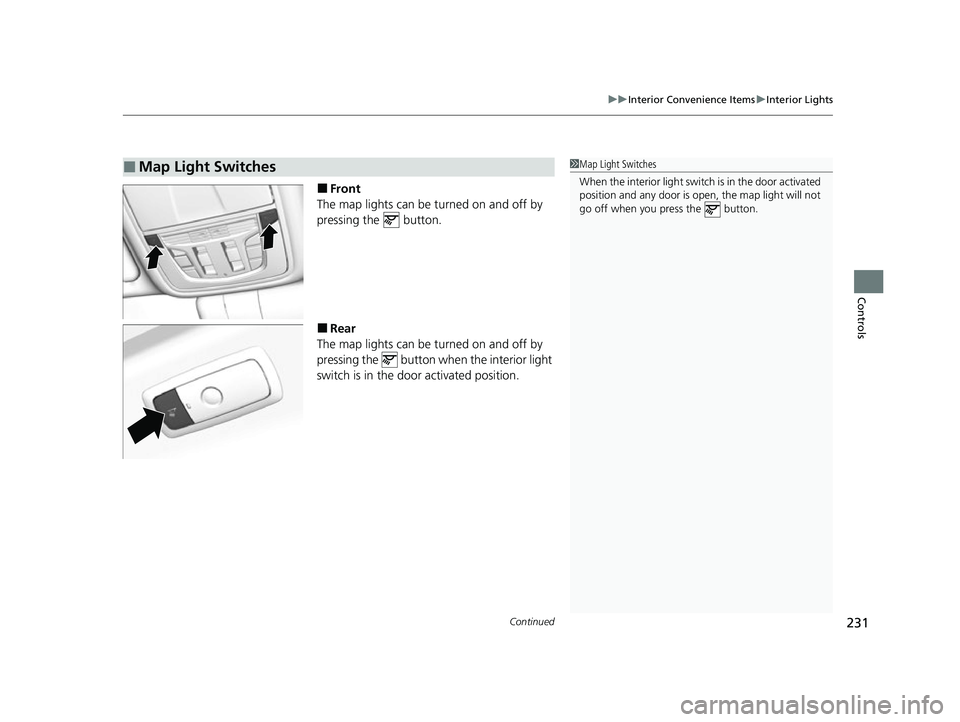
■Front
The map lights can be turned on and off by
pressing the button.
■Rear
The map lights can be turned on and off by
pressing the button when the interior light
switch is in the door activated position.
■Map Light Switches1 Map Light Switches
When the interior light swit ch is in the door activated
position and any door is open, the map light will not
go off when you press the button.
23 ACURA RDX-31TJB6400.book 231 ページ 2022年8月4日 木曜日 午後1時51分
Page 234 of 713
uuInterior Convenience Items uInterior Lights
232
Controls
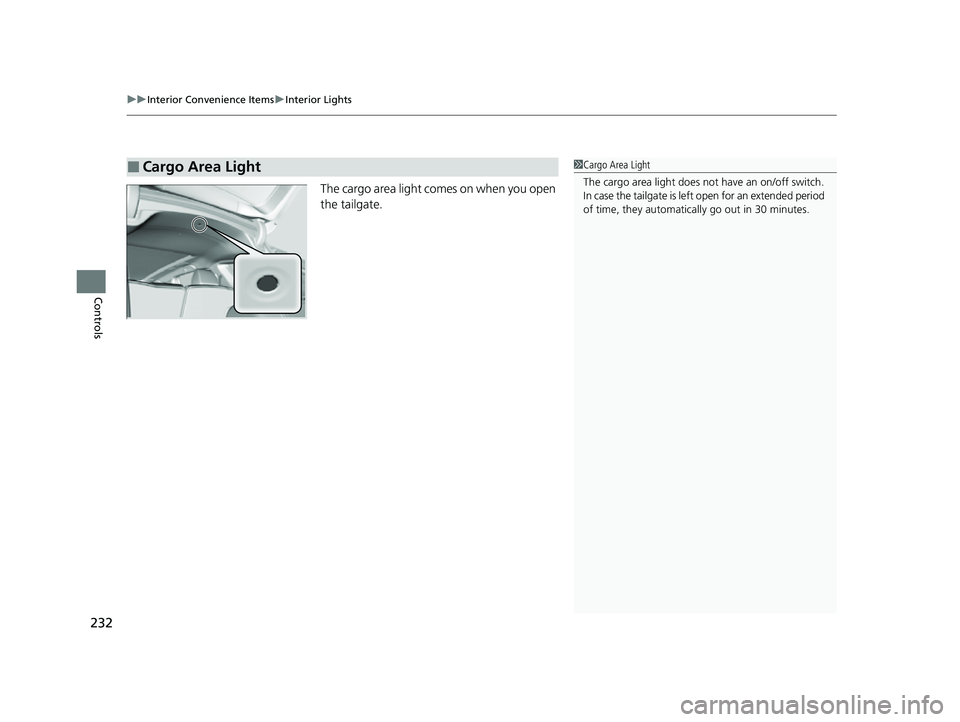
The cargo area light comes on when you open
the tailgate.
■Cargo Area Light1Cargo Area Light
The cargo area light does not have an on/off switch.
In case the tailgate is left open for an extended period
of time, they automatically go out in 30 minutes.
23 ACURA RDX-31TJB6400.book 232 ページ 2022年8月4日 木曜日 午後1時51分
Page 235 of 713
233
uuInterior Convenience Items uStorage Items
Continued
Controls
Storage Items
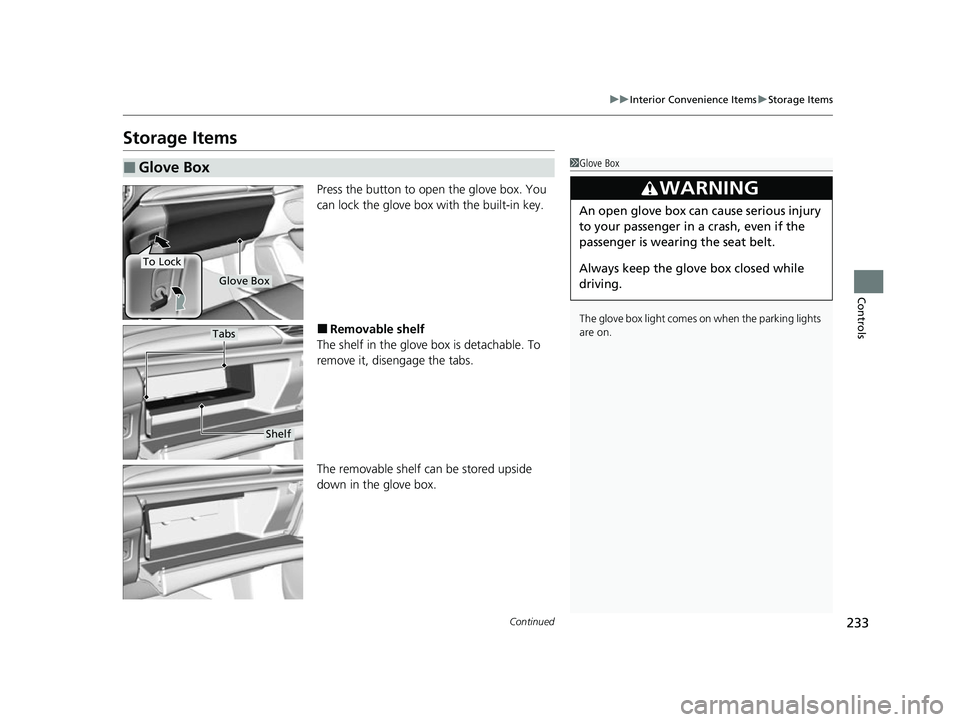
Press the button to open the glove box. You
can lock the glove box with the built-in key.
■Removable shelf
The shelf in the glove box is detachable. To
remove it, disengage the tabs.
The removable shelf can be stored upside
down in the glove box.
■Glove Box1 Glove Box
The glove box light comes on when the parking lights
are on.
3WARNING
An open glove box can cause serious injury
to your passenger in a crash, even if the
passenger is wearing the seat belt.
Always keep the glove box closed while
driving.
Glove Box
To Lock
Shelf
Tabs
23 ACURA RDX-31TJB6400.book 233 ページ 2022年8月4日 木曜日 午後1時51分
Page 292 of 713
290
uuAudio System Basic Operation uVoice Control Operation
Features
Voice Control Operation
Your vehicle has a voice control system that allows hands-free operation.
The voice control system uses the (tal k) and (back) buttons on the steering
wheel and a microphone near the map lights on the ceiling.
To achieve optimum voice recognition when using the voice control system:
• The system recognizes natural language and accepts free-form voice commands.
An example of voice commands:
2 Voice Recognition Screen P. 291
•Close the windows and panoramic roof.
• Adjust the dashboard and side vents so air does not blow onto the microphone
on the ceiling.
• Speak clearly in a clear, natural speaking voice without pausing between words.
• Reduce any background noise if possible. The system may misinterpret your
command if more than one person is speaking at the same time.
■Voice Recognition
1Voice Control Operation
When you press the button, the system beeps and
the display changes to the voice recognition screen.
Press the (home) button, (back) button on
the True Touchpad Interface or APPS button on the
steering wheel to cancel a voice recognition function.
23 ACURA RDX-31TJB6400.book 290 ページ 2022年8月4日 木曜日 午後1時51分
Page 380 of 713

378
uuCustomized Features u
Features
*1:Default SettingSetup Group Customizable Features Description Selectable Settings
Vehicle Driving
Position
Setup
Memory Position Link
Turns the driving position memory
system on and off. On
*1/
Off
Seat Position Movement at
Entry/Exit Causes the driver’s seat to move back
to make it easier to enter or exit the
vehicle.
On
*1/
Off
Keyless
Access Setup Door Unlock Mode
Changes which doors unlock when
you grab the driver’s door handle. Driver Door or
Tailgate Only
*1/
All
Doors
Keyless Access Light Flash Causes some exterior lights to flash
when you unlock/lock the doors.
On
*1/
Off
Keyless Access Beep Causes the beeper to sound when you
unlock/lock the doors. On
*1/
Off
Remote Start System On/
Off
*Turns the remote engine start feature
on and off. On*1/
Off
Walk Away Auto Lock Changes the settings for the auto lock
function when you walk away from
the vehicle. Enable
/Disable
*1
* Not available on all models
23 ACURA RDX-31TJB6400.book 378 ページ 2022年8月4日 木曜日 午後1時51分