belt ACURA RDX 2023 Owners Manual
[x] Cancel search | Manufacturer: ACURA, Model Year: 2023, Model line: RDX, Model: ACURA RDX 2023Pages: 713, PDF Size: 21.99 MB
Page 2 of 713
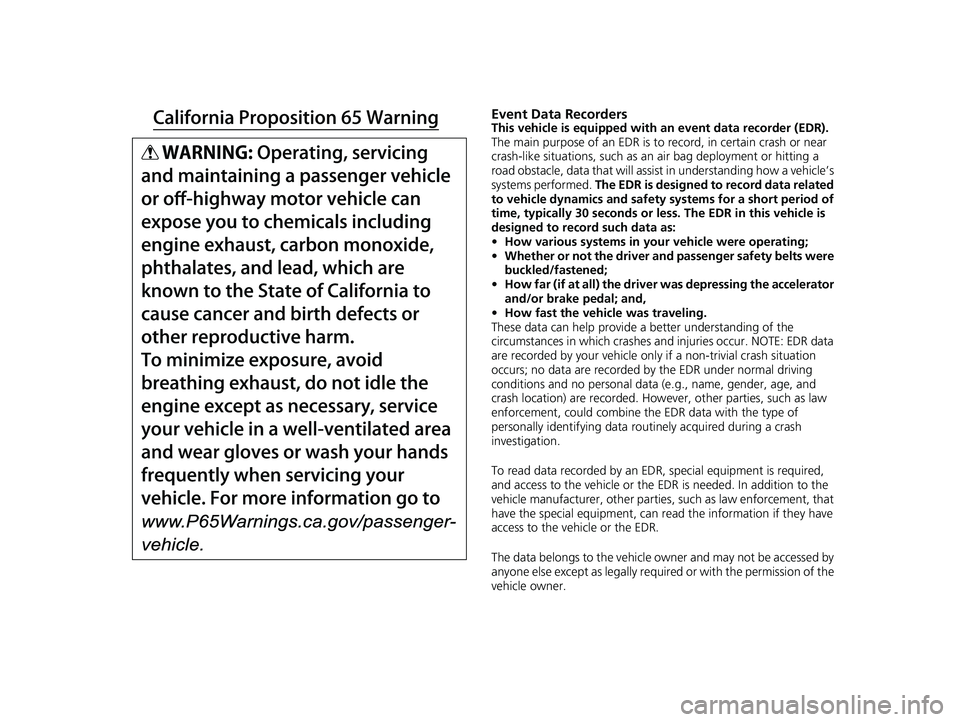
Event Data RecordersThis vehicle is equipped with an event data recorder (EDR).
The main purpose of an EDR is to record, in certain crash or near
crash-like situations, such as an air bag deployment or hitting a
road obstacle, data that will assist in understanding how a vehicle’s
systems performed. The EDR is designed to record data related
to vehicle dynamics and safety systems for a short period of
time, typically 30 seconds or less. The EDR in this vehicle is
designed to record such data as:
• How various systems in your vehicle were operating;
• Whether or not the driver and passenger safety belts were
buckled/fastened;
• How far (if at all) the driver was depressing the accelerator
and/or brake pedal; and,
• How fast the vehicle was traveling.
These data can help provide a better understanding of the
circumstances in which crashes and injuries occur. NOTE: EDR data
are recorded by your vehicle only if a non-trivial crash situation
occurs; no data are recorded by the EDR under normal driving
conditions and no personal data (e.g., name, gender, age, and
crash location) are recorded. Howeve r, other parties, such as law
enforcement, could co mbine the EDR data with the type of
personally identifying data routinely acquired during a crash
investigation.
To read data recorded by an ED R, special equipment is required,
and access to the vehicle or the EDR is needed. In addition to the
vehicle manufacturer, other parties, such as law enforcement, that
have the special equipment, can re ad the information if they have
access to the vehicle or the EDR.
The data belongs to the vehicle ow ner and may not be accessed by
anyone else except as legally requ ired or with the permission of the
vehicle owner.
23 ACURA RDX-31TJB6400.book 0 ページ 2022年8月4日 木曜日 午後1時51分
Page 3 of 713
Service Diagnostic Recorders
This vehicle is equipped with service-related devices that record
information about powertrain perfo rmance. The data can be used
to verify emissions law requirem ents and/or help technicians
diagnose and solve service problems . It may also be combined with
data from other sources for research purposes, but it remains
confidential. Some diagnostic and maintenance information is
uploaded to Acura upon vehicle start up.
California Perchlorate Conta mination Prevention Act
The airbags, seat belt tensioners , and CR type batteries in this
vehicle may contain perchlorate materials - special handling may
apply. See www.dtsc.ca.gov/hazardouswaste/perchlorate/
As you read this manual, you will find information that is preceded
by a symbol. This information is intended to help you avoid
damage to your vehicle, othe r property, or the environment.
NOTICE
Software End User License Agreement
Your vehicle comes equipped with software, which is governed by
the End User License Agreement in this Owner’s Manual, and
which contains a binding arbitration clause. Please refer to the End
User License Agreement for the terms and conditions governing
your use of the installed software, as well as the applications,
services, functions, and content provided through the software.
Your use of the installed software will serve as your consent to the
terms and conditions of the End User License Agreement.
You may opt out within 30 days of your initial use of the Software
by sending a signed, written notice to Acura at American Honda
Motor Co., Inc., Acura Client Relations, Mail Stop CHI-4, 1919
Torrance Blvd., Torrance, CA 90501-2746.
Privacy Notice
This vehicle may share location and usage information. To manage
this setting, visit www.acuralink.com/vehicle-data-choices .
To learn more about how we collect and use Personal
Information, please read our Privacy Policy, accessible
at www.acura.com .
23 ACURA RDX-31TJB6400.book 1 ページ 2022年8月4日 木曜日 午後1時51分
Page 6 of 713
Contents
This owner’s manual should be considered a permanent part of the
vehicle and should remain with the vehicle when it is sold.
The Navigation Manual is available online at owners.acura.com
(U.S.) or acura.ca (Canada). If you are the firs t registered owner
of your vehicle, you may request a complimentary printed
copy of the Navigation Manual within the first six months of
vehicle purchase. To request a copy, visit owners.acura.com. In
Canada, please request a copy from your Acura dealer.
This owner’s manual covers all models of your vehicle. You may find
descriptions of equipment and features that are not on your
particular model.
Images throughout this owner’s ma nual (including the front cover)
represent features and equipment that are available on some, but
not all, models. Your particular mo del may not have some of these
features.
This owner’s manual is for vehicles sold in the United States and
Canada.
The information and specifications in cluded in this publication were
in effect at the time of approval for printing. Honda Motor Co., Ltd.
reserves the right, however, to discontinue or change specifications
or design at any time without notice and without incurring any
obligation.2 Safe Driving P. 31
For Safe Driving P. 32 Seat Belts P. 37 Airbags P. 46
2Instrument Panel P. 79
Indicators P. 80 Gauges and Displays P. 136
2Controls P. 153
Clock P. 154 Locking and Unlocking the Doors P. 156
Panoramic Roof P. 189
Seats P. 216
2 Features P. 253
Audio System P. 254 Audio System Basic Operation P. 260
Customized Features P. 359 HomeLink® Universal Transceiver P. 386
2 Driving P. 429
Before Driving P. 430 Towing a Trailer P. 435
Braking P. 545Parking Your Vehicle P. 555
Fuel Economy and CO2 Emissions P. 578 Turbo Engine Vehicle P. 579
2 Maintenance P. 581
Before Performing Maintenance P. 582 Maintenance MinderTM P. 585
Checking and Maintaining Wiper Blades P. 609
Climate Control System Main tenance P. 627 Cleaning P. 629
2Handling the Unexpected P. 639
Tools P. 640 If a Tire Goes Flat P. 641
Overheating P. 669 Indicator, Coming On/Blinking P. 671
If You Cannot Unlock the Fuel Fill Door P. 686
2 Information P. 689
Specifications P. 690 Identification Numbers P. 692
Warranty Coverages P. 697 Authorized Manuals P. 700
23 ACURA RDX-31TJB6400.book 4 ページ 2022年8月4日 木曜日 午後1時51分
Page 11 of 713
9
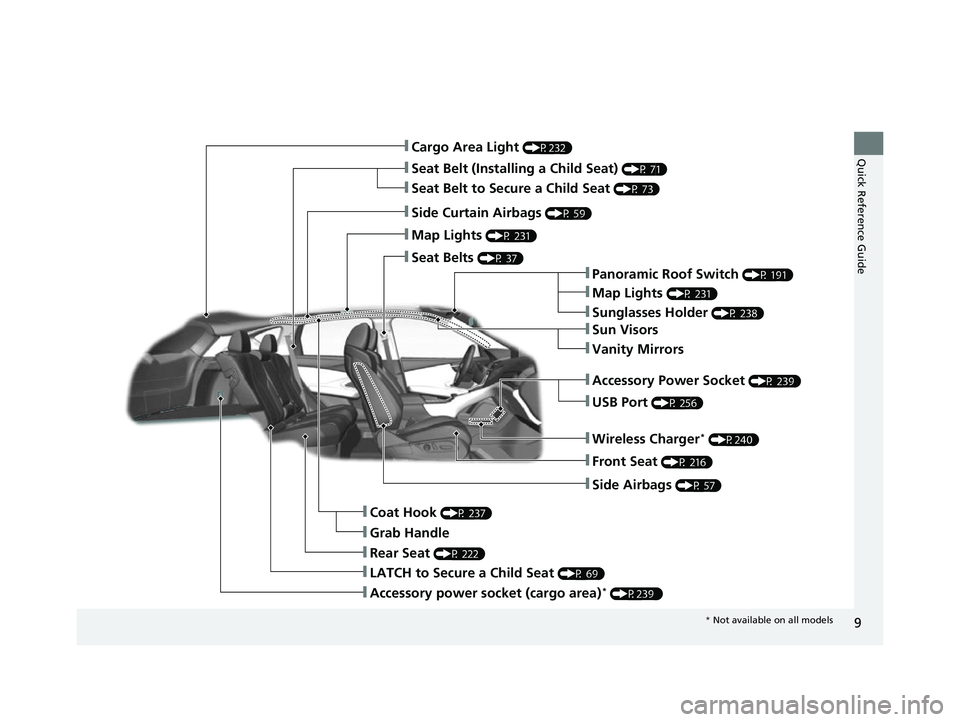
Quick Reference Guide❚Cargo Area Light (P232)
❚Seat Belt (Installing a Child Seat) (P 71)
❚Side Curtain Airbags (P 59)
❚Map Lights (P 231)
❚Seat Belts (P 37)
❚Panoramic Roof Switch (P 191)
❚Map Lights (P 231)
❚Sunglasses Holder (P 238)
❚USB Port (P 256)
❚Front Seat (P 216)
❚Side Airbags (P 57)
❚Coat Hook (P 237)
❚LATCH to Secure a Child Seat (P 69)
❚Rear Seat (P 222)
❚Sun Visors
❚Vanity Mirrors
❚Seat Belt to Secure a Child Seat (P 73)
❚Grab Handle
❚Accessory Power Socket (P 239)
❚Wireless Charger* (P240)
❚Accessory power socket (cargo area)* (P239 )
* Not available on all models
23 ACURA RDX-31TJB6400.book 9 ページ 2022年8月4日 木曜日 午後1時51分
Page 14 of 713
12
Quick Reference Guide
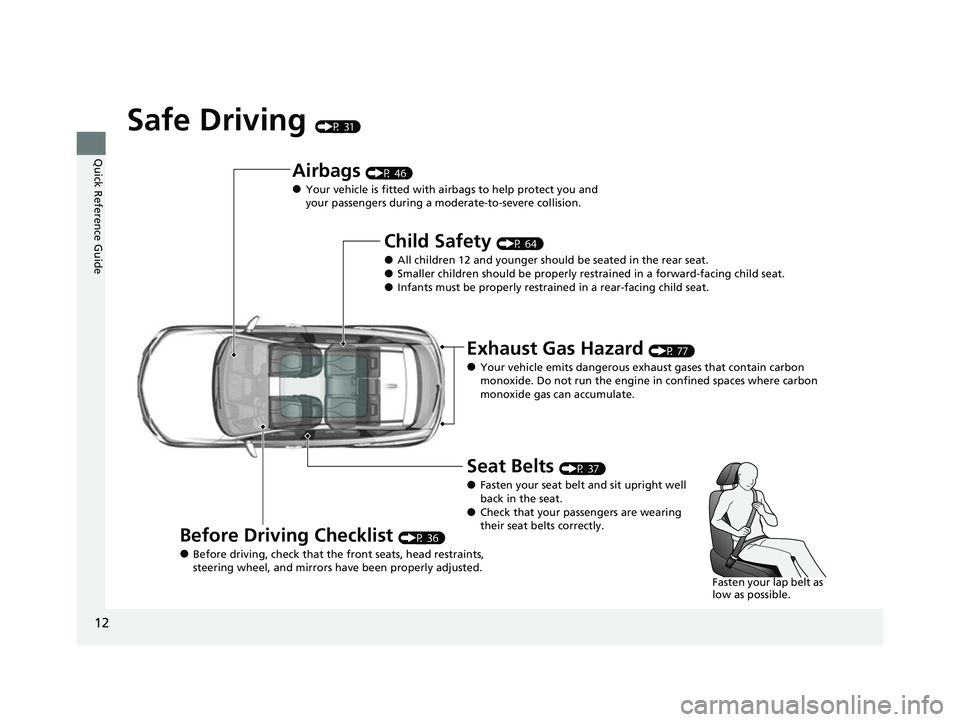
Safe Driving (P 31)
Airbags (P 46)
●Your vehicle is fitted with airbags to help protect you and
your passengers during a moderate-to-severe collision.
Child Safety (P 64)
●All children 12 and younger should be seated in the rear seat.●Smaller children should be properly restra ined in a forward-facing child seat.●Infants must be properly restrained in a rear-facing child seat.
Exhaust Gas Hazard (P 77)
●Your vehicle emits dangerous exhaust gases that contain carbon
monoxide. Do not run the engine in confined spaces where carbon
monoxide gas can accumulate.
Before Driving Checklist (P 36)
●Before driving, check that the front seats, head restraints,
steering wheel, and mirrors have been properly adjusted.
Seat Belts (P 37)
●Fasten your seat belt and sit upright well
back in the seat.
●Check that your passengers are wearing
their seat belts correctly.
Fasten your lap belt as
low as possible.
23 ACURA RDX-31TJB6400.book 12 ページ 2022年8月4日 木曜日 午後1時51分
Page 31 of 713
29
Quick Reference Guide
Why does a beeper sound
when I walk away from the
vehicle after I close the
door?The beeper sounds if you move outside the walk away auto lock
operating range before the door completely closes.
2Locking the doors and tailgate (Walk away auto lock ®) (P163)
Why does the beeper
sound when I start driving?The beeper sounds when the driver and/or front passenger are
not wearing their seat belts.
Pulling the electric parking
brake switch does not
release the parking brake.
Why?Pull the electric parking brake switch with the brake pedal
depressed.
I’m seeing an amber
indicator of a tire with an
exclamation point. What is
that?The Tire Pressure Monitoring Sy stem (TPMS) needs attention.
Check tire pressure.
2 If the Low Tire Pressure/TPMS Indicator Comes On or Blinks (P676)
Depressing the accelerator
pedal does not release the
parking brake
automatically. Why?●Fasten the driver’s seat belt.
●Check if the transmission is in (P or (N. If so, select any other
position.
23 ACURA RDX-31TJB6400.book 29 ページ 2022年8月4日 木曜日 午後1時51分
Page 32 of 713

30
Quick Reference Guide
Why does the gear position
automatically change to
(P
when I open the driver’s
door to check for parking
space lines when
reversing?
●Fasten the driver’s seat belt.
●Close the driver’s door and manually change the gear
position.
2 When opening the driver’s door (P454)
Why do I hear a screeching
sound when I apply the
brake pedal?The brake pads may need to be replaced. Have your vehicle
inspected by a dealer.
Unleaded gasoline with a
Pump Octane Number
(PON) of 91 or higher is
recommended.
Is it possible to use
unleaded gasoline with a
Pump Octane Number
(PON) of 87 or lower on
this vehicle?Use of a lower octane gasoline can cause occasional metallic
knocking noise in the engine and will result in decreased engine
performance.
Use of a gasoline with a pump octane less than 87 can lead to
engine damage.
23 ACURA RDX-31TJB6400.book 30 ページ 2022年8月4日 木曜日 午後1時51分
Page 33 of 713
31
Safe Driving
You can find many safety recommendations throughout this chapter, and throughout this manual.
For Safe DrivingImportant Safety Precautions.............. 32
Important Handling Information ......... 34
Your Vehicle’s Safety Features ............ 35
Safety Checklist ................................. 36
Seat Belts About Your Seat Belts ........................ 37
Fastening a Seat Belt .......................... 42
Seat Belt Inspection ............................ 45
Airbags Airbag System Components ............... 46
Types of Airbags ................................ 49 Front Airbags (SRS) ............................ 49
Knee Airbags ..................................... 54
Side Airbags....................................... 57
Side Curtain Airbags .......................... 59
Airbag System Indicators .................... 60
Airbag Care ....................................... 63
Child Safety Protecting Child Passengers ............... 64
Safety of Infants and Small Children....... 66
Safety of Larger Children ................... 75
Exhaust Gas Hazard Carbon Monoxide Gas ....................... 77 Safety Labels
Label Locations .................................. 78
23 ACURA RDX-31TJB6400.book 31 ページ 2022年8月4日 木曜日 午後1時51分
Page 34 of 713
32
Safe Driving
For Safe Driving
The following pages explain your vehicle’s safety features and how to use them
properly. The safety precautions below are ones that we consider to be among the
most important.
Important Safety Precautions
■Always wear your seat belt
A seat belt is your best protection in all types of collisions. Airbags are designed to
supplement seat belts, not replace them. So even though your vehicle is equipped
with airbags, make sure you and your passengers always wear your seat belts, and
wear them properly.
■Restrain all children
Children ages 12 and under should ride properly restrained in a back seat, not the
front seat. Infants and small children shoul d be restrained in a child seat. Larger
children should use a booster seat and a lap/shoulder seat belt until they can use the
belt properly without a booster seat.
■Be aware of airbag hazards
While airbags can save lives, they can cause serious or fatal injuries to occupants
who sit too close to them, or are not prop erly restrained. Infants, young children,
and short adults are at the greatest risk. Be sure to follow all instructions and
warnings in this manual.
■Don’t drink and drive
Alcohol and driving don’t mix. Even one dr ink can reduce your ability to respond to
changing conditions, and your reaction time gets worse with every additional drink.
So don’t drink and drive, and don’t let your friends drink and drive, either.
1Important Safety Precautions
Some states, provinces and te rritories prohibit the use
of cell phones other than hands-free devices by the
driver while driving.
23 ACURA RDX-31TJB6400.book 32 ページ 2022年8月4日 木曜日 午後1時51分
Page 36 of 713
34
uuFor Safe Driving uImportant Handling Information
Safe Driving
Important Handling Information
Your vehicle has higher ground clearance than a passenger vehicle designed for use
only on pavement. Higher ground clearance has many advantages for off-highway
driving. It allows you to travel over bumps, obstacles, and rough terrain. It also
provides good visibility so you can anticipate problems earlier.
These advantages come at some cost. Beca use your vehicle is taller and rides higher
off the ground, it has a higher center grav ity making it more susceptible to tipping
or rollover if you make abrupt turns. Util ity vehicles have a significantly higher
rollover rate than other types of vehicles. In a rollover crash, an unbelted person is
significantly more likely to die than a pe rson wearing a seat belt. As a reminder,
make sure you and your passeng ers always wear seat belts.1Important Handling Information
For information on how to reduce the risk of rollover,
read:
2 Driving Guidelines for Your Utility Vehicle
P. 449
2 Off-Highway Driving Guidelines P. 441
Failure to operate your vehicle correctly might result
in a crash or a rollover.
23 ACURA RDX-31TJB6400.book 34 ページ 2022年8月4日 木曜日 午後1時51分