mirror ACURA RDX 2023 Owners Manual
[x] Cancel search | Manufacturer: ACURA, Model Year: 2023, Model line: RDX, Model: ACURA RDX 2023Pages: 713, PDF Size: 21.99 MB
Page 7 of 713
Contents
Child Safety P. 64Exhaust Gas Hazard P. 77Safety Labels P. 78
Tailgate P. 173 Security System P. 183 Windows P. 186
Operating the Switches Around the Steering Wheel P. 193 Mirrors P. 213
Interior Convenience Items P. 230 Climate Control System P. 247
Audio Error Messages P. 332General Information on the Audio System P. 336
Bluetooth ® HandsFreeLink ® P. 389 AcuraLink ® P. 419
Off-Highway Driving Guidelines P. 441 When Driving P. 443 AcuraWatchTM P. 483
Multi-View Rear Camera* P. 565 Surround View Camera System*P. 567 Refueling P. 575
Maintenance Under the Hood P. 592 Replacing Light Bulbs P. 605
Checking and Maintaining Tires P. 614 Battery P. 623 Remote Transmitter Care P. 625
Accessories and Modifications P. 636
Handling of the Jack P. 663 Engine Does Not Start P. 664If the Battery Is Dead P. 667
Fuses P. 678 Emergency Towing P. 685
If You Cannot Open the Tailgate P. 687 Refueling P. 688
Devices that Emit Radio Waves P. 693 Reporting Safety Defects P. 694 Emissions Testing P. 695
Client Service Information P. 701
Quick Reference GuideP. 6
Safe DrivingP. 31
Instrument PanelP. 79
ControlsP. 153
FeaturesP. 253
DrivingP. 429
MaintenanceP. 581
Handling the UnexpectedP. 639
InformationP. 689
IndexP. 702
23 ACURA RDX-31TJB6400.book 5 ページ 2022年8月4日 木曜日 午後1時51分
Page 8 of 713
6
Quick Reference Guide
Quick Reference Guide
Visual Index
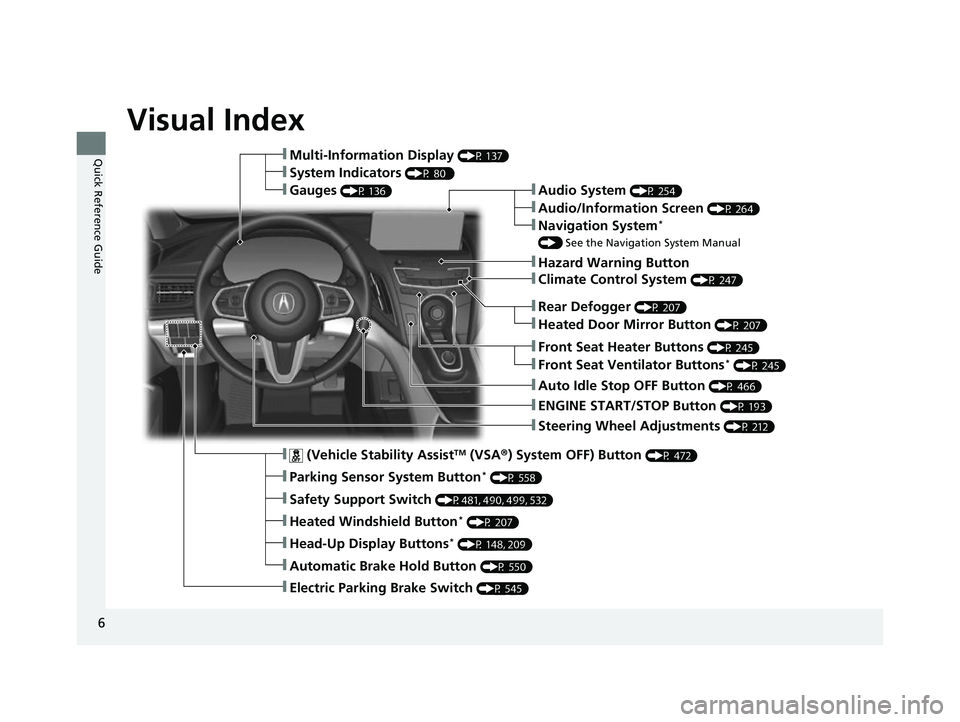
❚Steering Wheel Adjustments (P 212)
❚ENGINE START/STOP Button (P 193)
❚Rear Defogger (P 207)
❚Heated Door Mirror Button (P 207)
❚Climate Control System (P 247)
❚Audio System (P 254)
❚Hazard Warning Button
❚Audio/Information Screen (P 264)
❚Navigation System*
() See the Navigation System Manual
❚Front Seat Heater Buttons (P 245)
❚Front Seat Ventilator Buttons* (P 245)
❚Auto Idle Stop OFF Button (P 466)
❚ (Vehicle Stability AssistTM (VSA ®) System OFF) Button (P 472)
❚Parking Sensor System Button* (P 558)
❚Safety Support Switch (P481, 490, 499, 532)
❚Heated Windshield Button* (P 207)
❚Head-Up Display Buttons* (P 148, 209)
❚Automatic Brake Hold Button (P 550)
❚Electric Parking Brake Switch (P 545)
❚Multi-Information Display (P 137)
❚System Indicators (P 80 )
❚Gauges (P 136)
23 ACURA RDX-31TJB6400.book 6 ページ 2022年8月4日 木曜日 午後1時51分
Page 10 of 713
Visual Index
8
Quick Reference Guide
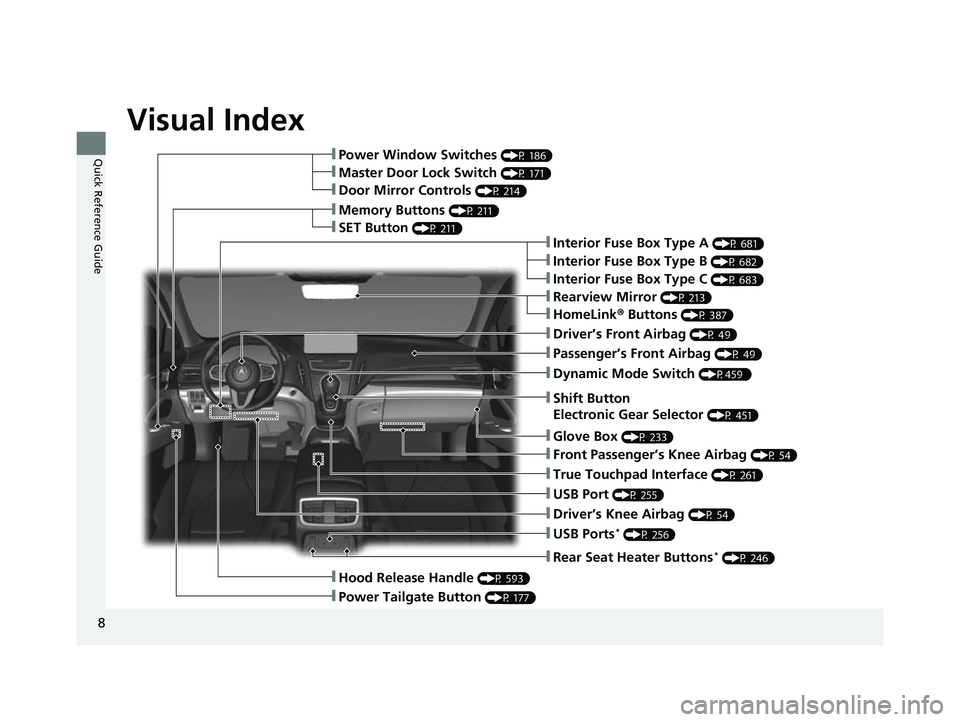
❚Rearview Mirror (P 213)
❚Shift Button
Electronic Gear Selector
(P 451)
❚Driver’s Front Airbag (P 49)
❚Glove Box (P 233)
❚Passenger’s Front Airbag (P 49)
❚HomeLink® Buttons (P 387)
❚Interior Fuse Box Type A (P 681)
❚Dynamic Mode Switch (P459 )
❚Front Passenger’s Knee Airbag (P 54)
❚True Touchpad Interface (P 261)
❚USB Port (P 255)
❚Driver’s Knee Airbag (P 54)
❚USB Ports* (P 256)
❚Power Window Switches (P 186)
❚Memory Buttons (P 211)
❚SET Button (P 211)
❚Master Door Lock Switch (P 171)
❚Door Mirror Controls (P 214)
❚Hood Release Handle (P 593)
❚Power Tailgate Button (P 177)
❚Interior Fuse Box Type C (P 683)
❚Rear Seat Heater Buttons* (P 246)
❚Interior Fuse Box Type B (P 682)
23 ACURA RDX-31TJB6400.book 8 ページ 2022年8月4日 木曜日 午後1時51分
Page 11 of 713
9
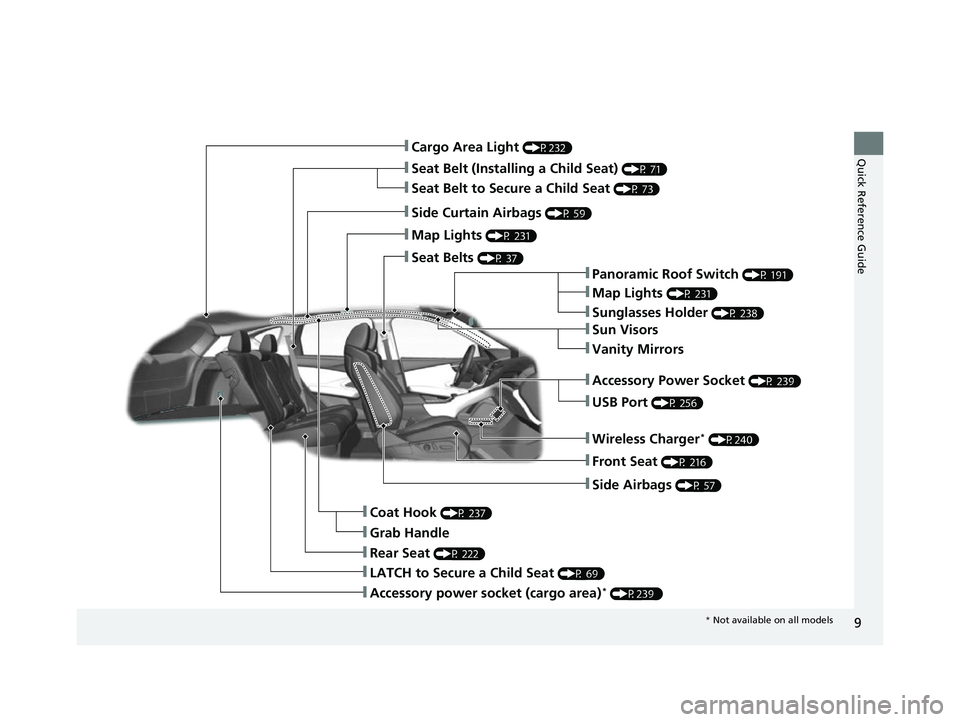
Quick Reference Guide❚Cargo Area Light (P232)
❚Seat Belt (Installing a Child Seat) (P 71)
❚Side Curtain Airbags (P 59)
❚Map Lights (P 231)
❚Seat Belts (P 37)
❚Panoramic Roof Switch (P 191)
❚Map Lights (P 231)
❚Sunglasses Holder (P 238)
❚USB Port (P 256)
❚Front Seat (P 216)
❚Side Airbags (P 57)
❚Coat Hook (P 237)
❚LATCH to Secure a Child Seat (P 69)
❚Rear Seat (P 222)
❚Sun Visors
❚Vanity Mirrors
❚Seat Belt to Secure a Child Seat (P 73)
❚Grab Handle
❚Accessory Power Socket (P 239)
❚Wireless Charger* (P240)
❚Accessory power socket (cargo area)* (P239 )
* Not available on all models
23 ACURA RDX-31TJB6400.book 9 ページ 2022年8月4日 木曜日 午後1時51分
Page 12 of 713
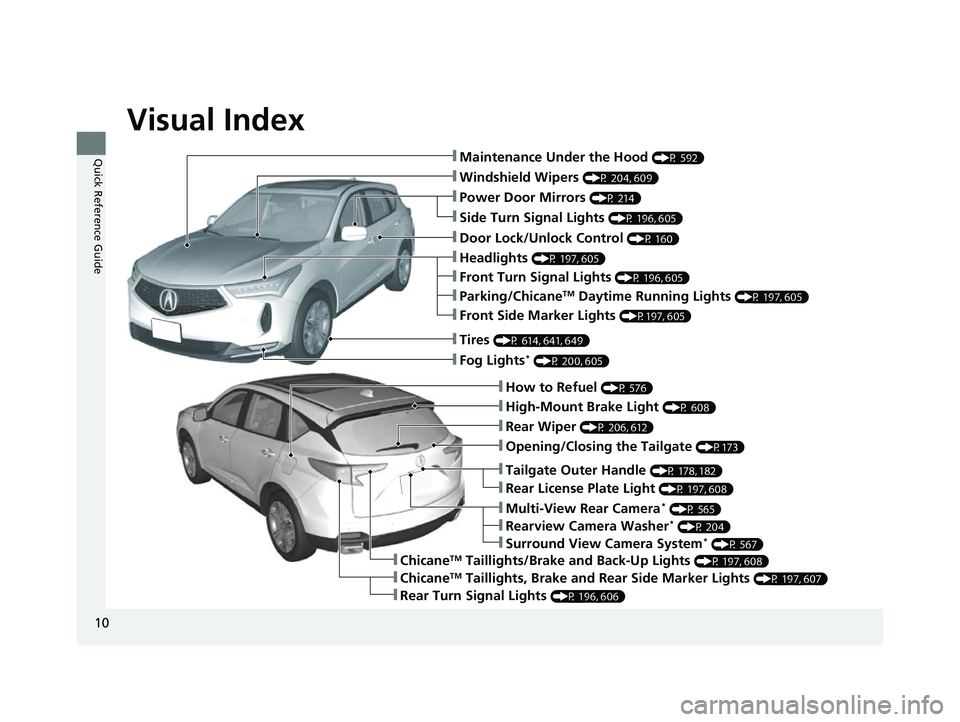
Visual Index
10
Quick Reference Guide
❚How to Refuel (P 576)
❚High-Mount Brake Light (P 608)
❚Opening/Closing the Tailgate (P173)
❚Rear Wiper (P 206, 612)
❚ChicaneTM Taillights, Brake and Rear Side Marker Lights (P 197, 607)
❚Rear Turn Signal Lights (P 196, 606)
❚Multi-View Rear Camera* (P 565)
❚Rear License Plate Light (P 197, 608)
❚Tailgate Outer Handle (P 178, 182)
❚ChicaneTM Taillights/Brake and Back-Up Lights (P 197, 608)
❚Windshield Wipers (P 204, 609)
❚Power Door Mirrors (P 214)
❚Maintenance Under the Hood (P 592)
❚Fog Lights* (P 200, 605)
❚Tires (P 614, 641, 649)
❚Door Lock/Unlock Control (P 160)
❚Front Turn Signal Lights (P 196, 605)
❚Parking/ChicaneTM Daytime Running Lights (P 197, 605)
❚Side Turn Signal Lights (P 196, 605)
❚Headlights (P 197, 605)
❚Front Side Marker Lights (P197, 605)
❚Surround View Camera System* (P 567)
❚Rearview Camera Washer* (P 204)
23 ACURA RDX-31TJB6400.book 10 ページ 2022年8月4日 木曜日 午後1時51分
Page 14 of 713
12
Quick Reference Guide
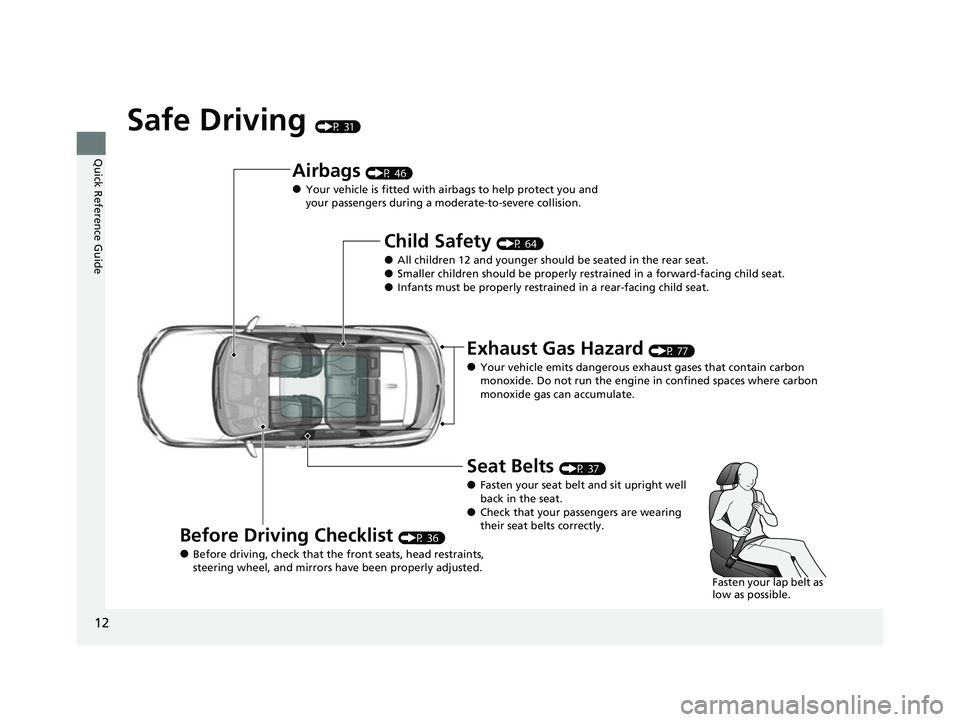
Safe Driving (P 31)
Airbags (P 46)
●Your vehicle is fitted with airbags to help protect you and
your passengers during a moderate-to-severe collision.
Child Safety (P 64)
●All children 12 and younger should be seated in the rear seat.●Smaller children should be properly restra ined in a forward-facing child seat.●Infants must be properly restrained in a rear-facing child seat.
Exhaust Gas Hazard (P 77)
●Your vehicle emits dangerous exhaust gases that contain carbon
monoxide. Do not run the engine in confined spaces where carbon
monoxide gas can accumulate.
Before Driving Checklist (P 36)
●Before driving, check that the front seats, head restraints,
steering wheel, and mirrors have been properly adjusted.
Seat Belts (P 37)
●Fasten your seat belt and sit upright well
back in the seat.
●Check that your passengers are wearing
their seat belts correctly.
Fasten your lap belt as
low as possible.
23 ACURA RDX-31TJB6400.book 12 ページ 2022年8月4日 木曜日 午後1時51分
Page 18 of 713
16
Quick Reference Guide
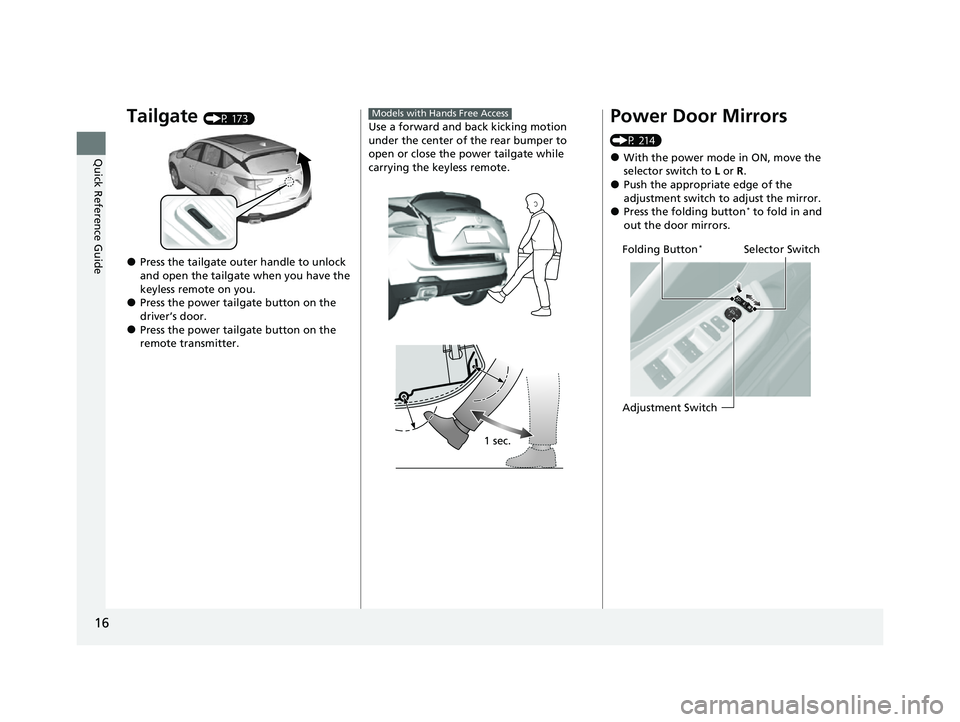
Tailgate (P 173)
●Press the tailgate outer handle to unlock
and open the tailgate when you have the
keyless remote on you.
●Press the power tailgate button on the
driver’s door.
●Press the power tailgate button on the
remote transmitter.
Use a forward and back kicking motion
under the center of the rear bumper to
open or close the power tailgate while
carrying the keyless remote.
Models with Hands Free Access
1 sec.
Power Door Mirrors
(P 214)
●With the power mode in ON, move the
selector switch to L or R .
●Push the appropriate edge of the
adjustment switch to adjust the mirror.
●Press the folding button* to fold in and
out the door mirrors.
Selector Switch
Adjustment SwitchFolding Button*
23 ACURA RDX-31TJB6400.book 16 ページ 2022年8月4日 木曜日 午後1時51分
Page 26 of 713

24
Quick Reference Guide
AcuraWatchTM (P483)
AcuraWatch
TM is a driver support system
which employs the use of two distinctly
different kinds of sensors, a radar sensor
located behind the emblem, and a front
sensor camera mounted to the interior side
of the windshield, behind the rearview
mirror.
AcuraWatch
TM is a driver support system
which employs the use of three distinctly
different kinds of sensors, a radar sensor
located behind the emblem, a front sensor
camera mounted to the interior side of the
windshield, behind the rearview mirror, and
the sonar sensors located in the front and
rear bumpers.
Models without Low Speed Braking Control
Models with Low Speed Braking Control
All models
Front Sensor
Camera
Radar Sensor
Models with Low Speed Braking Control
Sonar Sensors
Collision Mitigation
Braking System
TM
(CMBS
TM) (P486)
The system can assist you when it
determines there is a possibility of your
vehicle colliding with a vehicle or a
pedestrian detected in front of your vehicle.
The CMBS
TM is designed to alert you when
the potential for a collision is determined, as
well as to reduce your vehicle speed to help
minimize collision severity when a collision is
deemed unavoidable.
Low Speed Braking
Control
* (P497)
Using sonar sensors lo cated on the front and
rear bumpers, the vehicle can detect if there
is danger of a potential collision with a wall
or other obstacle. The system is designed to
alert you when a potential collision is
determined, as well as assist in reducing
speed, avoiding collisions, and reducing
collision severity.
23 ACURA RDX-31TJB6400.book 24 ページ 2022年8月4日 木曜日 午後1時51分
Page 155 of 713
153
Controls
This chapter explains how to operate the various controls necessary for driving.
Clock.................................................. 154
Locking and Unlocking the Doors Key .................................................. 156
Low Keyless Remote Signal Strength ... 159
Locking/Unlocking the Doors from the Outside .......................................... 160
Locking/Unlocking the Doors from the Inside ............................................. 169
Childproof Door Locks ..................... 171
Auto Door Locking/Unlocking .......... 172
Tailgate .............................................. 173
Security System Immobilizer System .......................... 183 Security System Alarm...................... 183
Windows ........................................... 186
Panoramic Roof ................................. 189
Operating the Switches Around the Steering Wheel ENGINE START/STOP Button............. 193
Turn Signals ..................................... 196
Light Switches.................................. 197
Fog Lights
*...................................... 200
ChicaneTM Daytime Running Lights ... 200
Auto High-Beam .............................. 201
Wipers and Washers ........................ 204
Brightness Control ........................... 208
Rear Defogger/Heated Door Mirror Button ........................................ 207
Heated Windshield Button*............. 207
Driving Position Memory System ...... 210
Adjusting the Steering Wheel .......... 212
Mirrors Interior Rearview Mirror ................... 213
Power Door Mirrors ......................... 214
Seats .................................................. 216
Interior Convenience Items .............. 230
Climate Control System Using Automatic Climate Control .... 247
Automatic Climate Control Sensors ... 252
* Not available on all models
23 ACURA RDX-31TJB6400.book 153 ページ 2022年8月4日 木曜日 午後1時51分
Page 204 of 713
uuOperating the Switches Around the Steering Wheel uAuto High-Beam
202
Controls
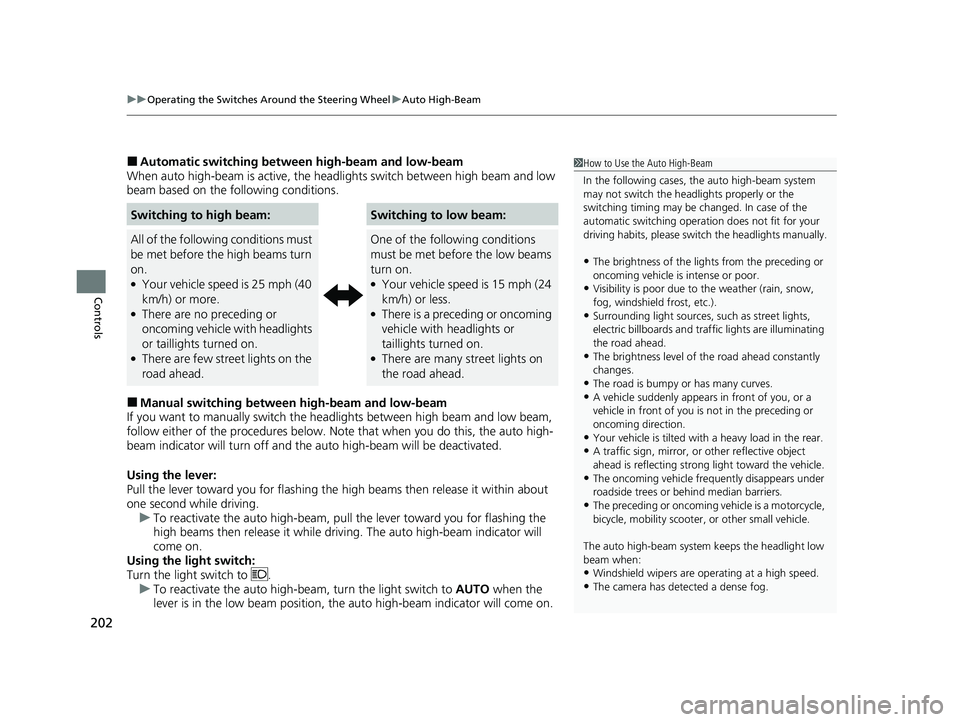
■Automatic switching between high-beam and low-beam
When auto high-beam is ac tive, the headlights switch between high beam and low
beam based on the following conditions.
■Manual switching between high-beam and low-beam
If you want to manually switch the headlights between high beam and low beam,
follow either of the proced ures below. Note that when you do this, the auto high-
beam indicator will turn off and the auto high-beam will be deactivated.
Using the lever:
Pull the lever toward you fo r flashing the high beams then release it within about
one second while driving. u To reactivate the auto high-beam, pull the lever toward you for flashing the
high beams then release it while driving. The auto high-beam indicator will
come on.
Using the light switch:
Turn the light switch to . u To reactivate the auto high-be am, turn the light switch to AUTO when the
lever is in the low beam position, the auto high-beam indicator will come on.
Switching to high beam:Switching to low beam:
All of the following conditions must
be met before the high beams turn
on.
●Your vehicle speed is 25 mph (40
km/h) or more.
●There are no preceding or
oncoming vehicle with headlights
or taillights turned on.
●There are few street lights on the
road ahead.
One of the following conditions
must be met before the low beams
turn on.
●Your vehicle speed is 15 mph (24
km/h) or less.
●There is a preceding or oncoming
vehicle with headlights or
taillights turned on.
●There are many street lights on
the road ahead.
1 How to Use the Auto High-Beam
In the following cases, th e auto high-beam system
may not switch the head lights properly or the
switching timing may be ch anged. In case of the
automatic switching operati on does not fit for your
driving habits, please swit ch the headlights manually.
•The brightness of the lights from the preceding or
oncoming vehicle is intense or poor.
•Visibility is poor due to the weather (rain, snow,
fog, windshield frost, etc.).
•Surrounding light sources, such as street lights,
electric billboards and traf fic lights are illuminating
the road ahead.
•The brightness level of th e road ahead constantly
changes.
•The road is bumpy or has many curves.•A vehicle suddenly appears in front of you, or a
vehicle in front of you is not in the preceding or
oncoming direction.
•Your vehicle is tilted with a heavy load in the rear.•A traffic sign, mirror, or other reflective object
ahead is reflecting strong light toward the vehicle.
•The oncoming vehicle freq uently disappears under
roadside trees or be hind median barriers.
•The preceding or oncoming vehicle is a motorcycle,
bicycle, mobility scooter, or other small vehicle.
The auto high-beam system keeps the headlight low
beam when:
•Windshield wipers are op erating at a high speed.
•The camera has detected a dense fog.
23 ACURA RDX-31TJB6400.book 202 ページ 2022年8月4日 木曜日 午後1時51分